
 4 hours ago
15
4 hours ago
15
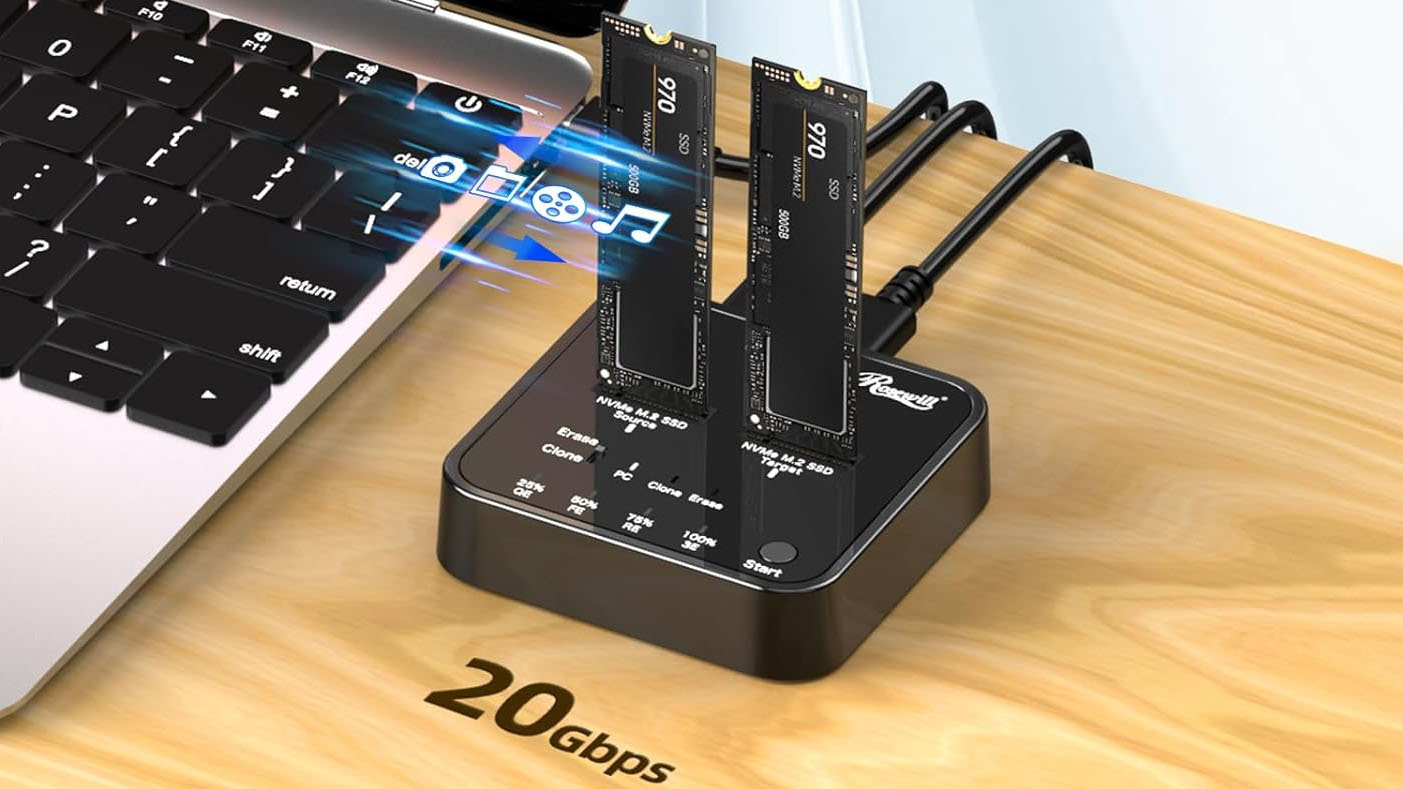
Last fall, a family member asked me for help with an older PC, which was trying to run Windows 10 and several programs on a cramped 110 GB SSD. At first, I figured I could clone the boot drive onto a more spacious drive so the OS and programs had more space to stretch out.
But the thought of juggling USB enclosures or shuffling drives in and out of my desktop filled me with dread as I pictured sitting there for hours, getting the system back up and running. So I looked into getting an M.2 SSD cloner, and was surprised to see they can be found for less than $50. And Rosewill’s upgraded Rosewill M.2 NVMe Cloner + Eraser, which just dropped down to its lowest-ever price of $47, is even more handy than a basic cloner, also offering four one-touch offline erase modes, or all your data deletion needs.
I don't love the plastic shell of Rosewill's cloner and eraser, but it's one of the more affordable options with these capabilities. I own the stepped-down model that doesn’t have the erase function (also on sale for $39, and using it is pretty straightforward. You plug in the included USB-C power adapter, put your source drive in the left slot, the destination drive in the right slot, press the power button on the back, and a few logos light up, letting you know you're ready to go. Press the clone button on the top, and drive cloning will commence (provided your destination is the same size or larger than your source).
That's assuming you want to do an offline clone. But because I needed resize the partition between the old 110 GB and the newer Team Group 512 GB SSD, I used the second included USB-C cable and connected my Rosewill cloner to my laptop and powered up the device. Both drives were recognized in Windows within seconds, so I fired up the excellent free DiskGenius software, cloned the old partition to a new drive with a few clicks, and then used the software to drag the boot partition to the full size of the new drive. The whole process took just a few minutes, since the Rosewill cloner supports 20 Gbps USB, and I wasn't exactly copying a huge partition.
The Rosewill cloner is also handy for just checking the contents of old M.2 drives you may have lying around. But if that's all you need, you can buy an NVMe enclosure or a single-drive dock. I also own a version of this model from Suitok, which costs $21.
More Prime Day Tech Deals
Join the Tom's Hardware deals Discord for up-to-the-minute hardware deals.
Best Tech and PC deals | Best gaming PC deals | Best RAM combo deals | Best 3D printer deals | Best RAM deals | Best gaming laptop deals | Best monitor deals | Best Wi-Fi Router deals | Best GPU deals | Best SSD deals | Best hard drive HDD deals | Best CPU deals | Best gaming chair deals | Best PC building tool deals | Best PC peripherals deals | Best filament and resin deals | Best motherboard deals | Best CPU cooler deals | Best PC case deals | Best Dell and Alienware deals | Best USB charger deals | Best gaming and productivity laptop deals under $1,000 | Best laptop PC deals


 English (US) ·