
AceMagic K1: 30-second review
The AceMagic K1 is a compact mini PC with a stylish silver metallic finish and ultra compact square form factor that should find a place easily enough in any desktop.
Lifting the K1 out of the packaging, despite its quality, the all-plastic body is immediately apparent, although it does have a decent weight for its size, and everything feels solid and well put together. At this price point, I didn’t expect a metal case, and the silver finish does a good job of initially fooling you that this is a premium styled model.
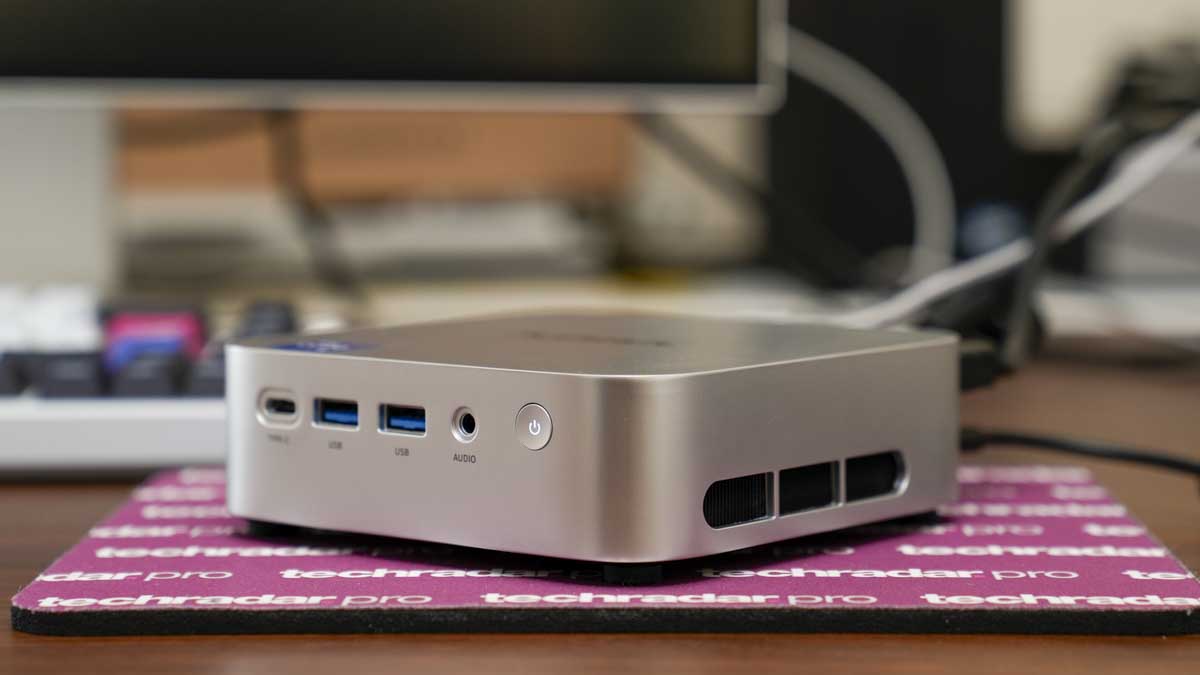
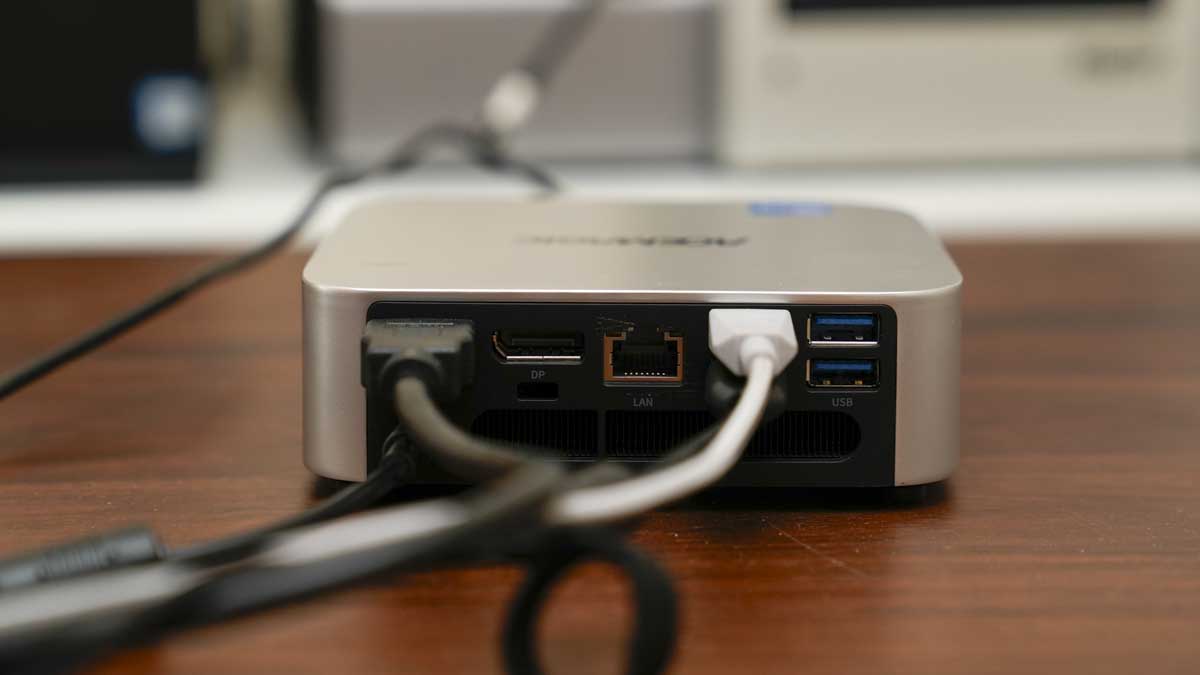
The port layout is split between front and rear. On the front, you get two USB 3.2 Gen 2 Type-A ports running at 10 Gbps, a USB-C port for display and data, and a 3.5mm audio jack. The rear offers four USB 3.2 Gen 1 Type-A ports at 5 Gbps, HDMI and DisplayPort outputs, and a single Gigabit Ethernet port. The rear ports sit just above the exhaust vent, which means some care is needed with cable management to avoid obstructing airflow through the machine.
Due to the small size, mounting the K1 on the back of your monitor utilising the VESA would be the best solution and also free up desk space. While there is a decent amount of ports, it’s a shame that aside from the USB-C on the front, there are no additional options on the rear, opting for older USB Type-A instead.
Inside the machine is an Intel Core i5-12600H; this CPU isn’t the latest Intel technology, but it has a proven track record and is a step above the Intel N150-equipped machines that still seem to be available.
In my review unit, it came equipped with a single 16GB DDR4 stick, which essentially means single-channel operation. This is worth mentioning as, through the test, I did find the GPU performance limiting, and a second matched 16GB module should improve memory bandwidth and GPU performance, and the 32GB dual-channel configuration is the better starting point if the budget allows.
Running Windows 11 Pro and then loading Microsoft Office applications, the K1 was fast and handling all Office programs was well within its abilities. Word, Excel, and PowerPoint all loaded and ran well, able to handle everyday work without issues. Through the test, I was able to lay out large PowerPoint presentations with embedded images and video, and all was easily handled by the machine.
Taking a look at some creative applications and Lightroom Classic took a little longer to open than I am used to on more powerful machines, but once loaded, it ran well enough for cataloguing and basic editing of files from the Canon EOS R5 C. Using Adobe Bridge showed the first real signs of the GPU starting to struggle, with noticeable lag rendering thumbnails from a folder of more than 500 images.
Another bigger point to note was the speed of the Wi-Fi connectivity. Connecting the machine through the Wi-Fi 6 connection to an Eero 6 router performed well, but when downloading games through Steam, it felt slightly slower than other Wi-Fi 6 devices I also have in the office. The wired RJ45 Ethernet was connected to the router, and speeds took a notable step up.
When video editing, I ran two 4K BenQ monitors via HDMI and DisplayPort, and added a third 1080p monitor via the front USB-C port, which the K1 again handled without issue, although every time the system was pushed, the fans kicked in, and the dual fans were noticeable, especially when editing video and gaming. While not quite up there with the machines in our best mini PC guide, it's a fair all-rounder that's ideal for everyday tasks at home and in the office.
ACEMagic K1: Price and availability
- How much does it cost? From £359 / $359
- When is it out? Available now
- Where can you get it? Directly from Acemagic.com, and online retailers such as Amazon.com, and Amazon.co.uk
The K1 with either the Intel Core i5-12600H or a range of AMD Ryzen processors is available for $395 direct from Acemagic.com.
In the US, you can also get the model sporting an AMD Ryzen chip starts from $330 at Amazon.com, and comes in a range of configurations.
In the UK, I'm seeing a configuration with an AMD Ryzen processor, 16GB DDR4 RAM, and 512GB SSD for £330 at Amazon.co.uk.
The machine ships with Windows 11 Pro. A two-year warranty is included on purchases from the official store.
- Value: 3.5 / 5
AceMagic K1: Specs
*as reviewed
CPU: Intel Core i5-12600H
GPU: Intel Iris Xe Graphics
Memory: 16GB DDR4 3200MHz (2x SO-DIMM slots, up to 64GB)
Storage: 512GB M.2 2280 NVMe PCIe 3.0 x4 (2x M.2 slots, up to 4TB total)
Display output: HDMI 2.0 (4K@60Hz), DP 1.4b (4K@60Hz), USB-C (4K@60Hz) — triple 4K supported
Front ports: 2x USB 3.2 Gen2 Type-A (10Gbps), 1x USB 3.2 Gen2 Type-C, 1x 3.5mm audio jack, power button
Rear ports: 4x USB 3.2 Gen1 Type-A (5Gbps), 1x HDMI 2.0, 1x DP 1.4b, 1x RJ45 Gigabit Ethernet, DC in
Wireless: Wi-Fi 6, Bluetooth 5.2
OS: Windows 11 Pro
Dimensions: 128 x 128.2 x 41.3mm
AceMagic K1: Design
The K1 is a surprisingly compact square-format mini PC that measures in at just 128 x 128.2 x 41.3mm, one of the smallest that I’ve seen for a while. The exterior could initially be mistaken for high-quality brushed metal, but as soon as I lifted it from the box, the warmer, non-metal feel instantly highlighted the all-plastic construction. Still, for a few moments, the finish does give you the impression that it's a slightly higher-quality product than you might expect at this price.
On the front panel, there are two USB 3.2 Gen2 Type-A ports at 10Gbps, a USB 3.2 Gen2 Type-C port that supports display output and data, and a 3.5mm audio jack alongside the power button. These front connection options are useful if you ever connect external SSDs, USB Keys or headphones and help you to avoid reaching around to the back of the machine, where port placement can be tight, especially on a machine like this.
The rear panel of the machine packs in a surprising amount of ports with four USB 3.2 Gen 1 Type-A ports, HDMI 2.0, DisplayPort 1.4b, and a single LAN port. The ports at the rear are close together, but there’s still just enough space to plug in all your accessories, and for a machine of this size, that volume of ports is handy. My only comment on the ports is that, like the older CPU, the bulk of ports here are the older USB Type-A, and in reality, an additional USB-C or two would definitely have been an advantage.
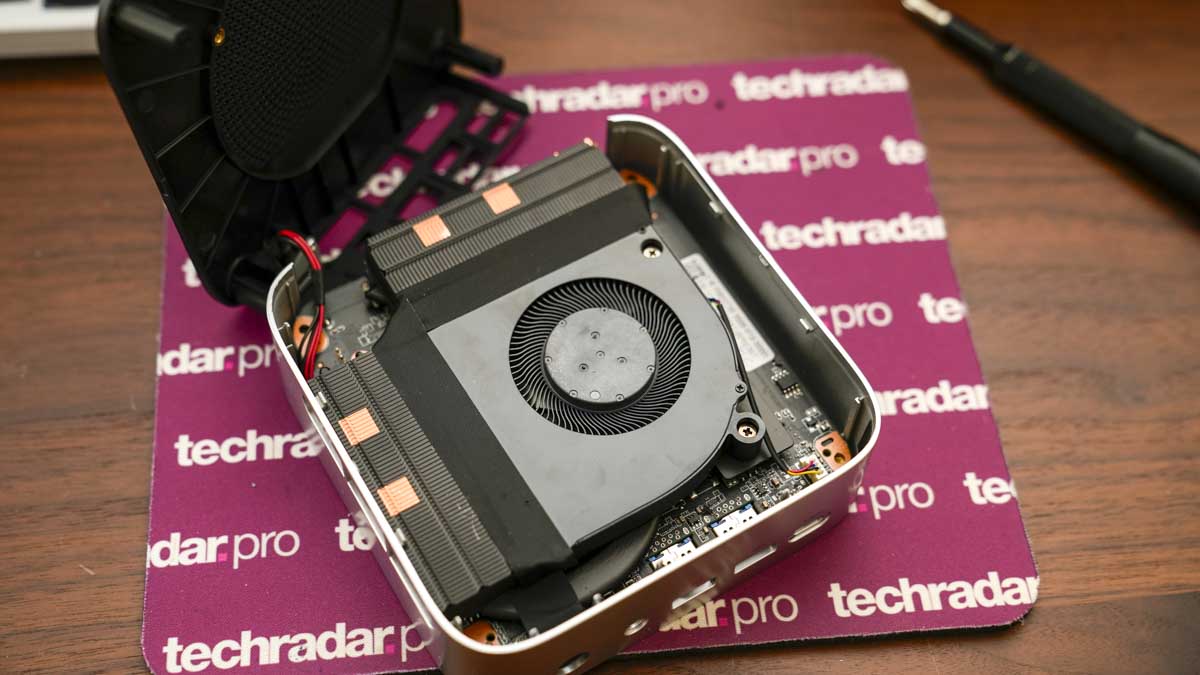
As I opened up the machine to look at the layout of the internal components, it was good to see the dual-fan exhaust design, with the large main fan mounted at the top. As I used the K1 to edit FHD video in DaVinci Resolve, the fans were quick to kick in, helping to keep things cool. For less intensive work, such as working with Word and Excel, the fans generally stayed quiet.
Checking over the machine and while using the computer for a good 6 hours, parts of the machine were warm to the touch.
As I went through the test, I did find that the specifications were a little limiting, especially the RAM and internal SSD. An upgrade is possible, but compared with the quick access of many Mini PCs to the internal components, here the process is altogether more involved.
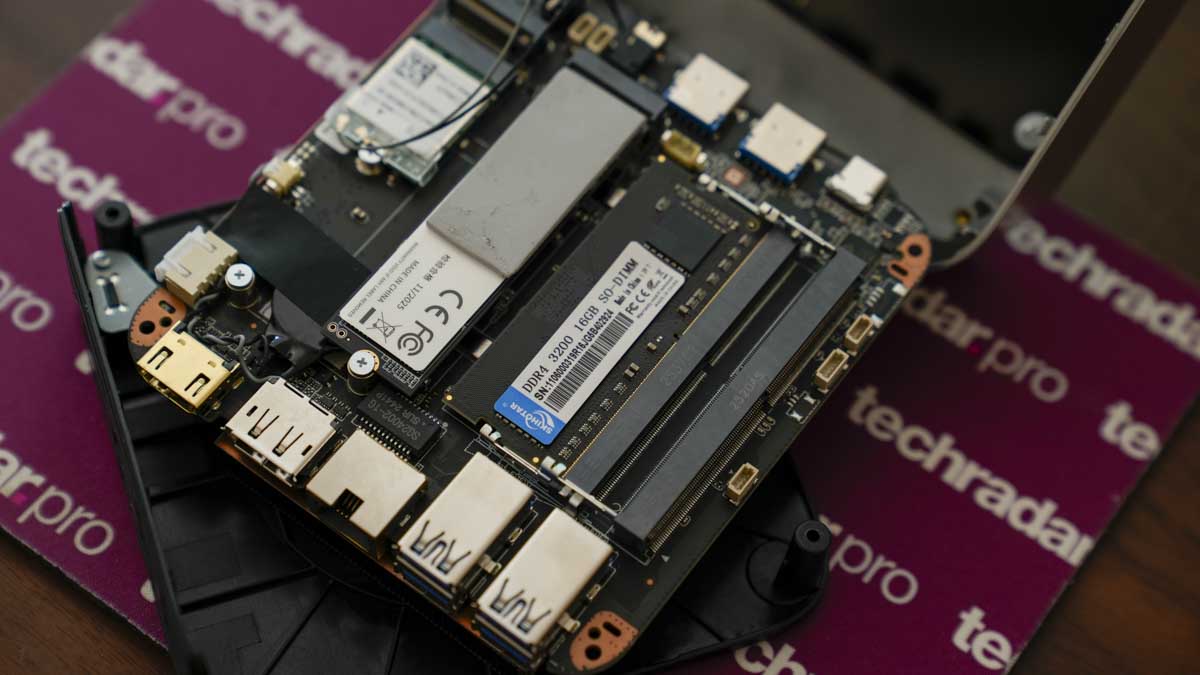
To reach the RAM and second M.2 slot, for instance, the four rubber feet on the base need to be carefully lifted; they are held with double-sided adhesive to reveal the four mounting screws beneath. These four screws sit in deep recesses of the mini PC’s body, and to reach them, you need a longer cross-head screwdriver than I commonly use.
However, once inside, you then need to lift the motherboard and set it carefully to the side. If you want to completely disconnect the motherboard from the chassis then you can, otherwise I found carefully propping it up was a great was to save time. Once the chassis is moved aside and the motherboard lifted, you have access to the memory and SSD slots below.
The process is manageable with patience and some experience, but if you’re less confident, then you may prefer to order the higher-spec configuration from the outset with more RAM and storage.
- Design: 4 / 5
AceMagic K1: Features
The list of features of the K1 does all seem a little dated, but this is a machine aimed at those who are looking for a solid, tried and tested specification that should run Windows and Microsoft Office apps without issue.
Therefore inside is an Intel Core i5-12600H, the 12-core hybrid configuration combines four cores running at up to 4.5GHz with eight cores handling background tasks, which means Windows 11 ran smoothly from the outset with the standard Microsoft Apps, however, while Microsoft application loaded quickly, Steam, the Adobe Suite and DaVinci Resolve took a good while to completely load, and some games wouldn’t load at all due to hardware requirements.
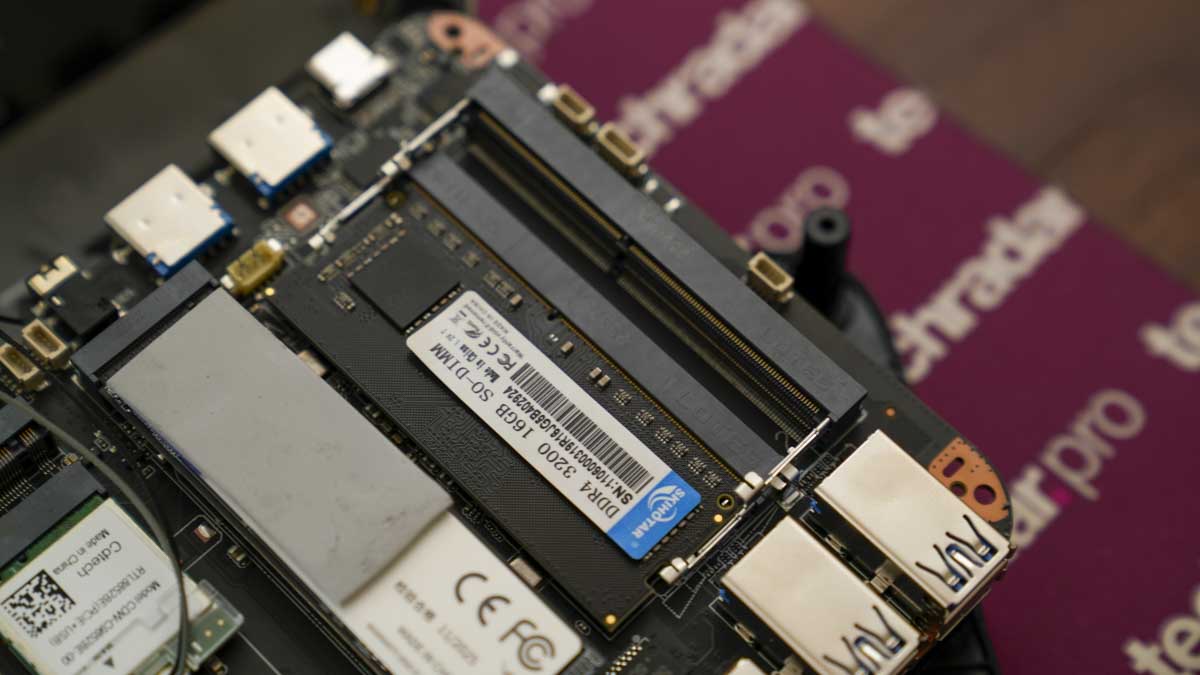
My review unit came pre-installed with 16GB of DDR4 at 3200MHz in a single SO-DIMM, running in single-channel mode. It is worth noting that single-channel memory halves the available memory bandwidth compared with a dual-channel pair (When you have two sticks installed), which will have an impact on the GPU performance.
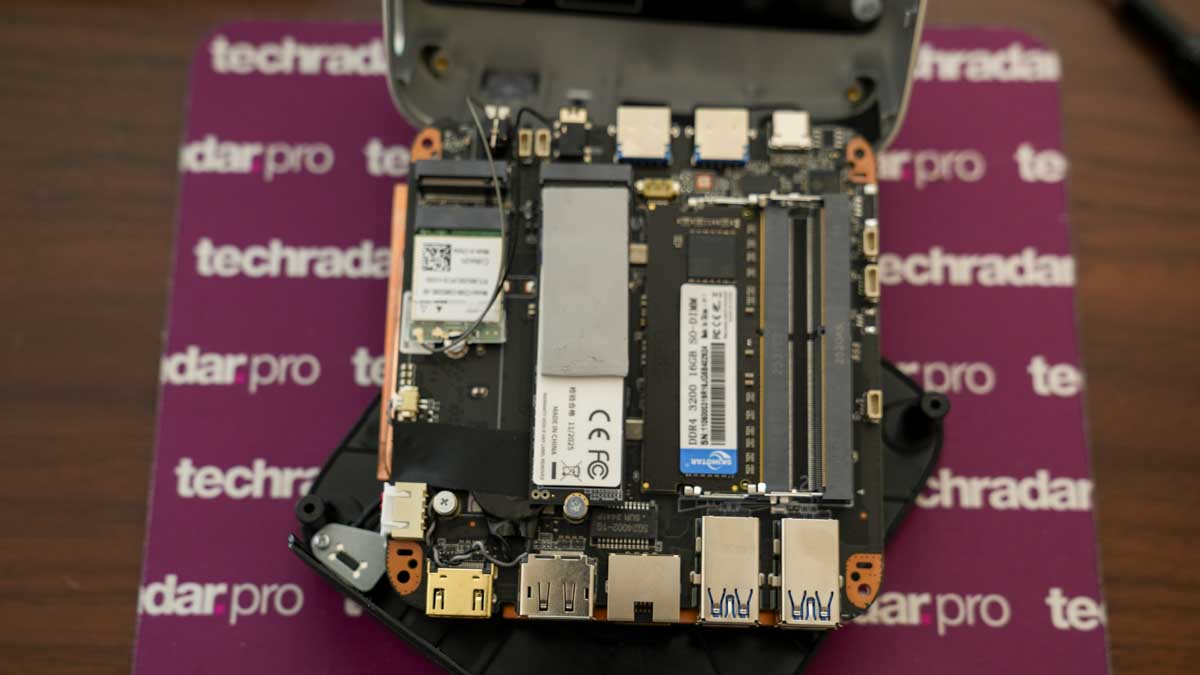
Storage is just 512GB M.2 NVMe SSD running on PCIe 3.0 x4, and this is again fine for Windows and Microsoft Office applications, but a little limiting on space for more creative tasks and applications. What I did like is that there is a second M.2 slot available for additional storage, and if you want, you can install two 2TB sticks to bring the full internal storage up to 4TB.
The display setup is well captured, and while you can run triple 4K displays through the test, I settled on two 4K BenQ models. These displays are connected to the HDMI 2.0 and DisplayPort 1.4b outputs on the rear, and then a third display can be connected to the USB-C on the front, which is never the neatest solution.
The port selection on both the front and back does offer plenty of scope with two 10Gbps USB-A ports and a USB-C port on the front, plus four 5Gbps USB-A ports on the rear. On connectivity, alongside the single LAN port that covers wired networking, there’s also Wi-Fi 6 with Bluetooth 5.2 that handles all wireless connectivity.
- Features: 4 / 5
AceMagic K1: Performance
Test Scores
CrystalDiskMark Read: 3,468.16 MB/s
CrystalDiskMark Write: 2,582.68 MB/s
Geekbench CPU Single: 2,209
Geekbench CPU Multi: 6,190
Geekbench GPU: 10,012
PCMark Overall: 6,322
Cinebench CPU Single: 404
Cinebench CPU Multi: 2,148
3DMark Fire Strike Overall: 2,501
3DMark Fire Strike Graphics: 2,907
3DMark Fire Strike Physics: 20,390
3DMark Fire Strike Combined: 744
3DMark Time Spy Overall: 1,072
3DMark Time Spy Graphics: 941
3DMark Time Spy CPU: 5,230
3DMark Wild Life Overall: 5,697
3DMark Steel Nomad Overall: 563
Windows Experience Index: 8
Taking the small AceMagic K1 out of the packaging, the initial impressions are good with a decent weight and finish to the casing, with a premium metallic look despite being plastic.
Windows 11 Pro comes installed on the system, and the last part of the setup process, which involves entering your details and running the updates, is all that’s needed before you install your selection of applications.
Once everything is set up, Windows 11 Pro performs well, as do the Microsoft Office applications, really all well within the abilities that you would expect for a home office machine. Checking the PCMark overall score and sure enough, with a result of 6,322 and backed up by a Geekbench multi-core score of 6,190, all show that this is a machine that is perfectly tuned to everyday tasks and administration.
In Microsoft Office, the K1 was able to switch quickly between Word, Excel, and PowerPoint and loading up relatively large files and copying data from Excel to Word and embedding in PowerPoint all worked without issue. The only brief pause came when opening a large, image-heavy PowerPoint file, which took a moment to load before it seemed to settle, and editing became available.
As expected, web browsing in Edge and media streaming from YouTube and BBC iPlayer were all well handled, and while the Wi-Fi connection did feel slightly slower than other machines I also use on the network, streaming video ran well on the 4K monitor.
Pushing the demands on the system, I loaded Lightroom Classic, which did initially take a while to load, but once the application was ready, it worked well, handling RAW files from the Canon EOS R5 C and Hasselblad X2D II 100C for cataloguing, editing, and batch export without major issues.
Adobe Bridge was the first place where the GPU started to struggle, with a noticeable delay in rendering thumbnails when browsing a folder containing over 500 images. Photoshop handled general editing and multi-layer files without any real issues, although applying dodge-and-burn effects to larger landscape files did cause some stuttering.
In Premiere Pro, the limits of this machine really started to show with the 4K timeline rendering being particularly slow. I then cut the resolution to 1080, and the editing and export were much better. Taking that same footage over to CapCut, the machine was able to handle social media edits without issue.
An interesting point is that the SSD's read and write performance of 3,468 MB/s and 2,582 MB/s is solid for a PCIe 3.0 drive and does help with the speed of more demanding tasks, but while these transfer speeds were fast, some applications were slow to load.
Testing out the speed of the SSD and importing files from CFexpress cards, the speed was noticeably fast, although with only 512GB of storage, an external SSD would be a good idea, or a secondary 2TB internal SSD would be a good option.
To finish off the test, I tried out a few games, and again, the limitations of the machine's hardware really started to show as the Iris Xe GPU was put under pressure.
Titles with demanding graphics requirements, such as Indiana Jones and the Great Circle, would not run at all, highlighting Vulcan incompatibility issues with the machine.
Dirt Rally, which is a far older game, ran at reduced settings and played smoothly enough to be enjoyable. The K1 is not a gaming machine, but lighter and older titles are within reach at low to medium settings.
- Performance: 3.5 / 5
AceMagic K1: Final verdict
The AceMagic K1 is a decent entry-level mini PC that’s perfectly suited to administration work where Microsoft Office applications are going to be the main focus of use. While the machine can handle lightweight multimedia editing, the limitation with graphics holds it back.
However, around the body there are plenty of connectivity options enabling you to plug in not only your keyboard and mouse, but plenty of additional accessories such as external SSDs, USB Keys and control boards. It’s also good that you can connect up to 3 4K monitors, although in this test I connected two 4K on the HDMI and DP and a third 1080p monitor through the front USB-C.
Through the test, I did note that anything that required graphics, from loading the Adobe applications to gaming, took the machine a while to load. This may well have been solely down to the GPU, but could also be due to the single-channel RAM configuration. Having 32GB will give an obvious boost, but adding that additional stick will also provide more memory bandwidth.
While the specifications for RAM and SSD in my review sample were modest to say the least, there’s plenty of upgrade potential with the RAM option up to 64GB and the SSDs enabling up to 4TB of internal storage. If you did go down this route, then you would have to clone the OEM version of Windows from the smaller SSD to the new one.
If you need a compact, Windows 11 machine to run the full Office suite, some light multimedia work, and a two to three-monitor setup, on a budget, the K1 is a decent choice. It is a good, solid machine that looks great and will provide you with all the power you need for core apps and the Microsoft Office suite. If you need it to do anything more, I would look at a higher-spec machine.
Should I buy an AceMagic K1?
Swipe to scroll horizontally
Value | Decent if dated CPU and plenty of connectivity options with the potential to upgrade as budget allows | 3.5 |
Design | silver finish that gives a premium look and feel despite the plastic construction. The small size also makes it easy to position on or off the desktop. | 4 |
Features | Ability to connect up to three 4K monitors and plenty of USB ports, along with Wi-Fi 6, and plenty of upgrade options. | 4 |
Performance | Good for Windows 11, Office, web, and light creative work, but anything more, and the GPU will struggle | 3.5 |
Overalls | A compact, no frills machine that will suit any office where administration and word are at the heart of day-to-day life. | 4 |
Buy it if...
You want a budget home office machine
The Core i5-12600H handles Office, browsing, and light photo editing well, and the triple 4K display support makes it good for multi-monitor setups.
You like upgrade potential at an entry-level price
Dual M.2 and SO-DIMM slots enable plenty of upgrade options to 64GB and 4TB, as your budget allows
Don't buy it if...
You need serious GPU performance
The Iris Xe graphics struggled with 4K video, Photoshop, and many games. If GPU power matters, then look elsewhere.
Internal upgrades must be simple
Getting to the RAM and storage requires removing adhesive feet, a deep-recess screwdriver, and lifting the motherboard. If you don’t like DIY, then this won’t be for you.
For more desktops, we've reviewed the best business computers.




![New 100% RT Cyber Thriller Unleashes 10-Minute Sneak Peek [Exclusive]](https://static0.colliderimages.com/wordpress/wp-content/uploads/2026/01/wardriver-sasha-calle-dane-dehaan.jpg?w=1600&h=900&fit=crop)


 English (US) ·