
 2 hours ago
3
2 hours ago
3
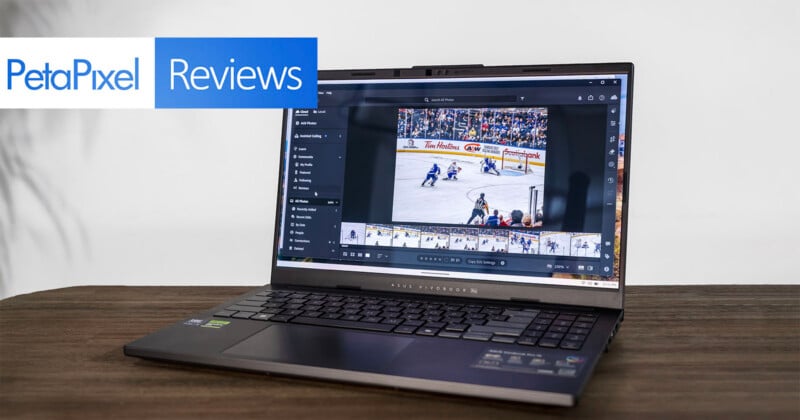
One look at the Asus Vivobook Pro 15 (2025) might be enough to dismiss its plastic-heavy build as little more than another PC lost in the shuffle. Asus figures you won’t feel that way once you open it up and take it for a creative-laden spin thanks to its attractive OLED screen and dependable performance.
It’s somewhere between a high-end mid-ranger and a premium model, but can the mix Asus crams in here be enough to make it a reliable workhorse? The biggest selling point is the 15.6-inch OLED display (2880 x 1800) with a 16:9 aspect ratio and a 120Hz refresh rate. Throw in discrete Nvidia graphics with what’s supposed to be a robust Intel CPU, and you should ideally have enough to get things done with confidence.
Uninspired Design That Just Works
My loaner review unit offers a decent mix of specs for what a creative workload often requires. Running on a 14th-gen Intel Core Ultra 9 285H CPU with 16 cores and Nvidia GeForce RTX4050 GPU, there’s also an AI Boost NPU with up to roughly 11-13 TOPS for on-device AI tasks. The latter isn’t all that consequential in the grander scheme, though it does take at least some of the load away from the CPU and GPU when it comes to AI-specific processes. The 24GB of RAM is actually an upgrade over the base 16GB, while the 1TB SSD serves as the standard storage.
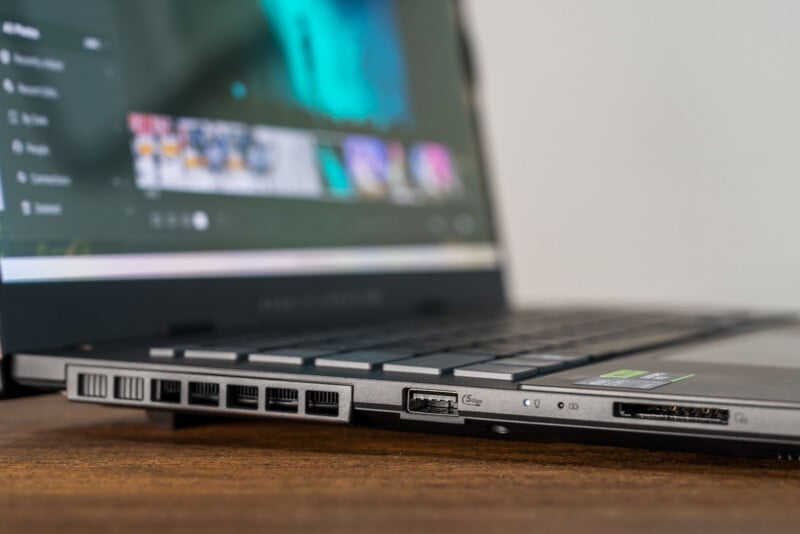
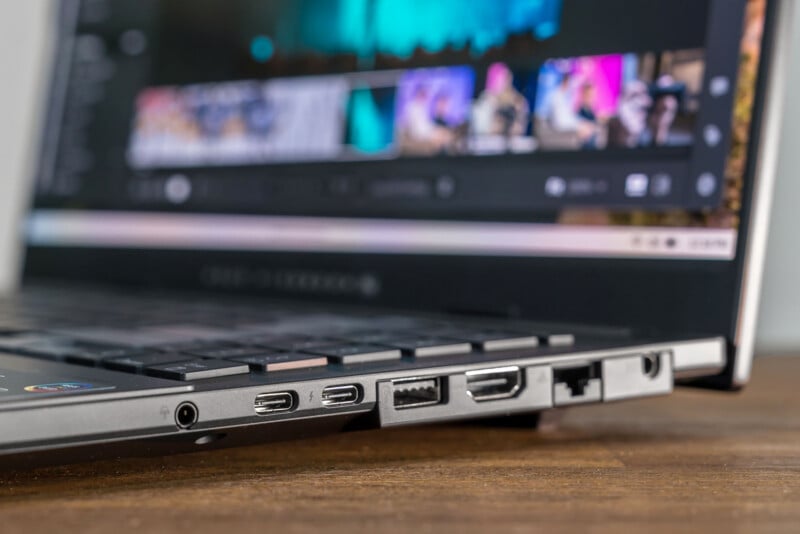
An array of ports also helps, not least of which is the UHS-II SD card slot on the left side to go with one of two USB-A 3.2 ports. On the right are an Ethernet port, HDMI 2.1, USB-A 3.2, one USB-C with Thunderbolt 4, one USB-C 3.2 Gen 1, and a 3.5mm headphone jack. Unlike other contemporary PC laptops, the power port is more of an old-school plug, though you can also charge the device via USB-C if you have a different charger handy.
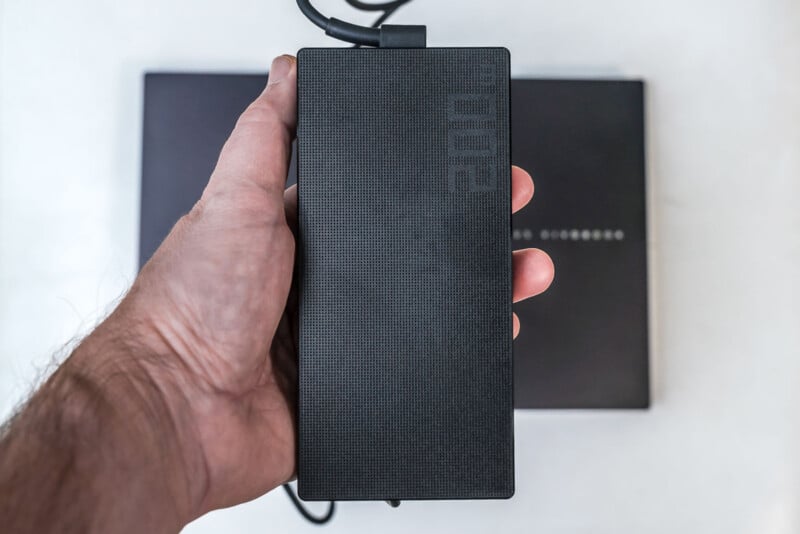
You might want to, on occasion, given the brick that is the Vivobook Pro 15’s 200W charger. While there’s plenty of cable length to keep the laptop plugged in from a reasonable distance, you also need to find a landing spot for the charger itself given it feels like it weighs at least half a pound on its own.
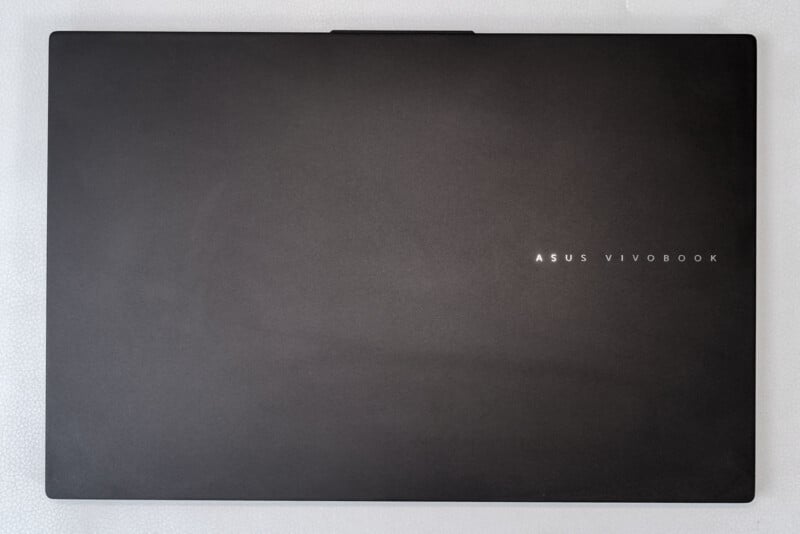
Otherwise, that kind of fits with the neutral and boring aesthetic on the outside. The chassis is mostly plastic, with clean-cut edges and a matte lid finish — the kind of look that could fit right in a home studio setup or a corporate desk. Weighing in at 4.19 pounds (1.8 kg) and just shy of 2 cm thick, it certainly doesn’t qualify as super thin and light, but that’s where you look for components and performance to make up for it.
Open it up and a full-size backlit keyboard with numeric pad appears sitting above a sizeable trackpad with Asus’ DialPad integrated in it. Harman Kardon stereo speakers give this machine some audible range, but not as much as you might expect, given the brand. Rather than fire up at you, they fire down instead, and you can tell during playback. Granted, you would probably use headphones anyway for video or audio editing but just something to consider.
What catches the most attention is the display itself. Vibrant and colorful, hitting up to 500 nits peak brightness (300+ in most cases) and presenting an excellent contrast ratio, the screen is also capable of 100% sRGB, 97% Adobe RGB, and 100% of DCI-P3, including 0.83 DeltaE color accuracy.
This is where the trade-offs begin for the Vivobook Pro 15. For starters, 16:9 now feels dated compared to the industry standard 16:10, though I also recognize that creative users may prefer it. The 75Wh battery isn’t necessarily small, but it also has to keep up with the kinds of creative workflows photographers or videographers regularly run. And the weight and heft make this 15-incher a little less mobile than a thinner 14-inch model might be.
Mostly Serviceable Performance
Some of these things are manageable if the performance and value intersect. That’s how I wanted to approach the Vivobook Pro 15. On a tighter budget and in need of a machine with a nice display and the chops to handle some business, could it serve as a viable alternative?
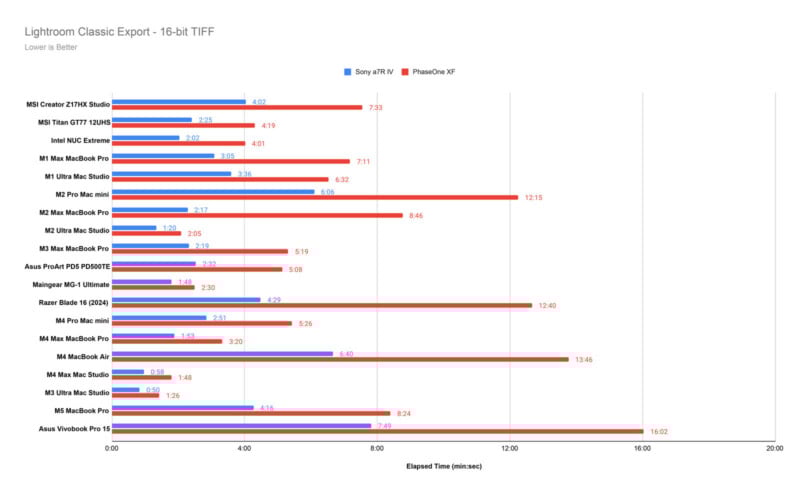
The results aren’t too bad. Importing photo batches into Lightroom Classic didn’t cause me any problems, nor was I forced to find workarounds in case hiccups became nagging workflow shackles. Moving photos into Photoshop also never presented noticeable constraints or issues that would affect keeping things running smoothly. While fan noise could increase a little as an image grew in size (due to layers and resolution) with some multitasking thrown in, thermals didn’t get to the point where cooling went wild.
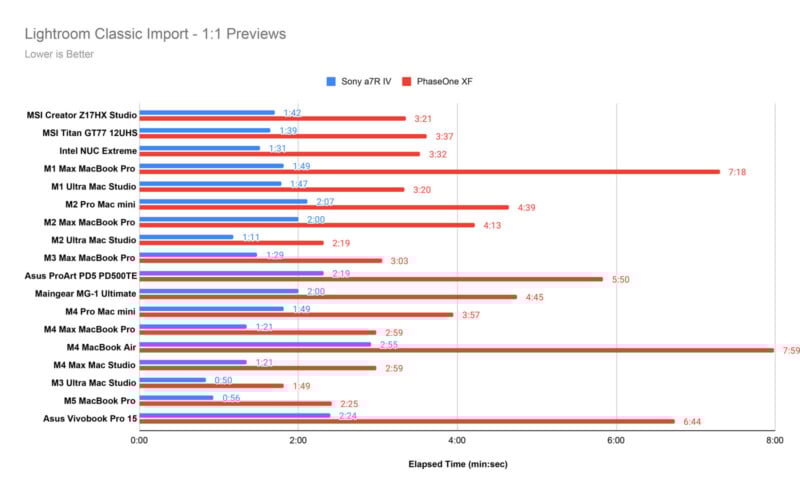
That proved consistently good when working through some images without worrying about any imposed processing limits. Over time, it felt natural and seamless, enabling the Vivobook Pro 15 to serve its purpose as a creative-friendly tool. Working with Apple silicon as much as I do, this was a welcome sight because it’s good that processes don’t have to wobble through in a device like this.
I use a mouse more often for photo edits, but in tighter quarters, the trackpad becomes far more useful. The main reason is the DialPad embedded in the pad’s top-left corner, which is hardly new at this point, but feels refined with each generation. The beauty of it is that its rotary dial layout makes it easier to increase or decrease tools or actions within apps like Lightroom and Photoshop. Make a brush bigger, lower the opacity, switch tools — that sort of thing.
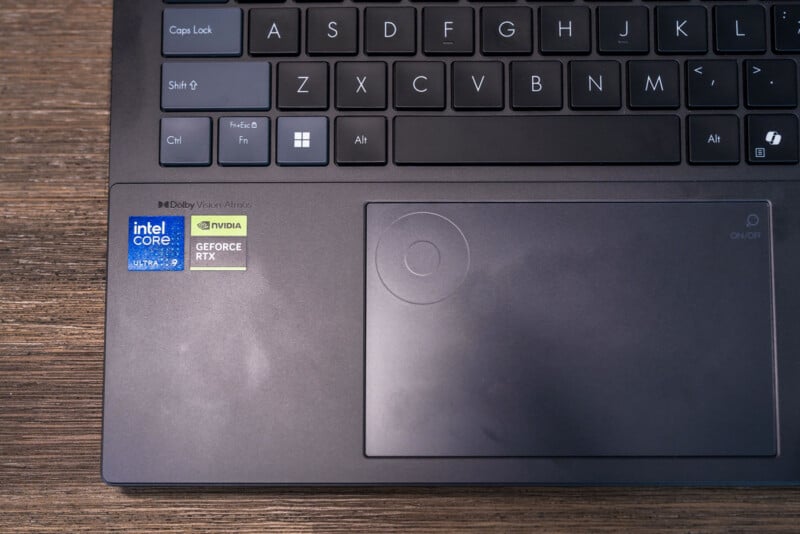
It’s made for the Adobe suite in a lot of ways but without the official exclusivity, making it customizable with other apps, to some degree. This is actually more a consequence of what Microsoft’s done with its Surface laptops where the Surface Dial opened up an API that Asus piggybacks on. The API is designed to make it easier to integrate apps with rotary input, which has further nudged the door open to other creative apps, like Affinity Photo and its broader suite.
There’s trial and error involved, regardless, because what might work in Affinity Photo might not work at all in Capture One or DxO PhotoLab 9, for instance. And that’s assuming you can get the two to interface properly. A device like the Logitech Creator Console has come a long way in that regard since launching in 2024, but that’s also more of a desktop solution.
However, that may also be the right move, since battery life poses challenges in the field, forcing you to park it more often. The default balanced power setting helps keep the laptop from doing more than sipping available power, but when you need more performance, it turns into more of a chug. One way or another, I had to look for the charger a mere few hours into heavier workloads after seeing the low battery warning pop up.
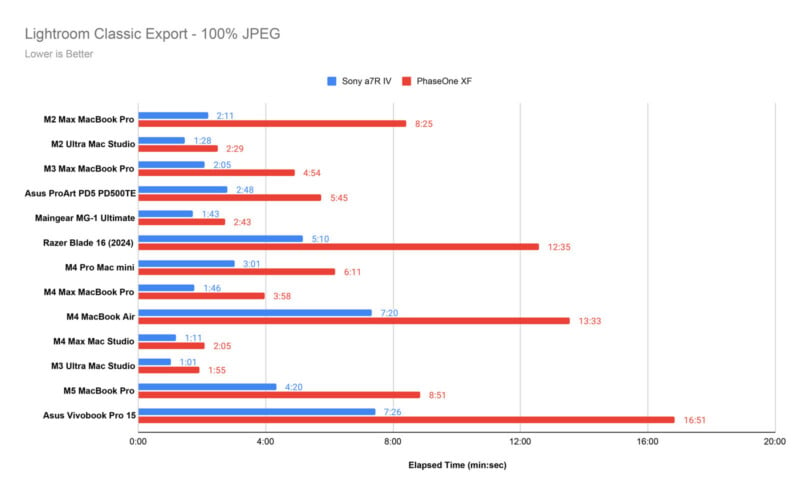
This, and the benchmark results, give me pause over considering this a dutiful video editing option. It can run DaVinci Resolve and Adobe Premiere fine, save for the faster speed you might expect at this price. The Puget Bench for Creators DaVinci Resolve benchmark test tripped up the Vivobook Pro 15 a few times in between successful tests, suggesting some struggle in managing a demanding workflow in that program.
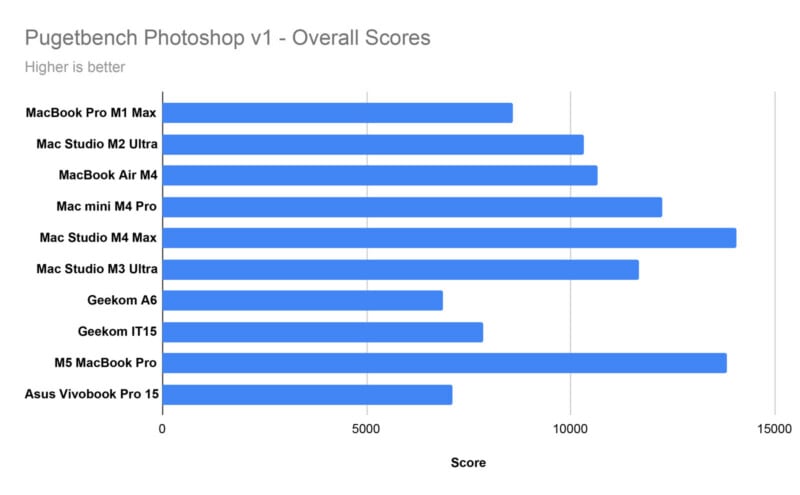
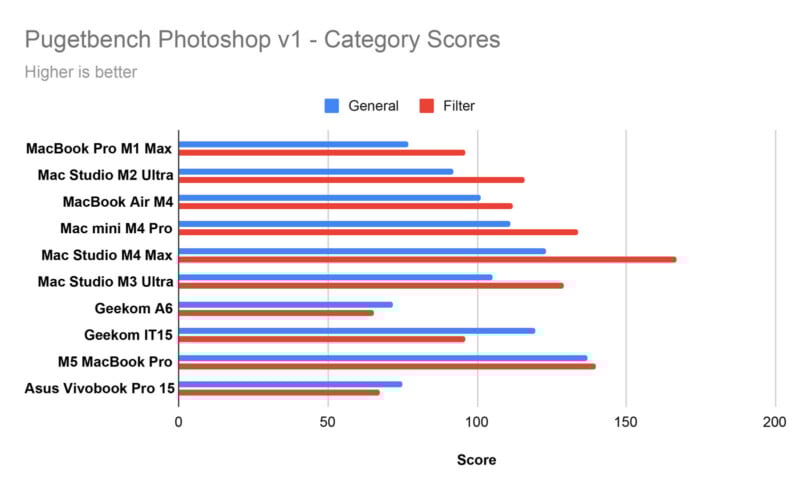
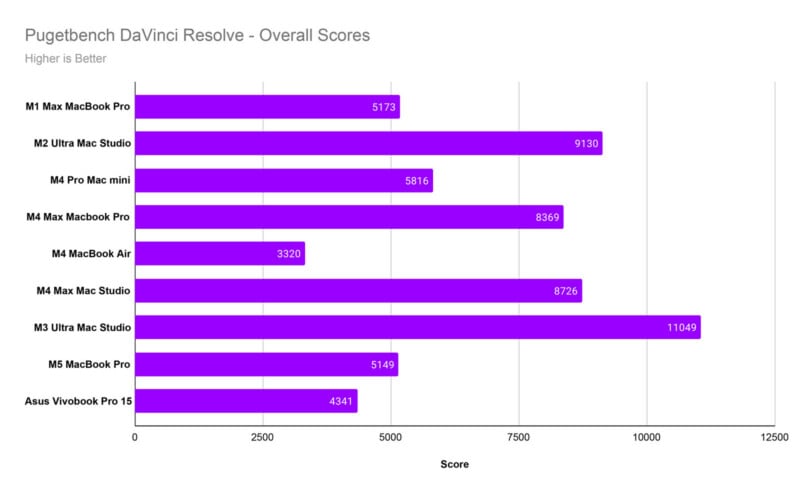
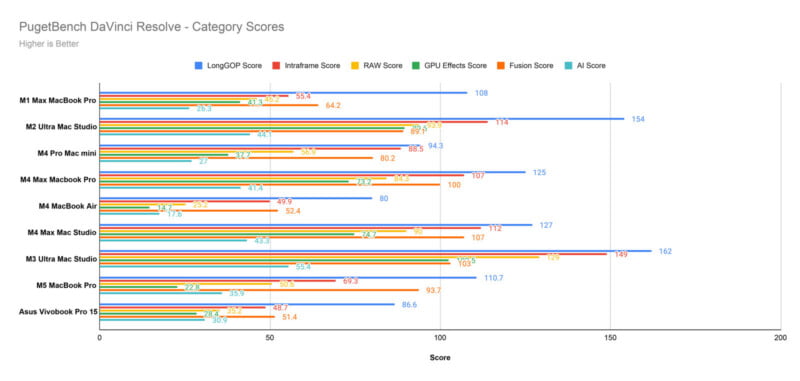
Editor’s note: The Adobe Premiere benchmark failed repeatedly when testing this machine. Ultimately, we elected to publish this review without the Premiere test results given that the DaVinci Resolve benchmark was completed successfully, providing a look at this laptop’s video editing capabilities. To be clear, the laptop can absolutely run Premiere without issues, but the benchmarking itself proved problematic.
Asus Vivobook Pro 15 Review: A Gorgeous Display at the Battery’s Mercy
It’s hard to go back from OLED when using it on a daily basis. That’s just me but I wouldn’t be surprised if it resonates with others, too. While it could be brighter for the price of the machine itself, it’s hard to argue with the vibrancy and consistency. It’s just a really nice-looking panel that your eyes could appreciate.
While Asus is careful not to deem this a gaming machine, it has the display to make games look good. I see it as a creative outlet first before gaming even enters the equation but there’s at least some flexibility, especially if you’re getting titles from the likes of Steam and Xbox Game Pass.
Pairing a strong OLED panel with a premium processor and discrete graphics will challenge any battery to keep up and that’s exactly what happens with the Vivobook Pro 15. Working on a creative task is unlikely to get you past four hours on battery alone, which is why you’re more likely to keep this parked and plugged in wherever you are. That doesn’t mean you lose out on all mobility, just that you have to be mindful of where a power outlet is going to be if you plan to stay a while. Bringing that power brick along only adds weight and heft to your commute.
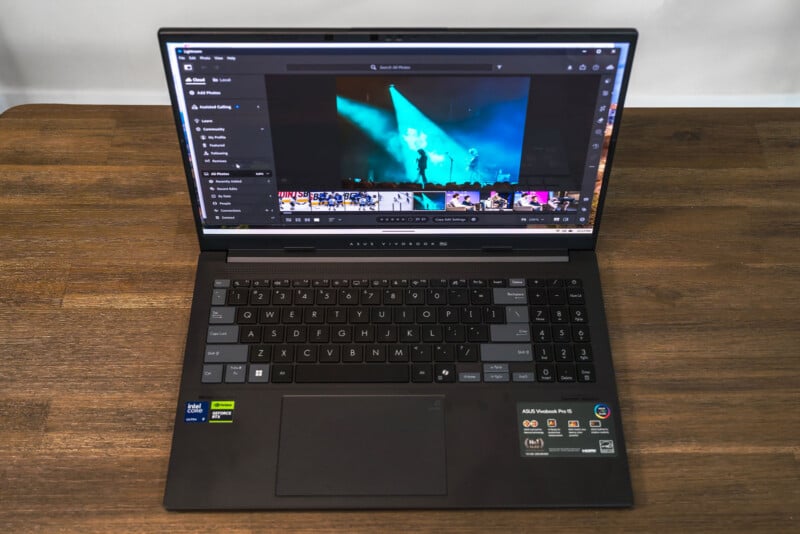
So, you’re left with a choice. You get a capable Windows PC with discrete graphics and internals good enough to handle creative workflows yet lack the all-day endurance and ultraportable design you might crave when you’re on the go. It’s a conundrum not specific to Asus or this particular Windows laptop but spending $1,600 needs to strike a balance that works for a foreseeable timeframe. Personally, I think I would struggle with this scenario.
Are There Alternatives?
Options abound but you have to parse configurations within your search. For example, the Lenovo Yoga 9i Aura Edition 16 (Gen 10) can run on the same Intel Core Ultra 9 285H CPU and faster Nvidia RTX 5070 GPU, as well as more ways to upgrade to 64GB of RAM. Plus, a 16-inch OLED panel doesn’t hurt. If you’re willing to forgo discrete graphics but want more portability and some input flexibility, Lenovo’s Yoga 9i 2-in-1 Aura Edition flips all the way back and supports touch and stylus input.
If you truly straddle the line between gaming and imaging or video, the Razer Blade 14 or 16 could be the way to go, especially given the onus on GPU performance and choice between OLED and Mini-LED panels. The catch is that you’re left with the same range anxiety on the battery side and portability isn’t much better.
The Vivobook Pro 15 also stands as a less expensive option compared to Asus’ ProArt series laptops, which ramp up configurations to be more suitable for creative fields. The ProArt P16 is easily the most advanced creator-focused laptop the company’s made to date, but it also starts at $2,199 for the most updated model, first unveiled in September 2025.
All of these PCs are based on the MacBook Pro 16 as a measuring stick but there’s no accounting for how efficient Apple’s silicon is with the company’s hardware.
Should You Buy It?
Maybe. I wasn’t blown away by the Vivobook Pro 15, though I also appreciated that getting through photo batches didn’t feel like a crawl, either. I wouldn’t get this if video is your primary pursuit but a photo-centric workflow can work well here under moderate use cases and expectations.







 English (US) ·