
 4 hours ago
9
4 hours ago
9
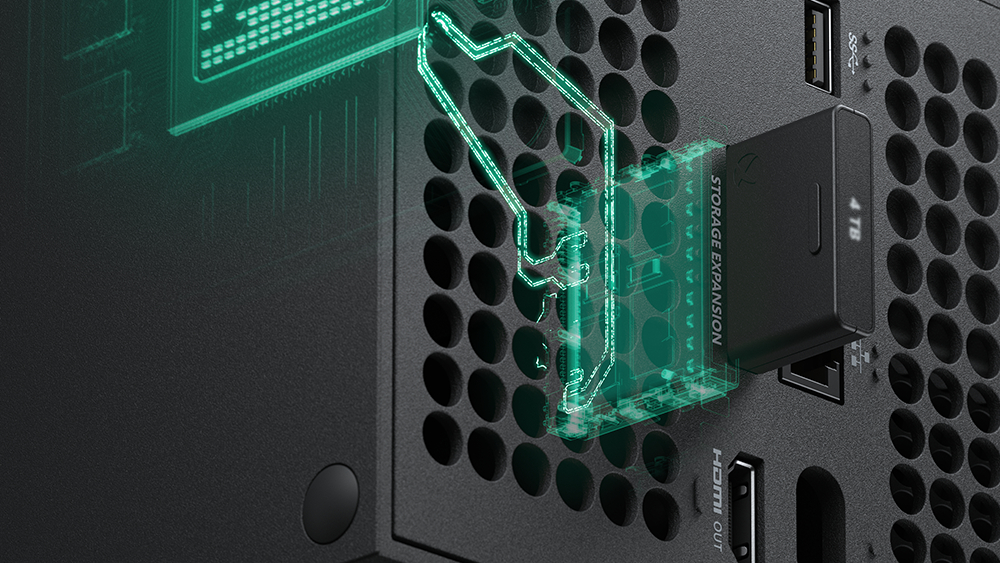
It turns out that you can use a PCIe to CFexpress adapter that plugs into a PCIe slot on your motherboard to use Xbox Series X|S Storage Expansion Cards as local storage in your PC.
Despite largely identical specs under the hood, Microsoft and Sony took different approaches to external storage for their current-gen consoles. While the PS5 has a dedicated M.2 slot, the Xbox Series X|S is stuck with proprietary Storage Expansion Cards made by Seagate and Western Digital. Turns out, they're actually not completely inflexible after all, as u/Dramatic-Shape5574 on Reddit showed you can use cheap CFexpress adapters to make these cards work on a PC.
Using Xbox Series X/S expansion cards as PC Storage from r/xboxThis is not exactly groundbreaking news; it's been known for a while that these expansion cards use the CFexpress Type-B connector. The standard itself uses the NVMe protocol, but it's limited to a PCIe 3.0 x2 connection. Microsoft's custom version of it, however, supports PCIe 4.0 x2. Previously, someone even made an M.2 to CFexpress adapter that took a rare PCIe 4.0 x2 M.2 SSD and converted it into an expansion card for Xbox.
We're looking at the opposite situation here, turning an Xbox Expansion Card into regular storage for a PC. The OP used a PCIe to CFexpress adapter that plugs into a PCIe slot on your motherboard, giving you a female CFexpress slot in return. There are also M.2 to CFexpress adapters that connect to the M.2 slot instead of a PCIe slot, if that's more convenient for you. Just make sure to choose one that says "Type-B."
500 GB Xbox Expansion Card for $99 (Western Digital only)
1 TB Xbox Expansion Card for $189.99 (Seagate)
1 TB Xbox Expansion Card for $149.99 (Western Digital)
2 TB Xbox Expansion Card for $275.88 (Seagate)
2 TB Xbox Expansion Card for $249.99 (Western Digital)
4 TB Xbox Expansion Card for $549.99 (Seagate only)
There's only one caveat — you need to format the Expansion Card before it can be used inside Windows. It'll still be recognized, but the Xbox-specific file system won't work with any OS directly. After formatting, it's picked up as a normal SSD with read and write speeds of up to 1,117 MB/s and 1,570 MB/s, respectively. That's much slower than even entry-level PCIe 3.0 drives, but fast enough for general usage, nonetheless.
The ongoing component crisis caused by the AI boom has skyrocketed the prices of memory and storage, so if you happen to have an Xbox Expansion Card lying around, these CFexpress adapters can be the perfect stopgap. And if you want to get your hands on a new Expansion Card, you're in luck because a lot of the models are on sale. We've listed multiple options above for each storage capacity in case any deal runs out.
There's no difference between the Seagate and Western Digital models, but we noticed the WD SKUs were consistently cheaper than the Seagate ones. Both are certified by Xbox, so they have identical specs and performance. That means there shouldn't be a difference in their adapted performance on PC either. If any of the Amazon links above expire, you can check out the deals on Best Buy and Newegg.

Follow Tom's Hardware on Google News, or add us as a preferred source, to get our latest news, analysis, & reviews in your feeds.


 English (US) ·