
 16 hours ago
10
16 hours ago
10
Microsoft announced in a blog post yesterday that it would allow users to pause updates in Windows 11 indefinitely. This would be the first time the company officially allowed indefinite update pausing for everyday users since the launch of Windows 10 in 2015. The change is in response to countless user complaints over the years about its “mandatory update” policy.
Updates are necessary for the seamless functionality of the Windows OS and for security. However, users have had limited control over when and how these updates happen. You could postpone updates, but never for more than 35 days. There have been reports of forced update restarts right in the middle of meetings or gaming sessions after the extension period expires.
Article continues below
The next change is the ability to shut down or restart your PC normally, even when updates are pending. Previously, whenever updates were due, the usual power options would change to “Update and shut down” or “Update and restart,” often accompanied by the familiar yellow notification dot beside the Shut down icon. This meant you couldn't simply perform a quick restart or power off your system without first installing pending updates. This change fixes that, allowing you to shut down or restart on your own terms, without being held hostage by a pending update.
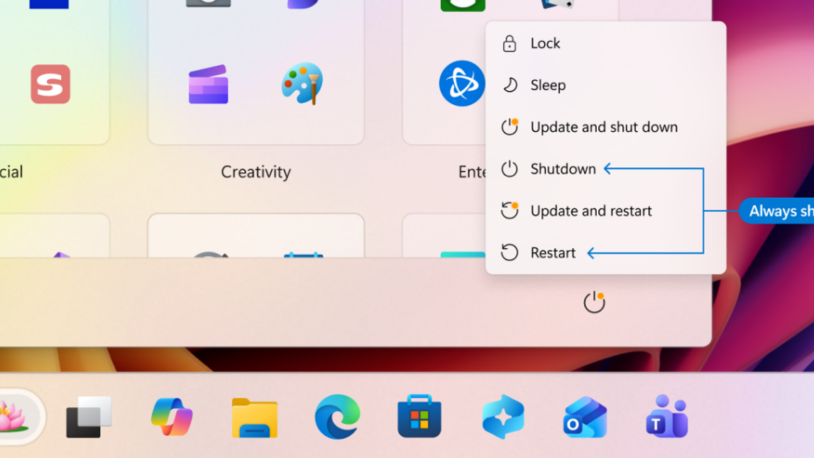
“With this change, the Power menu will always show the standard Restart and Shut down options, meaning you will always have a choice to just restart or shut down your device without having to install the pending update. At the same time, update‑specific choices like Update and restart and Update and shut down will still be available when applicable,” said Hanson.
As the final key change, Microsoft would provide more insights on available updates, ensuring you know exactly what's being updated.
“Often, driver updates would have similar, if not identical, titles. To help provide you with more insights, we have added the device class to the driver title – ensuring pending or installed driver updates clarify whether they apply to display, audio, battery, extension, HDC, or other applicable driver update classes,” explained Hanson.
In addition to these changes, Microsoft said it will try to unify updates so that users won't have to deal with multiple system updates in a month.
With these changes, Microsoft is simply giving you more control and making updates far less disruptive to your workflow. That said, Microsoft is clear that updates remain critical for security, performance, and system stability — so the intention isn't to skip them altogether, but to plan them around your schedule rather than be ambushed by them at the worst possible moment.

Follow Tom's Hardware on Google News, or add us as a preferred source, to get our latest news, analysis, & reviews in your feeds.








 English (US) ·