
 3 weeks ago
15
3 weeks ago
15
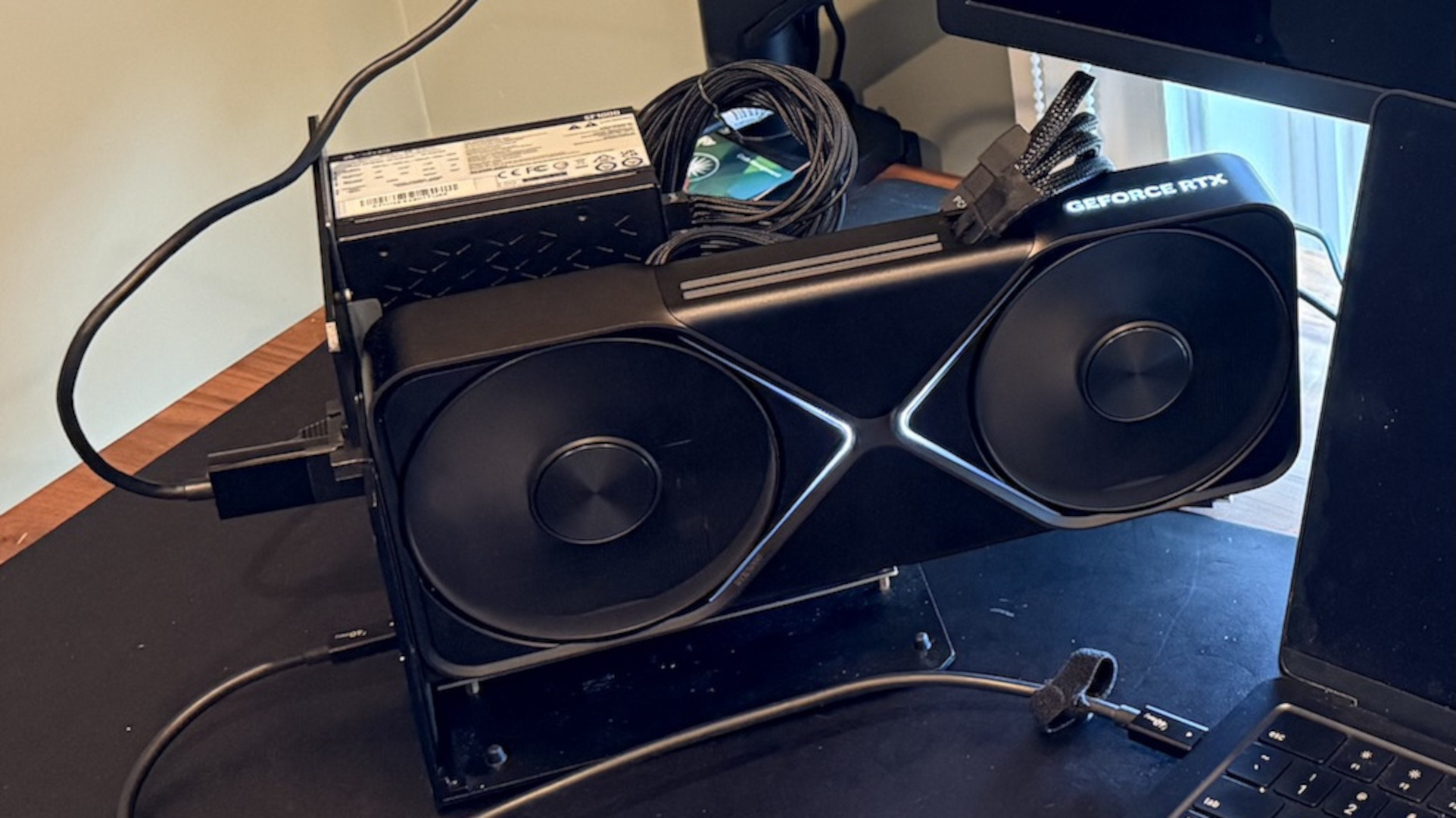
Apple’s M5 Max SoC flagship is one of the fastest pieces of silicon around and can compete with flagship consumer desktop chips from AMD and Intel in at least some workloads. Logically, this also makes it a great gaming CPU if paired with high-end GPU hardware. Software engineer Scott J. Goldman put this idea to the test and found a way to run Nvidia’s flagship RTX 5090 graphics card on an M5 Max-powered MacBook Pro using virtualization and an eGPU dock. His results revealed that gaming on an RTX 5090 via a MacBook can deliver a great experience in modern AAA games, as long as frame generation is enabled.
The setup process was anything but easy. ARM-based MacBooks don’t officially support eGPU gaming with Nvidia GPUs, requiring Goldman to make a plethora of tweaks to enable it, most notably through virtualization with a Linux OS. MacOS does not support Nvidia GPUs (there is no native driver support), and Linux does not natively support Thunderbolt on Apple silicon. Virtualization gets around this problem by leveraging the strengths of macOS and Linux.
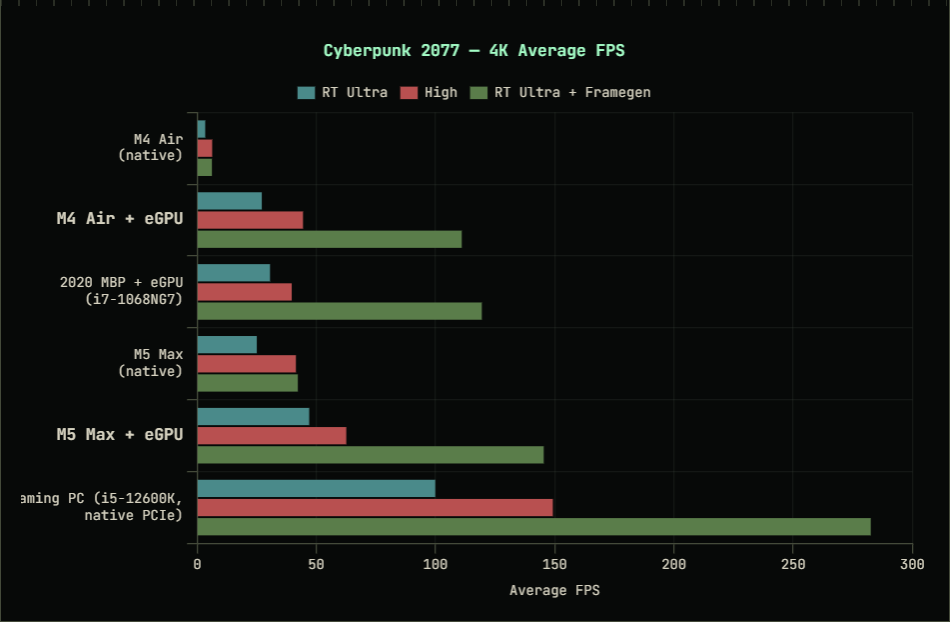
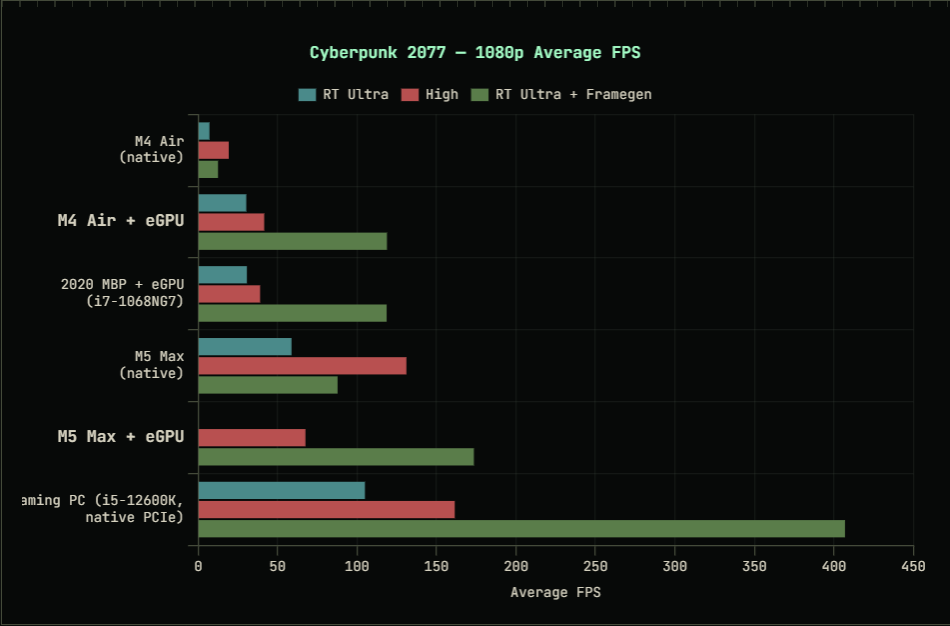
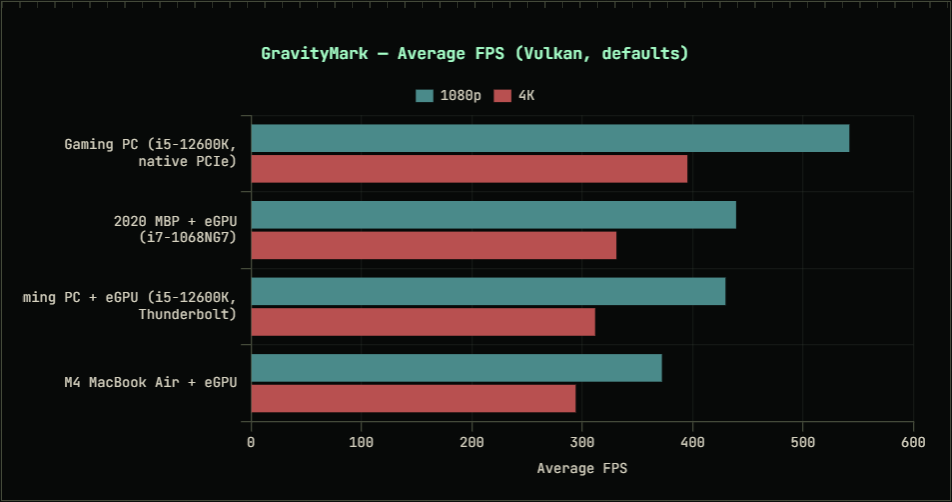
His performance benchmarks reveal that the eGPU setup on the M5 Max and M4 MacBooks can deliver a smooth gaming experience as long as frame generation is used. Cyberpunk ran at well over 100 FPS on both Mac devices at the RT Ultra preset with frame generation enabled, despite the overhead of FEX translation, a virtualized Linux environment, and the RTX 5090 running off a Thunderbolt eGPU.
However, performance falls apart without frame generation. In Cyberpunk, at the same settings at 1080p, performance drops down to just above 60 FPS on the M5 Max MacBook and below 50 FPS on the M4-powered MacBook Air. Performance on the M4 system is so bad that the Core i7-1068NG7 in the 2020 MacBook Pro with the RTX 5090 achieves almost identical frame rates. By contrast, the Core i5-12600K system achieved over 150 FPS without frame generation. In other games that the software engineer was able to get running without crashing (Shadow of the Tomb Raider and Crysis Remastered), performance was below 60 FPS.
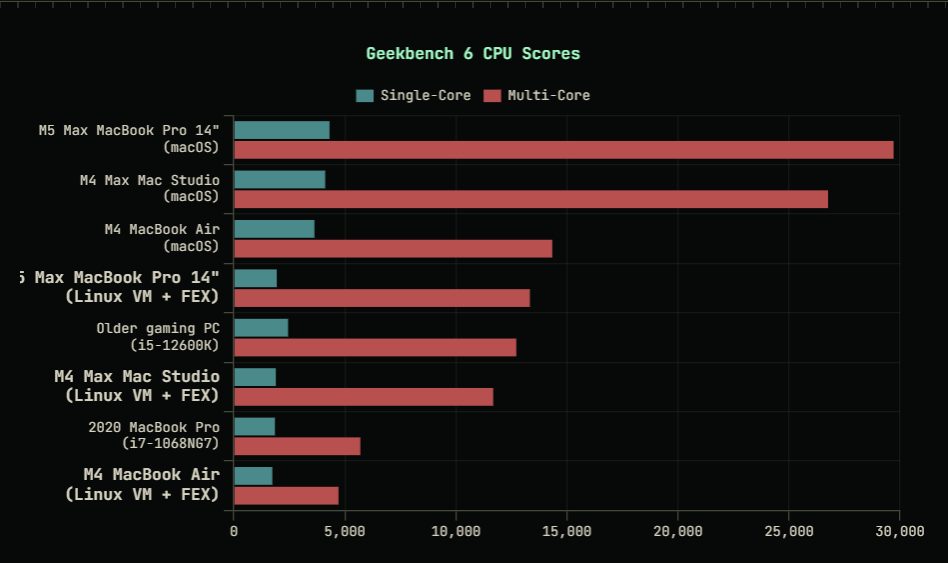
The main bottleneck is the FEX translation layer, which is hampering performance on Apple silicon-powered MacBooks. Goldman states that FEX incurs a roughly 50% performance penalty on the CPU compared to native ARM processing. This is clearly visible from his Geekbench 6 scores, where enabling FEX while using the Linux VM cut single and multi-core Geekbench scores in half. The software engineer also tested several other games and benchmarks, including GravityMark, where the performance drop-off between the eGPU setup and the native desktop experience (the 12600K setup) was only 20%.
Goldman’s results show that gaming on an RTX 5090 with an M5 Max chip is indeed possible, but the best method to game with this hardware combination requires frame generation to overcome the performance losses from the eGPU dock, as well as CPU processing for virtualization and translation. The performance potential is there, and in a perfect world, the RTX 5090’s performance would only be hampered by the eGPU connection. However, right now, the setup process alone makes this configuration far from ideal for gaming. We can only hope that one day Apple will cater to Mac gamers and provide better tools to make eGPU docks work seamlessly on M-series silicon.

Follow Tom's Hardware on Google News, or add us as a preferred source, to get our latest news, analysis, & reviews in your feeds.







 English (US) ·