
 3 weeks ago
21
3 weeks ago
21
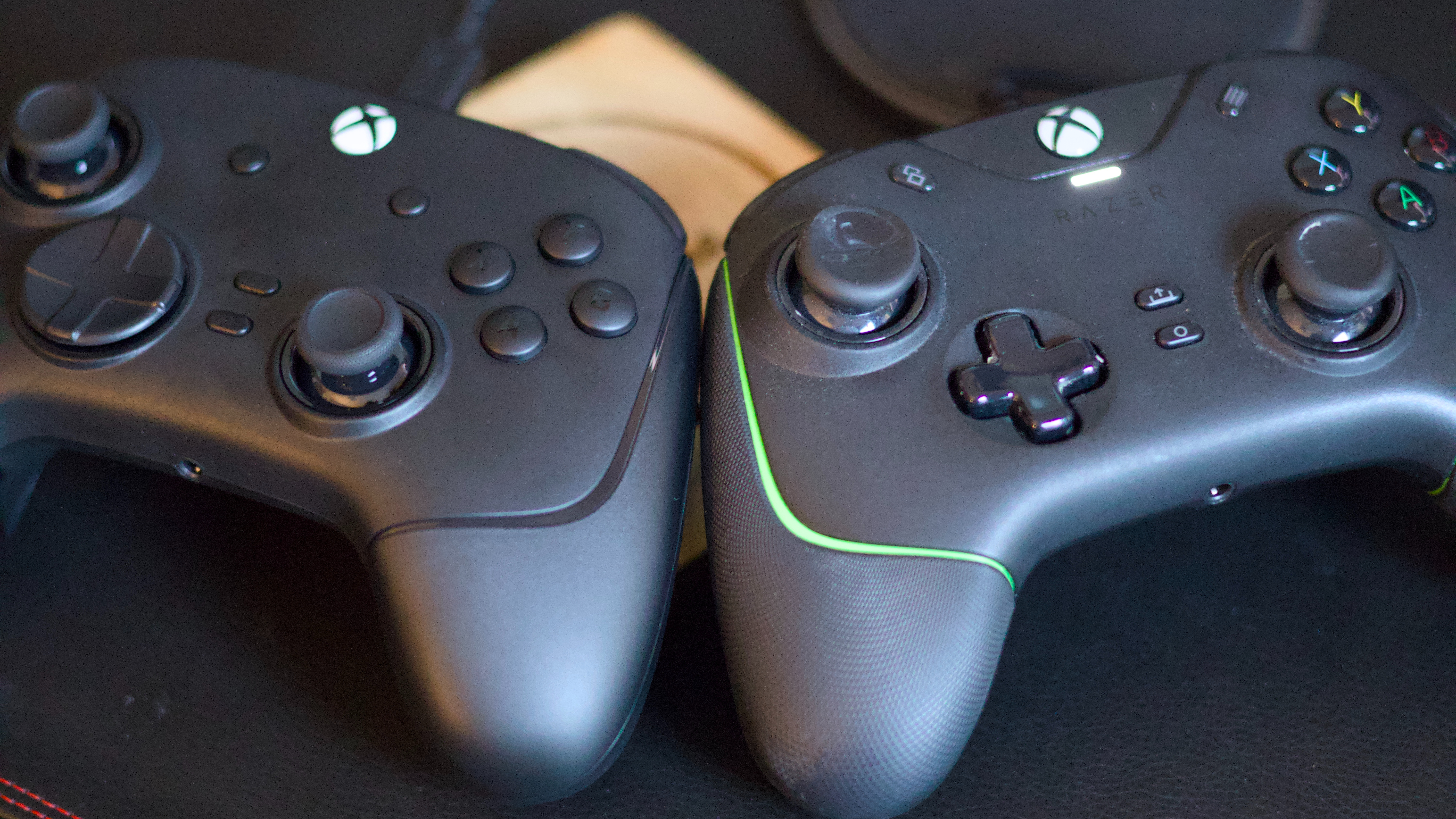
I’ve spent a good 25 of my 30 years welded to a game controller of some sort — be it the Dualshocks of my friends growing up, the Xbox 360 controller of my very first console, or one of the myriad gamepads I’ve had the privilege of testing over the years. But for the last four years, I’ve rocked exclusively one line of controllers full-time: the Razer Wolverine. In fact, I’ve bought not one, not two, but three Razer Wolverine controllers since December 2022: a wired V2 for myself, the same again as a thoughtful gift for a friend, and then finally an upgrade to V3 Tournament Edition, a gift to myself this New Year.
So what has my Razer experience taught me about buying the best gaming controllers for the PC? Like many of the best PC peripherals, there are almost too many options to choose from, making it quite daunting to know where to start. What are some considerations to keep in mind when choosing a PC gaming controller? Is my weapon of choice worth your time? Here’s what my experience has taught me, and some of the most important things to consider when making your own game controller decision.
1. Wired vs Wireless
Arguably, the most important choice you’ll make when buying a gaming controller for PC is the ever-present wired vs wireless debate. Like many people, I’d been a wireless proponent for as long as I can remember. The convenience and freedom of not having a cable was always my preferred mode, and I used to sigh with great remorse whenever I’d forget to charge the batteries in my Xbox controller and have to dig out the dreaded cable to get some juice.
In my old age, I’ve shifted back to wired, spurred by my Wolverine V2 purchase a few years ago. Of course, there are many great controller vendors out there, but across all of them, you’ll likely find that the wireless option is much more expensive than the wired version. When I went wired, it was mostly a cost decision. A Wolverine V2 will set you back around $60 today; I paid about $50. A similar wireless model will cost at least double that.
It was only once I’d decided to pick the cheaper wired model that I discovered the other benefits. Tethered to my PC or Xbox by cable, I never lose a wired controller, which definitely can’t be said of the wireless options in my house. Battery charging is never an issue either. There are no pesky dongles to lose, and I’ve saved a ton of money not buying either disposable batteries or more premium wireless charging solutions to keep my controller going.
Input lag is another possible consideration here. Generally, wired controllers should be faster than wireless controllers when it comes to the time it takes for your input commands to reach your PC. However, wireless controllers are pretty good these days, with most bog-standard offerings giving out near-imperceptible input lag. There are also some very potent 8000Hz wireless controllers out there if input lag is really a concern. However, unless you’re planning to join the pro Call of Duty circuit anytime soon, the difference between wired and wireless isn’t that big of a deal, at least in my experience.
Wireless controllers are a bit more convenient in-hand, what with no cable to worry about, but I’ve found the promise of knowing my controller will always be charged and ready to go to be invaluable, and I’ll probably never switch back to wireless for my daily driver.
So if you’re picking a controller, think about what you want and need in terms of convenience, how much more a wireless controller is going to set you back, and how you’re going to keep it charged for those mammoth gaming sessions. Otherwise, leave all of that behind and save yourself a few bucks by going wired.
A big upgrade I’ve found in the Razer Wolverine V3 is the detachable USB-C cable, which gives me more options if the cable were to give out. The older V2 has a proprietary cable with a USB-A adapter, and can’t be detached from the controller, so if it breaks, your options are decidedly more limited. Pay attention to the cable you get with any wired option.
2. Ergonomics
If you game as much as I do, you’ve likely encountered some RSI over the years. Gaming for too long, or with the wrong kit, can be really tough on your hands. So it’s important to pick a controller that is comfortable to hold. I love the Wolverine V2’s non-slip rubber grips and its contours. It is definitely nicer in the hand than the V3, but there are some drawbacks. Non-slip rubber is much less durable than plastic, I’ve found, so my V2 has bits that are starting to come away from the shell. If you take care of it, you’ll get decent life out of it, but it’s a trade-off over plastic worth taking into account. The V3 uses a less-soft, ridged plastic. It’s still grippier than a vanilla Xbox or PlayStation controller, but not as plush as the old one. However, I can already sense another benefit of this design that I’m yet to realise. The V2’s rubber seems infinitely more sticky than the V3’s plastic, and over time, my old controller has inevitably picked up dirt, grime, and no doubt some chocolate that I’d really wish wasn’t there. Standard plastic is much easier to keep in good condition.
Ergonomics also includes size. Xbox reduced the size of its controllers a few years back, and I was blown away by how drastic the difference in comfort was, despite the change not really being that visible. If you’re shopping for a new controller, take some time to check the size and also the weight, as a heavy controller will generally be less comfortable to hold for longer sessions.
3. Features, buttons, and modes
Gaming controllers, by default, will come with a basic set of buttons and features. At a minimum, to enjoy most titles, you’ll want a decent set of sticks, triggers, and buttons for input, as well as a D-pad. Beyond that, the possibilities are endless. I was drawn to the Wolverine series because I play a lot of first-person shooters. The V2 and V3 have an extra shoulder button on each side, and the new V3 comes with four paddles under the controller.
In theory, the latter ensures I never have to take my thumbs off the sticks during a gunfight. But even in less intense games, extra buttons, especially remappable ones, are handy. I love the Fallout franchise, for instance, and the A button on the right-hand side shoulder makes picking up items and interactions in titles like this much smoother.
My V2 and V3 also come with hair triggers, switches that reduce the travel time of the triggers to make shooting easier. Of course, if you’re looking for a nice colorful controller to play Stardew Valley, that probably isn’t of much interest. But the point is that you should definitely be looking for a controller with at least a few extras to spice up your gaming. Does it have any modular parts that can be swapped or customized? Does it have RGB lighting? The Turtle Beach Victrix Pro is a great example of a modular controller where nearly every physical aspect is customizable. You can change the design and feel of the sticks, or even swap out the buttons to your liking.
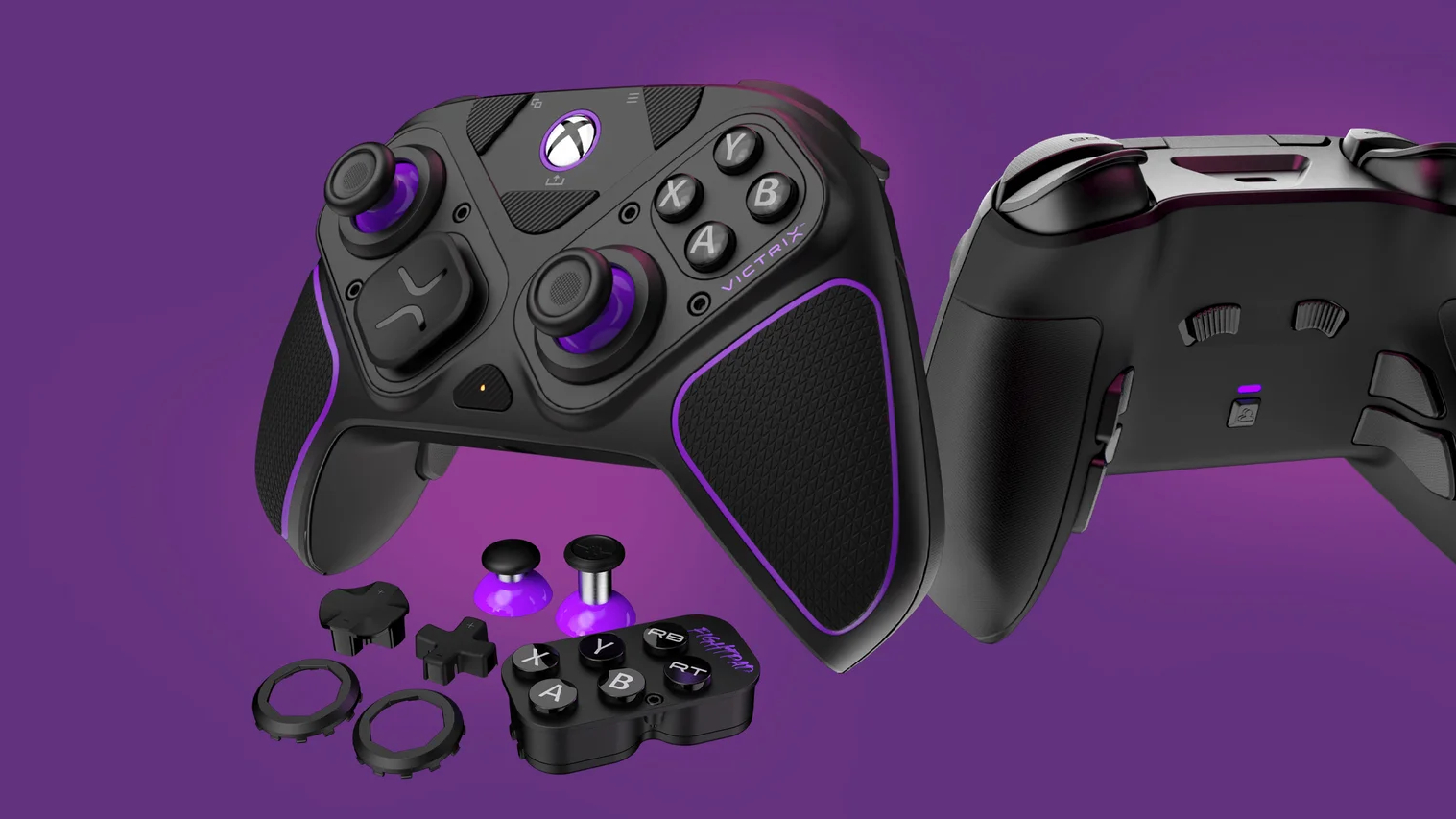
A final word should go to the hallowed Hall Effect or TMR thumbstick technology. If you want a decent amount of durability and to avoid dreaded stick drift, it is worth investing a bit more in a controller with upgraded stick tech beyond bog-standard potentiometers. I won’t go into detail on the pros and cons of Hall Effect vs TMR, but know that both use magnets, instead of the resistive film found on most common gaming controllers, which will inevitably wear out over time. Hall Effect sticks are an upgrade to the Wolverine V3 that I’m really pleased with, and it might mean I never have to buy another controller again.
So there you have it. PC gaming controllers are a vast and complicated environment, but that also means there’s a lot to offer for everyone. With a vast array of options, you also don’t need to break the bank for a good controller, with many good third-party options costing less than $50.
Still, remember you can always buy a standard-issue Xbox or PS5 controller to get you started. After all, there’s a reason those designs haven’t changed substantially in years, and a reason why so many third-party alternatives follow their designs.






 English (US) ·