
 3 hours ago
6
3 hours ago
6
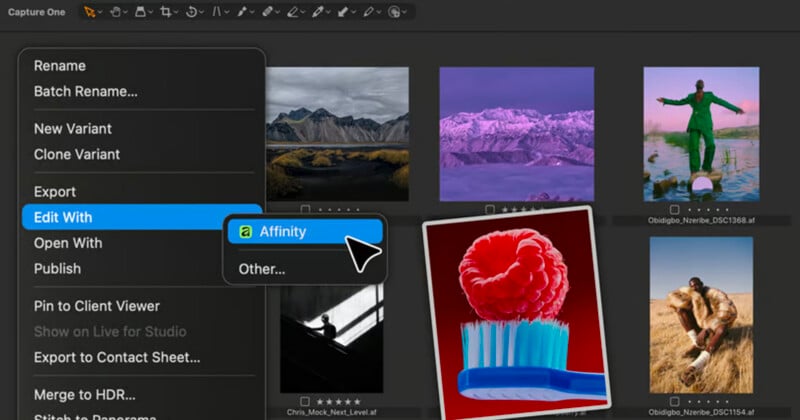
Canva’s latest round of announcements includes a wide range of updates to its expanding creative ecosystem, but one of the most impactful changes for photographers and video editors is a quieter addition: native support for Affinity’s .af file format in both Capture One and DaVinci Resolve.
At a glance, the update may seem incremental. In practice, it addresses a longstanding friction point in professional workflows by allowing creatives to move more seamlessly between applications without the need for file conversion or workarounds.
A More Connected Creative Workflow
With native .af file support, projects created in Affinity can now be opened and used directly within Capture One and DaVinci Resolve. This simplifies the process of moving between image editing, color grading, and video finishing, particularly for creators who rely on multiple tools across different stages of production.
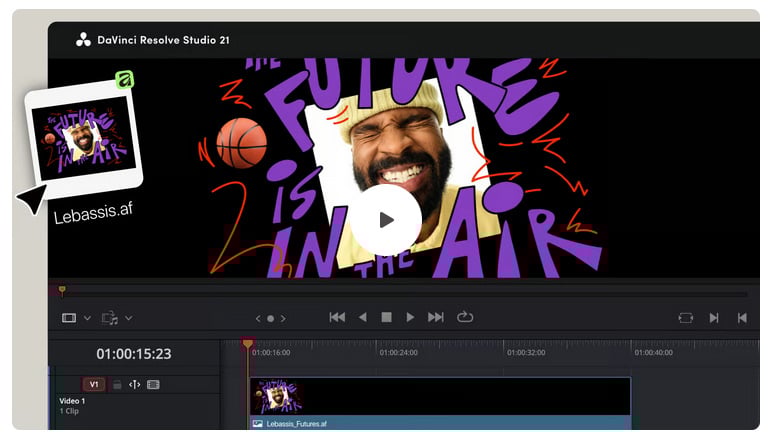
“DaVinci Resolve now supports native Affinity .af files, so your designs drop straight into professional video editing without the usual file gymnastics,” Affinity states.
“And it doesn’t stop there. When you update and save the .af file in Affinity, DaVinci Resolve refreshes it automatically, so your timeline stays in sync. No re-export. No relinking. So you can keep iterating without breaking your flow. Everything stays live, and nothing gets lost along the way.”
Previously, transitioning between these platforms often required exporting to intermediary formats, which could introduce inefficiencies or limit flexibility. Native compatibility removes that extra step, allowing files to retain their structure and integrity throughout the workflow.
Affinity and Canva Integration Expands With Built-In AI and Brand Tools
Alongside the new cross-platform file support, Canva is also deepening its integration with Affinity by bringing a range of its tools directly into the software.
“Affinity is now brought to you by Canva, and your Canva account gives you access to Affinity and other Canva products and features,” Affinity states.
“You can access all of Affinity’s vector, layout, and pixel tools for free with just a free Canva account. If you’d like to unlock Canva AI tools within Affinity, however, you will need a premium Canva plan.”
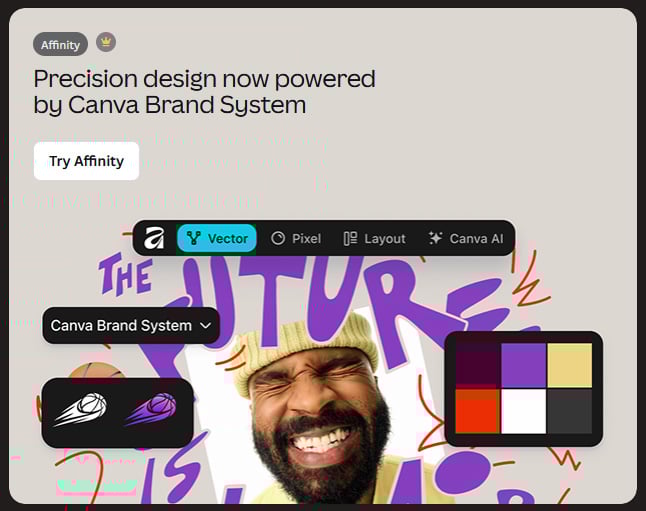
A new Canva AI Studio is now built into Affinity, giving users access to AI-powered features such as image generation, generative expand, background removal, upscaling, and portrait adjustments without leaving the app. These tools are designed to complement existing workflows rather than replace them, allowing photographers and designers to handle common editing tasks more quickly while maintaining control over the final output.
Access to these AI features is tied to Canva’s premium plans, while Affinity’s core editing tools remain available without a subscription.
Canva is also introducing its Brand System inside Affinity, enabling users to work with approved brand assets such as colors, fonts, and imagery directly within their projects. Assets created in Affinity can then be exported into Canva’s ecosystem, where they can be shared, adapted, and distributed across teams and formats.
Together, these additions position Affinity as both a standalone creative tool and an integrated part of Canva’s broader platform, bridging detailed design work with collaborative, scalable production workflows.
Bridging Photo and Video Pipelines
The integration is particularly notable for hybrid creators working across both stills and video. Capture One has long been a preferred tool for professional photo workflows, while DaVinci Resolve is widely used for editing and color grading in video production.
By supporting Affinity files directly, both platforms now fit more naturally into a shared pipeline. Edits made in Affinity can carry through more fluidly, reducing the need to duplicate work or rebuild assets when switching between applications.
Strengthening Adobe Alternatives
This move also reinforces the growing viability of non-Adobe creative workflows. Affinity has gained traction as an alternative to traditional image editing software, while Capture One and DaVinci Resolve are established options for photo and video professionals.
Bringing these tools closer together through native file support makes it easier to build a cohesive workflow outside of Adobe’s ecosystem. For many users, that means fewer compromises between performance, cost, and flexibility.
A Small Update With Broad Impact
While Canva’s broader announcements include new tools, integrations, and platform features, the addition of native .af support stands out for its practical implications, allowing existing tools to work together more effectively.
For photographers, editors, and hybrid creators, that kind of interoperability can have a meaningful impact on day-to-day workflows, making it easier to move from initial edits to final delivery without interruption.
Image credits: Canva, Capture One


 English (US) ·