
 7 hours ago
7
7 hours ago
7
Gaming handhelds aren't affordable anymore. Many of them go for $999 or more. And, crucially, the Steam Deck OLED, the best handheld gaming PC and a price leader at $549, has mostly been out of stock as the component crisis continues.
That makes it a great time to look at the Asus ROG Xbox Ally, a $599 Windows-based option with, spoiler alert, a chip that looks a lot like the one in the Steam Deck – at least on paper. The Ally shares a lot in common with the far more expensive ROG Xbox Ally X, but it's still distant enough from the Steam Deck, and has a few technical issues that makes it still feels compromised.
Design of the Asus ROG Xbox Ally
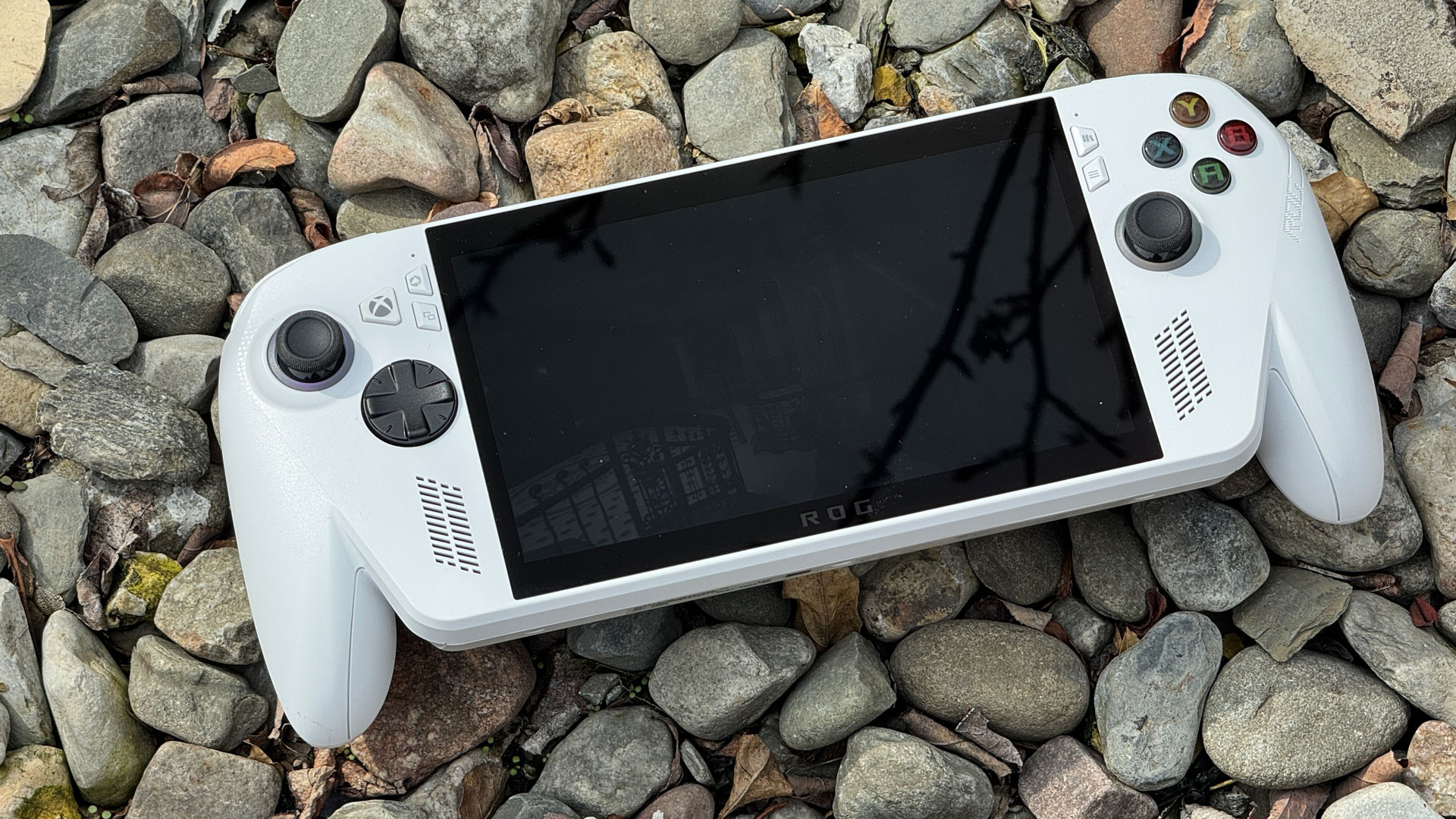
The ROG Xbox Ally's design is effectively identical to its more powerful sibling, the Asus ROG Xbox Ally X. That's hard to complain about, as that machine had superior ergonomics compared to many other gaming handhelds thanks to prongs that feel like they're part of an Xbox controller.
There are, though, two major aesthetic differences. The first is that this handheld comes in white, while the Ally X is black. I owned white Xbox 360 controllers back in the day, and those got gross even in the best of circumstances. Granted, I'm now an adult who takes better care of his stuff, but I can't look at this and not worry about what will happen to this thing if I don't wash my handsevery time before I touch it. Despite my best efforts, it did get a bit dirty during my review period, possibly from my hands or just from sitting in my bag.
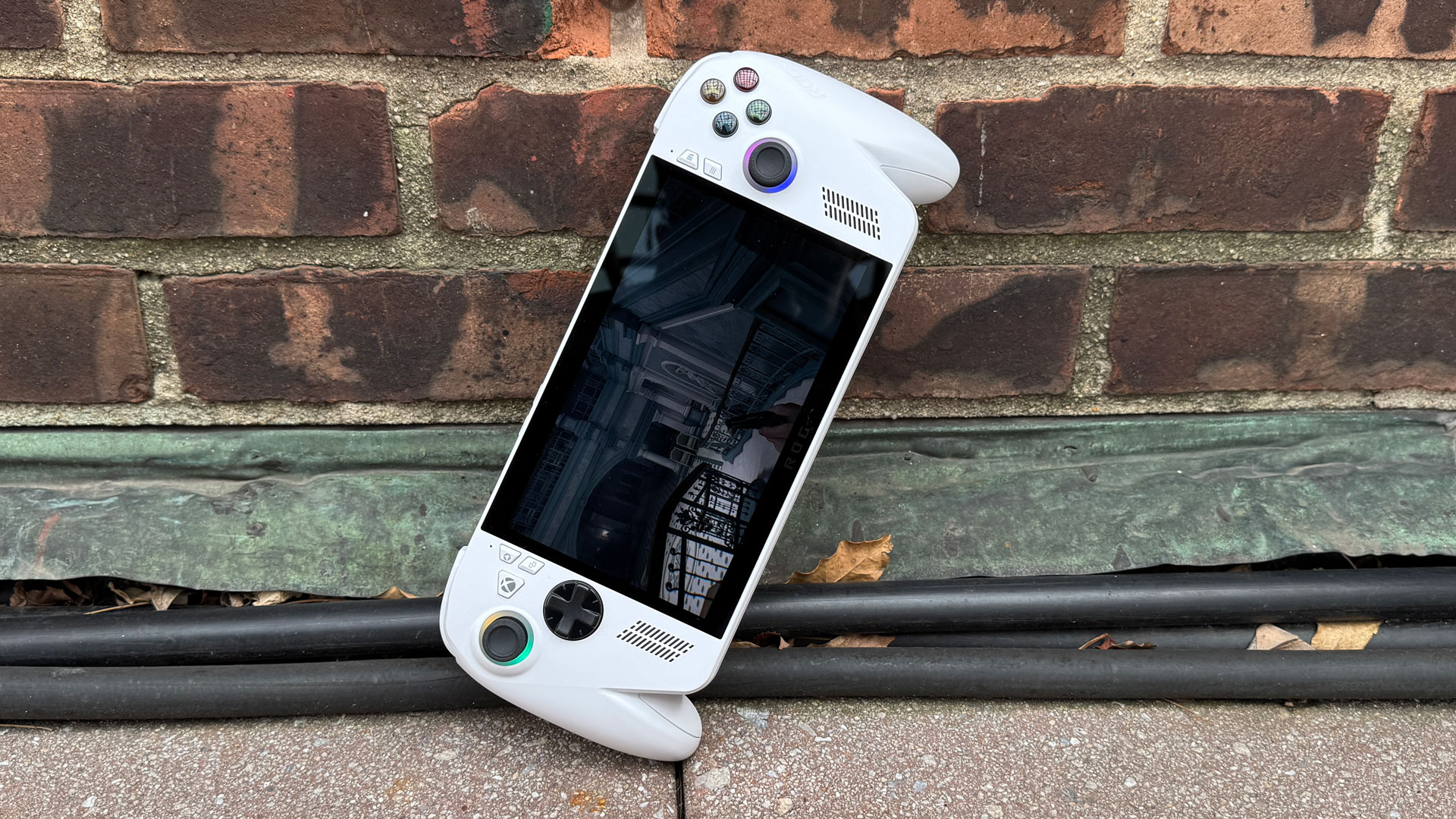
On the bright side, the cheaper model has colored buttons that match an Xbox controller, which the all-black X model doesn't.
The other difference is that at 1.48 pounds (670 grams), the Xbox Ally is slightly lighter than the Xbox Ally X at 1.58 pounds (715 grams). Putting them next to each other, I could definitely tell. The Steam Deck OLED is even lighter at 1.41 pounds (640 grams).
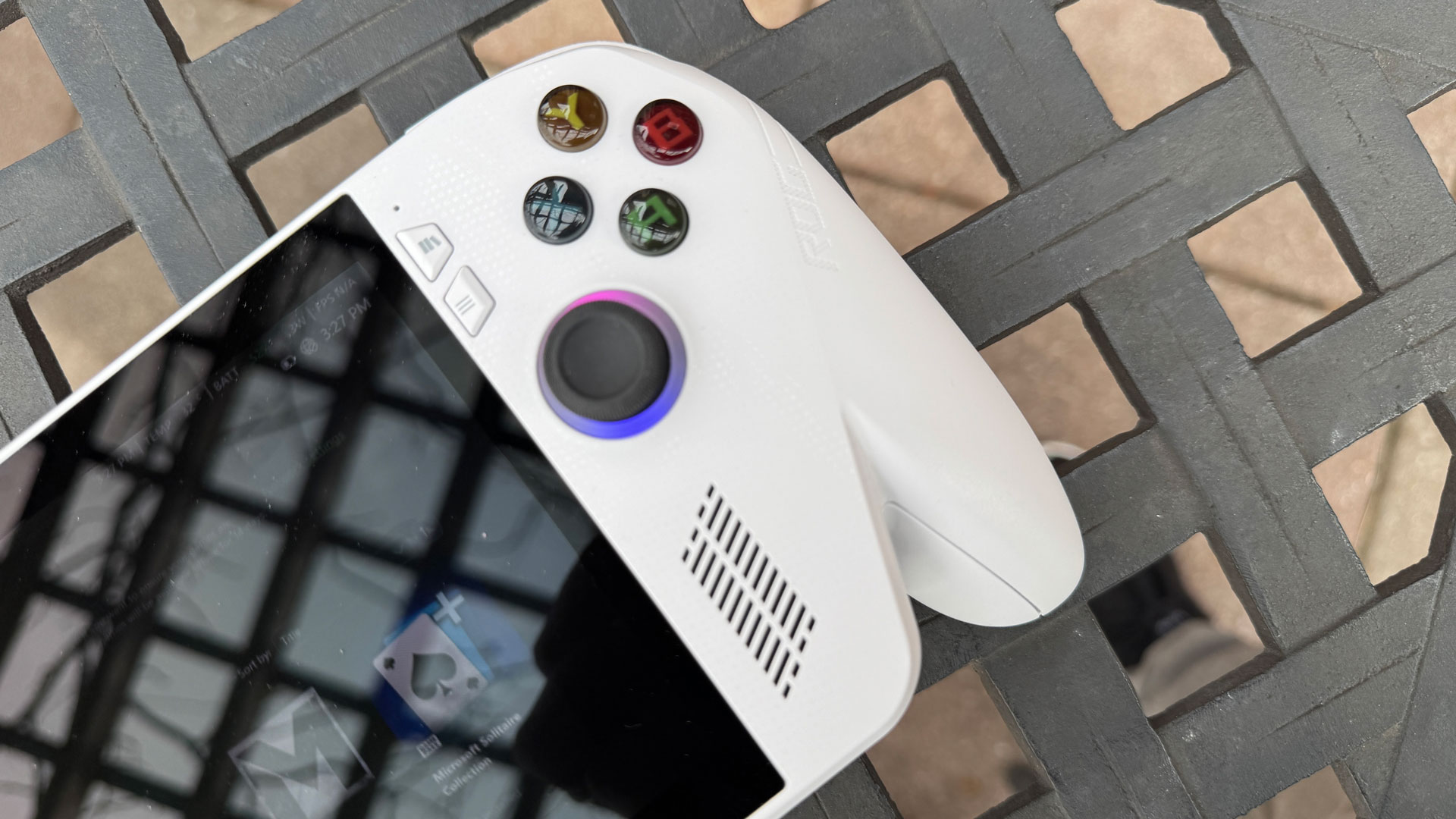
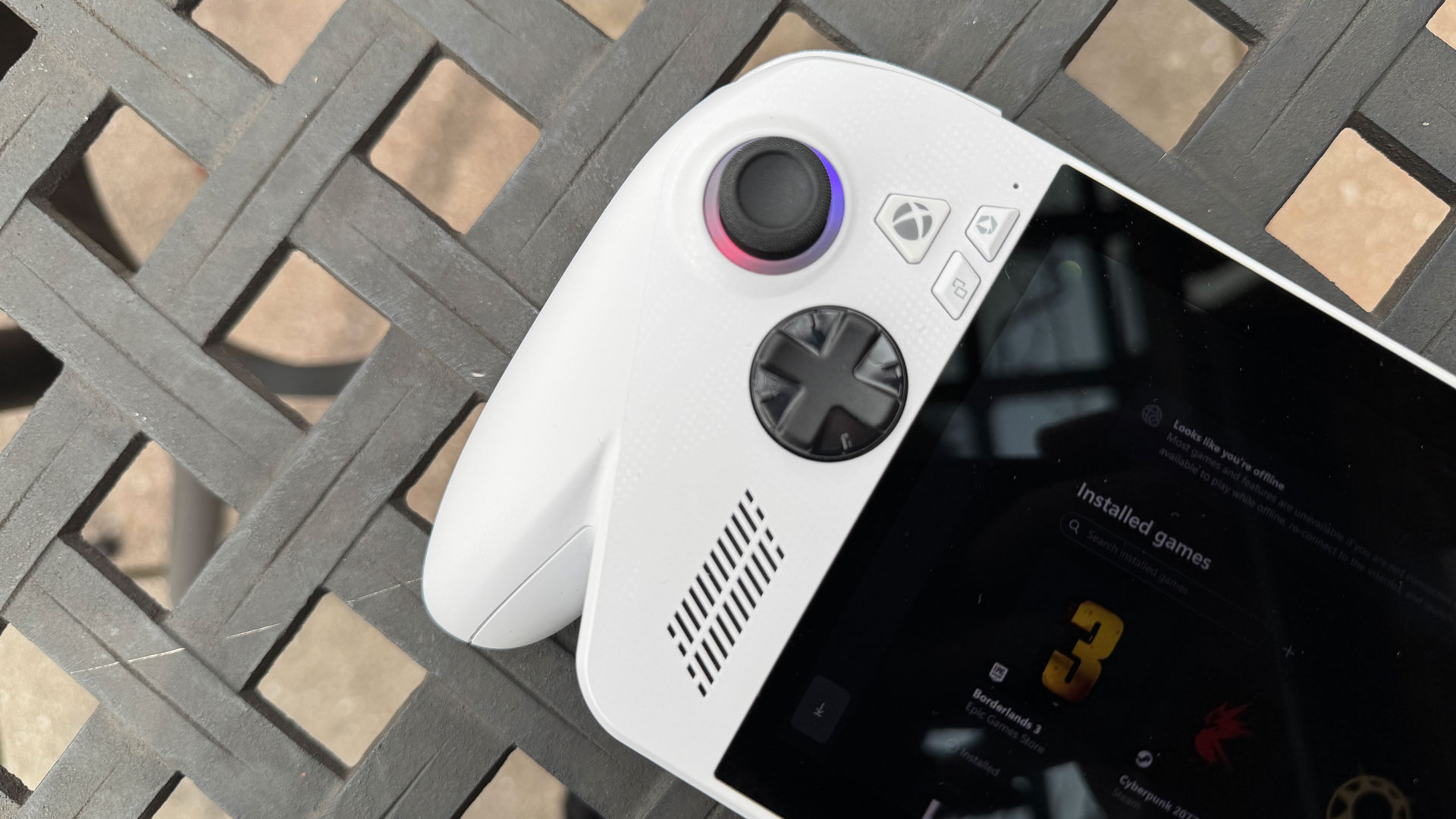
Unsurprisingly, the Ally has a controller layout very similar to an Xbox controller, including ABXY buttons, a D-pad on a disk, and offset joysticks, though it all has Asus' more angled look. Like the Ally X, you get rubberized texture on the control sticks, RGB lights, and clicky, tactile buttons.
The Ally's triggers don't feature rumble like the Ally X, but at this price, I'm not missing it. The bumpers are made out of cheap clicky plastic, and I would have liked to see those reinforced.
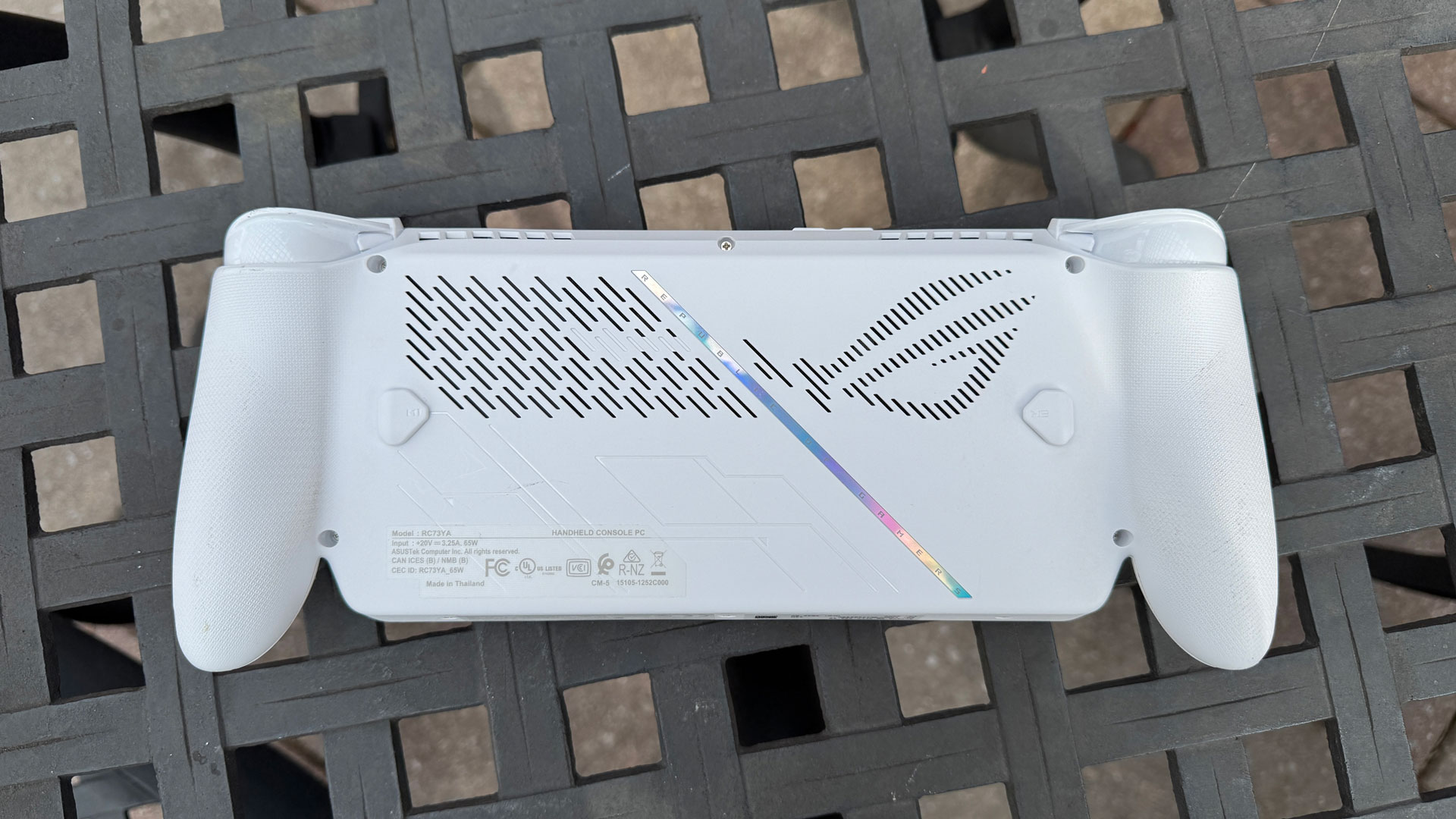
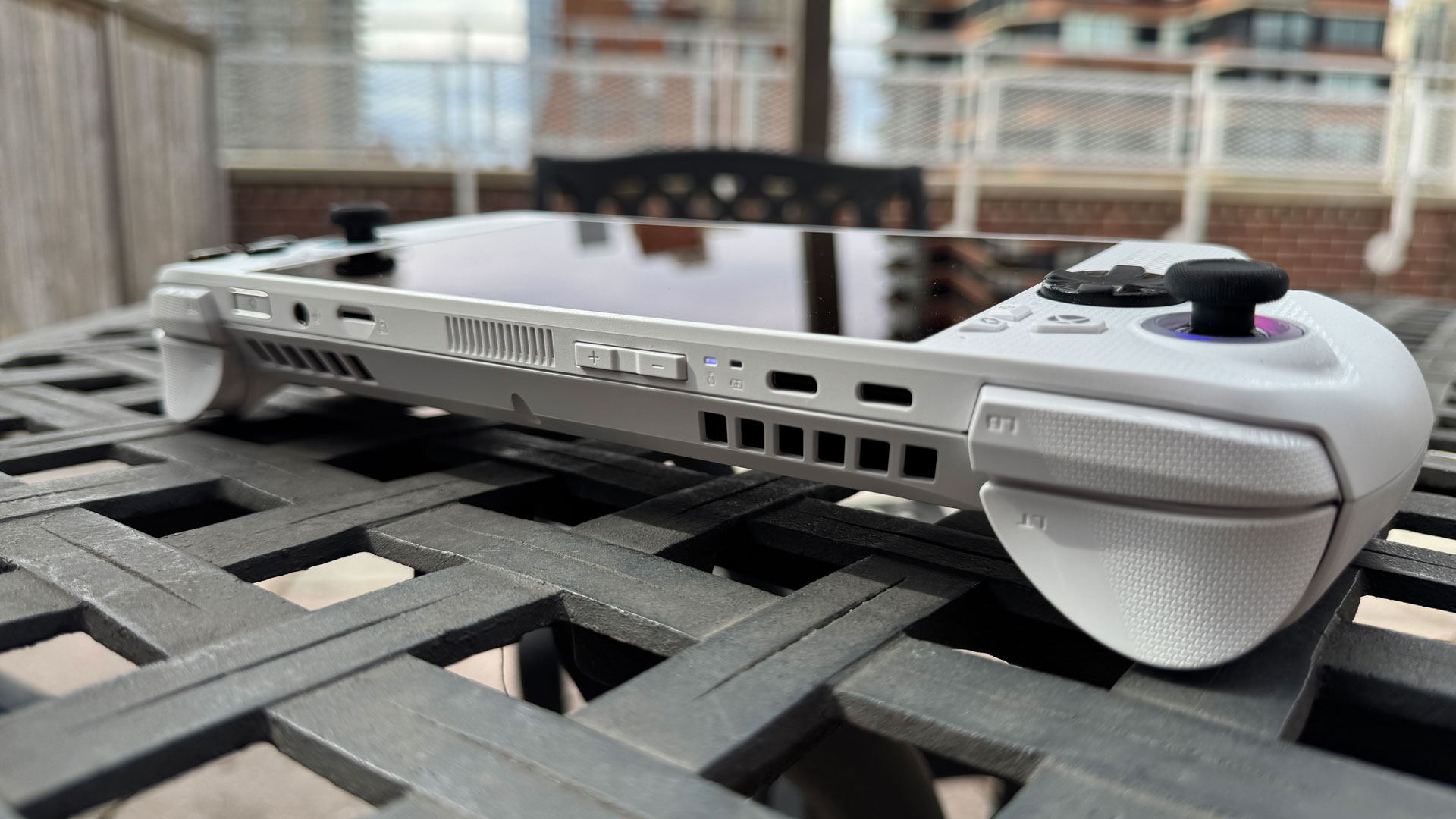
There are two macro buttons that you can customize on the rear of the device, down from four on the Steam Deck. On the front, there are a series of buttons for Asus and Xbox menus, including the Xbox button next to the left thumb stick, as well as Armoury Crate and Xbox library buttons. There are also Xbox-standard view and menu buttons.
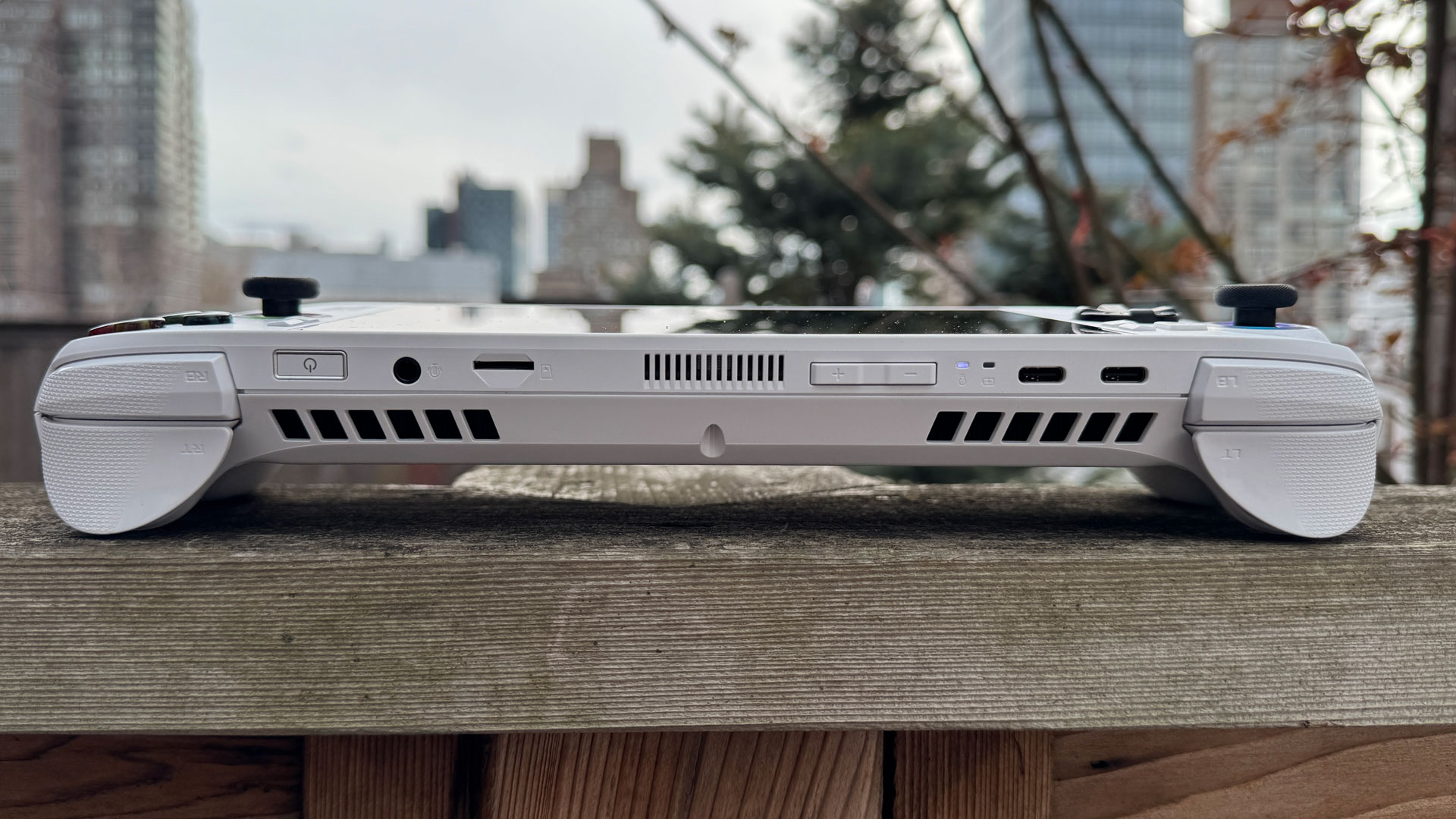
On top of the handheld, Asus offers two USB 3.2 Gen 2 Type-C ports, a microSD card reader, and a 3.5 mm headphone jack. That's also where you'll find the volume rocker and a combination power button and fingerprint reader. (The Ally X replaces one of those Type-C ports with a faster USB4 port.)
Asus includes a little cardboard stand in the box. Considering the Steam Deck and Lenovo's Legion Go 2 handheld come with full-on carrying cases, Asus should consider better accessories next time around. If you want the official case, that will cost you $69.99.
Asus ROG Xbox Ally Specifications and Components
The Asus ROG Xbox Ally is powered by AMD's Ryzen Z2 A, a 4-core / 8-thread processor using AMD's Zen 2 architecture. On paper, it's significantly less powerful than the Ryzen AI Z2 Extreme in the ROG Xbox Ally X, but it's also in a cheaper system. The Z2A has a max boost clock of 3.8 GHz and a boost clock of 2.8 GHz.
The Z2 A's default TDP is 15W, though it is configurable up to 20 W, which Asus uses in the system's turbo mode. Here's how Asus uses that with its performance modes, with comparisons to previous models:
Swipe to scroll horizontally
Silent Mode | 6W | 13W | 10W | 13W |
Performance mode | 15W | 17W | 15W | 17W |
Turbo mode - plugged in | 20W | 35W (25W unplugged) | 30W | 30W |
The Z2 A SoC has an 8-core GPU, using integrated Radeon RDNA 2 graphics, as opposed to RDNA 3.5 on the Xbox Ally X, putting it in line with the Steam Deck OLED. Asus has included 16GB of RAM and a 512GB M.2 SSD in a standard M.2 2280 form factor. The 60 WHr battery is significantly smaller than the 80 WHr battery in the Ally X, but is larger than the 50 WHr cell in the Steam Deck OLED.
Swipe to scroll horizontally
CPU | AMD Ryzen Z2 A |
Graphics | Radeon RDNA 2 graphics (8 cores) |
Memory | 16GB LPDDR5-6400 |
Storage | 512GB M.2 2280 SSD |
Display | 7-inch, 1920 x 1080, 120 Hz, IPS, touch |
Networking | Wi-Fi 6E, Bluetooth 5.4 |
Ports | 2x USB 3.2 Gen 2 Type-C, UHS II microSD card reader, 3.5 mm headphone jack |
Battery | 60 WHr |
Power Adapter | 65 WHr |
Operating System | Windows 11 Home |
Dimensions (WxDxH) | 11.42 x 4.76 x 1.08 ~ 2.00 inches (29.0 x 12.1 x 2.75 ~ 5.09 cm) |
Weight | 1.48 pounds (670 grams) |
Price (as configured) | $599.99 |
Gaming and Graphics on the Asus ROG Ally
The Asus ROG Ally's 8-core integrated GPU with RDNA 2 graphics effectively ages this machine out of the box. The technology is very similar to the Steam Deck OLED, which also uses 8 RDNA 2 compute units, albeit on a slower processor. The CPU and GPU share 16GB of memory, with 6GB assigned to the GPU by default (you can change this in Asus Armoury Crate SE, but we tested with the standard settings).
The handheld runs at a 15W performance mode when unplugged and a 20W turbo mode when plugged in, though you can switch between them. We ran games at both 1080p and 720p. For the Steam Deck OLED, we tested at 1920 x 1200 and 1280 x 800 to fit its 16:10 aspect ratio.
Using the Xbox Full Screen Experience should free up some memory and provide performance advantages, as it doesn't load some Windows components. We benchmarked games through the FSE, with the exception of our stress test, which requires additional logging software.
I used the ROG Xbox Ally to play Resident Evil Requiem, a game I bought while I was reviewing the handheld. I played the game at 720p without upscaling, using low graphics quality and otherwise auto-configured graphics settings, including low lighting and shadow. The game ran between 32 and 55 frames per second as Grace Ashcroft ran from the early game monster called "The Girl." In a third-person action scene at Rhodes Hill, with Leon Kennedy fighting a wave of enemies with a chainsaw, the tame ran at 34-37 FPS.
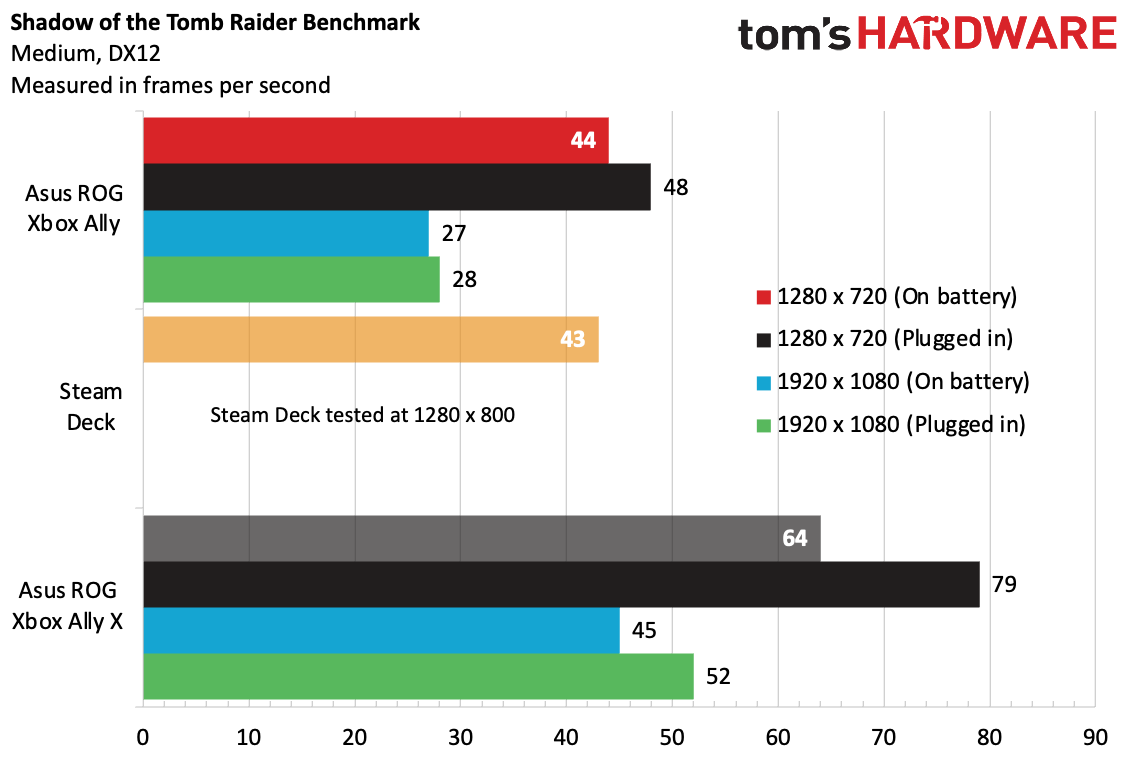
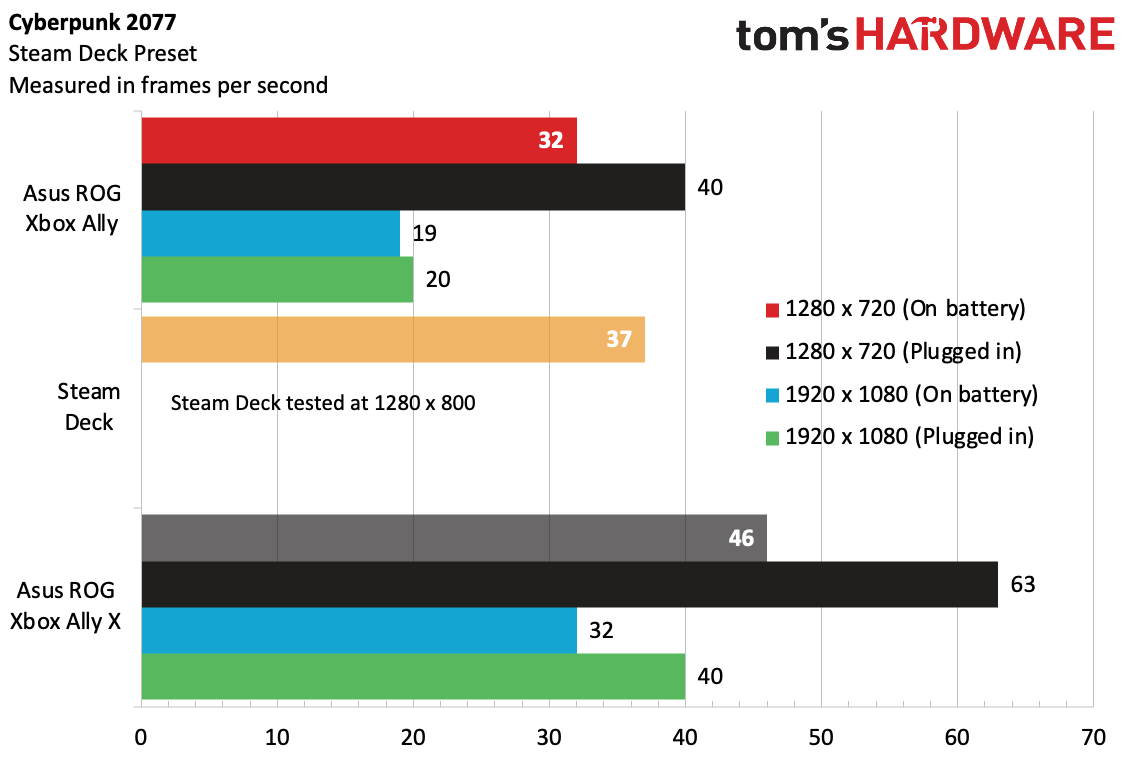
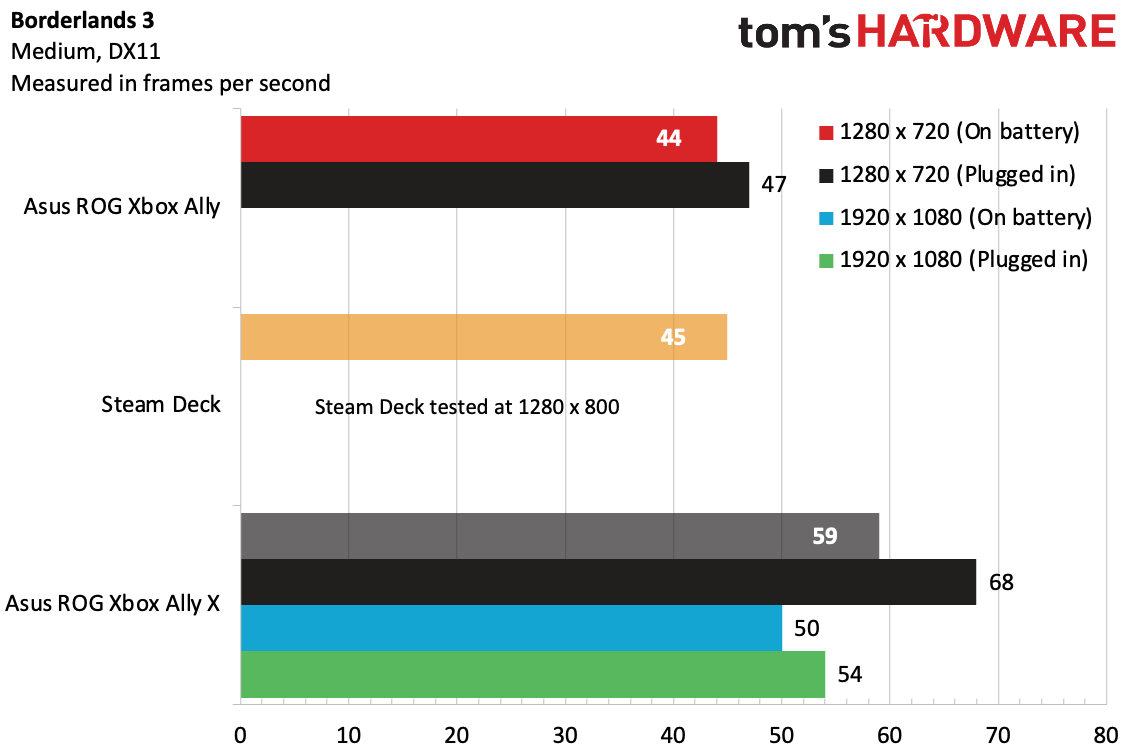
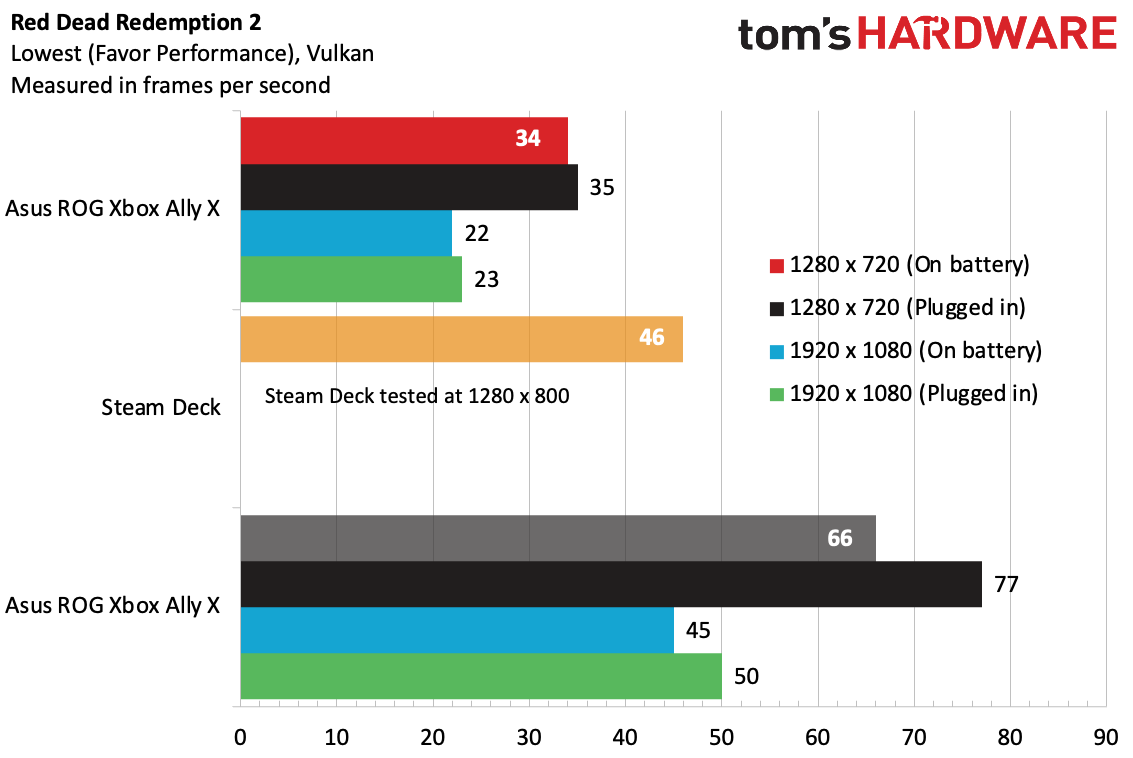
Two patterns emerged from our benchmarks. The first is that despite the 1080p screen, this machine is meant to game at 720p. On each of our benchmarks, the system couldn't handle the higher resolution at a playable frame rate, whether plugged in or unplugged. Borderlands 3 wouldn't even let us switch to 1080p at all, which an Asus representative claimed was a feature to encourage higher performance, but it only ever happened on that game.
The other pattern was that to meaningfully beat Valve's Steam Deck OLED, the Ally had to be plugged in or running at turbo mode. Even then, in some games, like Shadow of the Tomb Raider and Borderlands 3, it was still very close. On Red Dead Redemption 2, the Steam Deck was superior no matter what.
On our Metro Exodus stress test, the Xbox Ally ran the benchmark 10 times to simulate about half an hour of gameplay. The handheld averaged 43.28 frames per second and was consistent with a frame or so between runs. The average clock speed of four CPU cores was 2.66 GHz during the test while the GPU ran at 1241.36 MHz.
Windows 11 and Armoury Crate
Like the ROG Ally X that shipped beside it, the ROG Xbox Ally ships with Microsoft's Xbox Full Screen Experience. While it's far and away better than using the standard Windows 11 desktop on a gaming handheld, there are still some hitches throughout.
You boot straight into the Xbox app, meaning that Windows doesn't load certain components of the OS that aren't used for gaming. This should make the OS lighter and save RAM, letting you put the resources towards the games that you're playing. It came with Steam installed, which I appreciated, and the library also lets you easily download Epic Games, Battle.Net, GOG Galaxy, and Ubisoft Connect.
But still, the launchers don't always play nice with the Xbox controller. Epic Games, for instance, really is designed for a mouse and keyboard, and I was largely forced to use it with touch controls to get it to work. In addition, games bought from launchers are treated as second class-citizens, without box art or analysis of how well the game plays on your system.
Even if you never touch the regular Windows 11 desktop, you'll still have to deal with User Account Control pop-ups.
Asus' Armoury Crate SE software is still there, and you can use it to change RGB lighting and install updates. But it's baked into the Xbox menu in the Full Screen Experience, and most performance-related settings are way easier to reach there.
I was hoping that Asus and Microsoft would have fixed some issues that reviewers found at launch. For instance, I had sleep/wake issues. The first time I put the system to sleep with a game paused, I woke up to a Direct3D error and a crash screen. A few other times, I found that the system wouldn't wake up at all, and ultimately booted back to the Windows desktop. I also had the system wake up to a notification that the controller, permanently attached to the system, had disconnected. So save your progress before you put this system to sleep. If you didn't, you may wish you did.
Asus suggested to us that for many users, switching the power button to hibernate, not sleep, could fix the issue. This was more reliable, though we had to deal with the startup animation and a login screen each time, and the controllers would often take a minute to be detected. While Asus says recent Windows builds should have largely addressed the issues we had, a rep also gave us this statement:"Our team is aware of the issue of wake/sleep and is working on improving the end-user quality of life, it’s a bigger task than most people expect. Requiring coordination and efforts between ASUS, AMD, Microsoft, and some game developers as well since the expectation is a bit different on Windows as opposed to console gaming that you’d find on a traditional Xbox home console."
The ROG Xbox Ally feels more like a PC than an Xbox, and that includes all of the tinkering that some enthusiasts love, but without the simplicity one hopes for in a console-style experience.
Display on the Asus ROG Xbox Ally
The 7-inch, 1920 x 1080, 120 Hz touch screen on the ROG Xbox Ally is surprisingly decent for a standard LED panel.
In Resident Evil Requiem, the screen, even at 40% brightness, was enough for me to see enough of the Rhodes Hill Chronic Care Center's west wing to sneak around. And yes, there was plenty of crimson red blood when some Infected broke out the chainsaws.
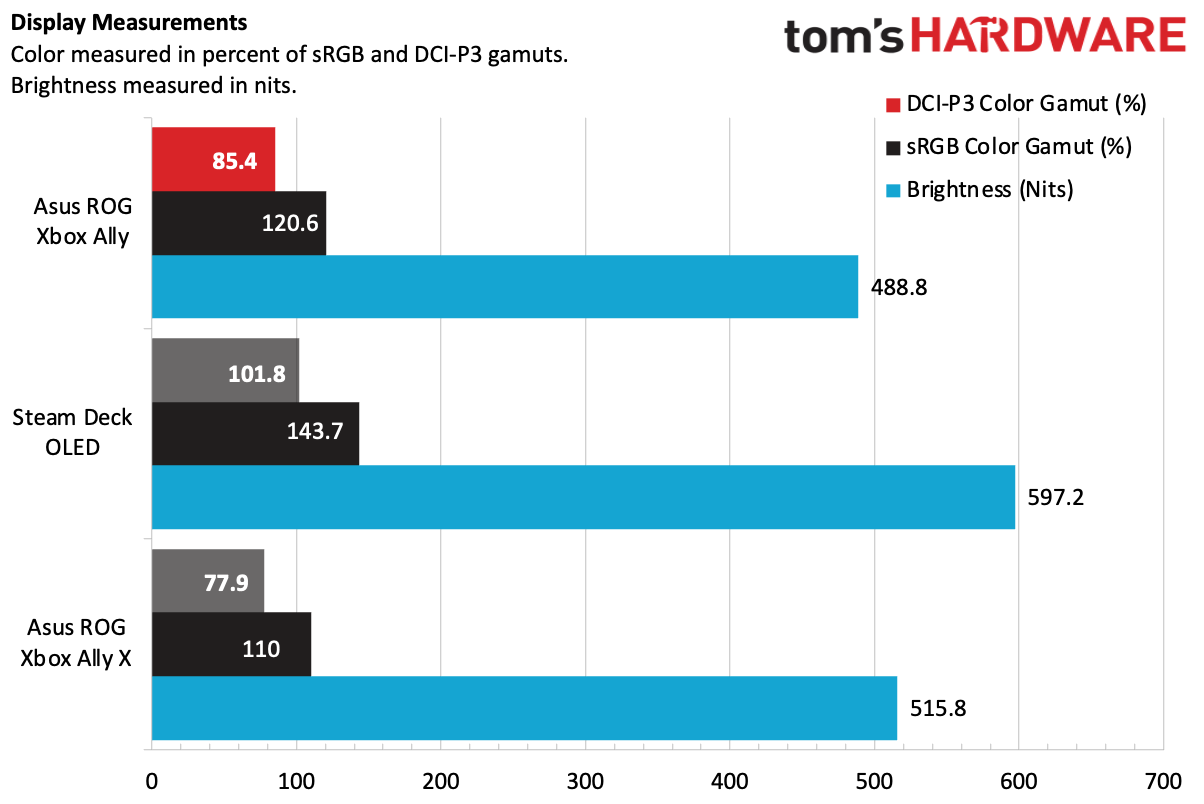
On our meter, the Ally covered 85.4% of DCI-P3 volume and 120.6% of sRGB volume. Notably, both of those numbers are a bit higher than the screen on the Asus ROG Xbox Ally X, which is the same on paper. But the regular Ally measured 488.8 nits, which is a bit dimmer than the Xbox Ally X at 515.8 nits. These differences suggest that Asus might have separate sources of displays, with some differences.
Either way, the Ally doesn't touch the Steam Deck OLED's screen, which is way more vivid and, at a max of 597.2 nits, significantly brighter.
Battery Life on the Asus ROG Xbox Ally
Battery life on a gaming handheld will be heavily dependent on the games you play and the settings you play. I often try to keep settings pretty conservative to try battery life, but I did play some intense games on the ROG Xbox Ally. If you play 2D side scrollers, you'll have longer battery life than what I saw.
Perhaps the hardest challenge I threw at the Xbox Ally and its 60 WHr battery was playing a bit of Resident Evil Requiem on it. One night, I sat back in a relatively dark room and snuck through the Rhodes Hill Chronic Care Center as Grace Ashcroft. I used auto-detected settings and low graphics quality at 720p, but with FSR on and the screen locked to 60 FPS and 40% brightness, along with the 15W performance mode that the Ally defaults to when unplugged. After an hour and 17 minutes of playtime, the system had a 45% charge left over. That suggests that, had I not needed to wind down if I wanted to sleep that night, I could have probably hit about two-and-a-half hours at those settings.
Audio on the Asus ROG Xbox Ally
In general, the dual speaker system in the Xbox Ally isn't going to beat some decent headphones. Still, it's good enough to play games without them. In Resident Evil Requiem, a boom of thunder was deep enough to surprise me. A shriek from the monster "the girl" was loud and clear, as was an infected chef's repeated meat chopping.
That being said, in dialogue-heavy games, like Marvel's Midnight Suns, I did find myself wishing for a bit more vocal clarity.
The system's front-facing speakers are definitely loud enough. Some games are just better with headphones. That's the case with a PC or handheld of any size.
Heat on the Asus ROG Xbox Ally
During our Metro Exodus stress test, we took measurements on the back of the system. The system stayed pretty cool, measuring 88 degrees Fahrenheit at the center of the system, and 89.5 a bit closer to the macro buttons. This is all completely acceptable. The hottest point was at the vent on top of the system, where the hot air exhausts; that hit 104.5 F, but you won't need to touch that portion of the system to play games.
The AMD Ryzen Z2 A SoC hit an average of 67.7 degrees Celsius inside the handheld.
Upgradeability on the Asus ROG Xbox Ally
If the 512GB SSD in the ROG Xbox Ally is feeling a bit cramped, I have good news: you can upgrade it. I also have bad news: It's kind of a pain.
The Xbox Ally is held together with eight Phillips-head screws: five on the back of the handheld and three on the bottom. The middle screw on the rear is captive, but every other screw comes out, so have something nearby to keep them organized.
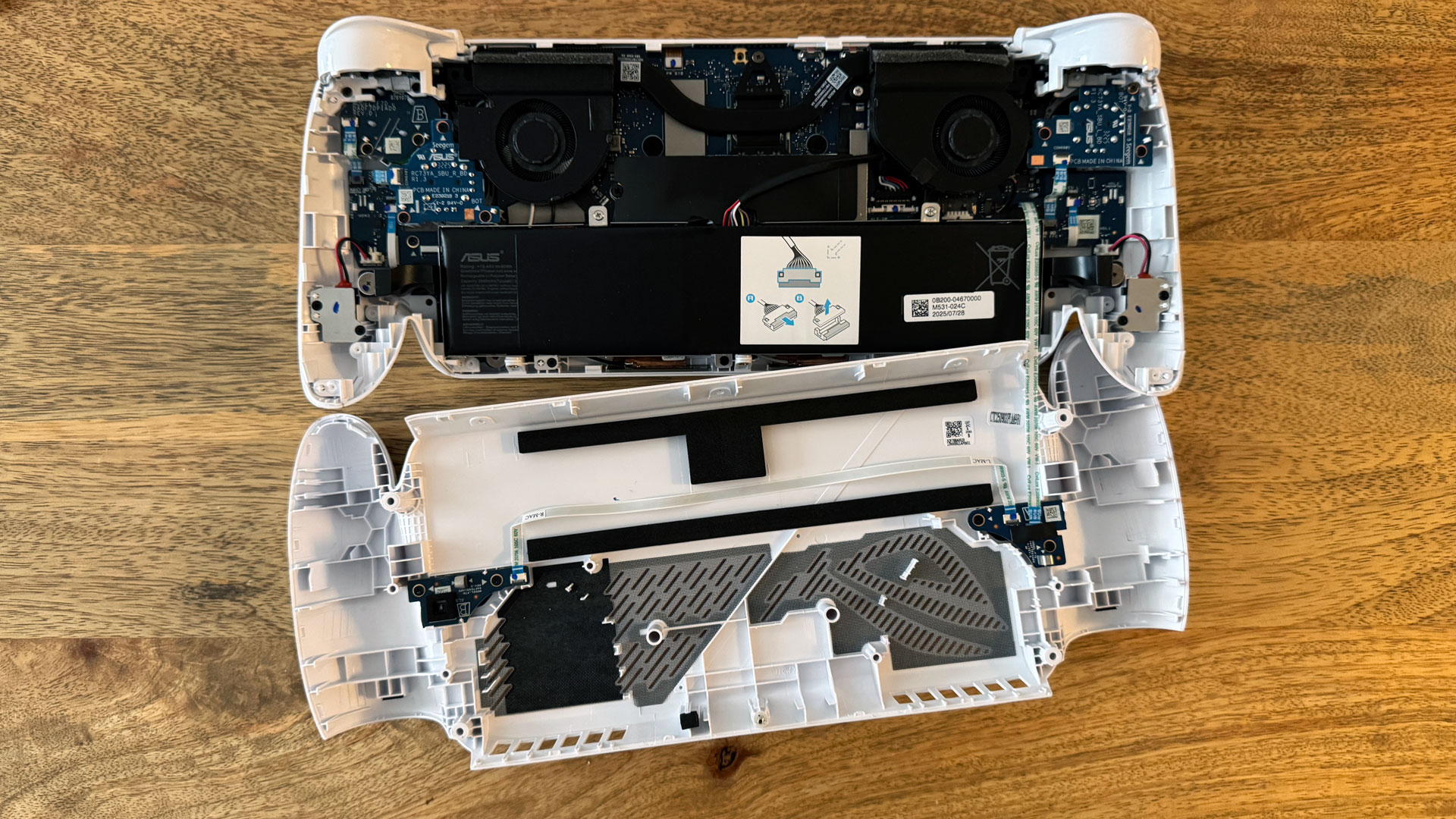
With the screws out, you'll need a tool to pry from the top and all the way around the sides of the system, controller handles included, to separate the back from the rest of the handheld. You'll need to be careful not to damage a ribbon cable that connects the motherboard to the M1 and M2 buttons on the back of the system. It's enough of a hassle that I'd recommend most people just use the microSD card reader instead.
The only component that you can upgrade is the M.2 2280 SSD, which is right at the center when you open the system. The battery cable runs over the SSD, and while you should disconnect that before doing work anyway, you'll need to in order to get the SSD out and install a new one.
Asus is using modular thumbsticks here. These are potentiometers, so they'll be prone to drift eventually. While Asus doesn't sell replacements, other companies, like GuliKit, sell affordable TMR replacements that you can consider if you ever have an issue.
Asus ROG Xbox Ally Configurations
Asus sells the ROG Xbox Ally in just one configuration. The $599.99 model comes with an AMD Ryzen Z2 A processor, 16GB of RAM, a 512GB SSD, and a 7-inch, 1080p touchscreen. As of this writing, it can be found for as low as $499.99 on Amazon, making it cheaper than the Steam Deck OLED with the right deal.
Its more powerful sibling, the Asus ROG Xbox Ally X, has a black chassis and red buttons, and bumps up to an AMD Ryzen AI Z2 Extreme, 24GB of RAM, and a 1TB SSD. It costs $999.99.
Bottom Line
There's no denying that gaming handhelds are getting expensive, with many at or over the $999 mark. That makes the Asus ROG Xbox Ally's pricing alone, at $599, a breath of fresh air. While it looks very much like the more expensive ROG Xbox Ally X, it doesn't have the polish or the power.
In terms of price, the Ally's only competition is the Steam Deck OLED, which starts at $549 for the 512GB model. But despite being 3 years old, that system still has a nicer screen, better performance on battery, and similar performance to the Ally when plugged in. That Deck also comes with a carrying case.
Still, the Xbox Ally can play games well enough, which might be all you need. But the fact that I'm still facing sleep/wake issues similar to early reviewers more than seven months after this thing was released suggests they may never be truly fixed.
And while the Windows Full Screen Experience is a huge improvement to the regular Windows 11 desktop, SteamOS is still simpler, smoother, and easier to use.
That would all make for an easy decision, except that, as of this writing, the Steam Deck OLED has been largely out of stock for weeks, with blips in and out. If you're patient, waiting might get you a superior device. But if you want to get a relatively affordable system and don't mind Windows 11 and some technical quirks, the ROG Xbox Ally is here, available, and feels great in the hands.







 English (US) ·