

- Yandex, Edge, and Chrome are the most data-hungry mobile browsers
- Yandex even collects in-app messages, warns Surshark's latest report
- Surfshark recommends switching to safer alternatives
Do you regularly use Google Chrome, Microsoft Edge, or Yandex to surf the internet on your phone or tablet? You might want to rethink that choice. According to Surfshark, these mobile browsers are the most voracious data harvesters of all, which could potentially put your privacy at serious risk.
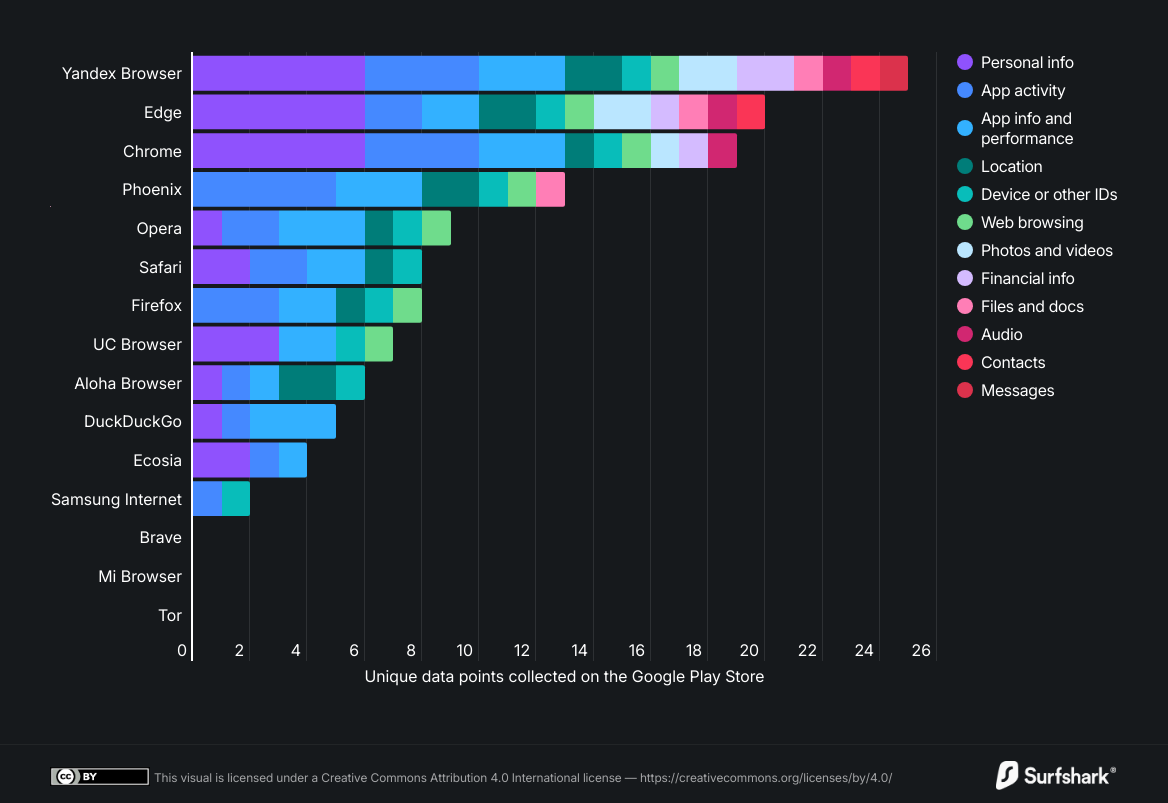
The creator of one of the best VPNs recently examined how the 15 most popular mobile browsers handle user data, basing its analysis on the Google Play Store's privacy policy pages.
In its findings, Chrome and Edge ranked third and second, respectively, among the most data-hungry browsers, aggregating 19 and 20 of the 38 possible types of user data. Yandex topped the list with 25. Data includes user photos, voice and audio recordings, web browser history, and user payment information.
Yandex and Google Chrome also collect location data, while Microsoft Edge and Yandex access user content, files, and documents.
Particularly disturbing is that Yandex’s users, often based in Russia, India, and Brazil, appear to be the most exposed to extensive data harvesting, with the browser even accessing their in-app messages and personal chats.
Chrome, used by seven out of ten Internet users worldwide, further damages its already tarnished reputation as one of the least data-friendly browsers. A previous study showed the iOS app version retrieves more than three times as much data as its competitors.
What's happen to your data?
These browsers’ developers assure that data collected aims to ensure app functionality, including personalisation, account management, and fraud prevention, notes Surfshark.
However, browsers including Yandex, Microsoft Edge, and Aloha confirm sharing a substantial amount of data with third parties. This may include payment information, precise location, user ID, crash logs, or app interactions.
In the best-case scenario, this excessive collection is used to create user advertising profiles and offer highly personalised offers.
"Collected user data allows companies to create digital profiles, predict user behaviour, and make decisions based on it, for example, showing users different prices, ads, or offers," explains Justas Pukys, senior product manager at Surfshark.
Browsing habits and interests can also reveal highly sensitive details such as health concerns, financial status, political views, or personal struggles – details people often prefer to keep private.
Unfortunately, Surfshark’s data claims only two out of ten people still consider themselves ‘privacy policy conscious.' This could increase the chances of them losing control over what data is used, how, and by whom.
In the worst-case scenario, sensitive information could end up in the wrong hands during a third-party breach, where browser-derived identifiers appear to have become extremely valuable to attackers.
Last year, the UK market was hit hard by data breaches, with customer identification data being the most frequently exposed category according to incident trends recently reported by IBM.
How to protect your browsing privacy
In this climate, choosing a mobile browser that respects privacy is essential, and fortunately, there are many alternatives to choose from besides the usual suspects.
According to Surshark, Ecosia collects only four types of data, Samsung Internet browser collects only two, while Brave, Mi Browser, and Tor collect no user data at all, ensuring virtually zero risk to your privacy.
And, if you don’t fancy a switch, Surfshark advises sharing as little personal data as possible, as well as regularly checking your browser app permissions and using a password manager that protects your account passwords.
Finally, of course, you may not be surprised to learn they suggest you never forget to use a VPN to add an extra layer of protection on your phone (something we couldn’t agree with more). You will be thankful when the next company gets hacked.
Follow TechRadar on Google News and add us as a preferred source to get our expert news, reviews, and opinion in your feeds. Make sure to click the Follow button!







 English (US) ·