
 4 hours ago
5
4 hours ago
5
For a long time, the best gaming PCs were relegated to desks. Under the TV has long been the realm of the console, even if some, myself included, have hooked midtowers up to their living room screens. Valve's Steam Machine is an attempt to bridge that gap, letting people who play games on their rigs and on their handhelds also play comfortably on the couch.
The hardware isn't brand new. Like the Steam Deck, Valve has turned to AMD for semi-custom chips using some older technologies. In the case of newer, intensive games, this makes the Steam Machine a 1080p or 1440p computer, though it can support 4K on older games and in some cases with FSR.
But the Steam Machine is pricier than many had hoped, coming in at $1,049 for the 512GB version and, in our review unit, a $1,428, 2TB bundle that includes two faceplates and a Steam Controller. That's largely a result of the current state of the component market, but it will leave a lot more people asking if the Steam Machine (can or should) fill their needs, given the cost.
Latest Videos From

Design of the Steam Machine
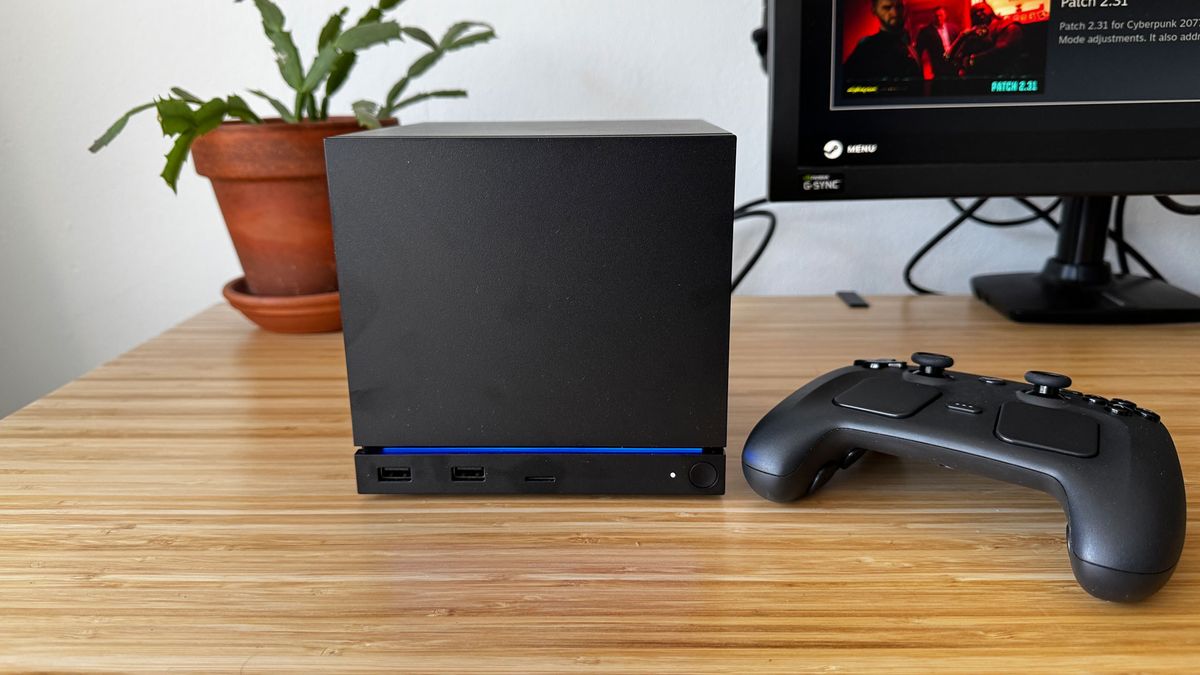
The Steam Machine really looks less like a gaming PC than a mini PC. It's a black box that, at 5.98 x 6.14 x 6.39 inches including the system's feet, can fit discreetly on a TV stand or a desk.
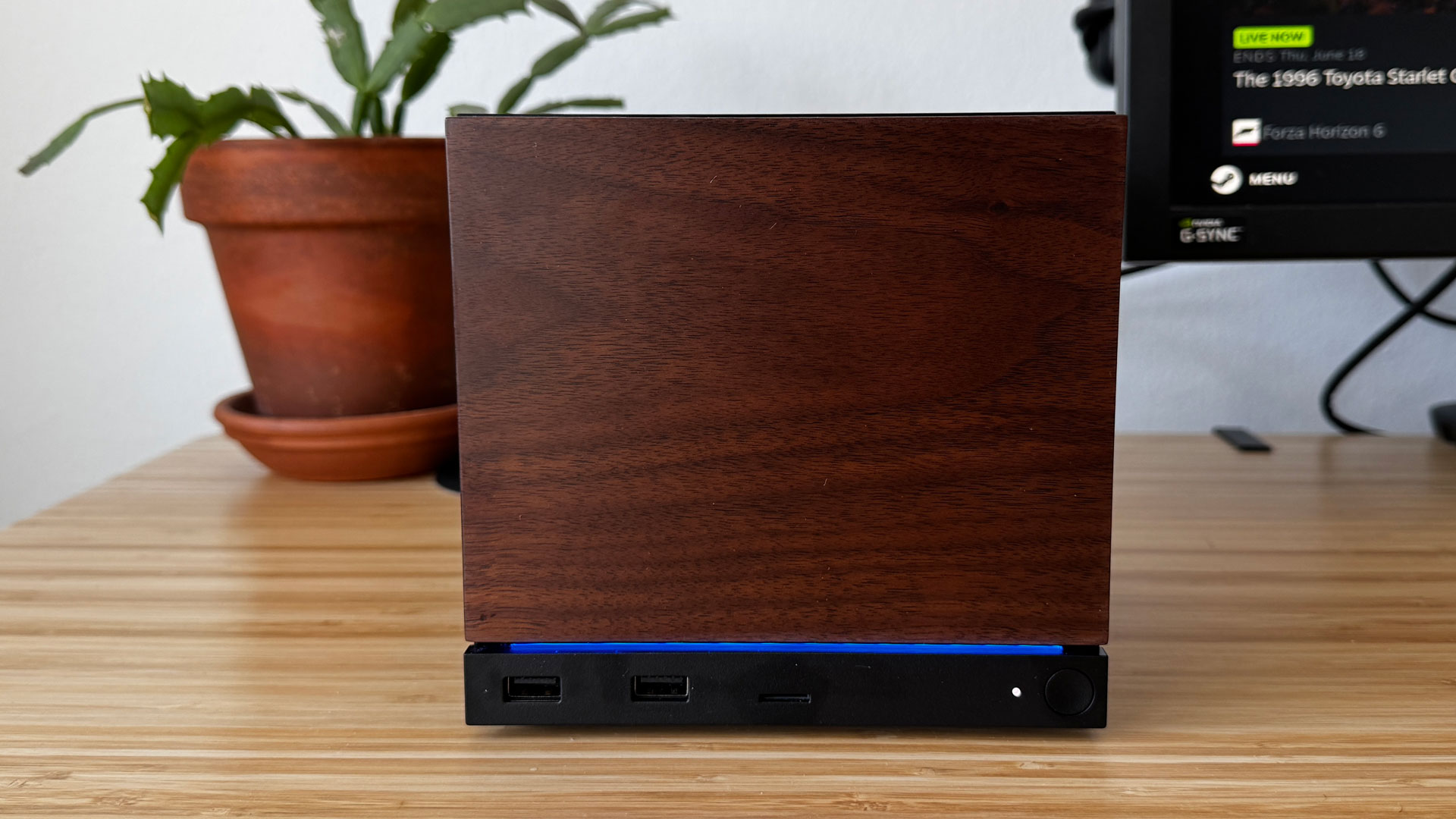
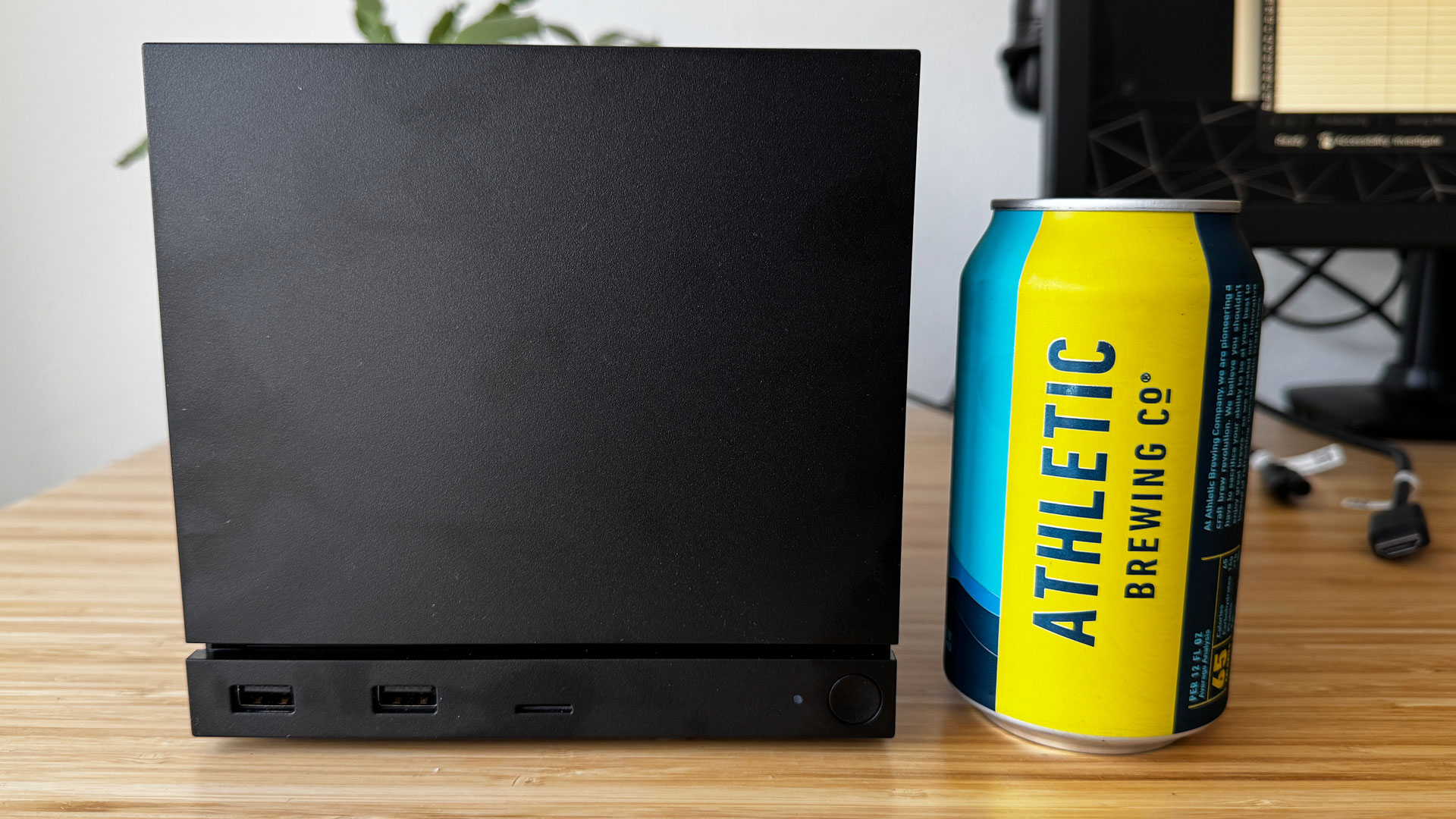
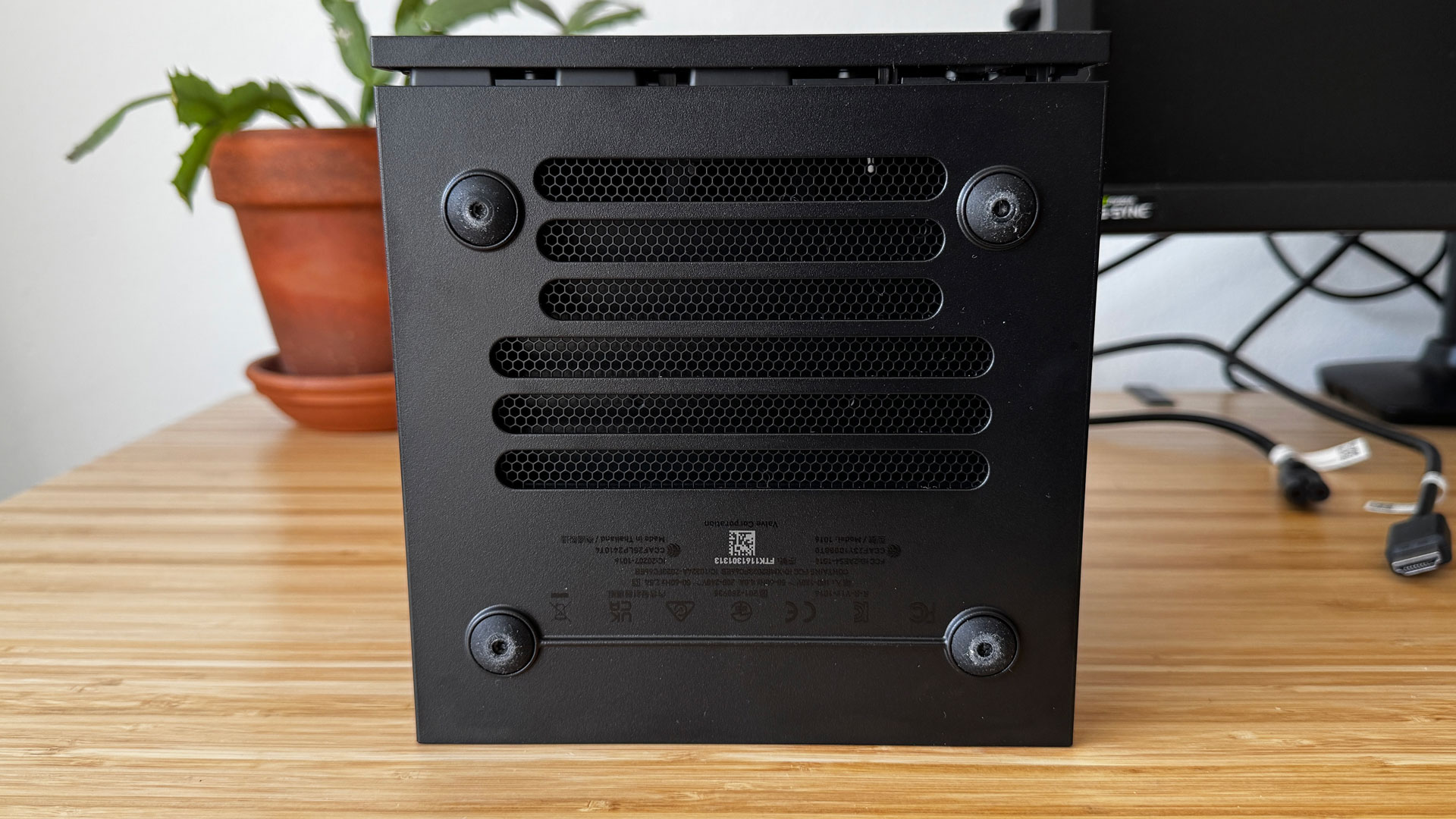
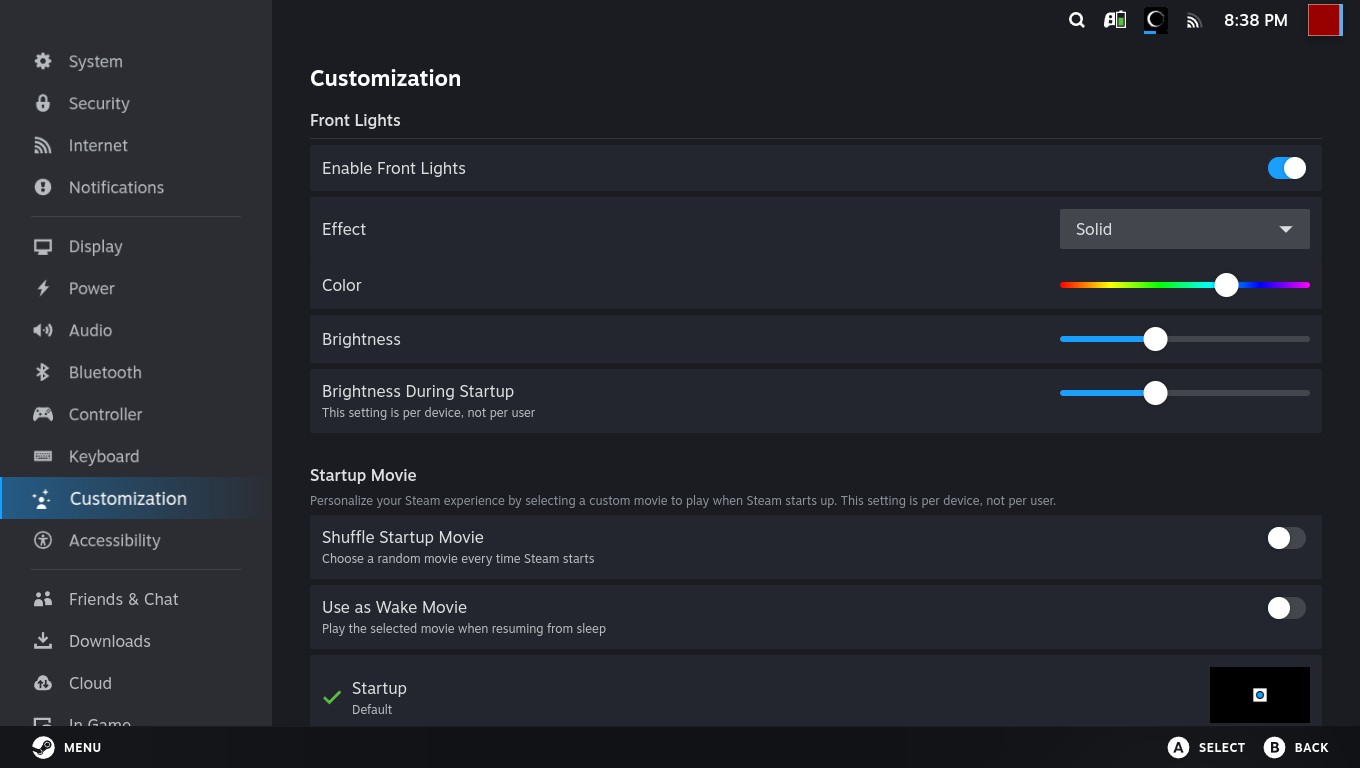
The one part that really stands out is the integrated LED strip with 17 addressable RGB LEDs, which can share the Machine's system status or be customized to your liking. For instance, you can see the strip appear like a light bar when you download updates, and you can choose from solid colors, rainbows, or animations, like breathing. You can even control each of the 17 lights individually for a truly chaotic look. My preference was mostly to keep it off entirely for a minimalist effect.
The front of the Steam Machine is effectively a faceplate, which pops on and off with magnets. Valve ships two extras with the 2TB version: a fuzzy cloth-like red plate, and one with dark wood, which went well with my furniture. The company has also committed to releasing files for people to 3D print their own. (They have a good track record of this, having recently released CAD files for the Steam Controller and its puck.) It doesn't, however, have plans to sell the wooden and red plates separately.
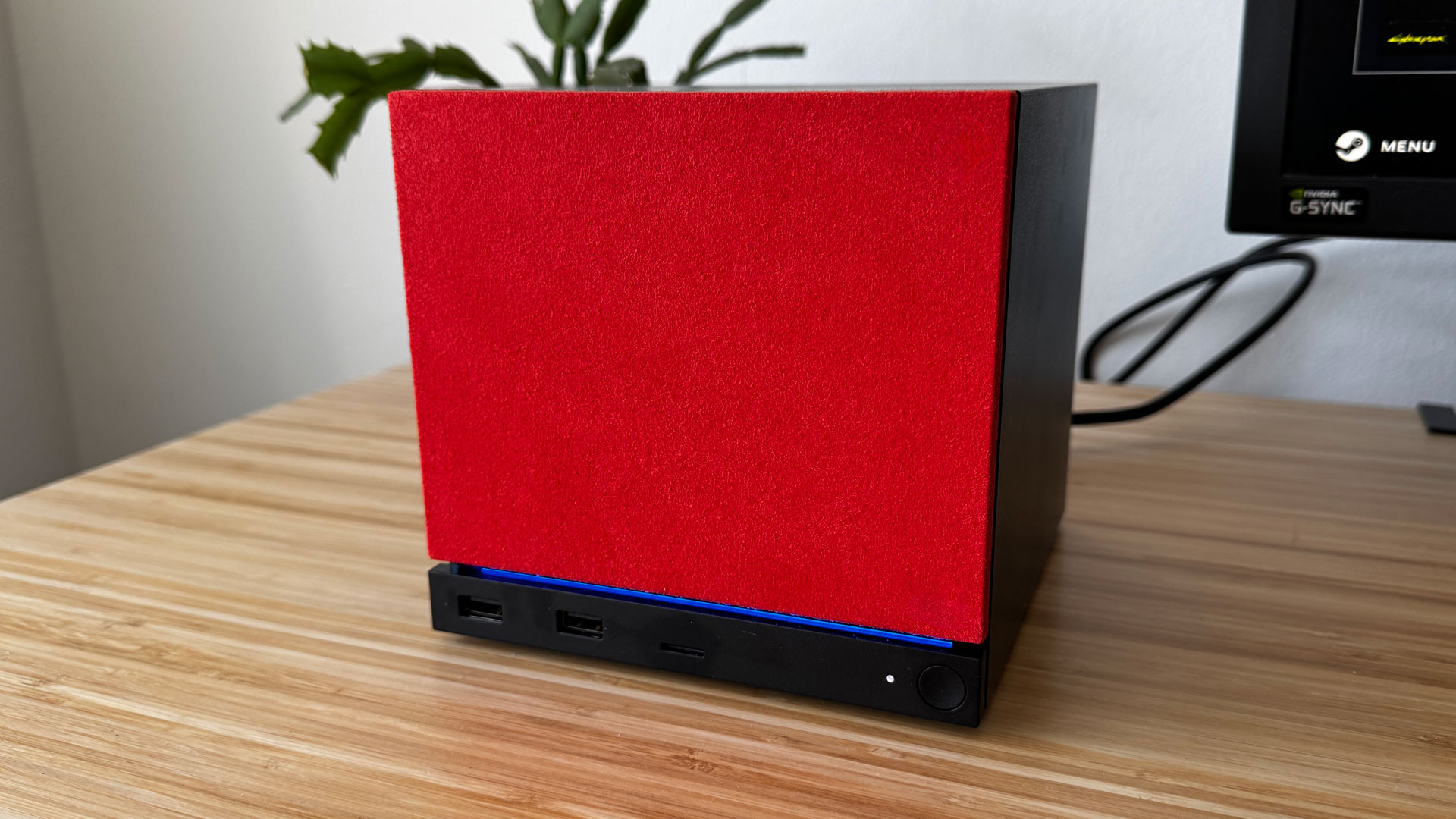
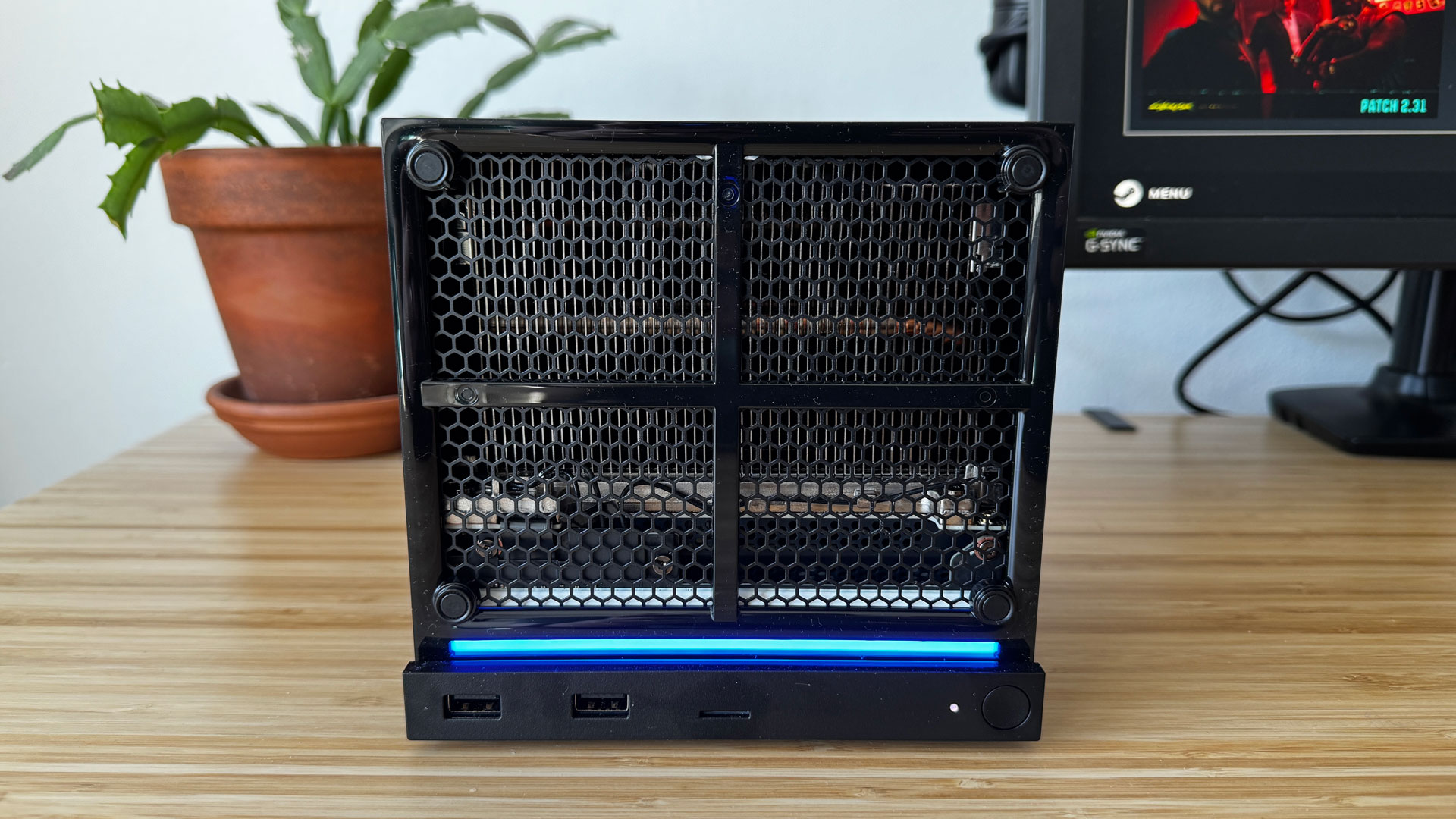
Located at the base of the system are the front ports: a pair of USB Type-A 3.2 Gen 2 ports, a microSD card slot, and the power button.
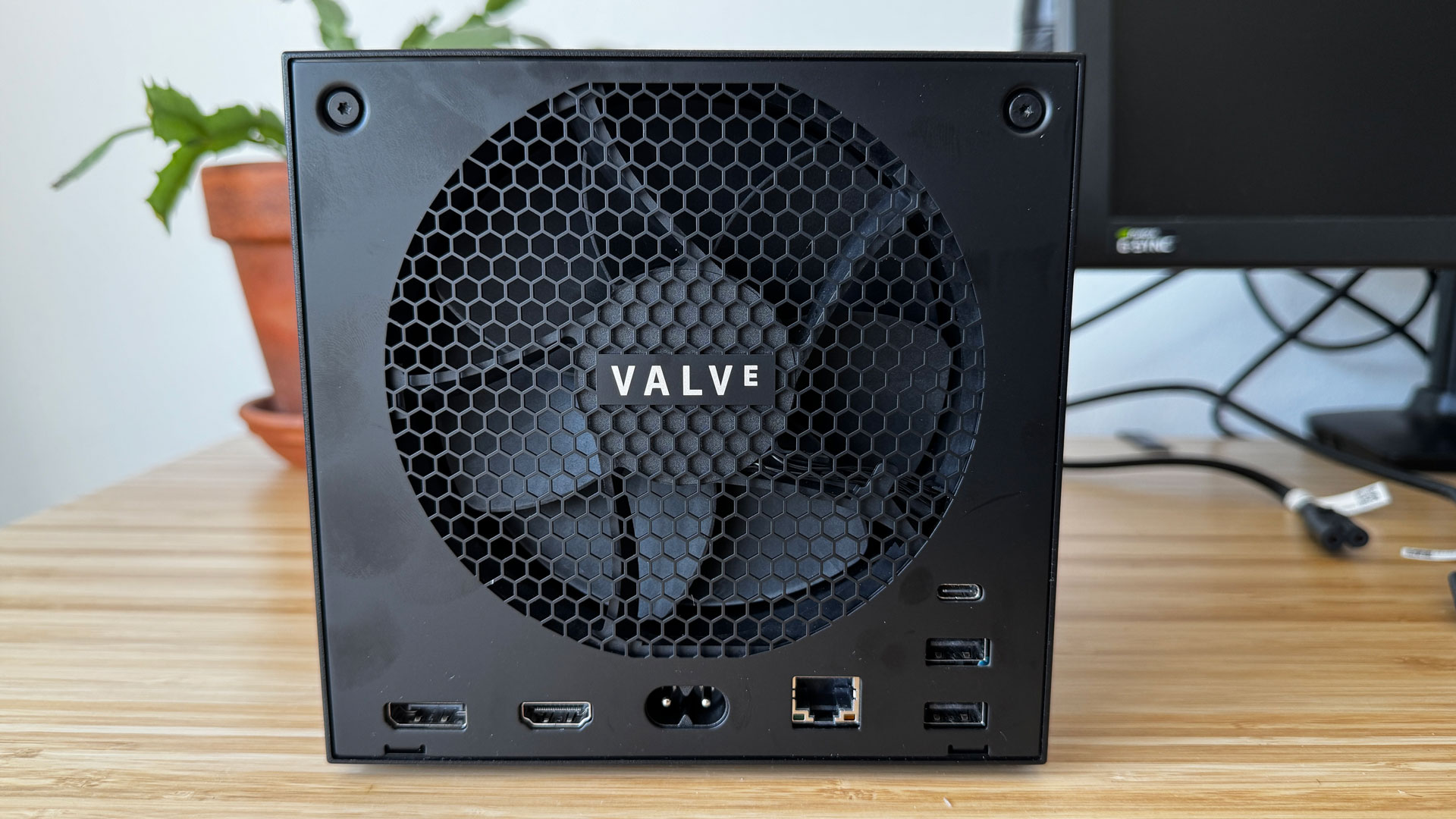
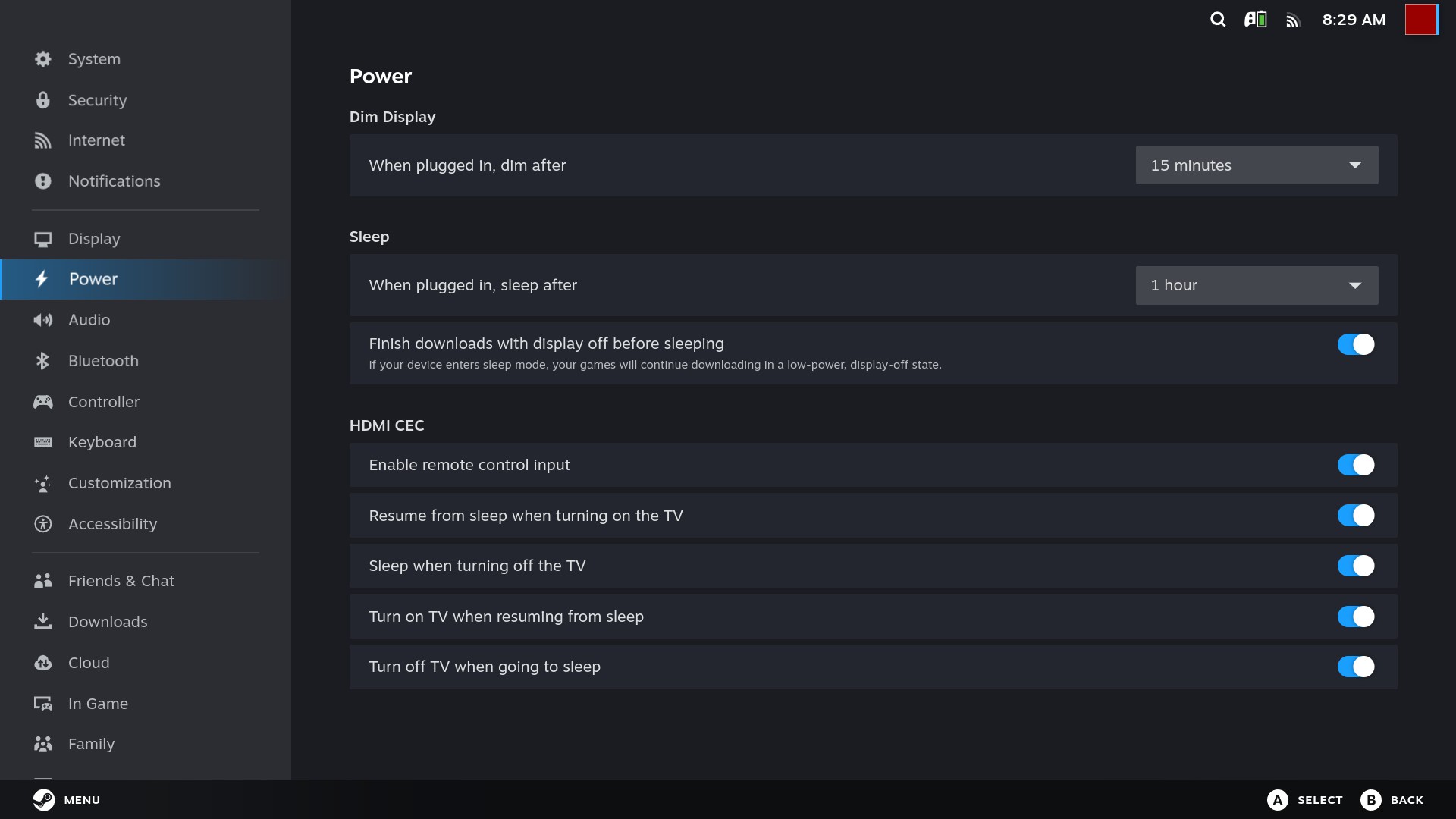
The rest of the ports are on the rear: DisplayPort 1.4 and HDMI 2.0, the AC power connector, an Ethernet jack, two USB-A 2.0 ports, and a USB-C 3.2 Gen 2 port. (Despite not being officially labeled HDMI 2.1, the HDMI port does support 4K at 120 Hz, and has some other niceties, like HDMI-CEC to turn on televisions).
Also on the rear is the exhaust for the 120 mm fan attached to the heatsink that cools the APU. It's much more obvious than the intake, which is behind the front panel and draws air in from the sides. That fan is truly whisper-quiet. Even while benchmarking, I barely even heard it, and I had to pay attention and move my head near the system to notice anything at all.
Steam Machine Specifications
You can decide whether you believe the Steam Machine is a PC or a console. In Valve's eyes, it's a PC, and the spec list certainly looks like one. On paper, it's easy enough to see the significant jump from what Valve uses in its other gaming system, the Steam Deck, simply by nature of moving from Zen 2 to Zen 4 and RDNA 2 to RDNA 3.
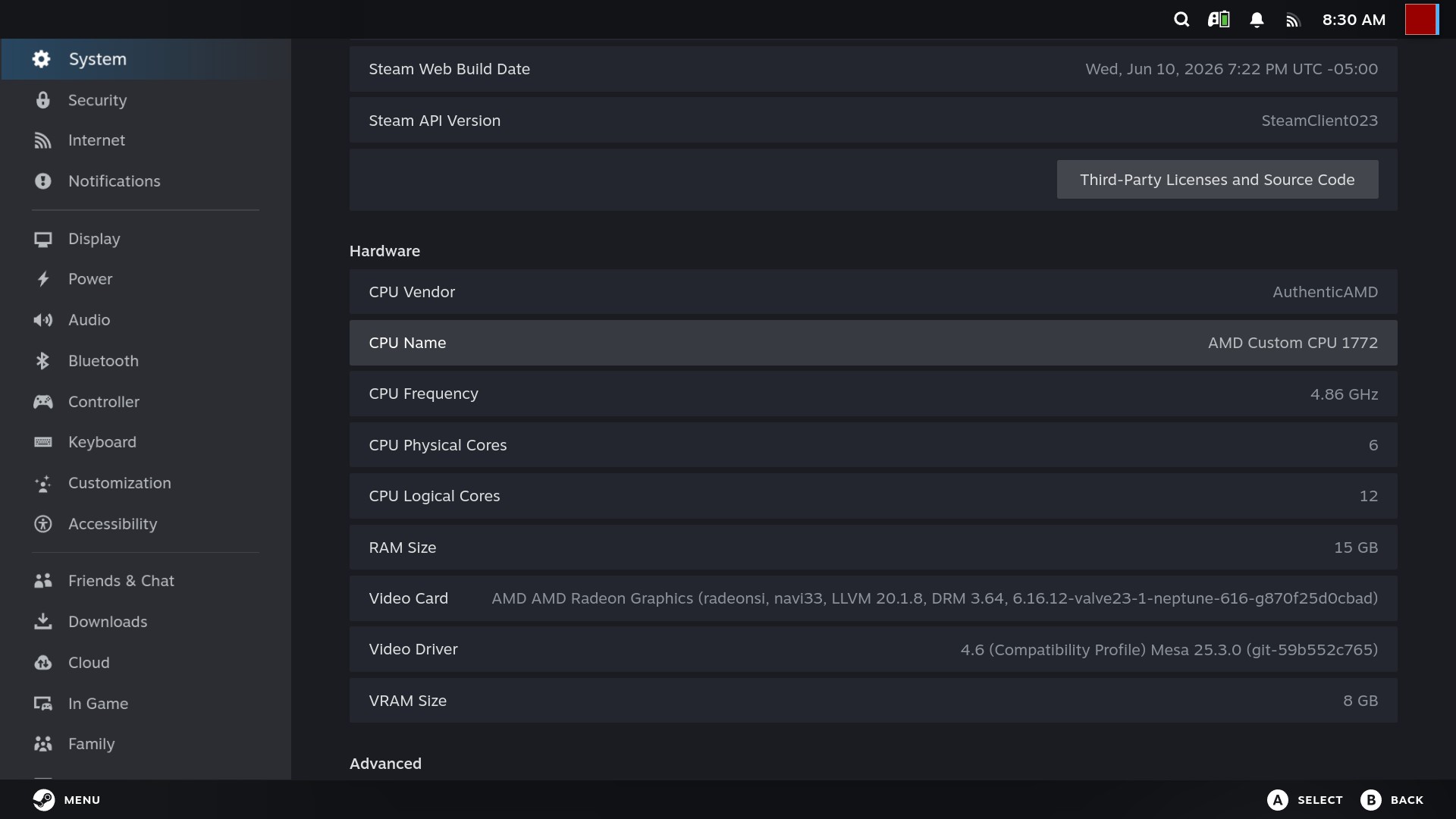
The processor is a semi-cuzon AMD Zen 4 chip with six cores and 12 threads, going up to 4.8 GHz with a 30W TDP. Meanwhile, the integrated graphics are also semi-custom, using AMD's RDNA 3 with 28 compute units, going up to a maximum sustained clock speed of 2.45 GHz and a 110W TDP. The big number people are thinking about here is the 8GB GDDR6 RAM, which many enthusiasts feel is no longer enough to play some games above 1080p, let alone future-proof a system.
The system is powered by a 300W power supply, smaller than both the one in the Xbox Series X and the PlayStation 5.
Like the Steam Deck OLED, Valve has integrated a discrete Bluetooth antenna alongside the Wi-Fi 6E connection, which should help with latency. There's also a built-in antenna for the Steam Controller.
The Steam Machine starts with a 512GB SSD, but a more expensive option (the one we're testing) comes with 2TB. For further storage, you can add a microSD card (or swap out the SSD entirely).
Swipe to scroll horizontally
Processor | Semi-custom AMD Zen 4 chip - six cores, 12 threads, up to 4.8 GHz, 30W TDP |
Graphics | Semi-custom AMD RDNA3 graphics, 28 CUs, 2.45 GHz max sustained clock, 110W TDP, 8GB GDDR6 VRAM |
Memory | 16GB DDR5-5600 |
Storage | 2TB NVMe SSD |
Networking | Wi-Fi 6E, separate Bluetooth 5.3 antenna, 2.5 GHz Stream Controller adapter, Gigabit Ethernet |
Front Ports | 2x USB Type-A 3.2 Gen 1, microSD |
Rear Ports | 2x USB-A 2.0, USB-C 3.2 Gen 2, DisplayPort 1.4, HDMI 2.0, Ethernet |
Power Supply | 300W internal power supply, 110-240V |
Cooling | 120mm fan on heatsink |
Operating System | SteamOS 3 (Arch-based), KDE Plasma on the desktop |
Dimensions (H x W x D) | 5.98 x 6.14 x 6.39 inches (152 mm x 156 mm x 162.4 mm) |
Other | Steam Controller, Two additional faceplates |
Price as Configured | $1,428 for bundle with controller and faceplates, $1,349 for 2TB Steam Machine alone |
Gaming and Graphics on the Steam Machine
If you're coming from the Steam Deck, the Steam Machine is a powerful upgrade. If you compare it to other gaming PCs on the market, you'll see that its GPU's aging technology is far from the most powerful option on the market.
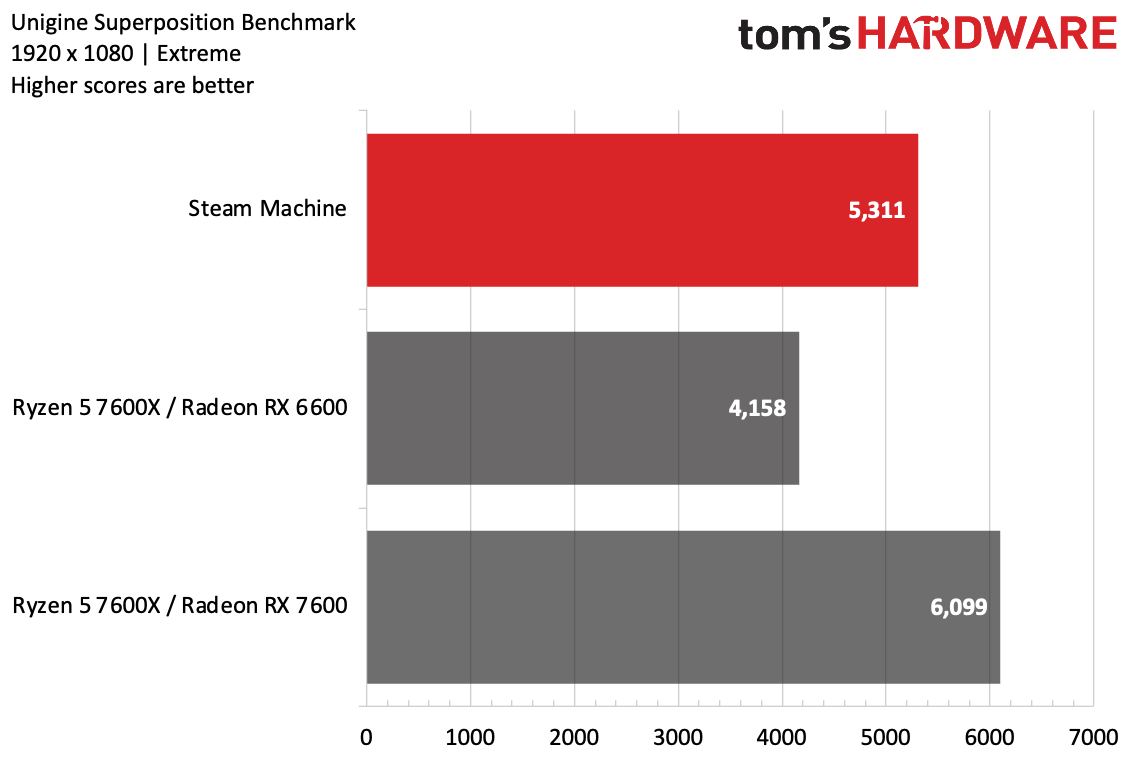
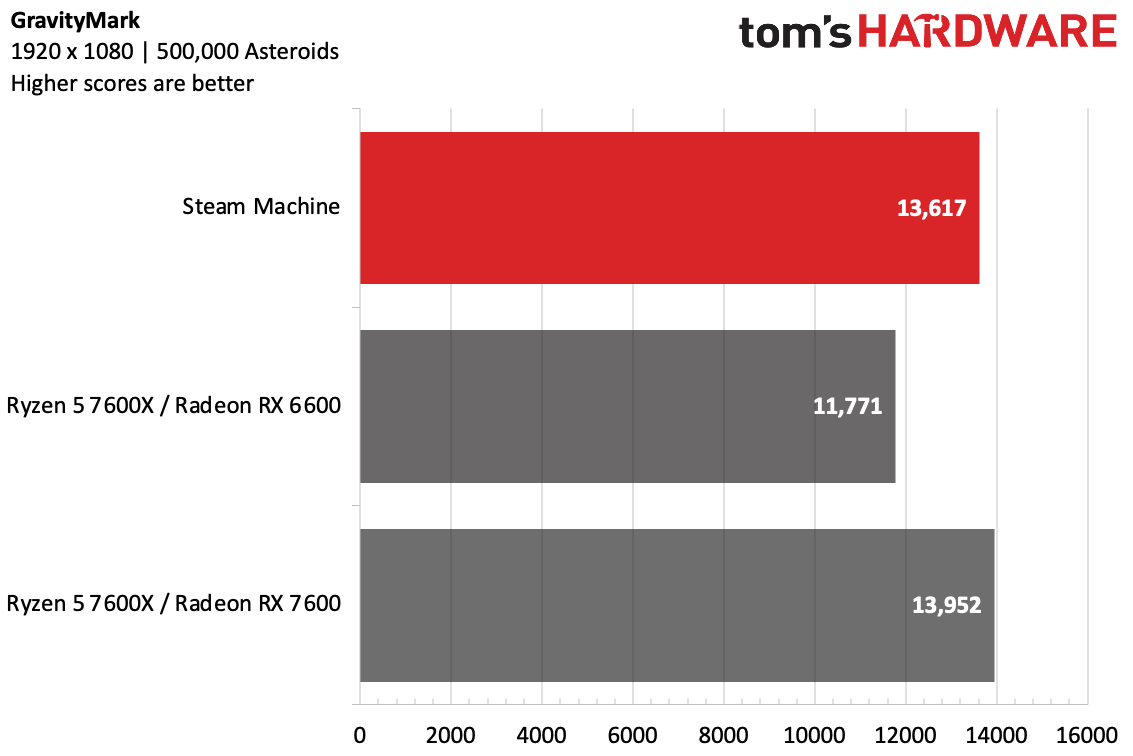
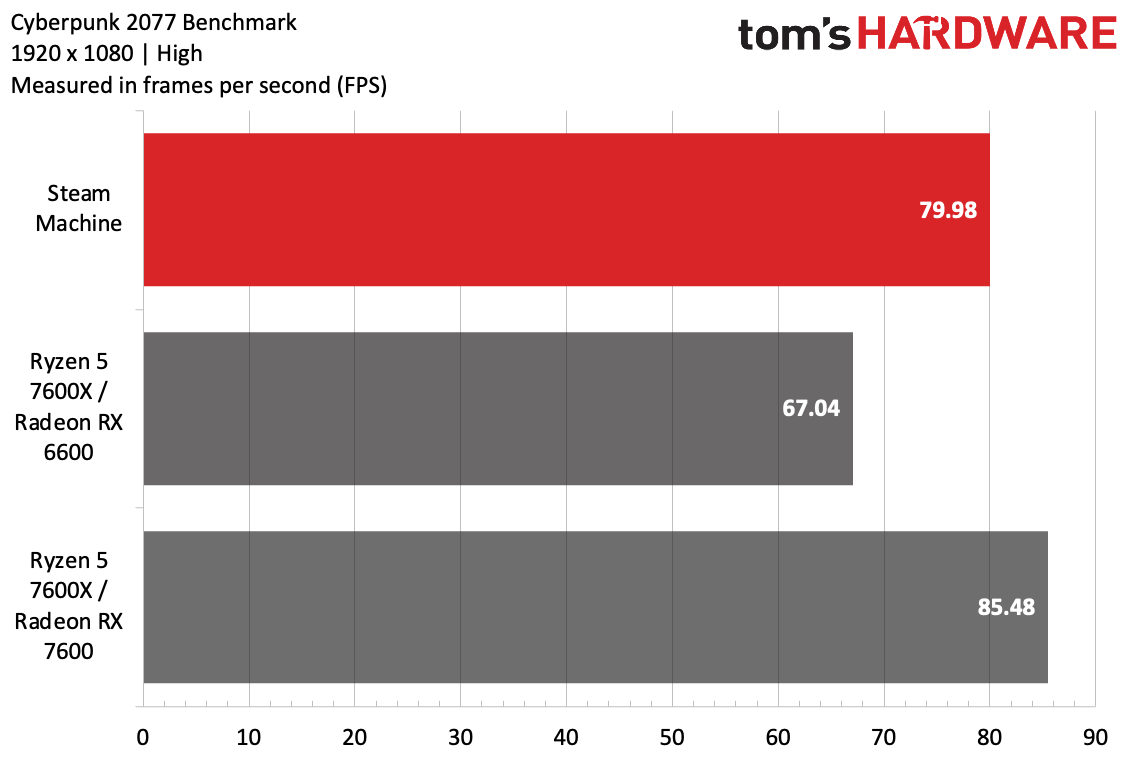
First, let's put this GPU into context. Based on testing, we found that the Machine's graphics card would land somewhere towards the bottom of our GPU benchmarks hierarchy. To figure this out, we put together a Linux machine running Bazzite, with an AMD Ryzen 5 7600X and 16GB of DDR5-5600, memory along with both the Radeon RX 6600 — the bottom GPU on our list — and the RX 7600, which is the next AMD-branded step up.
In the Unigine Superposition (1080p Extreme) and GravityMark benchmarks, both of which run natively on Linux, the Steam Machine's graphics ran in between those two Radeons. Using our Cyberpunk 2077 configuration for raster testing desktop graphics cards, the same happened, with the Steam Machine producing 79.98 frames per second, behind the 7600X at 85.48 FPS. This is capable gaming performance, but bottom-rung compared to modern desktop GPUs.
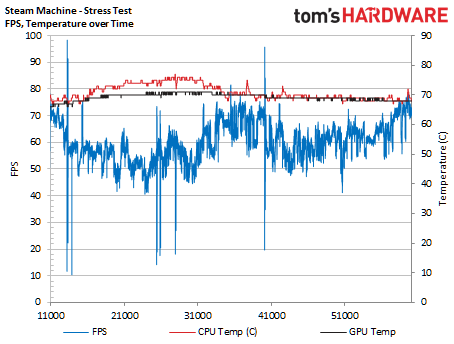
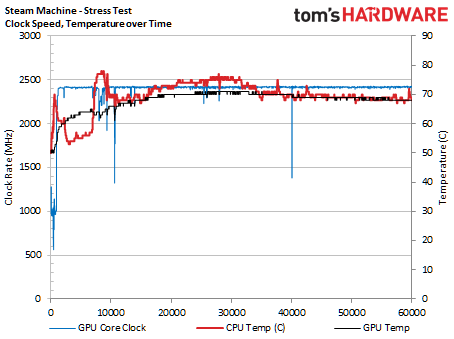
I spent some time playing Resident Evil Requiem on the system. With the resolution set to 2560 x 1440 without any upscaling or advanced features like hair strands, the game ran largely smoothly through the Cedarbook Apartments section, as Leon sneaks past zombies, takes on a violent boss, and escapes through the other side of the building, though there were a few hiccups as he first entered the dark building. The game typically ran between 60 and 70 FPS, though there were some drops to around 20 FPS during the environmental transition, which were extremely noticeable. Here are my recordings from MangoHud, showing how the game ran:
On SoulCalibur 6, the game ran great at 4K, hitting the game's 60 FPS frame limit with maximum graphics settings as I progressed through Arcade mode as Siegfried. Granted, that game came out in 2018 and isn't super intensive, but people have all kinds of games like that in their Steam libraries, and they should play well.
Games that barely run on the Steam Deck, like Black Myth: Wukong, can be made to easily run on the Steam Machine. It's just clear that Valve isn't aiming for people looking for the highest-end performance on every game.
In my time playing around on the Machine, I did notice some crashes and slowdowns, often (but not always!) related to changing settings. One time, this led to the entire Steam Machine crashing and leaving artifacting on-screen when it booted back up. (Another reboot fixed this.)
Some of this may be due to the fact that some games see the Steam Machine as a Steam Deck. You can turn off that auto-detection, which helped to a degree. Valve says it is updating its APIs ahead of availability to avoid these kinds of problems.
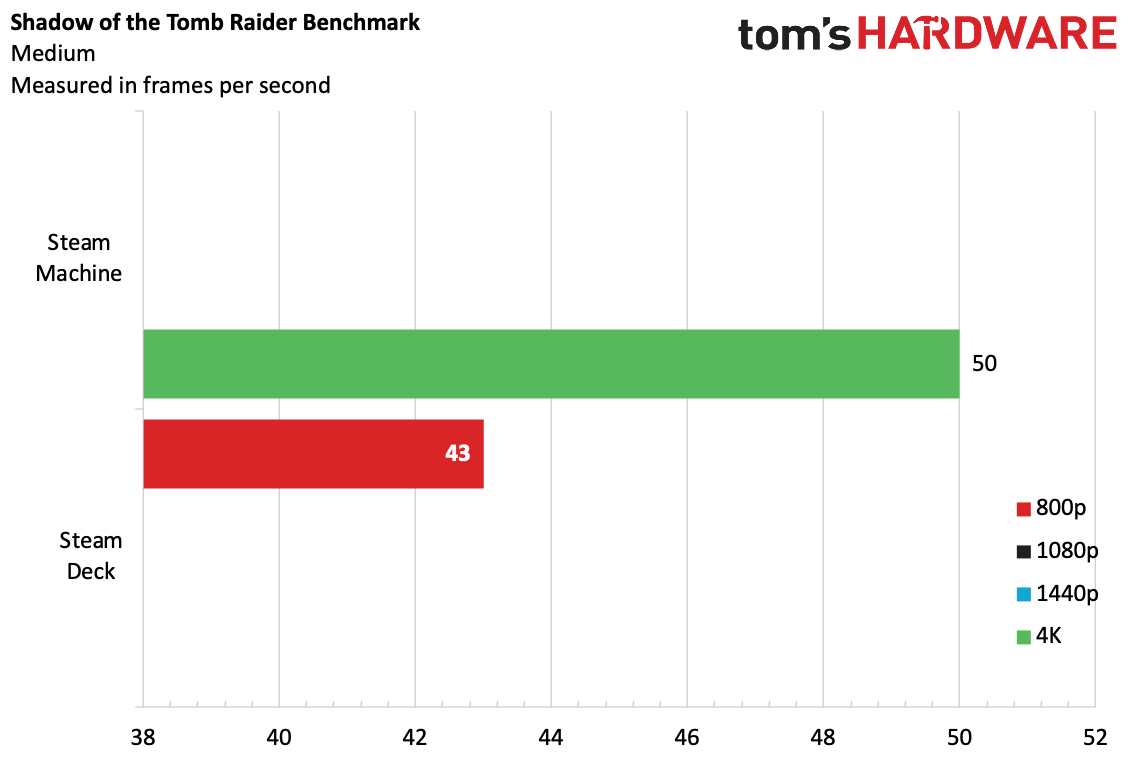
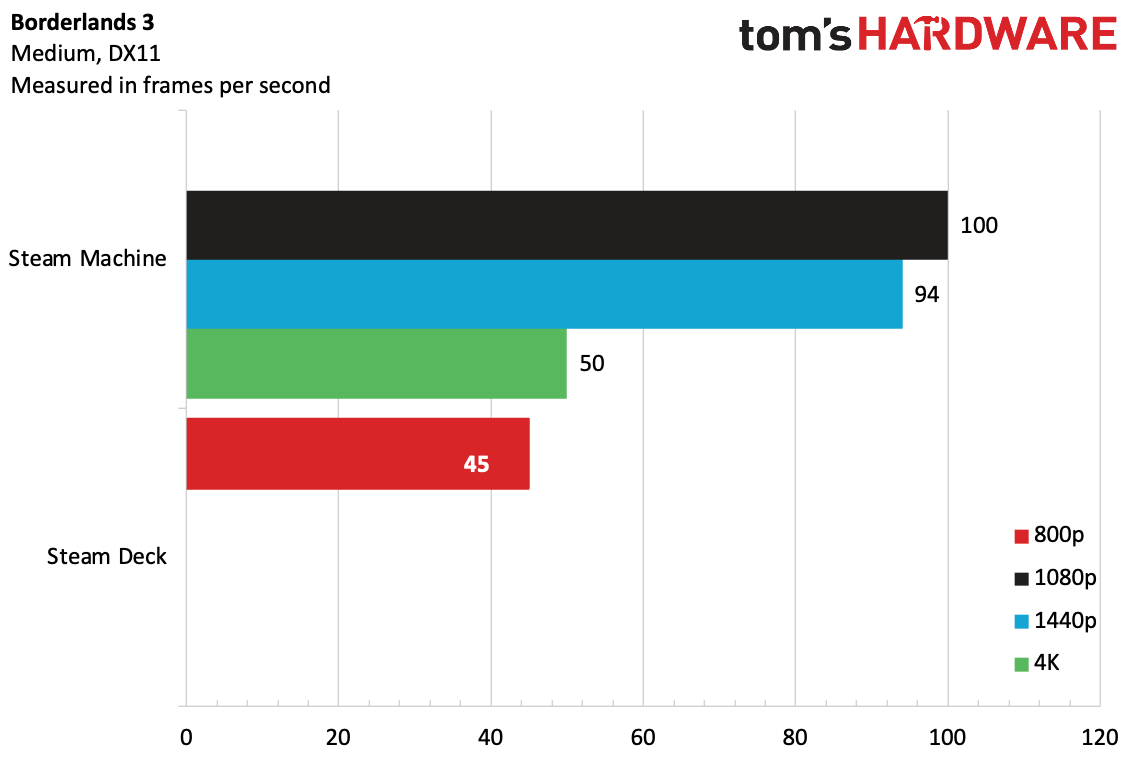
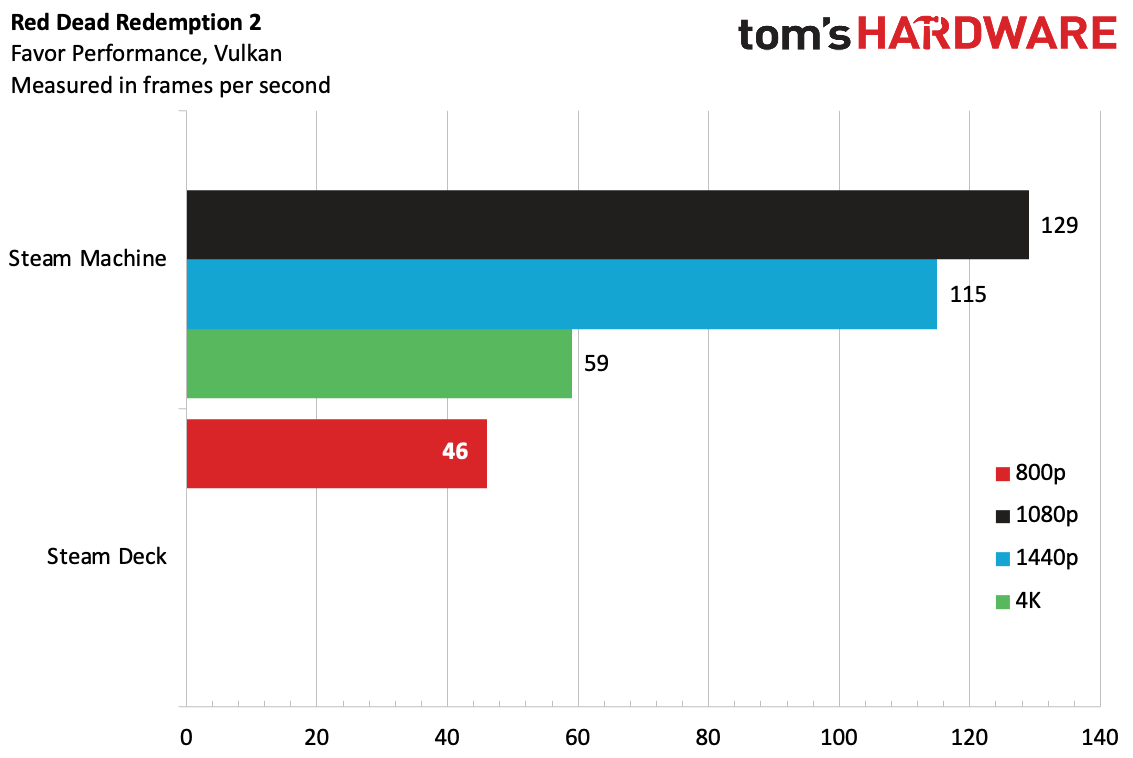
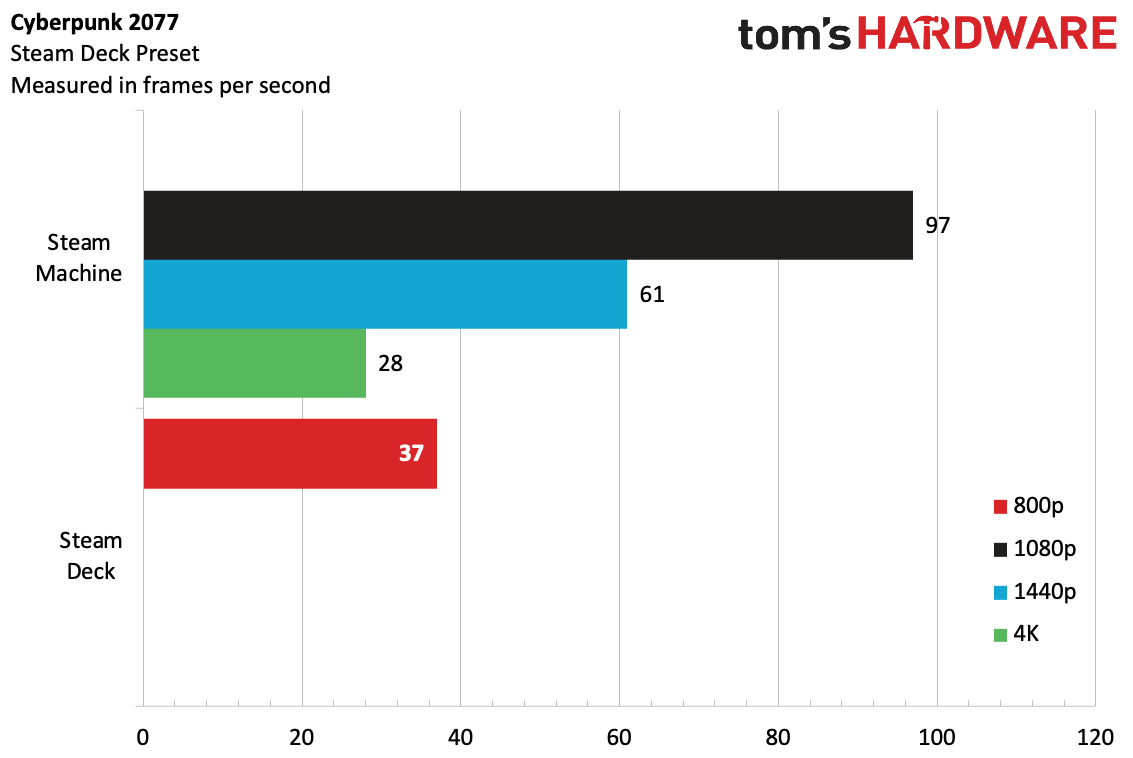
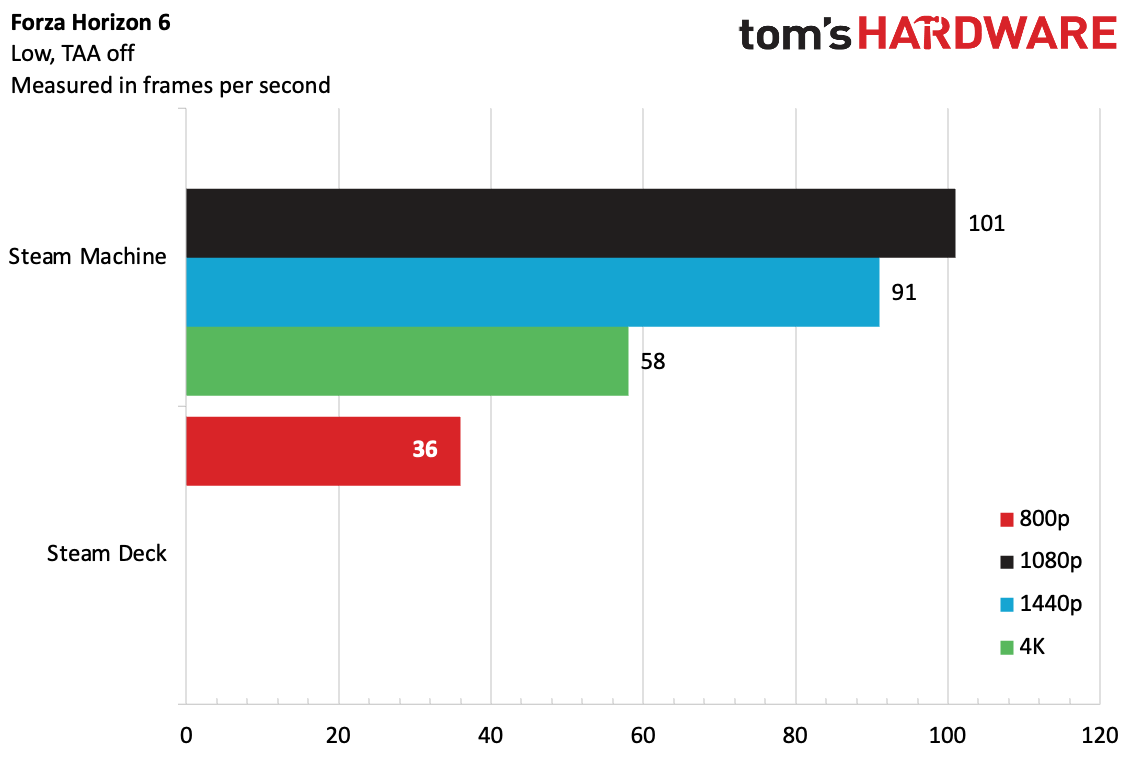
One way we tested the Steam Machine was in comparison to the Steam Deck. On paper alone, it's no surprise that the Machine blows the Deck away, but we wanted to see exactly what kind of gains you could get when moving a game from the handheld to the desktop. Here, we tested at our typical handheld settings, though we ran the Steam Deck at native 800p while the Steam Machine was tested at 1080p, 1440p, and 4K.
When I tested, I found that most games would only run at 1080p, unless I went into game settings and changed the maximum display resolution to 4K. Valve reps told me that "1080p is the system default game resolution on Steam Machine to ensure a good gameplay experience out of the box," but you can change it on a global level in Settings > Display, or, like I did, on a per-game basis.
What this reveals is a vision of SteamOS that is significantly stronger than we've ever seen, playing most of our test games at 4K better than the Steam Deck can at 800p, including Forza Horizon 6 and Red Dead Redemption 2. But again — that's at settings designed for the Deck. And it also proved that not all games can run at 4K on the Steam Machine, including Cyberpunk 2077 on the Steam Deck preset. If you were someone plugging your Steam Deck into a dock and outputting that to your TV, you would get a better experience on the same settings.
You'll see some things missing. Shadow of the Tomb Raider, one of our go-to systems-testing games, wouldn't allow the game to run above 60 FPS, even with V-Sync off. That game was tested exclusively at higher settings, where that wasn't an issue.
When comparing to prebuilt PCs, we chose the CyberPowerPC Gamer Xtreme and Acer Nitro 60 that we tested last year. These were two of the last sanely-priced systems we saw before the component crisis got really bad, priced at $1,099.99 and $1,599.99, respectively. The CyberPowerPC boasted an Intel Core Ultra 5 225F and Nvidia GeForce RTX 5060, while the Acer had a Core i7-14700F and RTX 5070. Each offered 32GB of RAM. Notably, you can't find these systems at these prices now, which simply highlights the type of problem Valve had in pricing the Steam Machine. (The newer Acer Nitro 65 is over $2,000.)
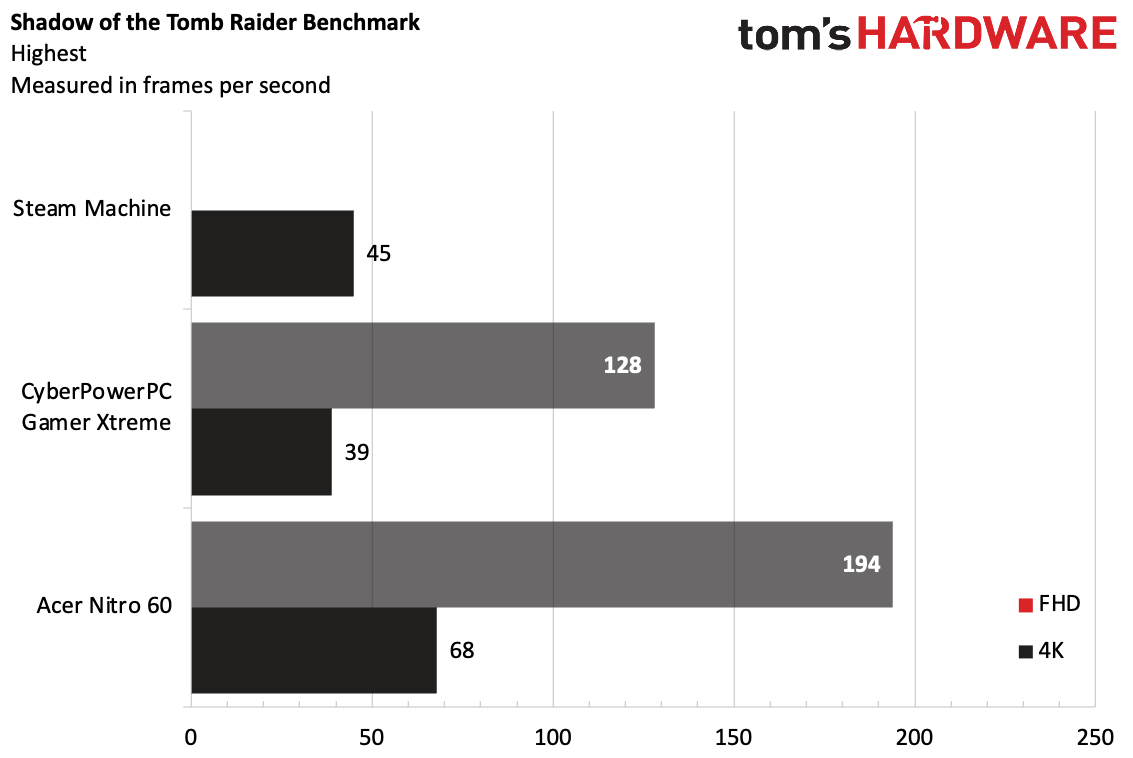
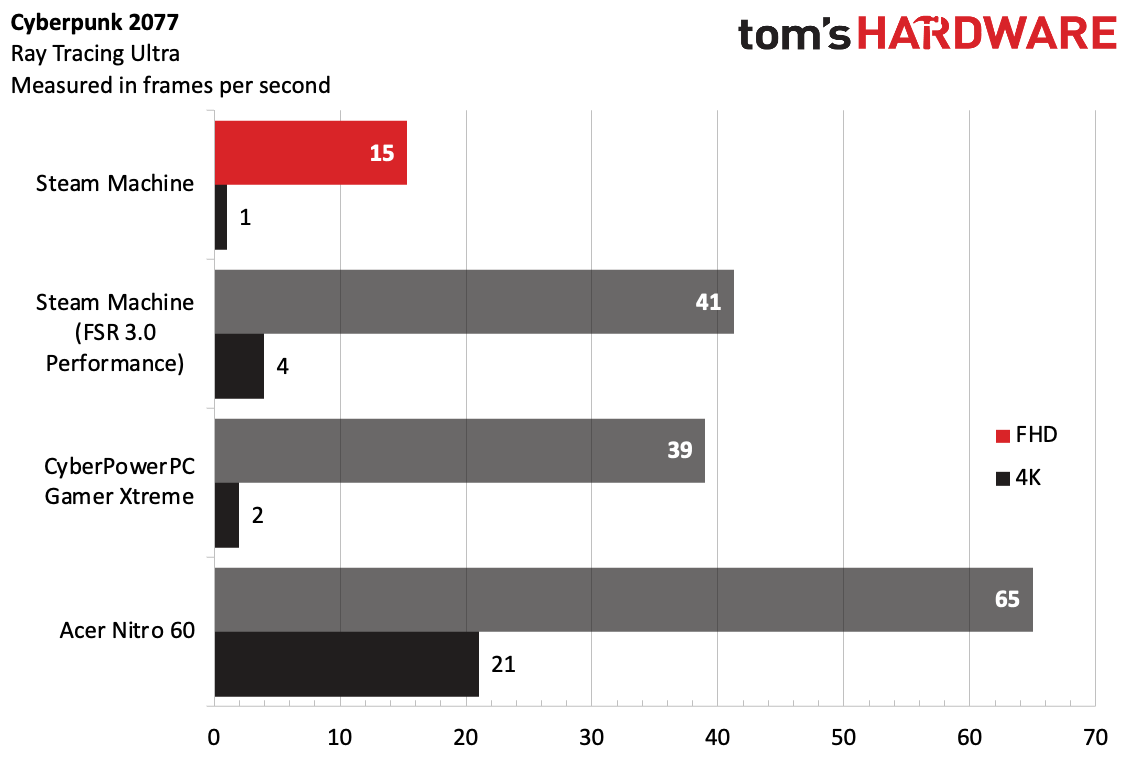
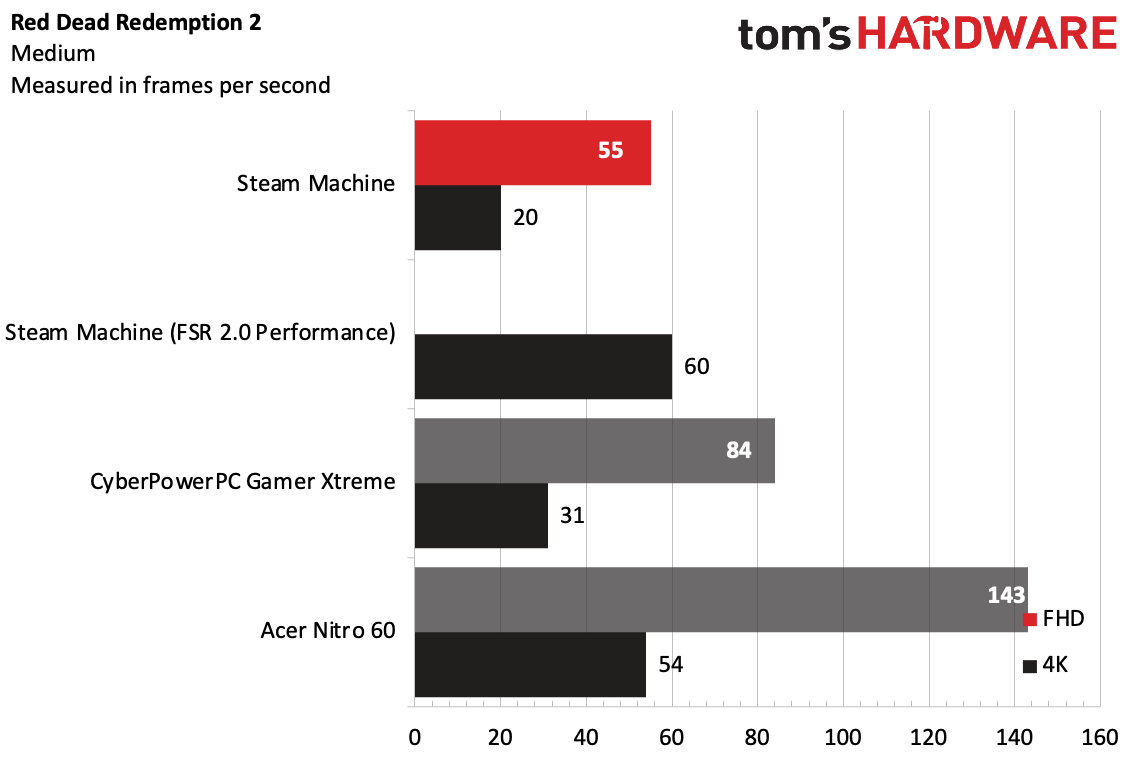
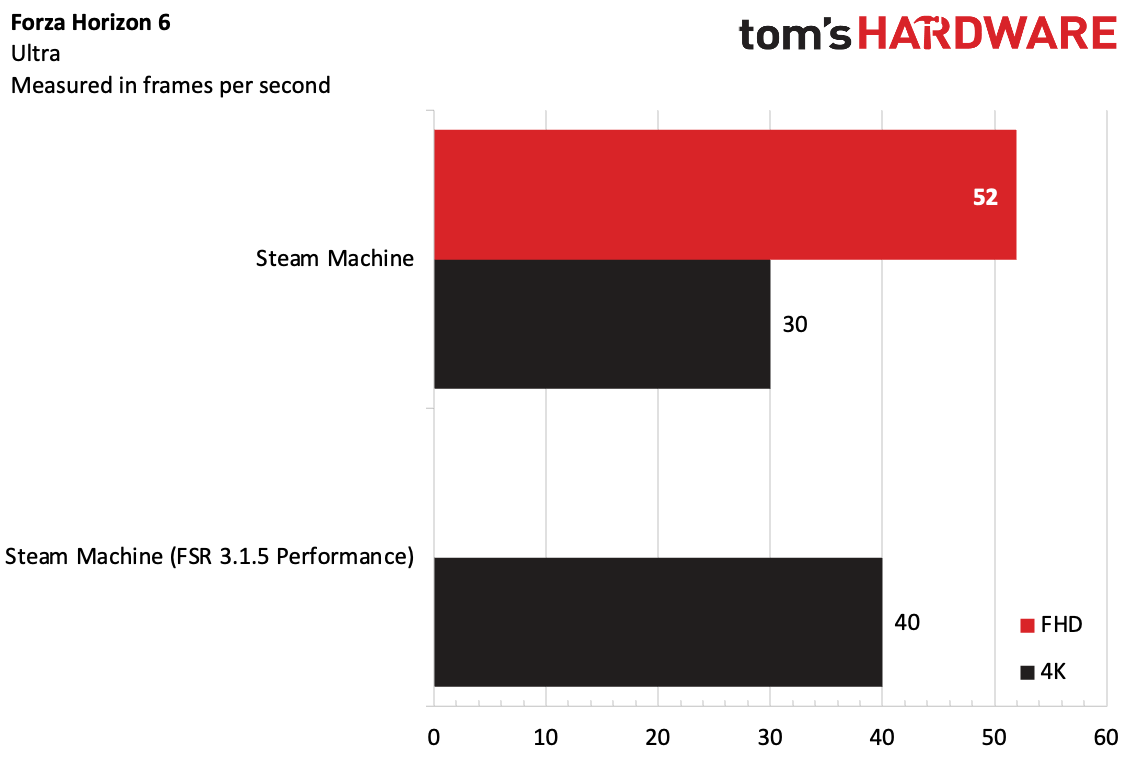
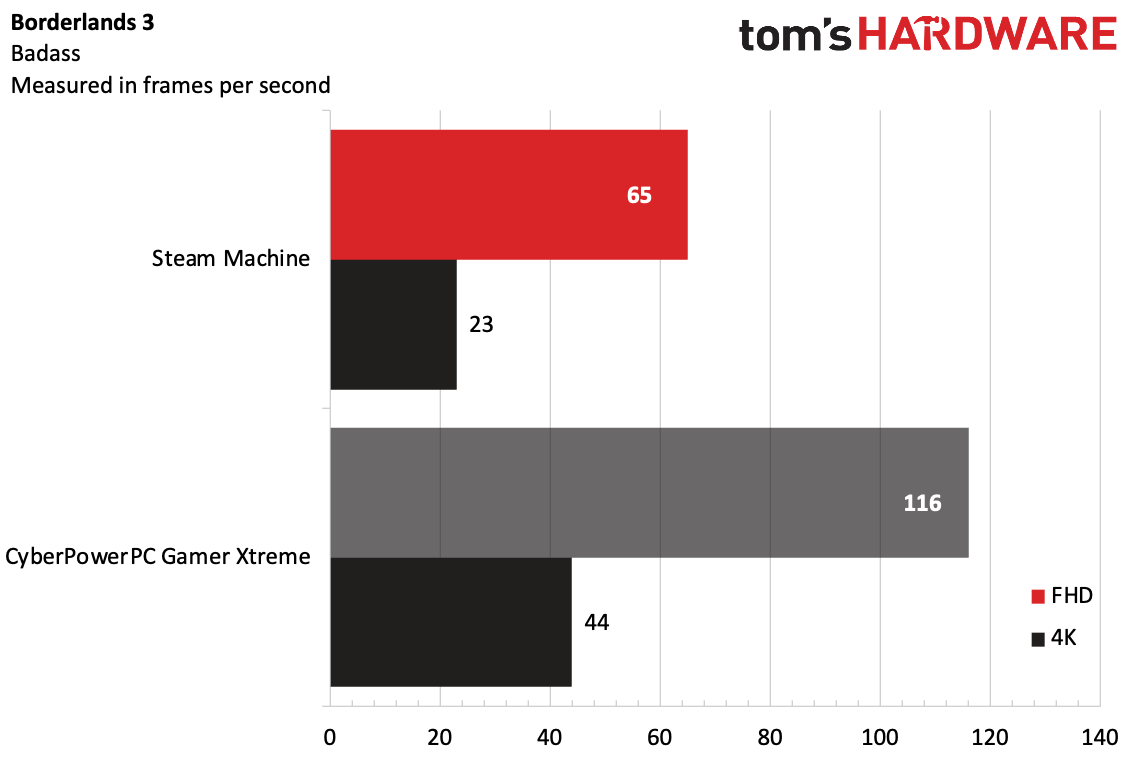
For the most part, those larger boxes with desktop-class GPUs significantly outperformed the Steam Machine without any upscaling, FSR, DLSS, or similar technologies. Most importantly, the highest-end settings were playable on those machines. But those boxes are also significantly larger and have room to fit power-hungry components – and they cost a lot more now.
Valve definitely has size on its side. If you want something smaller than a mini-ITX build that comes with SteamOS installed, this is for you. But on paper, if you have nearly any GPU from the last three to four years, you already have a faster machine. And given that the Steam Machine starts at $1,049, that matters a lot.
When testing using our prebuilt desktop methodologies, which include some aspirational settings, it is clear why Valve says you need FSR to get 4K at 60 FPS. Based on the aging hardware alone, it should be clear that you won't be playing games at their top settings. But FSR can certainly help the Steam Machine along.
For example, on Red Dead Redemption 2 at medium settings, the Machine played the game at 20 FPS at 4K. But with FSR 2.0 in Performance mode, it reached 60 FPS.
On Forza Horizon 6's Ultra settings, the game ran at 30 FPS at 4K, but turning on FSR 3.1.5 Performance nabbed an extra 10 FPS.
Still, Cyberpunk 2077 was unplayable on Ray Tracing Ultra even at 1080p. Here, FSR 3.0 performance made it technically playable (up to 41 FPS from 15 FPS), but given the latency that could introduce, I wouldn't try it. (You can play this game on the Machine though — see the Steam Deck comparison above.)
If 60 FPS is your goal, the Steam Machine isn't a 4K machine, and I'm not sure Valve should have advertised it as one. It's much more suited for 1080p or 1440p gaming with appropriately middling-to-high settings, depending on what you're playing.
Upgradeability of the Steam Machine
The only exposed screws on the Steam Machine are on the rear. The two captive Torx T9 screws are in the top corners of the machine, so at least you don't have to worry about losing them. From there, a small pry tool pushed into in two purposeful-looking indents on the bottom lifts the back cover right off.
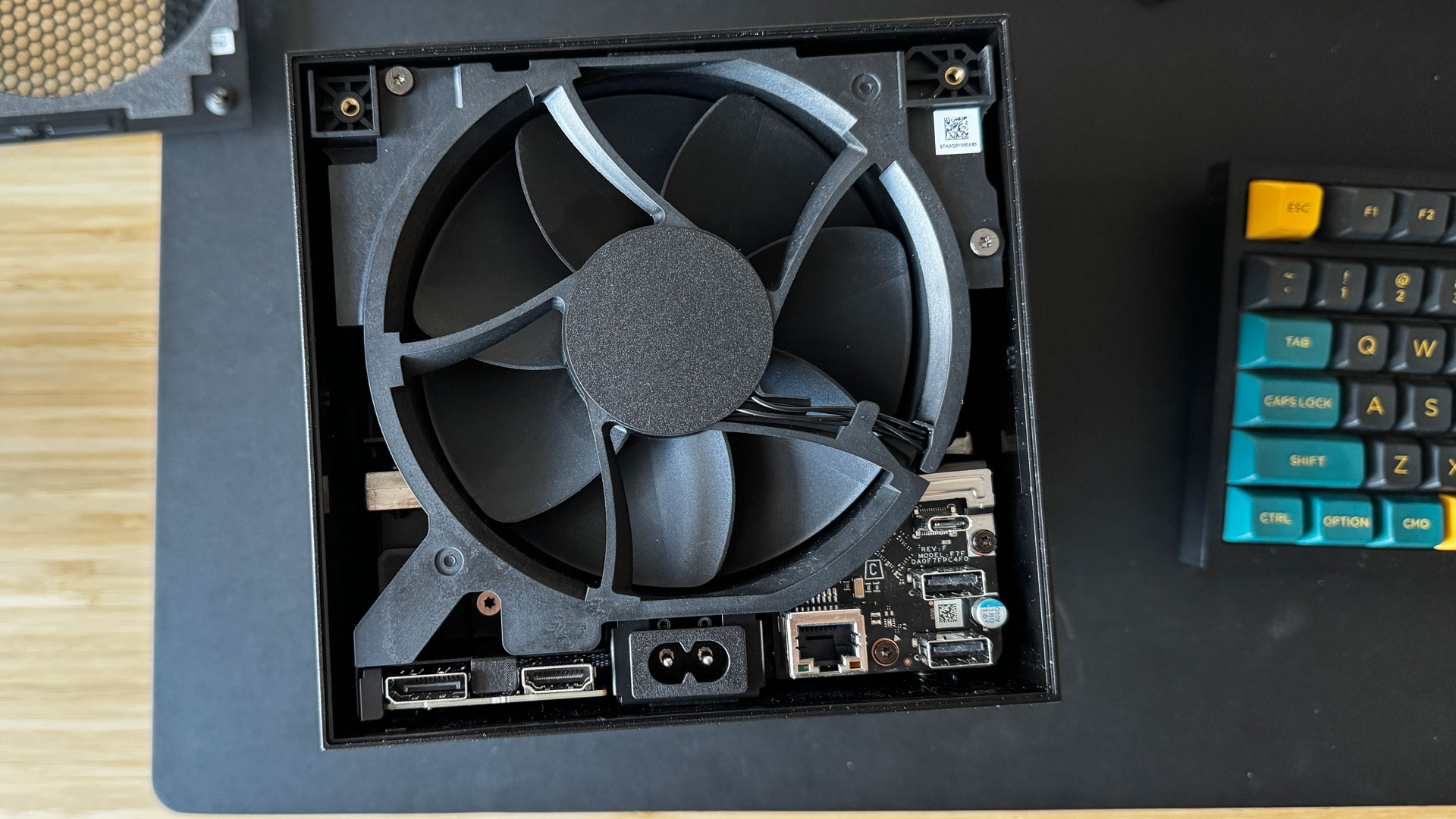
From in there, you'll see some studs coming in from the bottom. If you look closely at the feet, you'll see they have the same Torx indents in the center of the rubber, and that they're actually screws. This is way better than how some devices require you to remove adhesive to take off screws that are under feet. It's a neat trick that shows Valve had repairability in mind.
Back inside, two more T9 screws hold the fan assembly to the chassis. With these out, you can remove the internals in one massive piece.
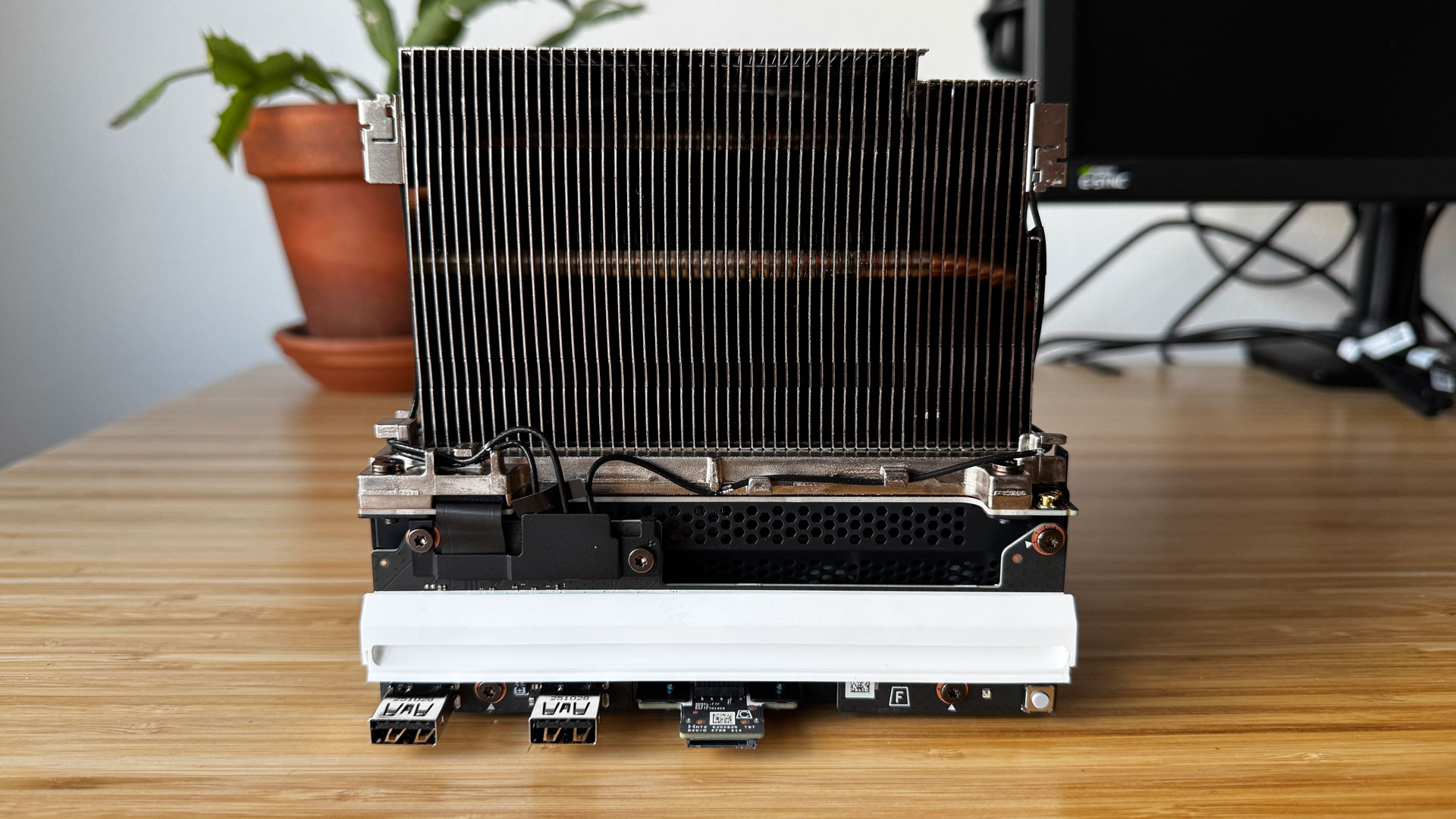
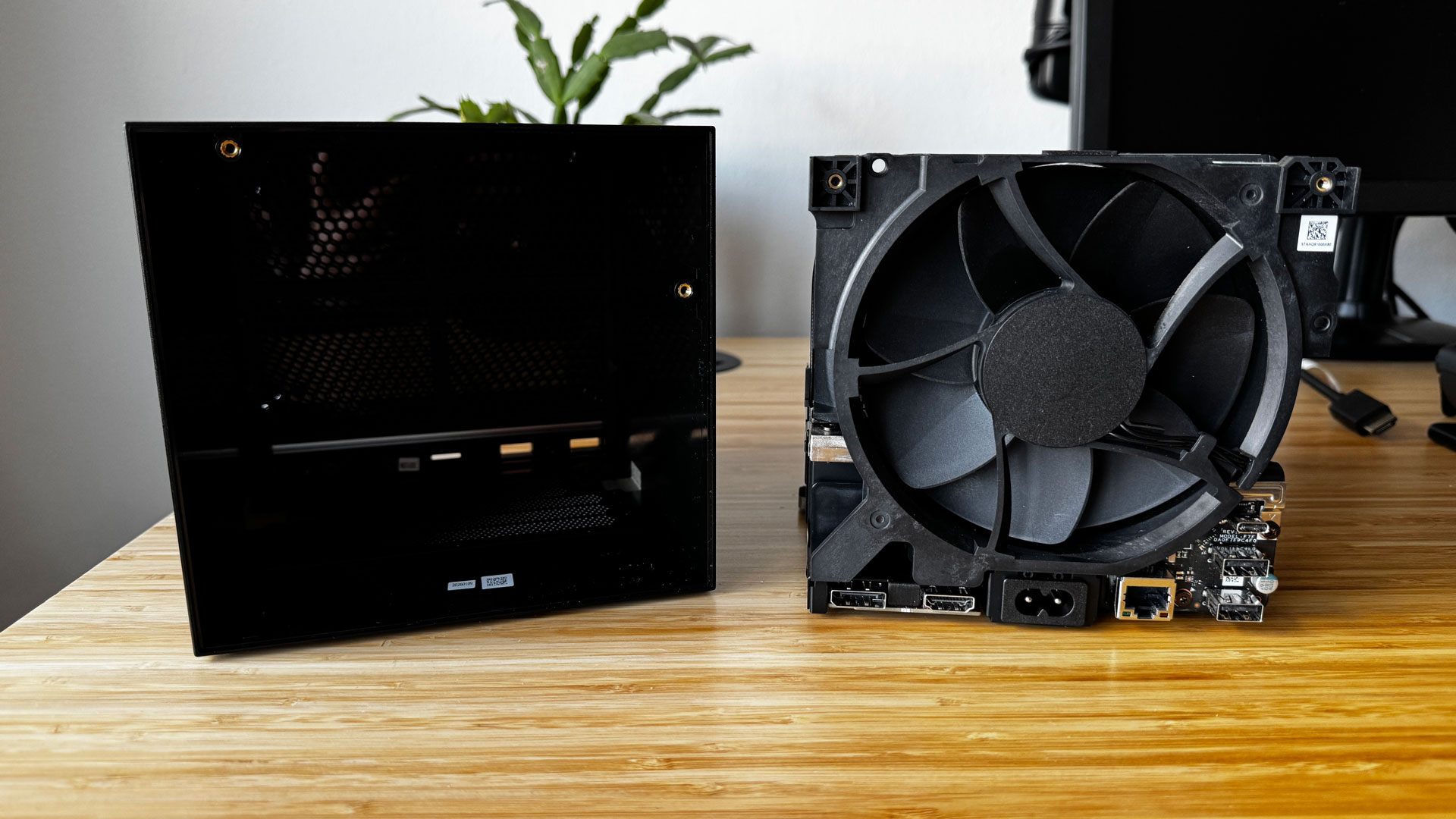
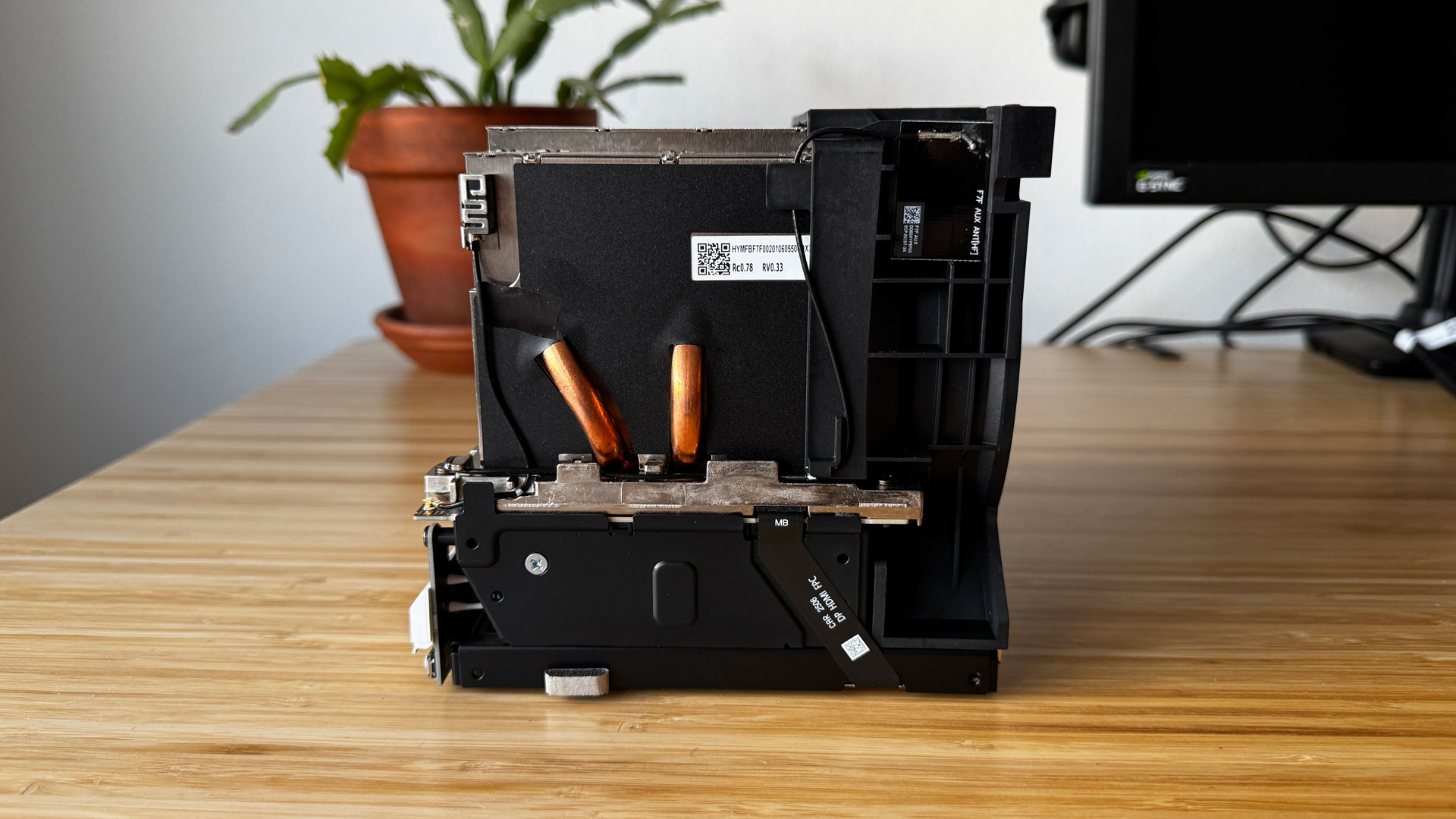
From here, you'll be able to see all the ports on small daughterboards, as well as the antennas for the Wi-Fi and Bluetooth. But the real jewel is at the bottom: an easily accessible M.2 SSD slot mounted below the power supply. Ours came with a 2TB drive, which is fairly roomy, but this may become a must-have upgrade for 512GB Steam Machine owners if storage prices ever come down. And this drive is also held in with the same Torx screw, so you can use one screwdriver to make that swap.
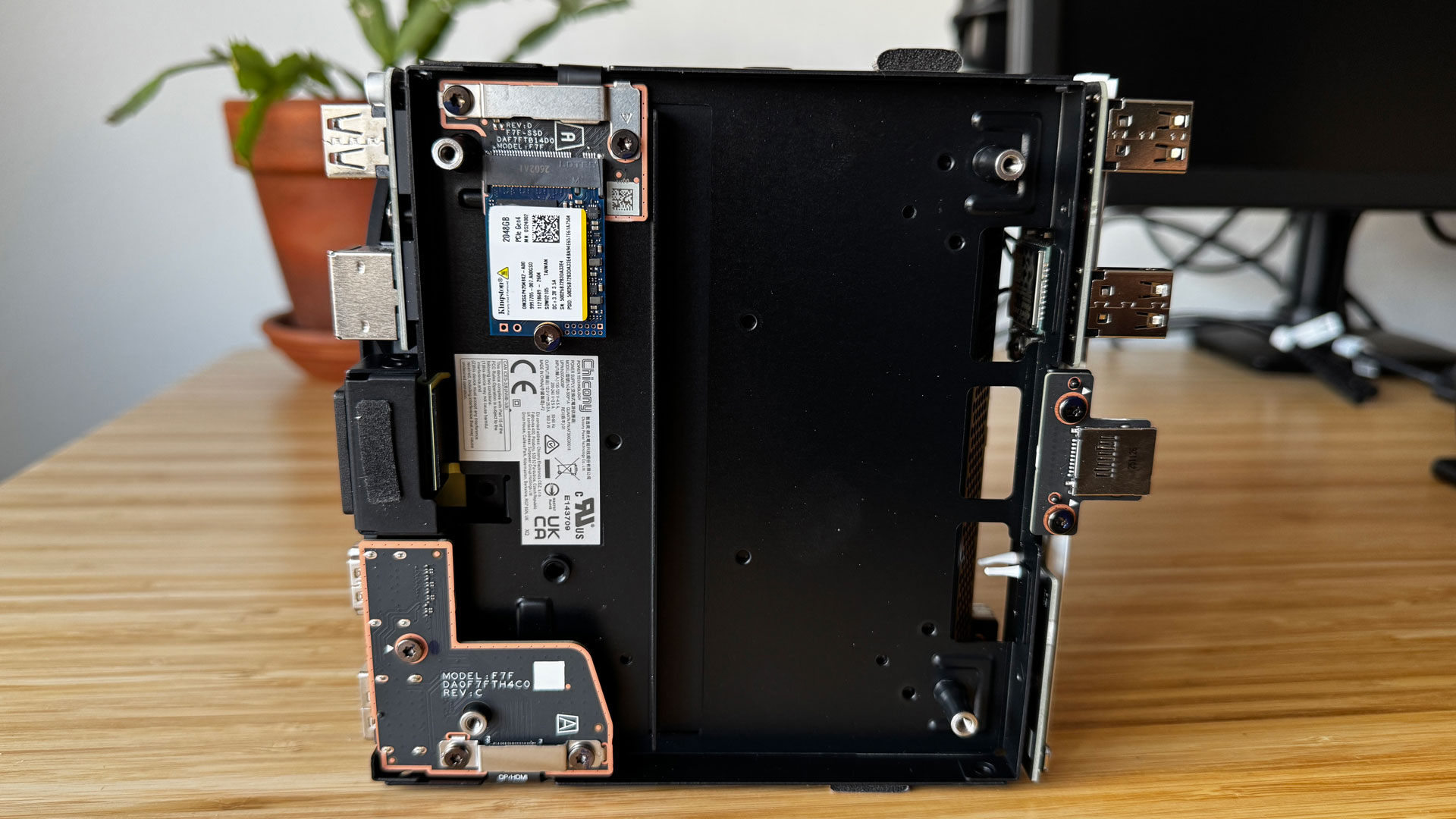
Getting to the memory is far more involved and is more of a repairability compromise than we typically like to see. You need to remove the giant heatsink, which cools all of the components with the single fan, in order to get to the DDR5 SO-DIMMS. Given how tightly packed the Steam Machine is, with many cables and ribbon cables to daughterboards throughout the outside of the heatsink and PSU, that's a complex order that takes time and more risk than I think many Steam Machine owners may want to take. But given that the daughterboards are there, you should be able to replace broken ports, even if you have to do it in groups. Valve tells me it will partner with iFixit on repair manuals, similar to the Steam Deck.
Productivity Performance on the Steam Machine
The semi-custom, six-core/12-thread Zen 4 chip in the Steam Machine can hold its own against some current mobile chips.
The closest modern chip we had a record for is the AMD Ryzen AI 7 445, which has the same core count (with four Zen 5c cores and two Zen 5 cores), with a max boost clock of 4.5 GHz and a configurable TDP of 15-54 W. Valve's chip has 30W, but the GPU is discrete and isn't included here.
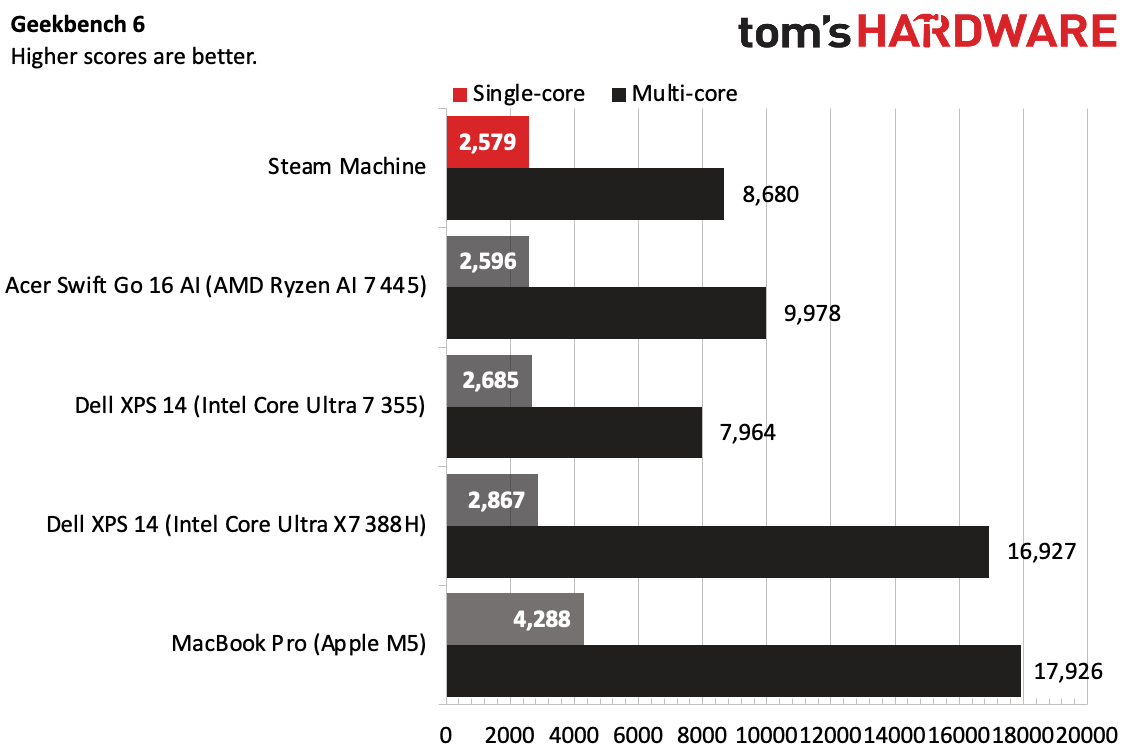
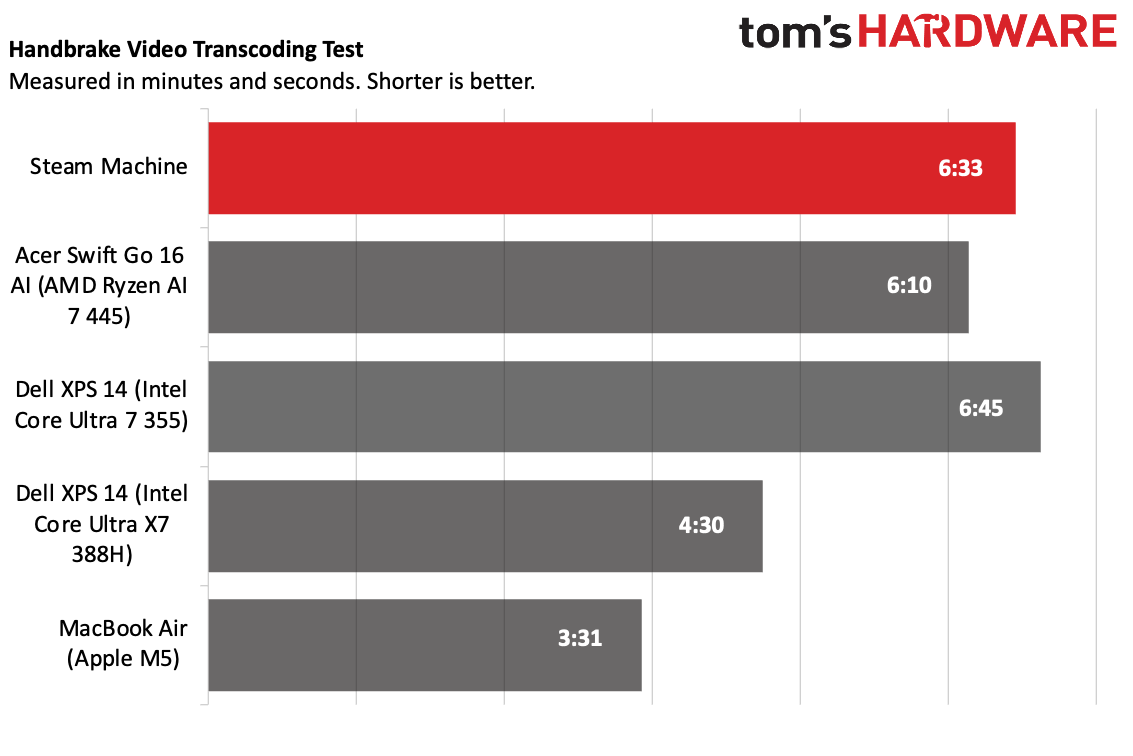
The Ryzen AI 7 445 ("Gorgon Point") in the Acer Swift Go 16 AI was marginally faster in single-core performance, but significantly faster in multi-core performance. On Handbrake, the Gorgon Point chip was 23 seconds faster than the Steam Machine, which completed the task in 6:33.
In our charts, you can also see comparisons to Intel's Panther Lake Core Ultra 7 355, a weaker chip than Valve's, and the Core Ultra X7 388H, which was stronger (but in far more expensive systems). Apple's M5, under air in the MacBook Pro, was the fastest of the bunch on both tests.
SteamOS and KDE Plasma Desktop
If you've used a Steam Deck before, everything on the Steam Machine will feel familiar. SteamOS 3 is the same here as it is on the handheld, just running on more powerful hardware. If you haven't used a Steam Deck before, but have used Steam's Big Picture Mode on a PC, you'll still be mostly at home, as the interface is very similar.
SteamOS continues to be Valve's primary advantage over the largely Windows-based ecosystem of gaming PCs. It's easily handled entirely with a controller. If you've used SteamOS on the Steam Deck, you might want to consider the Steam Controller, as you'll have all of the same buttons to navigate the operating system (and that's before you get into the fact that gameplay will feel similar).
Valve has adopted the Verified program from the Steam Deck to the Steam Machine. In Valve's documentation, it states that you need to hit 30 FPS at 1080p to be verified, which is pretty low stakes. Games that already run on Steam Deck should be shoe-ins, while the stronger hardware should enable more games to run on the Machine and earn the badge.
If you want a more typical desktop PC experience — perhaps you're playing at a desk – you can use the KDE Plasma desktop. While I suspect most people will never enter the desktop mode, Valve has added some significant updates here over the years, and I appreciate that you can use your computer as a computer. If you like to tinker and install extra software that isn't available through Steam, it's a great option.
Still, not all games run on Steam. While you can add most games to Steam through the "Add a Non-Steam Game to My Library" flow, not all work well. Some launchers have unofficial versions you can run through Linux, like the open-source Heroic Games launcher that will run Epic Games and GOG.
I wish that Valve offered a way to dual-boot Windows and SteamOS on both the Machine and the Steam Deck for these edge cases. The company said it would back when it announced the first Deck. With a 2TB drive, there is plenty of room.
"While Steam Deck is fully capable of dual-boot, the SteamOS installer that provides a dual-boot wizard isn't ready yet," Valve's page on Windows resources reads. "This will ship alongside SteamOS 3 once it's complete."
The Steam Machine is part of an ecosystem
There is a point in using the Steam Machine where I saw it as more of a platform. It was no surprise that the Steam Deck was built around playing games on a Valve platform, even if you can install other OSes. But with the Steam Machine in play, there's a fuller picture: playing your Steam games on the go, uploading the save to Steam Cloud, plopping yourself on the couch, turning on your Steam Machine, and resuming the same game, running locally, with the same controls thanks to the Steam Controller.
Perhaps one of the coolest things you can do is move your SD card from device to device. If you have an SD card in your Steam Deck, you can move it to your Steam Machine, and the games will be immediately playable. (Or, if you prefer, you could quickly move the games to the internal SSD.)
There are plenty of parts you can sub in there: You can play Steam on any handheld, or come home to your own custom-built rig, or use another controller. Despite its hardware, Steam still supports a ton of devices and ways to play.
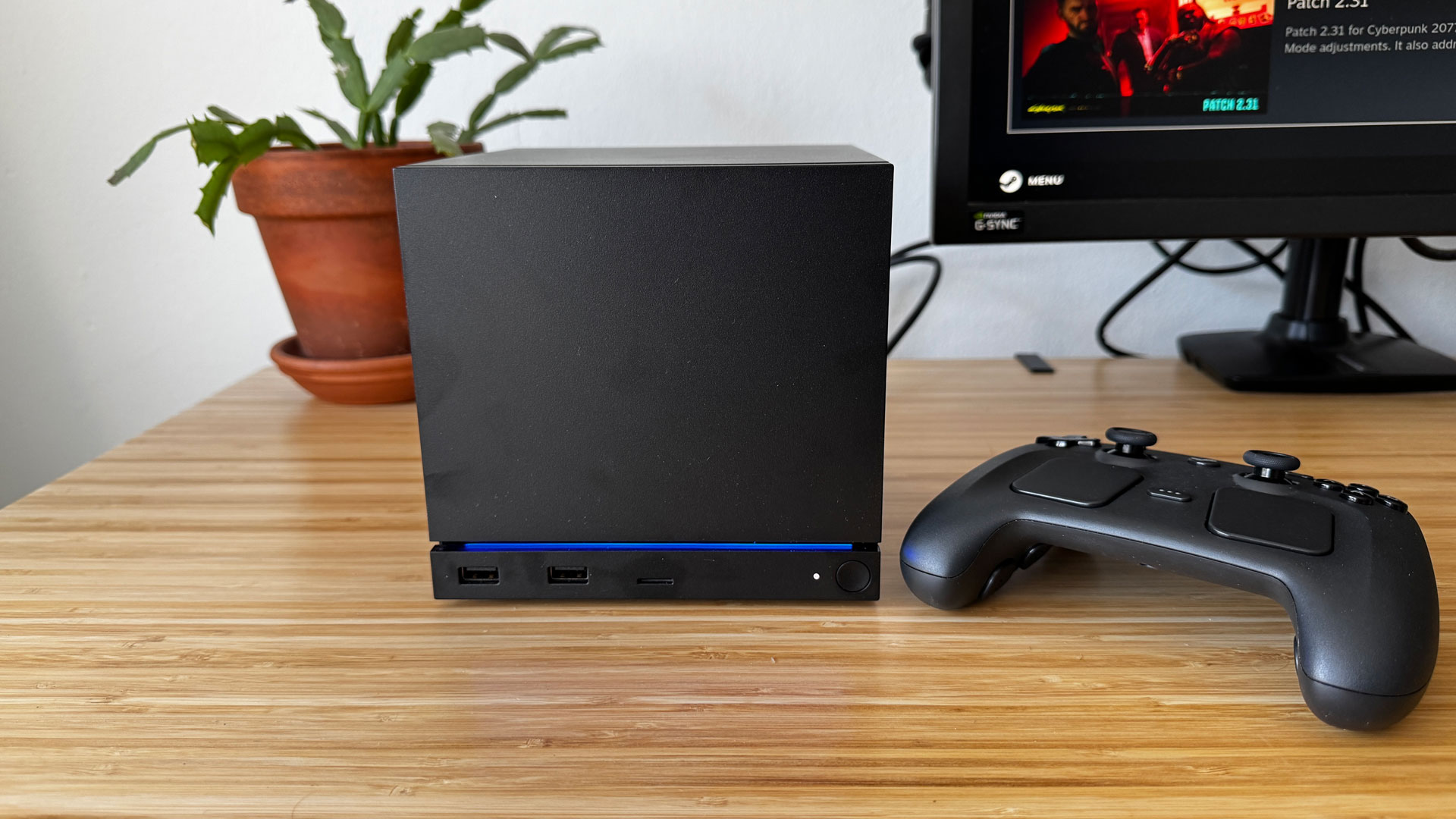
But if you do have Valve's hardware, it starts to feel like an ecosystem on the level with Apple's, just focused exclusively on gaming. You get some benefits there — sleep and wake work just as well on this desktop as it does on Valve's handhelds. SteamOS is the best version of Steam's Big Picture mode out there. And this is way smaller than most DIY PCs. If you're all in on Valve, this is the way to go. But if you want more power and future-proofing, subbing in a more powerful PC will last you longer in the long run.
One thing that has been notable about the Steam Deck is Valve's commitment to updates. There have been a ton, adding features, squashing bugs, and making it more stable. In fact, that history is the one thing that makes me feel reasonably confident that the bugs I have seen will eventually be fixed.
Of course, Steam doesn't have every single game. Some won't run on SteamOS because of anti-cheat issues with Linux. Others simply have compatibility problems. Valve does have a method for running non-Steam games through Steam, but some, notably Epic Games' Fortnite, don't play well with it. You can install Windows or other launchers via Linux, but you will lose some of the ease the ecosystem offers. Valve offers minimal support for Windows, but at least it's something.
Steam Machine Configurations and Warranty
There are four configurations of the Steam Machine. First, there are two models of the computer; Both of them are identical with the exception of the storage. We reviewed the more expensive $1,349 version with a 2TB NVMe SSD and two extra faceplates, and bundling it with the Steam Controller brought it to $1,428.
The base model is a cheaper $1,049 option with a 512GB SSD. Bundling that with a Controller brings you to $1,128.
Swipe to scroll horizontally
| Row 0 - Cell 0 | USD | CAD | EUR | GBP | AUD | PLN |
Steam Machine (512GB) | $1,049 | $1,509 | €1,039 | £879 | $1,609 | 4,389zł |
Steam Machine (512GB) with Steam Controller bundle | $1,128 | $1,628 | €1,108 | £938 | $1,728 | 4,698zł |
Steam Machine (2TB) with faceplates | $1,349 | $1,919 | €1,359 | £1,149 | $2,109 | 5,379zł |
Steam Machine (2TB) with faceplates and Steam Controller bundle | $1,428 | $2,038 | €1,428 | £1,208 | $2,228 | 6,048zł |
512GB isn't huge for a gaming system. Valve's spec sheet highlights that no matter which option you get, it comes with a high-speed microSD card slot. Luckily, the SSD is easy to access (See upgradeability above).
The $1,049 starting price is higher than consoles, including the more powerful PlayStation 5 Pro ($899) with 2TB of storage. A base PS5 Digital Edition is $599 with 825GB of storage. An all-digital Xbox Series X starts at $599.99. If you're looking for a living room solution to play games and don't care specifically about settings and your Steam library, those consoles are a better value.
In Asia, the Steam Machine will be sold through Valve's partner, Komodo, which also sells the Steam Deck. It will be available in Japan, Taiwan, and Hong Kong, but will not be sold in South Korea.
If you're buying this for a Steam library, you could also put Steam on any other computer and run it in Big Picture Mode. And given that supply is tight, that may be a better option for those willing to consider alternatives.
When we put together a parts list to estimate what a custom build looks like to match the Steam Machine, including a Ryzen 5 7600X, Radeon RX 7600, 16GB of DDR5-5600 RAM, a Gigabyte B650M Gaming Plus WiFi Micro ATX AM5 Motherboard, a 650W PSU, a case, cooler, and 1TB of storage, we hit $1,048.83. While our build gets you double the storage of the base Steam Machine, it doesn't get you the small case, dedicated Bluetooth or Steam Controller antennas, or super quiet operation. So if you're only comparing the Machine to other PCs, the price isn't terrible — it’s just the market, in general, that is.
Valve sells the Steam Machine with a one-year warranty.
Bottom Line
Valve's Steam Machine is a complicated little box. It was clearly designed for a simpler time, when components were plentiful, and it would be a somewhat affordable desktop that could be a more powerful option for Steam Deck owners to play their Steam games at home.
But it's not a simple time. The Steam Machine is still cute, still has a good selection of ports, still has an easily upgradeable SSD, and, most importantly, still runs SteamOS and gets all of the benefits that come with it. If you were docking your Steam Deck to the TV and wanted more performance, this will get you there, once Valve irons out the last of the bugs.
If you're just looking to get into gaming, a base-level PlayStation 5 or Xbox Series X is a better deal. You can buy one and a Nintendo Switch 2 and spend less than the Steam Machine.
You can also get many of the benefits of the Steam Machine on other devices. If you have an effective gaming PC or laptop, Steam Big Picture Mode will do most of the work there. Valve is also working to bring SteamOS to more machines, though currently it's only working on Radeon GPUs.
But if you want something small for your living room that plays years of Steam titles and maybe even has a cute little wooden faceplate, the Steam Machine is for you, but you should go in understanding its limitations.







 English (US) ·