
 14 hours ago
4
14 hours ago
4
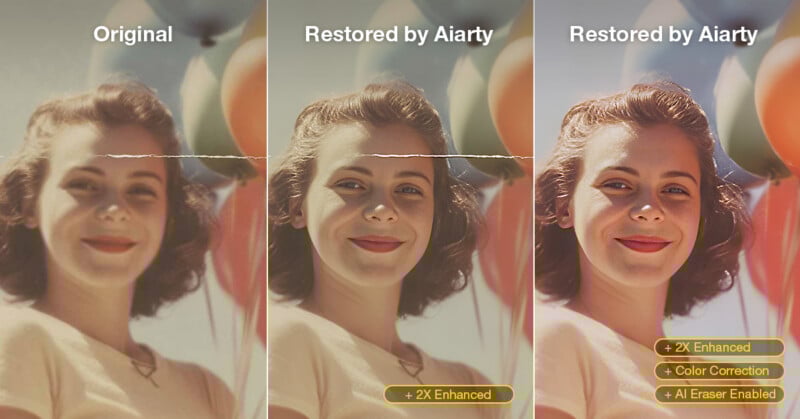
Old photos don’t just fade, they slowly lose the details that make them meaningful. If you’re looking for how to bring old photos back to life or make them clearer, an AI-powered tool like Aiarty Image Enhancer can serve as an essential part of the restoration workflow, offering one of the fastest and most practical solutions.
It restores damaged images, enhances facial details, and removes distractions in just a few clicks, helping to streamline the overall restoration process, especially when working with large batches of low-quality old photos, where efficiency matters most.
Full disclosure: This story is sponsored by Aiarty.
Old photos naturally fade, get scratched, or change color over time. A 2022 study found that over 60% of analog photos stored at home show noticeable degradation within 30 years. Traditional restoration is slow and requires skill, which is why many photographers now turn to AI. Aiarty Image Enhancer analyzes textures, detects faces, and reconstructs missing details, making it easier to restore photos while keeping them authentic and clear.
Limited Time Deal
Currently, PetaPixel readers can get 49% off the Lifetime License of Aiarty Image Enhancer. It’s ideal for archives, scanned prints, or low-quality portraits, especially if you prefer a one-time purchase over a subscription.
The current offer includes:
- One-time payment, no subscription
- Works on Windows & Mac computers
- Permanent free upgrades and tech support
- 30-day money-back guarantee
Aiarty Image Enhancer is not only cost-effective but also practical for restoring old or low-quality photos. Its powerful AI and easy workflow let professionals and hobbyists bring images back to life quickly, without a steep learning curve.
Upscale Old Photos without Losing Detail
Many photographers struggle with how to restore old photos without introducing artificial sharpness or haloing, especially when working with historical prints or low-resolution scans. Scanned prints, old digital files, or heavily cropped images often lack the detail needed for modern displays or high-quality printing.
Instead of simply enlarging pixels, Aiarty Image Enhancer uses AI super-resolution to reconstruct missing detail, particularly in textures like hair, fabric, and background elements. This makes it possible to upscale old photos to HD, 4K, or even 8K resolution for large prints or high-resolution archives while keeping edges clean and natural.
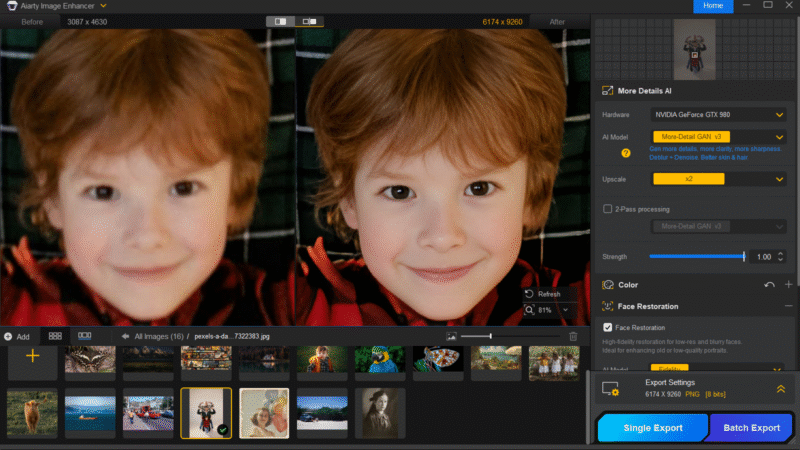 After upscaling with Aiarty, the blurriness in this old photo is gone. Hair, eyes, skin, and clothing textures are restored naturally and clearly.
Remove Noise, Blur, and Compression Artifacts
Old photos rarely suffer from just one issue. Film grain, scanning noise, motion blur, and JPEG compression artifacts often stack together, making images look soft and degraded.Aiarty’s enhancement model separates real detail from unwanted artifacts, reducing noise, correcting blur, and removing compression damage while preserving fine structures. In practice, this means grainy scans, slightly out-of-focus portraits, or blocky compressed old photos can be restored effectively. This is especially important when working with digitized archives, where multiple generations of quality loss are common.
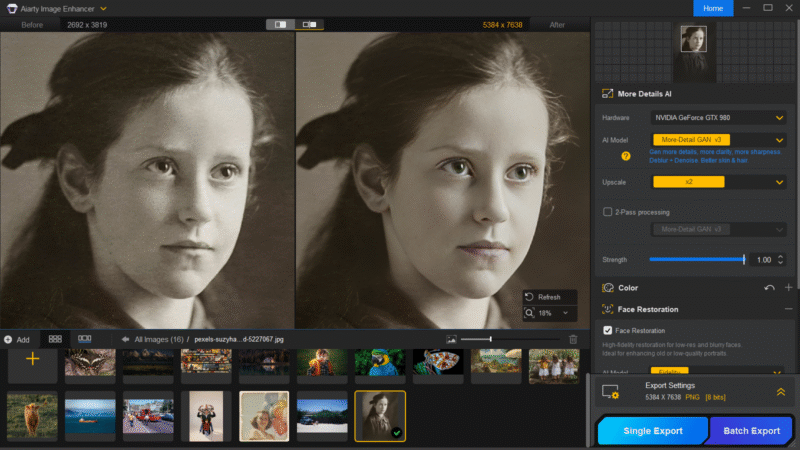 Aiarty removes the grain from scanned photos, restoring a cleaner texture.
Remove Imperfections & Restore Natural Colors with AI
Old photos are often affected by damage such as scratches, stains, and general wear, which not only impact the background but also compromise facial details. Aiarty’s AI Eraser intelligently repairs these imperfections by analyzing surrounding pixels and seamlessly reconstructing damaged areas. It can effectively remove dust spots, creases, film grain artifacts, and even distracting objects, while also improving facial clarity without making portraits look over-retouched.
In addition to structural cleanup, Aiarty addresses common color degradation in aging photos, such as yellowing, low contrast, and faded tones. It allows users to fine-tune saturation, contrast, lighting, and shadows, and also supports SDR-to-HDR enhancement to recover details in both highlights and darker areas. The result is a more balanced, natural-looking image that remains faithful to the original scene, an essential step for archival or documentary restoration work.
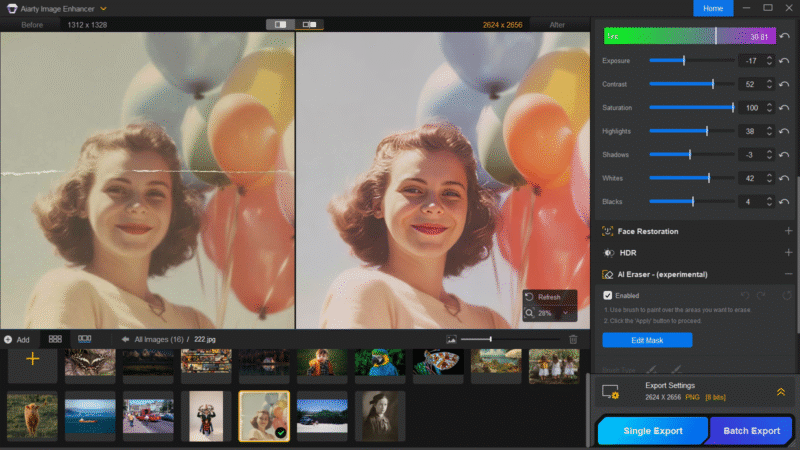 The AI Eraser restores damaged areas in old photos, while color fine-tuning breathes new life into them.
Efficient Workflow for Restoring Old Photos
Restoring old photos isn’t just about individual fixes, it also requires an efficient workflow, especially for albums or large archives. Aiarty supports batch processing, allowing multiple images to be restored at once for scanned collections or client projects. It also offers high-quality output formats like TIFF and DNG, ensuring maximum detail for editing, printing, or long-term storage, making it easier to restore old photos at scale with consistent quality.
Bringing Your Memories Back: Final Thoughts
Whether preserving family history or managing archival collections, Aiarty Image Enhancer fits seamlessly into the old photo restoration workflow. With the AI Eraser, color correction and professional file support, it makes key steps faster and easier, helping you achieve high-quality results with less effort. Take advantage of the exclusive deal: unlimited access, permanent upgrades, and a one-time payment.
Full disclosure: This story is sponsored by Aiarty.





 English (US) ·