
 5 hours ago
3
5 hours ago
3
A customized mid-motor and Shimano’s new Cues components are a winning combination.
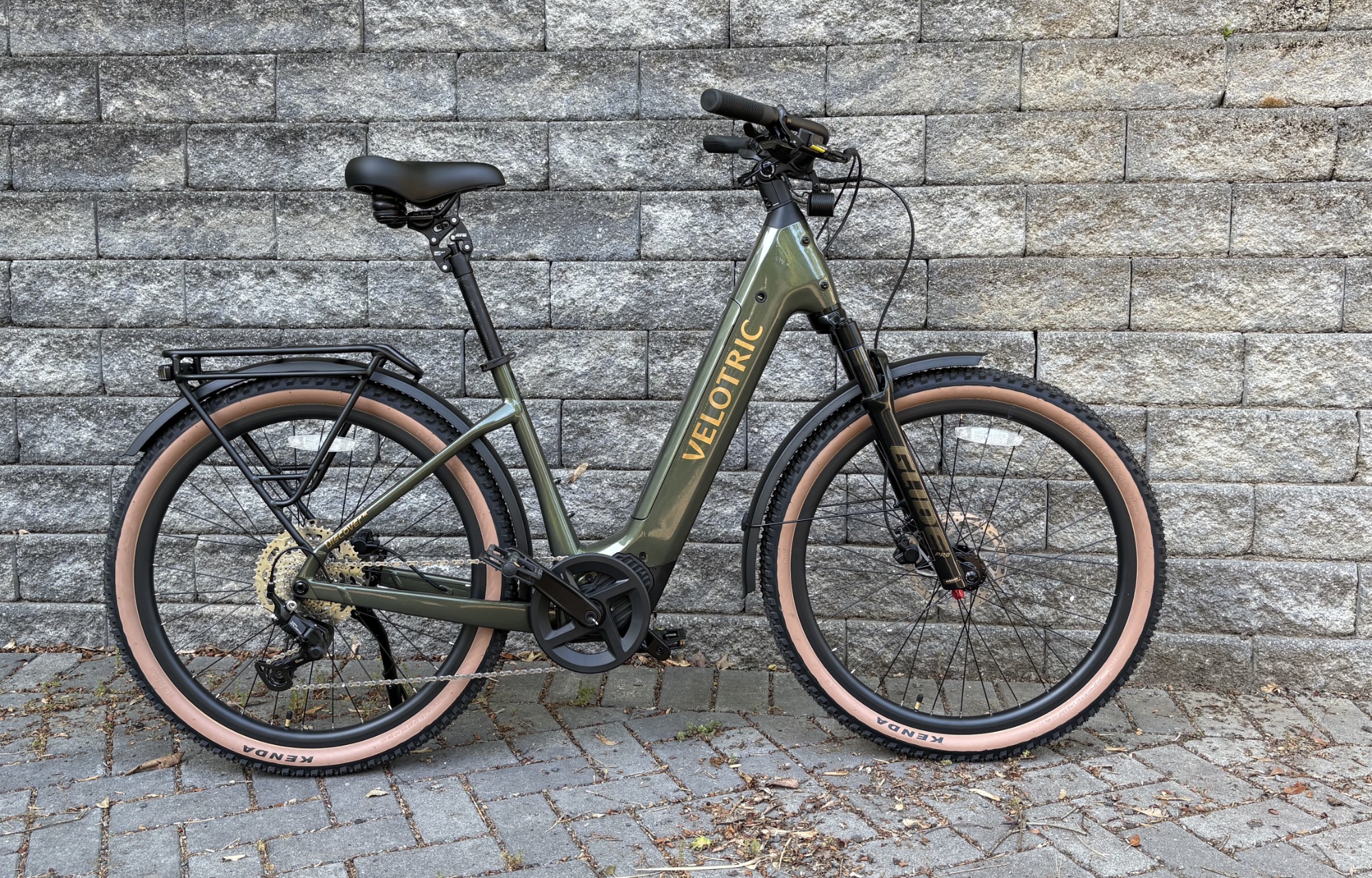
Commuter bikes don’t come with the same constraints many other bikes do. Mountain bikes must glide gracefully through all sorts of abusive terrain; road bikes need to mix high performance with enough comfort to let riders stay in the saddle for hours on end. All a commuter bike needs to do is comfortably and reliably get you from A to B on typical roads with minimal fuss.
So it’s been surprising how rarely the commuter bikes I’ve tested have gotten it right. At the low end of the price scale, as you’d expect, the required compromises have a big impact on the experience. The high end addresses those shortcomings, but at prices comparable to high-end bikes from specialized categories. I’ve never encountered something in the middle of the two: affordable, with no compromises.
But I may have just found my ideal commuter bike: the Velotric Discover 3. It’s comfortable, it has a great combination of components, and it comes in at just under $2,000.
Upgrades all around
Velotric’s first entry in this line, the Discover 1, marked a promising start for the company. While it was definitely in the “compromises needed” category, the shortcomings were relatively minor and carefully chosen. Since then, the company has expanded considerably, introduced many new models, started working with local dealers in the US, and moved a bit upmarket.
The third iteration of the Discover illustrates the upmarket move. It costs nearly twice as much as the original Discover, but you get a lot for that price. The hub motor is gone, replaced by a mid-frame motor produced under contract for Velotric.
While it still has a cadence sensor you can select through a menu, the Discover uses a torque sensor by default, providing far more integration with your pedaling. Cadence sensors simply register when the pedals are spinning; a torque sensor registers how much force you’re applying to the cranks. The latter makes the electric assist feel more like just that: an assist for your legs rather than a replacement for effort.
Switching to the cadence sensor triggers a warning that it will drain the battery faster, which makes sense: You can gently spin the pedals in a gear meant for climbing hills while the electric motor does all the work. I quickly switched back to the torque sensor for pleasant spring-time riding, but I can see where the cadence sensor might make sense once the full heat of summer starts.
Of course, you could always just use the throttle. More on that below.
Another big upgrade comes in the drivetrain, provided by Shimano. After years spent diversifying its low-end components and moving electronics down from the high end to the middle of its range, Shimano has finally decided to rationalize everything. All the models in its upper range, both road and mountain bikes, will have dedicated electronic groupsets. The entire low end will be occupied by items from the Cues groupsets, which will all be completely interoperable.
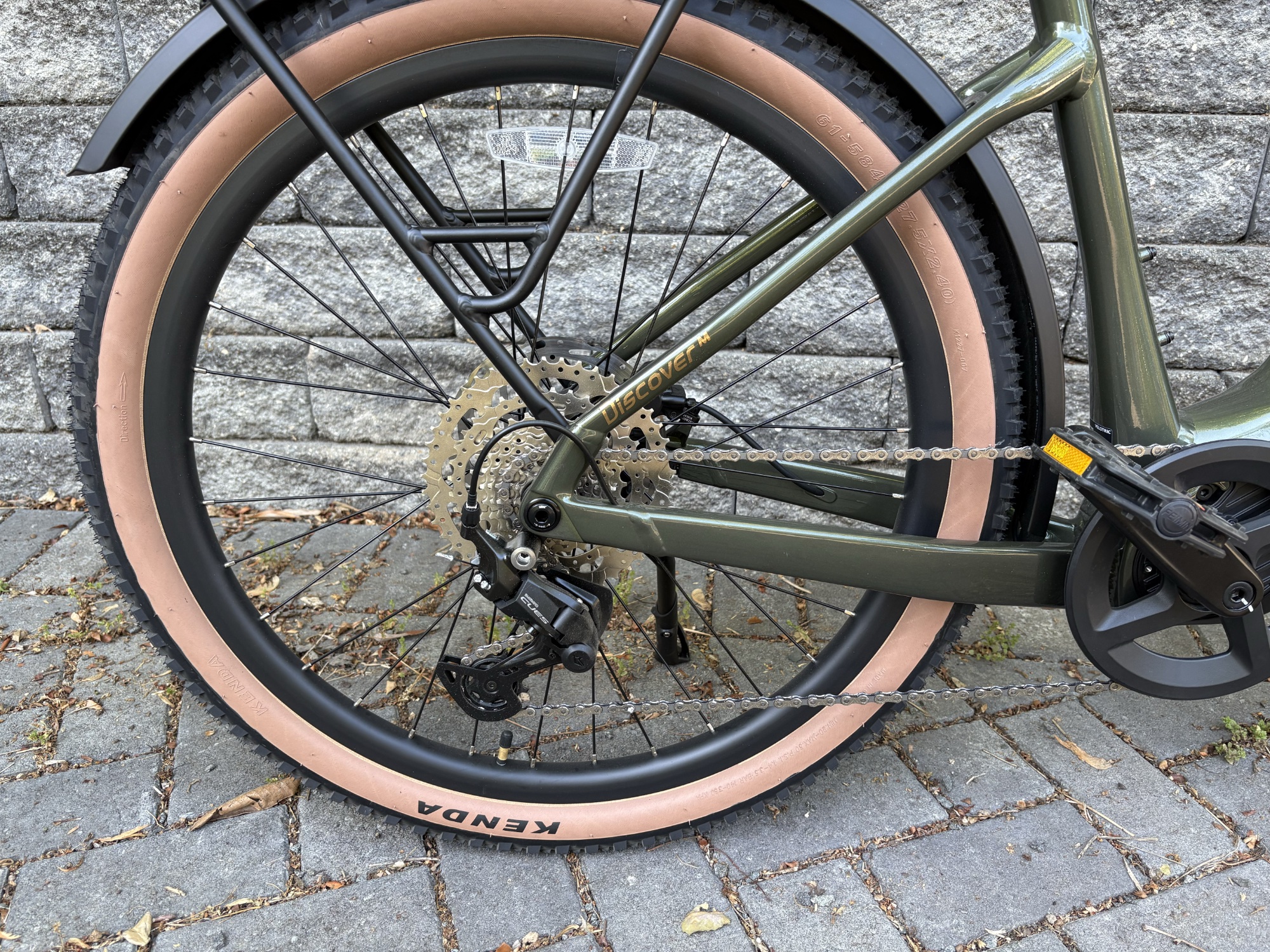
Look at that nicely spaced set of gears. Shimano’s new Cues components seem great.
Credit: John Timmer
Look at that nicely spaced set of gears. Shimano’s new Cues components seem great. Credit: John Timmer
In theory, this means a mountain bike rear derailleur could be paired with a road-style shifter and work without a fuss (the road shifter hasn’t been released yet, so nobody knows). This seems to be a recipe for even more chaos, as bike manufacturers can potentially mix and match quality and intended use at random.
In practice, though, using a Cues system has allowed Velotric to avoid the worst features of some of Shimano’s previous low-end hardware: cheap plastic shifters and a gear range so narrow it was nearly impossible to pedal fast enough to reach the full rated speed. The Discover 3 has decent-feeling thumb trigger shifting that runs you through eight useful gears in back, with a range typical of a low-end mountain bike. It is an enormous step up from some previous budget hardware.
True class
US law defines three classes of e-bike. Class 1 provides an assist for up to 20 miles an hour (32 km/hr), but you must be pedaling to activate it. Class 2 is similar but adds a throttle that also cuts out at the same maximum speed. Class 3 e-bikes offer an assist to 28 mph (45 km/hr) but do not allow a throttle. The accepted classes are a patchwork, making it difficult to design a single bike for the US market.
Nearly every manufacturer focused on the US market has settled on a compromise that’s probably not technically legal: They enable switching to Class 3 in software but still provide a hardware throttle. The throttle simply cuts out at the lower max speed of Class 2. The assist it provides is also somewhat anemic; I could generally accelerate away from a full stop much faster by mashing the pedals a bit.
Velotric has provided a simple software solution. If the bike is set to Class 1 or Class 3, the throttle is disabled. While this may seem like a blindingly obvious way to do things, it’s rare enough that I initially thought I had been shipped a bike with a defective throttle.
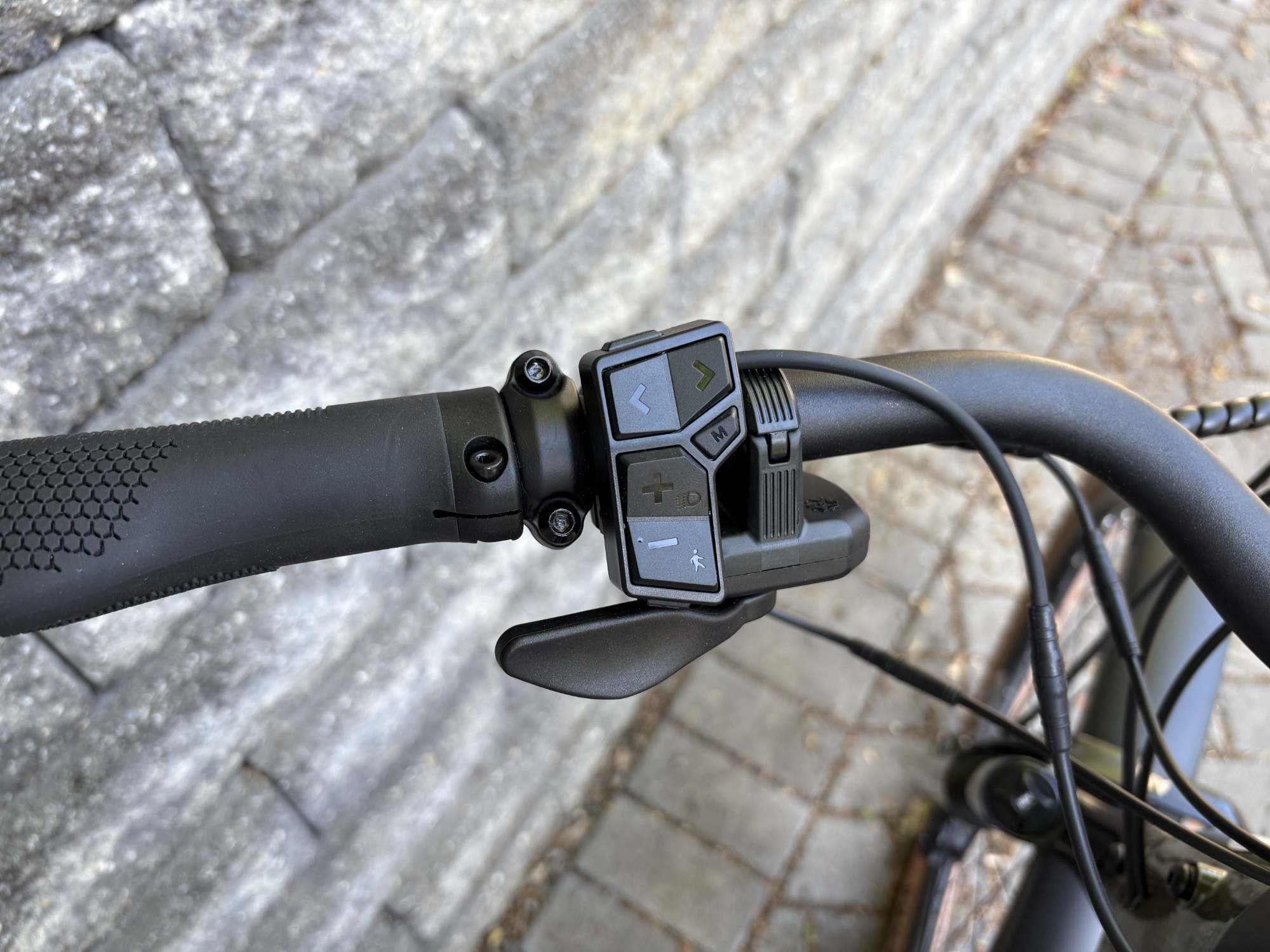
Even if you don’t use the throttle, the seven buttons on the controller should keep your left thumb busy.
Credit: John Timmer
Even if you don’t use the throttle, the seven buttons on the controller should keep your left thumb busy. Credit: John Timmer
The assist provided by the throttle is a bit weak; I could generally accelerate from a full stop faster by mashing the pedals down with the assist set to high. If you want to cruise around using the throttle to avoid the effort of pedaling, you’re better off activating the cadence sensor and then casually spinning the pedals with the chain in a large gear ring. That will get you to the max speed faster than waiting for the throttle to take you there.
Customize your ride
In general, Velotric offers exceptional customization options. You can adjust the speed of any assist level up to its legal maximum. So if you live in an area with low speed limits, you can set Class 1’s assist to max out at 15 mph while leaving the remaining ones untouched. Or if you’re worried you’re not getting enough exercise, you can set the throttle to cut out at 10 mph while leaving Class 2’s 20 mph assist maximum untouched.
This is actually useful because Velotric includes a dedicated button for switching classes on the controller. On most bikes, changing classes requires a trip to a phone application or diving through menus that require you to pull over. Thanks to the button, you simply adjust the class to your current needs. I would set it to Class 1 when sharing space on a heavily trafficked bike path, then switch to Class 3 to match the traffic speeds on suburban streets.
Anything that makes it easier to change classes will obviously also make it easy for riders to switch into a class that may not be appropriate for the conditions. Of course, this sort of rider is more likely to set the bike to Class 3 and keep it there.
This isn’t the only nice bit of electronics that Velotric has added. The bike includes rear turn signals controlled by buttons that are easy to use without looking down, along with an alert when they’re active. I’ve found that leaving them on after a turn can be a real problem, as directionals are not part of my normal cycling routine. The only omission is front directionals, which would be helpful for turning left across oncoming traffic.
All this customization can be done through the on-bike display or Velotric’s phone app. On many systems I’ve tested, it felt like I couldn’t access everything I needed without making adjustments on both the bike and the app. Velotric’s system, by contrast, presents the same options in the same order in both places, giving me confidence that I’m not missing out on any options, no matter how I’m setting them.
All that and a great ride
Reviewing the list of features, there’s little that’s missing or problematic. The battery is sufficient, and it comes standard with a robust rear rack and fenders. It’s UL listed, and depending on how aggressively you set the assist, it should deliver the promised 60–80 miles of range (at least 100 km). Hydraulic disk brakes from Tektro provide plenty of stopping power.
The screen is bright and clear, and the settings are easy to navigate, though there are a lot of them. It’s helpful that Velotric’s smartphone app isn’t required, but it’s a nice alternative. The software also integrates with Apple’s Find My system and Google’s equivalent, and it can be set to unlock the bike when you’re nearby. There’s also a USB-C port for charging on the go.
Velotric has also included adjustable front shocks and a shock-absorbing seatpost, coupled with a thick and cushy saddle. The Discover 3 also comes with some fairly beefy tires that also help cushion any bumps. The result is a very gentle ride, even across my local Worst Paved Road in Town™.
In general, the ride is great. You sit with a very upright posture, but it’s comfortable, and the large version is appropriately sized for someone like me (well over 6 feet/185 cm), which isn’t always the case with “large” frames. It’s not a performance bicycle, but the U-shaped frame is solid and gives the sense that the effort you put into the pedals translates directly to forward movement rather than being lost to frame flex.
With three classes and five levels of assist a few button presses away, it was easy to find a setting that worked for the effort I wanted to put in. That could range from powering down the streets in an “I’m going to be late panic” to gentle “I don’t want to end up covered in sweat” rides. Having a useful gearing setup thanks to the Cues components was also a big help in this regard.
At a bit over 60 pounds (27 kg), it’s not enjoyable to ride without the assist, but it’s manageable in a pinch.
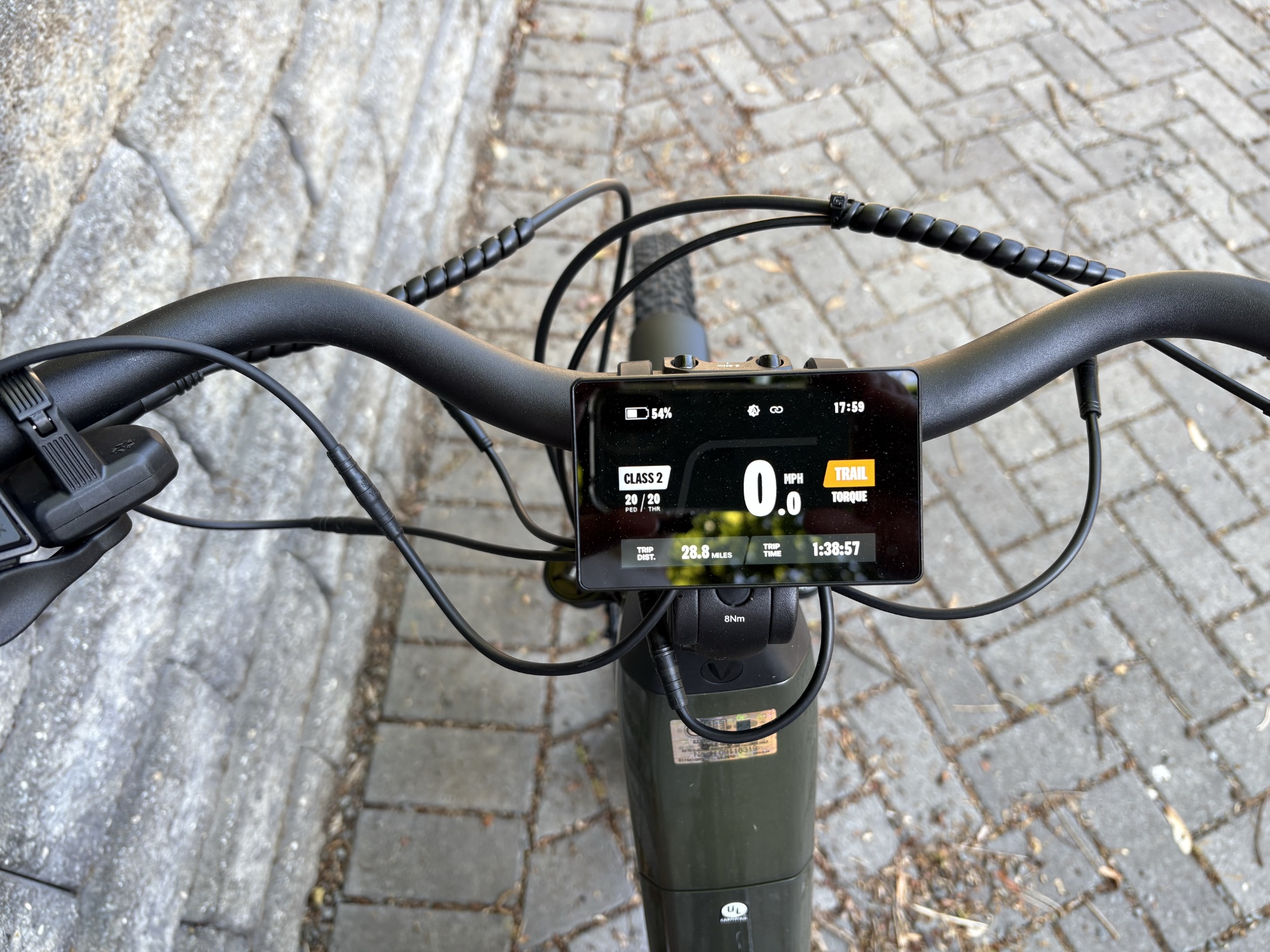
When it’s not nagging you to change gears, the display nicely balances information content and information overload.
Credit: John Timmer
When it’s not nagging you to change gears, the display nicely balances information content and information overload. Credit: John Timmer
One mildly annoying feature is that the bike uses input from the torque sensor and occasionally flashes a yellow warning on the display recommending when you should shift gears. This typically happened when I was pushing a high speed at high cadence—the bike would prompt me to shift into a higher gear and pedal more slowly with more force. I’m a better judge of my own cadence/power tradeoff than the software, so I found this less than helpful, and there doesn’t appear to be a way to shut it off.
Little to complain about
I’m not really the target audience for a commuter bike; if I had to commute, I’d rather do it on something that could also handle something like a bit of light trail riding. But it was hard not to be impressed with what Velotric has put together. The $2,000 price tag will obviously be a barrier for some people, but it isn’t a huge jump from models that are a significant step down in features and quality. And many commuter bikes that cost substantially more than the Discover 3 don’t add much to the riding experience, though they likely have higher-quality components.
Velotric itself has also been around long enough to iterate on several of its designs, lending some confidence that the company will be there to provide any service that’s needed in the future.
I see a couple of minor things that could be improved, but they are truly minor. So for the second time since I’ve started reviewing e-bikes, I’m giving one the official Ars seal of approval. If you’re in the market for a good commuter bike, the Discover 3 provides a fantastic balance of price and quality.
The Good
- Solid and comfortable commuter bike
- Very competitive price for the quality
- Great (and actually legal) system for managing the assist class
- New Shimano Cues components are a big step up from budget gear
The Bad
- Doesn’t have a front turn signal
- Throttle takes forever to get the bike up to 20 mph
- Gets annoying about telling you what gear you should be in
The Ugly
- There’s nothing ugly about it

John is Ars Technica's science editor. He has a Bachelor of Arts in Biochemistry from Columbia University, and a Ph.D. in Molecular and Cell Biology from the University of California, Berkeley. When physically separated from his keyboard, he tends to seek out a bicycle, or a scenic location for communing with his hiking boots.






 English (US) ·