
Pricing & plans
StrongVPN offers two subscription plans, monthly or annual. As with most VPN providers, the price drops the longer you’re willing to sign up for.
Currently, StrongVPN charges $11.99 for a monthly plan, or $47.69 for the annual plan, equivalent to $3.97 a month.
This puts StrongVPN's price up against providers such as Surfshark, CyberGhost and Private Internet Access, some of which are cheaper and offer more features for your money.
After your first year, the plan jumps to $89.99 (equivalent to $7.50 a month), so make sure you turn off auto-renewal, or mark that date on your calendar if you don’t want to pay the increased cost. Like most VPNs, there’s also a 30-day money-back guarantee, but only for the annual plan.
Server network, privacy & infrastructure
StrongVPN has quite a small server network compared to its competition. The website states it has 950 servers, covering 30 countries and 46 locations, which is not a lot compared to its competitors.
To compare, CyberGhost has 125 locations in 100 countries; Surfshark also covers 100 countries and 100+ locations. This information also hasn’t been updated on the StrongVPN website in years, so there’s no way to confirm if this is accurate.
The app comes with a kill switch to help protect you in case your VPN connection is interrupted, though this functionality is missing on the Android and macOS versions and only works on slower OpenVPN connections, not WireGuard.
While most kill switches only block your internet if the VPN fails, StrongVPN’s kill-switch implementation blocks all internet access unless you’re connected to the VPN.
While this means all your traffic's encrypted, it’s somewhat inconvenient given that there’s no split tunneling on Windows.
This means if you have an app or website that doesn’t work with the VPN, you can’t set it to ignore the VPN and use your regular connection; you’ll need to turn your VPN off every time you want to access that particular site or use that specific app.
StrongVPN is based in New York, USA; this isn’t the best jurisdiction choice for the privacy-sensitive internet user.
StrongVPN claims it doesn’t log any of your online traffic, but it does log your incoming IP and outgoing VPN IP address. There have also been no third-party audits to confirm exactly what information the company does and does not collect.
Streaming and torrenting
StrongVPN allows streaming and torrenting from all its locations, with no P2P specific locations to choose from, but it returned a mixed set of results when it came to reliably and consistently accessing streaming sites.
It was able to unblock Netflix, Disney+, and DAZN, and we could access local streaming services like the BBC iPlayer and Australia’s 9Now, but we were unable to stream any content from YouTube Premium and Amazon’s Prime Video regardless of what server or location we tried.
So if streaming is a major requirement, there are certainly better VPN providers out there.

Speed
StrongVPN's download speeds were poor, leaving it at the bottom of our performance charts.
Our tests returned speeds of around 128Mbps for OpenVPN and between 234-353Mbps for WireGuard, a poor showing compared to the 2005Mbps returned by Surfshark or the 2263Mbps from Windscribe, both of which cost around the same as StrongVPN.
These performance issues could be due to its use of older, less secure implementations of both OpenVPN and WireGuard, with other providers using faster and more secure versions of these protocols.
Support, accessibility & reviews
If you run into any issues with your StrongVPN app or connection, support is available through the support website, a chatbot, or by email.
There is also phone support, but this isn’t mentioned on the support site; you can only find this by logging into your StrongVPN account.
The support chatbot can't let you speak to a human; there’s no way to escalate a query, nor does it appear to use any sort of LLM in the background, struggling with anything but basic queries.
StrongVPN’s apps struggled with accessibility. Most screens didn’t clearly highlight the option you have selected, and some screens didn’t use common shortcuts correctly.
When on location lists, apps should support using the Up and Down keys to select a location, and the Enter key to select. If you press Enter on StrongVPN’s location list, it moves to the next location in the list, leaving you with no way to choose the location you need.
Apps, features & usability
StrongVPN has apps for Windows, macOS, Android, iOS, and Fire TV, plus a browser extension for Chrome. There’s also a manual setup guide for Linux users.
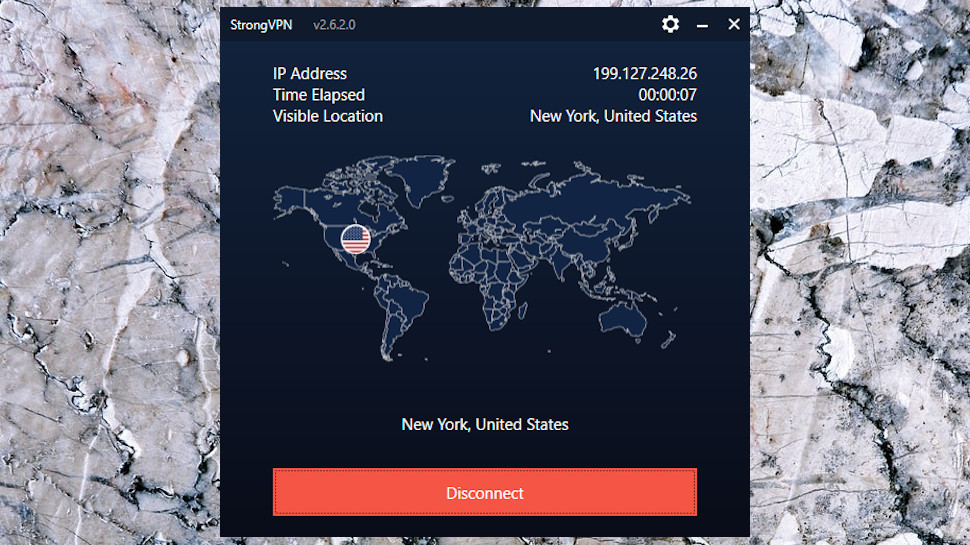
The apps are simple to the point of being basic. The Windows app has a small map that can’t be interacted with, connection status, the name of the current location, a Connect/ Disconnect button, and the familiar gear icon to open the Settings menu.
Locations are sorted alphabetically by country and if you’d prefer not to scroll through the list you can, type a few characters in the Search box and this will go directly to your preferred city.
However, there's no Favorites system or ‘Recently Used’ list to quickly access your most used locations, and there’s no latency information to help you pick the fastest server location.
The Windows app also sometimes took a long time to load during our testing, with delays at the login screen exceeding 30 seconds while the app was doing something in the background.
It didn’t happen every time, but often enough to be mentioned.
Windows users get a kill switch, and macOS users get a kill switch but only for OpenVPN. There’s no split-tunneling on Windows, only on Android. There is an auto-connect function which means the VPN will automatically connect if you use an untrusted network like a public Wi-Fi hotspot, but this works differently depending on the platform you’re on.
In terms of additional features, there's StrongDNS, StrongVPN’s private DNS servers, which can help you access sites and services that might otherwise be blocked in your location.
There’s also a free eSIM from aloSIM that gives you 3GB of mobile data, which can be useful if you travel overseas but that’s all that’s on offer. It’s a feature-light offering, focusing on the core VPN functionality.
StrongVPN barely mentions torrents on its website or support page, and there’s no P2P specific servers. Our testing confirmed we were able to download torrents without any issue while connected to StrongVPN.
Verdict
If you are looking for a straightforward, no-frills VPN service that provides connections that are fast enough for downloading, streaming, and gaming, then StrongVPN is a decent choice - but it comes with very little in the way of additional security and privacy features that we expect in the VPNs we recommend.
There are no multi-hop connections, alternative ID, or advert/tracker blocking. It’s up against strong competition in this low-to-medium price range, with companies like Windscribe, Surfshark, CyberGhost, and VyprVPN offering far faster connections and better features for roughly the same subscription cost and we would suggest these are a better choice.








 English (US) ·