
 3 weeks ago
35
3 weeks ago
35
Valve’s new $1,049 VR hardware tries to revive an abandoned VR “revolution.”
Hey, wheres all the wires and stuff that are supposed to connect to my computer? Credit: Kyle Orland
In the 2010s, Valve was at the forefront of a virtual reality revolution that looked to some like it would upend the gaming industry. The Valve of six to ten years ago seemed committed to being a major player in the world of PC-connected VR headsets, first through its “strategic partnership” with HTC on the impressive-for-the-time Vive headset (plus the SteamVR platform standard that powered it) and then years later with its own Index headset (and proof-of-concept adventure Half-Life: Alyx).
Then came the Meta (previously Oculus) Quest, a low-powered, low-cost headset that proved the vast majority of VR-curious gamers didn’t want to bother with being literally tethered to a bulky, expensive gaming PC. As the Quest line carved out a modest niche through the 2020s, Valve seemed more or less satisfied to let its earlier VR hardware and software ambitions wither on the vine.
Those years of Valve’s benign neglect of VR make the imminent release of the $1,059 Steam Frame—which starts taking reservations today—more than a little surprising. Now that virtual reality’s hype-fueled, revolutionary promises have decidedly not played out, Valve is somehow ready and willing to limp headfirst into the world of standalone VR headsets—today, in 2026. And after spending a week or so with Valve’s latest foray into gaming hardware, the Frame somehow feels simultaneously overengineered and underbaked, depending on how you look at it.
A new high-water mark in comfort
The Steam Frame makes a great first impression on your face. The entire setup weighs just 440 g (a bit under a pound), a roughly 15 percent weight reduction from the Meta Quest 3’s 515 g. That weight reduction inches us ever closer to the 250 g target that Meta’s former CTO John Carmack said he was once trying to achieve at the company.
If anything, that “all in” weight overstates how heavy the Steam Frame actually feels on your head, though. That’s because roughly half the weight is contained in a curved, cushioned, 21.6 Wh battery that tucks in behind your skull, attached to the back of a thick, stretchy headstrap. The remaining “core” lens-and-compute housing is noticeably less front-heavy than any other VR headset I’ve tried. Combined with the counterbalance of the battery in the back, the Steam Frame never feels like it’s pulling your head forward or threatening to fall down the bridge of your nose as many heavier, less balanced headsets can.
Yes, the “ski goggle” fit of that lens housing does still put a little pressure against your cheekbones and forehead, effectively trapping heat and sweat during more active VR experiences. But while we’re still a far way from “forget it’s there” territory, you’re much less likely to feel the Frame shifting uncomfortably on your face as you move your head around in VR. I had no trouble wearing the Steam Frame across hours-long sessions without the need for a comfort break.
The front eye cushion (and an included spacer) attach magnetically for easy removal and replacement. Kyle Orland
The only major downside of the Frame’s design is that the “battery bump” on the back of your skull can get in the way if you try to lean your head back against a headrest during seated play. Glasses-wearers should also be aware that the headset pushed noticeably against my thin corrective frames while I wore them inside the Frame, even with an included magnetic spacer. Hopefully, a third-party accessory maker will come up with a thicker spacer to help glasses-wearing Frame players out.
Plug vs. stream
On paper, the Steam Frame has all the specs you’d want from a modern virtual reality headset. The pancake optics display maxes out at 144 Hz and 2160 x 2160 resolution per eye, offering a relatively luxurious 110-degree field of view that limits the “tunnel vision” effect seen on earlier headsets. Outward-facing cameras provide “inside-out” tracking that doesn’t require setting up the bulky base stations needed for previous Steam VR devices while also letting you see a grainy image of the room around you without taking off the headset.
The somewhat awkwardly shaped Steam VR controllers of the Vive and Index have been replaced with new versions that mimic the look and feel of the Meta Quest standard to an almost ridiculous degree (with the addition of some added buttons and a d-pad on the Frame for good measure). The Frame even sports fancy extras like eye-tracking for effective foveated rendering in the center of your vision and an SD card slot for expanded storage (you can also splurge for a $1,299 Frame version that upgrades the internal storage from 256GB to 1TB).
Unfortunately, those good-on-paper specs start to run into literal in-your-face annoyances when you use the headset for a bit. For one, the unit’s self-contained head-tracking system isn’t quite as rock-solid as it should be, leading to noticeable juddering and image “ghosting” when you move your head quickly. It’s not as bad as the old camera-free, three-degree-of-freedom headsets, but it’s just annoying enough to be noticeable in many situations.
The Steam Frame’s limited battery life is a much bigger issue. The headset barely manages to crawl past an hour and a half on a full charge when playing most VR titles in the graphics-maximizing “Performance” mode. Much of that quick battery drain no doubt comes from the unit’s hefty internal fan, which tends toward blowing a constant stream of hot air up and away from your forehead and which causes a persistent audible whine when playing most VR games.
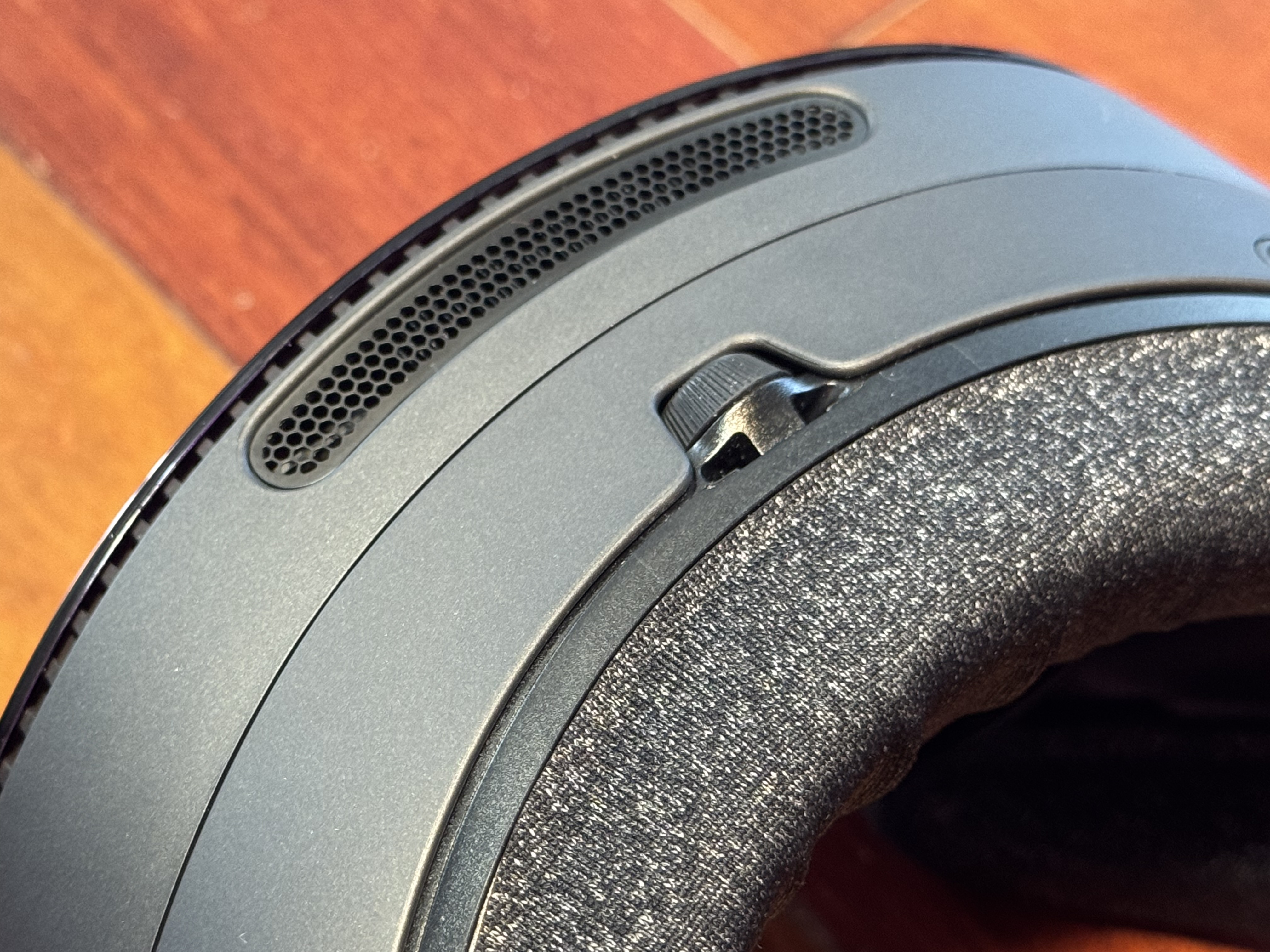
Close-up of the handy IPD-adjustment dial and the vent for the constantly blowing fan.
Close-up of the handy IPD-adjustment dial and the vent for the constantly blowing fan.
Switching over from “Performance” to “Playtime” in the SteamOS settings ameliorates the battery life issue somewhat, pushing the average unplugged play session well above two hours in our tests. But that extension comes at a significant cost to the unit’s graphical power, pushing down rendering resolutions and forcing a barely tolerable 72 Hz refresh rate in most cases. That leads to notably blurrier objects in the distance, clear “stair step” patterns along the edges of nearby objects, and much more jittery animations when you move your head quickly. “Playtime” mode is very hard to recommend over the relatively smooth and sharp graphics of “Performance” mode.
To max out both graphical performance and battery life, the best option for many Steam Frame owners will be wireless streaming of VR games running on a nearby PC with a full-fledged graphics card. The Steam Frame comes with a dedicated 6 GHz Wi-Fi USB dongle that works with your Wi-Fi setup to make wireless streaming as consistent and latency-free as possible.
As someone who has tried many in-home game streaming solutions in the past, I was skeptical that a wireless connection could be solid enough to maintain an immersive VR experience. But I was pleasantly surprised by the quality of the Steam Frame’s dongle-aided streaming. The wireless connection generally had five to ten milliseconds of ping according to SteamOS’s on-screen display, a reasonable price to pay for the frame rate and resolution bumps provided by a PC graphics card. The only real issue was setting up that connection, which sometimes required restarting the stream a number of times and/or fiddling with the SteamVR app loaded on my desktop.
Not the same old SteamOS
Unlike previous Steam VR headsets—which more or less served as “dumb” monitors for a Windows PC—the Steam Frame is essentially its own self-contained computer, so Valve has adapted its Linux-based SteamOS to run both in VR and on the Frame’s ARM-based hardware (as opposed to the AMD chips on the Steam Deck and Steam Machine).
That transition to a new platform and chip architecture has come with more than a few growing pains. Unlike on the Steam Deck, which could play almost every Steam game well when it first launched, many existing SteamVR games had trouble running natively on the Frame. That includes games that outright refused to launch (Doom VFR, I Expect You To Die 3), games that exhibited frequent extreme graphical glitches (Fruit Ninja, Valve’s own The Lab), and games that simply crashed the entire device suddenly, requiring a restart (six separate occurrences across various games during my test period).
Following the Steam Deck Verified program, Valve has crafted a list of “Great on Frame” games it says should run without issue on the headset. But that list thus far includes only a few dozen of the thousands of SteamVR games, yet it still lists at least one (I Expect You to Die 3) that I was unable to load on the Frame at all.
You may notice that “Great on Frame” list also includes a number of non-VR games you can play on a virtual flat screen when inside the Frame. But the relatively weak Qualcomm Snapdragon 8 Gen 3 processor in the Frame means the games are limited to relatively undemanding 2D titles or older 3D titles (Portal 2, anyone?) Even a game like Returnal, which can hit a “Playable” 30 fps on the aging Steam Deck, managed a paltry 9 fps in benchmarks on the Frame at 720p “Low” graphics settings.
Streaming these games from a Windows PC rather than relying on a Linux conversion layer on a low-powered headset once again ameliorates most of these problems. And the VR version of SteamOS should improve as Valve releases new updates over time. But I expected more from the company’s first attempt at virtual reality in the SteamOS era.
Late to the party
For most players, it’s hard to recommend the $1,049 Steam Frame over a $599 Meta Quest 3 (or even a $349 Quest 3S for the more budget-minded). Sure, Steam Frame owners will be able to point to the more comfortable lightweight design of their headset. The Frame’s dongle-powered wireless streaming stability is also a nice touch, though a decent Wi-Fi network lets you stream well from a SteamVR desktop to a Quest 3 headset these days.
Other than that, the core, moment-to-moment VR experience on the Steam Frame is much too similar to that of the years-old Quest 3 to justify spending hundreds of extra dollars on Valve’s late device. And the stability of Meta’s platform after years of iteration compares quite favorably to the early stumbles of SteamOS on a new hardware platform.
Steam Frame owners can at least revel in Half-Life: Alyx, which is included with every Frame purchase and is as close to a “killer app” exclusive as Valve has in the VR realm. Valve says squeezing the full Alyx experience onto the Frame “required over a year of extra software work within the Vulkan drivers and SteamVR,” as well as a lot of Alyx-focused software optimization and hardware-based foveated rendering. That work has paid off, as the “standalone” version of the game offers relatively few compromises when compared to its Windows cousin (which you can still stream to the Frame from a desktop for better graphical fidelity).

Half-Life: Alyx looks surprisingly decent on the low-powered Frame headset. Note: the blurred resolution on the edges is a result of the “foveated rendering” that heightens resolution where the player is looking.
Credit: Valve
Half-Life: Alyx looks surprisingly decent on the low-powered Frame headset. Note: the blurred resolution on the edges is a result of the “foveated rendering” that heightens resolution where the player is looking. Credit: Valve
As impressive as that technical achievement is, a “portable” version of a state-of-the-art VR game from over five years ago feels less impactful at a time when big-budget games from 2024 are getting Verified for Steam Deck (Assassin’s Creed Mirage won’t even load on the Steam Frame, for what it’s worth). Frame owners should also be aware that they could be missing out on some Quest-exclusive VR experiences that Meta has built up on its platform over the years.
For some, the biggest selling point for the Steam Frame will be the opportunity to use a capable standalone VR headset without giving money to Meta or signing in to a privacy–inconsiderate Meta account. Tinkerers will also likely appreciate the ability to load right into a Linux desktop from SteamOS rather than registering for a Meta “Developer Mode” account to get access to features like sideloading on the Quest.
For most VR-curious gamers, though, avoiding Meta’s platform lock-in isn’t worth the hundreds of extra dollars Valve is seeking for its unsubsidized VR hardware. If you already have a lot invested in Steam VR titles or want to finally see what Half-Life: Alyx is all about, the Steam Frame might be worth some consideration. Otherwise, it feels like Valve is a few years late and a few hundred dollars short here.

Kyle Orland has been the Senior Gaming Editor at Ars Technica since 2012, writing primarily about the business, tech, and culture behind video games. He has journalism and computer science degrees from University of Maryland. He once wrote a whole book about Minesweeper.








 English (US) ·