
Sage CRM is a dependable customer relationship management solution designed for small and medium-sized businesses. Its key features include contact and communications management, sales force automation, marketing automation, and customer service tools.
Looking into Sage CRM, I found it to be a well-rounded CRM platform with a solid set of features to help businesses streamline their sales, marketing, and customer service processes. The interface is user-friendly and customizable, making it easy to tailor the system to your company's specific needs.
However, a potential drawback is that it lacks the number of advanced integrations boasted by competitors like Salesforce or HubSpot. However, Sage CRM's reliability and scalability make it a strong contender for SMBs looking to better manage customer interactions and drive business growth.
Sage CRM core capabilities
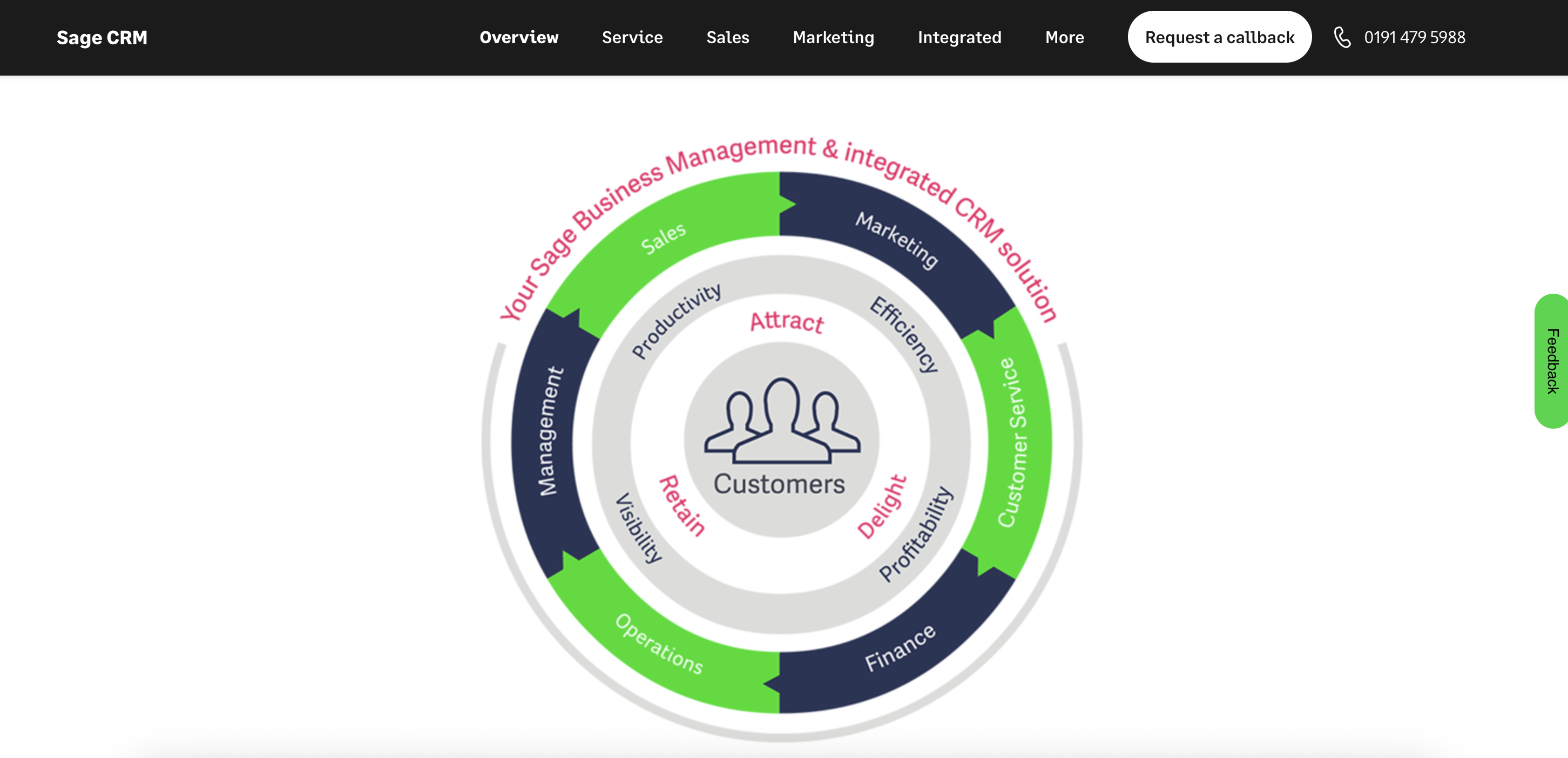
Sage CRM has a lot going for it when it comes to essential CRM capabilities. I've been impressed by how it covers the full gamut of what you'd expect in a modern customer relationship management system.
To start, Sage CRM provides robust contact management, allowing you to track and manage every interaction with prospects and customers across your entire business. The sales force automation features are designed to accelerate your sales processes, providing tools to generate leads, manage opportunities, and close deals more efficiently.
Then there’s the targeted marketing functionality. Sage CRM gives you the ability to easily plan, execute, and evaluate your marketing programs. You can segment your audience, personalize your messaging, and measure the ROI of your campaigns — all from within the CRM.
Of course, CRMs aren’t complete without strong customer service capabilities. Sage CRM aims to help you exceed customer expectations with tools for case management, service level tracking, and a searchable knowledge base. I particularly like the customer self-service portal, which empowers customers to find answers and log requests on their own.
Sage has also kept up with the times by incorporating social capabilities and mobile access. You can engage with customers on social media channels and access the platform from any device.
Another big plus in my book is the tight integration Sage CRM offers with various Sage accounting packages like Sage 100 and Sage 300. Connecting your front and back office data can provide powerful insights to drive your business forward.
Reporting and analytics are also key strengths. Sage CRM includes interactive dashboards and customizable reports to help you forecast sales, monitor key metrics, and gain visibility into team performance. You can slice and dice data to your heart's content.
Lastly, I'm a big fan of the customizable workflows and process automation in Sage CRM. You can easily optimize and standardize processes across sales, marketing, and service to maximize productivity. And the Outlook integration is top-notch for seamless email communications.
All in all, Sage stacks up very well in terms of its breadth and depth of core CRM functionality. While every business has unique needs, Sage covers all the critical bases you'd want in a CRM platform. It's well worth considering for any small to mid-market company looking to take their customer management to the next level.
How easy is Sage CRM to use?
Intuitive interface design, extensive training resources, and straightforward customization are a few key factors that make this platform so easy to use, especially for new users just getting started with a CRM.
Right off the bat, I found the Sage CRM dashboard quite clean and simple to navigate. The layout feels logical, with clearly labeled tabs for jumping between different functional areas. Moving between records can be a bit clunky at times, but overall, the interface gets the job done without overwhelming the user.
Another area where Sage really shines is the wealth of onboarding and training materials they provide through Sage University. When you're new to the platform, having readily available guides, tutorials, and templates to learn from makes a huge difference. Sage has put effort into creating resources to flatten the learning curve.
Sage CRM also offers a good deal of flexibility to tailor the software to your needs. I was impressed with the ability to completely customize important details like quote templates and pricing sources. Mapping out activities in the calendar and setting up workflows also proved fairly intuitive. You don't need to be an IT whiz to mold Sage CRM to your business.
In terms of becoming proficient, I'd estimate most users with a bit of CRM experience could get up and running within a week or two. Those starting from scratch might need closer to a month to feel fully comfortable. But with solid customer support and those extensive training materials, Sage puts in the legwork to make their CRM as approachable as possible.
Ease of use is definitely one of Sage CRM's strong suits. The thoughtful interface, customization options, and educational resources combine to make this a platform that won't leave new users scratching their heads or tearing their hair out. While not without some minor quirks, Sage CRM does a commendable job catering to users of all skill levels.
Integrations
Generally speaking, Sage CRM has strong integration capabilities. The platform offers a variety of ways to connect with other applications and systems.
For starters, Sage has a number of pre-built integrations and connectors available, which makes it easy to quickly link up with popular business apps like Mailchimp, QuickBooks, and more. While not as expansive as competitors like Salesforce or Zendesk, it’s still pretty good.
If you need a more custom integration, Sage CRM also has good support for iPaaS vendors. It integrates seamlessly with automation tools like Zapier and Make. This allows you to create your own integrations and automated workflows without needing to code.
Under the hood, Sage CRM provides a powerful set of REST and SOAP APIs. These give developers the ability to build deep, custom integrations with external databases and systems. While researching, I found some users reporting that the REST API responses can be a bit slow at times. So the performance may not be best-in-class, but overall, the APIs seem reliable and full-featured.
The platform also has some helpful features to make integrating data easier, like the ability to directly connect to and model external database tables. Users say the data synchronization is generally smooth.
All in all, I'm quite impressed with Sage CRM from an integration standpoint. Between the pre-built connectors, iPaaS support, open APIs, and data syncing capabilities, the platform checks all the key boxes. And it seems to mostly deliver on the ease-of-use front as well. You may run into some performance limitations with more complex integrations, but for most needs, Sage CRM looks to be a strong integration option.
How good is Sage CRM customer support?
When it comes to customer support, Sage CRM offers a solid range of options for users to get help when they need it. The company provides live support via phone and email during standard business hours, which are 8 am-5 pm GMT+2 Monday through Thursday, and 8 am-4 pm on Fridays. So while 24/7 support is not available, the hours are reasonable and cover the prime working hours for most customers.
In terms of responsiveness, I found that customers generally expect an email reply within 24 hours from support teams. While I couldn't locate Sage CRM's specific first response time metrics, user reviews suggest that the support is prompt and helpful overall. Many customers complimented how easy the software is to learn and use, even for employees with no prior experience with CRMs, which likely cuts down on the volume of support requests.
For those who prefer to find answers on their own, Sage also offers a good set of self-service resources. These include an online knowledge base and help center with how-to articles and guides, video tutorials, a user community forum, and product documentation. Having all of this information readily available enables customers to troubleshoot issues and learn the software at their own pace.
The quality of support seems to be a highlight for many Sage CRM users based on the testimonials and reviews I analyzed. Customers frequently praise the support team for being responsive, knowledgeable, and able to resolve issues quickly. Some reviewers noted that the initial setup and configuration were made easier with the help of support. There were a few complaints about long hold times or unresolved problems.
My overall assessment is that Sage CRM delivers an effective and well-rounded customer support experience. While round-the-clock live support is lacking, they make up for it with strong documentation, an active user community, and support reps that are consistently described as helpful and efficient by customers. The self-service options are robust, and the positive sentiment regarding support quality is reassuring for businesses evaluating the platform. Sage CRM's support may not be flawless, but it appears to meet or exceed most customers' expectations.
Sage CRM pricing and plans
Swipe to scroll horizontally
Price | $45/user/month | Lifetime license with custom pricing |
Best For | Small to medium businesses seeking a cloud-based solution | Businesses preferring an on-premise CRM with one-time licensing |
Features | • Customizable modules • Integration with Sage ERP • Mobile access | • Perpetual licensing • Greater control over data • Extensive customization |
Limitations | Requires internet connection for use | Higher upfront costs, IT infrastructure needed |
Sage CRM offers two deployment options with different pricing models. For the cloud version, Sage charges $45 per user per month. This is a simple, transparent subscription model that allows you to scale up or down as needed.
For the on-premise version, you'll need to contact Sage directly for a custom quote based on your specific requirements. Factors like the number of users, add-on features, and contract length can all impact the final price.
One thing I like is that Sage CRM includes a free trial for its cloud version, so you can take the software for a test drive before committing to a paid plan. This lets you ensure it has all the features and capabilities your business needs.
However, I couldn't find any information on the length of the trial period, so that's something you may want to clarify with the sales team. Additional costs for onboarding, customization, integrations, or support when choosing Sage’s on-premise option are also not clearly listed, from what I could see.
Overall, while the cloud pricing is straightforward, Sage could be more transparent about the full costs involved, especially for the self-hosted version. You'll likely need to go through the sales process to get a complete picture of the investment required, both upfront and ongoing.
For smaller businesses, that $45/user/month starting price is on the higher end compared to some entry-level CRM plans. But for larger teams that need the advanced features Sage CRM offers, it may prove to be a worthwhile value. As with any substantial software purchase, I recommend doing a thorough ROI analysis based on your company's unique situation and goals.
Sage CRM review: Final verdict
Exploring Sage CRM for this review, I found it to be a robust and well-rounded CRM platform that covers all the key bases a small to mid-sized business would need. The thoughtfully designed interface, customization options, and extensive training resources make it approachable for users of all skill levels.
Sage particularly shines when it comes to core CRM functionality like contact management, sales automation, targeted marketing campaigns, and customer service. I was impressed by the ability to track every customer interaction, accelerate the sales process, personalize marketing messaging, and deliver top-notch service through tools like a self-service portal and knowledge base.
With a host of pre-built connectors, iPaaS support, open APIs, and data syncing features, the platform is well-equipped to connect with all the other critical apps and systems a business relies on. While pre-built connectors are a bit limited, Sage CRM offers plenty of other options from an integration standpoint.
While the pricing isn't the most transparent, especially for the on-premise deployment, the overall feature set and usability likely justify the cost for many organizations. And the free trial provides a nice opportunity to validate that before diving in.
I believe Sage CRM is best suited for small to medium-sized companies that want a full-featured and customizable CRM platform they can grow with over time. Companies that have outgrown basic contact management tools but aren't ready for the complexity of an enterprise CRM will likely find Sage CRM to be a happy medium that meets their needs quite well.






 English (US) ·