


Published Mar 6, 2026, 1:00 PM EST
Carrie is a Senior Writer at ScreenRant who previously managed Geek to Geek Media and wrote for SwitchRPG. She is particularly knowledgeable when it comes to WoW, Diablo, and cozy games. She has a passion for supporting the indies and always enjoys sharing her passions with others through her writing.
For many of us, decorating our islands in Pokémon Pokopia is one of the joys of the game. With so many items and a plethora of open space across all the biomes, it can feel like a wonderful canvas to play around in. Being able to further customize all these items, houses, and more in whatever color you choose can make this game mechanic even more fun and unlock creativity and freedom of expression for players.
The open-world life simulation game, Pokémon Pokopia, already offers players so much through being able to build structures, terraform the world, and craft countless items. Working with our little pocket monster friends to fashion this ruined land into something beautiful can easily entertain many of us for hundreds of hours. And customizing things makes that even better.
Smearguru Holds All The Knowledge Of Paint
Customize Your Pokopia Worlds With Color

In a private little hut in Bleak Beach you will find the artist Pokémon, Smearguru, slaving away on a never-ending painting. It may take a little time before Smearguru gives you the quest which will then lead you down the road to customizing enlightenment. For me, the quest did not trigger until after I had beaten the main storyline. However, I suspect that is mainly due to my not looking.
Smearguru will ask you to bring a crushed Leppa Berry. Leppa Berries are plentiful in the world, obtained by headbutting trees with them growing on them. From there, you just need to get it crushed.
How To Make Dye And Paint Balloons
Pokémon With The Crush Specialty Can Make Dyes
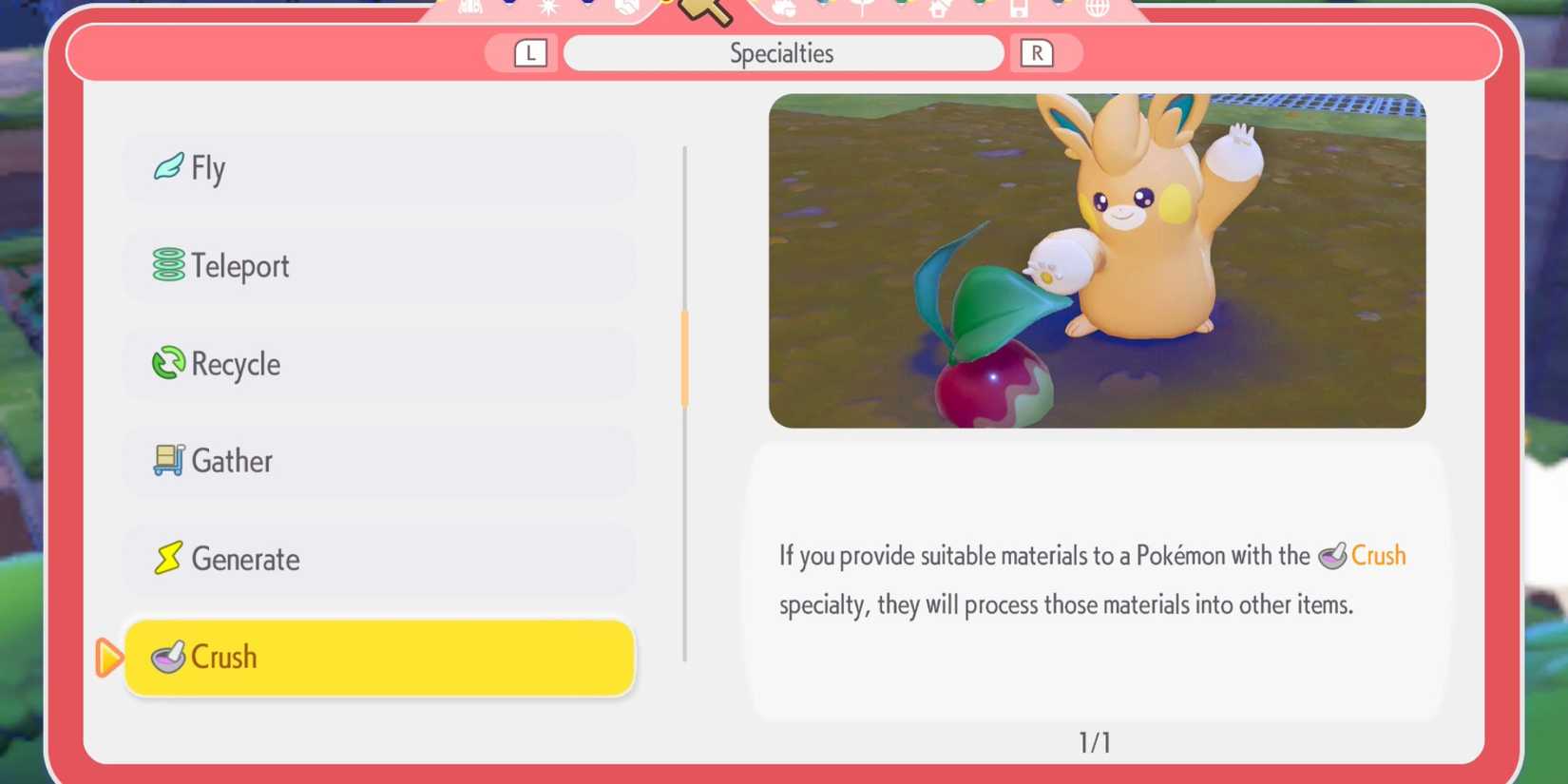
As you will have noticed by now, many of the Pokémon in Pokopia have special talents that can help you in your gameplay. For this, you need a Pokémon with the Crush specialty. In your Pokédex, run a search with the Crush keyword to quickly pull up who can do this job for you. Onix and Pawmi are two good ones to find.
Leppa Berries aren't the only things that can be crushed, and whatever you give them will create different colored dyes based on what you've handed over.

After bringing Smearguru the dye, they will give you the recipe to create Paint Balloons. These come in numerous colors, and can also provide you with a hint about what kinds of colors you should be looking for in berries and other things to have crushed.
Painting Items Is As Easy As Throwing A Balloon
But Only Certain Items Can Be Colored

There are two easy tips on how to paint in Pokémon Pokopia. If you take Smearguru with you as a follower, they can help paint buildings and items for you. Otherwise, you can use the Paint Balloons to color things yourself. After crafting a Paint Balloon, simply stand in front of or select whatever you would like to color, and "Use" the balloon on it.
This will then change its color, as long as it is something that is able to customize. Even with all the freedom of expression that the game gives us, sadly there are some items that are unable to be colored. In the crafting menu, you can see if an item can be altered by whether it has a small image of a paintbrush in the top right or not.
Now, go forth and make your worlds in Pokémon Pokopia as bright and colorful as you wish!
Released March 5, 2026
ESRB Everyone / Users Interact, In-Game Purchases
Developer(s) Koei Tecmo, Game Freak
Publisher(s) Nintendo, The Pokemon Company
Multiplayer Online Multiplayer





:quality(85):upscale()/2026/02/02/940/n/1922153/tmp_2bS324_5518251436641b44_Photo_Grid_3_Up_-_Burgundy_Green-2-Photo_Grid_4up_Main_-_Green_Burgundy_1_.jpeg)
 English (US) ·