
Mobicip is positioned as one of the best parental control app for busy parents who want to restrict the impact of Big Tech on their children’s lives.
The company claims that “more than 2 million parents” love its app, and that it can protect kids from social media, apps, websites and excessive screen time. And it's also got Family Voice and Mom’s Choice Awards, which prove its mettle.
We put Mobicip to the test to see whether it lives up to the hype and expectations. In this article, we discuss its pricing, features, interface, and overall user experience. We also compare it with other parental control software available to see where it stands in a crowded market.
Latest Videos From

Mobicip: Plans and pricing
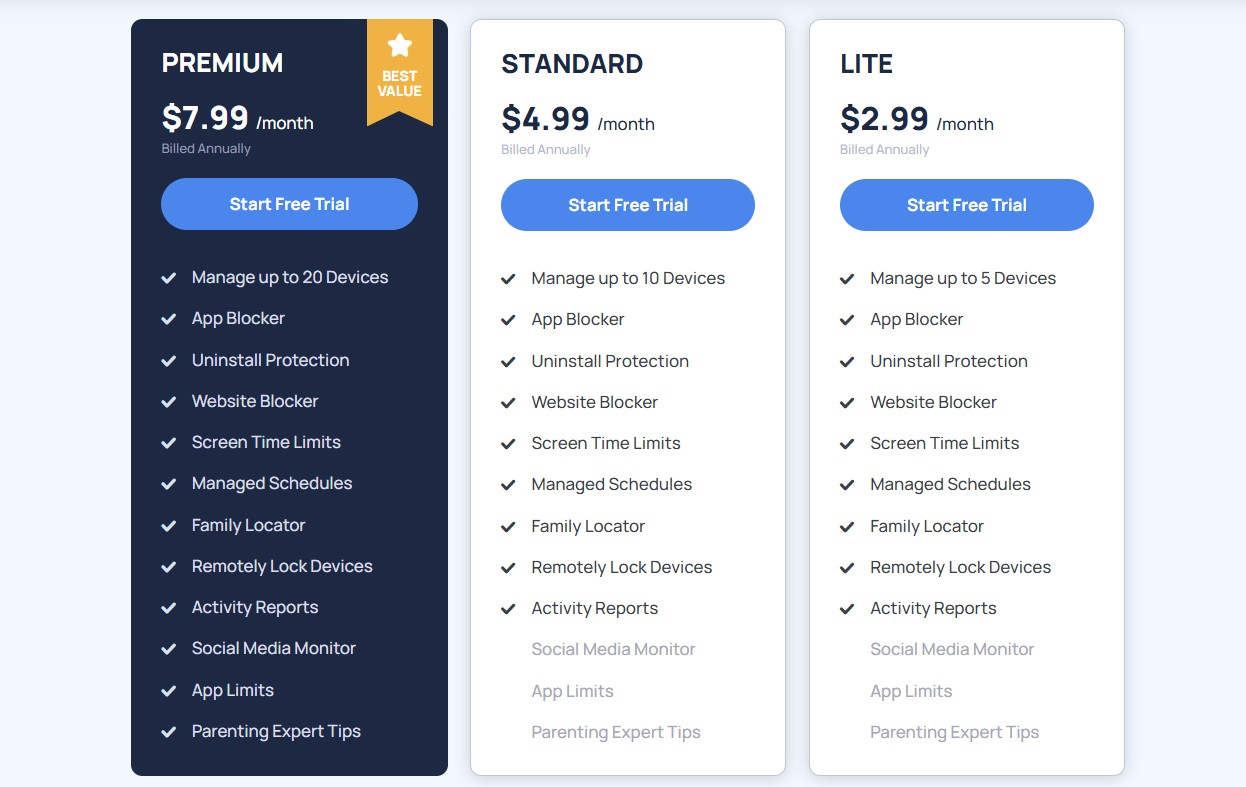
Mobicip’s pricing structure has its highs and lows. The biggest advantage is its affordable entry-level plan (Lite), which costs just $2.99 per month and allows you to manage up to five devices. It includes almost all the parental control features you’d need, such as screen time limits, website blocking, and detailed activity reports.
However, this plan lacks social media monitoring and app timers, both of which are key features of parental control applications. The Standard plan costs $4.99 per month and allows you to manage up to 10 devices, but it does not offer any additional features.
If you need social media monitoring and app limits, you’ll need Mobicip’s Premium plan, which costs $7.99 per month, or around $96 per year. This plan includes protection for up to 20 devices and every feature that Mobicip offers. And if you need to monitor more than 20 devices, you can request a custom quote from Mobicip’s sales team by filling out an online form.
Qustodio, meanwhile, costs $9.16 per month if billed annually and that includes support for unlimited devices, and Norton Family is even cheaper ($49.99 for the entire year). Bark is more expensive, though, but does go further than almost anything else when it comes to social media monitoring.
Overall, Mobicip is on the affordable end of the spectrum when it comes to parental control applications. Its Premium package is still the best value by some way thanks to its features. And, pleasingly, there’s a 7-day free trial and 30-day money-back guarantee.
Mobicip: Features
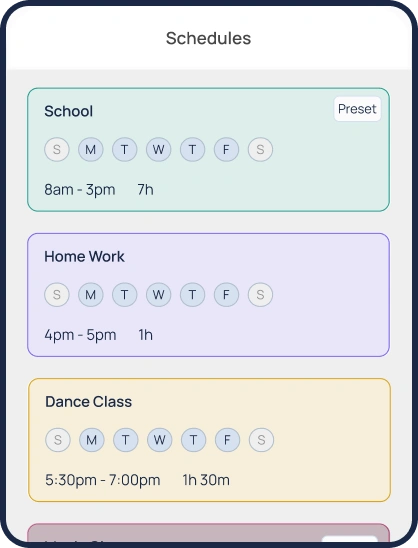
Mobicip’s screen time scheduling is immediately impressive. Parents can create specific schedules for homework, sleeping or school time.
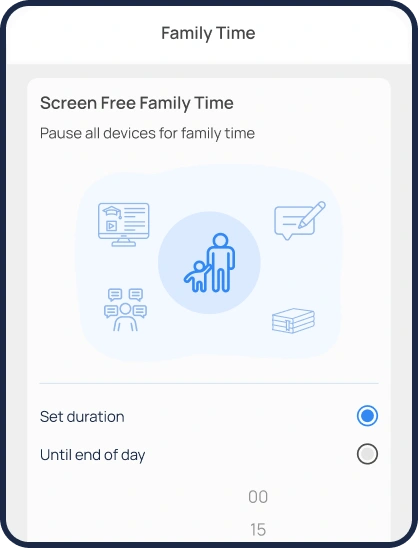
Daily screen time limits are available and, in an innovative twist on screen time features, parents can call for “family time” by locking all managed devices instantly – perfect for grabbing people’s attention.
You can create an unlimited number of custom filters, build schedules with five-minute increments, and allow or restrict apps or websites based on categories, too. There’s also a Vacation Mode feature that parents can deploy to allow more leniency.
This is comfortably one of the best scheduling tools on the market thanks to its great set of features – the only thing missing is the ability to set time limits for individual apps.
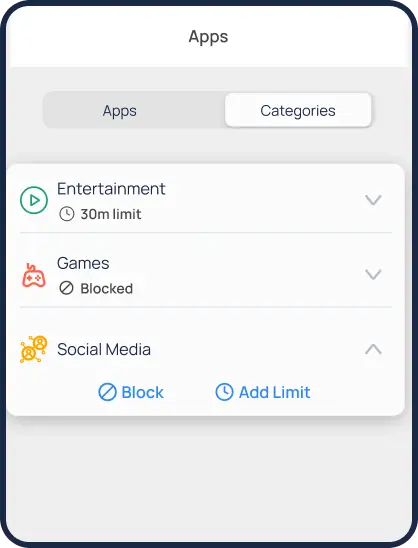
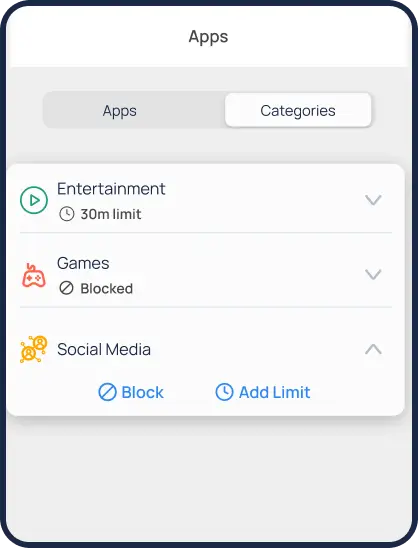
If you want to ensure that phones don’t capture attention, Mobicip allows parents to limit time spent on apps that hit certain categories, like social media or games, and particular apps can also be blocked entirely – while others can be put on a safe list.
Mobicip’s web filtering comes with 20 different categories of inappropriate content alongside the ability to block adult content, block specific words and block specific websites. Parents can also use a “whitelist-only” mode that allows children to only browse a list of pre-approved sites.
GPS functionality extends to a family locator tool, location sharing and geofencing – an ideal slate of location-specific options, even if Mobicip doesn’t have the innovative driving abilities found in some rival tools.
Its geofencing includes a 1,000m radius, which is more generous than many other apps – even if Norton is wider still. However, Mobicip doesn't offer live driving tracking or driving statistics, which are features available with providers like Net Nanny.
When it comes to reporting, parents can access a slick dashboard that provides browsing histories, location histories, your children’s access requests and a graphical representation of screen time usage displaying the categories of content your kids use the most – like social media apps, games or browsers.
Children also have access to a dashboard where they can request more screen time or ask to access blocked apps. And if you want multiple people to be able to manage the app, parents can add trusted guardians or contacts using a straightforward and secure invitation system.
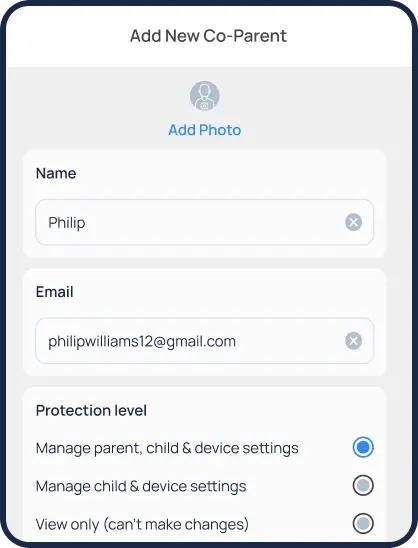
We found this to be a unique feature that is not offered by many parental control apps and is especially useful for families with grandparents or co-parenting households.
Elsewhere, Mobicip monitors Facebook and Snapchat for harmful content, but that’s it for social media monitoring – a poor showing compared to most rivals and, notably, Bark.
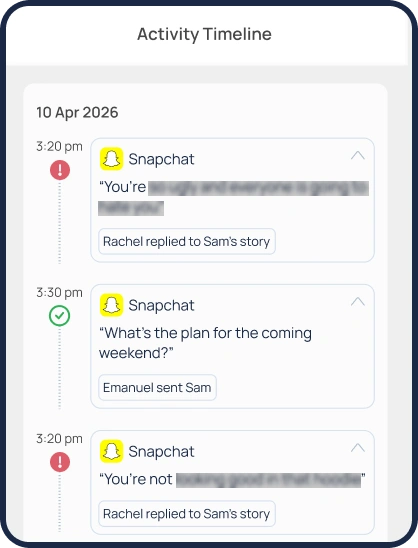
Bark monitors more than 30 platforms, including TikTok, YouTube, Discord, Reddit, and WhatsApp, all of which Mobicip misses out on. Additionally, these apps can only be monitored on Android devices and still lack iOS support, which is a bit of a letdown.
You can’t set time limits for individual apps on Mobicip, only categories of apps, and Mobicip doesn’t monitor text messages or calls.
Mobicip: Interface and in-use
It’s very easy to get started with Mobicip: download the app, allow permissions, and off you go. And, impressively, Mobicip works across loads of platforms, from Android and iOS to Windows, macOS, Chromebook and even Kindle.
One thing we liked about Mobicip is that it preconfigures many settings and filters based on your child’s age when you set up their profile. This is particularly useful for busy parents who don’t want to spend hours configuring everything from scratch.
In-depth guides make setup and configuration even easier, and parents can duplicate settings across multiple child devices – ideal for families with more than one child.
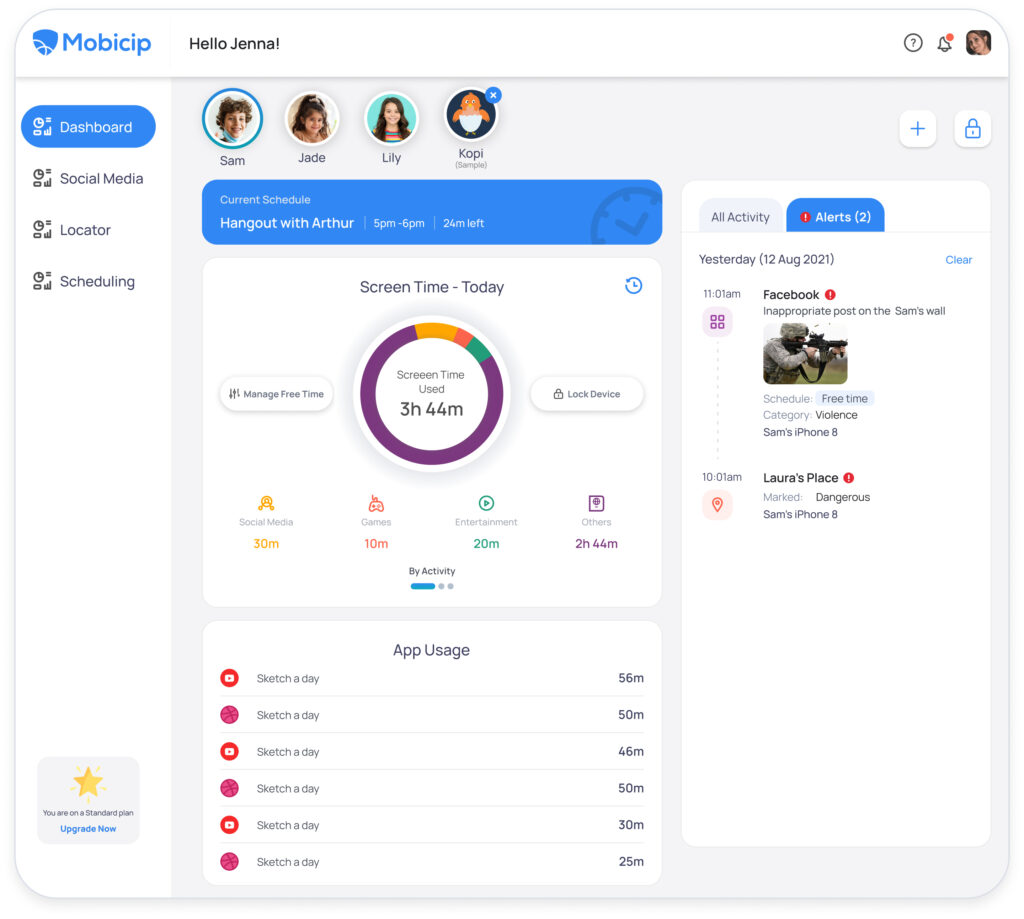
Mobicip’s web interfaces and apps are clean, intuitive and easy to use, too: for kids, it’s easy to check their screen time allowances and schedules. For parents, it’s simple to find every setting required and to access activity reports and analytics.
Mobicip: Support
This is another area where Mobicip goes above and beyond many rivals. As well as submitting a support ticket, parents can schedule a call with Mobicip’s customer service teams – ideal if you want to speak to a human.
An AI-powered chatbot provides answers to simpler questions, and there are loads of guides with useful imagery on Mobicip’s website. It’s a good support option, with callbacks available alongside more conventional email support and loads of comprehensive articles.
Mobicip: The competition
Mobicip is a strong contender when it comes to parental control, but it still has rivals that are better in some areas.
For instance, Norton Family costs $49.99 per year, which is cheaper than Mobicip’s Standard plan. It offers comprehensive social media monitoring across platforms such as Facebook, Instagram, Twitter, LinkedIn, TikTok, Snapchat, and YouTube. Mobicip, on the other hand, can monitor only Facebook, Instagram, and Snapchat.
Additionally, Bark is a much better option for social media monitoring, covering more than 30 applications. That said, Bark is a more expensive option, costing around $14 per month for its full feature set.
Then there’s Qustodio, which is only slightly more expensive than Mobicip, with an effective monthly cost of $9.16. However, this plan allows you to add unlimited devices and monitor your child’s calls and messages – something that Mobicip cannot do.
Mobicip: Final verdict
Mobicip impresses in loads of departments. Its filtering is effective, and its screen time and scheduling options are among the best you’ll find anywhere. Its location-tracking features are strong, too, and this app is attractive and easy to use for parents and children.
Customer support is excellent, its activity reporting is comprehensive, and it does some innovative things with scheduling and screen time that some rivals simply don’t offer – like its Vacation Mode or Family Time settings.
You get all of these features at fairly affordable prices, starting at just $2.99 per month with Mobicip’s Lite plan. If you want to unlock the full range of features, you’ll need to spend around $7.99 per month, which is comparable to other social media monitoring applications.
However, Mobicip’s biggest drawback is its lack of message and call monitoring, along with its limited social media monitoring capabilities. If those features are important to you, you may need to look elsewhere and consider alternatives such as Bark or Qustodio.
- We've also featured the best free parental control software






 English (US) ·