

Microsoft has announced plans to disable Outlook Web Access (OWA) Light, the lightweight version of the Outlook Web App email client, in a future Exchange Server update.
"OWA Light was an important compatibility experience when the web needed it. Today, the full Outlook on the web experience is the right place for us to focus," the Exchange Team said on Wednesday.
"Retiring OWA Light will help reduce legacy surface area, simplify ongoing engineering work, and allow us to continue improving the experience customers use every day."

Microsoft introduced OWA Light roughly two decades ago as an alternative to OWA Premium, offering a simplified web interface for systems that didn't have Internet Explorer 6 or later installed or ran older web browsers.
At the time, the company said that OWA Light offered a cleaner look, faster logon times on low-bandwidth Internet connections, and worked in locked-down browser modes (such as kiosks).
However, OWA Light has a limited set of features compared to the standard version (which offers full functionality), including the lack of weekly or monthly calendar views, access to shared mailboxes or shared calendars, the ability to import or export messages or contacts, and the ability to create or modify tasks or notes.
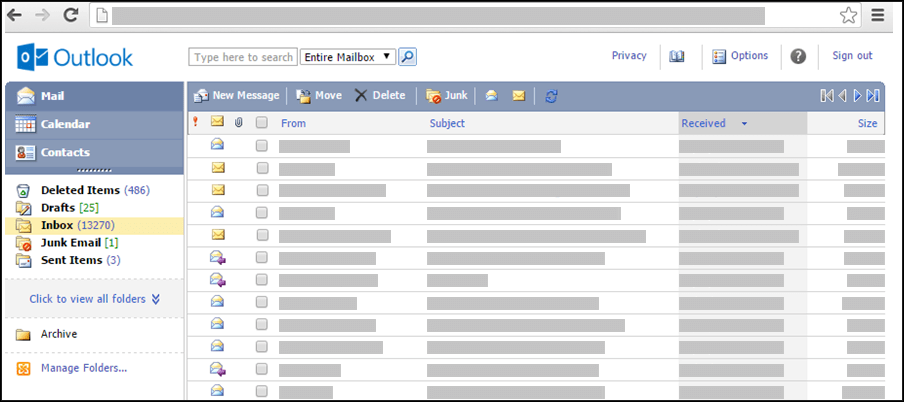 OWA Light inbox (Microsoft)
Microsoft deprecated OWA Light as of August 19, 2024, and announced this week that the OWA Light experience will likely be removed from Exchange Server (on-premises) next month.
"The web has changed significantly since OWA Light was introduced. Modern browsers are more capable and more consistent, network conditions have improved for many customers, and security landscape has changed significantly," Microsoft added.
"In an upcoming Exchange Server update (estimated in August 2026), we plan to disable and remove the OWA Light experience. After that change is introduced, users will no longer be able to choose or be redirected to OWA Light and should use the modern Outlook on the web experience instead."
Admins can also block OWA Light right away using the "Set-OwaMailboxPolicy -OwaLightEnabled $false" command and disable the OWA Light selection menu on the logon page by running "Set-OwaVirtualDirectory -LogonPageLightSelectionEnabled $false".
Microsoft provides further information on how to disable or block OWA Light in the Set-OwaMailboxPolicy and Set-OwaVirtualDirectory documentation.

Test every layer before attackers do
Security teams log 54% of successful attacks and alert on just 14%. The rest move through your environment unseen.
The Picus whitepaper shows how breach and attack simulation tests your SIEM and EDR rules so threats stop slipping by detection.







 English (US) ·