

Microsoft has started testing a faster File Explorer and a less cluttered and more customizable context menu in Windows 11 preview builds rolling out to Insiders this week.
As the File Explorer team explained in a Monday blog post, the changes focus on improving File Explorer speed, performance, and reliability and addressing customer-reported issues.
The redesigned context menu experience also aims to make it faster, reduce clutter, and make it more customizable than ever before.

At the bottom of the new right-click menu, Microsoft also added a "Customize menu" shortcut to the Settings page, where users can tweak the context menu to suit their preferences.
"We've continued refining File Explorer based on that feedback, removing friction and improving the details that help make everyday tasks feel more natural and predictable. For example, file renames no longer get interrupted by background file synchronization, and case-only filename changes now appear immediately," Microsoft said.
"Today, we're [also] excited to announce an updated context menu that delivers a faster, simpler, and more customizable experience. The new design reduces top-level clutter, keeps commonly used actions easy to access, and introduces a new Settings experience that gives you more control over what appears in the menu."
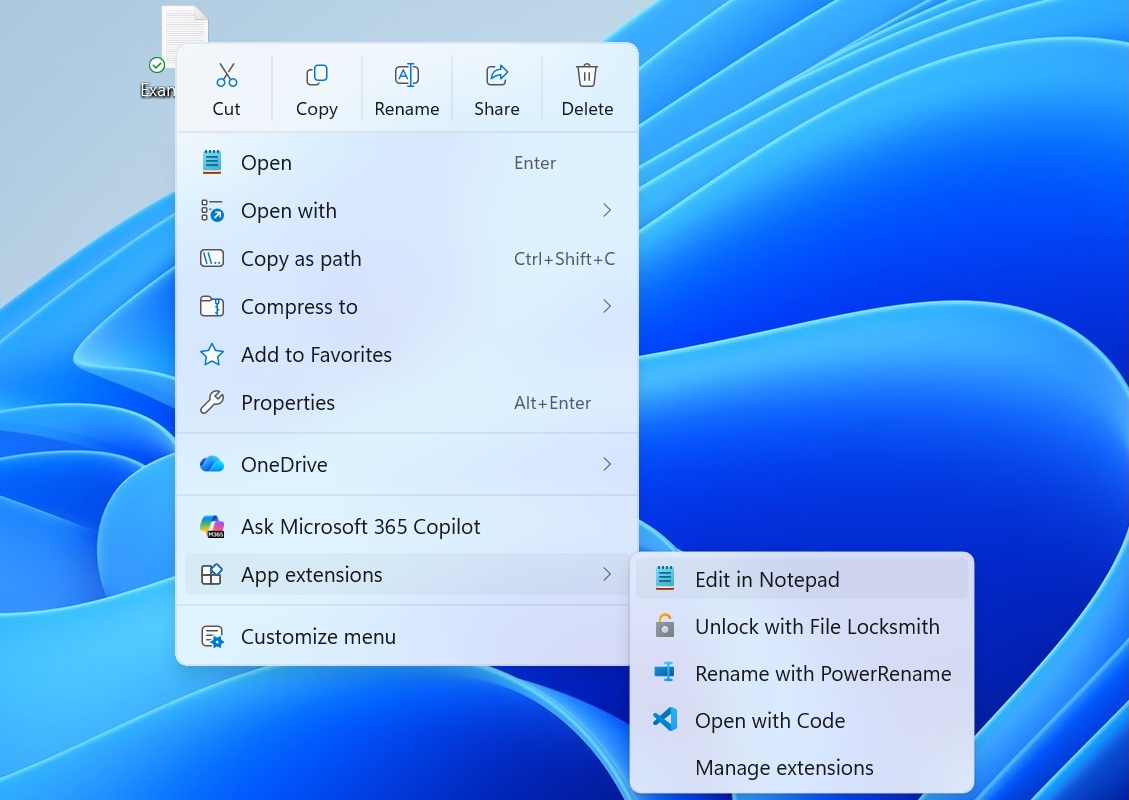 New Windows 11 context menu (Microsoft)
These changes follow a broader effort to improve Windows Explorer speed and performance for Windows 11 users, with the most recent changes including another set of File Explorer improvements that rolled out in April.
Microsoft also began testing a feature in November designed to preload File Explorer in the background to improve launch times and performance.
However, that was optional, allowing users who wanted to disable preloading to uncheck "Enable window preloading for faster launch times" in File Explorer's Folder Options under the View tab.
These File Explorer changes follow the May 2025 rollout of Startup Boost, a similar optional feature for Microsoft Office apps that launches a Windows scheduled task in the background during system logon to help launch Office apps faster.
On Monday, Microsoft also announced that it is removing the Windows Management Instrumentation Command-line (WMIC) tool, a known LOLBIN (living-off-the-land binary) abused by cybercriminals, starting with Windows 11 24H2 and 25H2, as well as the Windows 11 beta builds released this week.

Once attackers have valid credentials, only 37% of their actions are blocked
Overall prevention scores can hide what happens after initial access. Once attackers are using valid credentials, prevention drops sharply.
The Blue Report 2026 measures defenses technique by technique across 338 million simulations run in customer production environments.





 English (US) ·