
Keychron M6 8K review
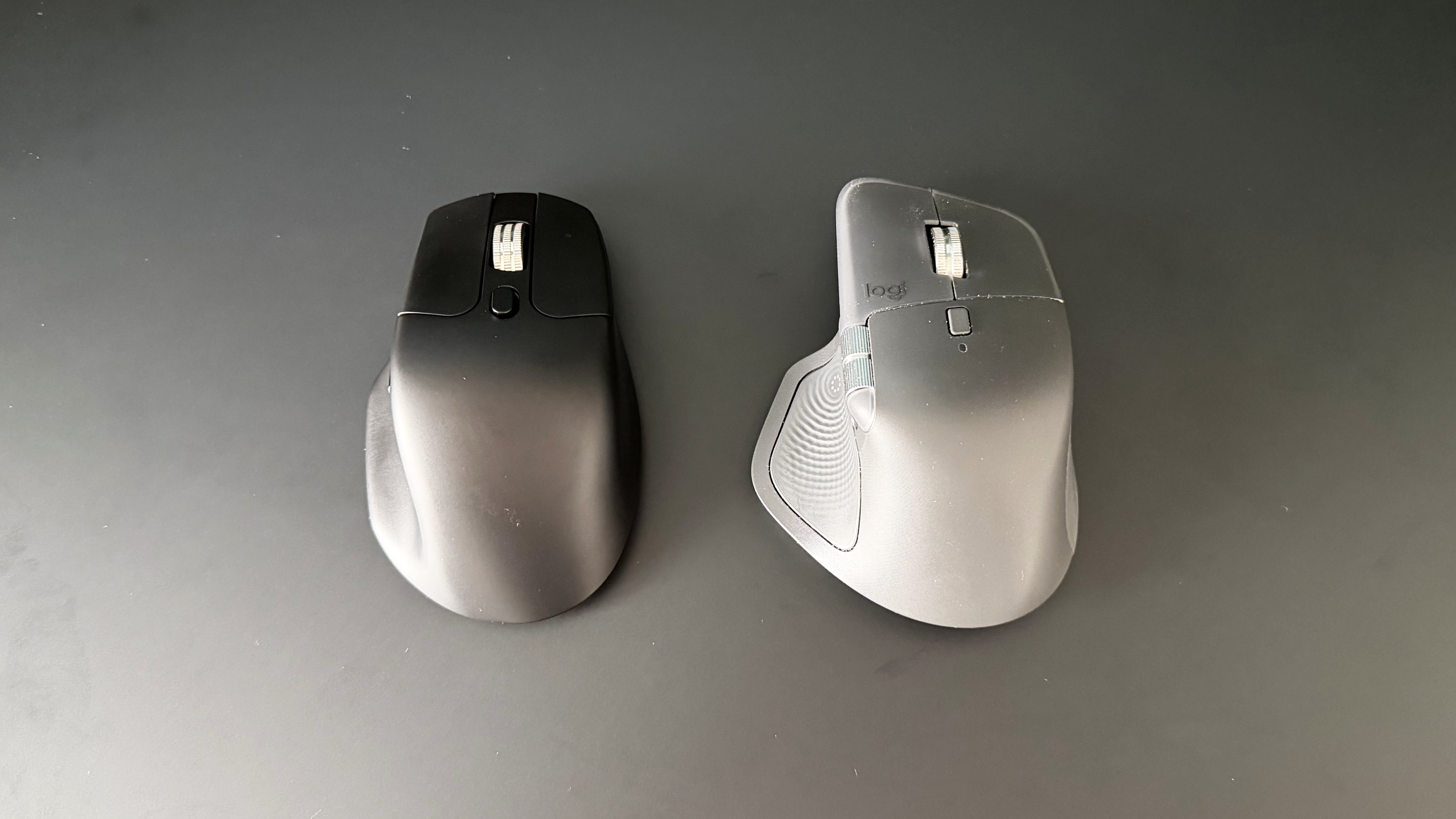
The Keychron M6 8K intrigued me when I first laid eyes on it. The resemblance to Logitech’s MX Master mouse is immediately apparent. I’ve used one iteration or another of Logitech's flagship productivity mouse every day for the last three years; I don’t even want to know how many hours I’ve clocked up with one in hand. Let’s be real, Keychron hasn’t even tried to be sneaky about copying its homework. At $69.99 / £74.99 / AU$129, however, it does set itself apart because that’s nigh-on half the price of an MX Master 4.
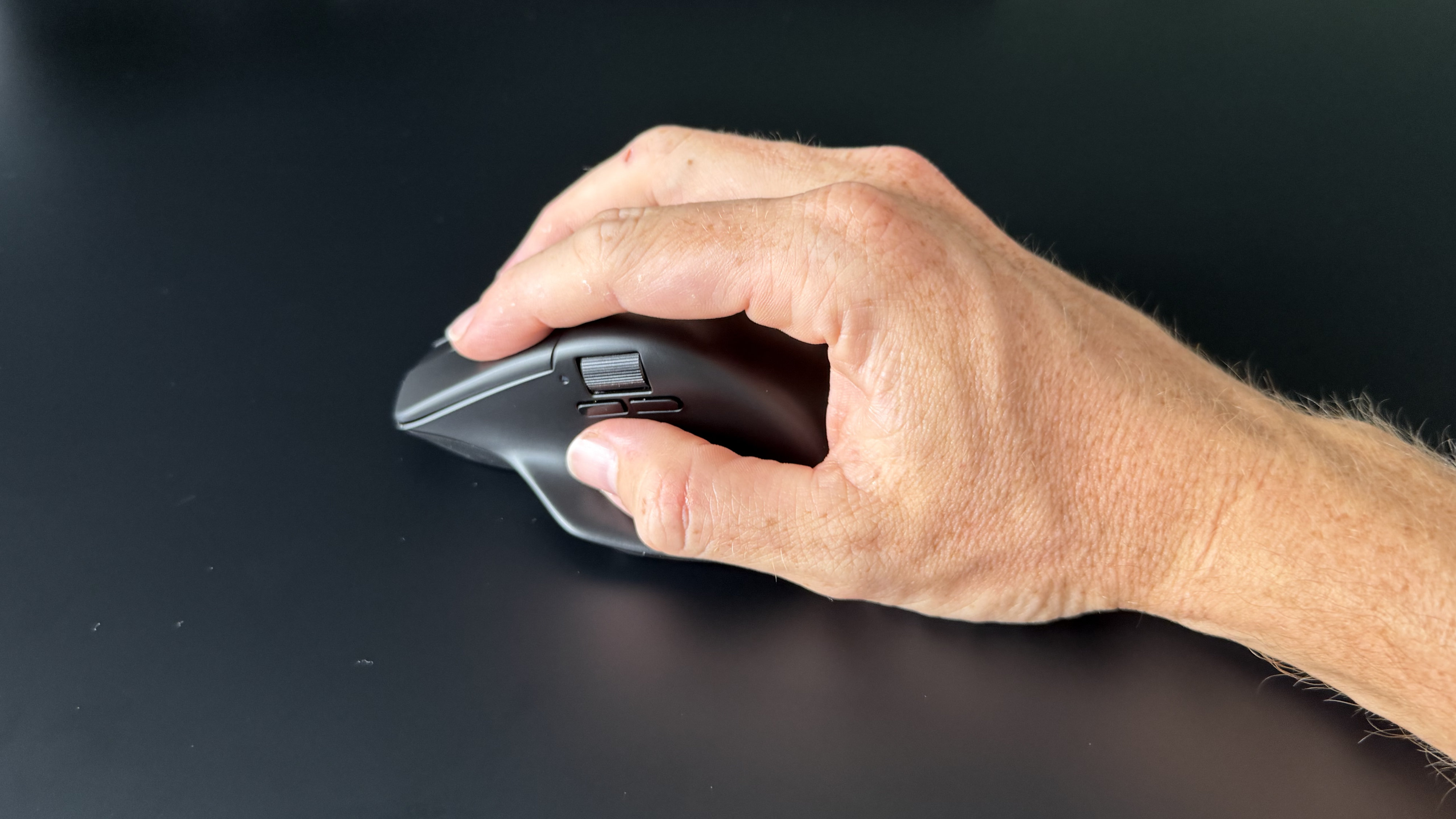
For that money you still get the same general ergonomic shape with a sizable thumb rest, a horizontal scroll wheel, and a multi-function scroll wheel. At first glance, the body looks quite sizable, but it isn’t actually quite as chunky as some other ergonomic mice and I found myself shifting from my usual full palm grip into more of a hybrid fingertip-claw arrangement. It’s comfortable, but personally, it wasn’t quite as comfortable over longer work sessions as it would have been if I was able to fully grab the mouse with confidence. But mouse grip is a subjective thing, so I won’t hold it against the M6.
Build quality is generally good. Nothing creaks or flexes across the ABS shell; it just doesn’t quite carry the premium edge of some more expensive competitors. The matte coating across the entire mouse feels pleasant enough and handles fingerprints well, and it’s available in your choice of white or black.
Latest Videos From

At 86g, the Keychron M6 8K is one of, if not the lightest full-body ergonomic mice you’ll find on the market and this is apparent in general use. For reference, the M6 8K is just over half the weight of the MX Master 4 and felt noticeably hollow and almost insubstantial by comparison. Anyone transitioning from a lighter or gaming mouse will likely find this change less stark, but to me it lacked the reassuring density and planted feel a heavier weight brings.
The Huano Silent Micro switches do keep things quiet and have a noticeably soft feel to them. I found them a little mushy overall though, and on a few occasions I experienced what I think were missed inputs. I’m not entirely sure whether I'd actually physically fired a click that didn’t register on the switch, or that I’d failed to properly trigger the switch at all, but it seemed like I had to go back for another go every now and then.
Visually the upgraded metal scroll wheel is a nice touch and it comes with pleasantly clicky lateral inputs too. As you’d expect for a productivity mouse, there’s a free-scroll mode, which is useful for navigating long documents or pages but the experience isn’t as sleek as the one Logitech offers on the MX Master.
The scroll wheel is surprisingly loud in ratcheted mode, while the toggle button for switching to free-scroll is positioned too far back and requires quite a bit of force to activate. That’s good for preventing accidental switches, but it meant I found myself completely ignoring the free-scroll feature rather than repositioning my entire hand to reach the toggle. The MX Master's automatic switching between modes is a feature I didn't realize I relied on so heavily until it was gone, though that’s also the kind of feature that doubles the price of a product, I guess.
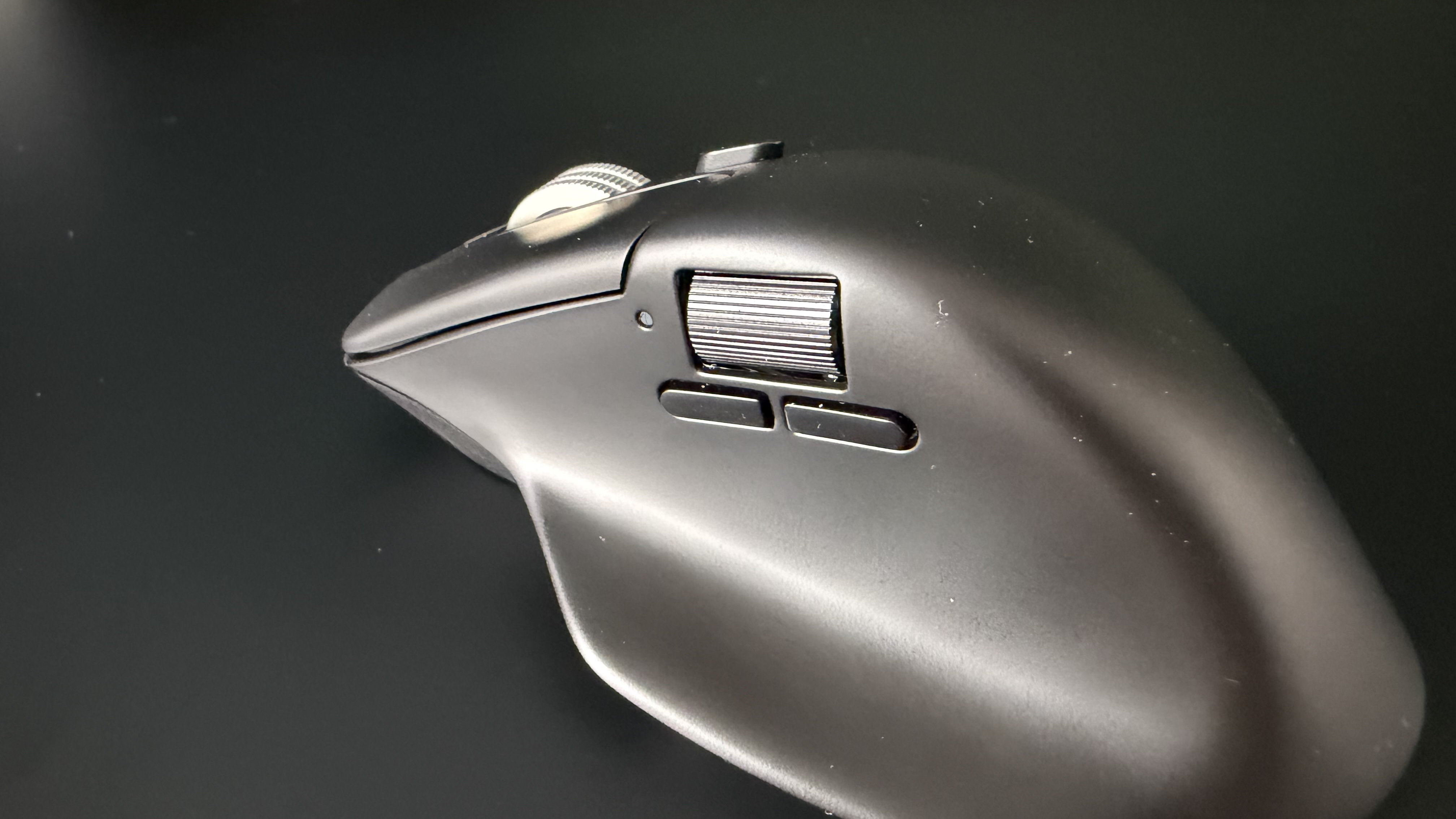
Within thumb’s reach on the side of the mouse are a horizontal wheel and a pair of additional buttons. This second wheel is really nicely positioned; close enough to need no thought to move your thumb to, but far enough out of the way to avoid accidentally rolling — though I'll admit I'm not much of a side-scroller on any mouse and didn't get much actual use out of it.
That pleasant positioning is also true of the two side buttons, which would usually be forward and back by default, though these don’t register at all in Safari. Both are fine in Edge and this isn't necessarily a Keychron-specific issue, as macOS has long been finicky with third-party mouse inputs. But other brands have cracked the code so it's a shame to see it missing here.
Where the M6 8K genuinely impresses and pulls ahead of more expensive rivals is in sensor performance. The PixArt PAW3950 meant the M6 8K tracked flawlessly across every surface I tested, including a desk mat, solid wood, my leg, the sofa, and even a glass window. Got a funny look from my neighbor checking that one. Keychron claims glass tracking at 4mm minimum thickness, and it delivered so no concerns for glass desk users.
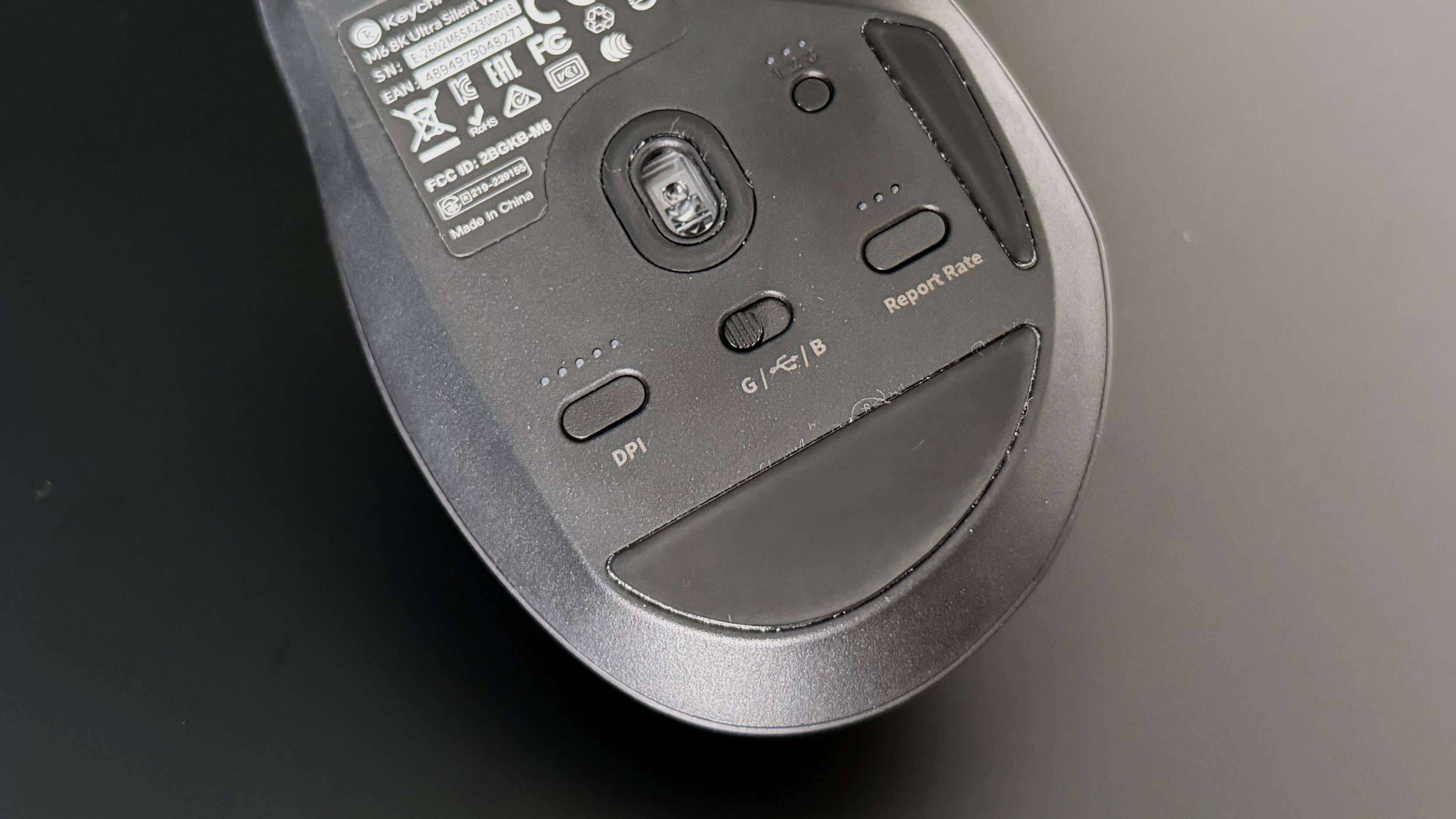
DPI can be adjusted from 100 to 30,000 and polling rate from 125 to 8,000Hz, numbers that extend the Keychron M6 8K from just a productivity mouse into a genuine gaming option. At the higher end of those settings and coupled with the light overall weight, the M6 becomes super responsive and should keep up with every flick during intense gaming sessions. I settled on 1,200 DPI and 1,000Hz polling for daily work, which felt perfectly sharp. Both settings can be adjusted on the fly through customizable presets using physical buttons on the mouse, which is a great touch, or you can use the Keychron Launcher web app for more granular control.
That browser-based configuration software was a surprise highlight for me. It's feature-rich, cleanly laid out, and very familiar if you've used Keychron's keyboards. Personalization features like button remapping, sensor settings, macros, lift-off distance, and scroll acceleration are all accessible without installing a single background process. You can also check battery levels here, though you won’t need to do this often — it seems to sip on its 800mAh battery, so it’ll be weeks between charges at reasonable settings.
As if it’s come straight from certain German supermarket chains, the Keychron M6 8K is a good dupe of a more expensive mouse. It does a lot of things well, but perhaps most importantly, it’s at a price that lets you forgive the things that aren’t quite so good. The scroll wheel lacks the refinement of Logitech's implementation, the clicks can feel a little mushy, and Safari users will miss having a working back button. But the feel is great, the sensor is superb, the battery life is excellent, and the web app is near best-in-class for the segment. If you can't justify the MX Master 4's asking price, this is where you should look instead.
Keychron M6 8K review: Price & release date
- The Keychron M6 8K has a list price of $69.99 / £74.99 / AU$129
- It's often discounted, both directly from Keychron and via retailers
- It's available in black or white
At $69.99 / £74.99 / AU$129, the Keychron M6 8K significantly undercuts the Logitech MX Master 4 ($119.99 / £119.99 / AU$199) that it’s clearly inspired by. You’ll find it both on Keychron’s own web store and from retailers, and it’s worth keeping an eye out for sales as I often saw it discounted while writing this piece. Make sure you’re picking up the right variant too. There’s also an M6 with a less responsive 1K sensor, though if you don't need 8K polling, you could save even more.
Keychron M6 8K review: Specs
Swipe to scroll horizontally
Sensor | PixArt PAW3950 |
DPI | 100 - 30,000 |
Polling Rate | 125 - 8,000Hz |
Connectivity | Wired, Bluetooth, 2.4GHz Wireless |
Switches | Huano Silent Micro |
Weight | 86g |
Battery | 800mAh (up to 120 hours at 1KHz) |
Should I buy the Keychron M6 8K?
Swipe to scroll horizontally
Features | Dual scroll wheels and free-scroll mode, 8K polling, and tri-mode connectivity. The browser-based Launcher software is excellent. | 4.5 / 5 |
Performance | Sensor tracking is flawless across surfaces including glass. Battery life is very strong at sensible settings. Silent switches are slightly mushy with occasional missed clicks. | 4 / 5 |
Design | Ergonomic shape that's comfortable enough, but the lightweight feel and scroll wheel let it down. | 3.5 / 5 |
Value | At roughly half the price of the MX Master 4, the M6 8K offers a remarkable amount of hardware for the money. | 4.5 / 5 |
Buy it if…
You want MX Master features without the MX Master price
The M6 8K replicates most of Logitech's ergonomic productivity formula at nearly half the cost, and throws in 8K polling and a gaming-grade sensor for good measure.
You hate installing mouse software
Keychron Launcher runs entirely in the browser with no background processes. Configure everything you need, close the window, and forget about it.
You work and play on the same machine
The M6 8K’s sensor is equally at home slowly scrolling a spreadsheet as it is ramping up sensitivity for a quick firefight on your lunch break.
Don’t buy it if…
You jump between scroll modes often
The M6 8K's metal wheel is a little wobbly, its ratchet mode is loud, and the manual toggle for free-scroll is awkward to reach. If the scroll wheel is the feature you use most, spend more on the Logitech MX Master as it’s still in a league of its own.
You prefer a heavier, more planted mouse
At 86g, the M6 8K is noticeably light and will catch you off guard if you’re used to something with more heft. If you like your mouse to feel substantial and anchored on the desk, this featherweight approach won't suit you.
Keychron M6 8K review: Also consider
Logitech MX Master 4
The mouse that the M6 8K is clearly duping. It costs significantly more at $119.99 / £119.99, but you get Logitech's class-leading MagSpeed scroll wheel with automatic mode switching, superior build quality, the new haptic touch panel, and deep OS integration through Options+. If budget isn't the primary concern, it's still the productivity mouse to beat. Read our full Logitech MX Master 4 review.
MSI Versa 300 Wireless 8K
If gaming is more your focus, the MSI Versa 300 Wireless 8K ($99.99 / £59.99) offers a similar PixArt sensor and 8K polling in a lighter 66g symmetrical shell that's better suited to competitive play. It lacks the M6 8K's productivity features like the horizontal scroll wheel and thumb rest, but it's a strong pick for users who split their time between work and gaming. Read our full MSI Versa 300 Wireless 8K review.
How I tested the Keychron M6 8K
- I used the M6 8K as a daily productivity mouse over multiple weeks, replacing my Logitech MX Master 4
- I tested across multiple surfaces including a desk mat, solid wood, skin, and glass
- I tested all three connectivity modes and evaluated the Keychron Launcher software on macOS
I used the Keychron M6 8K as my mouse for all tasks for a couple of weeks. It was primarily a direct productivity replacement for my daily-driver Logitech MX Master 4, so I used it across extended work sessions on macOS. My testing covered general workflows, gaming, surface tracking across varied materials, and multi-device connectivity. I evaluated the Keychron Launcher software for configuration depth and usability.
- Read TechRadar’s reviews guarantee
- First reviewed: July 2026






 English (US) ·