
 5 hours ago
11
5 hours ago
11
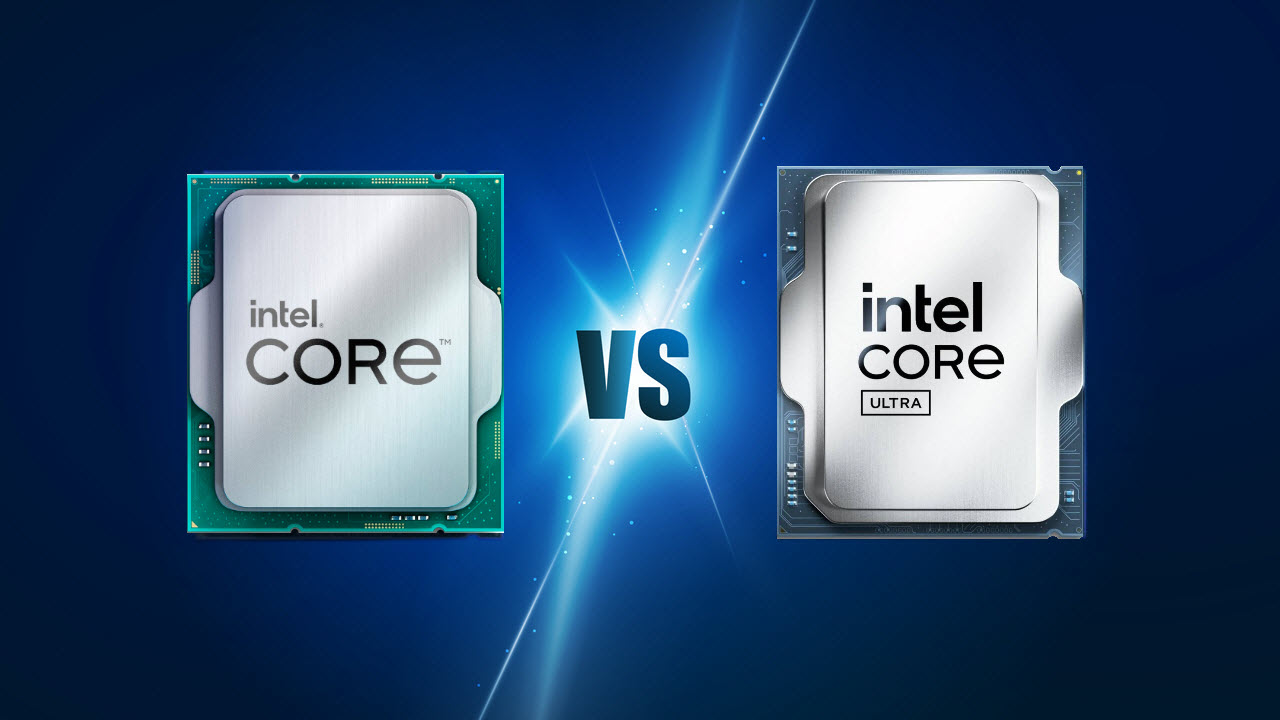
The Core Ultra 7 265K is the mainstream desktop offering from Intel in the Arrow Lake lineup of CPUs. It replaces the outgoing Raptor Lake-based Core i7-14700K as the high-end gaming CPU in Intel’s arsenal. Both of these CPUs can be found right around the $300 mark, but which one should you actually go for?
With the Core Ultra lineup of CPUs, Intel decided to shake up its desktop CPU stack along with a change in naming scheme. You can think of the Core Ultra 200 series of CPUs as the 15th-Gen desktop chips in spirit. More importantly, Intel has shifted from the Intel 7 production process to TSMC’s 3nm process, which is a huge leap, at least on paper.
Features and Specifications: Intel Core i7-14700K vs Intel Core Ultra 7 265K
Both the Intel Core i7-14700K and the Core Ultra 7 265K maintain Intel’s hybrid architecture with P-cores and E-cores, and both CPUs have a total of 20 cores (8 P-Cores and 12 E-Cores). The main difference between these two is the number of threads. Intel has eliminated Hyperthreading on its Arrow Lake processors, so the new Core Ultra 7 265K only has 20 threads compared to the 28 on the Core i7-14700K.
The Core i7-14700K is part of the 14th Generation Intel desktop CPU family, which is a refresh of the Raptor Lake architecture, and is built on a 10nm Enhanced SuperFin process, called Intel 7. The Core Ultra 7 265K marks Intel’s transition to TSMC’s advanced N3B process node on the compute tile, which is a massive leap from the aforementioned 10nm production process. This jump allows for significant improvements in transistor density and efficiency.
Moreover, there is another architectural change in the new Arrow Lake processors. Intel has shifted from a monolithic to a chiplet-based design, which further separates the 265K from its predecessor. The new Core Ultra CPUs employ separate dies for CPU cores, the GPU, and the SoC functions connected through Foveros Interconnect technology.
The decision to eliminate Hyperthreading helps push the base clocks higher, which is why the Core Ultra 7 265K has base frequencies of 3.9 GHz on the P-core and 3.3 GHz on the E-core. On the other hand, the Core i7-14700K operates with base frequencies of 3.4 GHz on the P-core and 2.5 GHz on the E-core. At full boost, the Core Ultra 7 265K reaches a P-core frequency of 5.5 GHz and an E-core speed of 4.6 GHz, compared to the 5.6 GHz P-core and 4.3 GHz E-core frequency of the 14700K.
Swipe to scroll horizontally
Cores (P + E) / Threads | 20 (8 + 12) / 20 | 20 (8 + 12) / 28 |
P-Core Base / Boost Clock | 3.9 GHz / 5.5 GHz | 3.4 GHz / 5.6 GHz |
E-Core Base / Boost Clock | 3.3 GHz / 4.6GHz | 2.5 GHz / 4.3 GHz |
Cache (L2 + L3) | 66MB (36MB + 30MB) | 61MB (28MB + 33MB) |
TDP / MTP | 125W / 250W | 125W / 253W |
Memory | DDR5-6400 | DDR5-5600 / DDR4-3200 |
Lithography | TSMC N3B | Intel 7 |
Architecture | Arrow Lake | Raptor Lake Refresh |
There are also differences in the cache layout of the two CPUs. The Core i7-14700K features 33MB of L3 Smart Cache along with 28MB of L2 cache, while the Core Ultra 7 265K has 30MB of L3 Smart Cache but a larger 36MB stack of L2 cache. This change is a part of Intel’s refined caching strategy that prioritizes faster L2 cache access to mitigate potential L3 latency.
The Core i7-14700K uses the well-established LGA 1700 socket and is compatible with both 600-series and 700-series motherboards. This is a ubiquitous platform that covers a wide range of chipsets, including Z690, Z790, B760, and H770, to name a few. The 14700K also supports both DDR4 and DDR5 memory, with DDR4-3200 and DDR5-5600 memory configurations being supported officially.
Intel’s newer Core Ultra 7 265K uses the LGA 1851 socket, which is exclusively compatible with DDR5 memory, at up to DDR5-6400 speeds officially, and an expanded maximum capacity of 256GB. The new 800-series compatible chipsets include Z890, B860, and H810 at the time of writing.
Both processors have very similar advertised power ratings, with the PL1 (base power) specification being 125W for both CPUs. The Core i7-14700K’s maximum turbo power reaches 253W compared to the 250W for the Core Ultra 7 265K, although it is much better to refer to real-world testing for accurate power consumption figures, which we'll dig into below.
⭐Winner: Intel Core Ultra 7 265K
Although both CPUs are very well-matched on paper, with obvious pros and cons that cancel each other out, there still is quite a bit of evidence that favors the Core Ultra 7 265K. Its advanced 3nm production process is a big advantage, as is its support for faster DDR5 memory at a higher maximum capacity.
Gaming Benchmarks and Performance: Intel Core i7-14700K vs Intel Core Ultra 7 265K
We have extensively covered both the Intel Core i7-14700K and the Core Ultra 7 265K, and you can see how they compare to the broader market in our CPU benchmark hierarchy. In this section, we are just going to focus on the gaming performance of the two CPUs in a variety of modern titles.
We have tested the two competing CPUs in a wide range of games at 1080p in order to maximize the performance differences between them, without running into any GPU limitations. Moreover, we used the mighty RTX 5090 graphics card in our testing to further alleviate any potential bottlenecks.
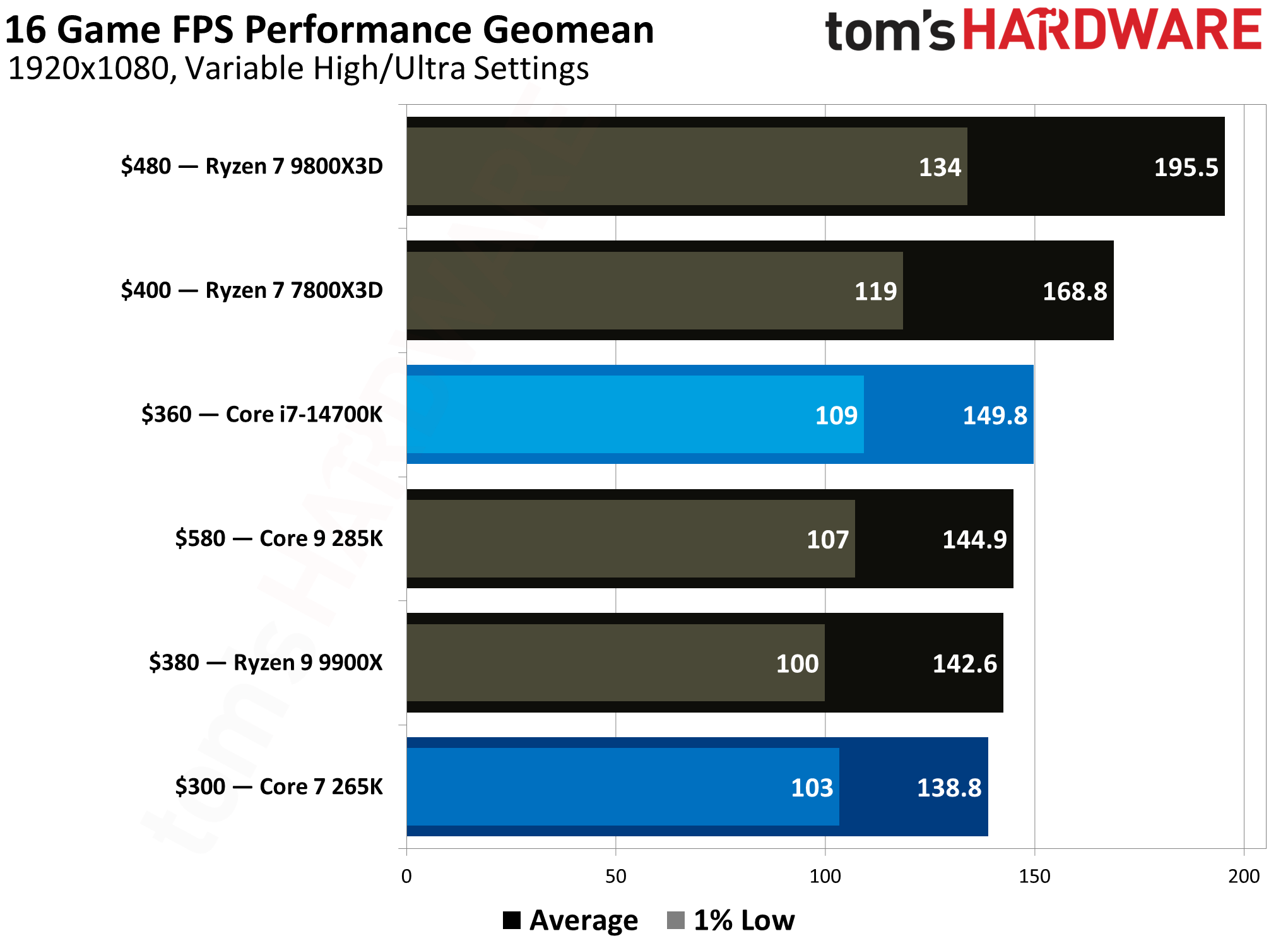
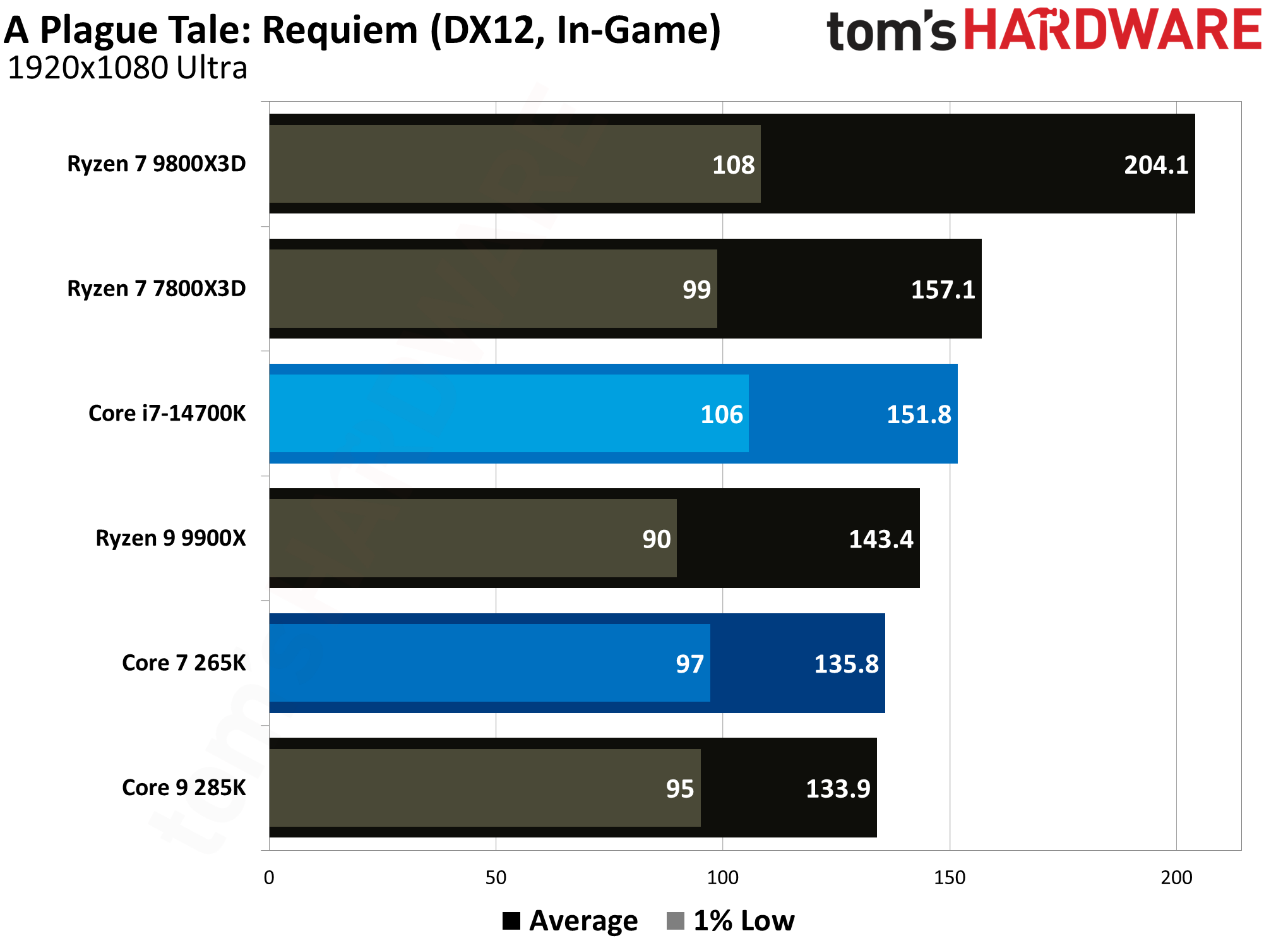
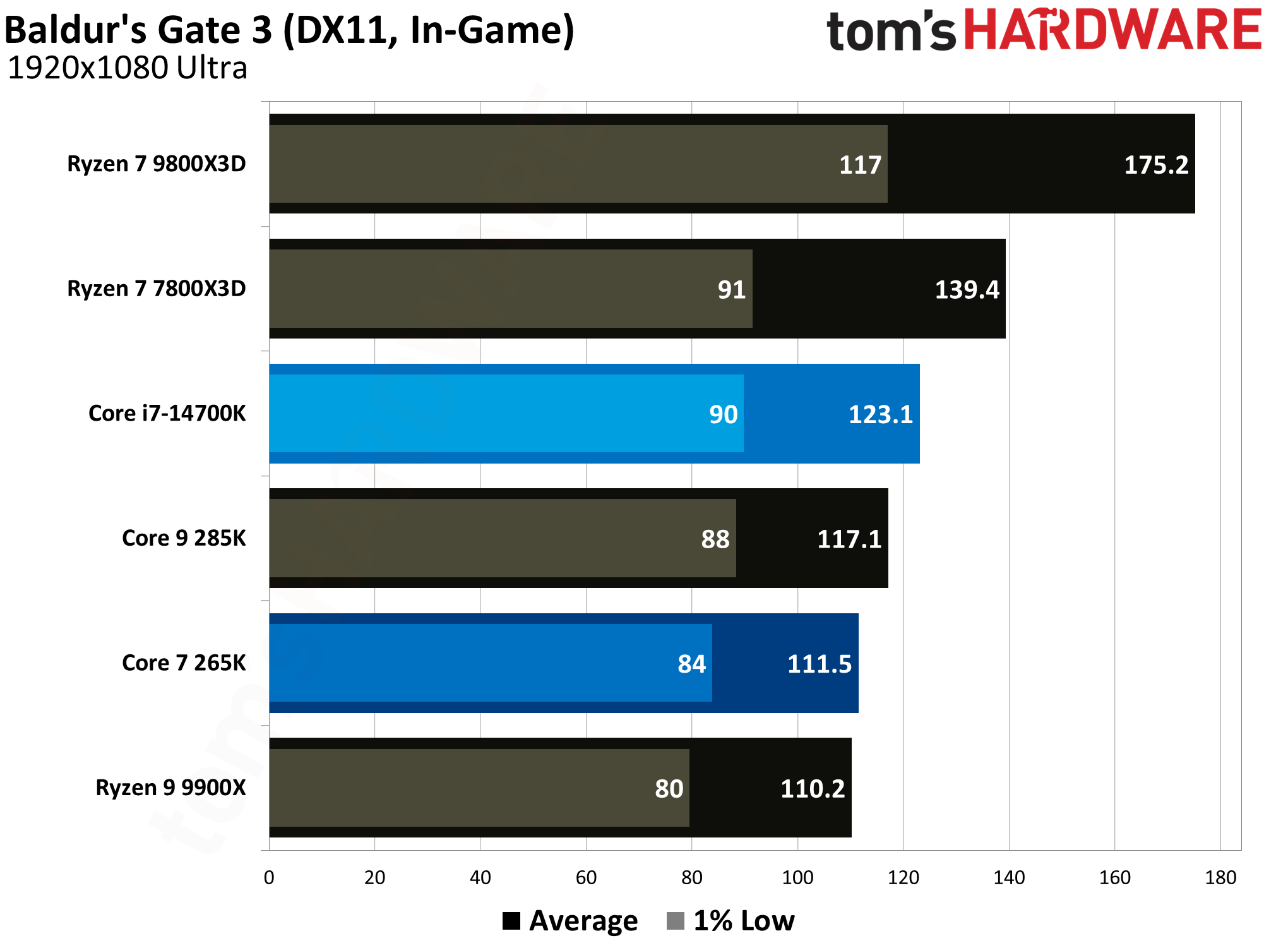
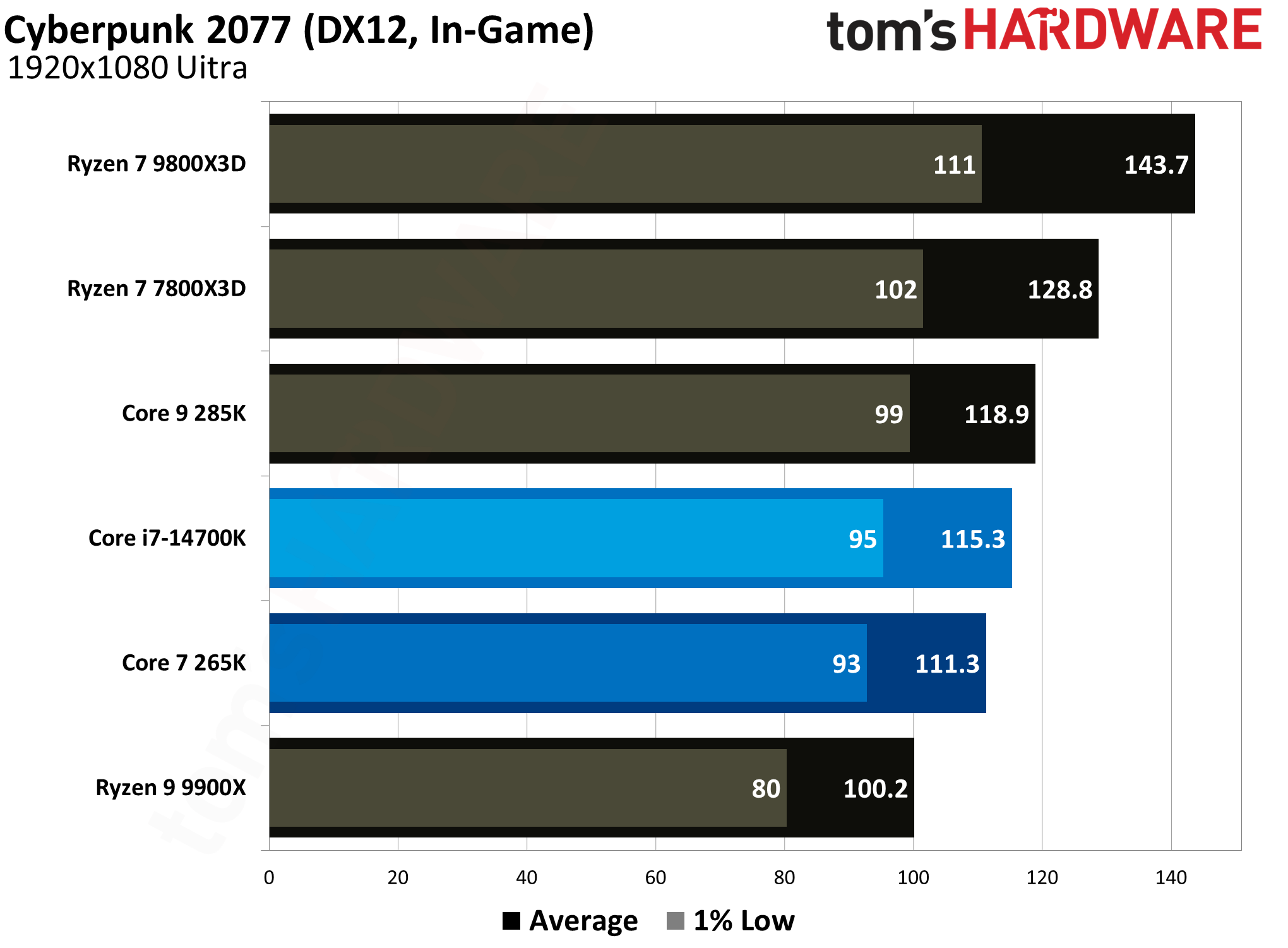
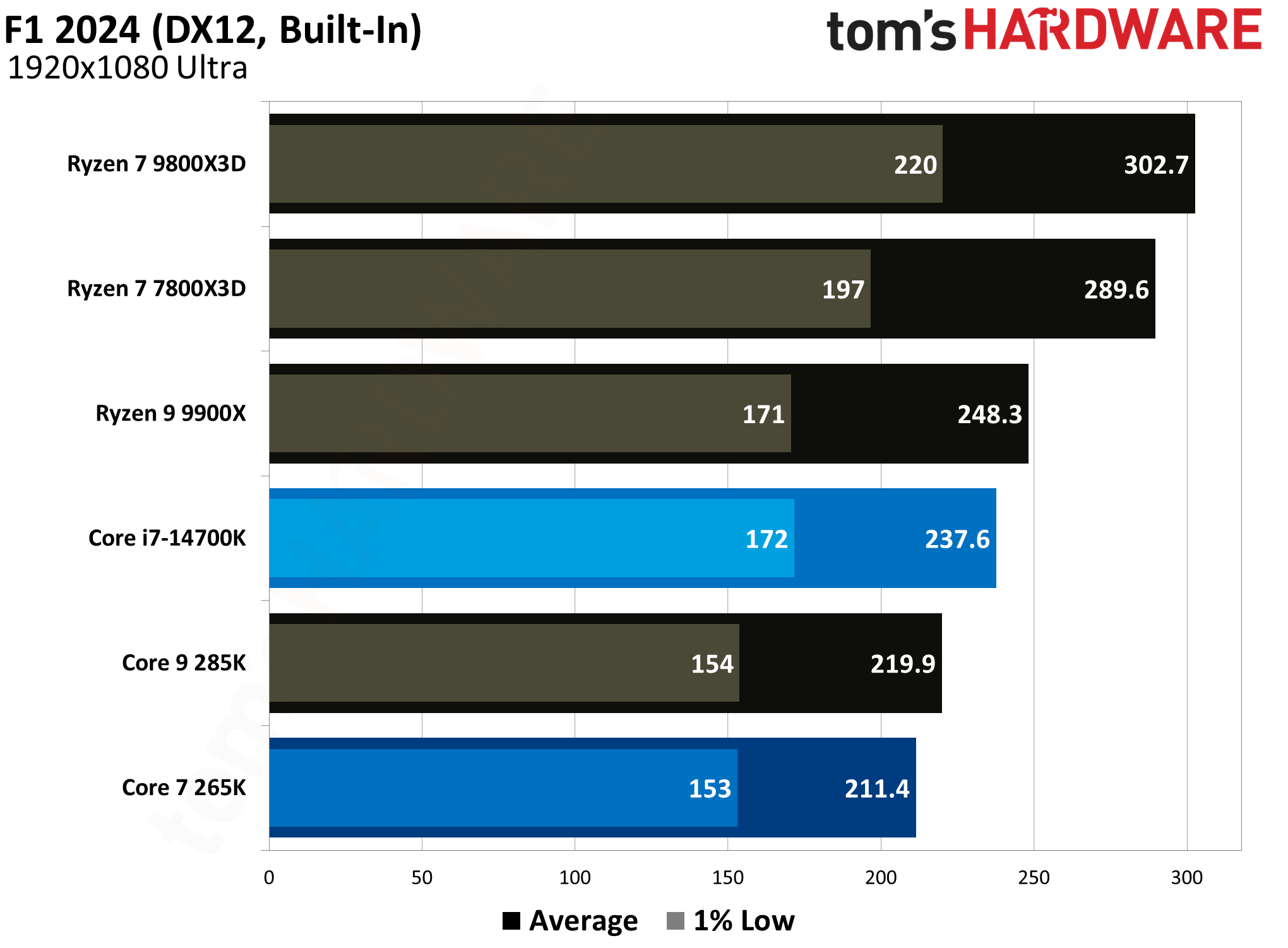
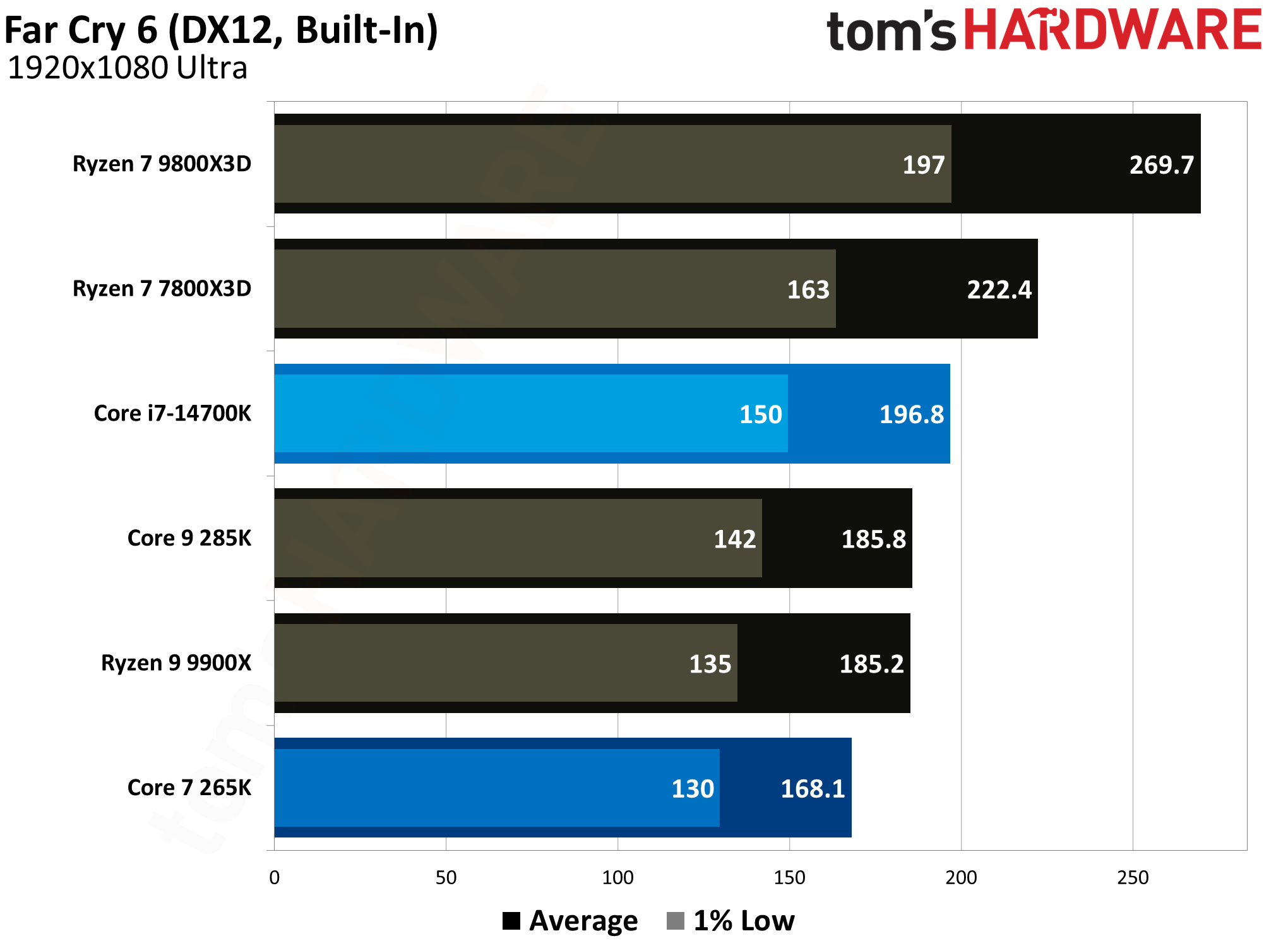
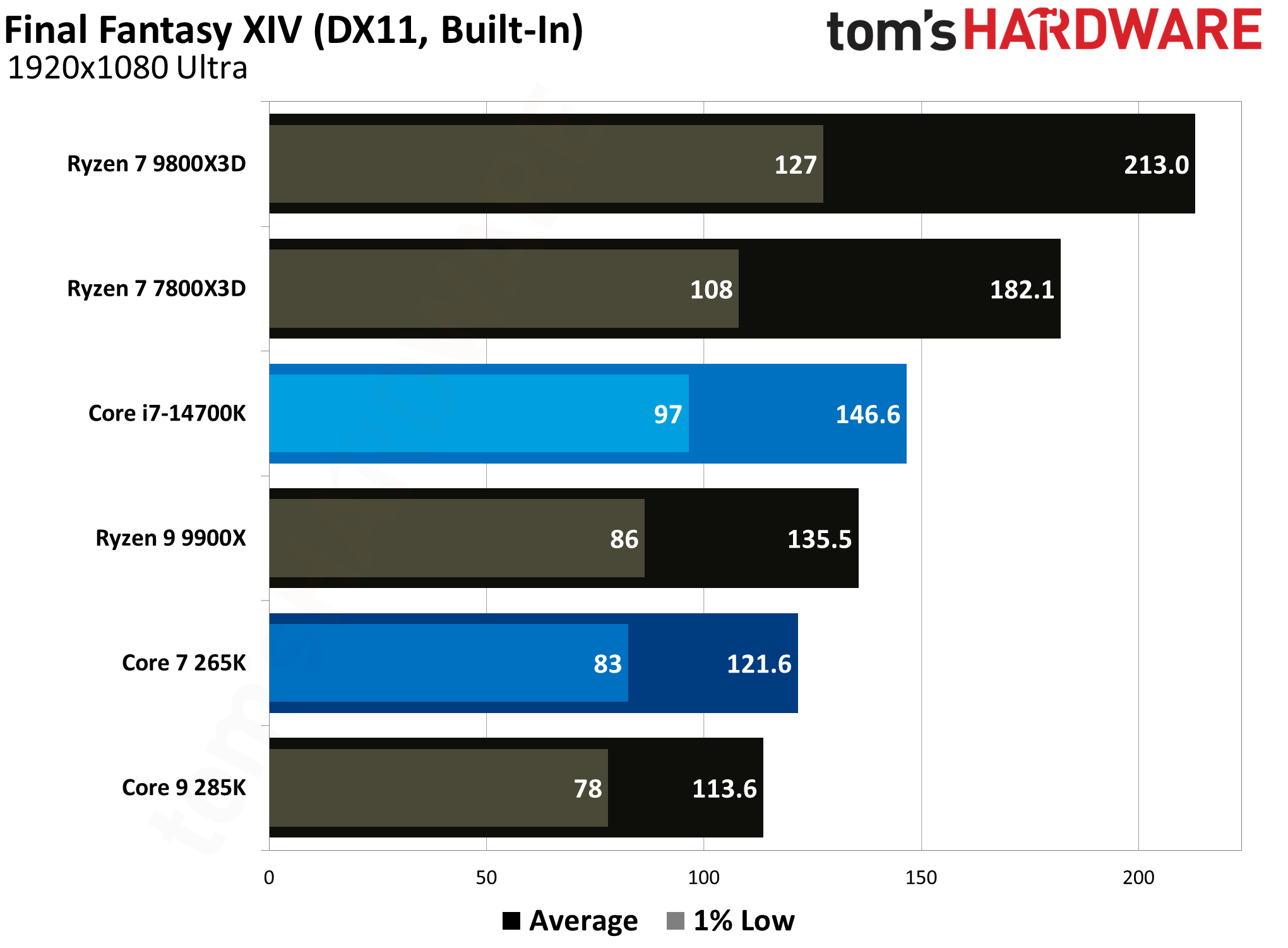
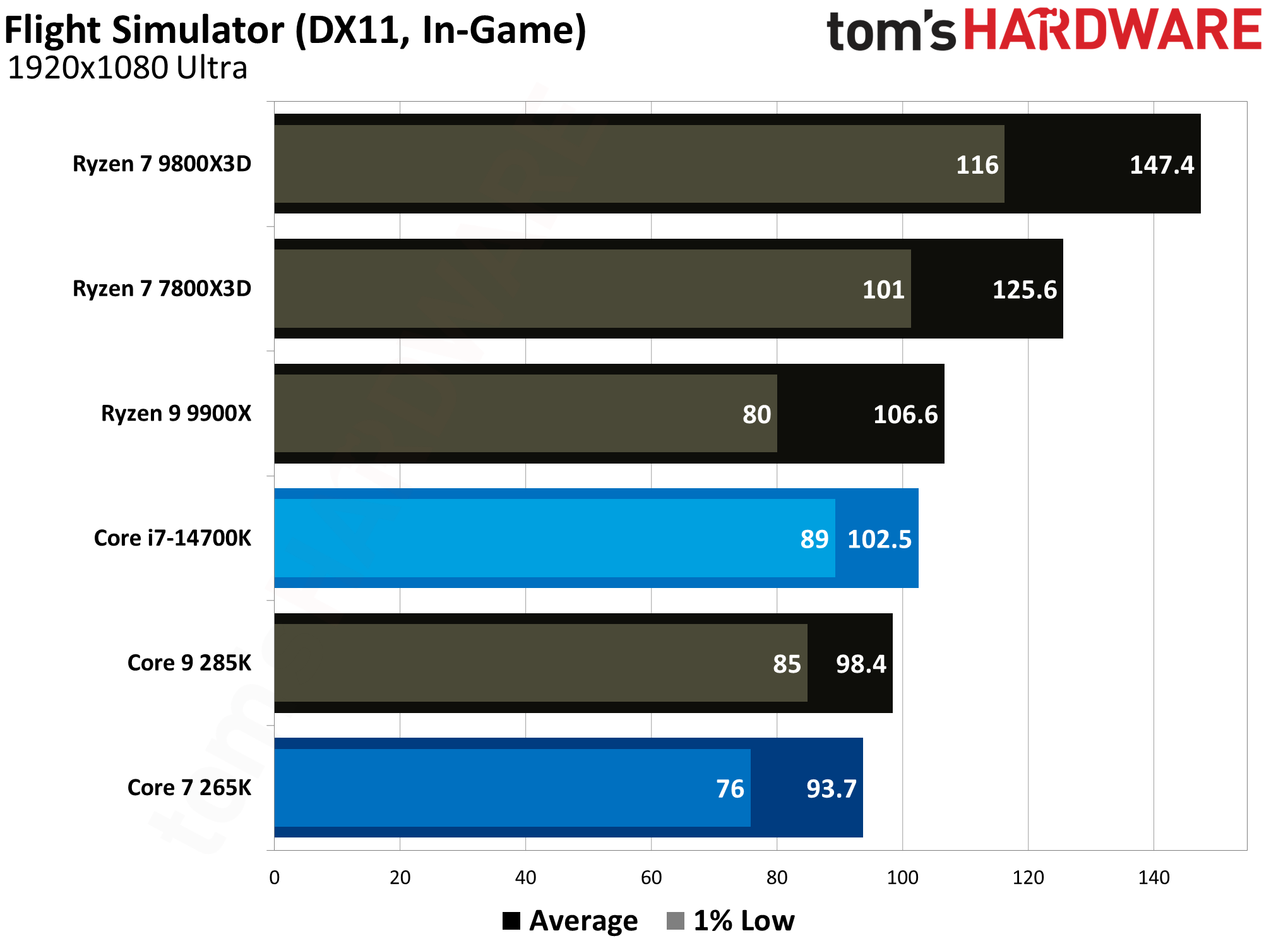
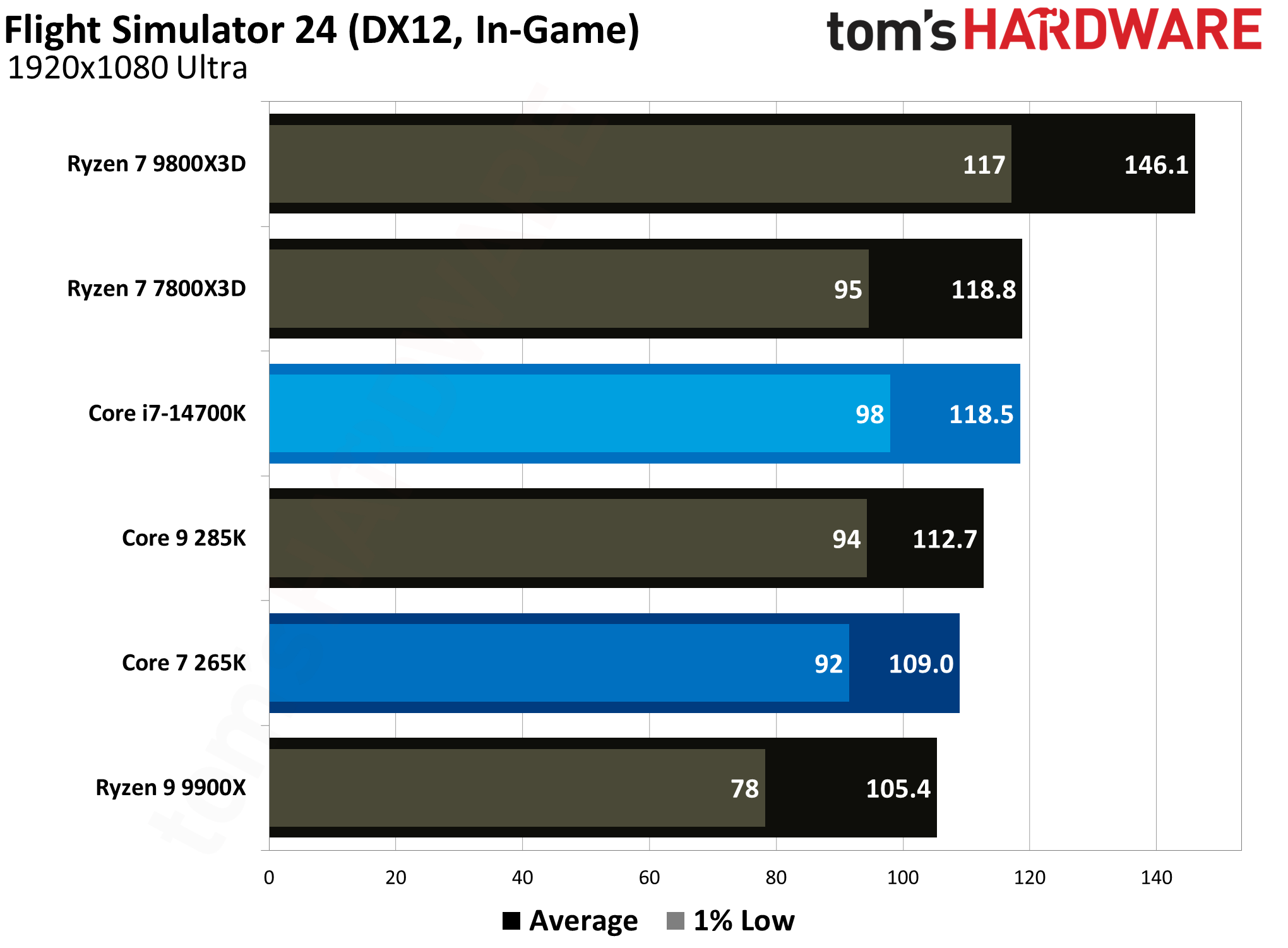
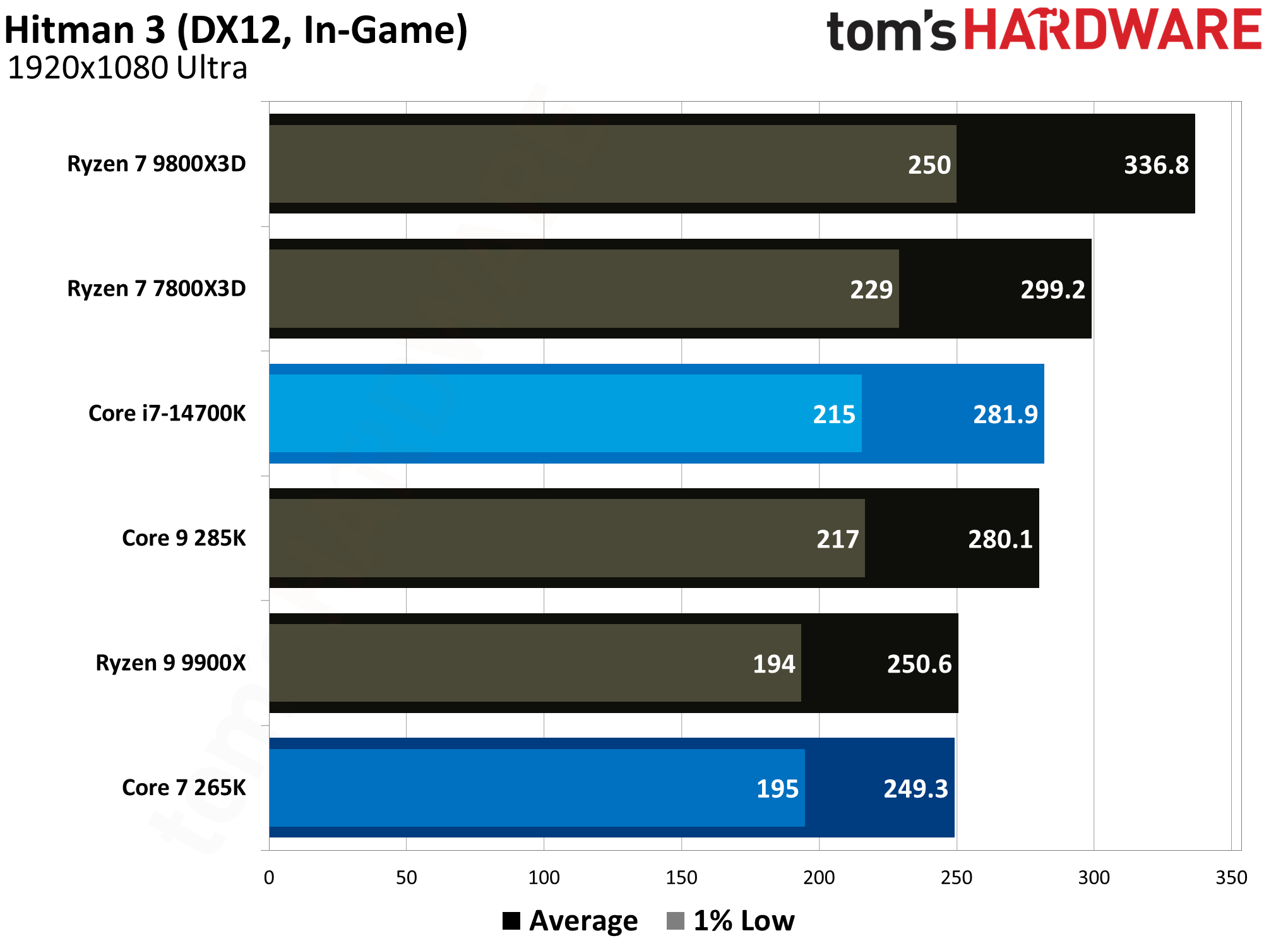
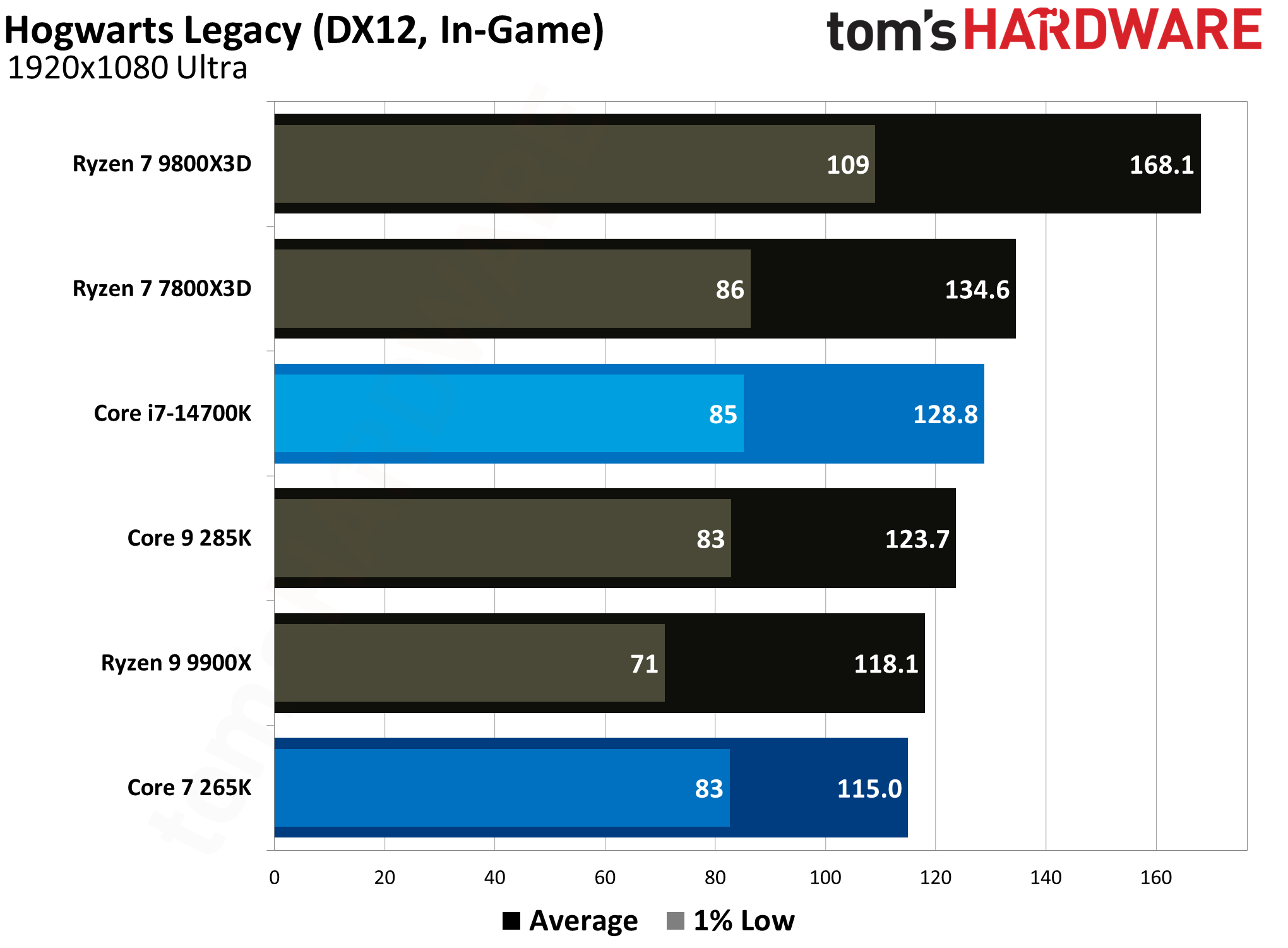
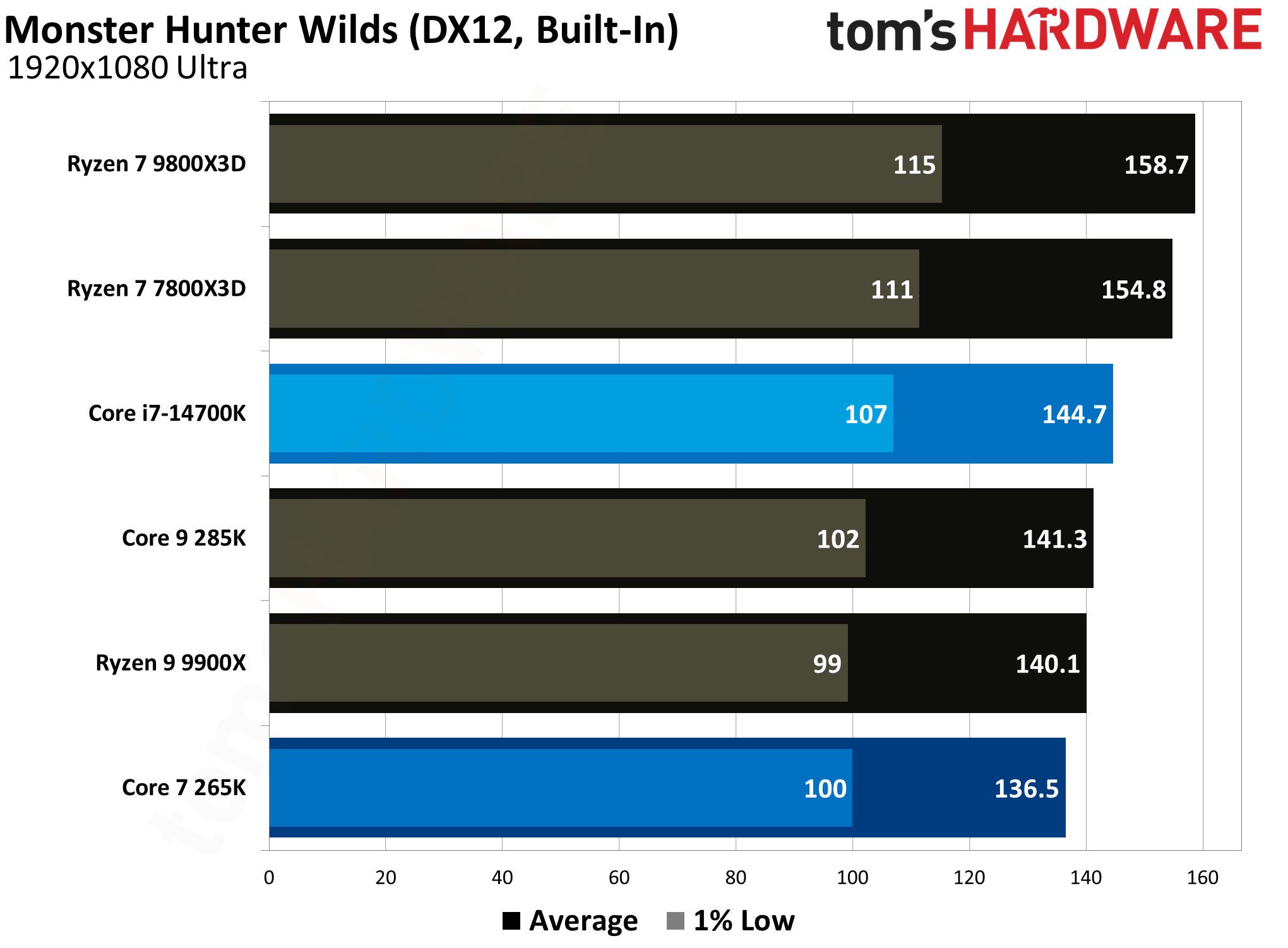
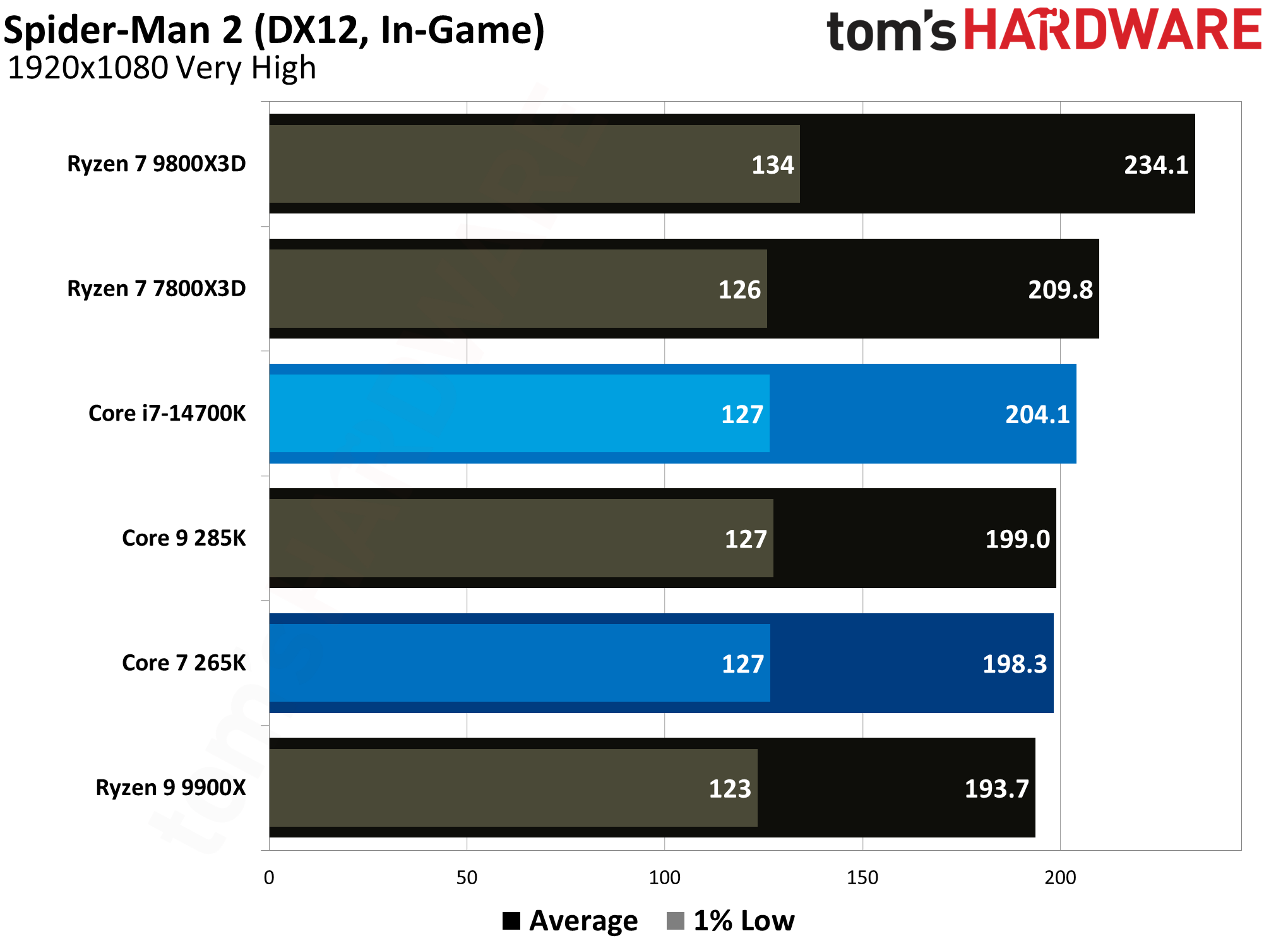
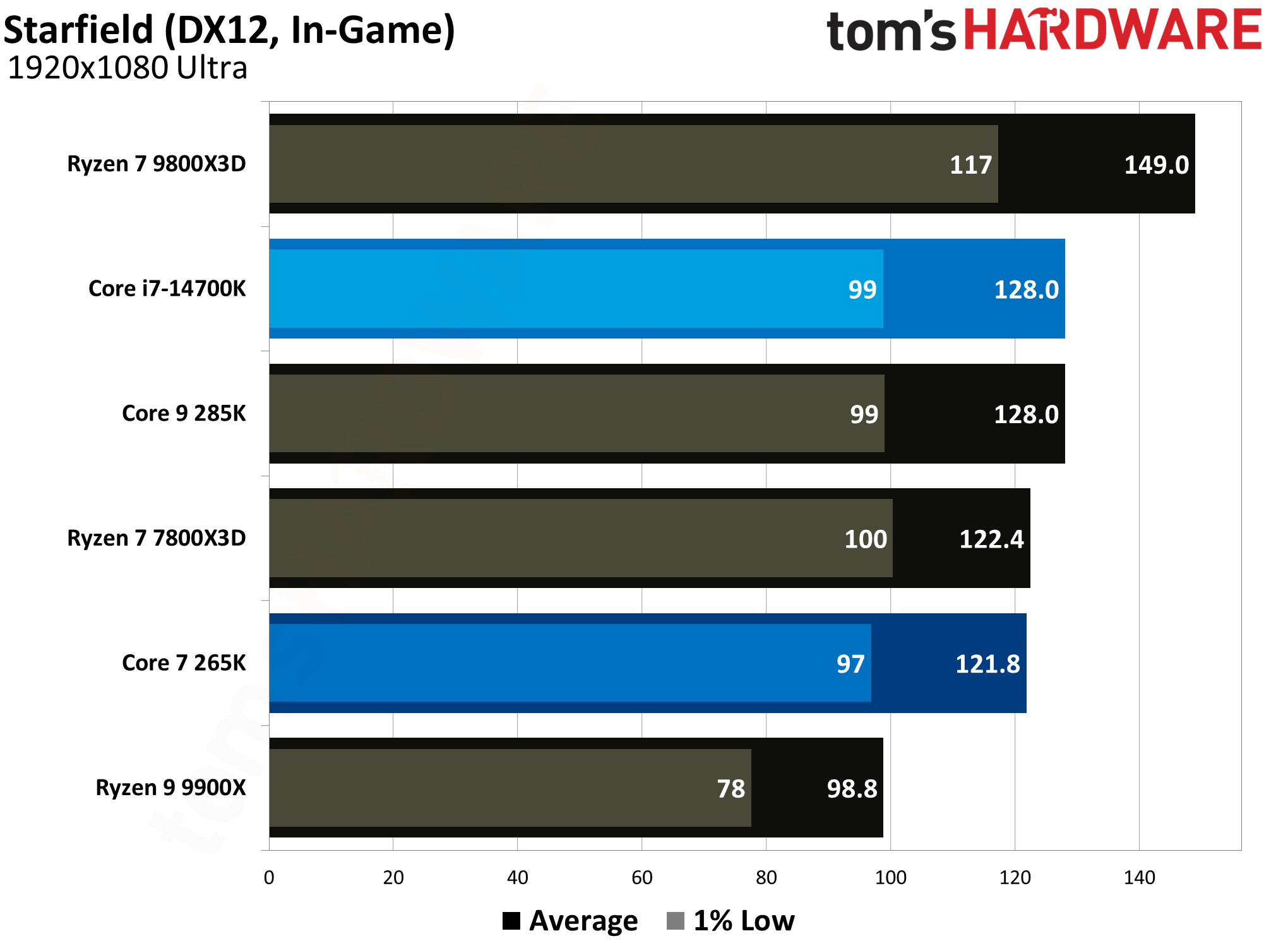
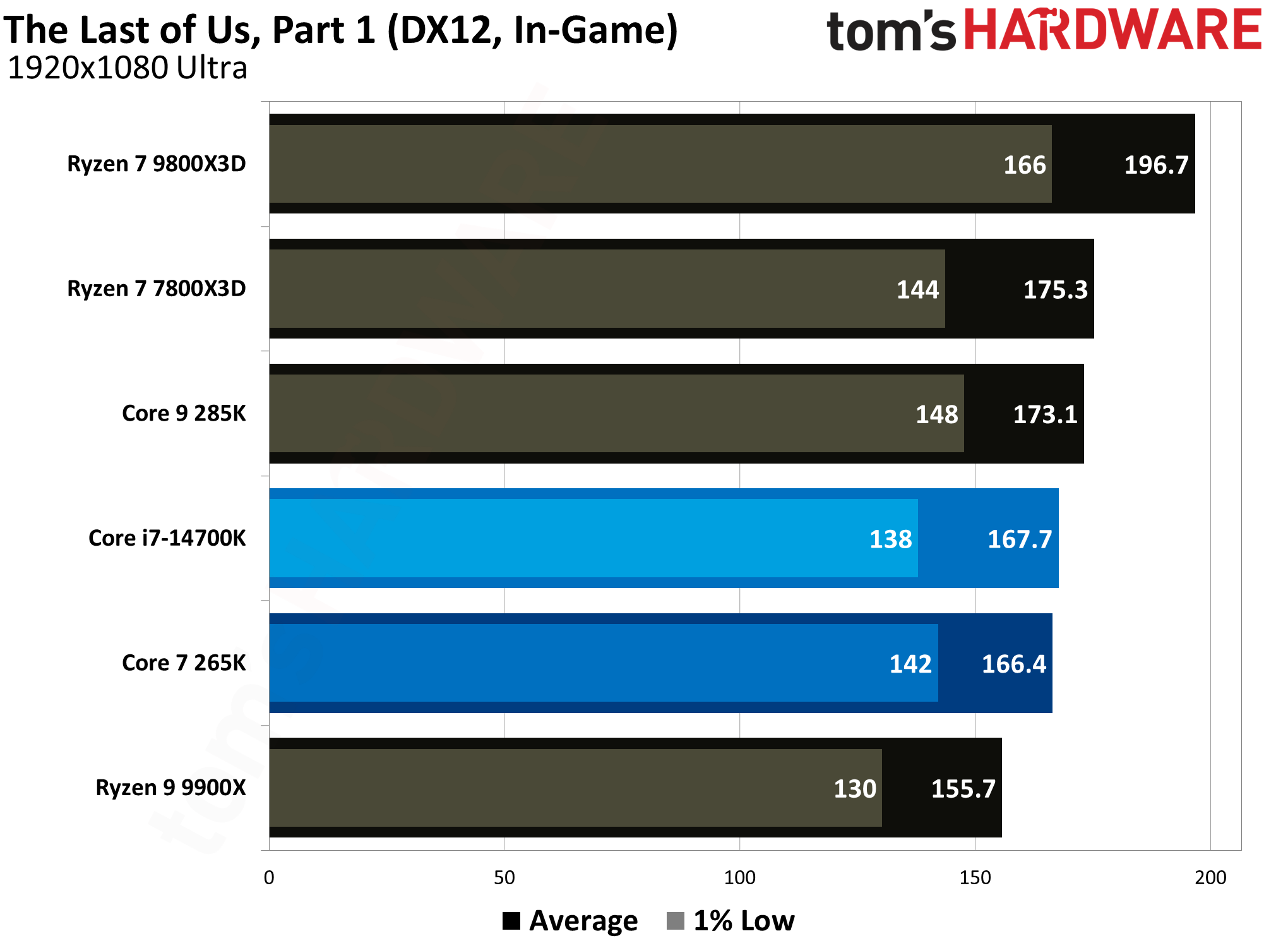
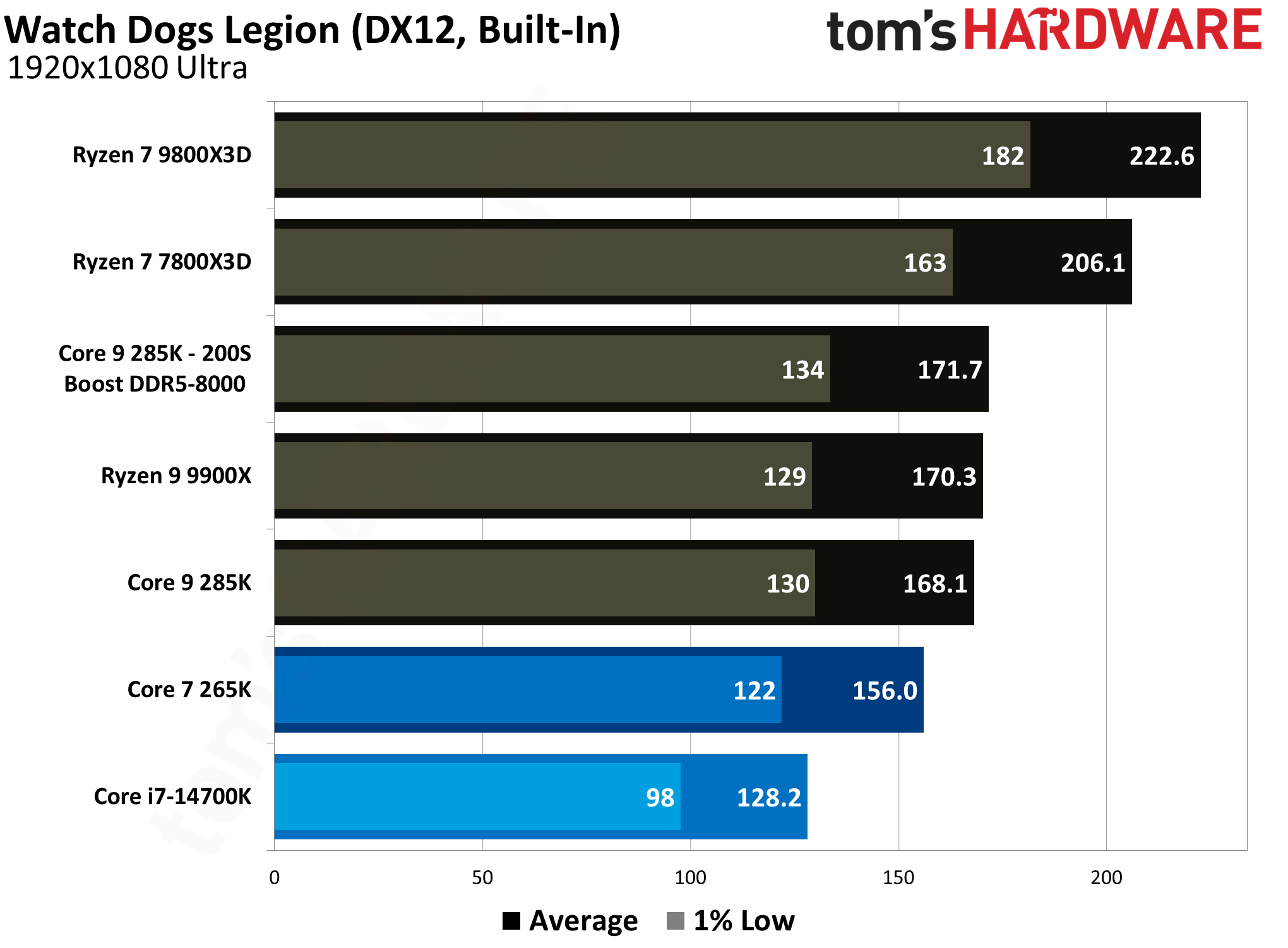
As we can see from our comprehensive benchmark data, the gaming performance comparison between the Core i7-14700K and Core Ultra 7 265K paints a clear picture. The last-gen Core i7-14700K maintains a consistent lead across details, ranging from a minor uplift to a clear advantage.
The 16-game geometric mean shows the 14700K achieving an average of 149.8 FPS, compared to the 265K's 138.8 FPS. This represents a performance advantage of approximately 8% for the older 14700K. As we'll see later in this face-off, the 14700K has much higher power consumption, helping explain its higher overall gaming performance.
When examining 1% low performance, which is critical for representing the smoothness and consistency of the gameplay experience, the Core i7-14700K again holds an edge. The Geomean for 1% lows shows the 14700K at a 6% advantage over the 265K. This indicates that while both CPUs are capable of delivering smooth gameplay, the 14700K is marginally better at mitigating stutters and frame time spikes across a wide range of titles.
Analyzing the results of specific titles helps explain the overall geomean rankings. In a CPU-intensive game like Hitman 3, the 14700K holds a 13% advantage in the average framerates. This title scales with higher thread counts, which plays to the 14700K's strengths.
Similarly, in Minecraft with RTX, the Core i7-14700K maintains a 16% advantage over the Core Ultra 7 265K, which gives us a pretty good overall idea of the gaming performance difference between the two CPUs. In more GPU-bound titles like Cyberpunk 2077, we can see the difference between the two CPUs drop down to a minor 3.6%, but that is an exception rather than the norm.
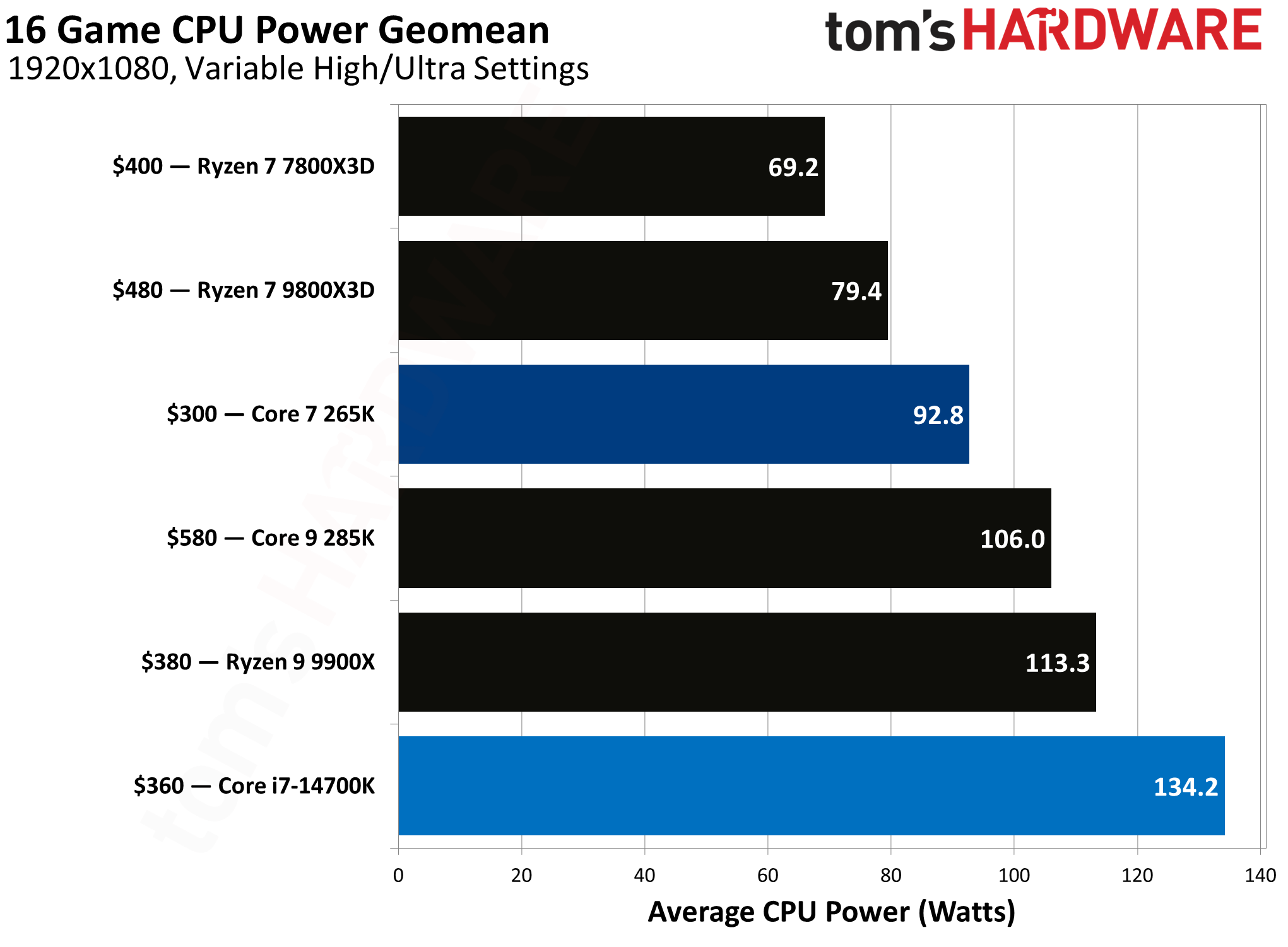
On the flip side, the performance narrative shifts significantly when considering power efficiency. This is the Core Ultra 7 265K's most decisive victory. The 16-game power geomean chart clearly demonstrates the architectural improvements of Intel's new Core Ultra series, with the 265K consuming an average of 92.8 watts during gaming. In stark contrast, the Core i7-14700K is one of the most power-hungry CPUs on the list, drawing 134.2 watts, which is a 45% increase in power consumption for its single-digit performance gain.
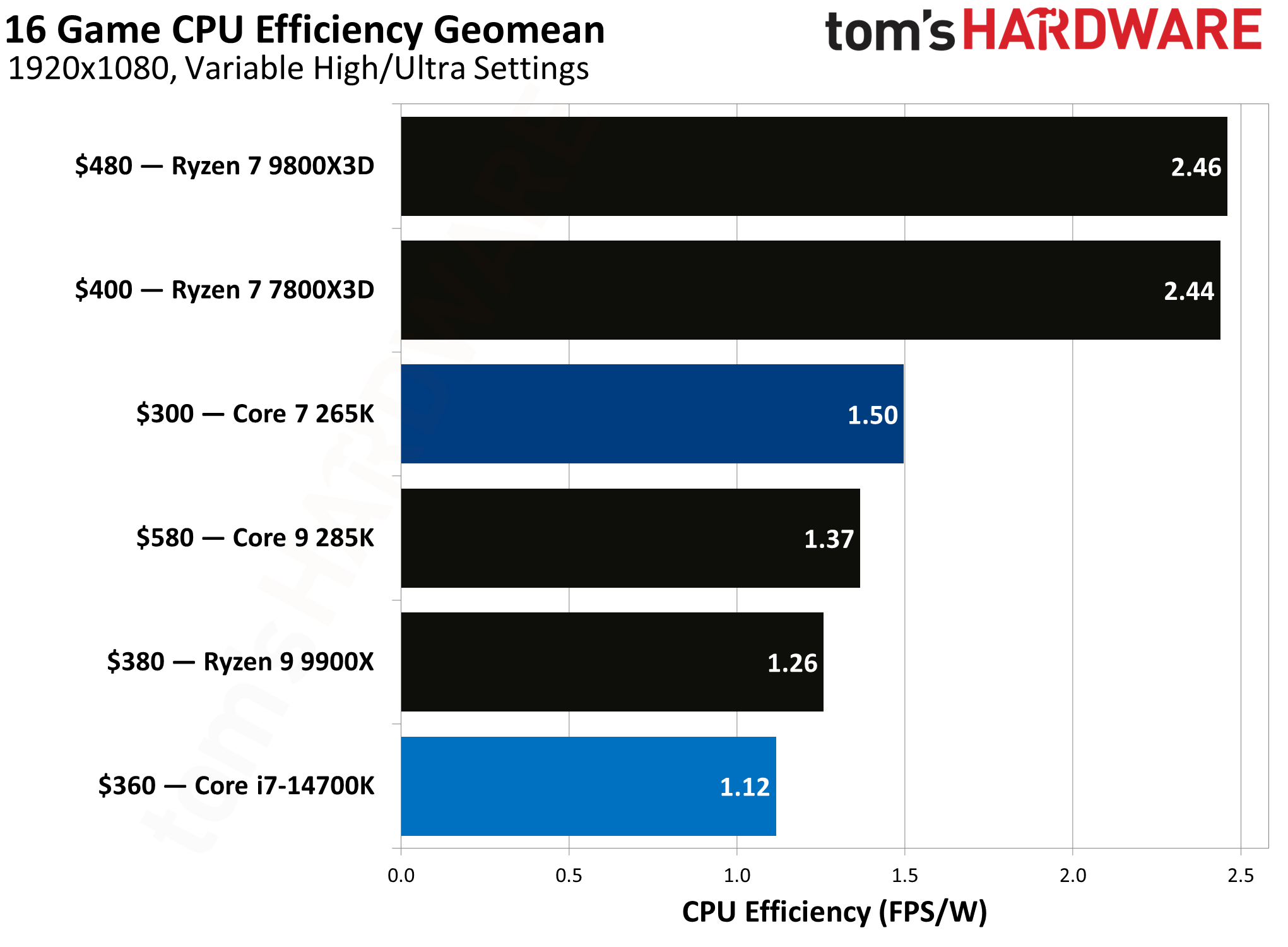
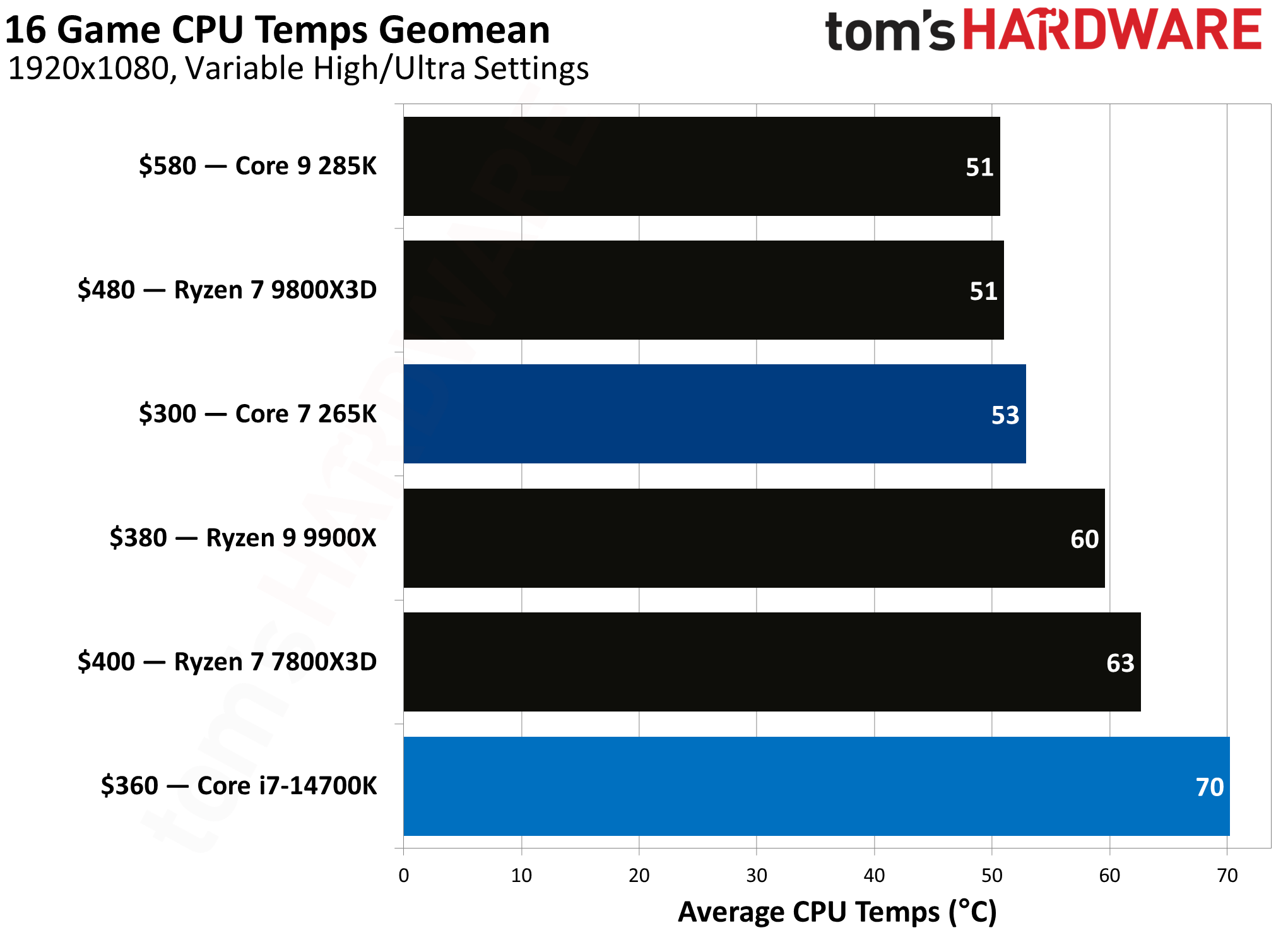
This immense efficiency gap translates directly into lower heat output and reduced demands on the cooling system, making the 265K a much more manageable CPU from a thermal perspective while gaming. In our efficiency ranking, the Core i7-14700K puts out 1.12 FPS/W, which is about 33% worse than the 1.50 FPS/W result of the Core Ultra 265K.
The performance per dollar, or value, calculation further complicates the direct comparison. Despite its older architecture, the Core i7-14700K presents a strong value proposition. Priced at $330, it achieves a value score of 0.45 (FPS/$). The newer Core Ultra 7 265K, even cheaper at $290, scores slightly higher at 0.48. This means that while the 265K offers better efficiency, the 14700K's higher absolute performance allows it to remain incredibly competitive in terms of pure framerate return on investment.
Ultimately, the choice between these two processors hinges on the user's priorities. The Intel Core i7-14700K remains the victor for users seeking the highest possible framerates and the best smoothness (1% lows), regardless of power consumption. It is a proven, powerful gaming chip.
The Intel Core Ultra 7 265K, however, represents Intel’s vision for the future: it offers vastly superior efficiency, significantly lower power draw and heat, and competitive value, all while delivering performance that is generally within 10% of its predecessor.
⭐Winner: Intel Core i7-14700K
Even though the Core Ultra 7 265K offers some compelling arguments in terms of efficiency and value, it cannot match the pure gaming horsepower of the Core i7-14700K, which is why the latter takes this round.
Productivity Performance: Intel Core i7-14700K vs Intel Core Ultra 7 265K
The competition between the Core i7-14700K and the Core Ultra 7 265K takes an interesting turn when looking at the productivity results. According to our detailed benchmarks, the Core Ultra 7 265K is consistently the better performer across a wide range of single-threaded and multi-threaded tests, which makes it the superior productivity processor.
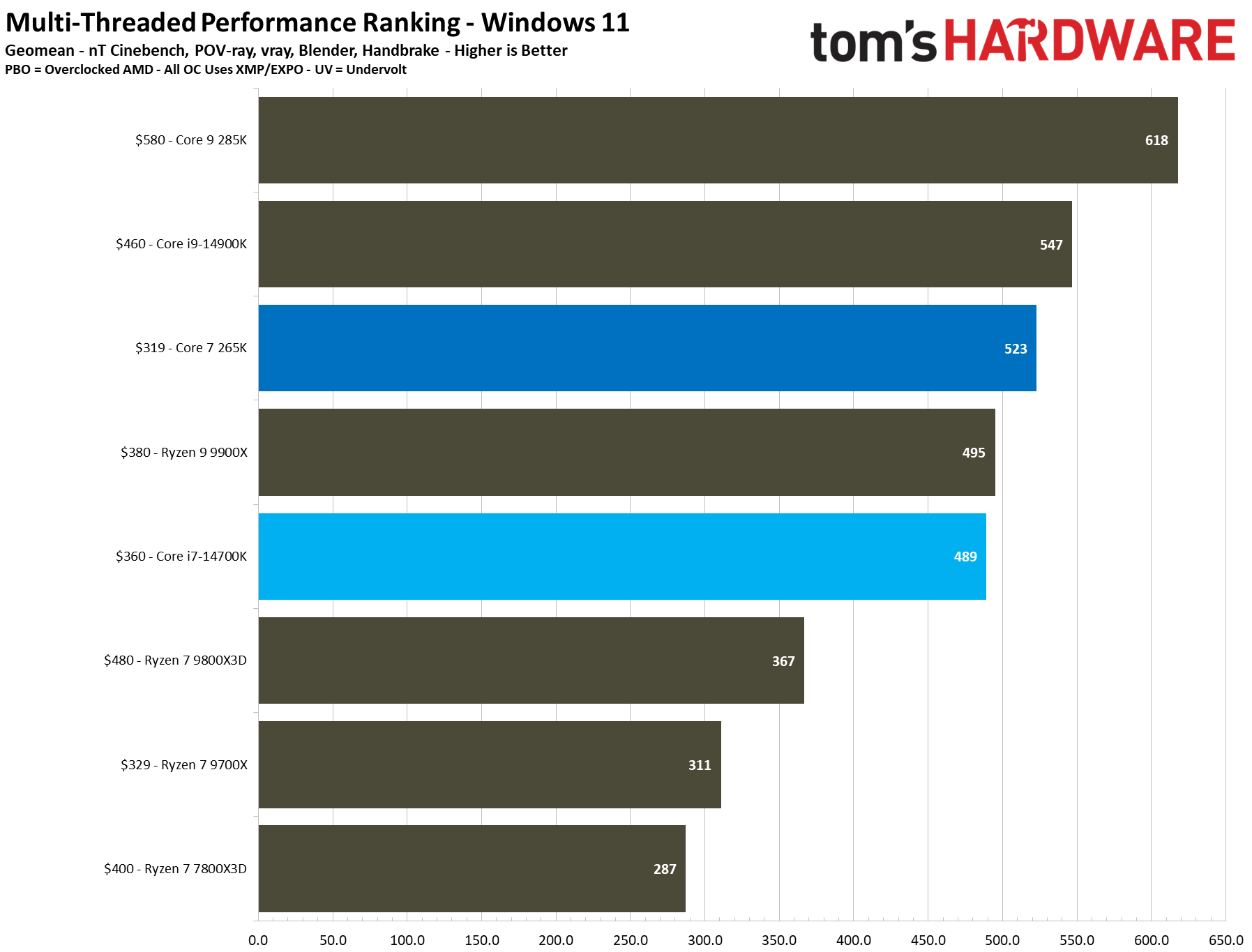
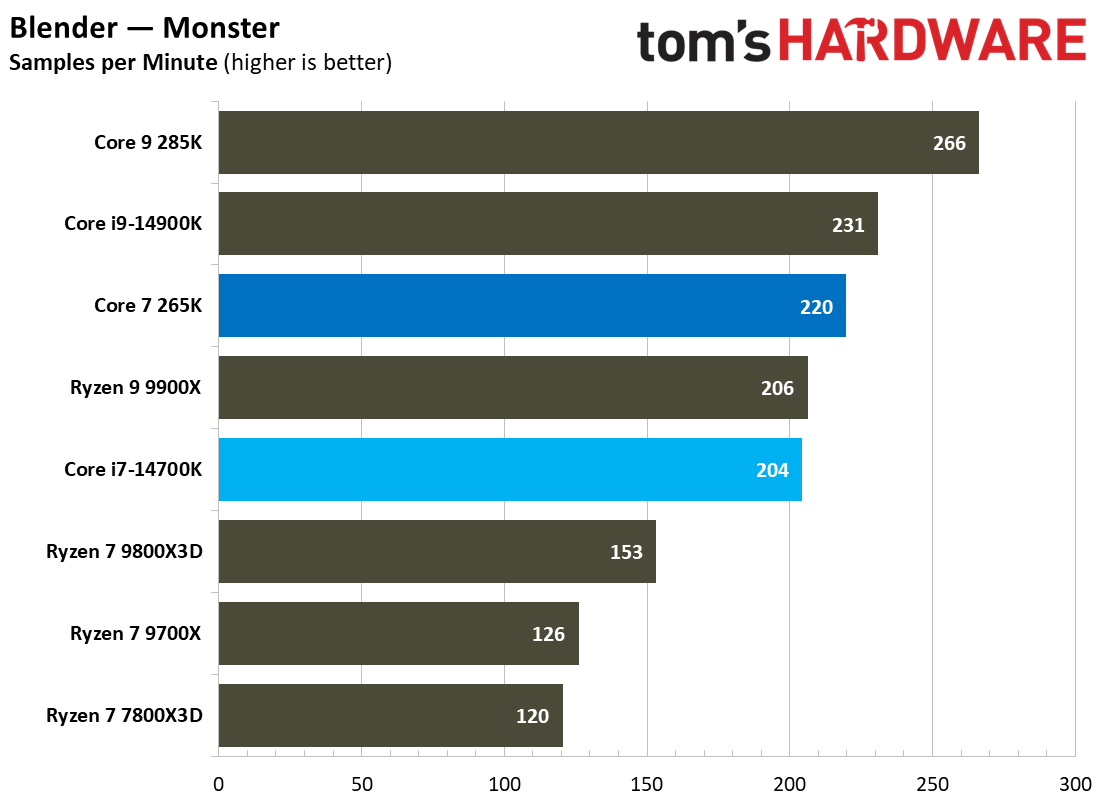
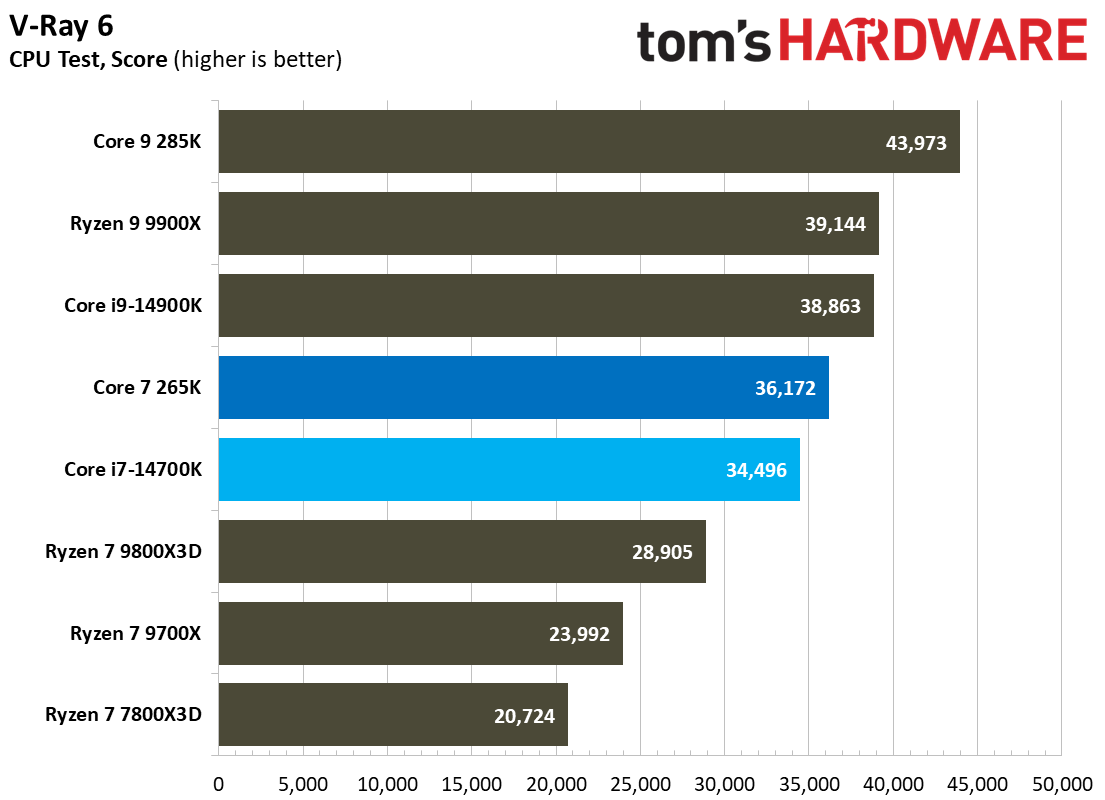
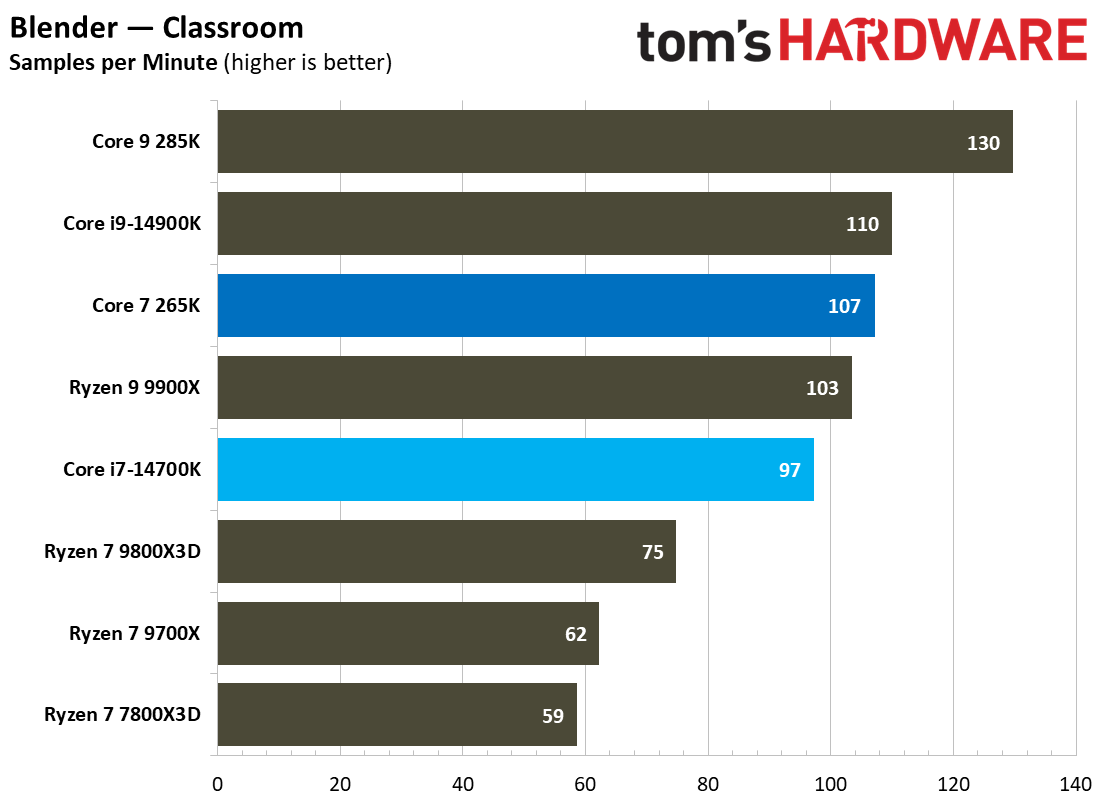
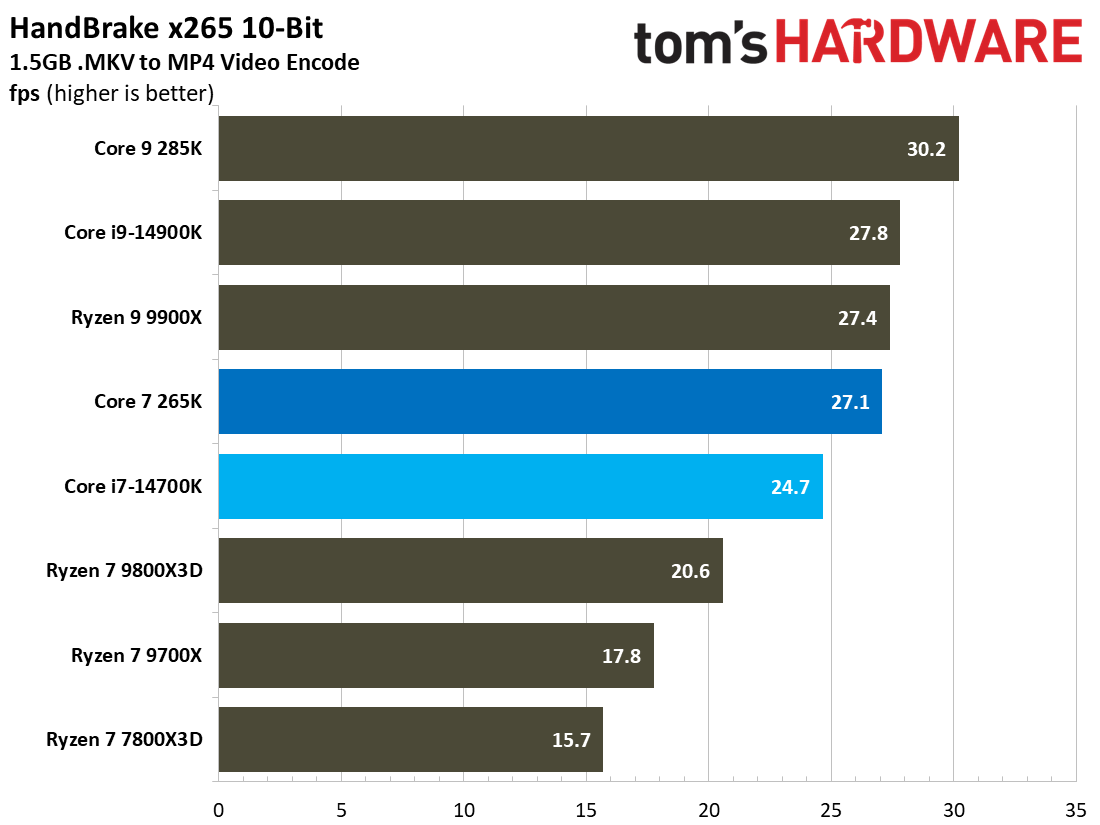
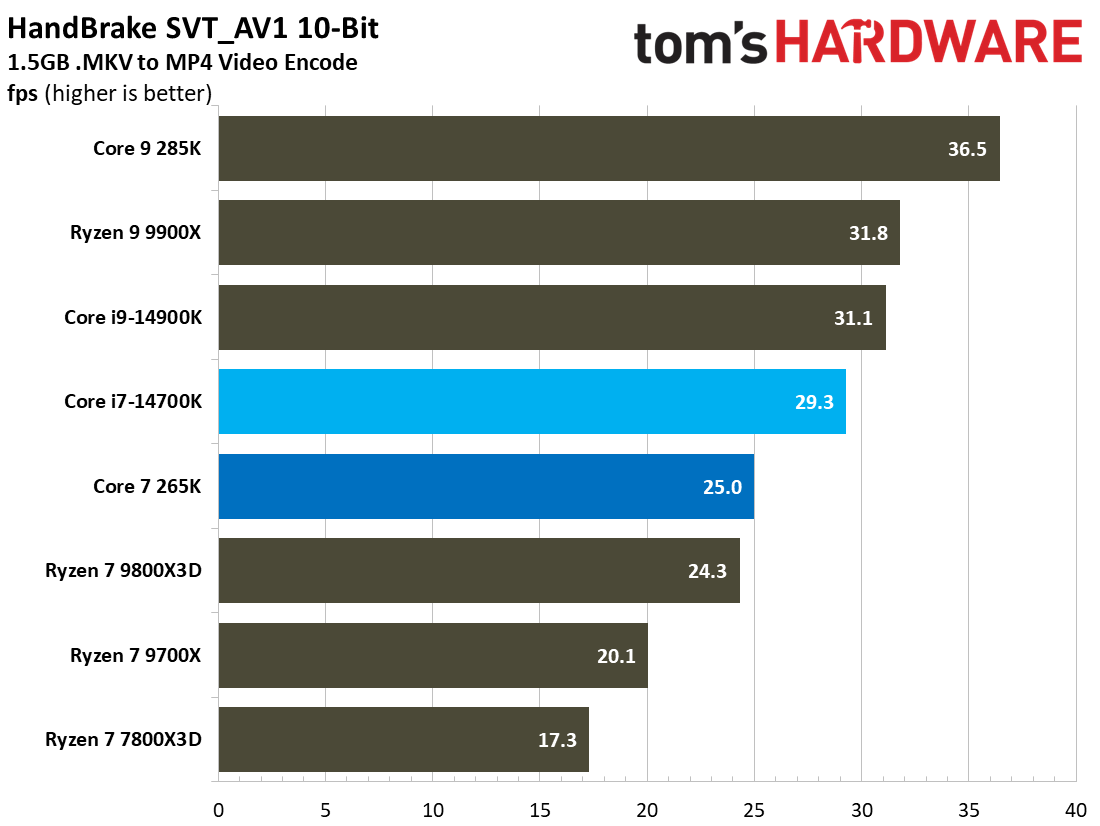
Looking at our multi-threaded geomean first, the Core Ultra 7 265K holds a decent advantage over its predecessor. The Geomean ranking represents the aggregate from our host of benchmarks, including Cinebench, POV-Ray, Blender, Handbrake, and more. Here, the 265K achieves a score of 523 points compared to 489 for the 14700K, which is a lead of 6.95%.
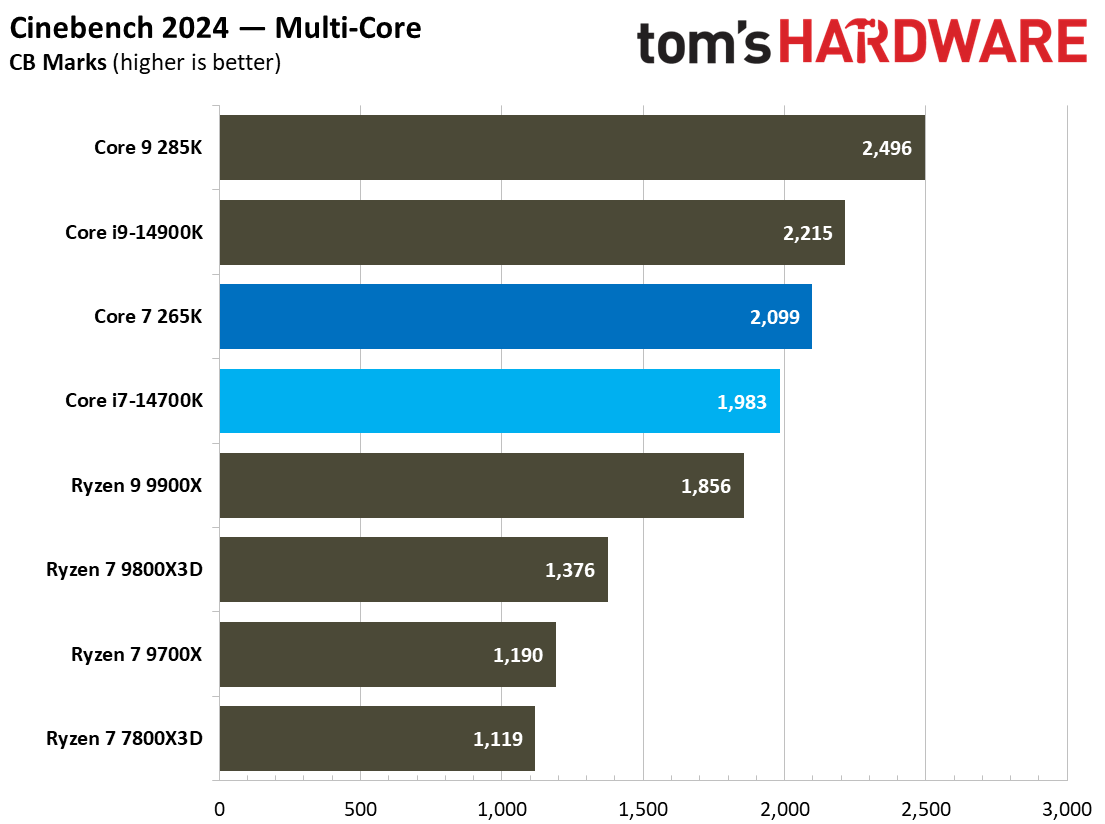
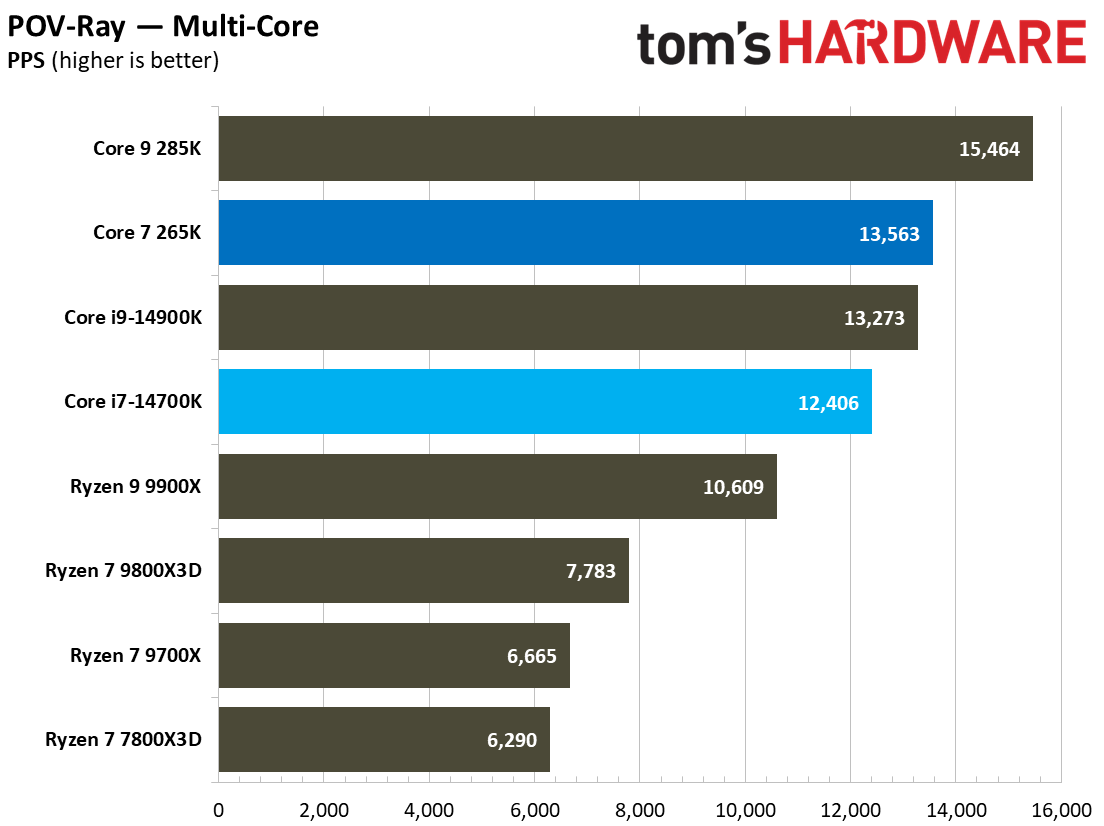
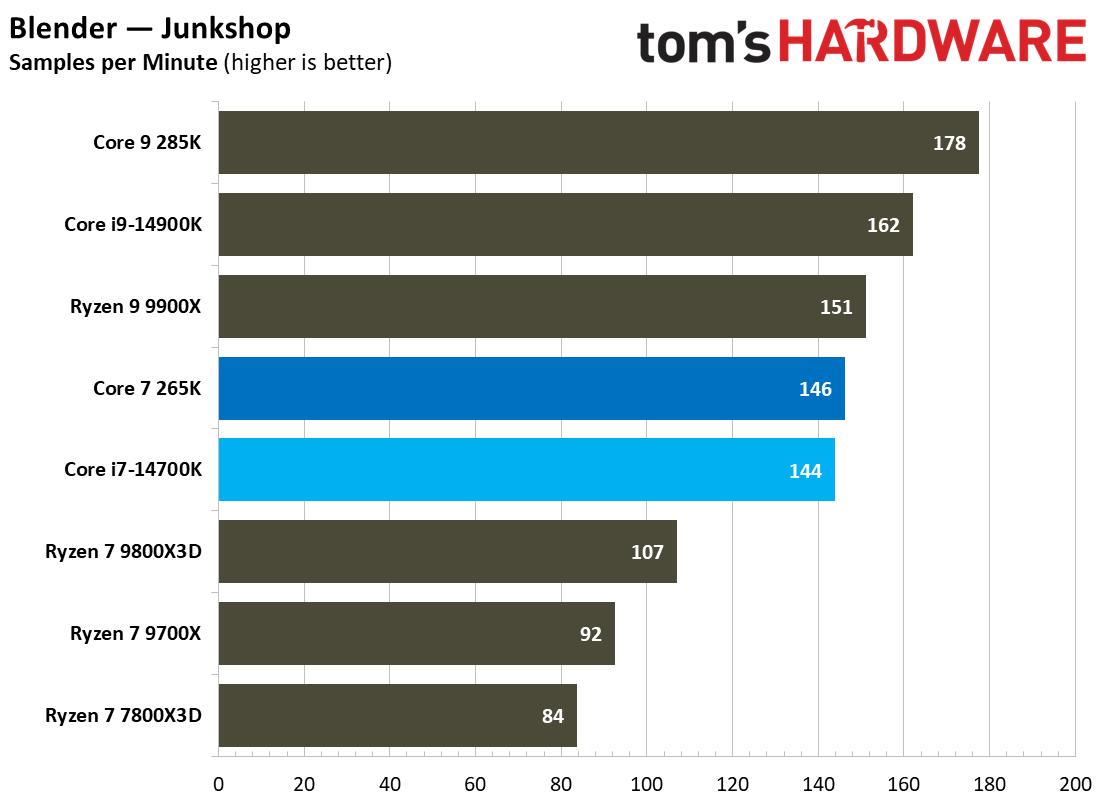
This lead is further solidified when we take a look at the individual benchmarks. In Cinebench 2024’s multi-core test, the Core Ultra 7 265K scores a 5.8% better result than the 14700K, while in POV-Ray, the gap widens to a substantial 9.3%. We can also see this pattern in HandBrake encoding, where the 265K encodes at a 9.7% faster rate than the Core i7-14700K.
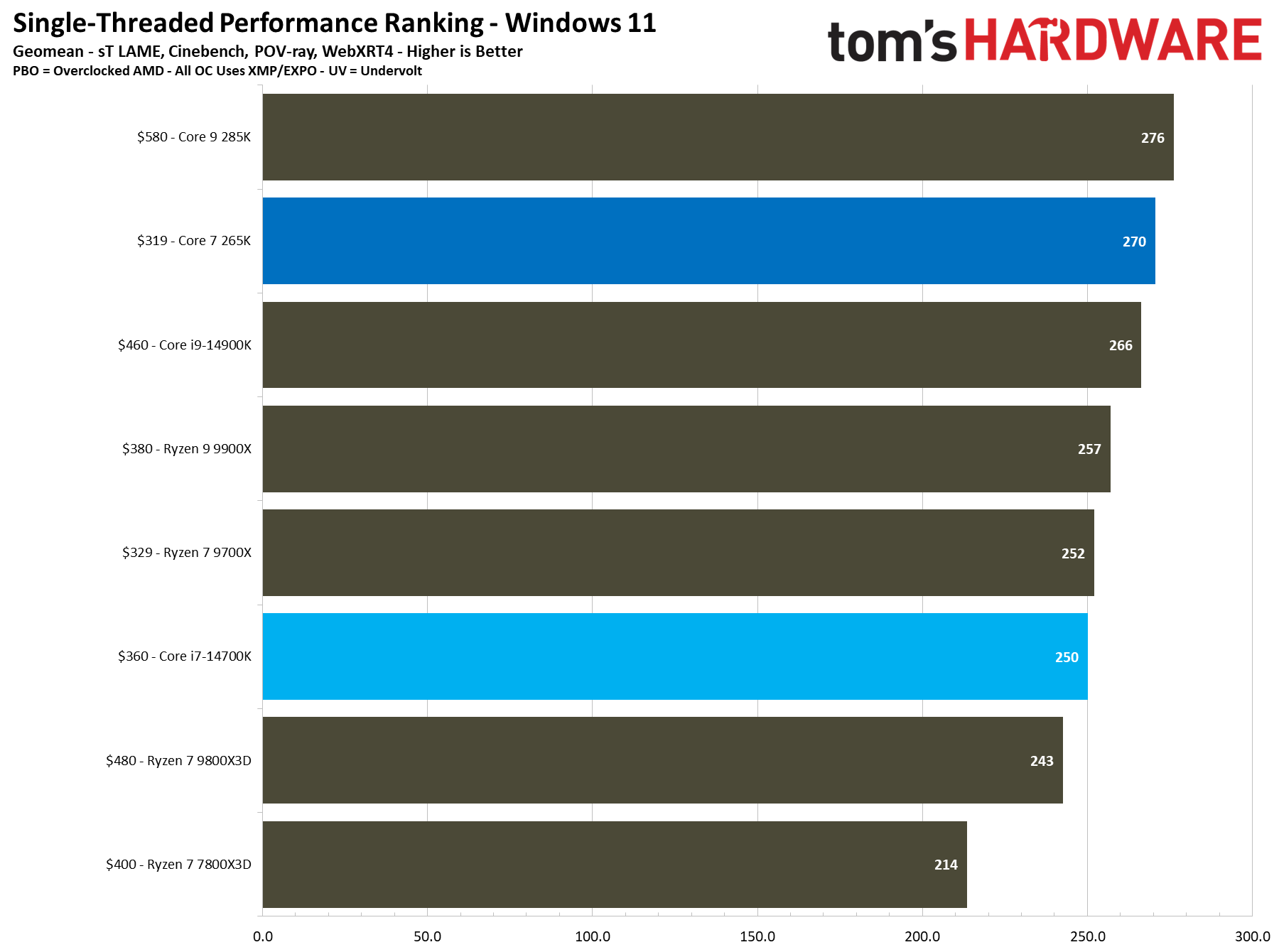
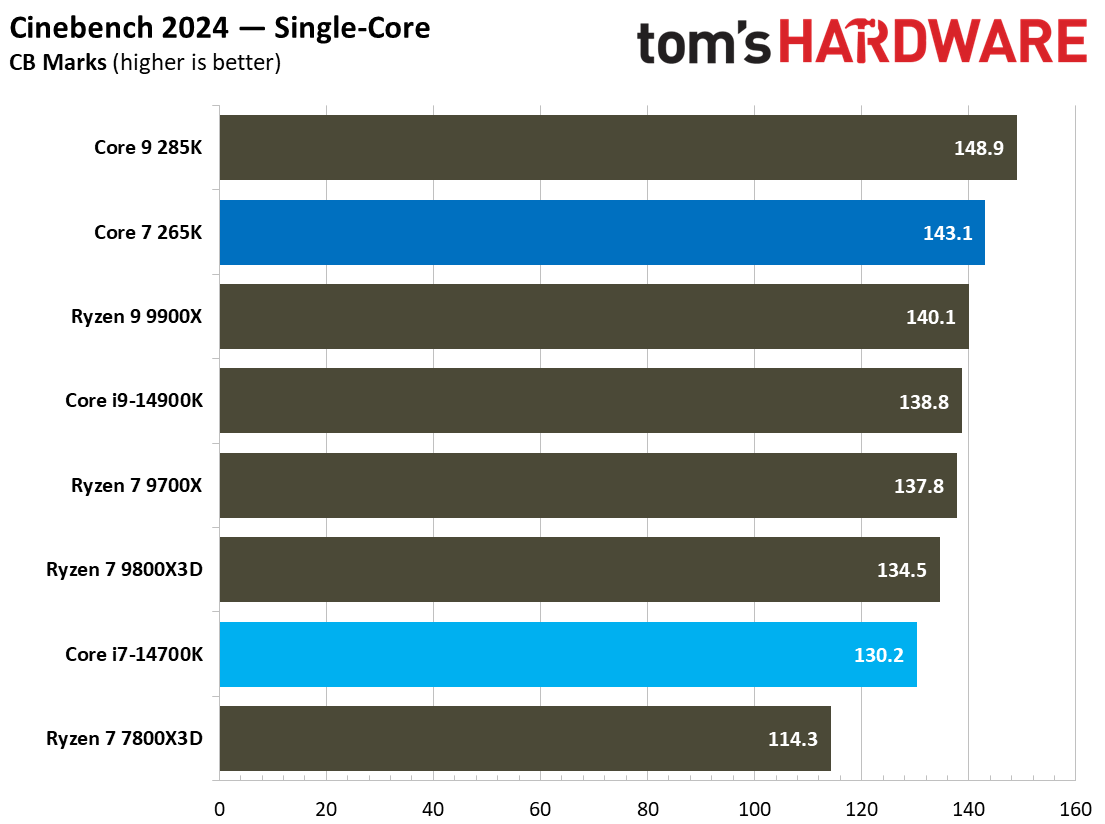
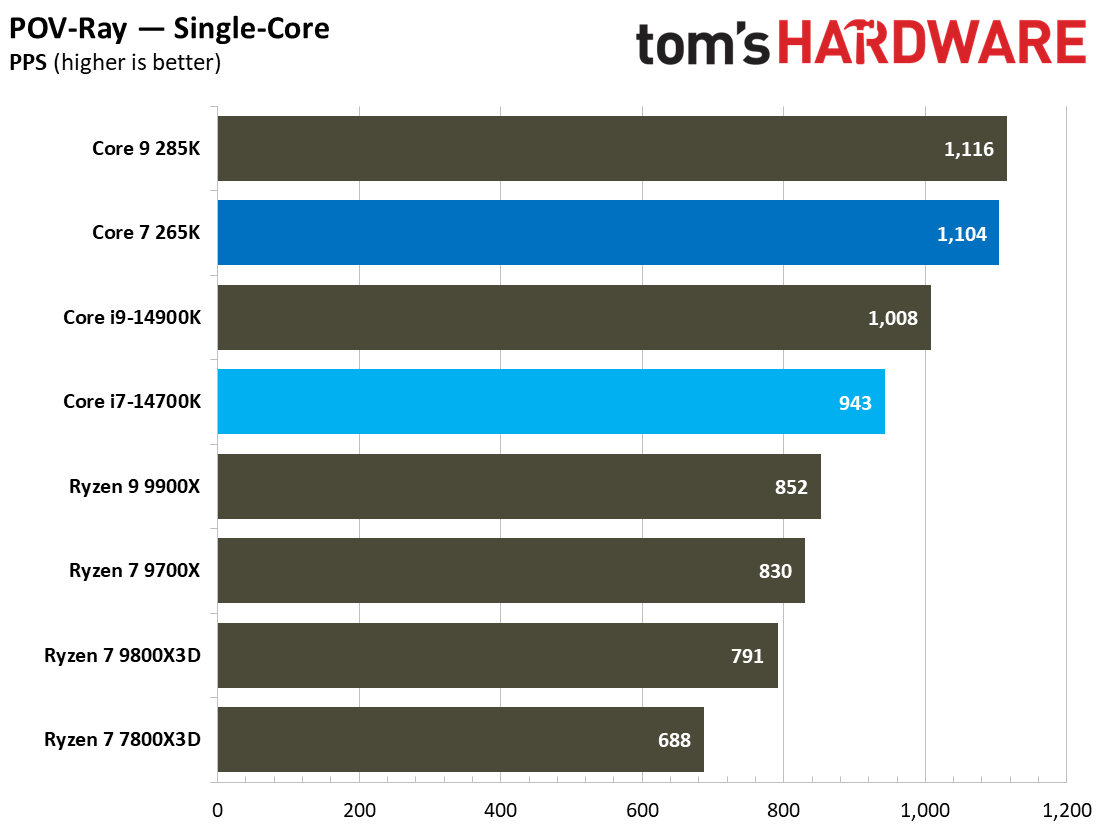
This superiority is carried into our single-threaded benchmark results as well. Pulling up the single-threaded geomean ranking, we can see that the Core Ultra 7 265K scores 270 points while the Core i7-14700K scores 250 points, giving the former a lead of 8%. This generational improvement is also evident in individual benchmarks like Cinebench 2024’s single-core test, where the 265K holds a 10% lead over the 14700K.
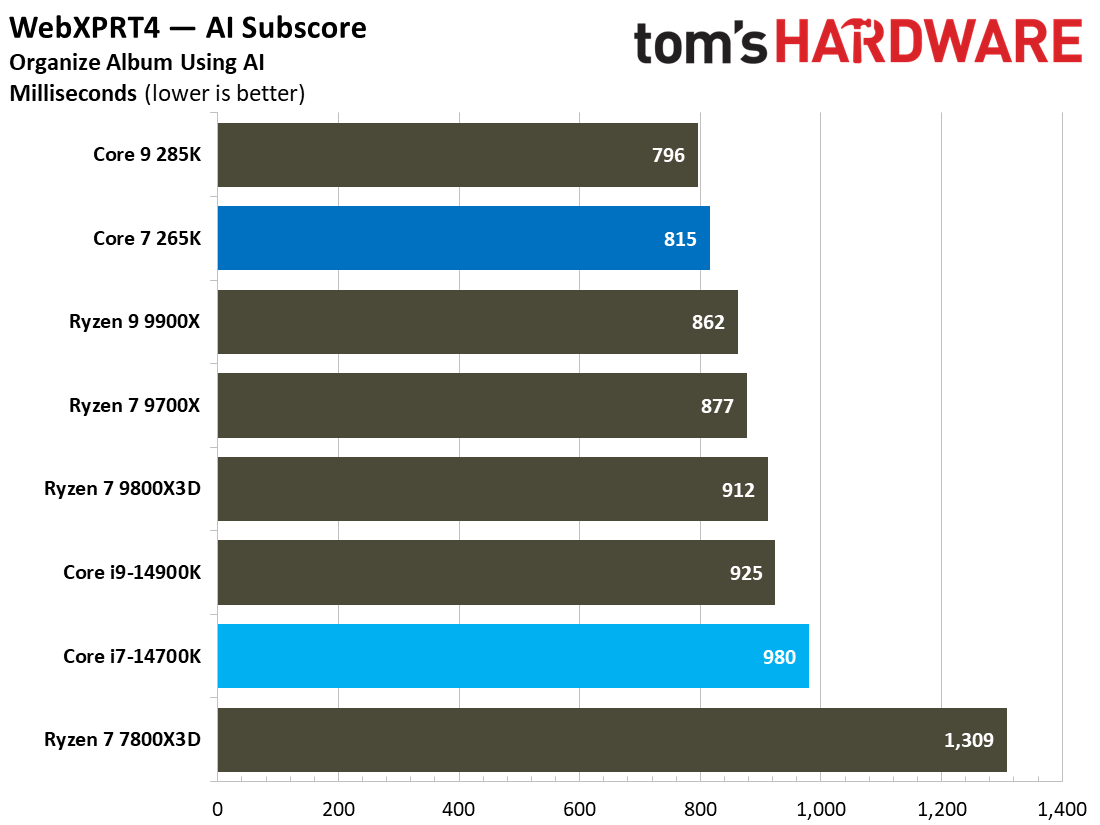
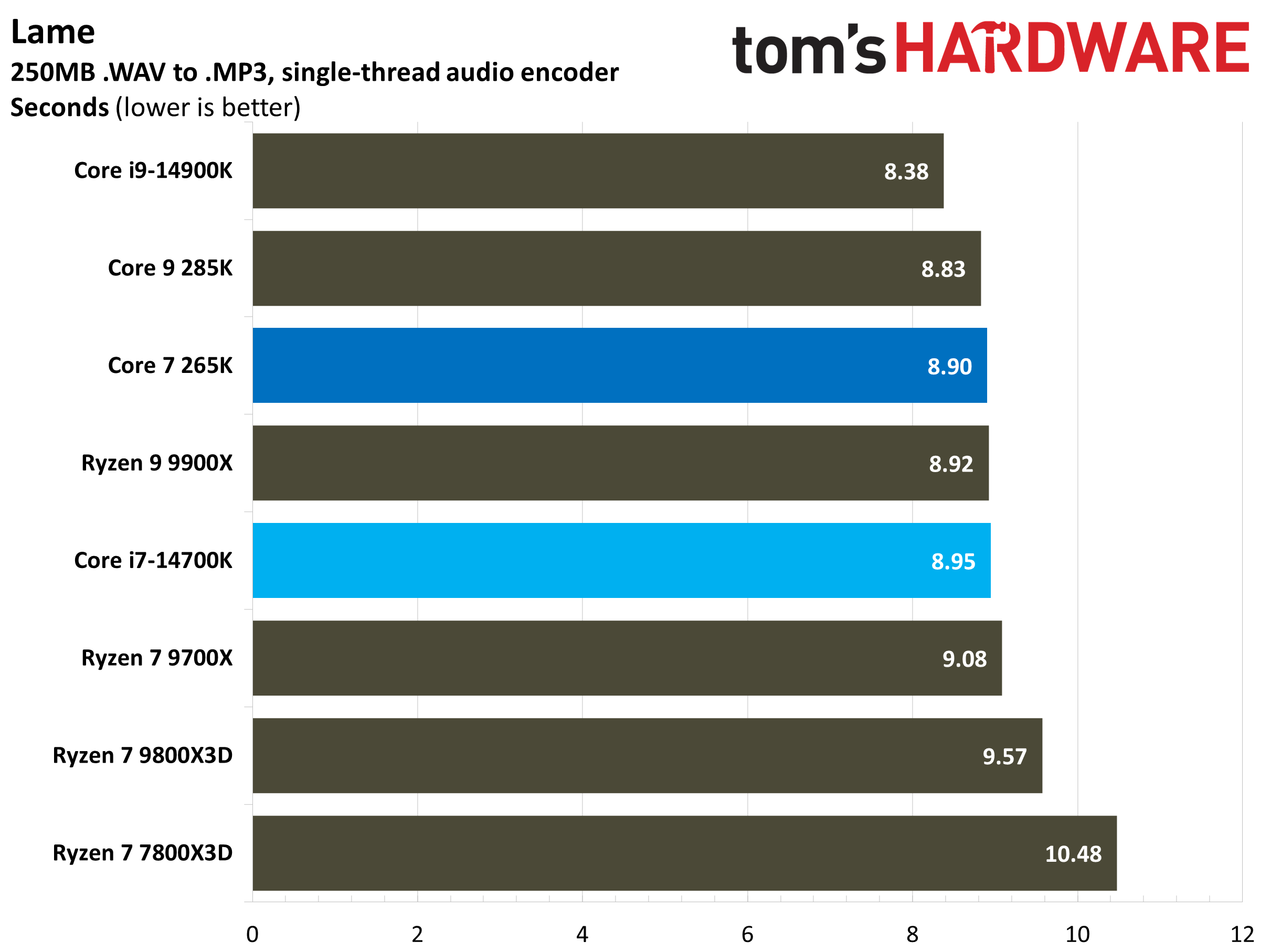
We can also see the same pattern in the LAME audio encoding test, although the difference drops to just 0.5% in favor of the 265K. However, this is one of the few benchmarks in which the Core i7-14700K remains somewhat competitive. We see the 265K pull away again when we look at the WebXPRT 4 web performance test, with an 8.9% lead over the 14700K.
⭐Winner: Intel Core Ultra 7 265K
Putting all the data together, it is clear that the Core Ultra 7 265K is the better processor for productivity. It shows a clear and consistent generational improvement over the Core i7-14700K, which is visible in both single-threaded and multi-threaded applications. It leads the latter by about 7% on average in our multi-threaded benchmarks, while the single-threaded lead is also around 8%.
Overclocking: Intel Core i7-14700K vs Intel Core Ultra 7 265K
Although both processors are K-series chips with unlocked multipliers, they do offer slightly different approaches to overclocking.
The Core i7-14700K has proven overclocking foundations, but its high power demands and temperatures limit its maximum operating frequency devoid of intensive cooling. It's possible to hit 6GHz on individual cores, but you shouldn't expect all-core frequencies beyond its rated boost speeds, at least with most coolers.
The Core Ultra 7 265K introduces a few neat features with Arrow Lake, including OCTVB (Overclocking Voltage/Frequency Boost), granular ratio adjustments in 16.67MHz increments, and separate P-core and E-core voltage domains. These features offer more precise control, and the Core Ultra 7 265K generally scales well with an overclock, be it on the P-cores, E-cores, or fabric.
With the Core Ultra 7 265K, most users typically reach around 5.6-5.7 GHz on the P-cores, with limited scaling beyond that point. The E-cores have more headroom. The 265K does have the advantage of power efficiency due to its advanced 3nm node, and that may translate to better overclocking flexibility in thermally constrained systems.
⭐Winner: Intel Core Ultra 7 265K
Both CPUs offer similar overclocking toolsets and have pretty similar overclocking results, but the Core Ultra 7 265K is slightly easier to tune due to its efficiency, while the Core i7-14700K requires much more handholding at its high stock operating temperatures.
Power Consumption, Efficiency, and Cooling: Intel Core i7-14700K vs Intel Core Ultra 7 265K
The architectural jump from Raptor Lake Refresh to Arrow Lake is quite beneficial in terms of efficiency and power consumption. We tested the Core i7-14700K and the Core Ultra 7 265K thoroughly in a wide range of idle and load scenarios to figure out the winner in this category.
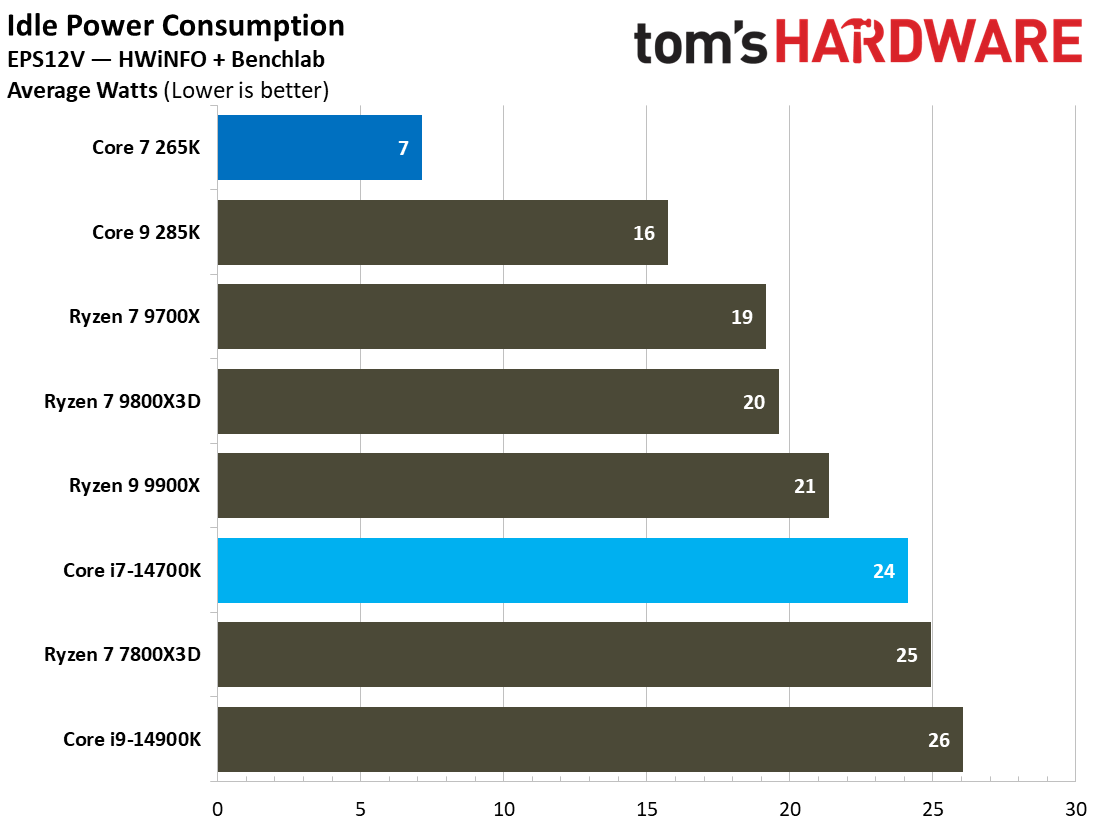
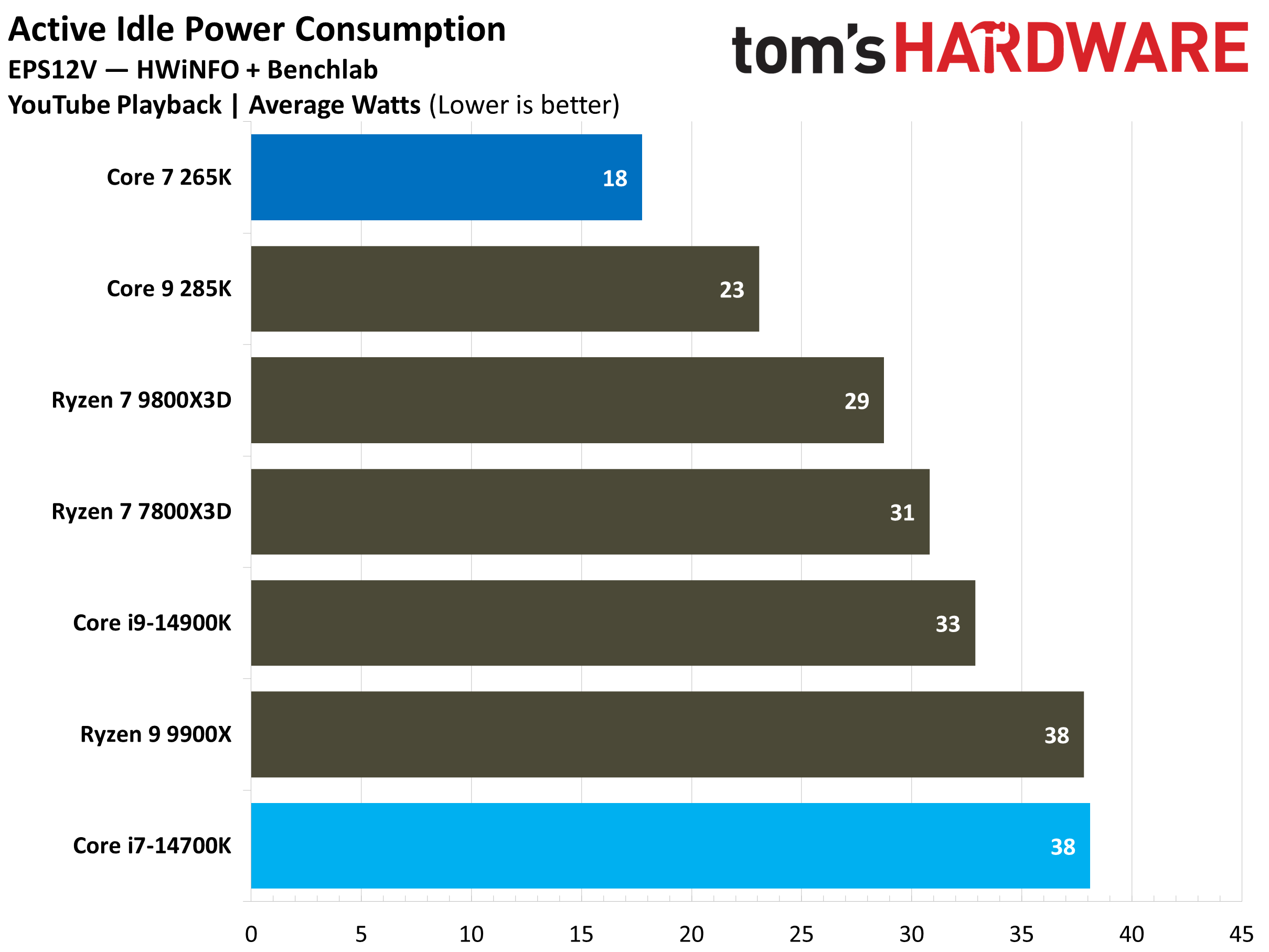
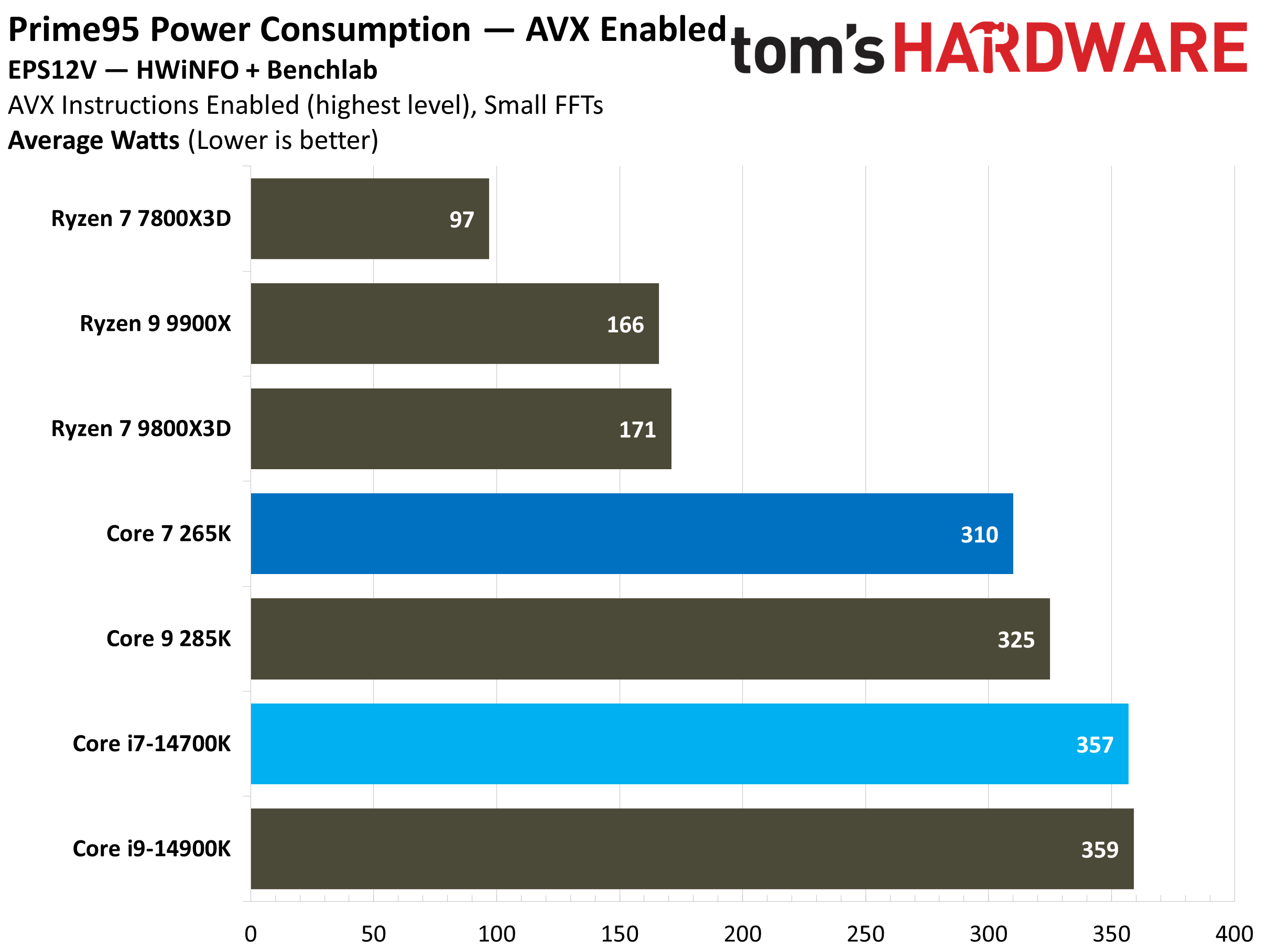
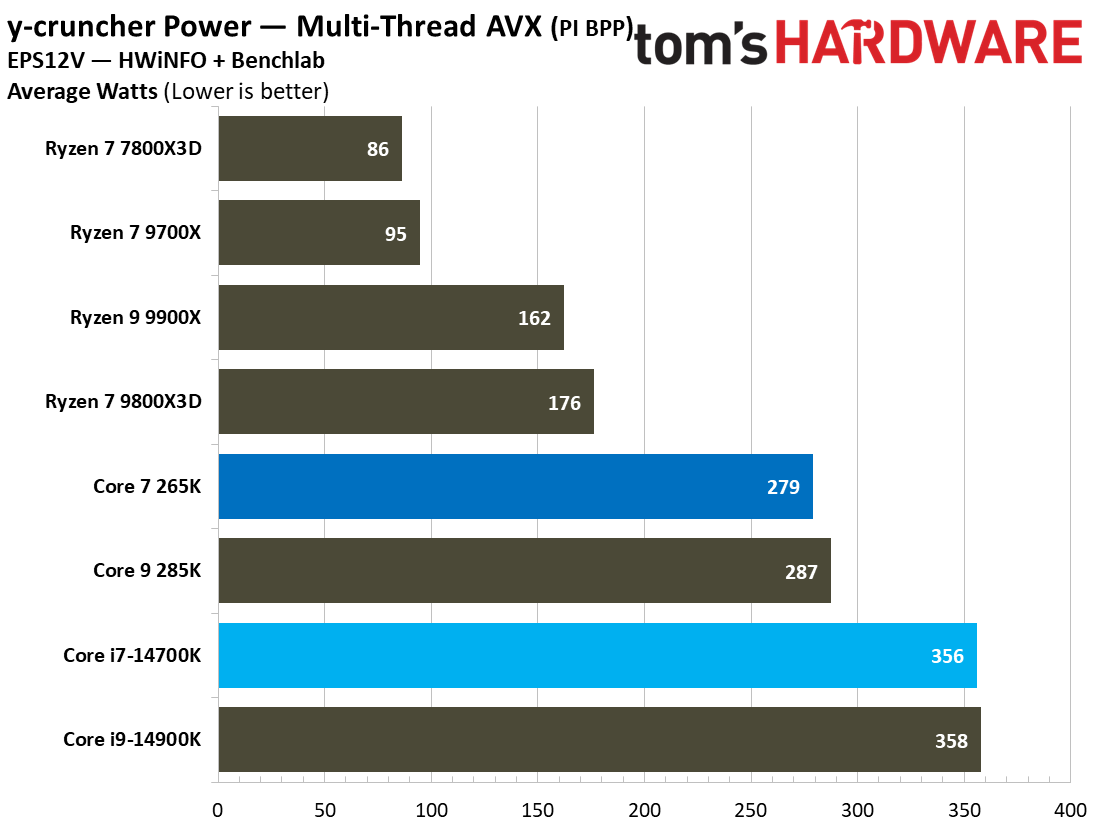
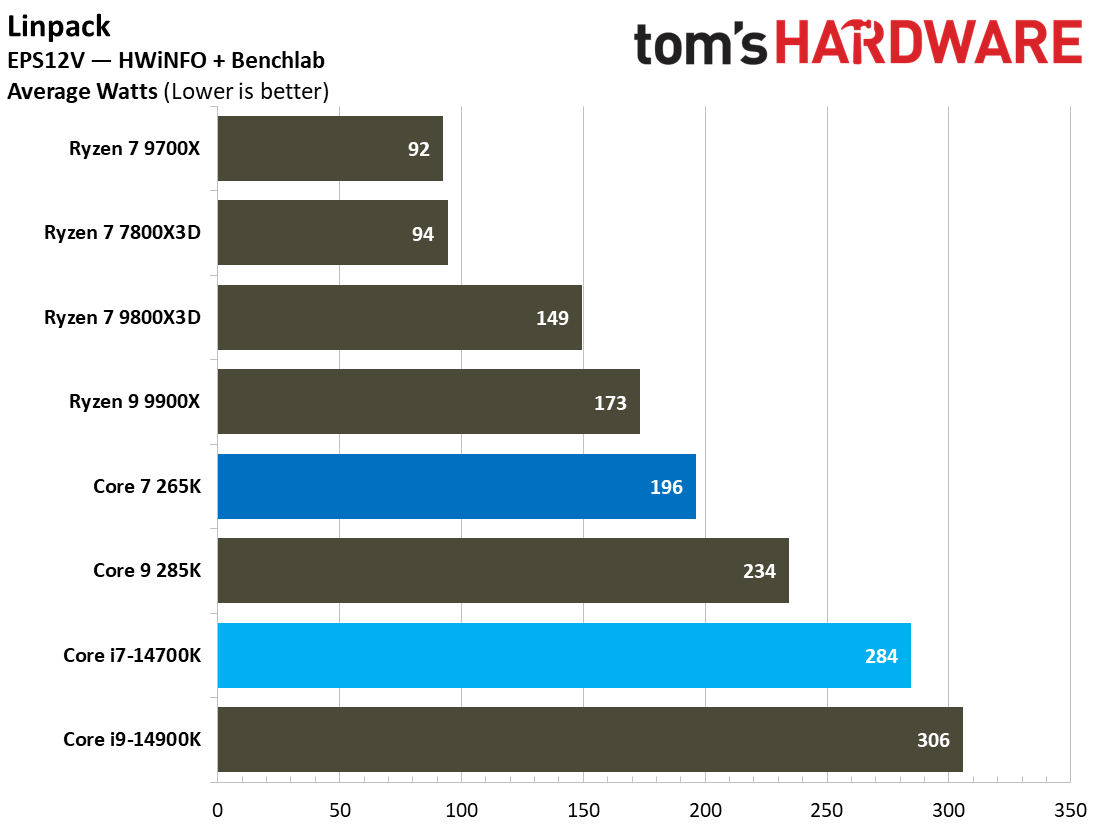
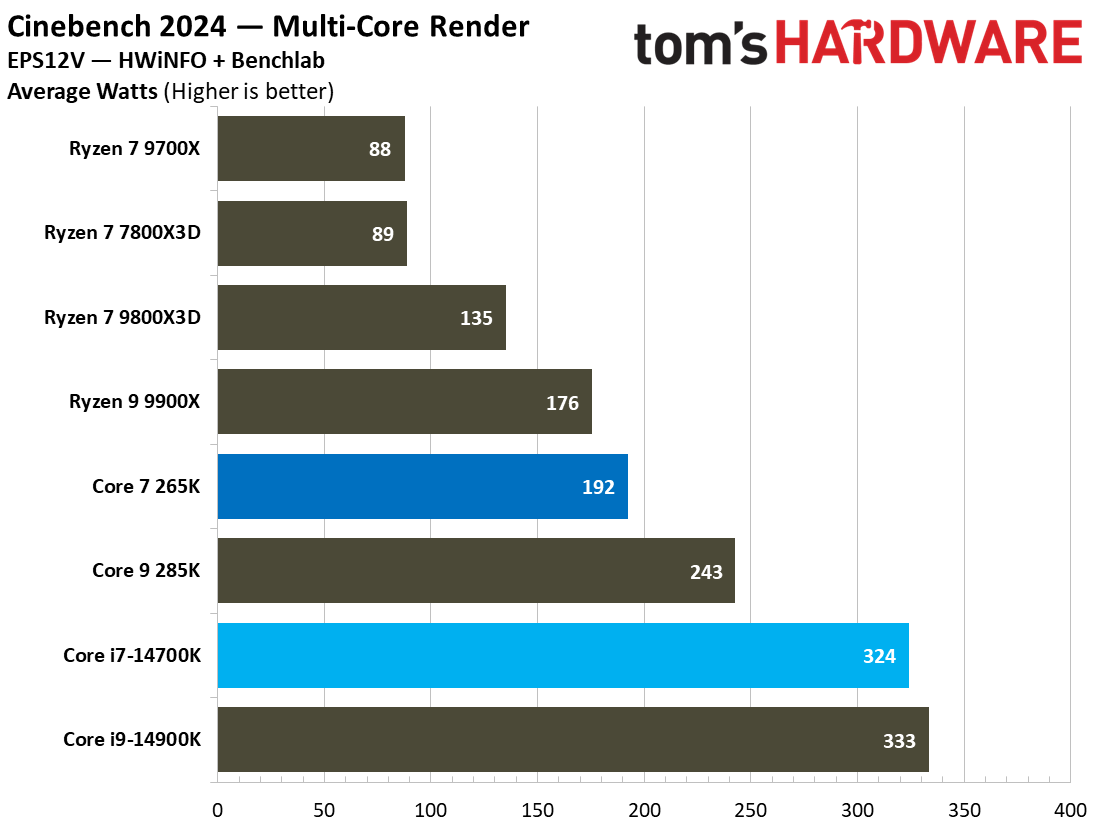
Starting out with the idle scenarios, we can see that the Core Ultra 7 265K uses just 7 watts in a true idle state, while the i7-14700K draws nearly 70% more power, coming in at 24 watts. Moreover, in active idle states like YouTube playback, the Core Ultra 7 265K still uses 53% less power than the older i7-14700K. This comparison highlights the improved efficiency of the Arrow Lake CPUs, at least in idle states.
Under full load, the story is not much different. If we take a look at the Prime95 small FFTs test with AVX instructions (a worst-case scenario power virus), we can see that the Core i7-14700K ends up near the bottom of the chart, with an average power consumption of 357 watts. On the other hand, the Core Ultra 7 265K is nearly 13% more efficient in the same test, using just 310 watts of power by comparison.
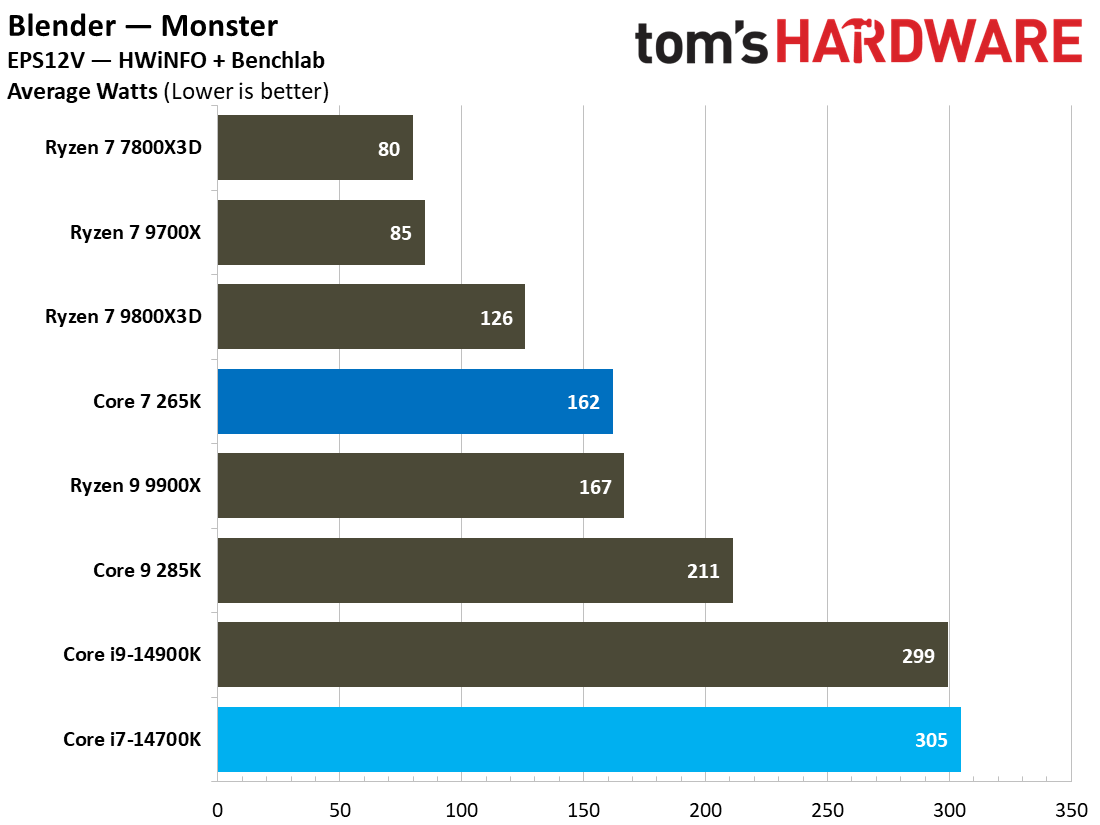
The same trend can be seen in other heavy workloads. In the y-cruncher multi-thread AVX benchmark, the Core Ultra 7 265K uses about 22% less power than the Core i7-14700K on average. Moreover, in the Cinebench 2024 multi-core render test, the Ultra 7 265K again proves its efficiency by consuming a whopping 41% less power than the i7-14700K. This dramatic difference is a result of Intel’s architectural redesign and new manufacturing process with the Arrow Lake architecture that prioritizes more work per watt rather than pushing power limits to the max.
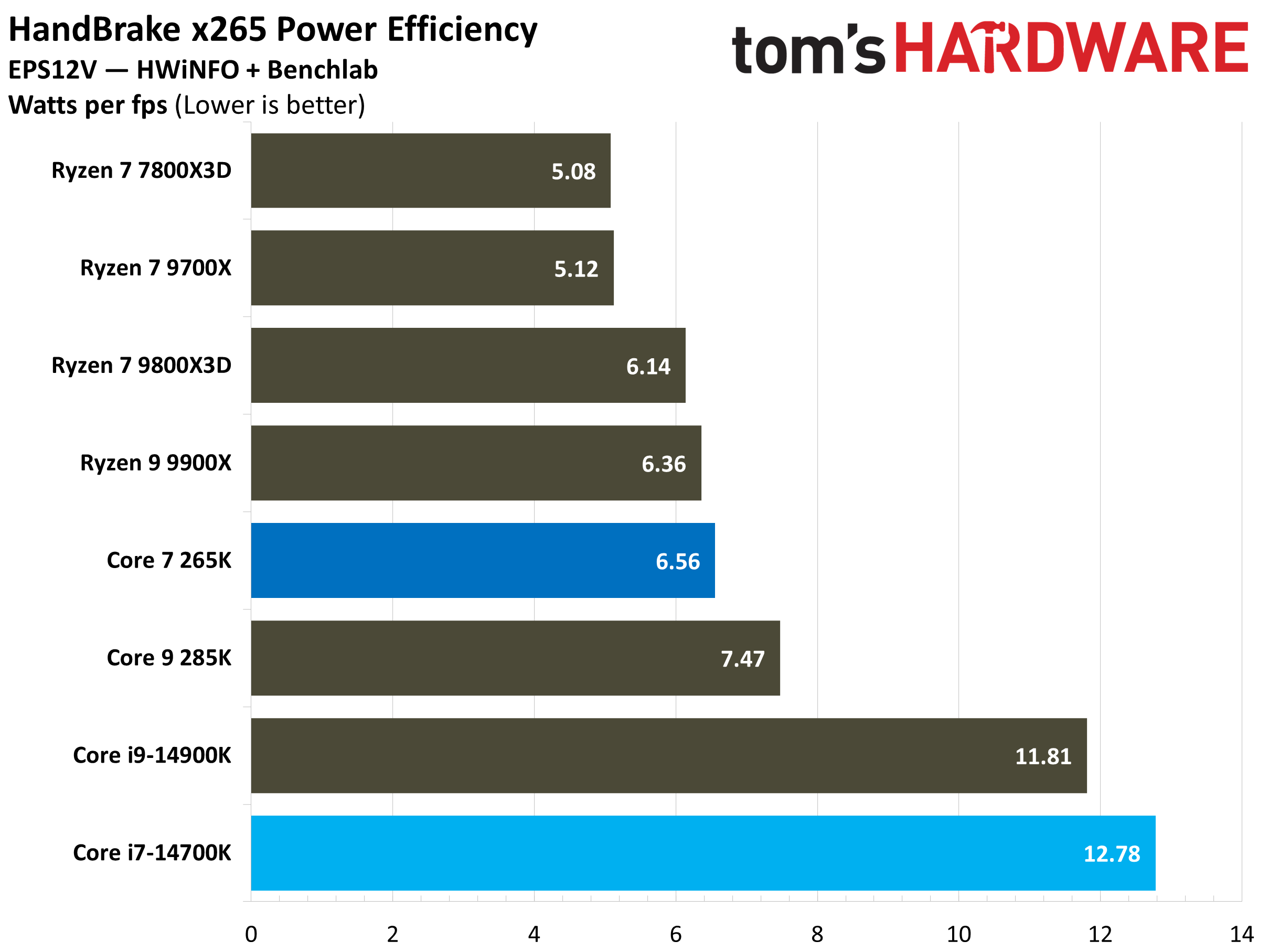
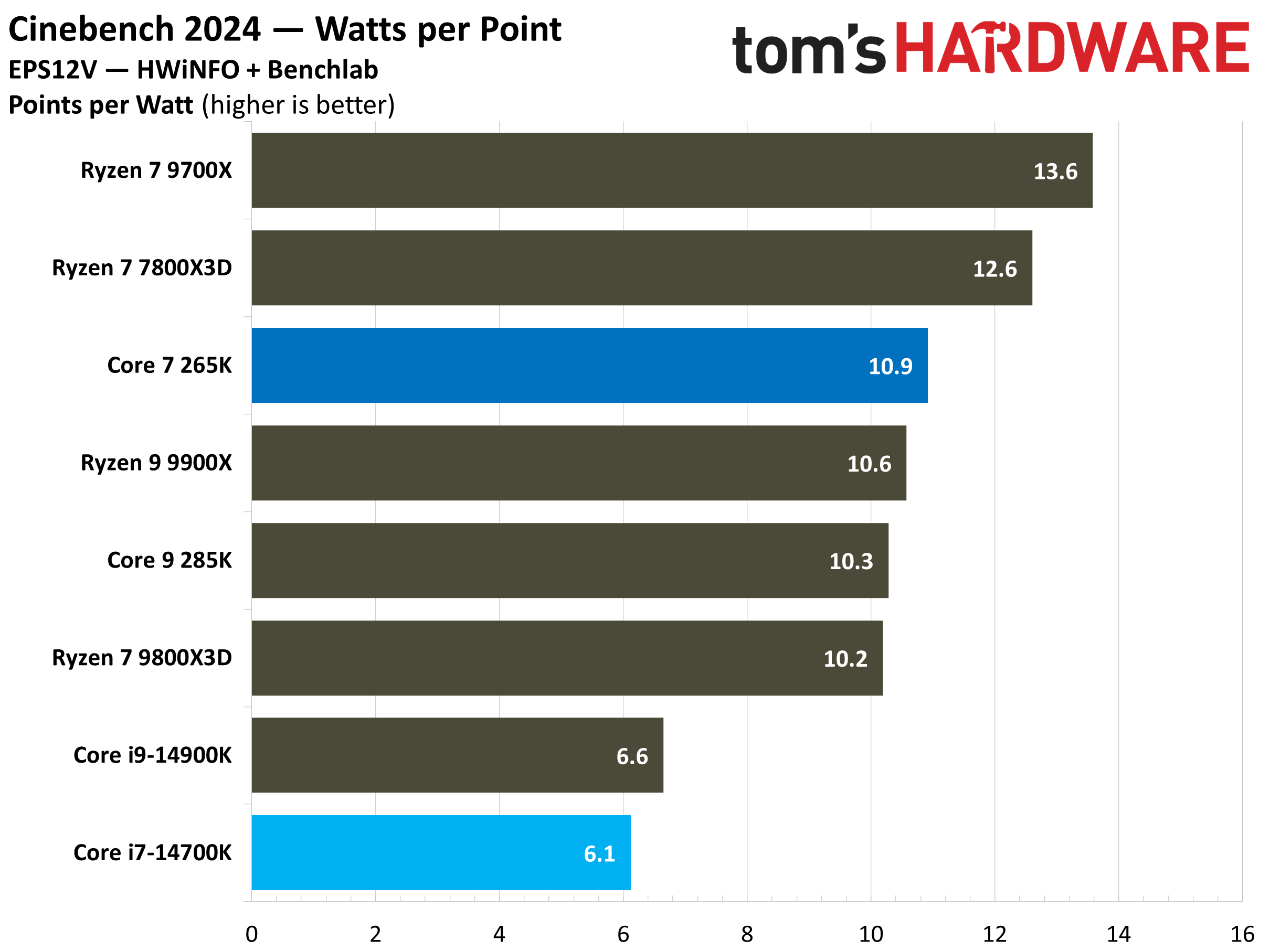
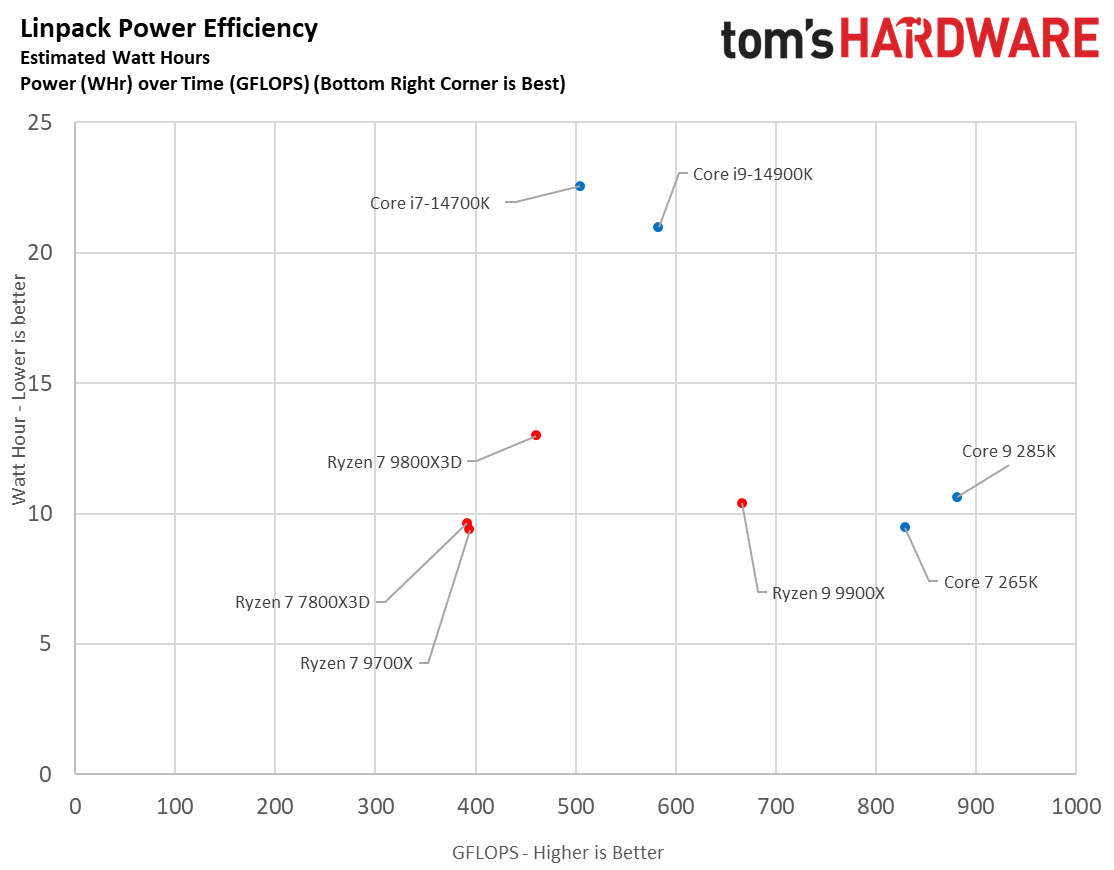
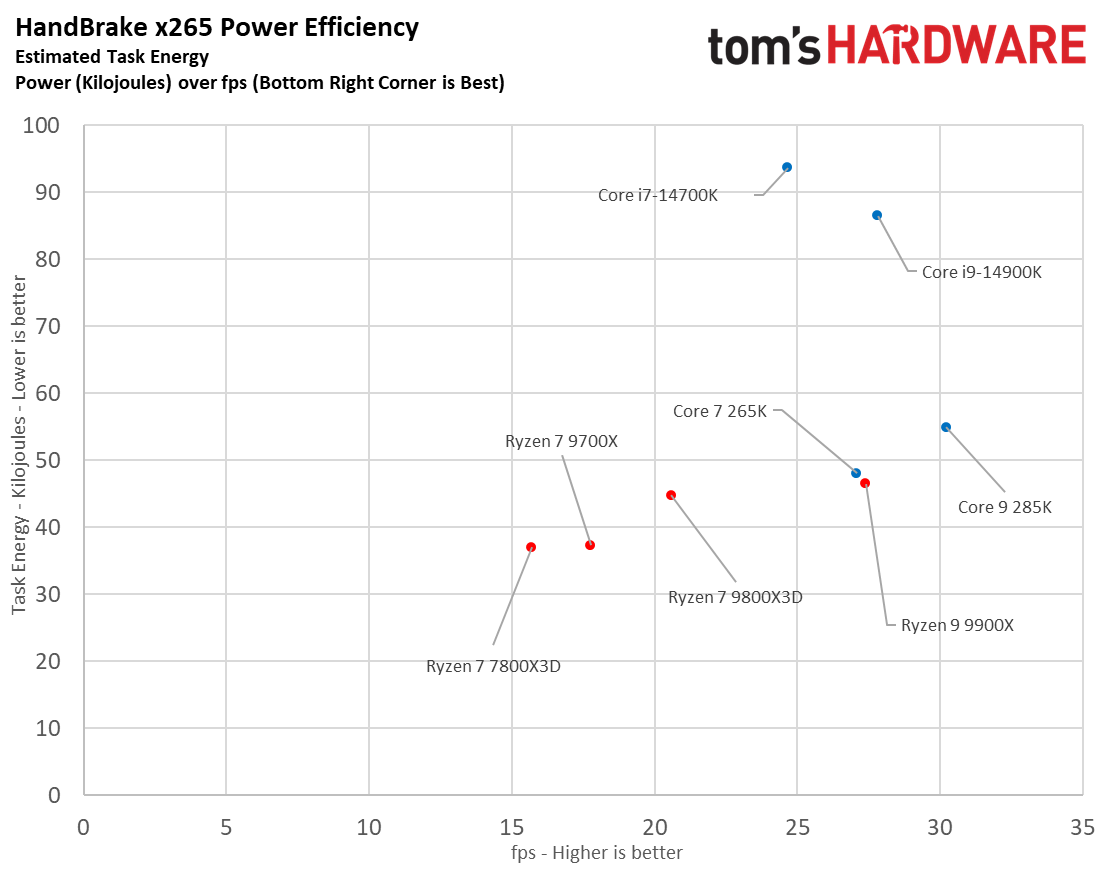
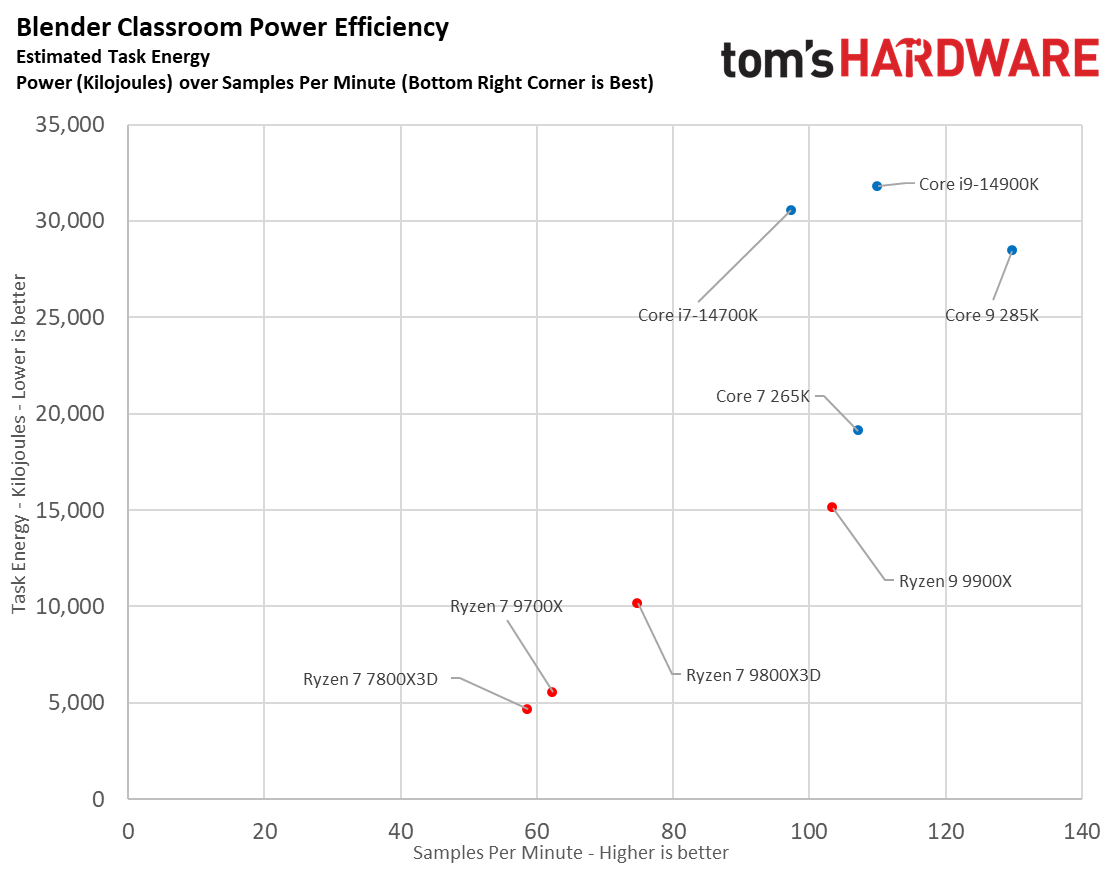
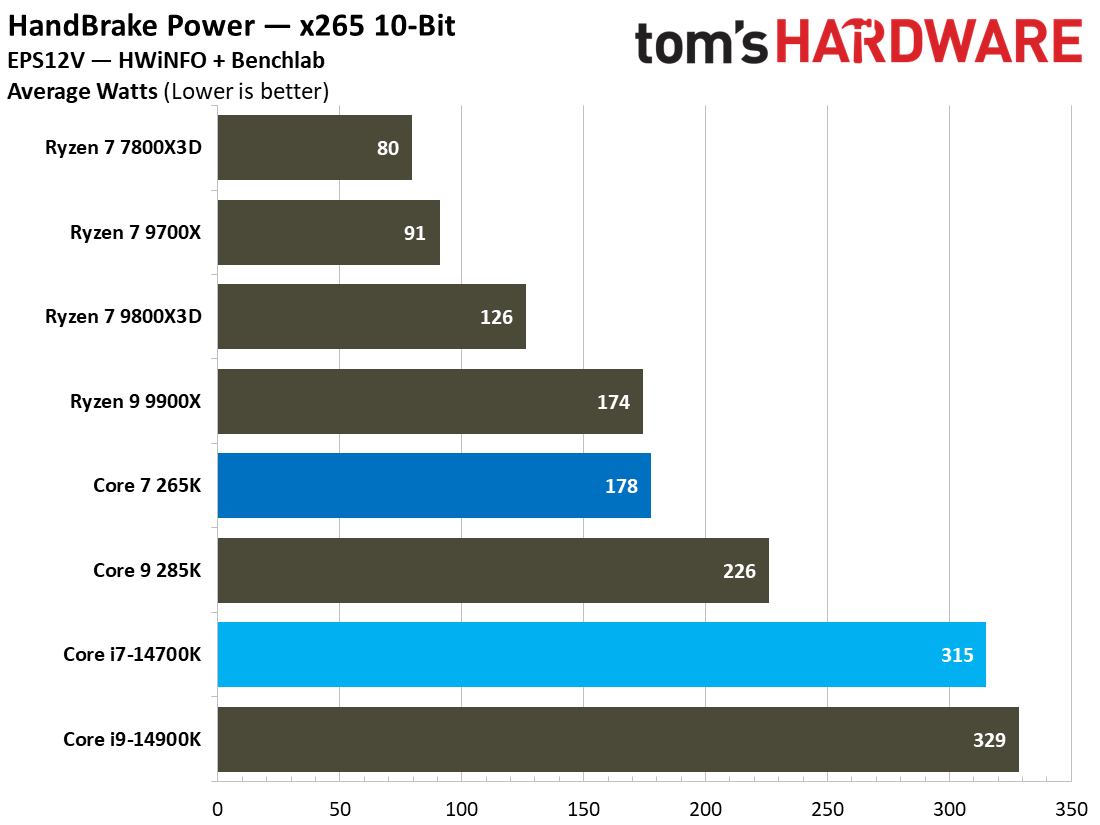
Speaking of work per watt, let’s dive into some efficiency benchmarks. The Core Ultra 7 265K sustains its lead in our HandBrake x265 encoding test, achieving a monumental 95% efficiency advantage over the i7-14700K. This makes it almost twice as efficient as the older Core i7 in terms of “watts per FPS” in this task. The same pattern holds true in Cinebench 2024, where the Core Ultra 7 265K achieves almost double the points per watt as the Core i7-14700K.
It is also interesting to look at the HandBrake x265 power efficiency scatter plot, which plots the FPS against the task energy in kilojoules. In order to be more efficient, the CPU result should be more towards the bottom right corner, which is true for the Core Ultra 7 265K when compared to the Core i7-14700K. It delivers more FPS in this task while consuming almost half the task energy, making it exponentially more efficient than the old Raptor Lake chip.
Since the Core i7-14700K consumes more power in load and idle states, it also puts out more heat, which is why it needs a beefier cooling solution as well. With the power consumption figures that we are seeing, it would be wise to go with a 360mm AiO liquid cooler for this CPU. Even a custom liquid cooling loop should not be ruled out if you can afford and maintain it. The Core Ultra 7 265K, on the other hand, can be paired with a 240mm AiO liquid cooler or a high-end tower air cooler for optimal results.
⭐Winner: Intel Core Ultra 7 265K
As a result of our testing, it is undeniable that the Core Ultra 7 265K is the superior CPU both in terms of power consumption and efficiency in this comparison. Not only does it consume way less power than the i7-14700K in most tasks, but it delivers better productivity performance in those scenarios as well. It is also quite a bit more efficient in idle states, which is a nice bonus.
Pricing: Intel Core i7-14700K vs Intel Core Ultra 7 265K
As of the time of writing, the Intel Core i7-14700K is priced around $330, while the Core Ultra 7 265K carries a retail price of $290, which gives the newer Arrow Lake processor a $40 advantage up front. However, the pricing comparison of the two CPUs is not just limited to the cost of the CPU, since we also need to factor in the overall platform cost in order to make a good purchase decision.
First, we have to take a look at the motherboard. The Core i7-14700K uses the established LGA 1700 socket, which is used in widely available Z790 and Z690 chipset motherboards. Since both the CPUs are unlocked, we will want a Z-series motherboard to maximize the potential of our CPUs. A basic but functional Z790 motherboard can be found around the $150 mark, but you will need to stretch your budget all the way to around $400 if you want all the bells and whistles.
The newer Core Ultra 7 265K uses the LGA 1851 socket, which is found on Z890 motherboards. These motherboards are newer and less widely available, so they are slightly more expensive at the time of writing. You can grab a basic Z890 motherboard for just around $170 at the time of writing, with premium offerings being sold around the $500 mark if you want the best of the best.
Memory is also an interesting part of the pricing conversation. While both CPUs support DDR5 memory, the Core i7-14700K also supports older DDR4 memory. This can be a good way to save if you already have DDR4 memory lying around, or even if you plan to build a brand new DDR4 rig with the Core i7-14700K (especially with high DDR5 prices right now). You will also need a DDR4-compatible motherboard with an LGA 1700 socket, which can also be slightly cheaper than the DDR5 variants.
Of course, since both CPUs are unlocked, we don’t get a stock cooler in the box with either of them. Referring to our earlier discussion about power consumption, the Core i7-14700K is a more demanding CPU and thus requires a bigger, more powerful CPU cooler as well. A 360mm AiO liquid cooler is recommended for this CPU, which can cost around $150-200. The Core Ultra 7, on the other hand, can get by with a 240mm AiO cooler or a tower cooler, costing as little as $50 or as much as $150.
It is also important to note that the Core Ultra 7 265K, with its newer LGA 1851 socket and newer DDR5 memory standard, is more future-proof than the Core i7-14700K. Its platform is also more open to upgrades in the near future as compared to the outgoing LGA 1700 socket. Intel has confirmed a refresh of Arrow Lake in 2026, which will leverage the same LGA 1851 socket.
Clearly, the Core Ultra 7 265K is the better CPU in terms of pricing and value. Although both platforms end up in a similar price range, the Core Ultra 7 265K is cheaper up front and easier to cool, while being on a modern platform that will get upgrades in the future. For gamers, the Core i7-14700K is still a good deal, especially if you want to go the DDR4 route.
⭐Winner: Intel Core Ultra 7 265K
Both CPUs have very similar platform costs, but the Core Ultra 7 265K takes the slight edge in this round due to its lower upfront cost and better future upgradability.
Bottom Line: Intel Core i7-14700K vs Intel Core Ultra 7 265K
Swipe to scroll horizontally
| Row 0 - Cell 0 | Intel Core i7-14700K | Intel Core Ultra 7 265K |
Features and Specifications | Row 1 - Cell 1 | ❌ |
Gaming | ❌ | Row 2 - Cell 2 |
Productivity Applications | Row 3 - Cell 1 | ❌ |
Overclocking | Row 4 - Cell 1 | ❌ |
Power Consumption, Efficiency and Cooling | Row 5 - Cell 1 | ❌ |
Pricing | Row 6 - Cell 1 | ❌ |
Total | 1 | 5 |
After a tough 6-round gauntlet match, the Intel Core Ultra 7 265K is crowned the winner in this comparison. This is a nice win for Intel’s Arrow Lake platform, and it also reflects a shift in Intel’s priorities.
While the Core i7-14700K is still a very capable CPU, especially when it comes to raw gaming performance, it just cannot match the Core Ultra 7 265K in areas such as productivity and efficiency. The new 3nm production process does wonders for the Arrow Lake CPUs, especially when compared to the aging 10nm Raptor Lake chips.
That is not to say that the Core i7-14700K is without merit. It still wins in our traditional gaming performance metrics, and can be more affordable overall if you pair it with DDR4 memory and a cheaper motherboard. Moreover, if you are already on an older CPU that supports the same socket, the Core i7-14700K can be a nice drop-in upgrade to boost your PC’s performance.
For new PC builders, however, it makes more sense to opt for the Core Ultra 7 265K in this price bracket. You will give up some gaming performance, but the resulting system will be much more well-rounded, easier to cool, and will have a lot more upgrade potential as well.
🏆Winner: Intel Core Ultra 7 265K






 English (US) ·