
A comprehensive, user-friendly cloud backup and cloud storage service, iDrive can back up all of your PCs, Macs, mobiles, and tablets from the convenience of a single account.
Personal plans come in 5TB and 10TB forms, and Team plans are available for anywhere between five and 100 users, offering 1TB per person. Larger companies will benefit from the Business plan, offering as little as 250GB or as much as 50TB per person, with unlimited users.
The flexible and tailored pricing strategy makes iDrive a very reasonable proposition, although the cost goes up for those who need the business features—such as server backup. At the higher tiers, it becomes a more expensive solution than Google Drive and Dropbox, though it does offer a more comprehensive set of features to justify the higher price tag.
iDrive: Plans & pricing
The iDrive cloud storage service offers up to 10GB of free cloud storage, one of the best free offerings among cloud services. Only Google Drive does better than this at 15GB of free storage. iDrive’s free 10GB of storage is much more generous than the likes of Dropbox or Proton Drive, which offer only 2GB and 5GB of free storage, respectively.
The paid plans offer plenty of options to choose from. If you're an individual, you have two choices: the Mini plan or the Personal plan. The Mini plan is meant for a single user, whereas the Personal plan allows you to use your storage across multiple computers.
You can get started for as little as $0.25/month with the 100GB Mini plan. There's also a 500GB storage option for $0.83/month. This makes iDrive one of the most affordable cloud storage services available.
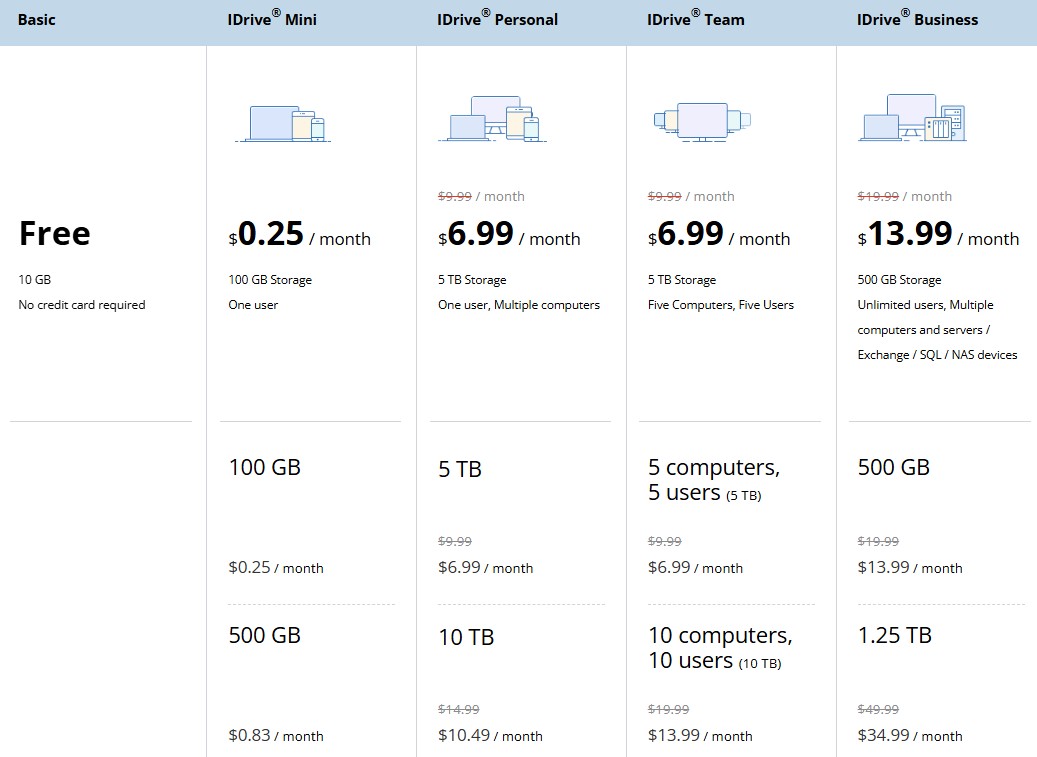
The Personal plan gives you five storage options to choose from: 5TB at $6.99/month, 10TB at $10.49/month, 20TB at $17.49/month, 50TB at $34.99/month, and 100TB at $69.99/month. This is by far one of the largest selections of plans we have seen across the industry, especially in the personal category.
If you're multiple people, you have two plans to choose from: Teams and Business. The Teams plan starts with 5TB of storage for five computers and five users, priced at $6.99/month. This scales all the way up to 500 computers and 500 users, offering 500TB of storage for $699.99/month. There are several tiers in between, including plans for 10, 25, 45, 100, and 200 users.
Lastly, there's the Business plan for enterprise-grade organizations, offering 500GB of storage for $13.99/month. This plan lets you add unlimited users, as well as multiple servers and computers. It scales all the way up to 100TB, which costs $1,621.66/month.
All of these plans are billed monthly. While we understand that having so many options can be confusing, it's better to have them than not. You can simply choose the plan that best suits your needs while ignoring the others.
iDrive: Features
iDrive doesn't skimp on features. For example, there's an Express service that lets you put your data on hard drives and actually post them off, as well as the ability to create full disk images in case you need to rebuild a computer from scratch.
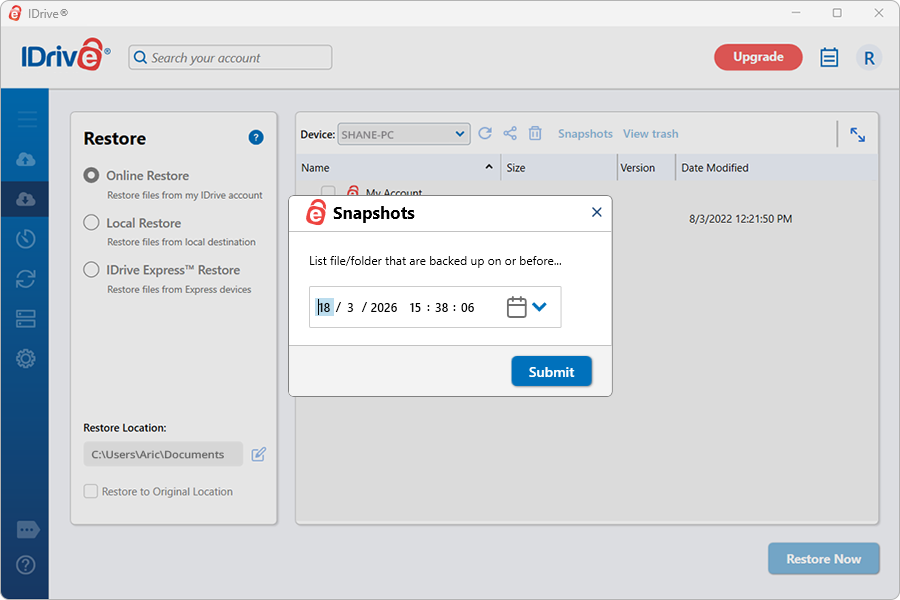
iDrive also supports snapshots and versioning. Unlike other platforms, which retain versions only for a specified period, iDrive allows you to restore up to 30 previous versions. The Snapshot feature comes in handy for point-in-time recovery.
If your data becomes corrupted or you fall victim to a ransomware attack, you can simply select the desired date and time, and iDrive Snapshot will restore your drive to its state at that point. From there, you can choose the files you want to recover.
All paid users get access to these physical backups via a temporary storage device, which is especially handy for those with poor Internet connectivity. This is capped at once per year for Personal customers and three times a year for Team and Business subscribers, though subsequent requests are always available at the cost of $59.95.
Then there's also some less obvious functions, including that iDrive only uploads modified parts of files to reduce bandwidth usage, the way data gets retained until you specifically delete it, or the extensive set of activity logs and reports you can access. For team managers, there are multiple user management and remote backup services.
As expected, iDrive focuses heavily on backup functionality, which is why it has also introduced cloud-to-cloud and SaaS backup capabilities. You can now back up your entire Microsoft 365, Google Workspace, Dropbox, Salesforce, and Box data to iDrive. Each of these services is available as a separate add-on that can be bundled with any plan you choose.
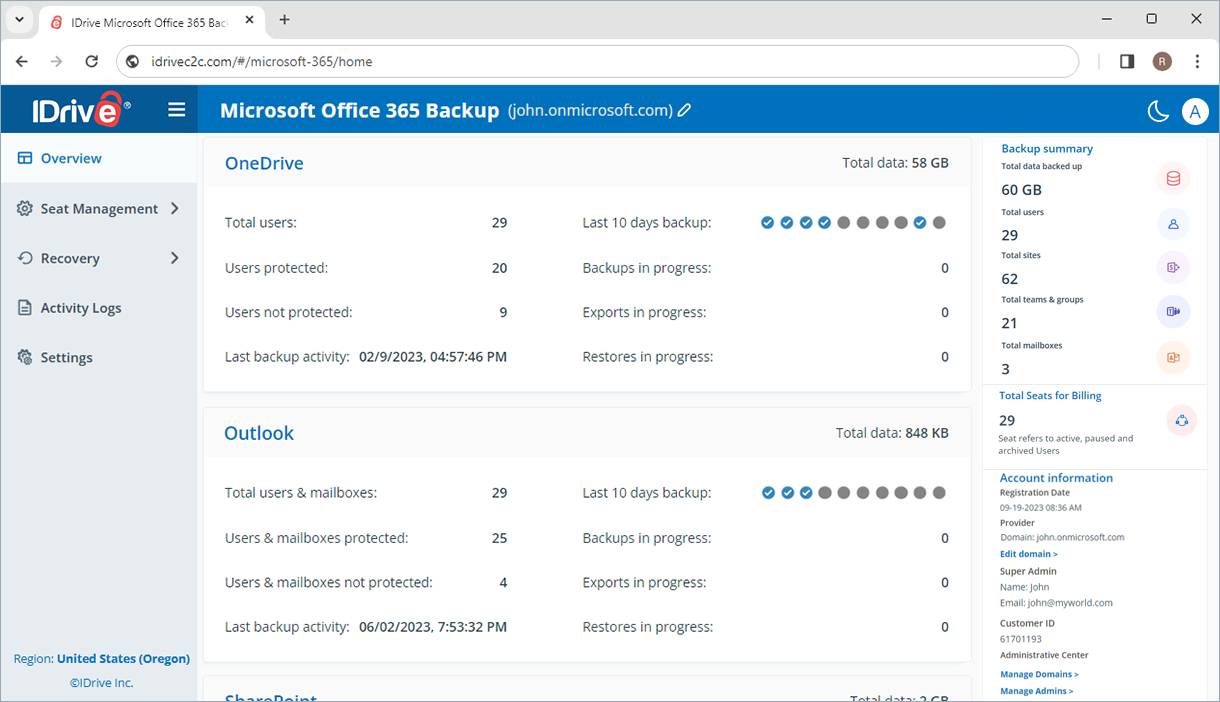
Cloud-to-cloud backup comes in really handy for businesses that rely on Google Workspace or Microsoft 365 to manage their emails, files, documents, and other business data. While these platforms already offer robust data protection measures, you’re never too far away from accidental deletions, ransomware attacks, or client-side errors. Backing up critical business data with iDrive ensures longer retention and more granular recovery options than those offered by the native platforms.
While the editing and collaboration ecosystem in iDrive is not particularly advanced, it does offer basic functionality. You can create, edit, collaborate on, and manage Microsoft Office and PDF files stored in your iDrive cloud storage. This allows you to open Microsoft Office files directly from your cloud drive without switching tabs, and any changes you make are automatically synced to the original file.
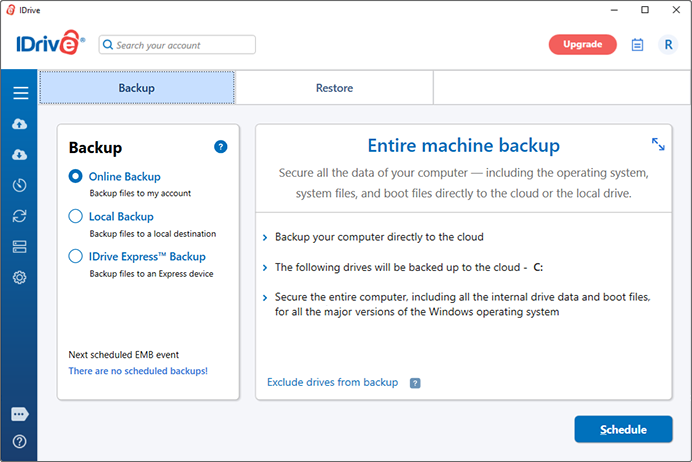
This is all on top of the core functionality, which backs up an unlimited number of various devices – computers, mobile phones, servers – to a single account. If necessary, it can also back up data from mapped drives on a network. Meanwhile, the iDrive web portal makes short work for managing all of these devices together in one place. While it is filled with function, the basic and frankly uninspiring user interface does leave users feeling somewhat shortchanged.
In addition to the standard features that will appeal to everyone, there are several aimed at organizations with larger, more complex requirements (including server cloud backups covering Linux, Oracle, Sharepoint, MS SQL, Exchange Server and more). iDrive includes bare-metal disaster recovery, which is the business-grade solution to ransomware. Help with new data standards can be found as well, via encryption and date stamping for those in the medical, accounting, and legal professions.
iDrive: Interface
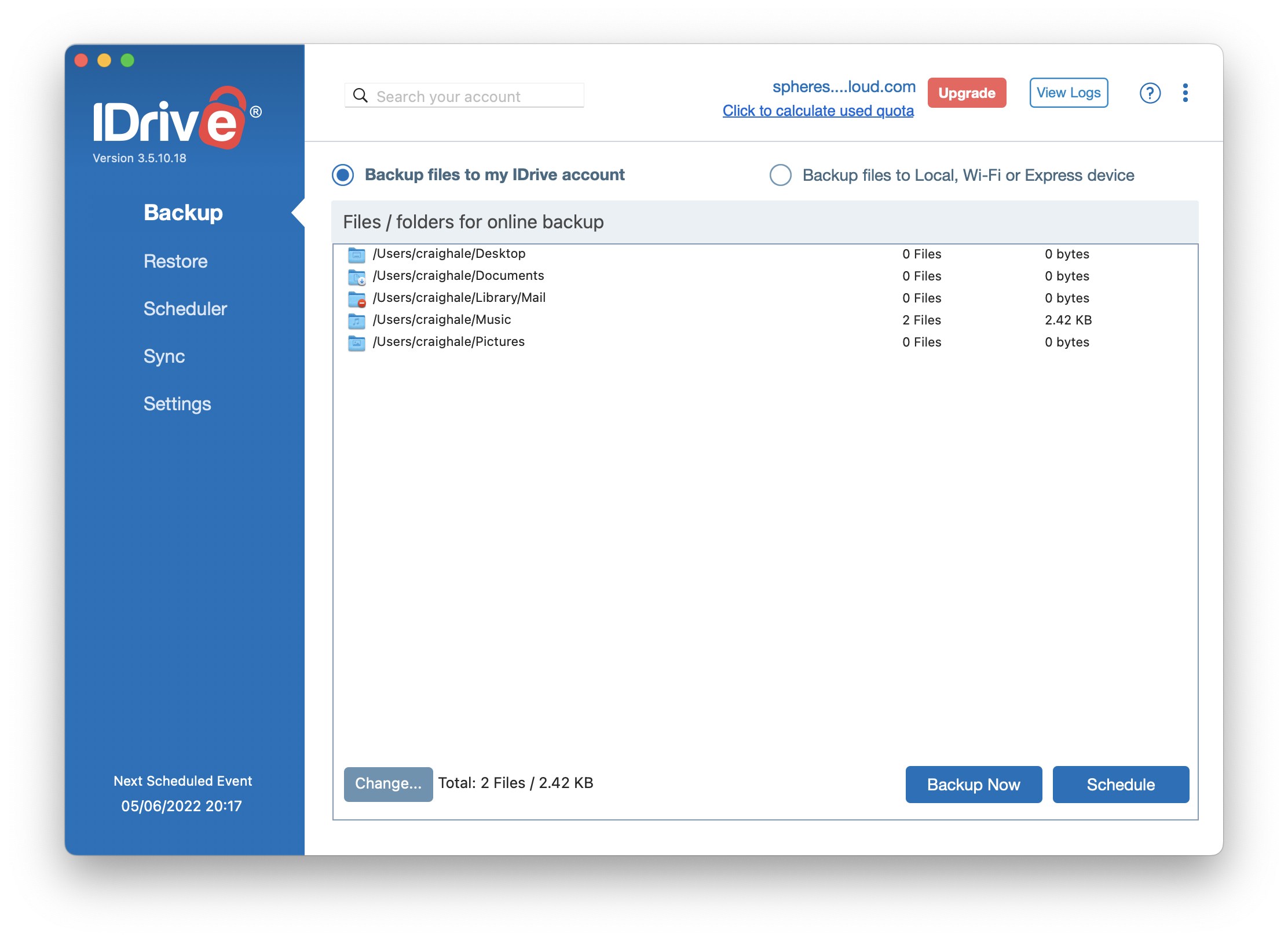
Cloud storage can be accessed through the browser portal, but for the full experience including device backup, the relevant program or application should be installed. Handily, iDrive supports all major device types, though the desktop clients are more impressive than the mobile apps in terms of polish and features.
You can have iDrive backup your entire hard drive (or mobile device) or just specific files and folders, and run backups manually or on a schedule. The goal here is very much ‘set and forget’ – get everything set up the way you like, and then let it work quietly away in the background.
iDrive’s web portal has also expanded, particularly for business users. Admins can now track storage quotas, team roles, and active devices from a centralized dashboard, while also setting custom policies for functions such as backups and restores.
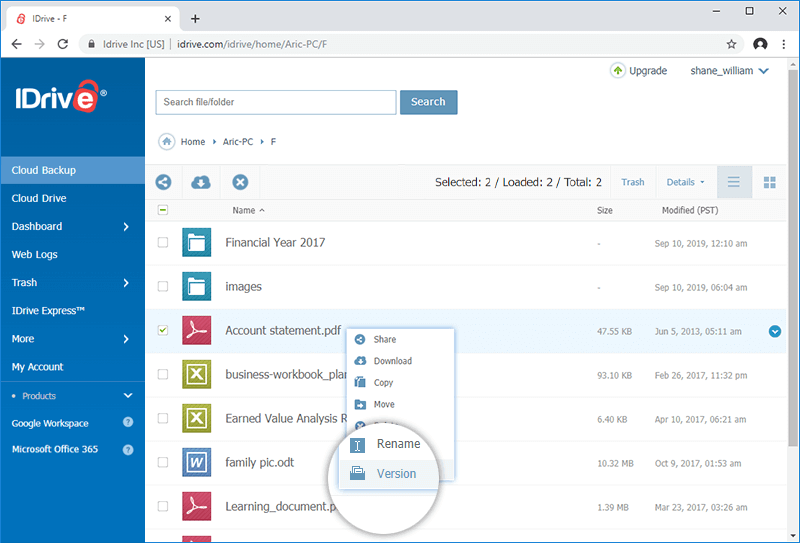
Another useful feature is folder syncing, for keeping certain files consistent across all of your devices. There are intuitive menus and settings screens that make it clear how to create the configurations you need. It’s also great that it is simple to use, so you don't need to have an IT degree or to even consult the help pages to figure out how to do the vast majority of tasks.
The iDrive programs have a ton of settings as well, though iOS versions are less impressive. While the Android client is able to back up things like your SMS messages, iPhones and iPads are limited to contact, calendar, photos and videos (however this is more of a limitation set out by Apple than iDrive). The desktop client allows granular adjustments for bandwidth throttling, file and folder exclusion, data verification, and more. You can even pause a backup if the battery level on your laptop or your phone drops below a certain level.
Uploading and backing up files is just as quick as big players in the cloud storage game, such as Google Drive. That said, initial uploads and backups are notably slow. In our testing, a 1GB test file took around two hours to upload during the initial seed phase. This is probably due to iDrive’s commitment to deduplication and block-level indexing. As such, it’s unlikely that iDrive will be the bottleneck here, and the primary restriction will come from your ISP’s upload speeds which, in most cases, is slower than the download speeds.
It's worth noting that browser downloads redirect to a new tab, and the process of opening the new location can be slow. In the case of our 1GB test file, opening the new tab took up to six times longer than the actual download process, which can prove both time consuming and rather annoying. The entire download process isn’t quite as slick, and took several minutes more than Google Drive for our 1GB file. Fortunately, this is less of a problem when using the desktop client.
One feature we are particularly impressed with is that the account password is required to delete any file, helping to prevent any accidental deletes as the user unconsciously navigates the portal on autopilot.
Due to the nature of the service, iDrive is intended more as a backup drive than a cloud space from which to work, so editing documents online is a no go. This means downloading and reuploading your files as and when necessary, so it’s crucial that you take into account the somewhat convoluted downloading process mentioned above before committing.
Having reached out to iDrive, it is confirmed that there is no maximum file size limit, which is great news to teams and businesses working on large projects such as video editing.
iDrive: Security
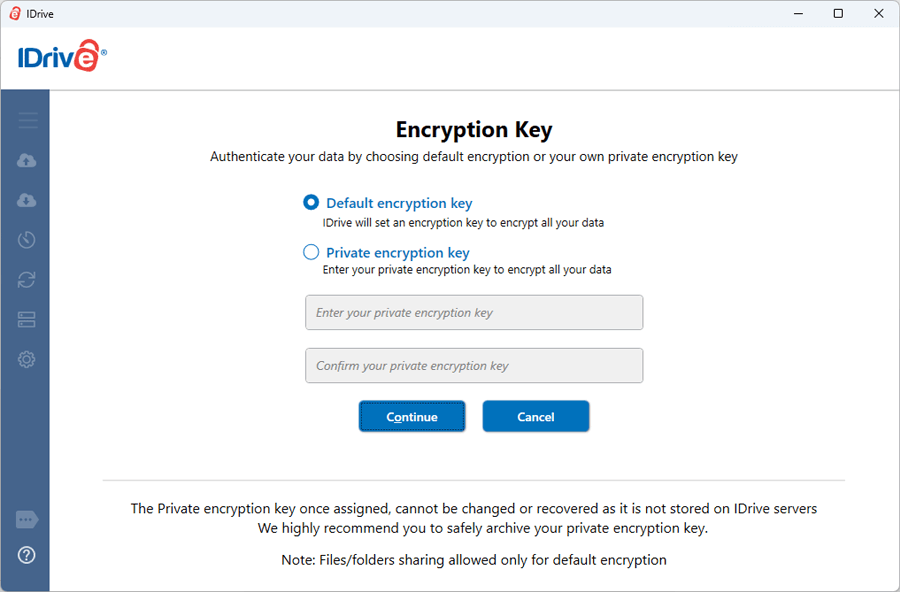
On top of two-factor authentication, iDrive provides end-to-end encryption for your data. Be cautioned that this requires a private key known only to you, so don’t you forget it, or you can't get anything back. It also means that you won't be able to share files and folders with other people, as this will break the end-to-end encryption protocols.
Another option is standard encryption, which isn't quite as secure, but will still protect your data against most potential breaches. In this scenario, iDrive stores the encryption key, and can help you restore your data if needed as well as potentially hand over your files if compelled to by law enforcement. The other advantage is that you get to use the file and folder sharing features with this setting.
Besides this, iDrive has also achieved SOC 2 Type II certification, underlining its commitment to safeguarding customer data and account information. It also holds ISO 27001:2022 certification, highlighting iDrive’s systematic approach to managing sensitive customer information while ensuring integrity, availability, and confidentiality. These certifications add another layer of credibility to iDrive’s security practices.
iDrive: Our tests
We performed three tests on iDrive using a Windows 11 virtual machine running the desktop client. The virtual machine was connected to the internet through fiber broadband and a VPN server, demonstrating an average upload speed of 2300 Mbps. The tests assessed the sync speed, file recovery, and versioning.
- Test 1: Sync speed
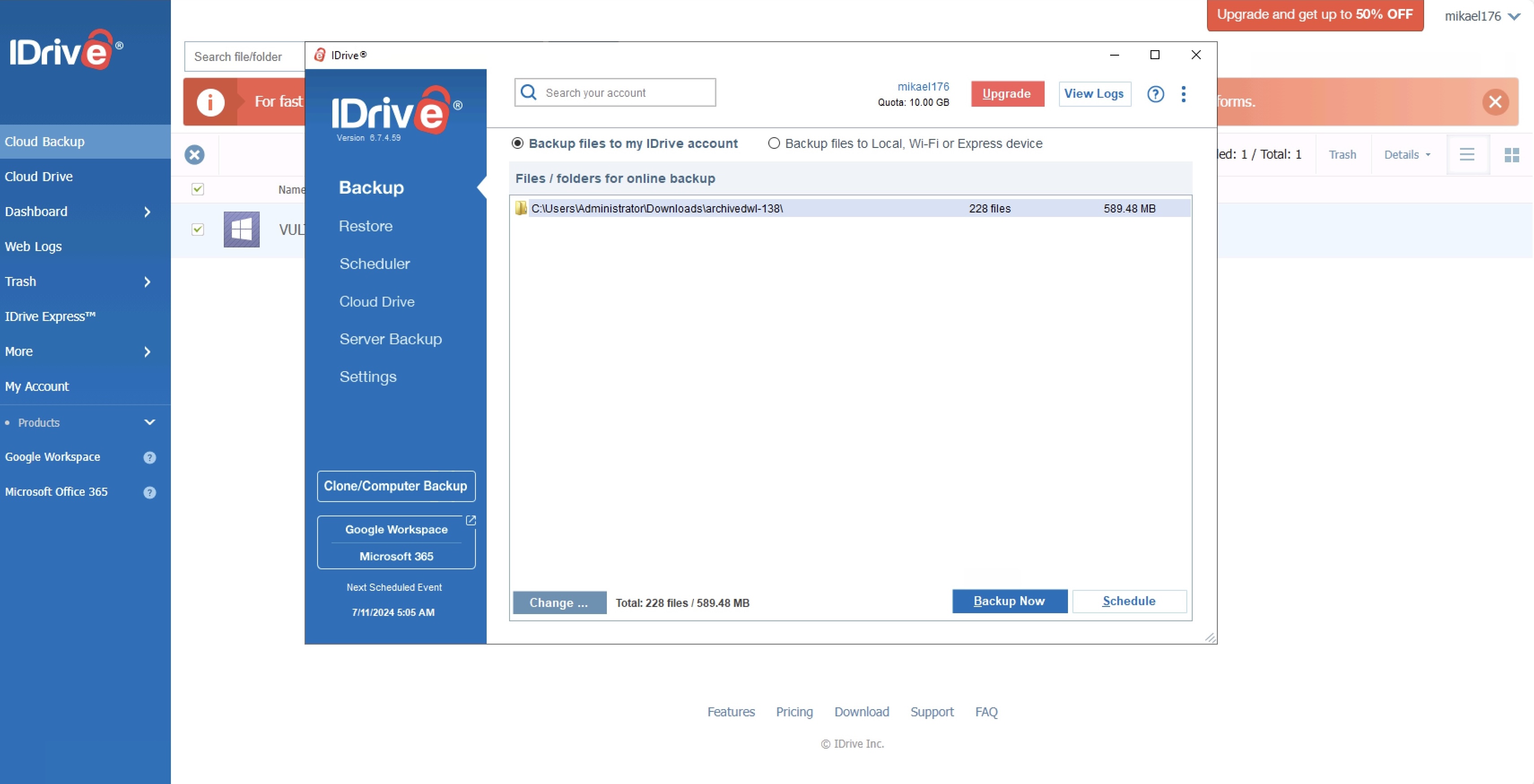
I used the iDrive desktop client to upload a test folder with 228 files spread across seven folders to the iDrive cloud. The total size of the files was 589MB. I was pleased to see that the app displayed the number of files remaining and the progress of the upload.
The app confirmed that all files had been successfully uploaded in just 16 seconds. You read that correctly: iDrive uploaded 589MB in 16 seconds.
- Test 2: File recovery
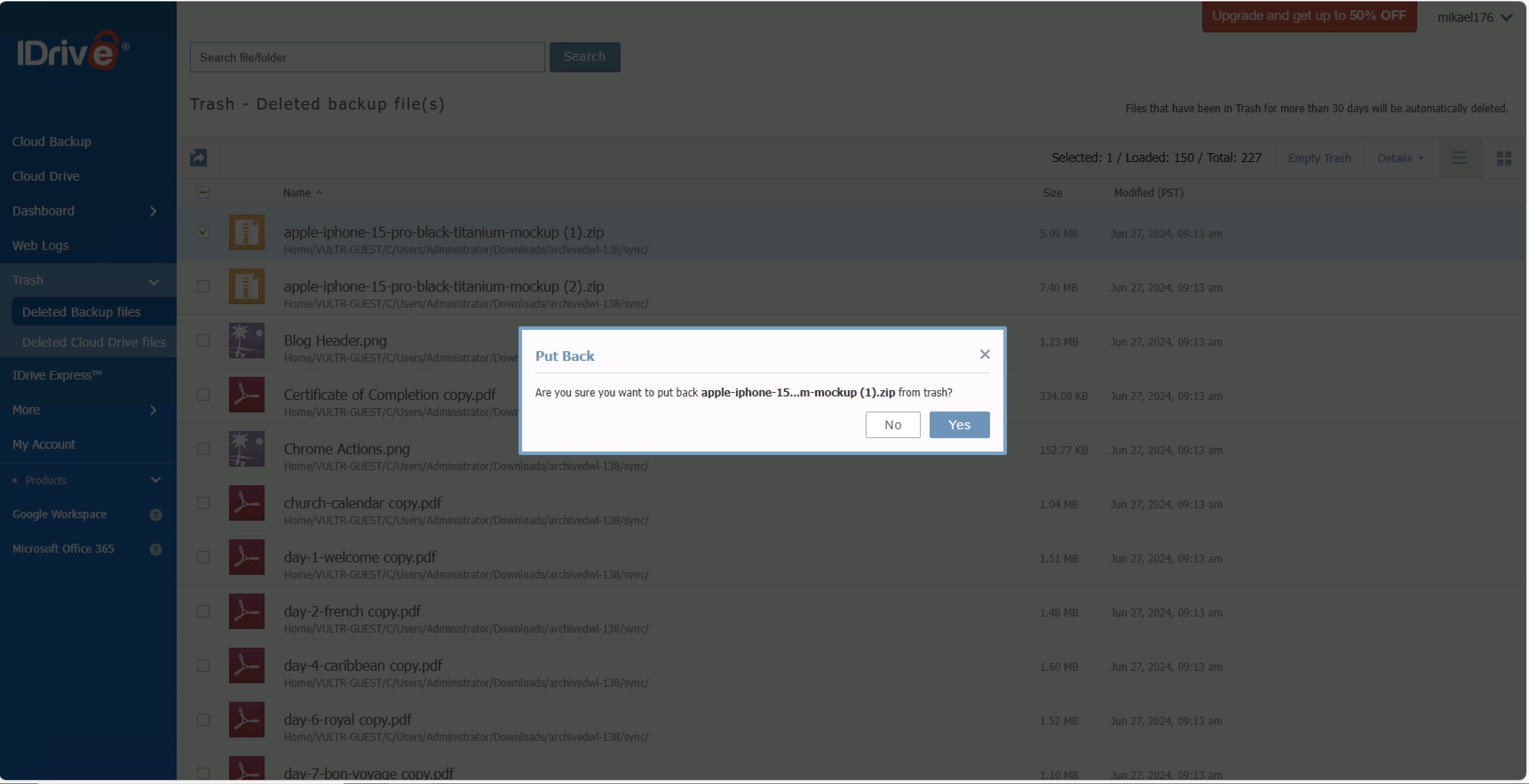
After uploading our test folder to the iDrive cloud, we accessed the web portal and selected “Delete” to remove it from the cloud. Before doing so, we were asked to enter our account password. Upon opening the Trash, we immediately saw the folder's contents; each file could be restored by clicking “Restore.” Unfortunately, we could not find a way to fix the entire folder in one easy step.
Files in Trash are automatically deleted after 30 days, or you can delete them manually. This process did not offer a one-click solution.
- Test 3: Versioning
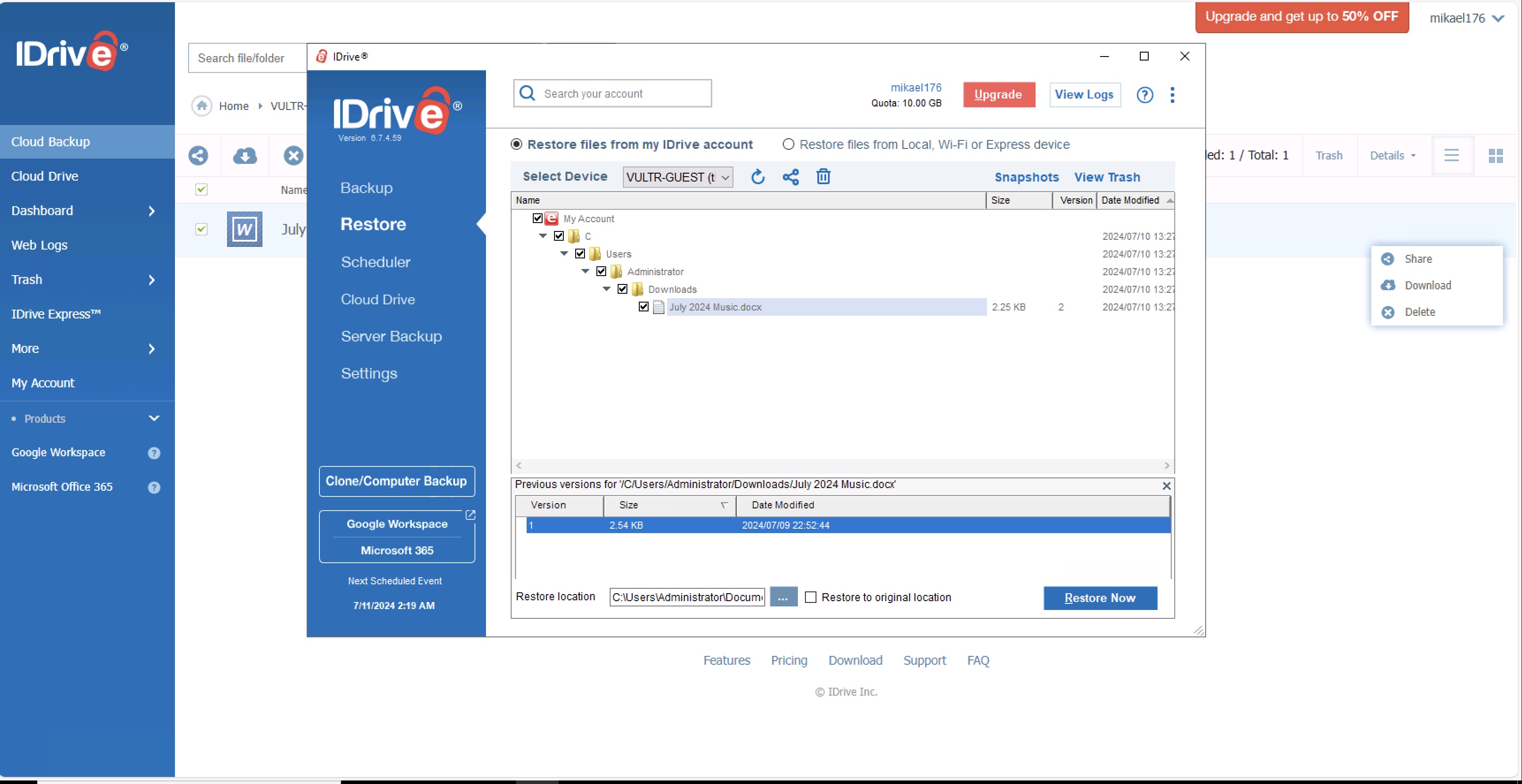
During our final test, we wanted to determine if iDrive would allow us to review and restore previous versions of the same file. We uploaded a simple Microsoft Word document to iDrive using the desktop client, then made some edits on our end and uploaded it again using the desktop client.
When we clicked "Restore," we could locate the modified file and view a list of versions. This enabled us to restore any version of the file that we wanted.
iDrive: Alternatives
iDrive is one of the most complete cloud storage platforms, with a heavy focus on data backup and recovery. That said, there are a few alternatives worth considering.
For instance, if real-time collaboration is your main priority, you could opt for a service like Google Drive. In addition to offering 15GB of free cloud storage, it integrates seamlessly with Google Docs, Sheets, and Slides, allowing remote teams to collaborate on projects in real time, with changes reflected almost instantly. That said, Google Drive can be a little more expensive, with its 100GB plan costing $19.99/year, compared to iDrive’s $0.25/month.
If you are a large business looking for a lifetime plan, you could consider options such as IceDrive or pCloud. While IceDrive offers lifetime plans starting at $199 for 100GB of storage, pCloud offers 500GB of storage for the same price.
If you’re looking for a bundled product rather than just cloud storage, you could consider Proton Drive, which includes secure Proton Mail, Proton Pass, and a high-quality VPN alongside end-to-end encrypted cloud storage. That said, Proton is a bit more expensive.
iDrive: Verdict
iDrive gets high scores for the sheer breadth of services offered – from backing up the photos on your smartphone and files on your computer to backing up a company's databses and servers.
For those who have many devices with data that needs to be secured at reasonable prices, iDrive could well be the service for you. Its great feature set covers a lot of ground, with enough security protection and extra features such as folder sync and bandwidth controls to satisfy the majority of users.
Its cloud-to-cloud backup service is particularly useful for businesses that want to maintain secure backups of critical business data stored in Google Workspace and Microsoft 365. The free 10GB plan only makes sense for users looking to store documents in the cloud, as space is too limited to perform major backups of computers, phones, and tablets.
The best thing about iDrive is its extensive selection of plans, which caters to both personal and business users. You can choose anywhere from 100GB of storage to as much as 500TB, depending on your needs.






 English (US) ·