
StationPC PocketCloud: 30-second review
There are plenty of situations where people collect large amounts of data during their working day, and are then confronted with the necessity to secure that as quickly and efficiently as possible.
The StationPC PocketCloud Portable NAS is designed to provide a bridge between the collection of that data and its ultimate destination, appearing to be an external storage device but actually a full-blown NAS.
The basic unit is an ARM-based NAS with its own operating system that can run from two replaceable batteries for six hours, and an internal M.2 slot can be populated with a module up to 8TB to provide a working capacity.
Computers can be directly connected using USB, Wi-Fi or Bluetooth. And using the Dock accessory, it can also be connected to a LAN using a 2.5GbE port. The Dock also includes a second M.2 slot for more storage, and can be used to charge the PocketCloud.
But the genuinely clever part of this device is that it is possible to use the provided phone and PC software to organise a multi-tiered backup strategy, where data collected on the PocketCloud can be copied to a cloud service, a remote NAS or to the second drive in the dock.
It’s not perfect - although it's fairly unique compared to our line-up of the best NAS devices - and I’ll cover some of its weaknesses in the full review below. But this is a product that aims to address the problem of backups that get forgotten and the vulnerability of single-source data. And since relatively few businesses are attempting to grasp those thorny issues, StationPC might have a portion of this market entirely to itself.
StationPC PocketCloud: Price and availability
- How much does it cost? From $255/£190/€220
- When is it out? Available now
- Where can you get it? Direct from StationPC and online retailers.
The PocketCloud Portable NAS is sold separately or with its associated dock, and it's worth noting that the dock's extra functionality makes it worth the additional investment. it's available from the StationPC website and online retailers.
Via StationPC, the PocketCloud is $254.15, and with the dock, it increases to $342.40 in the US. However, UK buyers can expect to pay £190.40 and £256 respectively.
Elsewhere, it's currently priced at $255 at Amazon.com and £372 at Amazon.co.uk.
Wherever you buy it, that’s not the entire cost, because you need at least one M.2 NVMe drive to use the PocketCloud, and two if you intend to exploit the full potential of the Dock.
Along with the PocketCloud and dock, StationPC also sells a protective cover ($29/£22), a storage bag ($39/£30) and the standalone dock ($119/£89).
While the PocketCloud is a very much one-of-a-kind product, there are products like the Ugreen hard drive enclosures for M.2 drives. These don’t offer the sophistication of the PocketCloud, but they start at about $30 for a 10Gbps model, $50 for a 20Gbps model, and $60 for one that supports Thunderbolt 4 and USB4 at 40Gbps.
On that basis, the PocketCloud seems on the expensive side, but that might be somewhat unfair, given that it's not just an external drive enclosure but more of a portable NAS.
- Value: ★★★★☆
StationPC PocketCloud: Specs
Swipe to scroll horizontally
CPU | RK3568B2, 4×Cortex-A55 |
GPU | ARM Mali-G52-2EE |
Material | ABS Plastic, PC Plastic, Aluminium Alloy |
NPU | 1TOPS |
RAM | 4GB, LPDDR4 |
ROM | 32GB, EMMC V5.1 HS400 |
M.2 Slot | Supports M.2 NVMe 2280 SSD, exFAT compatible |
SD Card Slot | SD3.0, SD/TF Card Support (TF Adapter Needed) |
USB Port | USB-A (USB3.0) x1 |
Bluetooth | Bluetooth 5.3 |
Network | Wi-Fi 6 (802.11 ax) |
Display | 0.96" LCD |
Battery | 3200mAh/23.04Wh (Original Battery) |
Power Input | PD Type-C 12V/2.5A |
Interface | Dock Connect Points, USB 3.0 Type-A, SD Card Slot, Type-C Port |
Dimensions | 153×93×27mm (6×3.6×1 inch) |
Weight | 363.5g (SSD not included) |
StationPC PocketCloud: Design
- Metallic shell with rounded edges
- Battery powered
- Dock is a necessity
If I’ve noticed anything in the forty years I’ve been writing, it's that the quality of devices has gotten markedly better, and the PocketCloud is a classic demonstration of this.
The outer shell is aluminium, thick enough that it should be able to handle being thrown into a laptop bag rather easily. Those wanting even greater protection can choose between a silicon protective case that wraps the entire device and an EVA hard case bag.
However, it’s a one or the other deal, since once the silicon case makes the PocketCloud too large to fit in the EVA Hard case bag.
If I were forced to choose between the two, I’d go for the EVA hard case bag, since it has a pocket for the screwdriver and USB cable.
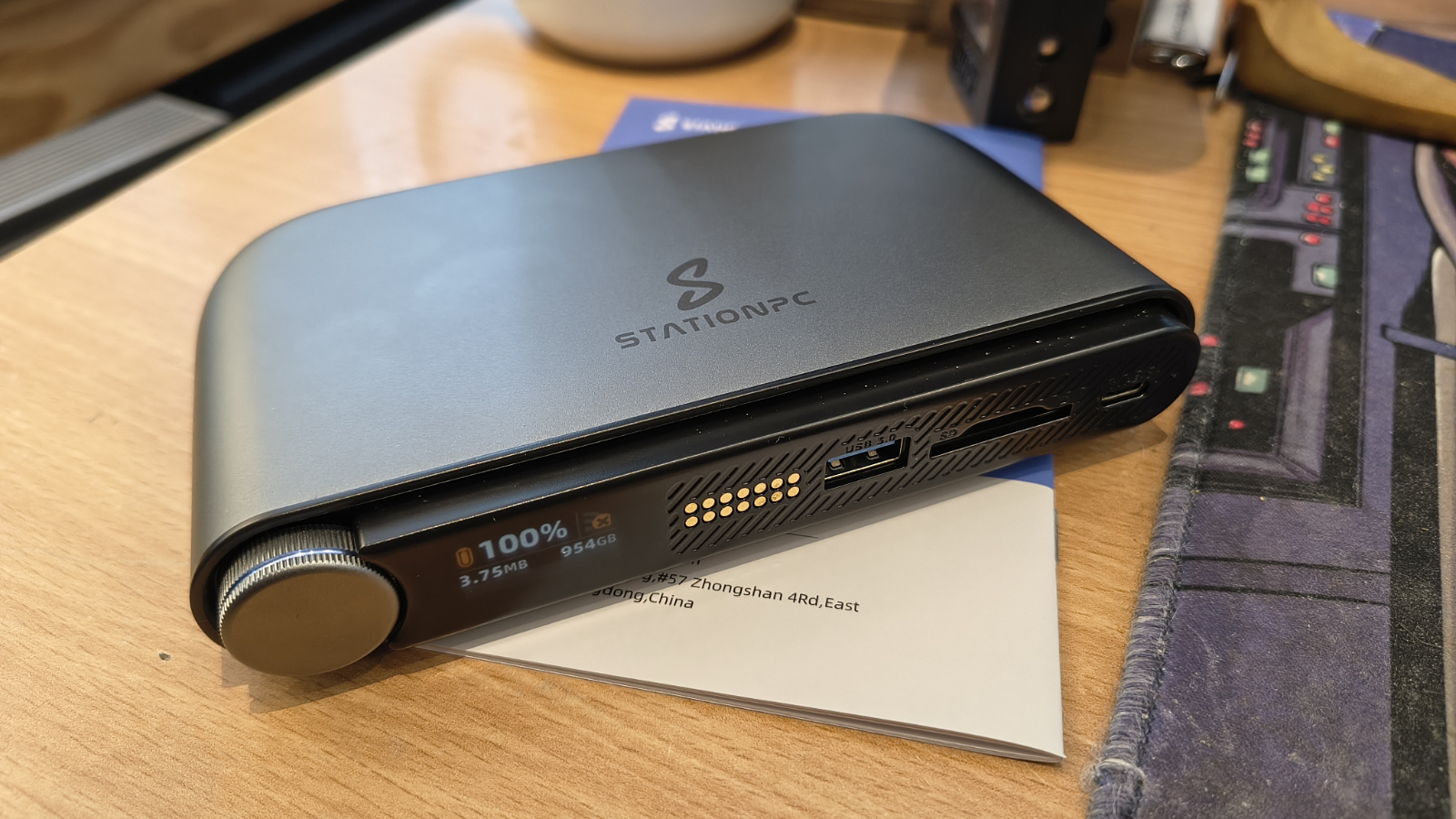
The front face of the PocketCloud has a menu selection wheel for using a tiny 0.96" LCD to select various modes, an array of pogo pin contact points for connecting to the Dock, a USB-A port for connecting an external drive or SSD, an SD3.0, SD/TF Card reader, and a USB-C port for directly connecting to a PC or phone.
Using the dial menu alone, it is possible to copy the contents of an SSD or the USB-connected drive to the storage inside with a single click.
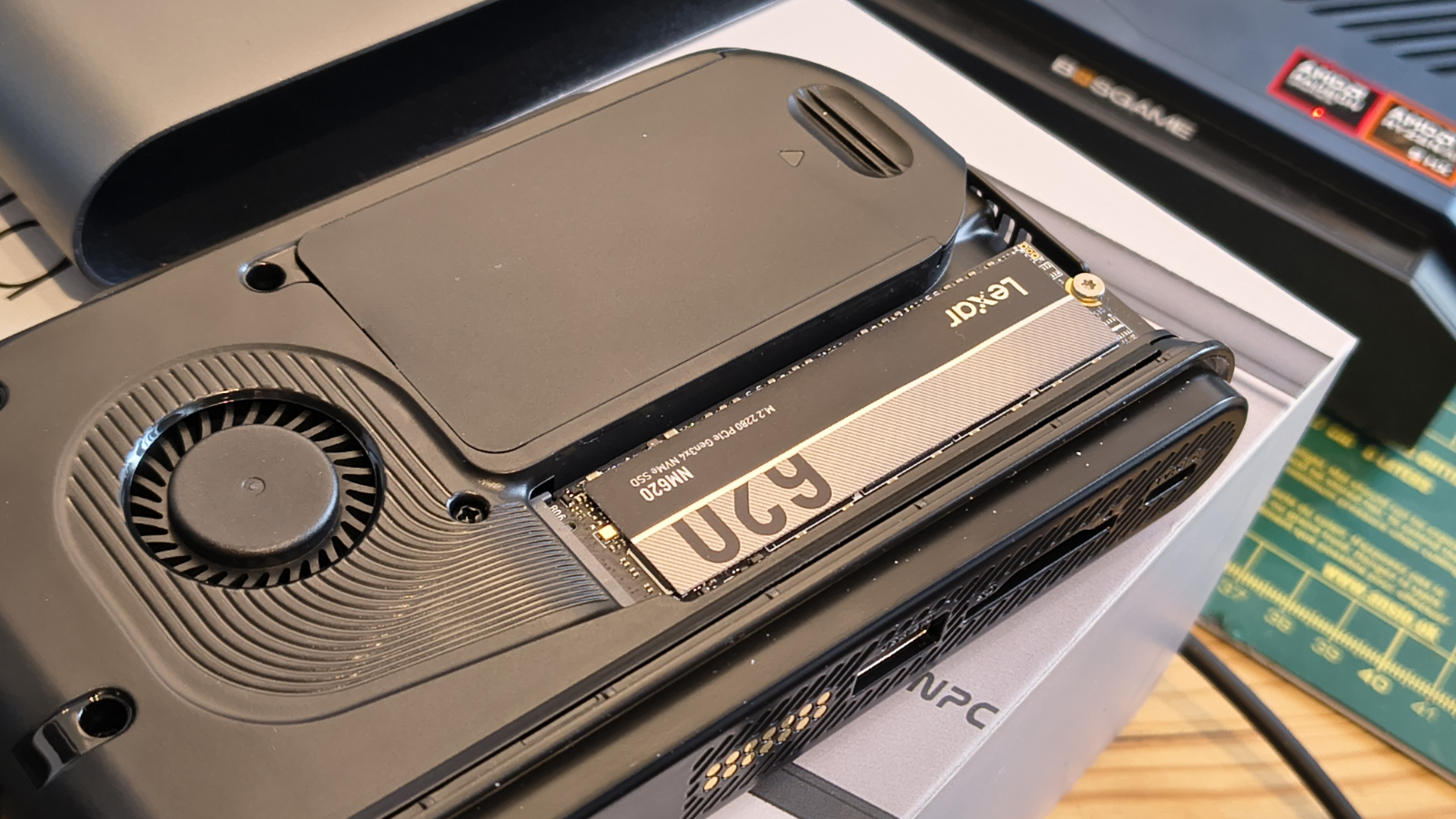
To put storage in the device, loosen two screws on the top, then slide the internal mechanism out of its metal cocoon.
Inside the system are two 18650 rechargeable batteries that can be replaced and an M.2 slot for a 2280 NVMe drive. One omission with the M.2 slot is that the screw holes for using 2232 or 2240 drives weren’t included, unfortunately.
Some potential customers might be put off by the single-drive (single point of failure) nature of this design, and it could be improved with a dual-drive mirrored configuration.
For the purpose of this review, StationPC provided two Lexar NM620 1TB drives, one each for the PocketCloud and the Dock. Installing them takes only a few seconds, as does changing them for alternative SSDs.
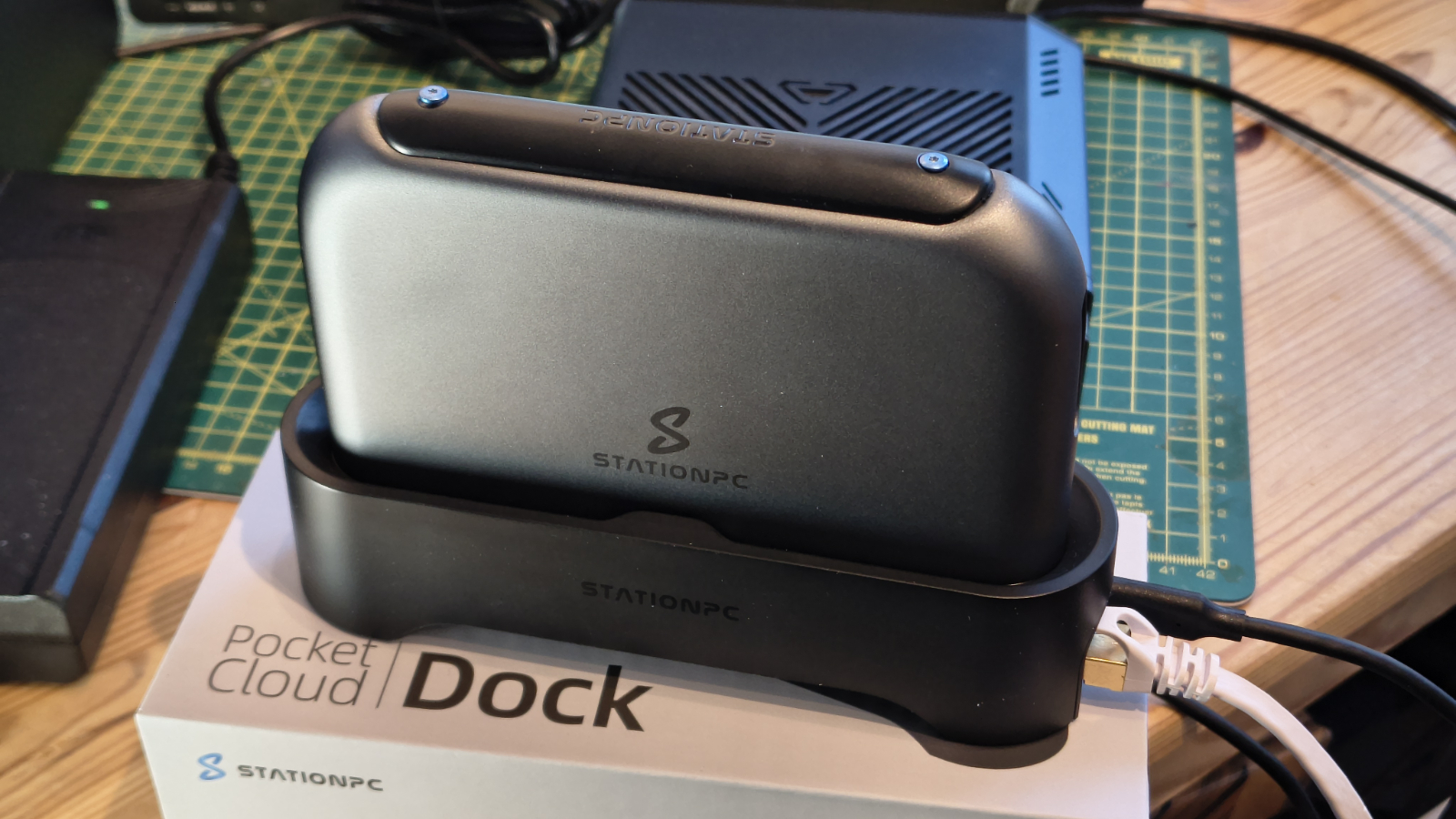
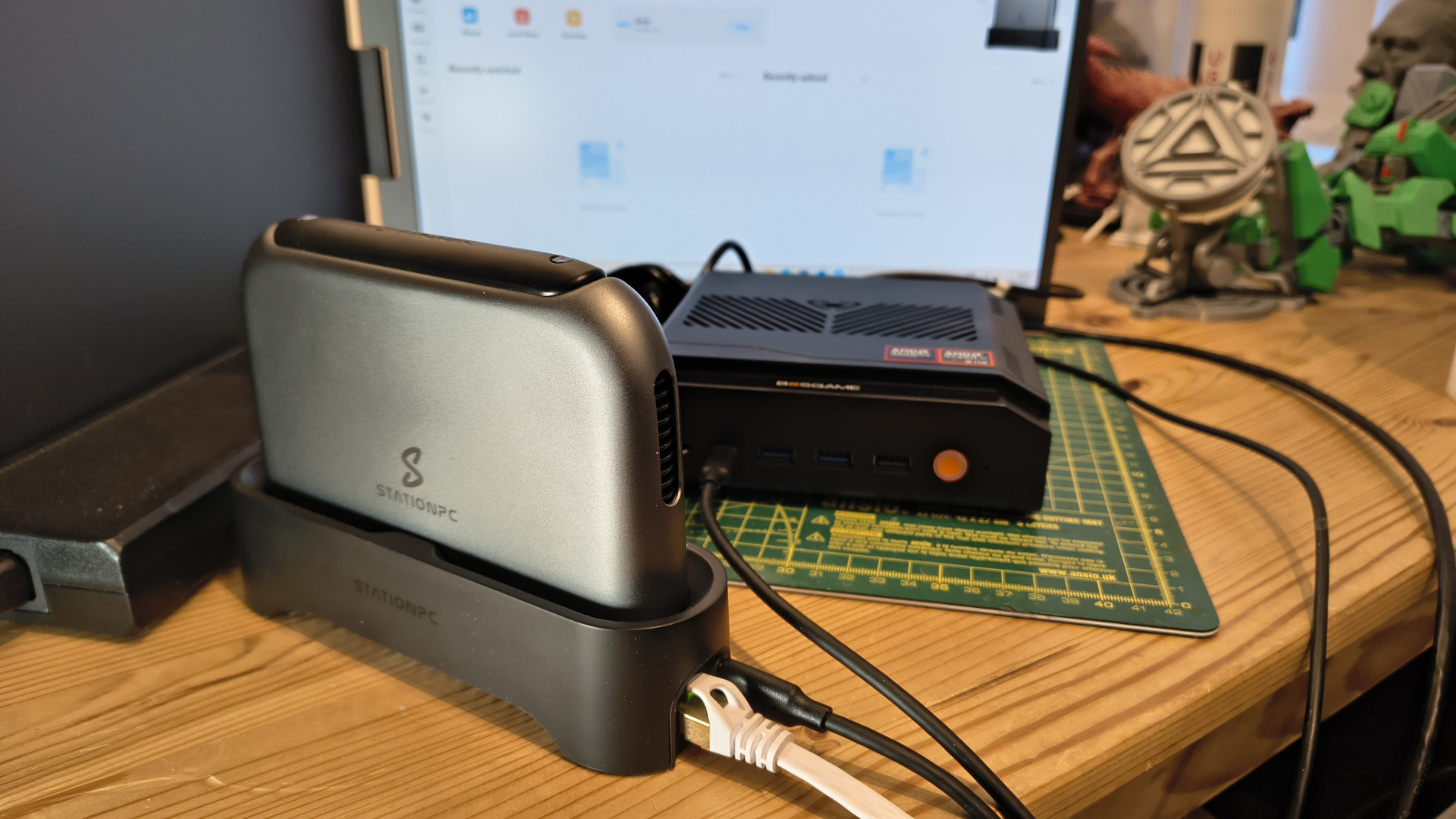
Although the Dock is officially an accessory, buying the PocketCloud and not the Dock would seem like a missed opportunity. Since it provides an easy drop-in connection for the PocketCloud using the pogo pin array.
But it also mirrors the PocketCloud in that it has a 2280 M.2 slot inside, and provides a 2.5GbE LAN connection for the system, something the base unit does not have.
Like the PocketCloud, it also has a USB 3.0 port, enabling more external storage to be combined with whatever SSD you put in the Dock.
This expands the capability of the system so much that labelling it merely an ‘accessory’ misses the point entirely and downplays what the PocketCloud can fully achieve.
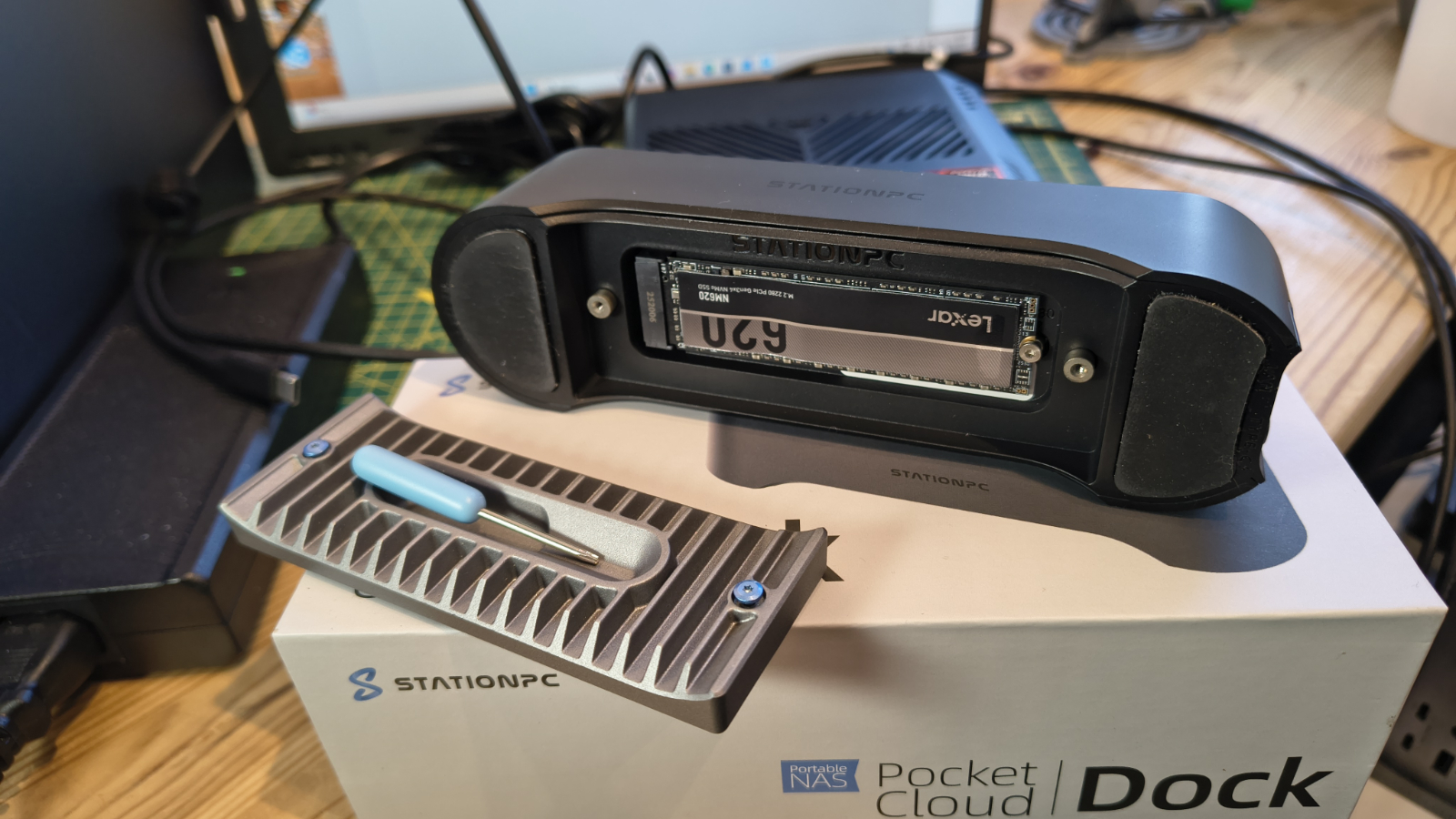
One feature of the Dock that was a nice surprise is that the M.2 slot cover, also a metal heatsink, holds the mini screwdriver magnetically. On the PocketCloud, there is no retaining location for the identical screwdriver that comes with it.
My only issue with the Dock is that it repeats the same limitation as the PocketCloud, in that the designer never considered those people with 2232, 2240 and 2260-sized drives.
While any design can be improved, the PocketCloud is one of the better-designed items that started on Kickstarter and made it to retail.
- Design: ★★★★☆
StationPC PocketCloud: Features
- Rockwell RK3568B2
- PCIe 3.1
The Rockwell RK3568B2 and its four Cortex-A55 cores are a curious choice for a system that can be battery-powered.
Obviously, having only four efficiency cores should be good for power consumption, but this is a 2021 design that was made using an ancient 22nm fabrication. To put that chip construction into perspective, the tracks on this chip are 7.5x thicker than those on a modern phone SoC, like the Mediatek Dimensity 8300.
So it could be better in that respect, but in other aspects, for this job, it's probably overpowered. It has an ARM Mali-G52 2EE GPU supporting OpenGL ES 1.1/2.0/3.2, OpenCL 2.0, and Vulkan 1.1, but this NAS has no HDMI port, so it's largely redundant.
The feature that probably swung this choice for StationPC was the PCIe3.0 PHY Interface, it support PCIe3.1(8Gbps) protocol and is backwards compatible with the PCIe2.1 and
PCIe1.1 protocol. It can have two PCIe controllers with x1 mode or one PCIe controller with x2 mode. Given the single drive setup, I suspect this hardware is configured for 2.5Gbbps, 5.0Gbps and 8.0Gbps serial data transmission rate per lane per direction.
My preference for the dual-controller mode is revealed in the performance results, but either way, this chip doesn’t have an excess of bandwidth.
Critically, it does have USB 3.0, and it also has SATA, which is probably not used here.
The Rockwell RK3568B2 was designed for Single Board Computers (SBCs),
AIoT equipment, Industrial Control Systems and Network Video Recorders (NVR). All these seem a country mile away from the requirements of a NAS, and I couldn’t find an example of it being used by a NAS product before this one.
Often, when a system designer uses a chip in an uncharacteristic way its because of prior experience with that device, and I’m assuming that’s what happened here.
- Features: ★★★☆☆
StationPC PocketCloud: User experience
- PC and Phone apps
- Backup bonanza
- A few security limitations
Where many complicated devices try to funnel their users into a particular workflow, the PocketCloud has more of a scatter-gun approach.
For example, if you wish, it is entirely possible to ignore the NAS functionality and simply plug this device into a computer or phone as USB storage.
However, that doesn’t make the best use of this device, since one of its major strengths is that, using the StationCloud applications, it is possible to automate transfers between storage locations. This is available for PC, Mac, Android and iOS devices, including Android TV. Sadly, no Linux app, but all the other boxes are ticked.
From the standalone device, you can copy the contents of an SD card or USB attached drive to the M.2 internal storage, but using the application, you can go much further, integrating the secondary storage in the Dock and also copying the files to Cloud services such as Google Drive, Dropbox or OneDrive.
This aspect is critical for those who never want to have a file go missing, because with extra USB drives connected to the PocketCloud and Dock, and a network connection to other systems and the internet, a single file might end up copied to six or more locations, if that’s the level of protection you want.
Contents stored on the PocketCloud and Dock can also be accessed remotely via the StationPC portal, enabling data to be pulled to remote servers rather than pushed from the device. The portal handles the security side of that deal, but more on that subject later.
For those who want to share files with colleagues without setting up access, you can easily create public links to files or folders.
The StationCloud software aims to strike a balance between home and business functionality, with a possible lean towards the home user.
Therefore, it has specific functions for managing photo and video libraries, but it also supports loading and launching Docker containers.
It’s worth saying that with a four-core ARM processor and 4GB of RAM, I wouldn’t be tempted to go wild with Docker containers, but at least it’s a possibility to add whatever functionality you might like.
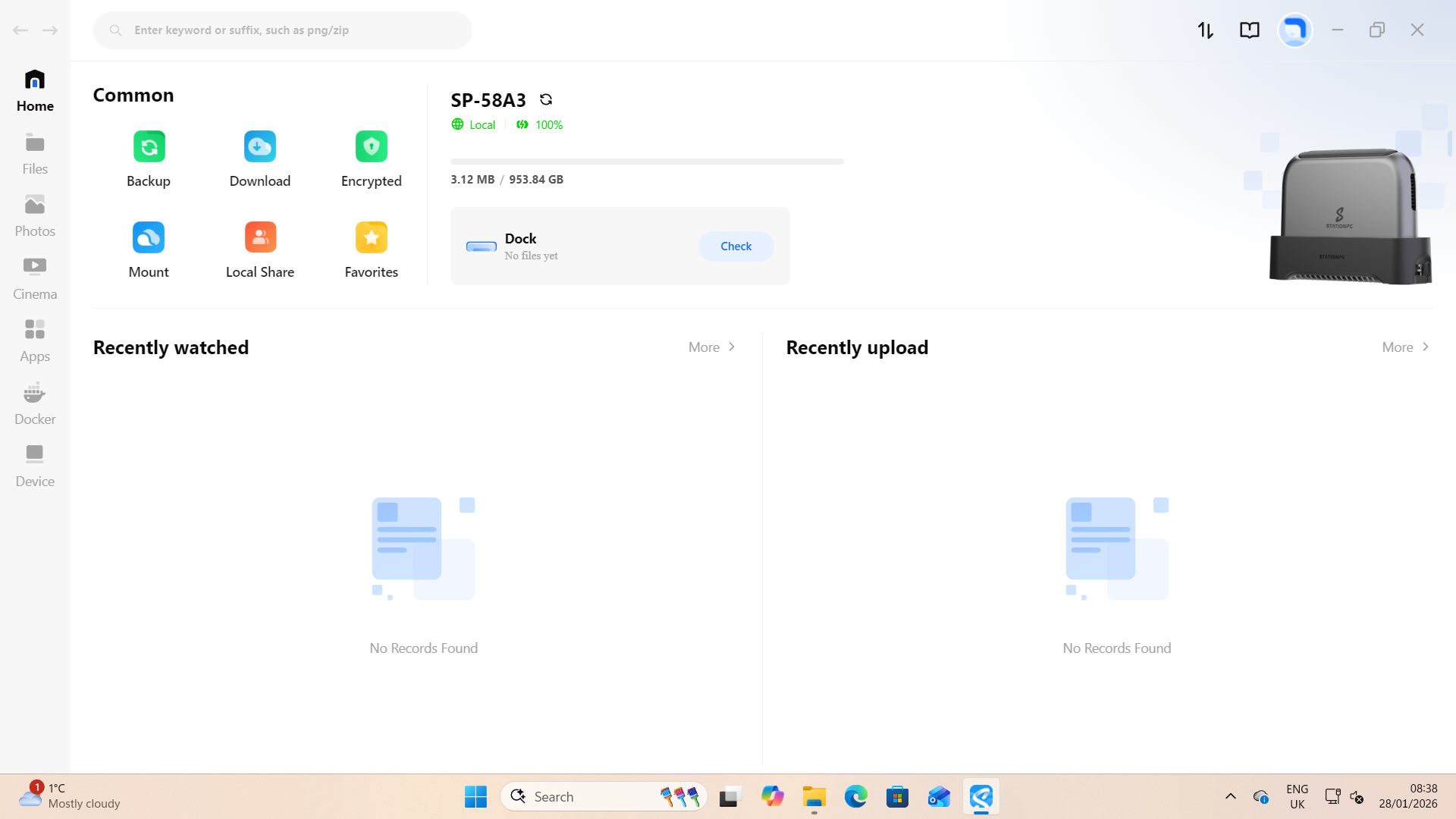
My issues with the software side of this equation boil down to the security model and how relatively easy it can be to circumvent it. As I’ve already said, access via the P2P mechanism of remote access is generally secure, as it assumes those gaining access have a valid ID and password to gain entry. It’s not two-factor authentication secure, but at least access can be controlled.
The problem is that this model doesn’t extend to those with physical access. Because they could rebind the PocketCloud to any computer or portable device, simply buy using the dial interface on the unit.
And equally, selecting USB-Mode on the device and plugging it into a computer will open the file system directly. The M.2 drives are formatted in exFAT, not NTFS or EXT4, and therefore are an open book to anyone with the device, or even if they take the SSDs.
As that choice also implies, you can use drives that support hardware encryption, but that feature can’t be used. Therefore, if the PocketCloud is stolen, the person who took it almost certainly has access to what’s stored on it.
That’s a bit disappointing, and for more business users to embrace this platform, it's undoubtedly an area that needs to be addressed.
- User experience: ★★★⯪☆
StationPC PocketCloud: Performance
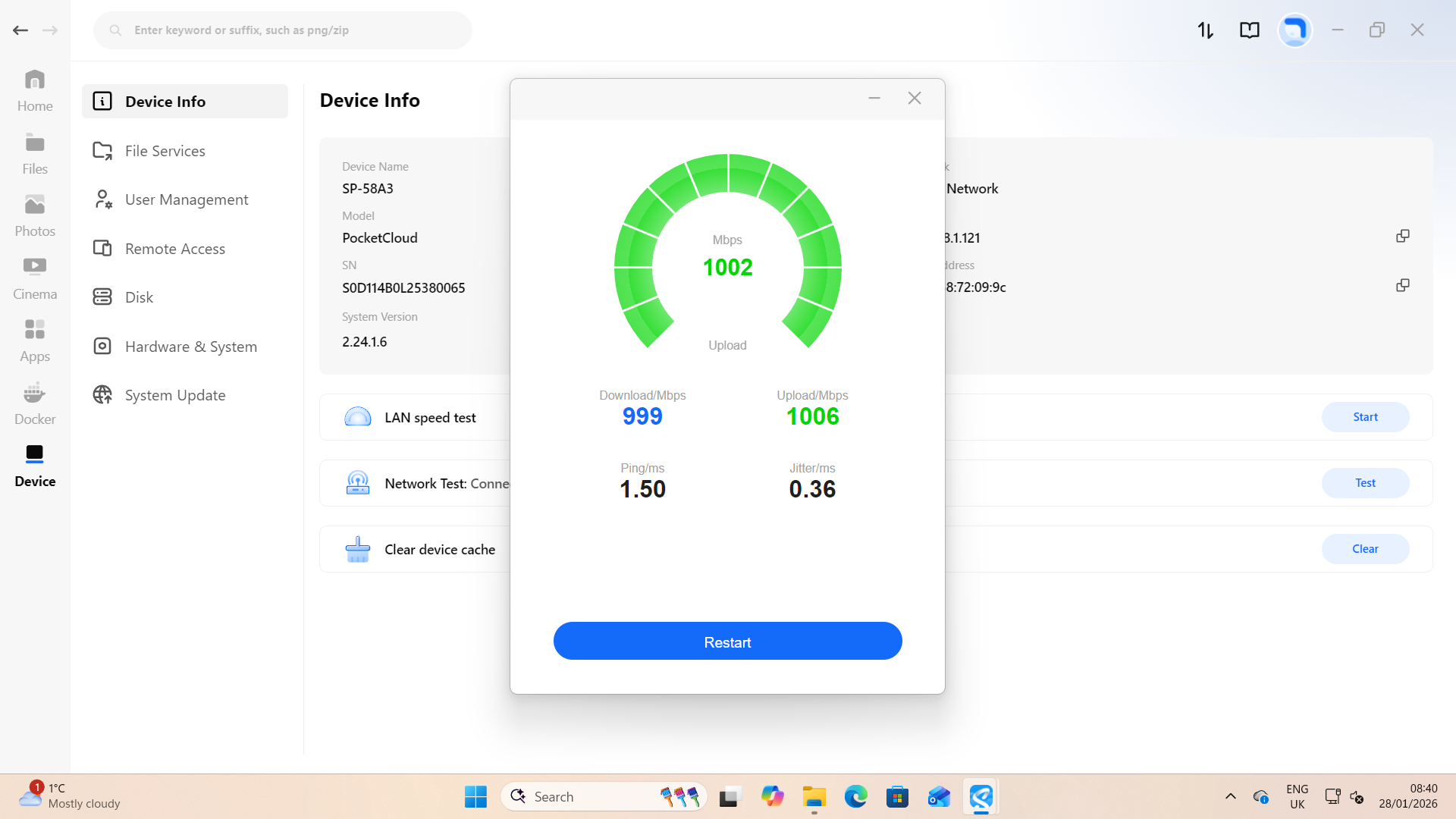
The transfer speed you can expect with this device is entirely based on how you connect to it. The best option is USB-C, since that achieves Gen 2 levels of performance, maxing out the M.2 single lane performance.
The Lexar NM620 used for testing is rated for 3500MB/s, but that’s with four PCIe 3.0 or 4.0 lanes; in this configuration, it gets only one lane, capping performance at around 1,000MB/s.
In my tests using a mini PC, it hit 1066MB/s reads and 1039MB/s writes, which is excellent for a USB 3.2 Gen 2 connected drive.
This number supports the single PCIe lane assumptions I made in the hardware overview, though the bottleneck in this instance might be USB. Had the USB port been USB 3.2 Gen 2x2 then it might have been twice this speed, if the M.2 slot had two lanes, and not one.
Even with a 2.5GbE LAN, the best that it can offer is around 275MB/s, and WiFi is the worst possible choice for speed, delivering less than 100MB/s in my tests. If you only have a 1Gbit LAN or worse than WiFi 6 technology, then expect even less speed.
In an ideal world, this device would have a 10GbE LAN port, WiFi 7 and USB4/Thunderbolt technology, but if it had all those things, it would probably cost double or more the current asking price, and the battery life would be significantly less.
I did find some users who got this device at the first Kickstarter incarnation and experienced much less performance from the PocketCloud, so improvements have been made to deliver the performance it now offers.
I’d classify the performance of this device as acceptable, but it's not ideal for those with terabytes of data to shift on a regular basis.
StationPC PocketCloud: Final verdict
Part of me thinks this is one of the best applications of NAS technology I’ve seen, but I also have a slightly nagging feeling that some of the potential gold medals here ended up as less worthy gongs.
With just a single PCIe Gen 3 lane connecting the SSDs, that becomes the chokepoint for any file transfer, but capping it at around 1,000Mbps does help with power management.
I’ve concluded that PocketCloud is a carefully arranged set of hardware dominoes, where more USB performance might have required a more powerful ARM processor, which would have impacted battery life and generated more heat.
The answer was probably a more power-efficient SoC, but that would have increased the price. All the choices here make sense to those who designed and built the PocketCloud, but to the end user, it's as simple as ‘why can’t I get my files on this device more quickly?’
Perhaps having proven the concept with this device, StationPC will address some of the performance limitations in a second incarnation, and also fix some of the security issues that I’ve already mentioned.
But this product is where it is now, and depending on how it is used, it could be remarkably useful. I do have reservations about the security aspect of this device, since it doesn’t have two-factor authentication and with physical access, it's an open book. But StationPC has said previously that if people keep asking for greater security, then they will add that in the future.
The only other blot on this landscape is that when the PocketCloud was first announced and on Kickstarter, the cost of M.2 flash modules was low, enabling someone to populate the NAS and the Dock with drives relatively cheaply. But today, that’s no longer the case.
The long-term forecast for SSDs is that they’re unlikely to become cheaper again until next year, unless the AI bubble bursts. And when that corner is turned, hopefully this product, perhaps with even better software, will still be available to make the most of these devices.
- Final score: ★★★★☆
Should you buy a StationPC PocketCloud?
Swipe to scroll horizontally
Value | Affordable, but do budget extra for the storage | 4 / 5 |
Design | Elegant design that combines durability and functionality | 4 / 5 |
Features | An odd old SoC, but battery life is good | 3 / 5 |
User experience | Encourages multi-tier backups but lacks full security | 3.5 /5 |
Overall | An effective tool if you can afford the drives to exploit it | 4 / 5 |
Buy it if...
You like to backup on the go
Being able to copy a file to the PocketCloud and then have it automatically migrate to other backup solutions is an ideal scenario. Anything that avoids having the only version of a file on a single device, with a single point of failure, is recommended.
You have spare M.2 modules
While the market for M.2 SSDs has gone slightly bonkers recently, if you have a few of them spare, that might significantly reduce the overall cost of ownership with the PocketCloud. As the performance required by the unit isn’t extreme, even the cheapest Gen 3 drives should suffice.
Don't buy it if...
You need to secure Terabytes
The performance of this system doesn’t lend itself to those with enormous files that might be hundreds of gigabytes or even Terabytes in size. A 1TB file could easily take more than half an hour to copy to the PocketCloud, and even longer over a network connection.
For more storage solutions, we've reviewed the best NAS hard drives.





 English (US) ·