
 1 hour ago
6
You won't have to ruin your weekend plans to download this open-world epic.
Dave Meikleham for Engadget
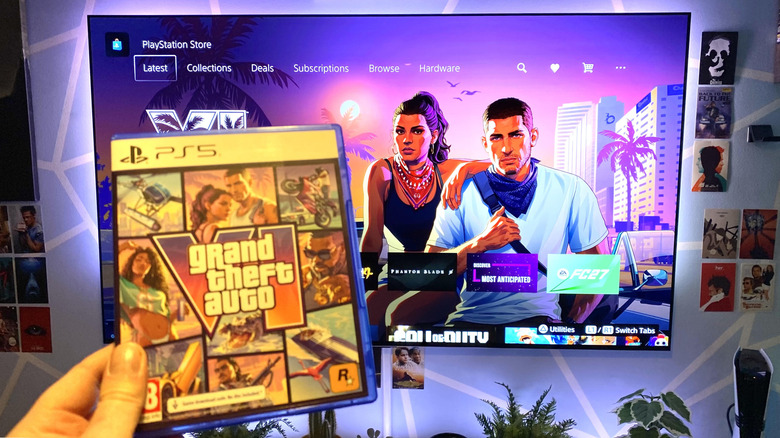
There's no getting around it: GTA VI is the most anticipated video game of all time. As such (at time of writing) Rockstar will let you pre-download the huge official 212GB file a week ahead of time of release. But how long is that download going to take? We're talking about arguably the most hyped game ever here. Depending on your connection, is it going to fill a full day or a couple of hours? Let's get into the practicalities of downloading the biggest game of this current console generation.
What internet speed do I need to download GTA 6 quickly?
Dave Meikleham for Engadget
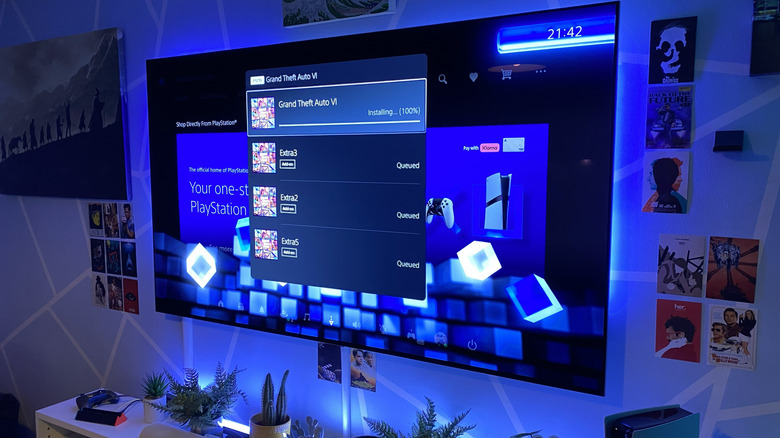
This is quite a difficult question to answer, but I'll do my best to guide you based on my experience of downloading GTA VI within the last few hours as I'm typing this. I live in Edinburgh, Scotland. I have the fastest available fiber broadband connection in my city (a full 1Gbps of rapid downloads speeds). I just downloaded Rockstar's hugely anticipated Vice City mega hit with my PS5 Pro in exactly 63 minutes and 30 seconds. Yes, I timed it on my iPhone. I clearly need to get a life.
For context, I tested my console's internet settings immediately before pre-installing GTA VI (I went with the code in the box version, because I'm a sentimental old soul who really wanted said box). Plus you get an old school poster, too. My PS5 Pro's download speeds hit around 568Mbps over a wired LAN connection just before I started the download. The highest I've seen Sony's supercharged console hit in network tests on my fiber optic is exactly 816Mbps, and that was extremely late at night when network demands would be low.
I'm obviously in a privileged position of having access to extremely fast internet, although it costs me a pretty penny. According to Allconnect, average broadband speeds in the United States range between 143Mbps to 314Mbps. The official preload download size of GTA 6 is 212GB.
In my case, it was precisely 209.921GB on my PS5 Pro. If we take that lower end broadband stat as a starting point, it will take a whole lot of American gamers around three hours and 56 minutes to download the Leonida crime epic. At the higher range of 314Mbps? You're looking at an install time of roughly 90 minutes.
If you have decent broadband, it should take no more than a few hours to download the biggest (in literal file size terms) single-player game of all time. Put it another way: you won't have to ruin your weekend plans to download this open-world epic if your broadband speeds are anywhere near average. Although the PS5 Pro I used to test GTA VI downloads is an expensive console, there's nothing special about its wired connectivity, as the PS5 Pro, base PS5, Xbox Series X and Xbox Series S all offer a 1Gbps Ethernet port.
Why can't my console take full advantage of my internet speed?
Dave Meikleham for Engadget
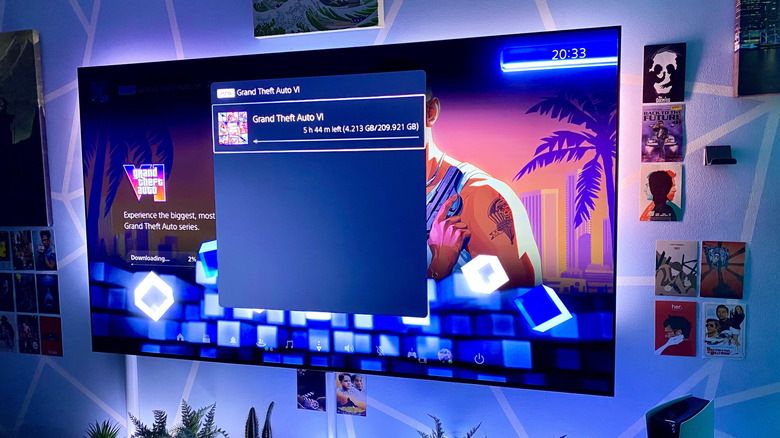
It's very rare to see a PS5/Xbox Series console accessing the full bandwidth your router and internet connection is capable of — just look at the glacial Wi-Fi speeds of downloading GTA VI on my fiber connection in the shot above. When using Wi-Fi, several factors can slow download speeds, which I'll touch on shortly in more depth. But even if you're connected via Ethernet, chances are your promised max speed isn't being delivered due to to the server you're downloading from.
The launch of GTA VI is a great example of the physical limitations of digital storefronts. This is almost certainly going to be the best-selling console title of the generation. As such, a whole lot of folks are pre-installing it before launch at the same time. This places more stress on console servers (be it PlayStation or Xbox), in turn slowing download speeds. But even on a quiet day, it's rare that you'll be able to download a file from, say, the PlayStation Store at a speed like 1Gbps.
The download speed on a PS5 or Xbox can seem like it's constantly changing every time you check it. That's not usually down to your router or console, it's a server or intermediary managing tens of thousands of concurrent requests and deciding how fast it wants to send you the file. On PS5, you can test your connection to PSN by going to Settings > Network > Connection Status and selecting Test Internet Connection, which should give you a decent idea of the maximum speed your console will be able to download games. On Xbox, a similar test can be performed at Settings > General > Network settings.
There is one thing you can do to improve things outside of troubleshooting your connection itself: It's important you don't actively play a game while downloading another title (whether it's a file size as gargantuan as GTA VI or not). Active gameplay during downloads restricts bandwidth, adding to the length of how long you have to wait to play that latest title. Basically, don't fire up a quick multiplayer session of Call of Duty: Modern Warfare 4 while you're downloading Grand Theft Auto VI.
Why is downloading over Wi-Fi so much slower than Ethernet?
Robbany Hossain/Shutterstock
If you're a GTA mega fan like me, you're no doubt keen to download the open-world opus as quickly as possible. In that case, do yourself a favor: hook your console up to an Ethernet connection rather than Wi-Fi. The latter is obviously logistically easier for most folks, but it's also considerably slower than a wired connection (for a variety of reasons I'll get into).
I realize I'm a social outlier being an obsessive gamer who is fine with having two 20 feet Ethernet cables running from their hall into their living room so that I can squeeze the best download speeds out of my PS5 Pro and gaming PC. For me, it's worth it, because the time saving measures of a good Ethernet connection compared to standard Wi-Fi are often huge. Note those 568Mbps/63 minutes figures I mentioned earlier when downloading GTA VI over a wired connection. As I type this, I'm redownloading the game over Wi-Fi on my PS5 Pro and currently looking at download speed of 76.8Mbps and a five hour and 44 minute wait. Yowsa.
Wi-Fi is obviously what most non tech-obsessed people want. But if you're reading this article, I'm guessing you quite like technology. The main reason Wi-Fi is so much slower than a wired Ethernet connection is because the latter gives your console a dedicated, uninterrupted path to your router. In the case of wireless connections, Wi-Fi is not only sharing the airwaves with other devices on your network, it's also competing with your neighbors' devices, and the myriad other signals that operate on similar bands.
There are physical issues with Wi-Fi, too. The further the distance between your router and console/device, the lower the download speeds are going to be. Walls and other physical barriers in your home are also going to reduce your Wi-Fi's effectiveness compared to a cable that directly connects to your console. A modern Wi-Fi connection operating at its theoretical best should absolutely be able to outperform the 1Gbps Ethernet port on your console, but ultimately, stability, signal strength and the sheer number of wireless signals flying through the air at any given time make it unlikely the average person will get anywhere near to Ethernet speeds.






 English (US) ·