
GMKtec EVO-T2: 30-second review
Mini PCs rarely arrive with fanfare. The GMKtec EVO-T2 is an exception. It debuted at CES 2026 with Intel CEO Lip-Bu Tan visiting the booth, testing the unit in person and signing a prototype. His signature wasn’t on my test version, and you can imagine my disappointment.
That kind of endorsement is unusual for a compact desktop from a Chinese OEM, and it signals something real. This is not a routine refresh.
At its core sits Intel's newest Panther Lake architecture. The Core Ultra X7 358H is built on Intel's own 18A process node, making the EVO-T2 one of the first consumer products to ship that fabrication technology at volume. The question every reviewer has to answer is whether the real-world performance justifies a price tag that sits above £1,500 for the standard retail configuration.
The review unit supplied by GMKtec uses the Core Ultra X7 358H with 64GB of LPDDR5X RAM and a 1TB NVMe SSD, but some SKUs offer the Core Ultra X9 388H for those willing to pay extra.
What GMKtec has here is cutting-edge Intel technology that’s ideal for power users, AI LLM fans, and creatives, all in a remarkably compact package that doesn’t cost a fortune.
With so few brands offering products with Panther Lake silicon, this is easily one of the best Mini PC machines available today.
GMKtec EVO-T2: Price and availability
- How much does it cost? $1899/£1521/€1,700
- When is it out? Available now
- Where can you get it? Currently, this machine can be obtained directly from GMKtec
The GMKtec EVO-T2 is available direct from the GMKtec US and GMKtec UK websites. I'm also seeing a configuration on Amazon.com.
There appears to be plenty of confusion about the pricing of these products on the GMKtec website, and pricing on Amazon seems only to compound things.
The USA pricing for the X7 is $1,899 for the standard model, but oddly $3,299.99 for the 853GB model. That second price is obviously a mistake, and I’d assume that’s the dollar pricing for the X9 version.
What I can say with some certainty is that on the GMKtec UK website, there are four SKUs: two X7 and two X9 models. And, the X7 358H design with 64GB of RAM and 1TB of storage, as per my review, the hardware is £1,520.99.
There is another X7 version with an 853GB drive, which I’m going to assume is a special partition for running LLMs, and it sells for £1,629. There are two corresponding X9 388H models, which are both priced at £2999.99, curiously. That seems like a ridiculous markup for only a few hundred MHz extra across a couple of clock settings, but that’s what they’re asking.
As a slight sweetener, UK customers are being offered a code that gets them a further £60 off at the time of writing.
European prices are €1.699,99 for the X7, with no X9 stock currently available.
Comparing these prices to anything else is a fraught exercise, since this is the first Mini PC to use this platform, even if Asus has a new NUC 16 Pro planned that uses this chip. And, Minisforum has a new AI X1 Pro model in the pipeline that uses an advanced AMD chip using its Gorgon Point core.
What I might point out is that the GMKtec EVO-T1, which uses the Arrow Lake Core Ultra 9 285H, is only $1,279.99 with 32GB of RAM and 1TB of storage, but it can also be bought barebones with no memory or storage for close to $900.
From a performance perspective, the GMKtec EVO-X2 Ryzen AI Max+ 395 is more powerful, and that, with 64GB of RAM and 1TB of storage, is only another $100 more.
On that basis, the EVO-X2 seems to be a better value than the EVO-T2. And, GMKtec offers a 128GB version of the EVO-X2, for those wishing to blow $3,299.99 on one.
The big issue here is patently the cost of memory, and these platforms all need the faster soldered modules that are currently 400% more than they were only months ago.
I’ve given this a score of 4 out of 5 since you can’t get this hardware anywhere else at this time, and when Asus and Minisforum do come to market, they’re unlikely to undercut GMKtec's price.
- Value: 4 / 5
GMKtec EVO-T2: Specs
Swipe to scroll horizontally
Architecture | Panther Lake (Intel 18A process) |
Cores / Threads | 16 cores (4P + 8E + 4LP-E) |
P-core Boost | Up to 4.8 GHz |
E-core Max | Up to 3.5 GHz |
LP-E Core Max | Up to 3.3 GHz |
L3 Cache | 18MB Intel Smart Cache |
TDP Range | 25W base / 80W Maximum Turbo Power |
AI Performance | Up to 180 TOPS combined (CPU + NPU + GPU) |
NPU | NPU 5 (50 TOPS INT8) |
Integrated GPU | Intel Arc B390 (Xe3 architecture, TSMC N3E tile) |
GPU Cores | 12 Xe3 cores |
GPU Clock | Up to 2.5 GHz |
Display Support | 4x 4K via HDMI 2.1 x2 and USB4 x2 |
RAM | 64GB LPDDR5X-8533 soldered |
SSD | 1TB NVMe |
M.2 Slot 1 | PCIe 5.0 M.2 2280 |
M.2 Slot 2 | PCIe 4.0 M.2 2280 |
Max Capacity | Up to 16TB combined |
AI SSD | Phison aiDAPTIV+ pseudo-memory extension |
USB4 Front | 1x 40Gbps with 100W Power Delivery and DisplayPort Alt Mode |
USB4 Rear | 1x 40Gbps |
USB-A | 2x USB 3.2 Gen 2, 1x USB 2.0 |
HDMI | 2x HDMI 2.1 (rear) |
DisplayPort | 1x DisplayPort 1.4 (rear) |
Audio | 1x 3.5mm combo jack |
OCuLink | 1x OCuLink Gen4x4 |
Ethernet | 1x 2.5GbE and 1x 10GbE |
Wi-Fi | Wi-Fi 7 |
Bluetooth | Bluetooth 5.4 |
Operating System | Windows 11 Pro |
Cooling | Ice Storm 3.0 active cooling with RGB fan |
Power Modes | Silent 35W | Balanced 45W | Performance 60W | Max 80W |
PSU Wattage | 148.2W |
Dimensions | Approx. 103 × 98 × 32 mm |
Weight | 1273g including PSU |
GMKtec EVO-T2: Design
- Same enclosure as EVO-T1
- Easy internal access
- No memory upgrades
The case of the EVO-T2 is oddly familiar, as it seems relatively unchanged from the EVO-T1 that I reviewed in August of 2025.
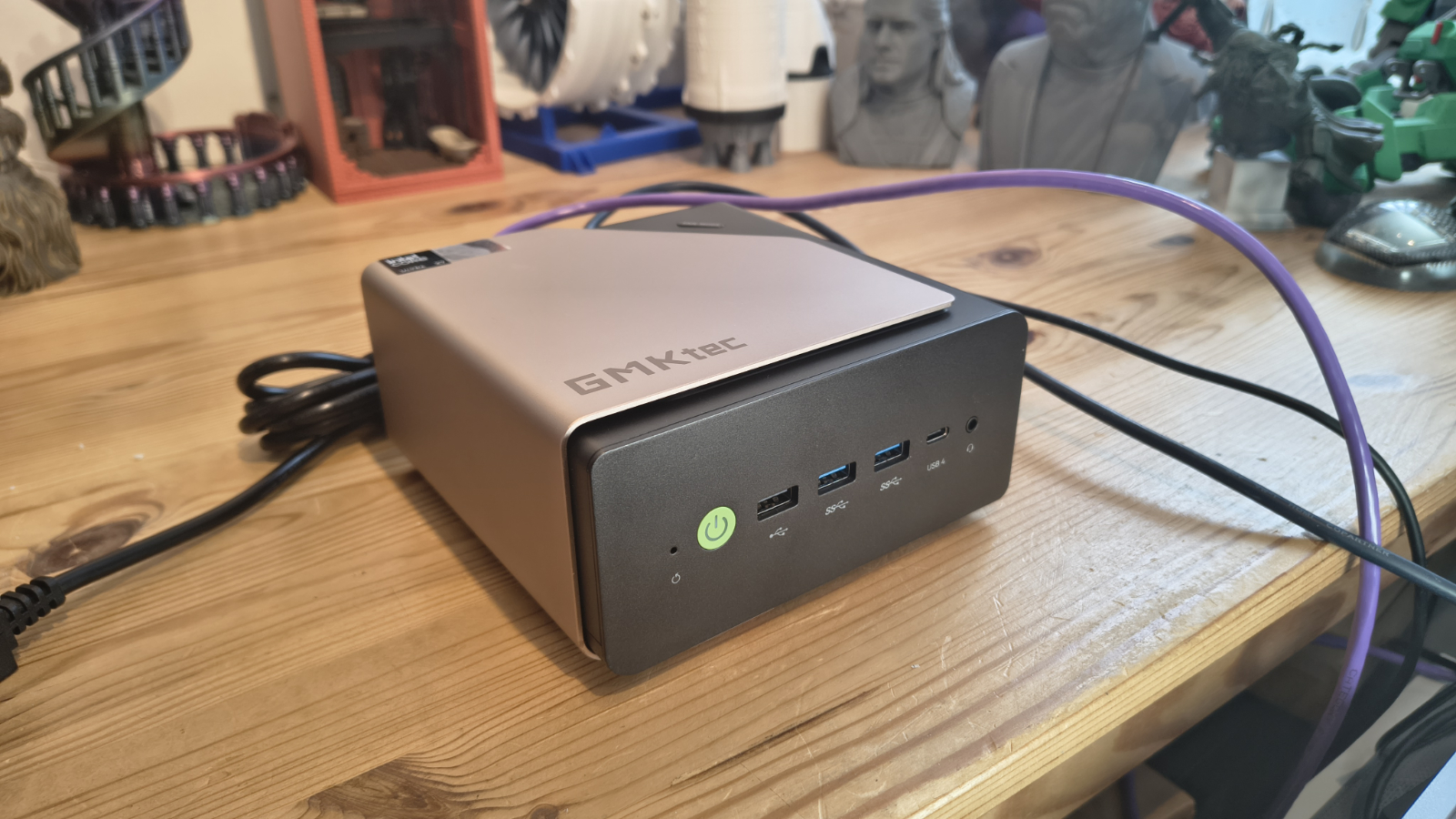
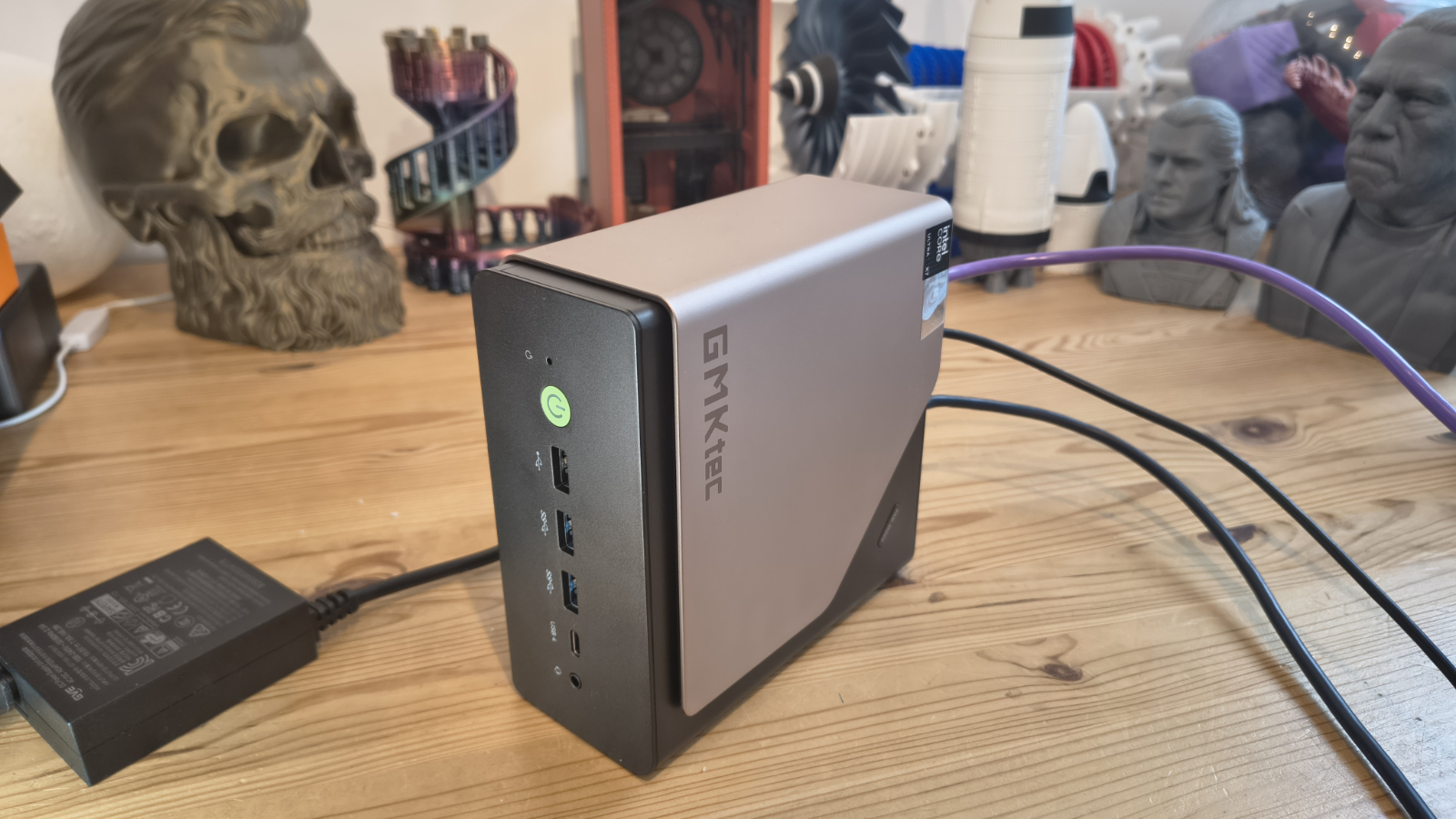
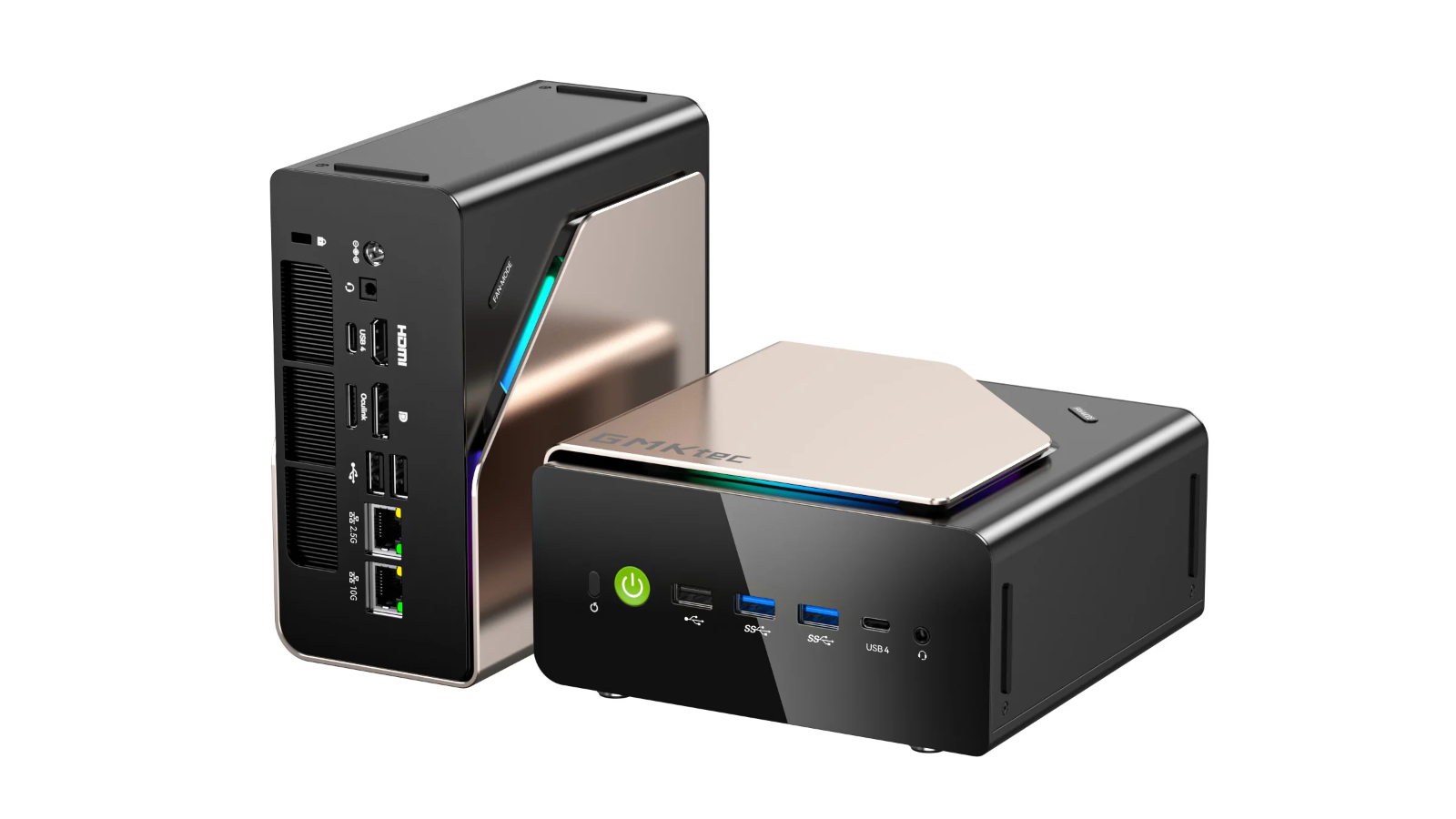
The EVO-T2 continues GMKtec's established squared, compact form factor. The chassis uses a precision surface finish and houses what GMKtec calls its Ice Storm 3.0 cooling system, an active solution with a visible RGB fan. It sits comfortably on a desk or mounts via VESA behind a monitor.
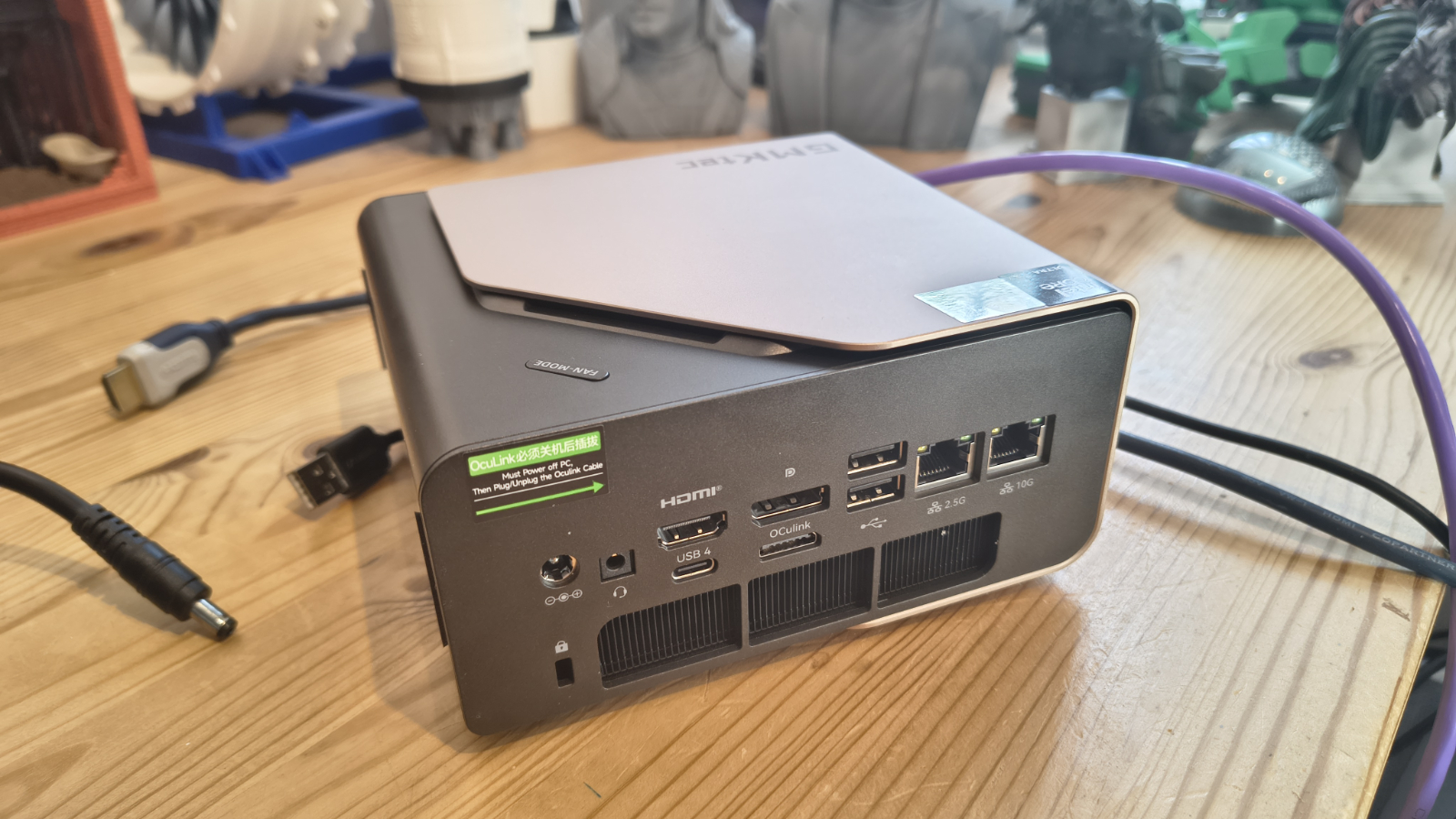
Port placement is well considered. The front panel carries the USB4 port with 100W Power Delivery alongside two USB-A 3.2 connections and one USB-A 2.0. These are the ports users reach for most often, and they are exactly where they should be. The rear houses the second USB4, dual HDMI 2.1, DisplayPort 1.4, dual Ethernet, the OCuLink port and the audio jack.
That rear panel is dense. It rewards deliberate cable planning rather than improvisation. Quad 4K display support is a genuine differentiator at this size. Creative professionals and multi-monitor users will appreciate having that headroom without needing an external dock.
This hints that the EVO-T2's connectivity specification is exceptional for the category.
Dual Ethernet with 2.5GbE and 10GbE ports on a machine this small opens it to homelab, network-attached storage and professional networking roles that most mini PCs cannot fill. The 10GbE port alone makes this worth serious consideration for anyone who moves large files regularly.
Wi-Fi 7 and Bluetooth 5.4 cover wireless needs for the foreseeable future. The front-panel USB4 port carries 40Gbps bandwidth and supports Power Delivery at 100W, which is genuinely practical for desk setups where the EVO-T2 acts as a hub. DisplayPort Alt Mode via USB4 adds display flexibility beyond the two HDMI outputs and the dedicated DisplayPort at the rear.
The OCuLink Gen4x4 port provides a direct PCIe pathway to external GPU enclosures without the bandwidth constraints of USB4. For users who plan to add a discrete GPU later or need GPU-accelerated compute for specific workloads, this is a meaningful long-term expansion option, though not all systems include it.
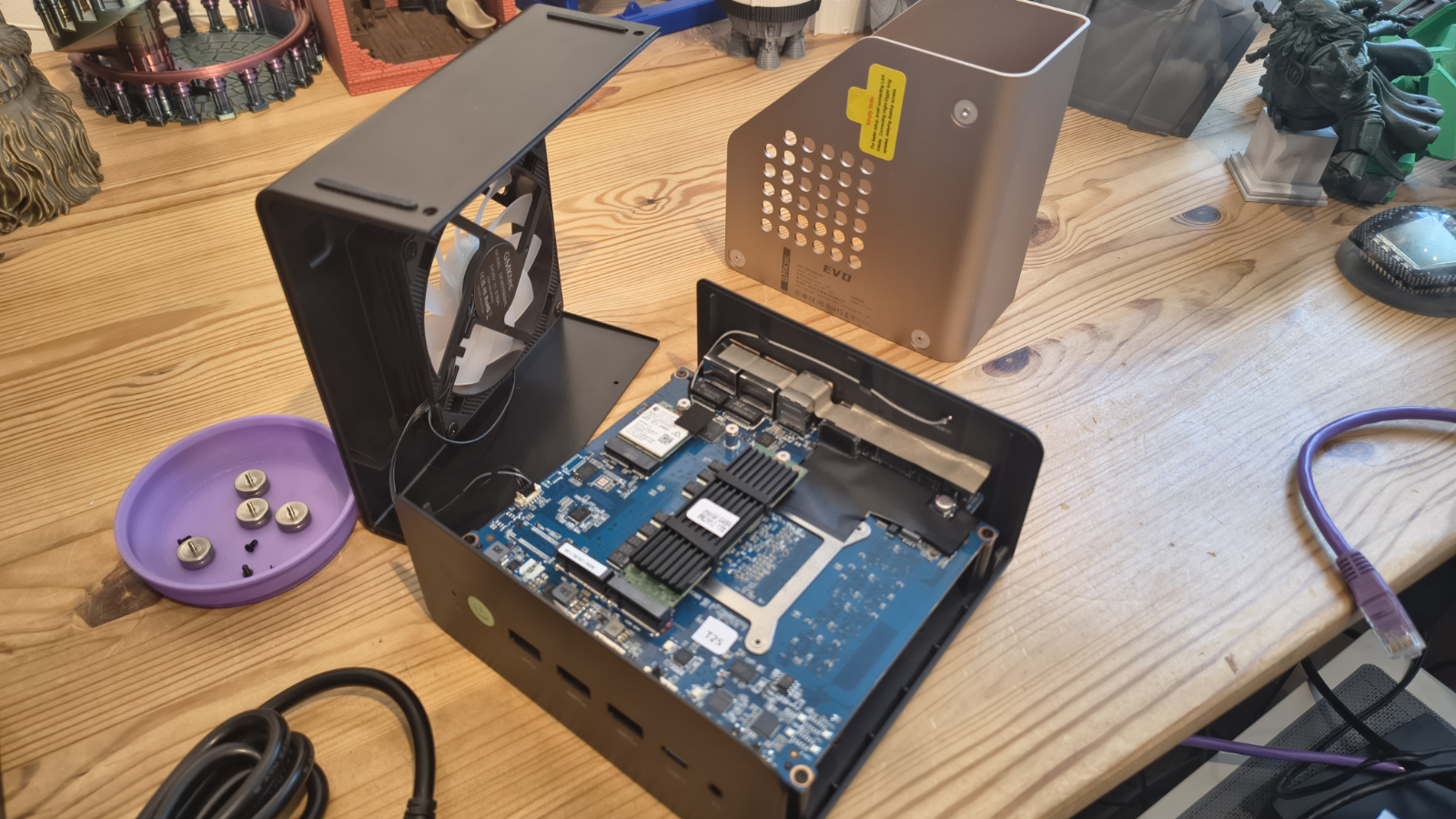
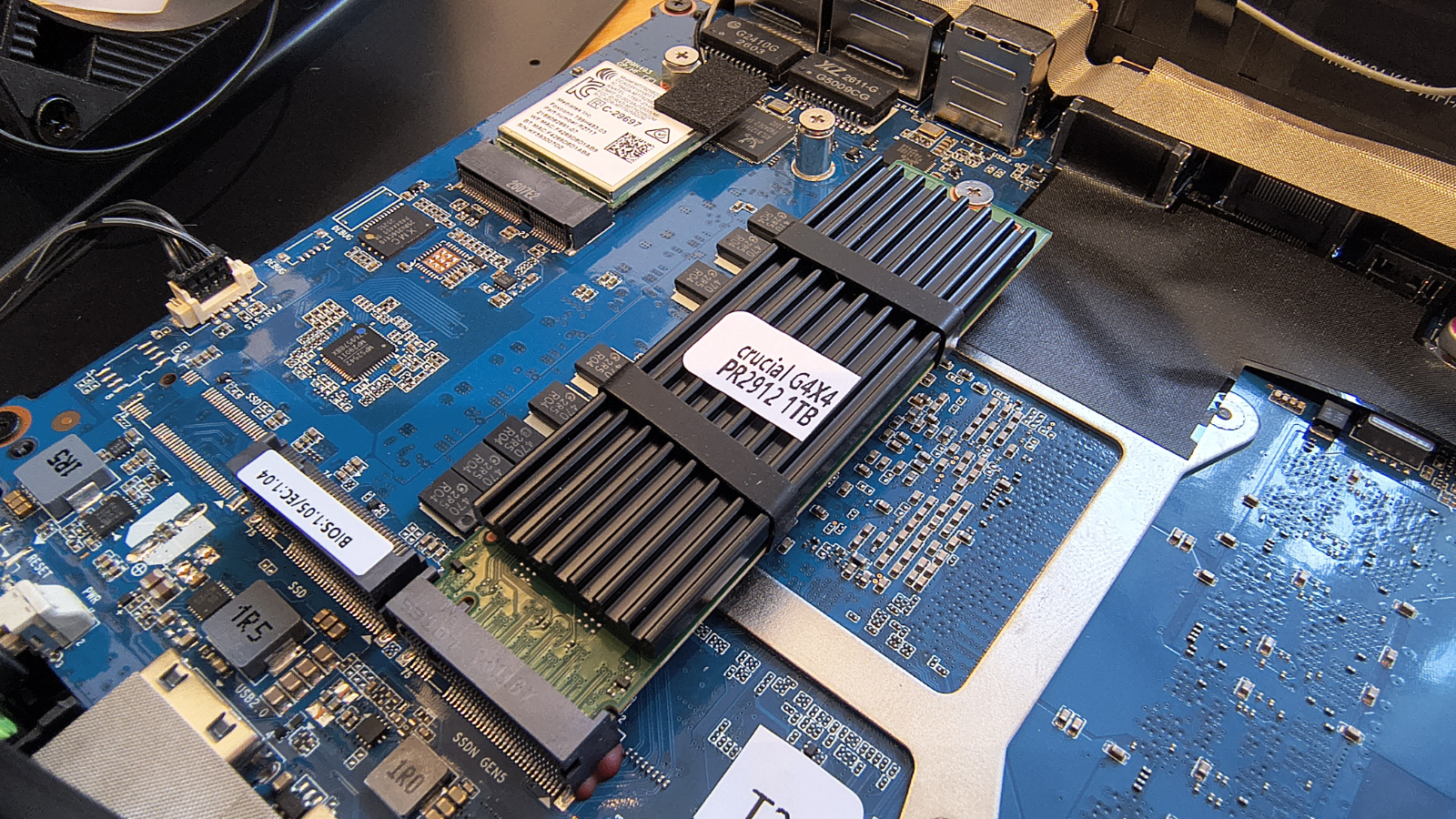
Internal access requires removing the feet and then four screws. It’s not difficult, but it might have been easier. Inside, you can access the three M.2 slot positions, two already being occupied by the Wi-Fi 7 adapter and the 1TB NVMe drive. One oddity about the two M.2 slots allocated for storage is that the one GMKtec filled with the supplied Gen4 drive is the PCIe 5.0 slot, leaving the PCIe 4.0 slot free. That seems silly, but this isn’t the only mini PC maker doing these things.
For testing, I moved the provided drive to the Gen4 slot and put a Gen5 drive in a slot where it works best. And, if anyone buys one of these, I’d recommend doing that and cloning the drive to the Gen5 module. I’d also suggest you get a Gen5 drive with a heatsink or add one before installation.
There are no memory upgrade options, because all the memory here is soldered to the mainboard.
- Design: 4 / 5
GMKtec EVO-T2: Features
- Intel Core Ultra X7 358H
- Soldered memory
- 180 TOPS AI
Panther Lake is easily Intel's most architecturally interesting mobile platform in years. The Core Ultra X7 358H uses a chiplet design built across three separate tiles. The compute tile is manufactured on Intel's 18A process and incorporates RibbonFET gate-all-around transistors alongside backside power delivery using PowerVia technology. Intel states this reduces voltage drop by around 30 per cent and improves transistor density over the prior generation.
I have a not-unreasonable feeling that this was what the 100 series was meant to be from the outset, and not what actually arrived.
The processor carries 16 cores across three tiers. Four Cougar Cove performance cores handle peak single-threaded workloads and boost to 4.8 GHz. Eight Darkmont efficiency cores manage sustained parallel tasks. Four low-power efficiency cores handle background activity.
It is a sensibly layered approach, and the trickle-down from mobile laptop silicon means the EVO-T2 benefits from extensive driver and platform maturity work done for notebook OEMs.
The gap between the X7 358H and the flagship X9 388H is modest in practice. The 388H adds 0.3 GHz of peak boost. For most productivity and AI workloads, the difference will be within the margin of thermal variation. The X7 is the right choice for a machine where value matters.
The soldered RAM configuration is the most significant design decision to understand before purchasing. Retail units ship with 64GB of LPDDR5X-8533. The review unit carries 16GB. Neither configuration can be upgraded after purchase. Buyers who anticipate needing more capacity should look at the GMKtec EVO-X2, which uses AMD Ryzen AI Max+ 395 with up to 128GB of unified memory.
Soldered LPDDR5X enables the higher bandwidth speeds that integrated graphics depend on heavily. The Arc B390 needs fast, wide memory access to perform at its best. The trade-off is permanent capacity. For most professional workflows and AI tasks at the 64GB retail tier, the ceiling should be workable for several years.
Storage is considerably more flexible. The primary M.2 slot runs PCIe 5.0, offering sequential read speeds above 10 GB/s with compatible drives. The secondary slot is PCIe 4.0, still capable of strong throughput for a second drive or overflow storage. Combined capacity can reach 16TB, which opens the machine to NAS-adjacent roles that most mini PCs cannot consider.
GMKtec's headline claim is 180 TOPS of combined AI performance across the CPU, GPU and NPU. The NPU alone contributes 50 TOPS, which represents a meaningful step up from prior Intel generations. The remaining compute performance is divided between the Arc B390 and the CPU cores themselves.
The 180 TOPS figure is a heterogeneous combined total. Real-world AI workload distribution depends heavily on the framework and the model. Not all applications can efficiently split inference across three compute blocks simultaneously. The NPU handles fixed-function acceleration well. More general local inference typically leans more on the GPU or CPU, depending on quantisation level and context window size.
The aiDAPTIV+ AI SSD technology developed with Phison is worth mentioning. It extends available memory by intelligently paging model data between DRAM and NVMe storage. GMKtec claims this allows the EVO-T2 to run models with up to 70 billion parameters locally. For a machine with 64GB of RAM, that is an extraordinary claim. The paging mechanism will introduce latency penalties for data not resident in DRAM, and the practical throughput impact under sustained inference loads has not been verified by me, since I don’t have an aiDAPTIV+ AI SSD.
One thing that did make me wonder about the design of the EVO-T2 was that GMKtec claims that the USB4 port on the front can push out 100W for recharging a laptop. As the PSU is only rated at 148.2W and the system could take 60W, there appears to be a voltage shortfall in that calculation.
Overall, the X7 358H is a dramatic uplift from the 200 series chips that came before it, although AMD has such a significant lead with its Ryzen AI 395 series that it's perhaps too much to ask in one generational change.
- Features: 4.5 / 5
GMKtec NucBox EVO-T2: Performance
Swipe to scroll horizontally
CPU | Intel Core Ultra X7 358H | AMD Ryzen AI 395 Max | |
Cores/Threads | 16C 16T | 16C 32T | |
RAM | 64GB LPDDR5X 8533 | 128GB DDR5 | |
SSD | 512 GB KINGSTON OM8TAP4512K1-A0 | 2TB Kingston OM8PGP42048N | |
Graphics | Intel Arc B390 | Radeon 8060S | |
3DMark | WildLife | 45211 | 70014 |
FireStrike | 14394 | 26917 | |
TimeSpy | 7621 | 11317 | |
S.Nomad | 6172 | 11201 | |
Cine24 | Single | 123 | 115 |
Multi | 1029 | 1879 | |
Ratio | 8.34 | 16.32 | |
GeekBench 6 | Single | 2849 | 2981 |
Multi | 16286 | 17882 | |
OpenCL | 56978 | 101915 | |
Vulkan | 64187 | 90384 | |
CrystalDisk | Read MB/s | 5047 | 4083 |
Write MB/s | 4498 | 3639 | |
PCMark 10 | Office | 10645 | 9056 |
WEI | Score | 8.9 | 9.6 |
Normally, I compare AMD and Intel Mini PCs against their ilk. But as this is a flagship design of a new silicon generation, and the best Intel has to offer, I thought it would be useful to compare it to the top-of-the-line AMD platform.
For those who like the fine details, the EVO-T2 was set into ‘Performance’ mode in the BIOS, rather than balanced or silent. According to GMKtec, there should be a mode above this that consumes 80W, but it was missing from my BIOS. Therefore, it might be possible to get even more out of the EVO-T2, and the BIOS certainly has plenty of features for overclocking some aspects.
The Arc B390 GPU is the headline graphics story in Panther Lake. It uses twelve Xe3 cores built on TSMC's N3E process and clocks up to 2.5 GHz. Intel positions it as delivering 76 per cent more performance than the Arc 140T from the previous Arrow Lake generation and 82 per cent more than AMD's Radeon 890M found in Ryzen AI HX 370 platforms. As usual, Intel ignores the Radeon 8060S in the Ryzen AI 395 Max, which is its true competitor.
And, as the results show, B390 might make Arc 140T and Radeon 890M look poor, but it still can’t run with the Radeon 8060S, not even close.
Obviously, you could use the OcuLink port to add a discrete GPU, but that’s the only way that the EVO-T2 would compete with a Bosgame M5 AI.
And, while all those extra cores in the Intel Core Ultra X7 358H CPU do boost the multi-processing considerably, it still falls short of the AMD Ryzen AI 395 Max.
It did well in the PCMark score, and it also had a better SSD than the Bosgame machine. I inserted a Crucial P510 Gen5 drive into this hardware, and it delivered 10,587MB/s reads and 8,977MB/s writes in the Gen5 M.2 slot, so it could be dramatically better with a small investment.
Overall, Intel is moving in the right direction, but AMD don’t need to worry yet.
- Performance: 4.5 / 5
GMKtec EVO-T2: Final verdict
The EVO-T2 is an impressive piece of equipment that exploits the dramatically better silicon Intel has released with Panther Lake. However, given the modest differences between the X7 358H and the X9 388H, I wouldn’t be rushing to spend the extra on the top model unless money isn't a concern for you.
Where this rig excels is in providing a punchy platform for software development, video editing and running AI LLMs. It would have been nice to have seen Thunderbolt 5 ports on this PC, but the cost of adding this feature appears to be putting mini PC makers off.
At least it has USB4 and an OCuLink port if you want more GPU power.
But the focus here is foremost AI, with GMKtec even deploying a version of OpenClaw to the desktop along with Herdman. While there are free tokens to be had, these are a portal to monthly subscription packages for those who want to fully exploit AI agents.
That seems slightly at odds with the premise of having hardware like the EVO-T2 that can run powerful local AI at no other cost than electricity, and your time to get it trained in your workflows. But agents will always come with extra costs, regardless of where they are launched from.
Getting back to the hardware, this is an exceptional piece of gear that nearly brings Intel back up to AMD’s current level. Although with new AMD hardware soon to launch, this might prove to be a false dawn for them.
What it comes down to here is the price, since all memory and storage costs are artificially inflated.
For those who, for whatever reason, don’t trust AMD, then this is quite clearly the best Intel mini PC technology available, especially for those running local LLMs.
Should you buy a GMKtec EVO-T2?
Swipe to scroll horizontally
Value | Not cheap, but with this spec it was never going to be | 4 / 5 |
Design | EVO-T1 revisited, but it does have a Gen5 M.2 slot | 4 / 5 |
Features | New CPU technology, new GPU, and plenty of TOPS | 4.5 / 5 |
Performance | New CPU technology, new GPU, and plenty of TOPS | 4.5 / 5 |
Overall | A little powerhouse with so many uses | 4.5 / 5 |
Buy it if...
You want power in a small package
This is an excellent choice if you want a compact, quiet desktop that handles everyday tasks and Copilot+ AI features without any cloud dependency. But this system is also ideal for a mini server, hardware firewall and a dozen other tasks.
You want local AI
This is the pinnacle of AI-focused mini PCs available today, and with 180 TOPS of combined compute to suit your workload, the only limitation is memory.
Don't buy it if...
You need more than 64GB of RAM
As the memory in this system cannot be replaced, the 64GB of memory you get out of the box is as much as it will ever have. Whether for LLMs, video editing, or heavy virtualisation, the stock RAM is soldered and permanent, which might not be sufficient for the largest models.
Cost is a concern
The review hardware isn't cheap, and the X9 model is insanely expensive. There are powerful systems based on older technology that you can get for cheaper than the EVO-T2,
Also Consider
Bosgame M5 AI
A massively powerful Mini PC platform that uses the AMD Ryzen AI Max+ 395 processor, with sixteen cores and thirty-two threads. There are two variants with 96GB and 128GB memory, respectively, and 2TB of storage.
Until Gorgon Point silicon arrives, this is the most powerful processor and integrated GPU combination. And, the 96GB model is only slightly more expensive than the X7 version of the EVO-T2.
Read my full review of the Bosgame M5 AI here.
Minisforum UM790 Pro
A powerful AMD system using a Ryzen 9-class processor, supported by the Radeon 780M GPU. Targeted towards creatives and gamers, the expandable memory and dual M.2 PCIe 4.0 SSDs allow you to boost performance according to your requirements, with the standard version already delivering remarkable capabilities.
Check out our Minisforum UM790 Pro review
For more professional hardware, we've reviewed the best business computers.






 English (US) ·