
Inspired by the early CCleaner era, FluentCleaner reimagines the classic PC cleanup utility for modern Windows systems. Built with WinUI 3, it focuses on a cleaner, lightweight experience centered around removing temporary files, cache, logs, and leftover clutter - without aggressive registry tweaks, bundled extras, or scareware-style prompts.
The project also embraces the community-driven spirit that helped make older cleanup tools popular in the first place. FluentCleaner supports the well-known winapp2.ini cleaning database format, allowing it to leverage a large ecosystem of community-maintained cleaning rules while keeping the app fast, transparent, and easy to use.
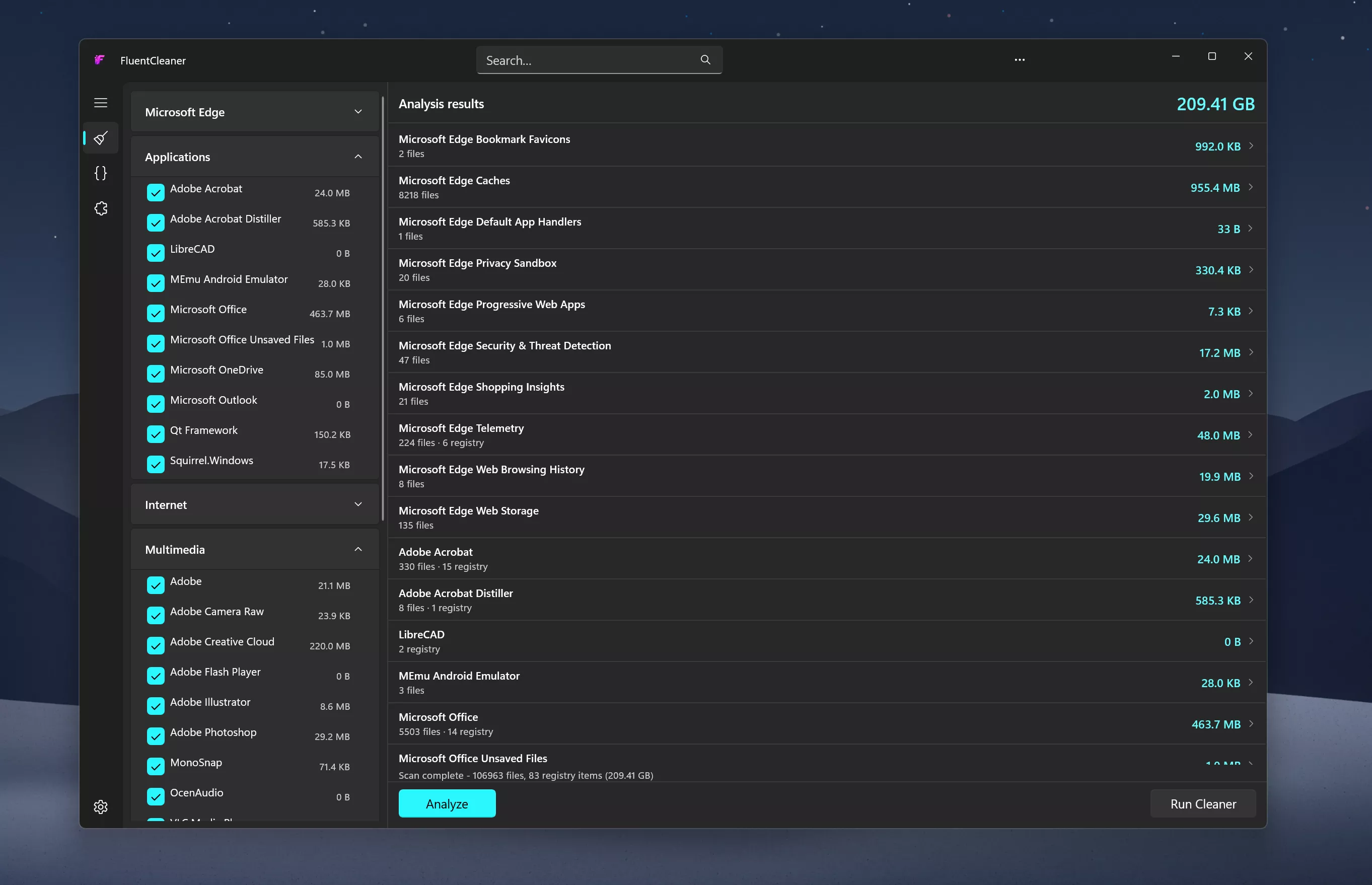
Features
- Portable design with no installation required
- One-click system analysis and cleanup
- Support for optional maintenance extensions
- Optimized for Windows 11
- Clear and easy-to-understand cleanup results
System Requirements:
- Windows 10 2004 (Build 19041) and later
- Windows 11
No Windows 11 requirement. Despite using WinUI 3, the app is intentionally built to remain compatible with modern Windows 10 systems as well
What's New
FluentCleaner Classic 1.0.0:
Introducing FluentCleaner Classic. A 3.5 MB, CCleaner-Style Companion to the 140 MB WinUI3 App
I used to be the WinForms king... and somehow I forgot just how ugly our apps used to be. And no, the screenshot below is not a mockup. I actually downgraded FluentCleaner back to WinForms + .NET Framework.
Modern vs. Classic. Yesterday I had no idea if I should actually ship this thing... Today I did, it was public on Twitter for barely an hour before the response made it obvious there was no real decision left to make
Why this version exists
Since FluentCleaner launched, I've received a ton of feedback and a striking chunk of it was technical in nature: roughly 14% of all incoming feedback came from users who couldn't get the app to start at all, or clearly struggled with it. A big part of that comes down to footprint: the WinUI3 version ships the Windows App SDK and .NET 10 runtime, landing at roughly 140 MB unpacked across 243 files. For a lot of setups older Windows 10 builds, locked-down environments, slow or metered connections, that's a real barrier to entry
FluentCleaner Classic is the answer: a lightweight, portable EXE built on .NET Framework 4.8 (WinForms) and .NET Standard 2.0 (the shared cleaning core), running on virtually any Windows install with nothing extra to download. The result: just 20 files and 3.57 MB unpacked a fraction of the WinUI3 footprint, powered by the exact same scan engine and the same Winapp2.ini/Winapp3.ini database
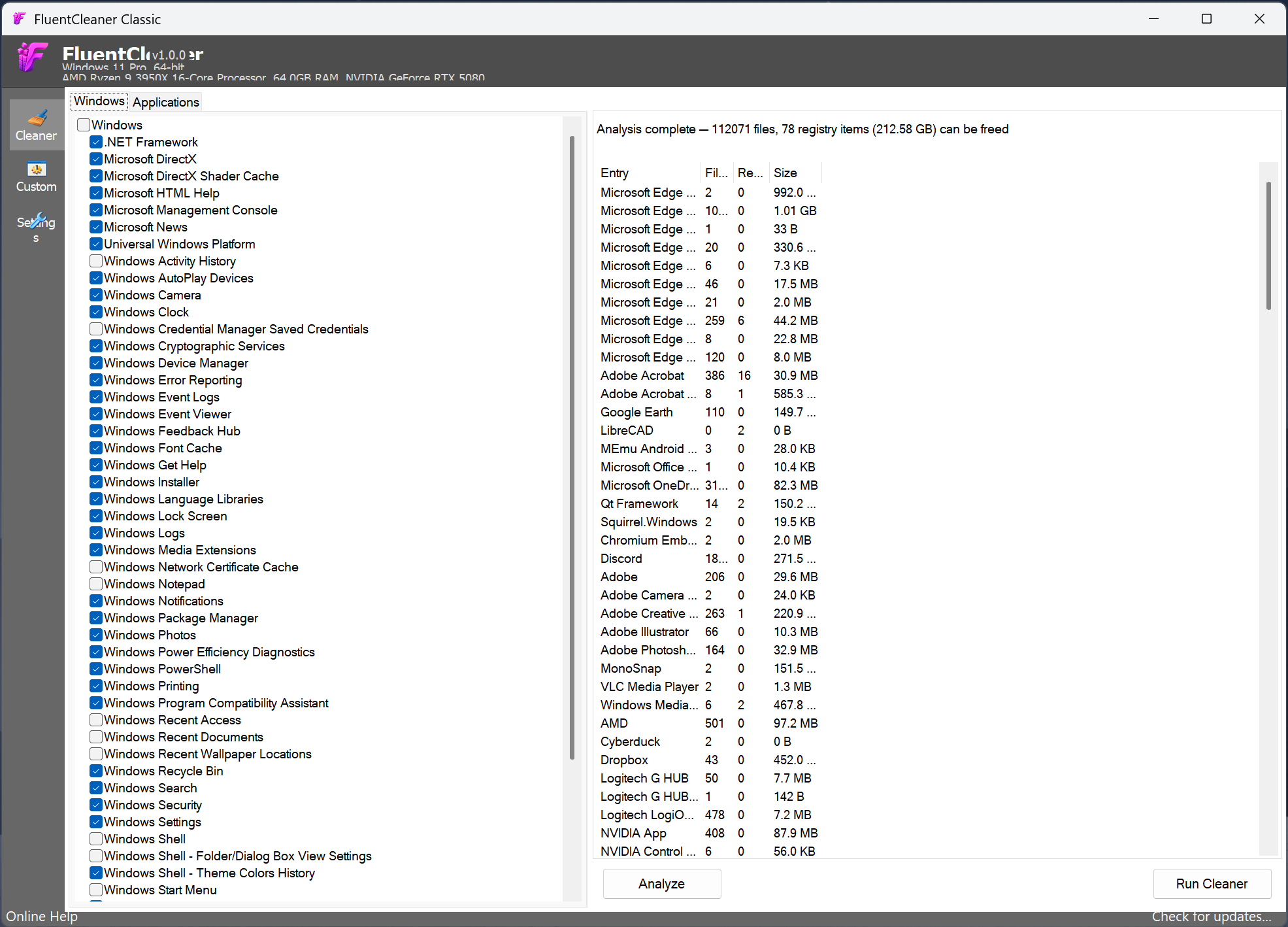
Both versions are being developed in parallel and share the same cleaning core (FluentCleaner.Core), so detection/cleaning improvements land in both at once. The database (Winapp2.ini/Winapp3.ini) can be updated straight from GitHub in either app.
What's different right now
FluentCleaner Classic is a fresh, from-scratch port, it's not a 1:1 replacement yet, and I'd rather be upfront about the gaps than have you find out the hard way:
- Not localized yet. WinUI3 ships 12 language packs (English, German, French, Indonesian, Italian, Lithuanian, Norwegian, Portuguese (BR), Russian, Ukrainian, Chinese Simplified/Traditional) via a proper per-language resource pipeline. Classic doesn't have that infrastructure in place yet, everything is currently English-only, hardcoded in the UI. Porting a full localization pipeline to WinForms takes real time to do right, and I wanted to get Classic into your hands first rather than delay it further. Language support is planned, not abandoned.
- Compatibility is still being verified. I haven't fully audited Classic across every Windows version/edge case yet, treat it as freshly baked. If something breaks on your system, please report it.
- Not yet at full feature parity with WinUI3. Currently missing or not yet ported to Classic:
- Theme picker (Light/Dark/System); Classic currently uses the default WinForms look
- In-app language switcher (tied to the localization gap above)
- Settings export/import (backup & restore)
- Portable-mode indicator in Settings
- Winappx (bloatware/AppX) database support
- Terminal page (interactive command console)
- Rule Lab (dry-run testing window for custom cleaning rules)
- AI-assisted custom cleaner generation (Classic's Custom page still supports manual create/edit/test, just not the AI prompt-to-rule flow)
Everything above is on the radar. Classic will keep catching up release by release.
FluentCleaner (Standard) 26.07.03:
Added
- Traditional Chinese (zh-TW) translation
- Italian (it-IT) translation
- Russian (ru-RU) translation
Improved
- AI explanations now talk back in your language: Just switch the UI to German, French or any supported language and the answers follow automatically #79
- AI explanations works with the built-in explainer and the Custom Cleaners AI generator (Winapp2 entries & PowerShell scripts) that some of you might not have discovered yet
- Settings > AI Explanations now surfaces both features in one place so nothing stays hidden
- Unhandled exceptions no longer silently kill the process and the app stays alive and logs the error instead of vanishing with exit code
- Database downloads are safer







 English (US) ·