
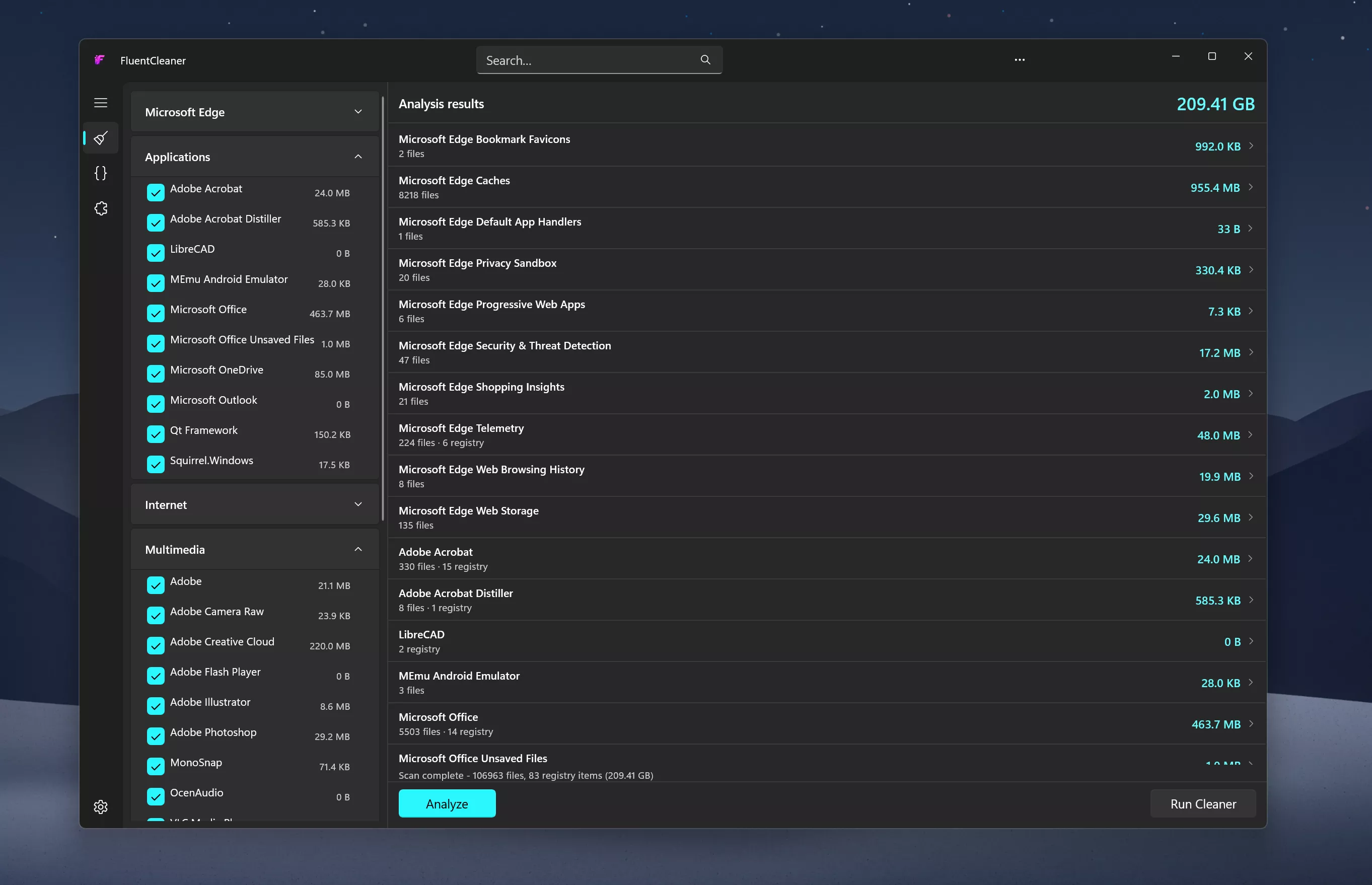
Inspired by the early CCleaner era, FluentCleaner reimagines the classic PC cleanup utility for modern Windows systems. Built with WinUI 3, it focuses on a cleaner, lightweight experience centered around removing temporary files, cache, logs, and leftover clutter - without aggressive registry tweaks, bundled extras, or scareware-style prompts.
The project also embraces the community-driven spirit that helped make older cleanup tools popular in the first place. FluentCleaner supports the well-known winapp2.ini cleaning database format, allowing it to leverage a large ecosystem of community-maintained cleaning rules while keeping the app fast, transparent, and easy to use.
Features
- Portable design with no installation required
- One-click system analysis and cleanup
- Support for optional maintenance extensions
- Optimized for Windows 11
- Clear and easy-to-understand cleanup results
System Requirements:
- Windows 10 2004 (Build 19041) and later
- Windows 11
No Windows 11 requirement. Despite using WinUI 3, the app is intentionally built to remain compatible with modern Windows 10 systems as well
What's New
- [Changed] Large parts of the app were refactored to use more native WinUI 3 behavior and APIs. Theme handling, TitleBar integration and system theme detection are now much cleaner and more consistent
- [Compatibility] FluentCleaner officially supports Windows 10 2004 (Build 19041) and later;no Windows 11 required
- [Added] Automatic update checks; the Settings page now silently checks for new versions on load.
- If an update is available, FluentCleaner shows a small red banner with a direct download button. You can also trigger update checks anytime from the [...] menu in Settings.
- [Added] Responsive TitleBar search; the search box now collapses into a compact search icon + flyout on smaller window sizes for a cleaner layout.
- [Added] Native-style hamburger menu; moved the pane toggle into the TitleBar to better match modern WinUI apps
- [Added] Terminal startup system info; Windows version, CPU and RAM are now shown when opening the terminal
- [Updated] CommunityToolkit.Mvvm 8.3.2 > 8.4.2
- [Fixed] ARM64 builds not resolving correctly. Turns out MSBuild is case-sensitive and arm64 ≠ ARM64. Added explicit RuntimeIdentifiers so self-contained builds correctly detect their target platform.
- [Changed] Migrated all [ObservableProperty] backing fields to partial properties. This is the new standard for CommunityToolkit.Mvvm 8.4+ on .NET 10. No behavior changes, just cleaner code and no more compiler warnings
Fast servers and clean downloads.
Serving tech enthusiasts for over 25 years.
Tested on TechSpot Labs.

Last updated:
May 12, 2026
Software similar to FluentCleaner 11
-
414 votes
Freeware system optimization tool that removes unused and temporary files.
- Freeware
- Windows, macOS, Android
-
213 votes
The standard CCleaner app, but without the need for an installer. CCleaner removes unused and temporary files from your system.
- Freeware
- Windows
-
121 votes
Free up disk space by deleting junk files that are no longer used.
- Freeware
- Windows
-
More similar downloads







 English (US) ·