
Capsule is an intuitive and affordable customer relationship management (CRM) solution designed for small to medium-sized businesses. Its user-friendly interface and gentle learning curve make it approachable even for non-technical users.
Despite its competitive pricing, Capsule provides a robust set of core features for managing contacts, identifying opportunities, tracking communications, and overseeing sales pipelines. Standout capabilities include the ability to store up to 30,000 contacts for just $18/month, a simple "projects" feature that can function as a basic helpdesk, and useful integrations with popular apps like Google Workspace, Microsoft 365, Mailchimp, and Xero.
In my experience, Capsule excels at delivering the key CRM platform essentials in a streamlined package. The well-designed layouts and intuitive workflows can help small teams quickly get up to speed. However, some advanced features like marketing automation are limited compared to pricier competitors. But for small businesses seeking an affordable and capable CRM without unnecessary complexity, Capsule is well worth considering.
Capsule CRM core capabilities
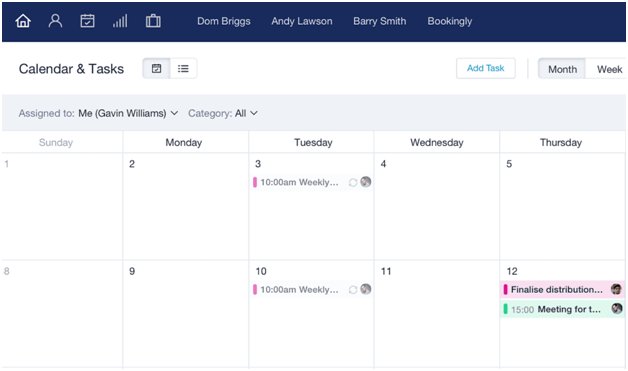
Capsule is a streamlined customer relationship management system designed to help small businesses efficiently manage their customer interactions and sales processes. Its core capabilities revolve around simplifying the most essential aspects of CRM.
It allows users to easily store, organize, and access customer data in one centralized location. Beyond basic info, it enables linking contacts to relevant opportunities, cases, and notes, providing a complete view of each customer relationship.
Sales teams can take advantage of visual pipeline tracking to monitor the progress of deals. Drag-and-drop functionality makes it simple to move opportunities from one stage to the next. Customizable pipelines ensure they fit the unique sales processes of each business.
Opportunity records give a snapshot of key data like value, win probability, and expected close date. This rolls up into sales forecasting reports and analytics to predict revenue and identify trends. The reporting features are a bit basic compared to higher-end CRMs, but they cover the essential needs of small businesses.
Where it really shines is in its ease of use and mobility. The interface is clean and intuitive, with a minimal learning curve to get a team up and running. And it gets full marks for its mobile-friendliness — a fully featured mobile CRM that makes it a breeze for sales reps and account managers to work on the go.
Integration options ensure the CRM isn't isolated but connected to the other systems businesses rely on. It hooks into popular small business tools for email, ecommerce, marketing automation, customer support, and productivity.
With a robust feature set yet simple interface, Capsule checks the boxes small businesses need in a CRM at a very affordable price point. The core capabilities are there, without a lot of extra bells and whistles that tend to bog down other systems. If complex and fine-grained customization isn't a requirement, Capsule is an excellent option.
How easy is Capsule CRM to use?
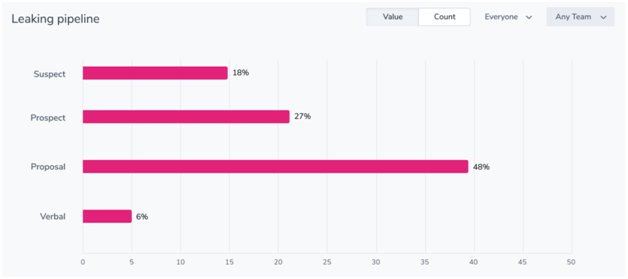
Capsule is widely praised for its user-friendly interface and intuitive design that makes it easy for new users to navigate and quickly become proficient with the platform. The simple layout focuses on the core CRM features small businesses need most, without unnecessary complexity.
I found the straightforward dashboard a breeze to use from the get-go. Key functions like contact management, opportunity tracking, task scheduling, and reporting are easily accessible. The visual sales pipeline is also simple to understand at a glance.
Capsule offers a good degree of customization to tailor the tool to your specific needs and processes. You can create custom fields, tags, filters, and views to track the exact information you need for contacts, opportunities, cases, and more. It's quick to set up dropdown menus, checkboxes, and date fields. You can also customize your sales pipeline stages and milestones.
The platform makes onboarding painless with a wide array of self-service training resources. These include tutorial videos, step-by-step guides, webinars, and an extensive knowledge base. The intuitive UI and wealth of educational content make it realistic for most users to get up and running in a couple of hours.
Capsule also has an active user community for Q&A, best practices, and feature suggestions. For more hands-on help, email support is responsive and thorough in my experience. All plans include customer support at no extra charge.
If your small business needs an affordable CRM without a steep learning curve, Capsule is well worth considering. Its thoughtfully designed interface, customization options, and strong support make it one of the most user-friendly CRMs that I've tried. Most teams should be able to deploy it quickly and see rapid user adoption.
Integrations
When it comes to integrations, Capsule really shines. The system offers an impressive array of pre-built integrations and connectors that make it easy to sync data with other business apps. There are official integrations for popular tools like Mailchimp, Xero, FreshBooks, and Google Workspace. So if you're already using those in your workflow, getting them connected is a breeze.
But the integration options don't stop there. Capsule also supports leading iPaaS vendors like Zapier and Make. This opens up a world of possibilities, allowing you to connect Capsule with thousands of other web apps without needing any coding skills. You can automate data syncing, trigger workflows based on events, and much more. Zapier integration, in particular, is very well done.
For those with more technical needs, Capsule provides a robust API. This allows developers to integrate the system more deeply with custom or third-party applications. In my experience, the API is well-documented and reliable.
I've found the data syncing to be fast and seamless. Once you have an integration set up, you can count on your data always being up-to-date across all tools. The system also handles data conflicts gracefully.
Little touches, like being able to easily map custom fields when setting up an integration, make the whole process very user-friendly. And if you ever run into issues, CapsuleCRM’s support team is very knowledgeable about integrations and quick to help.
How good is Capsule CRM customer support?
Capsule offers some customer support options, though it may not be as comprehensive as larger competitors. Users can access live support via email, with the friendly customer service team typically responding within one business day, Monday through Friday. However, phone and live chat support do not appear to be offered at this time.
Where the CRM really shines is in its self-service support resources. The company provides an extensive knowledge base filled with helpful articles and step-by-step guides covering everything from getting started to more advanced features and use cases. The Capsuleblog and YouTube channel are also fantastic resources, offering insightful tips, video tutorials, and customer success stories to help users make the most of the platform.
While researching CapsuleCRM's support, I was impressed by the largely positive customer reviews and high ratings the company has earned on third-party sites like G2, Capterra, and TrustRadius. Many users praise the responsiveness and helpfulness of the support team, noting that they received prompt and effective assistance despite the lack of live support options. However, a few reviewers did mention that the lack of phone support could be an issue for some customers.
It's worth noting that Capsule doesn't have a dedicated user forum or community at this time. While the knowledge base and tutorials are undoubtedly valuable, having a space for customers to connect, share ideas, and help one another could further enhance the support experience.
Capsule CRM plans and pricing
Swipe to scroll horizontally
Plan | Free | Starter | Growth | Advanced | Ultimate |
Price | $0/user/month | $18/user/month | $36/user/month | $54/user/month | $72/user/month |
Best For | Individuals testing CRM functionality | Small businesses needing basic CRM tools | Growing businesses requiring more contacts and automation | Larger teams needing extensive features | Large teams needing premium support and advanced CRM features |
Features | 2 users and 250 contacts Single sales pipeline Email sending | 30,000 contacts AI email assistant Shared mailbox | 60,000 contacts Workflow automations Multiple pipelines | 120,000 contacts Contact enrichment Multiple project boards | Everything in Advanced Premium onboarding Dedicated account manager |
Limitations | Limited contacts and users | No advanced reporting or automations | Limited project boards and contact enrichment | Higher cost, requires setup | Higher cost, best suited for larger organizations |
Capsule CRM employs a per-user per-month pricing model with five tiers ranging from a limited free plan up to $72 per user monthly. The free version supports up to 2 users, 250 contacts, and 10 AI content assists, but lacks workflow automations, project management features, and advanced customizations.
In my view, Capsule's pricing is fairly standard for a CRM, with the per-user monthly cost increasing as more robust features and higher usage limits are unlocked. The Starter plan, at $18 per user per month, should suffice for small teams just needing core CRM functionality. However, growing businesses will likely need at least the Professional plan at $36/user/month to access workflow automation capabilities that can significantly boost productivity.
One downside is that many features SMBs would want, like sales pipeline management, email templates, and custom fields, are limited or unavailable on the free and lower-tier plans. Capsule does offer a free plan and trial to test out the software, but the free version is quite limited compared to some competitors.
On the plus side, Capsule's pricing is transparent and straightforward, without any hidden fees or required add-ons. Discounts are provided for annual billing and new customers. The monthly price maxes out at $72 per user for the Ultimate plan, which is reasonable compared to enterprise tiers of many other CRMs.









 English (US) ·