
 3 weeks ago
62
3 weeks ago
62
Alibaba’s Qwen 3.8 27B open-weight AI model came out a couple of weeks ago, and it immediately created a wave of hype among local AI enthusiasts thanks to its impressive intelligence benchmark results for a model of its size and capabilities.
Totaling around 17GB for four-bit quantized weights and offering built-in multimodal capabilities on top of its general aptitude, Qwen 3.8 27B immediately grabbed the attention of everybody with an RTX 5090, RTX 4090, or RTX 3090 (as well as a Radeon RX 7900 XTX, Radeon AI Pro R9700, or Arc Pro B70).
Were we on the verge of frontier-level intelligence from a four-bit quant on a single graphics card? Could everybody with a capable enough local AI setup go and cancel their Claude or ChatGPT subscriptions?
The answer, of course, as with every open-weight AI model hype cycle, is more complicated than just eyeballing the size of the model weights and comparing it to your available VRAM pool. Does the card or system you're using to host the model have enough VRAM left over to provide useful amounts of space for the model's context once everything is running? Do your host system and LLM inference engine deliver acceptable time-to-first-token, as well as high throughput beyond just bench-racing from an empty context window?
It's one thing if you just want to chat with a model and see what happens; it's another entirely if you want to put it to work, especially as impatient agents take the limits of human perception out of the picture.
We wanted to see what hardware and software stack Qwen 3.8 27B really wants in order to deliver solid performance, so we ran it on systems ranging from a desktop PC with discrete GPUs to systems with unified memory architectures like the DGX Spark, Mac Studio, and Ryzen AI Halo.
Our discrete GPU AI testbed includes the following components:
Swipe to scroll horizontally
Tom’s Hardware Local AI Testbed |
Row 0 - Cell 1 |
CPU |
Ryzen 7 9800X3D |
Memory |
64GB (4x16GB) DDR5-5200 |
Motherboard |
Asus TUF Gaming X670E-Plus Wifi |
SSD |
Corsair MP600 Pro XT 4TB |
Power supply |
MSI MPG Ai1600TS |
Operating system |
Ubuntu 26.04 LTS |
Where it was possible to do so, we tested performance with Qwen 3.8 27B’s built-in multi-token prediction capabilities both enabled and disabled. Not all of the model runners we tested were able to support MTP within the amount of VRAM available to us on some of our platforms. We note where MTP was and wasn’t possible in our analysis of each platform, as well as in our charts.
RTX 5090 performance
We started with the RTX 5090, whose 32GB of GDDR7 and 1.8 TB/s of memory bandwidth would seem to make it an absolute no-brainer for getting the best local inference performance with this dense model. (Mixture-of-experts models tend to be friendlier to performance on lower-end hardware like the DGX Spark and AMD's Strix Halo, as their limited numbers of active parameters mean less data movement during inference).
As a baseline, we followed our usual local AI benchmarking approach: grab the latest build of llama.cpp from GitHub, build it, grab an Unsloth quantization of the model from Hugging Face, and run it. But our testing quickly ran into a speed bump.
Image 1 of 4
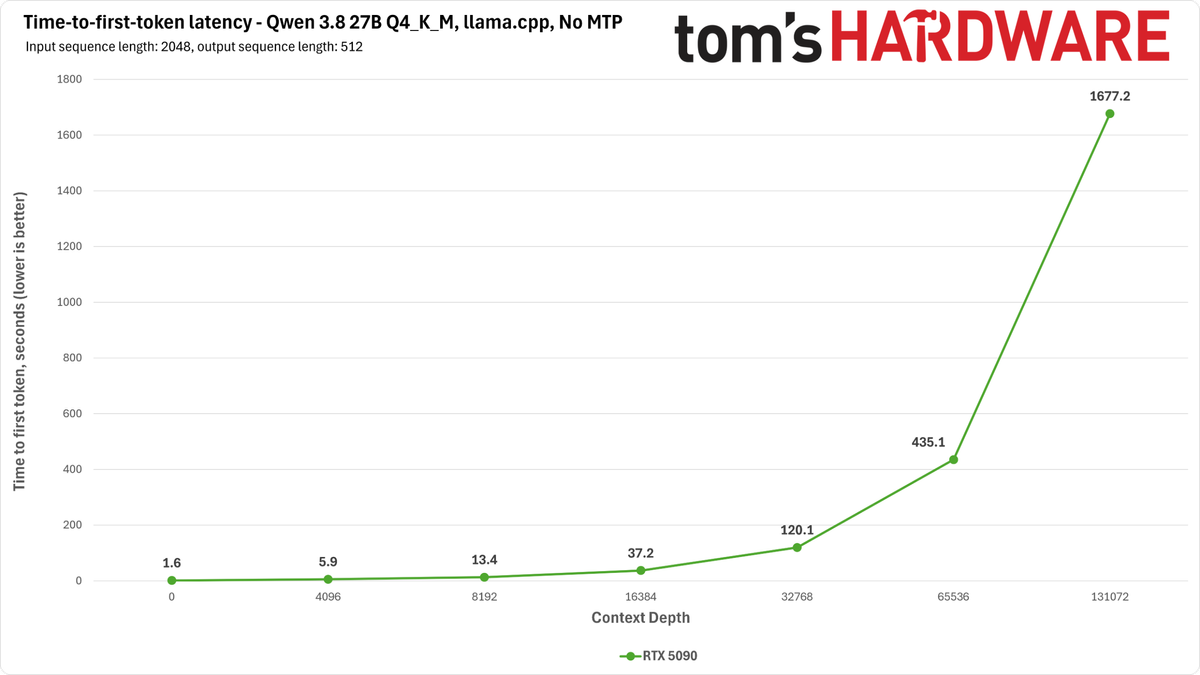
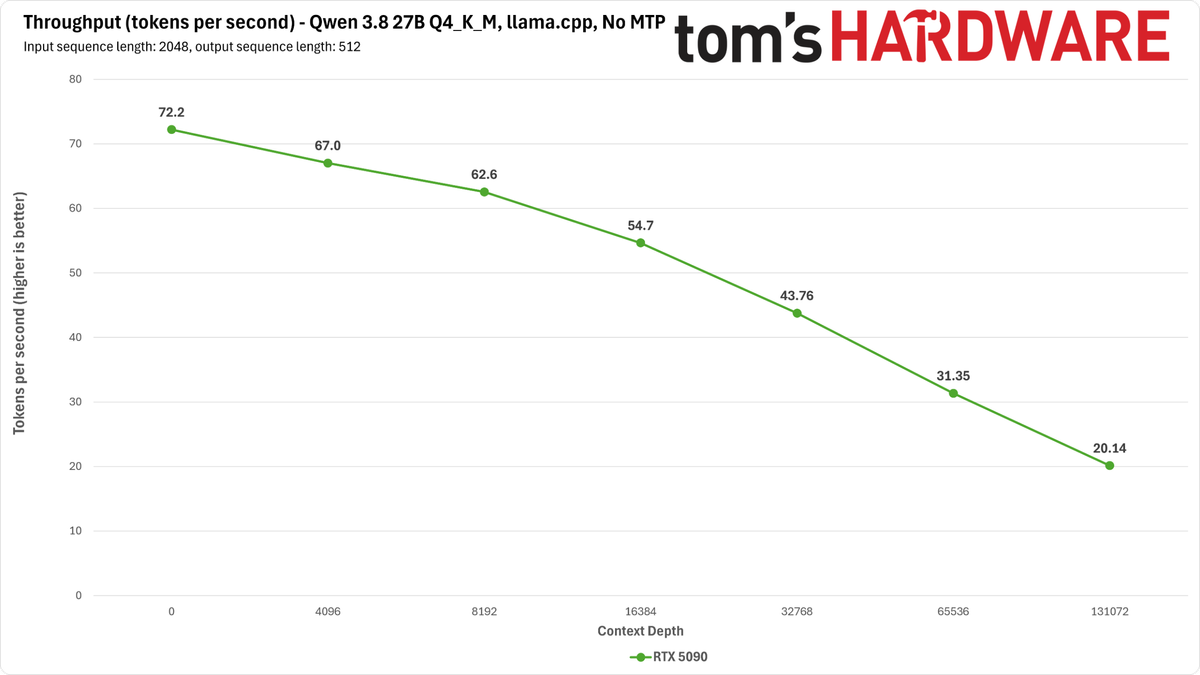
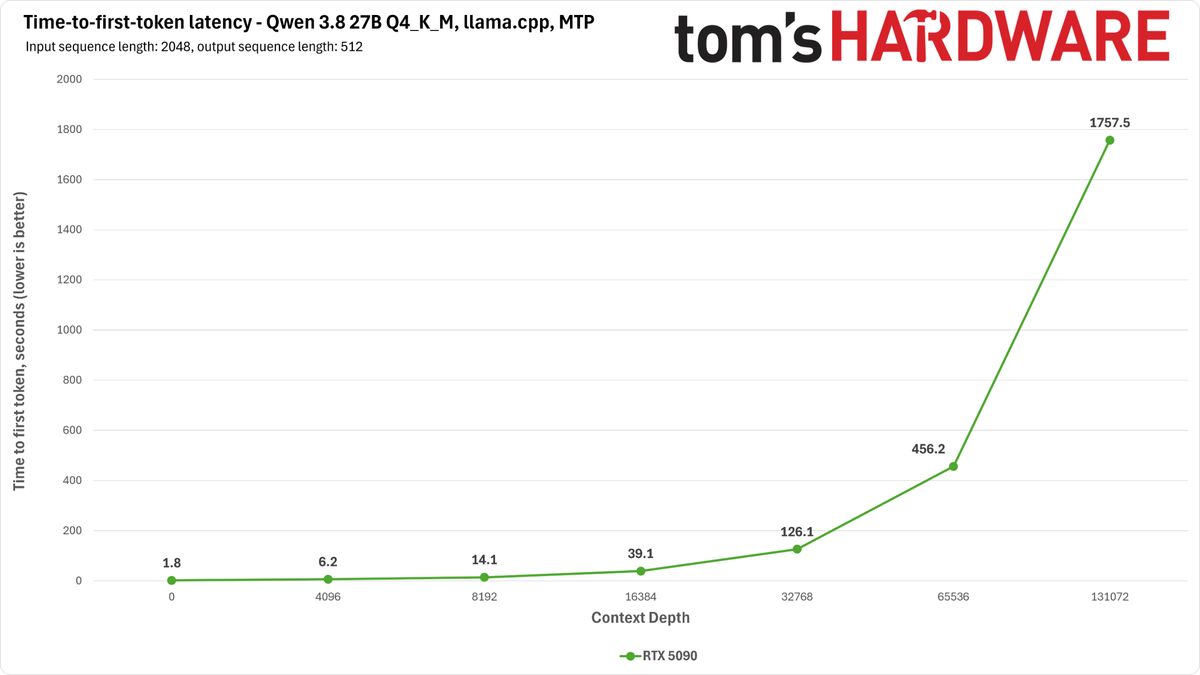
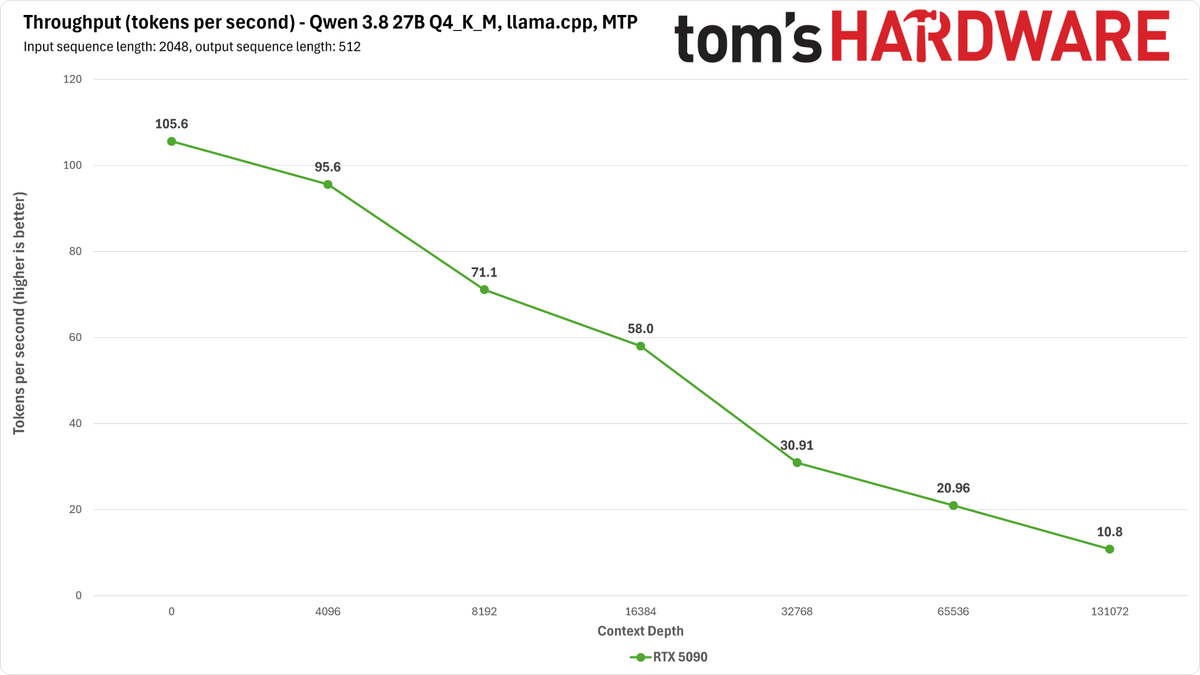
Although llama.cpp will happily allocate the full 262K context length with this model on an RTX 5090, its processing speeds at long contexts on this card are dire.
Time-to-first-token with a single 5090 stretches to roughly 30 minutes, suggesting that something is just broken here. And tokens-per-second throughput drops far, far below what you would expect for having one of the world's fastest graphics cards at your disposal. No matter how you slice it, llama.cpp is not the right model runner for this hardware right now.
Next, we tried vLLM, a production-grade inference engine that's more at home in the data center than it is on the desktop, although it can comfortably serve in both roles—at least if your host system is up to its requirements. Even with 64GB of main memory in our test rig, we had to allocate another 64GB of swap just to let vLLM load Qwen 3.8 27B successfully for the first time. A lightweight stack this is not.
The vLLM maintainers provide an NVFP4 quantization of Qwen 3.8 27B and deployment recipes for both one and two RTX 5090s. We just so happen to have two RTX 5090s in the TH labs, so we were able to try out both configurations.
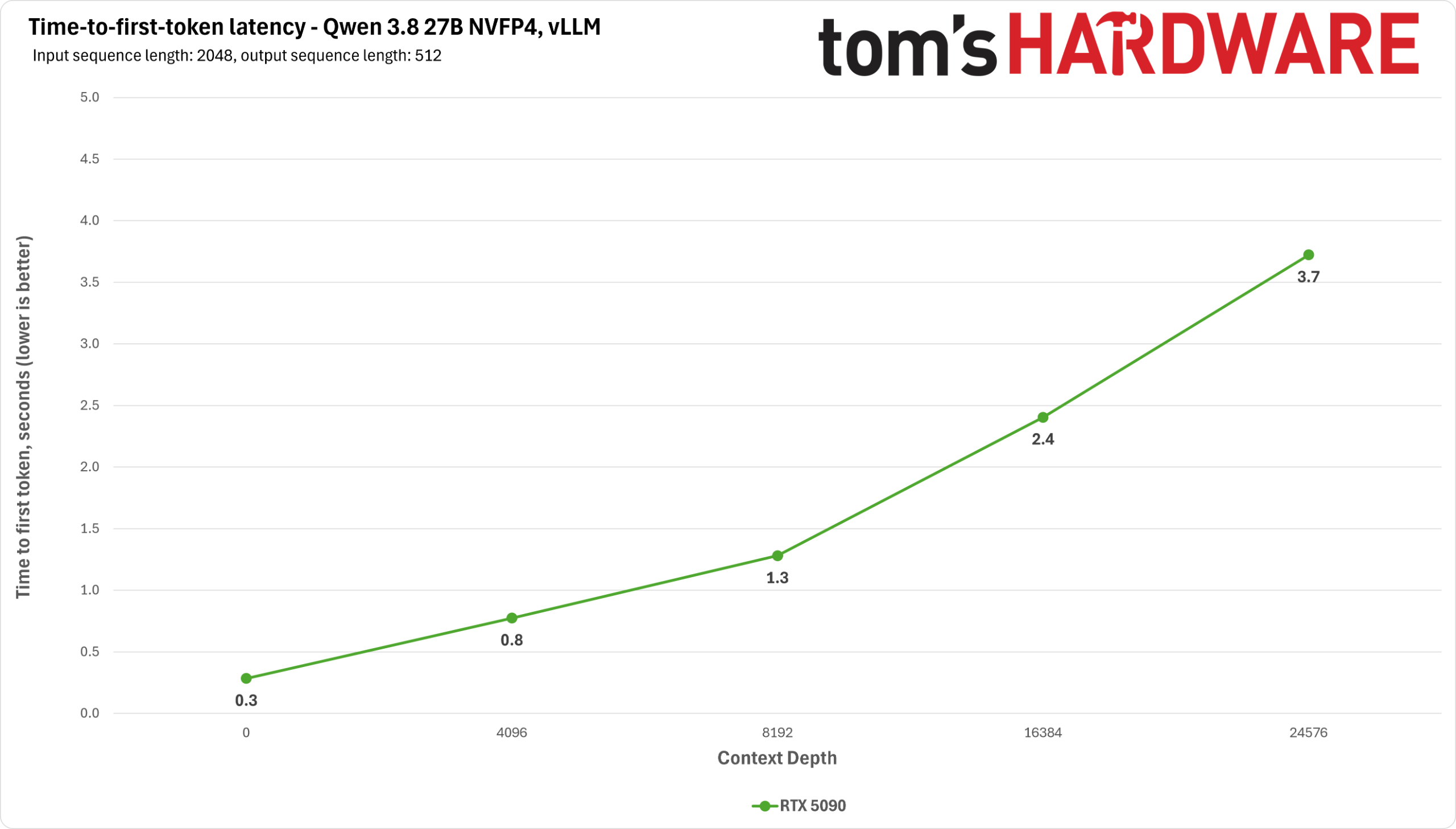
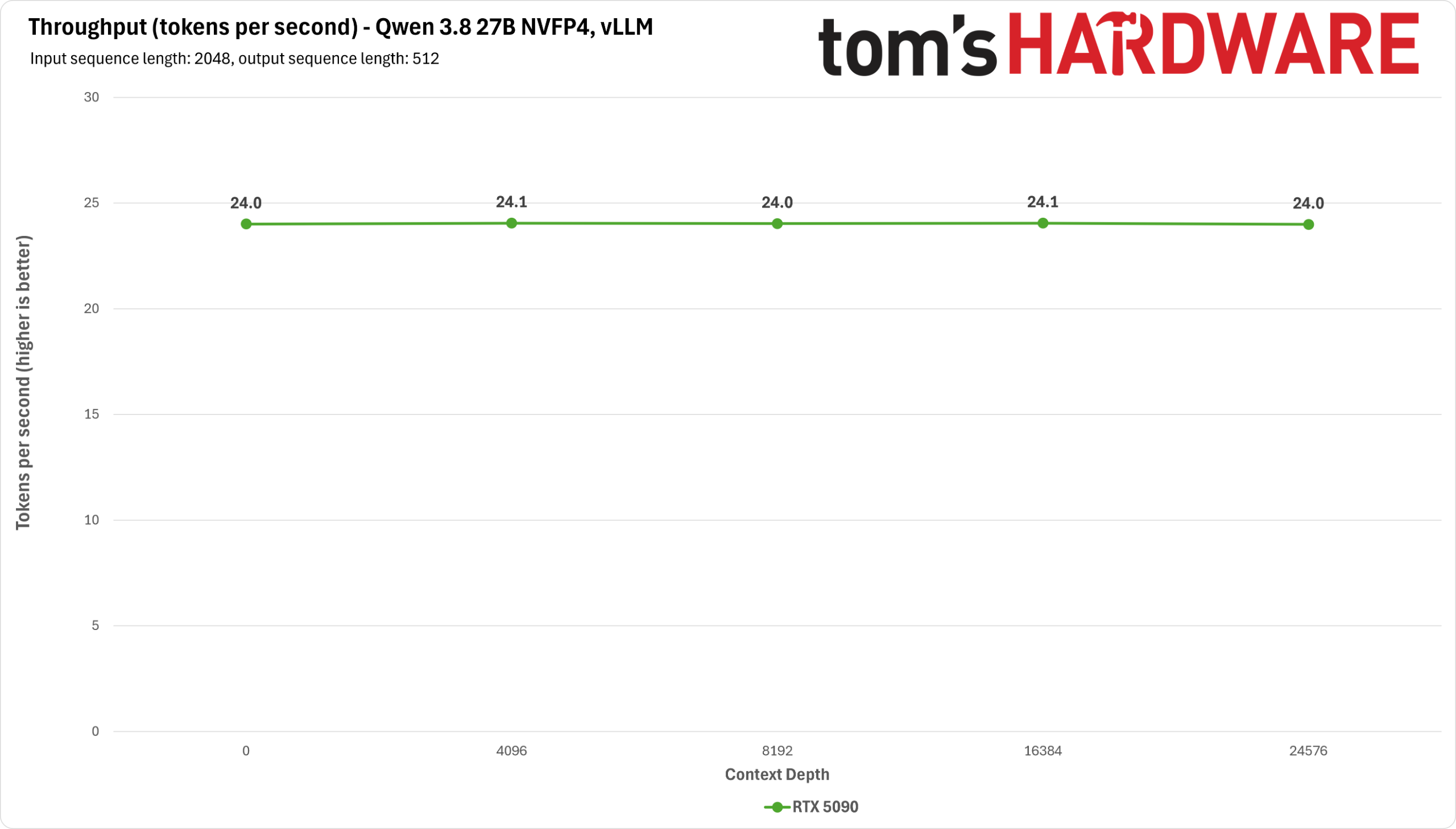
Serving Qwen 3.8 27B on one 5090 with vLLM certainly works in a pinch, but it's not ideal for long-context inference because the base recipe for it limits you to just a 32K context. To get the full 262K context, you really want a single card with more memory (like an RTX Pro Blackwell card with 48 or 72GB of RAM) or two 5090s, as we were able to test.
And a single card doesn't have enough memory to enable Qwen 3.8 27B’s built-in multi-token prediction (MTP), which is super helpful in getting faster decode performance from this setup. 20 tokens per second across the board without MTP is not an impressive baseline for a card of this caliber.
Image 1 of 2
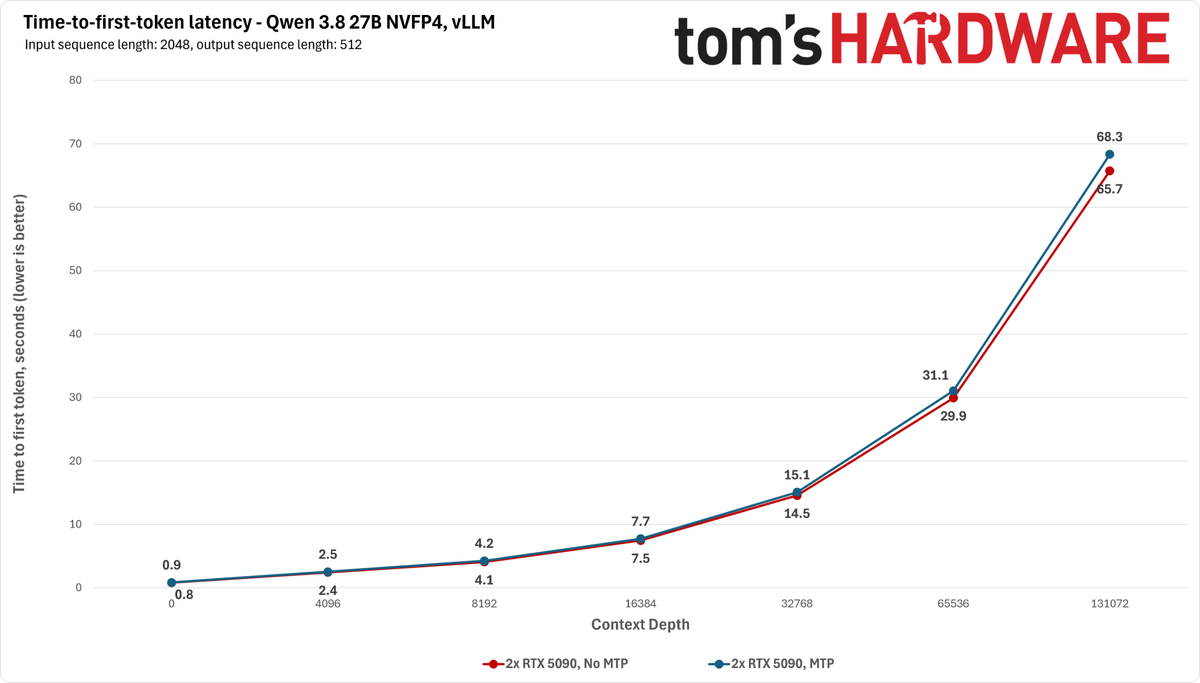
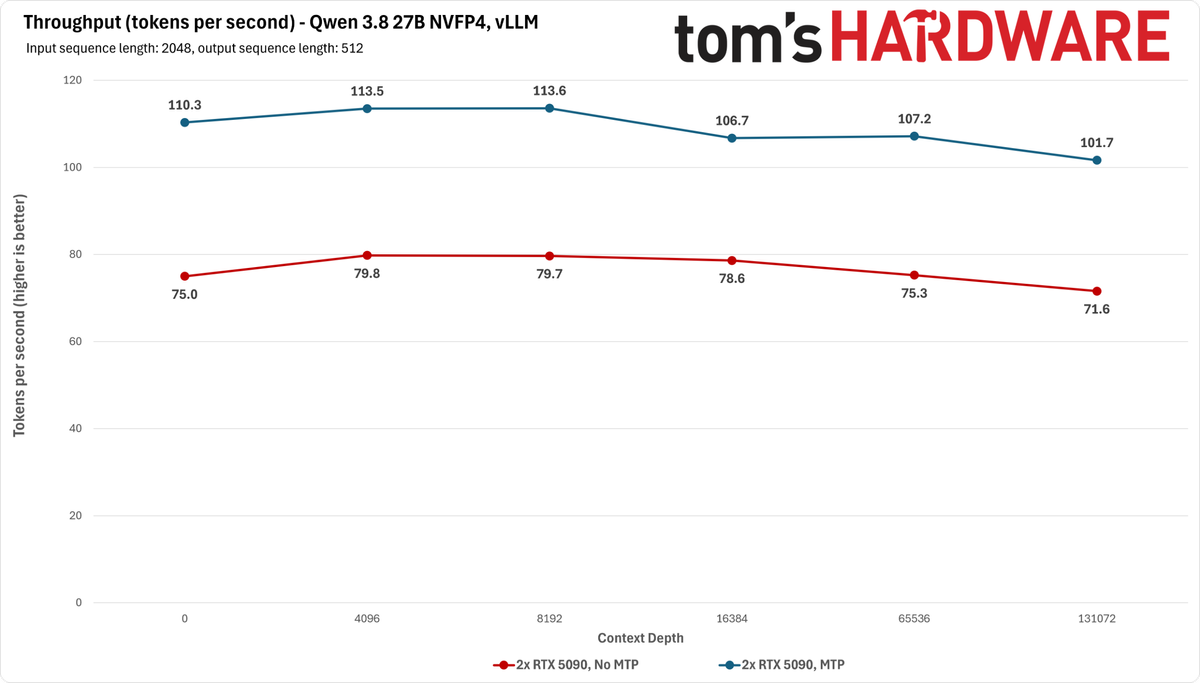
Get two 5090s into the picture, though, and decode speeds rocket upwards for vLLM (albeit at a high cost to prefill). 70-80 tokens per second across the context depth sweep is a fantastic result for a local setup, and TTFT remains fairly reasonable. But we can go faster.
Enabling MTP with vLLM gets us to 100-110 tokens per second on the decode side for only a small hit to prompt processing speed. This setup provides consistent performance at prompt processing speeds that don’t make you question whether something has gone seriously wrong. But it ought to be fast, because our dual RTX 5090 platform as tested here would currently ring in at over $13,000.
We also tried the SGLang inference engine on the RTX 5090 across similar configurations as we did with vLLM.
Image 1 of 2
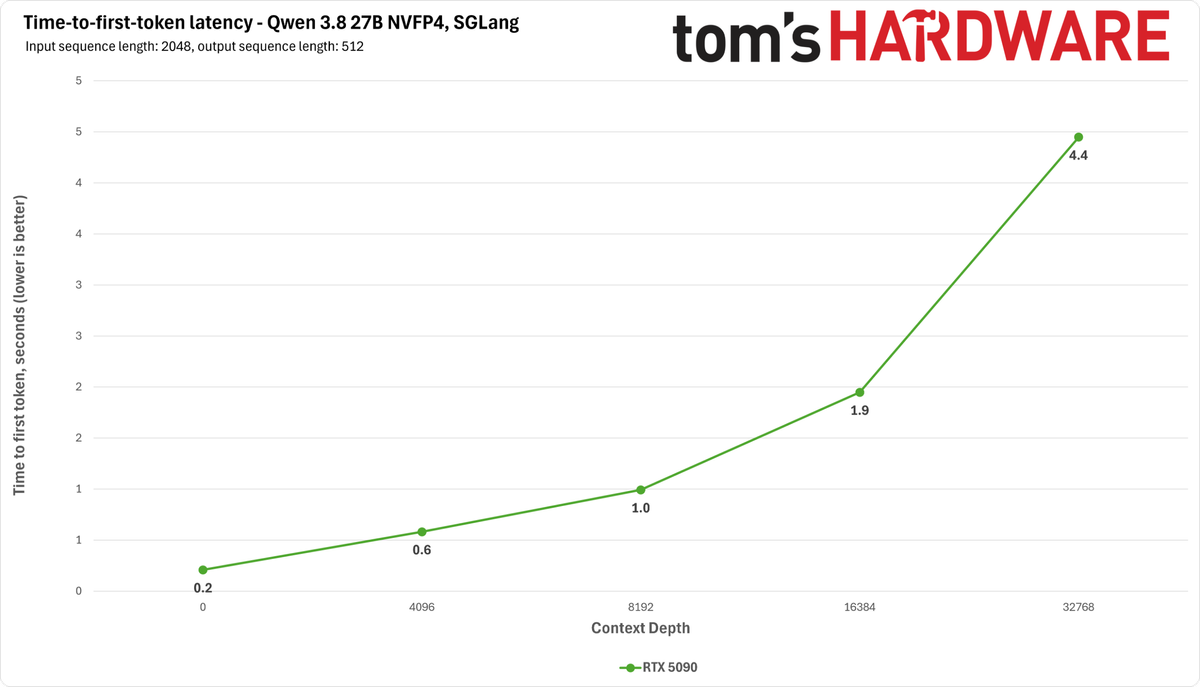
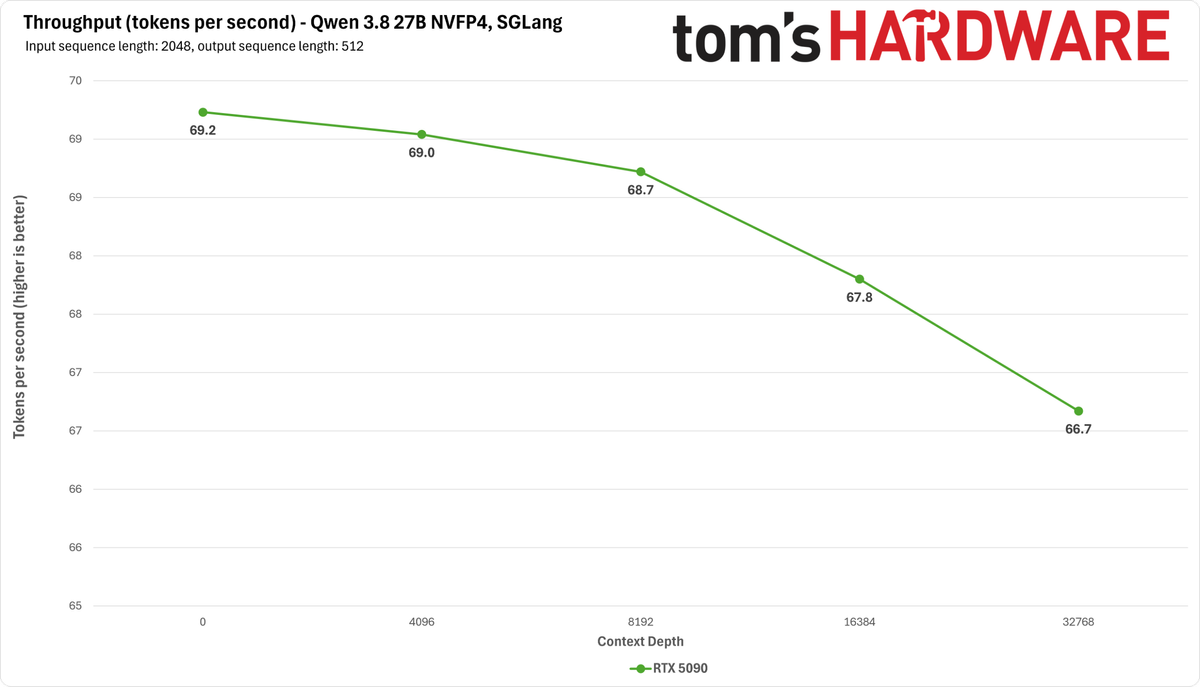
SGLang is much faster on a single 5090 for some reason – almost 3x faster than vLLM’s single-5090 recipe – and also ekes out a bit more context (37,740) versus vLLM. But if you want to get the full 262K that the model natively supports, you still need a second card or a different one with more VRAM.
Image 1 of 2
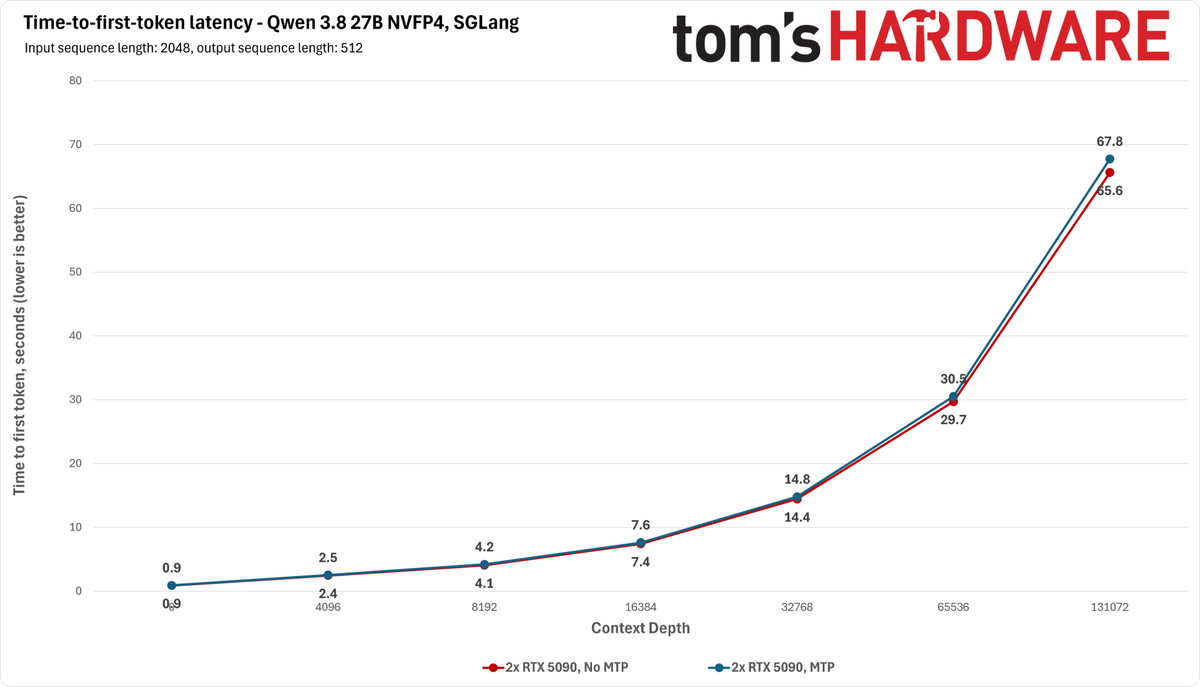
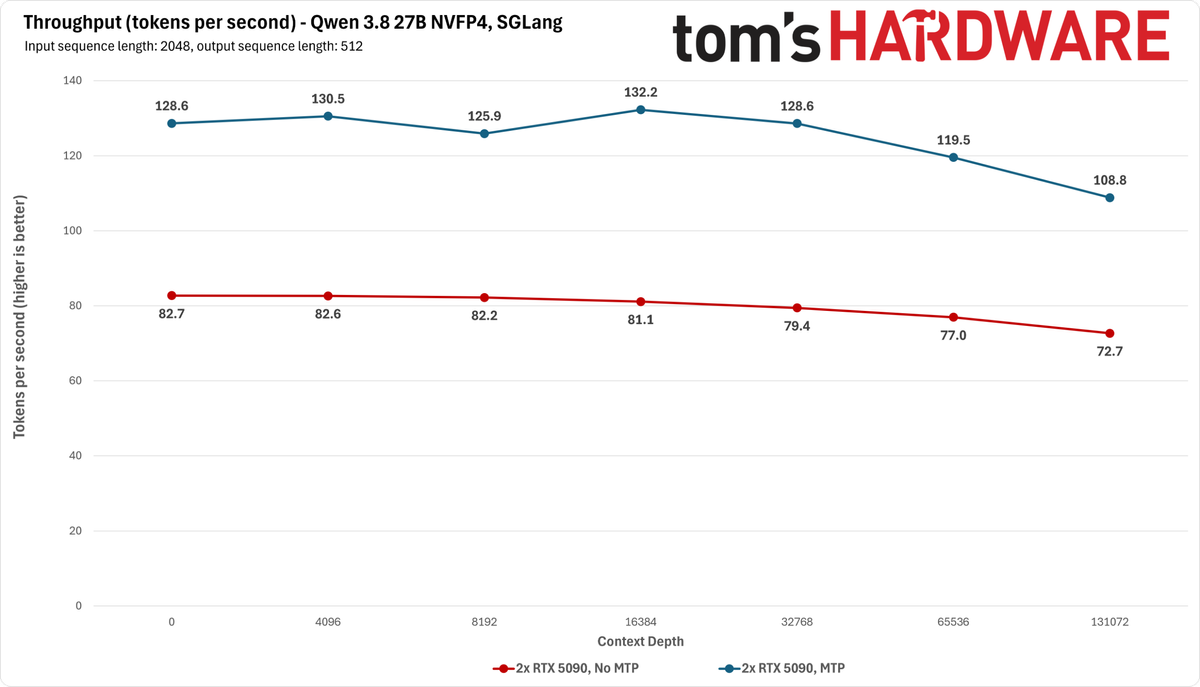
Like vLLM, SGLang supports tensor parallelism across multiple GPUs, so enabling dual-GPU inference is as simple as adding another launch flag. And as with vLLM, there are a number of speculative decoding strategies you can add to the recipe to enhance output performance.
The takeaway from this first phase of testing: if you have a single RTX 5090 and don't need long-context inference from it, you can certainly get usable performance from one with this dense model. But you need to choose your model runner carefully.
And if you want the full context window, reasonable prompt processing times, and high throughput from Qwen 3.8 27B all at once, you really want a graphics card with more than 32GB of VRAM as a starting point (or multiples).
RTX 3090 and RTX 4090 performance
With the RTX 5090’s behavior settled, we turned to some older consumer cards to see how they handle Qwen 3.8 27B. The 24GB RTX 4090 and 3090 are evergreen favorites among local LLM fans thanks to their relatively large VRAM pools and relatively affordable prices on the used market, but as we've already emphasized, just being able to load the model weights is far from the whole picture.
These cards can fit the Q4_K_M GGUF of Qwen 3.8 27B with llama.cpp just fine, but they require using the Q8_0 quantization of the KV cache to fit the results in their smaller VRAM pools from the get-go, and they also require limiting the context depth to well under the model’s 262K native limit. We found that a context length of about 112K tokens was about the most we could get away with before running out of VRAM.
And unlike the 32GB RTX 5090, which can usually get away with having the Linux desktop window manager running next to the LLM and its infrastructure, these GPUs need every last byte of VRAM for the AI workload and nothing else. So you really want a separate graphics card at hand for these two cards if you're not running a headless server, which can introduce some setup headaches of its own as you discover how your particular motherboard handles PCIe slot bifurcation and enumeration of the primary graphics device.
Image 1 of 8
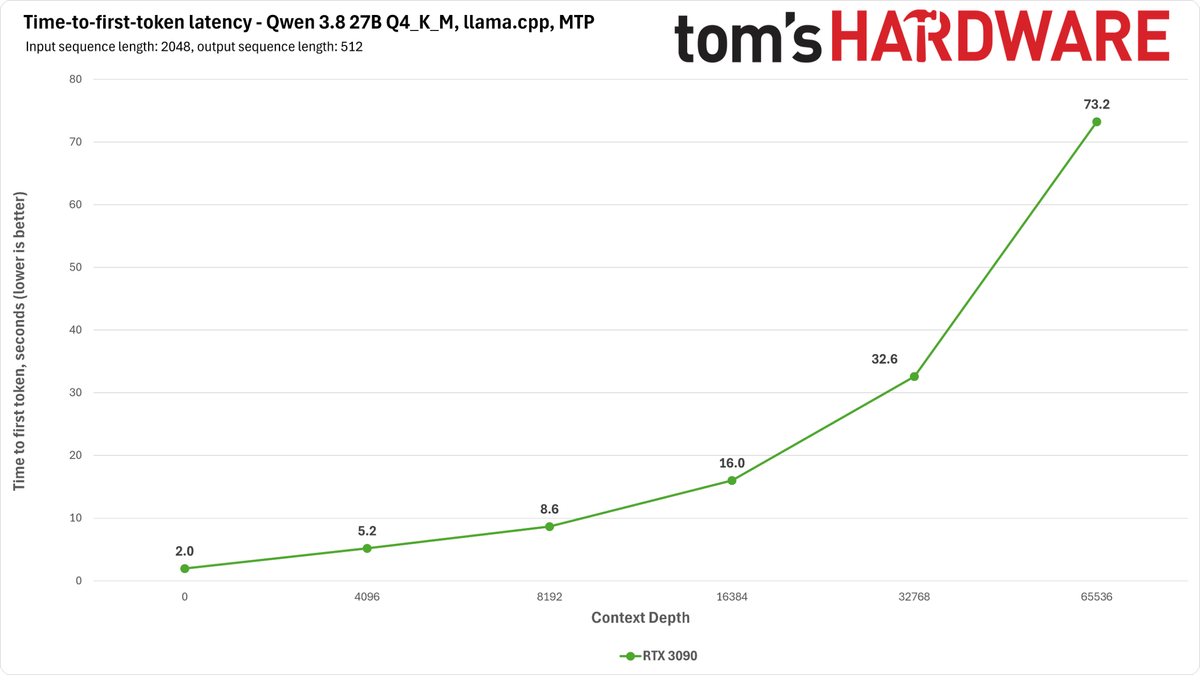
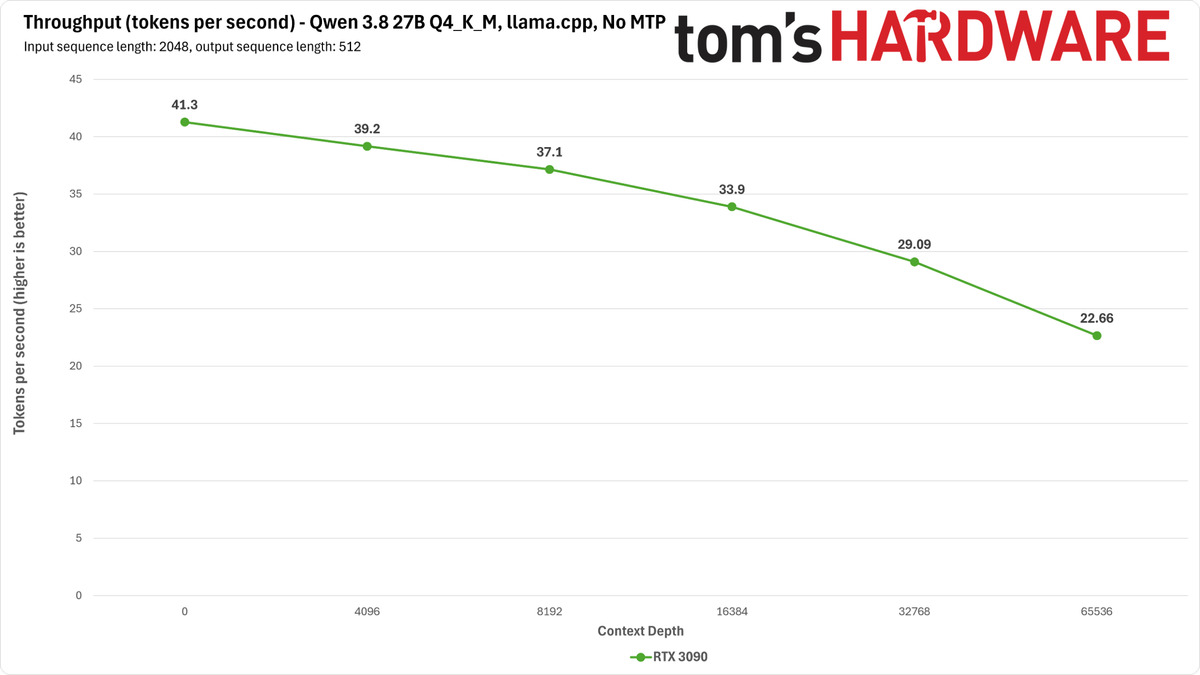
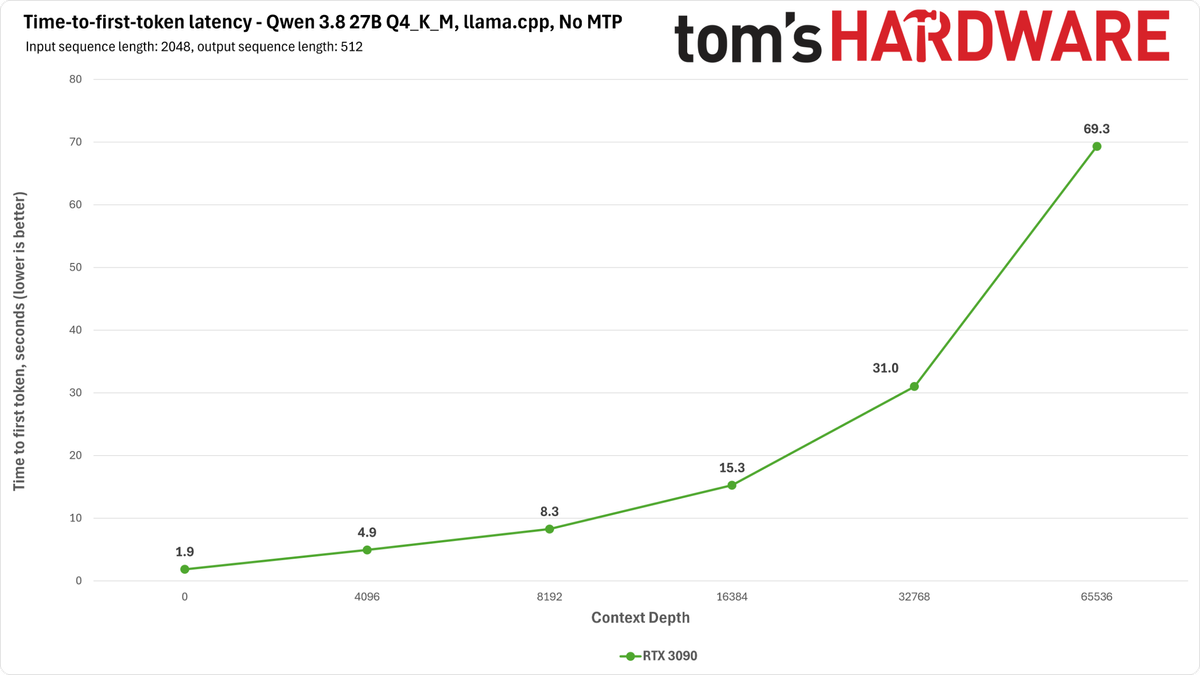
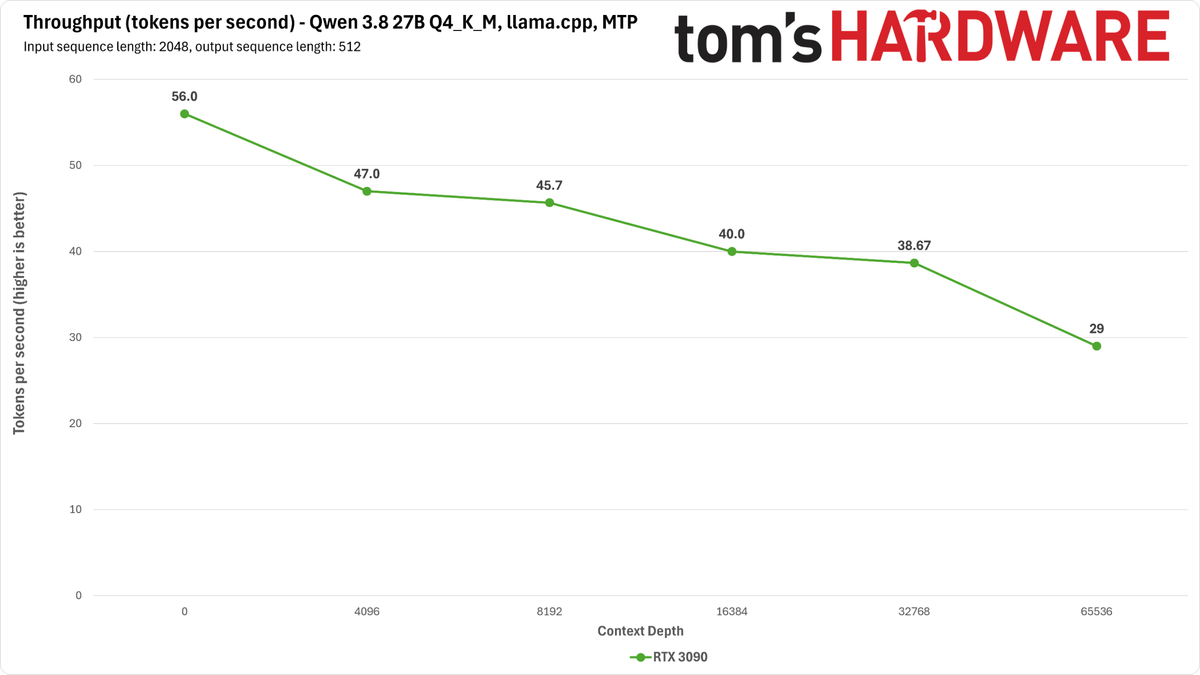
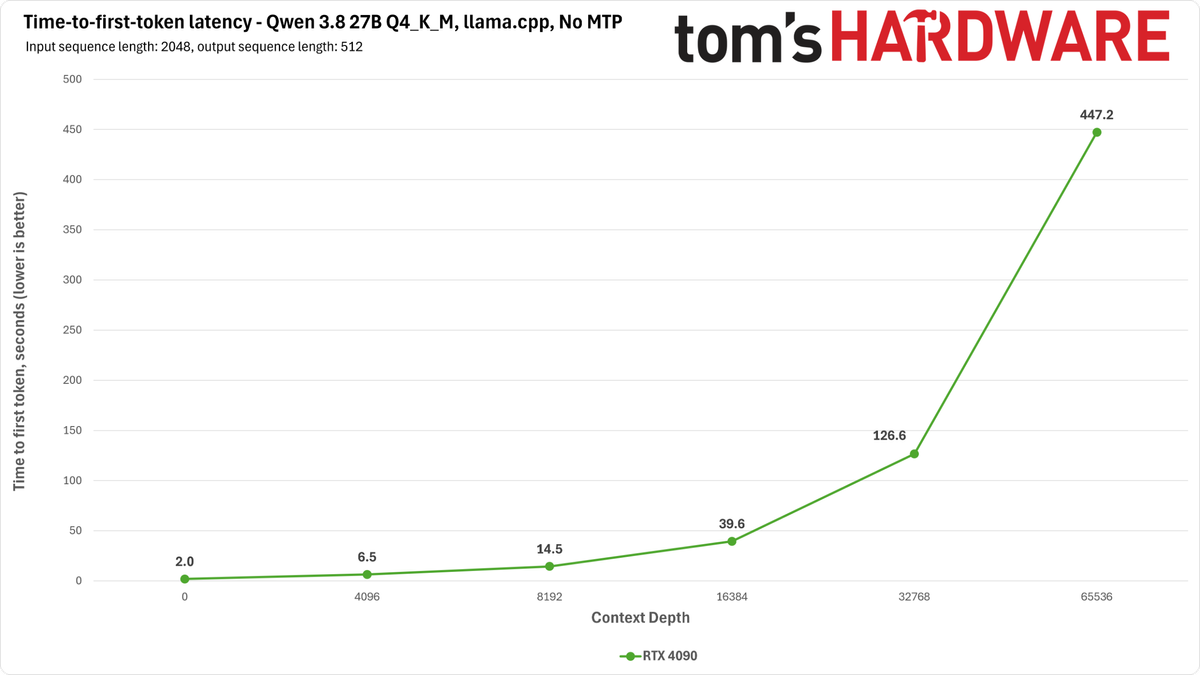
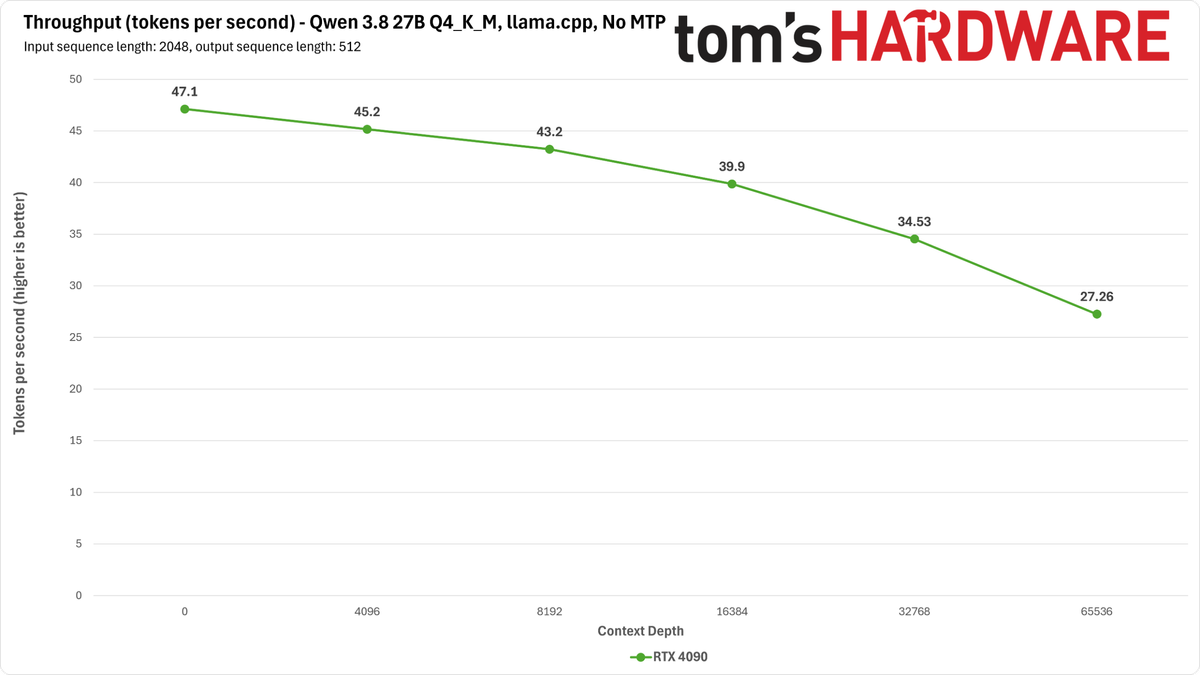
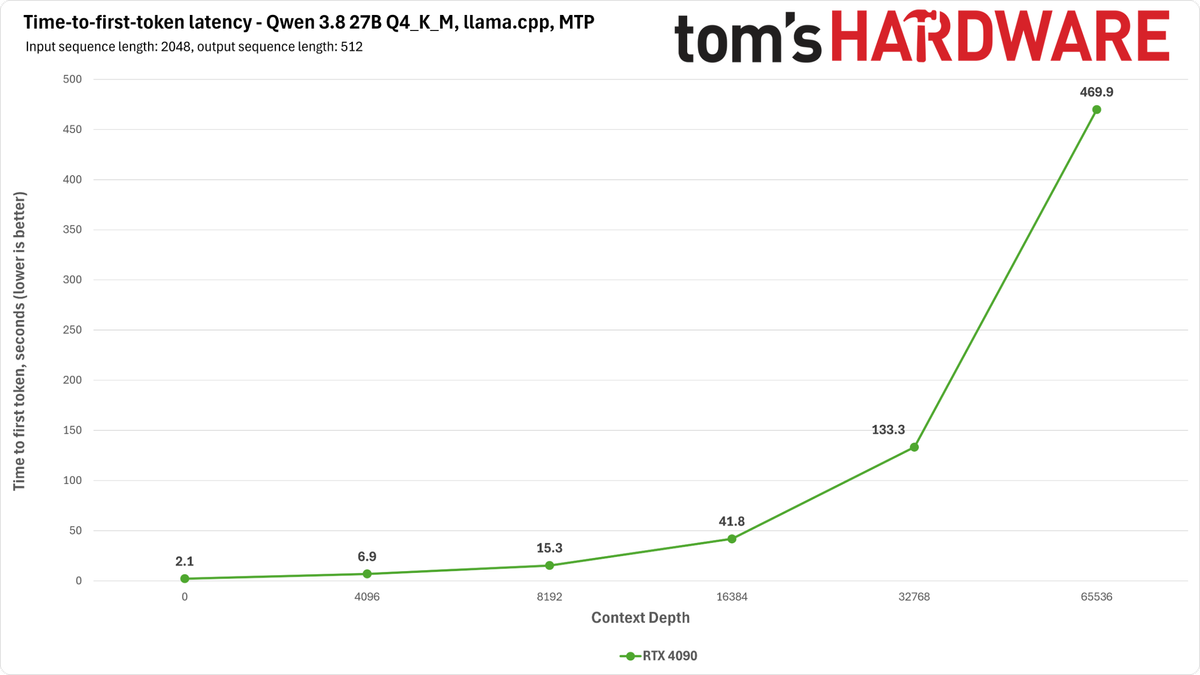
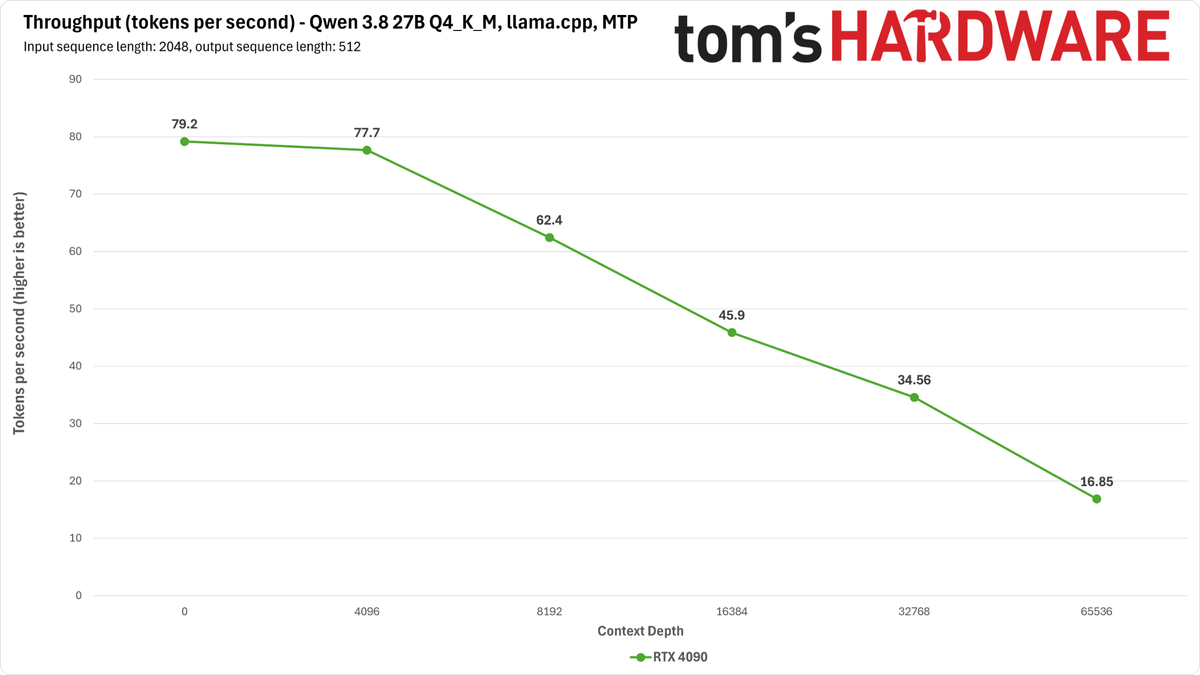
Once you overcome those obstacles and get Qwen 3.8 27B up and running on these cards, llama.cpp exhibits the same performance cliff at long contexts on the RTX 4090 that we saw with the RTX 5090. But the RTX 3090 is oddly not affected. This suggests a bug somewhere.
We didn’t have time to dig into SGLang or vLLM behavior on these products, but given that you’re already tight for context on an RTX 5090, we’re doubtful that either of those inference engines would be an awesome way to run the model on these 24GB cards, unless you’re somehow ready to roll with multiple 3090s or 4090s from past acquisitions.
DGX Spark performance
Hardcore local LLM enthusiasts will scoff at the DGX Spark’s mere 27 GB/s of memory bandwidth for a dense model like Qwen 3.8 27B, and indeed, we've found that this platform isn't the fastest with dense models in our past testing.
But now that models like Qwen 3.8 27B support MTP with nothing more than a server launch flag, you can often get a major free boost to the decode speeds of platforms with limited memory bandwidth.
Image 1 of 4
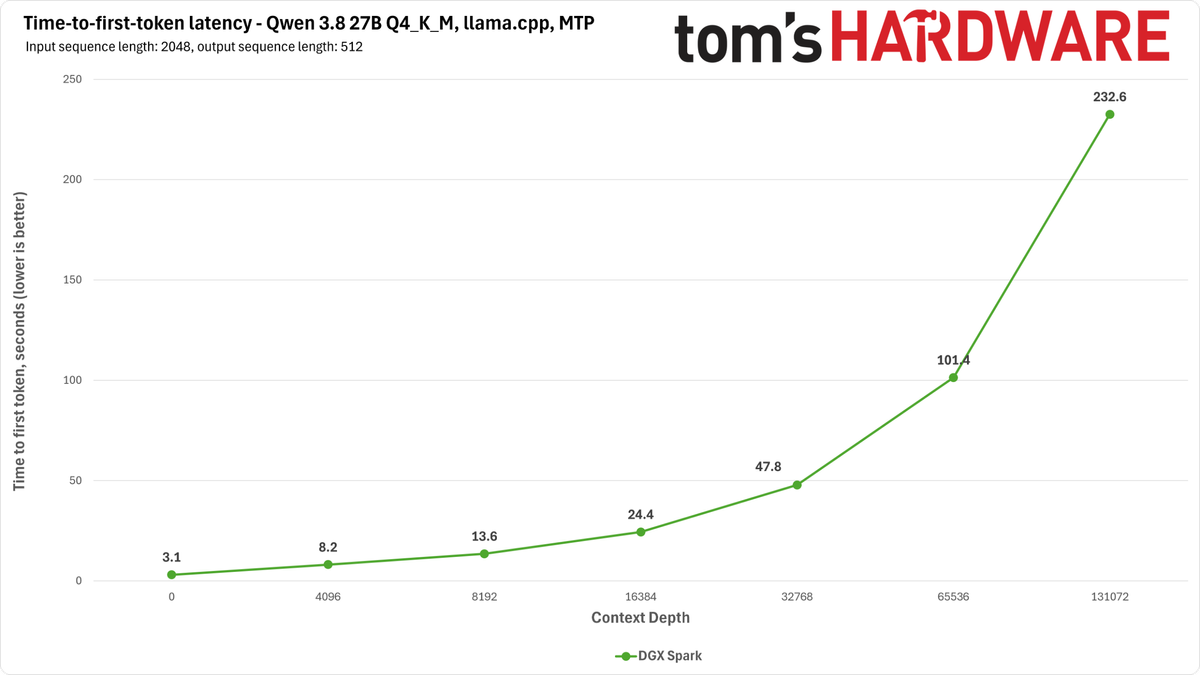
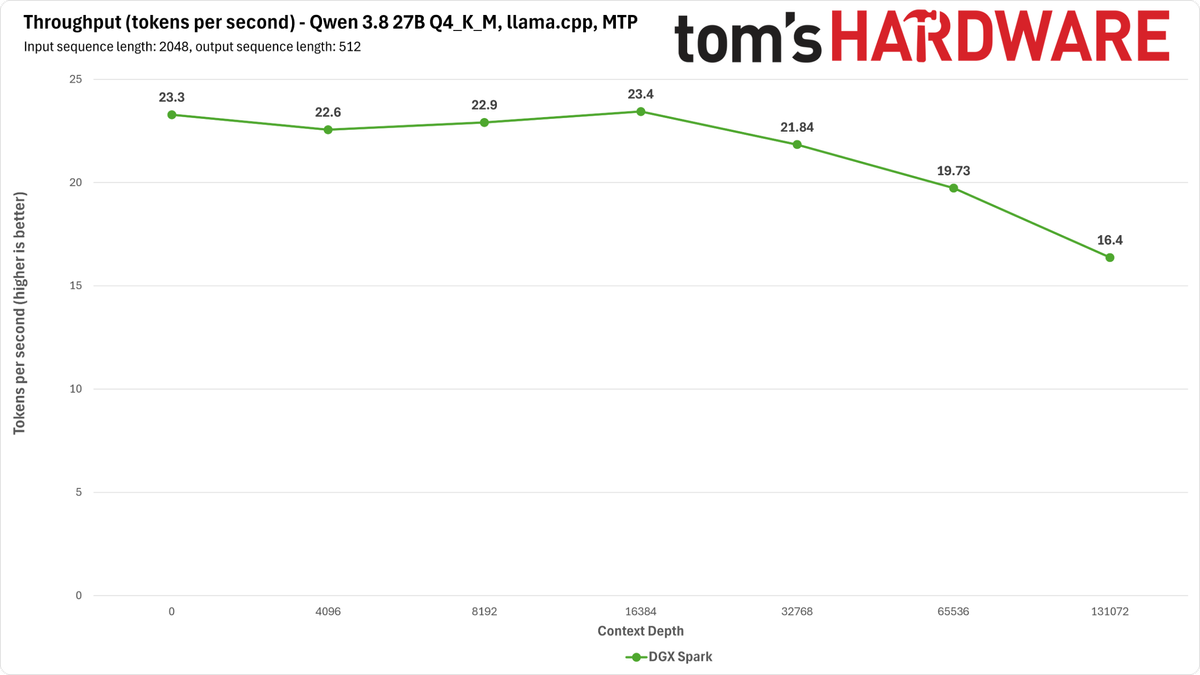
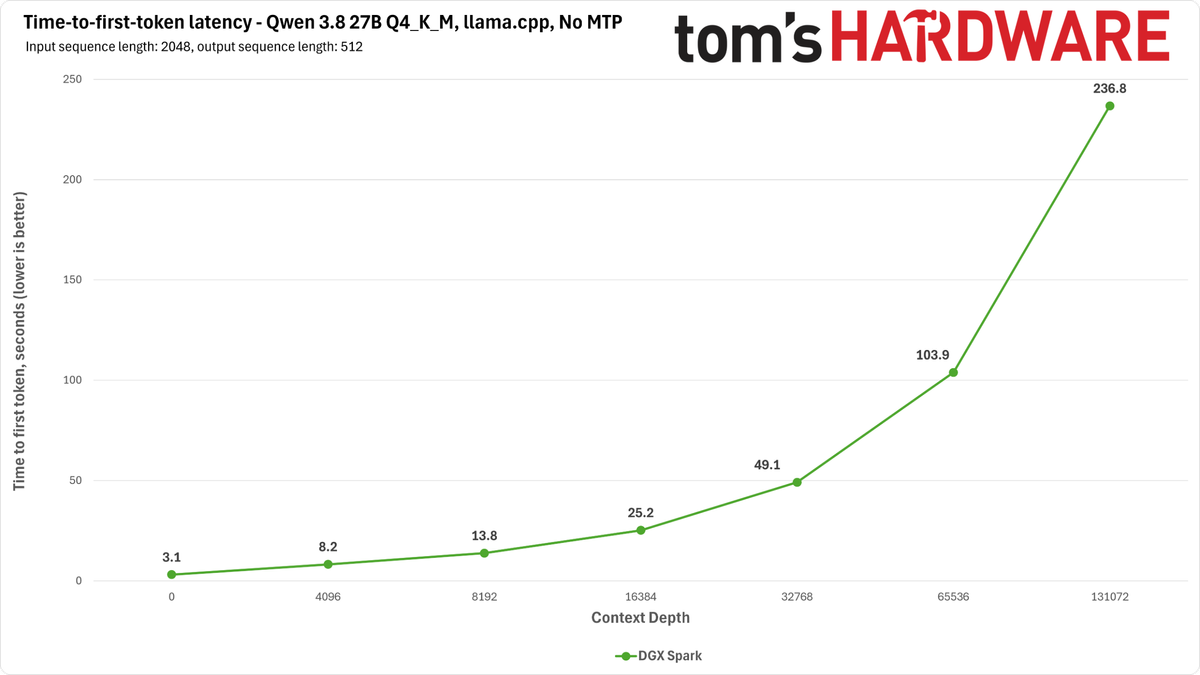
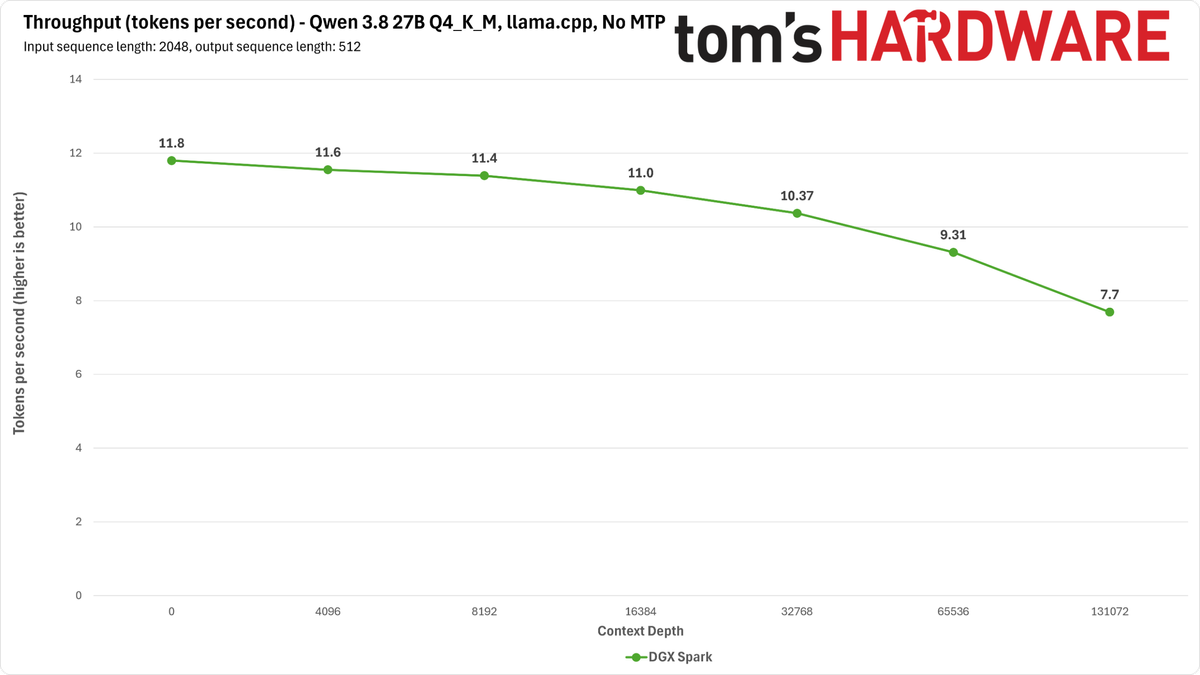
In our actual tests, the Spark's solid prefill processing performance means that it will often end up finishing inference turns at longer context lengths well before the RTX 5090 does with llama.cpp.
And beyond llama.cpp, the Spark is also well supported by SGLang and vLLM, so you can take advantage of those inference engines if they’re more to your taste. Consider also that a single Spark is still available for about $5000, and it’s a turnkey system that can be expanded into a handy cluster down the line if you want. So it shouldn’t be ruled out, even for serving this dense model.
Apple Mac Studio with M4 Max performance
The M4 Max-powered Mac Studio in our labs has the most memory bandwidth of any of the unified memory systems we have available, but as we've described in previous testing, that's only one metric that matters for local AI inference.
Image 1 of 4
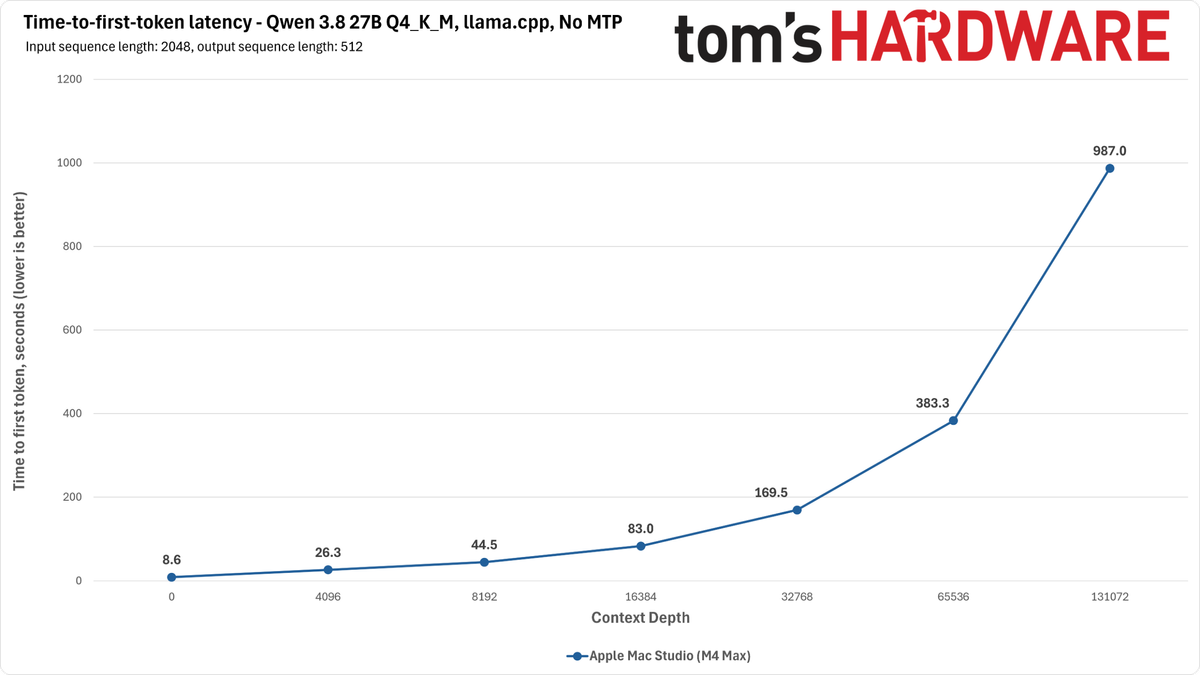
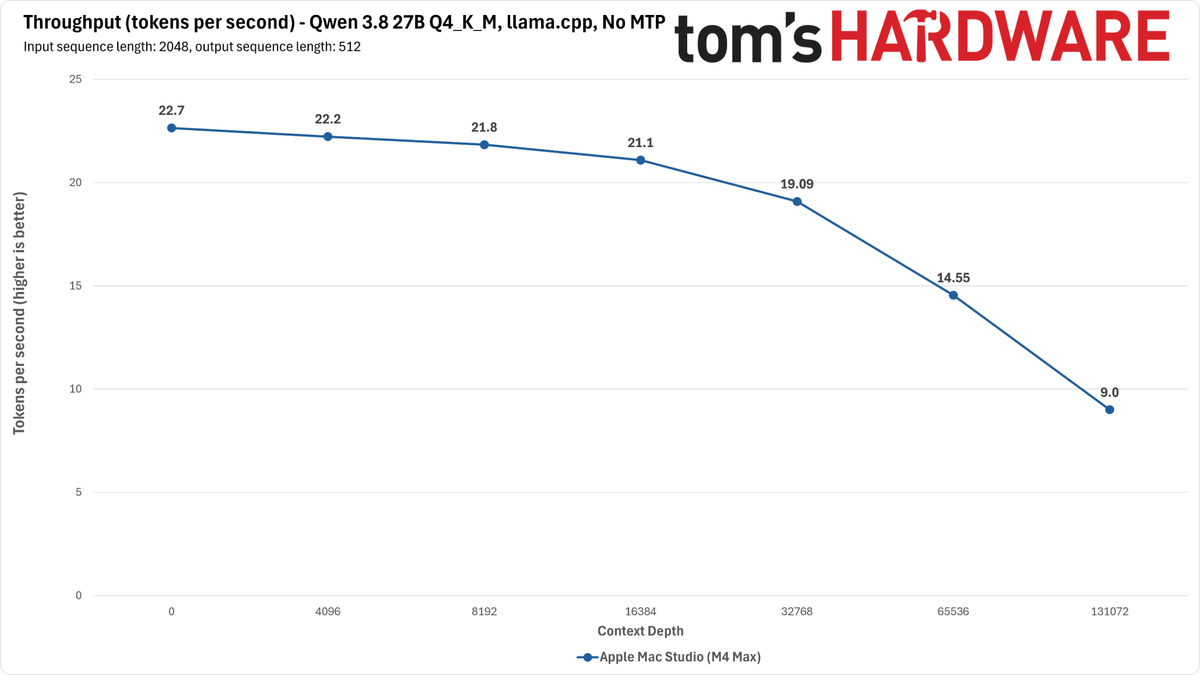
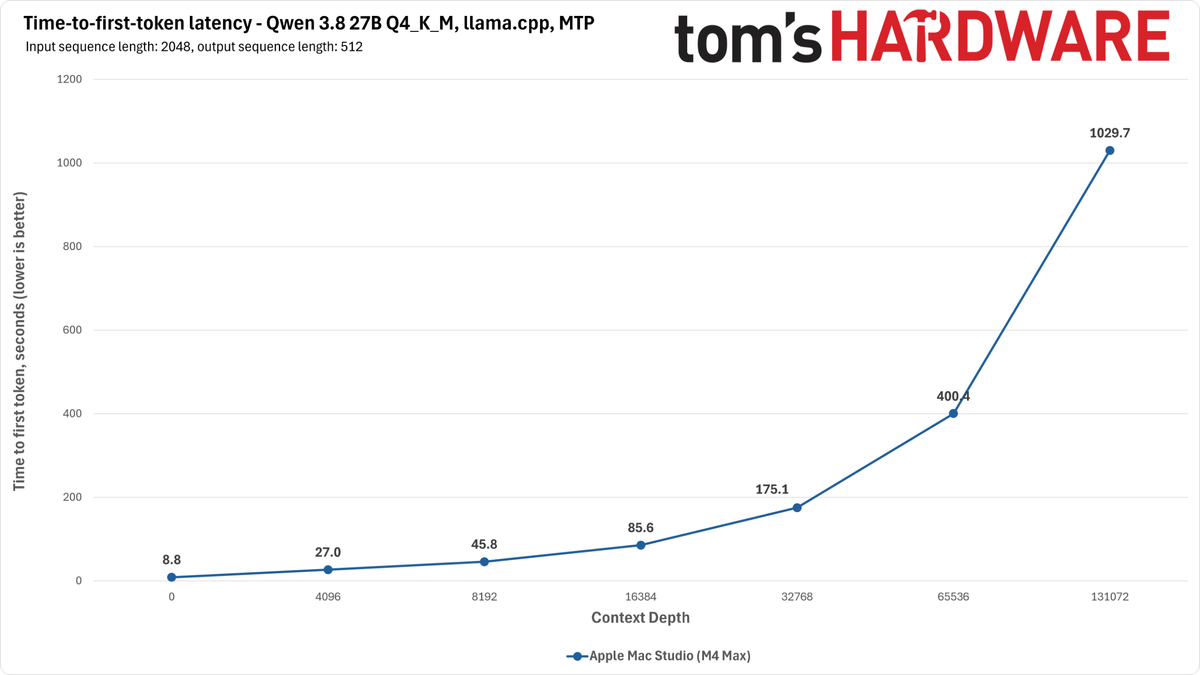
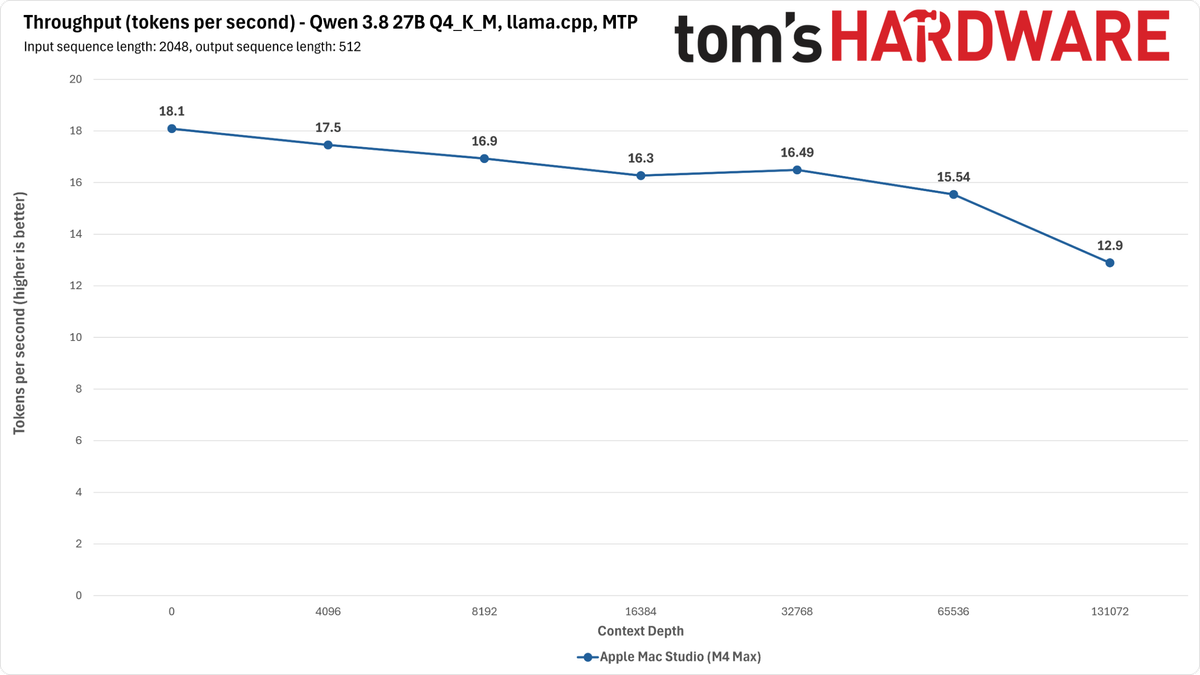
Prompt processing on this platform is slower than on Spark, so even if the Mac Studio can turn out more tokens than GB10 in the decode phase, it still ends up spending more time per inference turn than Nvidia's platform at longer contexts because that’s where it has to spend most of its processing time.
And at least in llama.cpp, using MTP on the Mac Studio actually causes a performance loss at shorter contexts for decode in exchange for a small boost at longer contexts, where it generally leads to improvements for other platforms. This demonstrates the value of actual benchmarking rather than spec-racing.
Ryzen AI Halo (Strix Halo) performance
AMD’s Ryzen AI Halo presents the worst-case performance scenario for this dense model: relatively low memory bandwidth and low prompt-processing performance.
Image 1 of 4
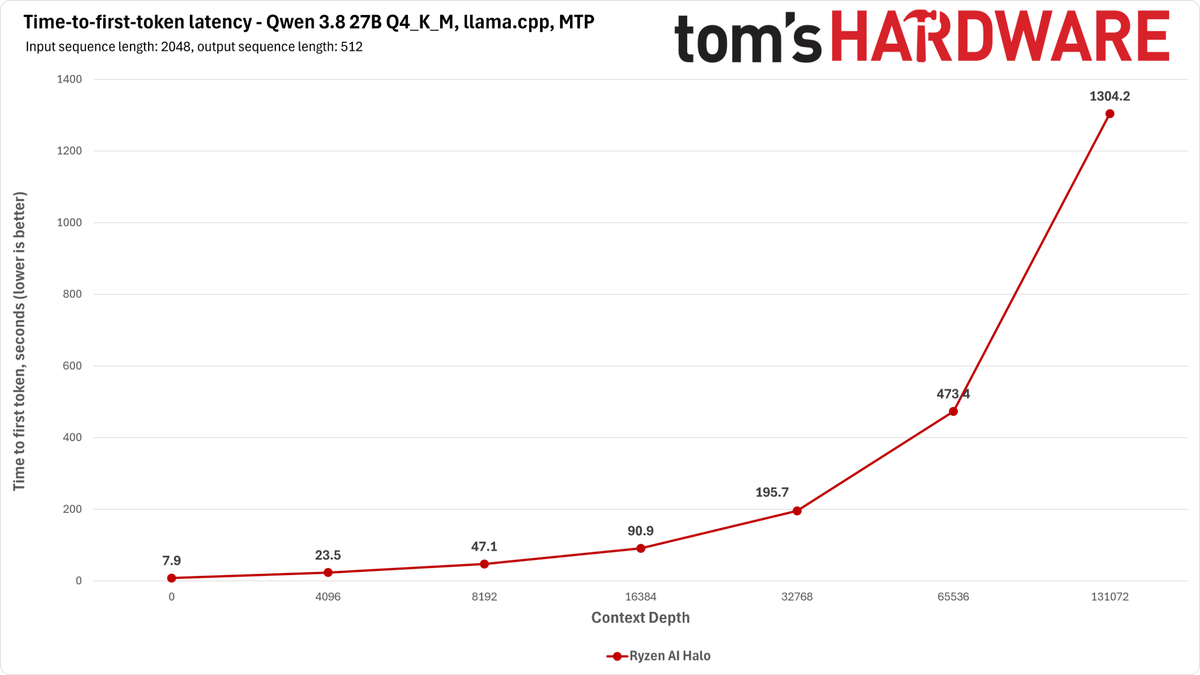
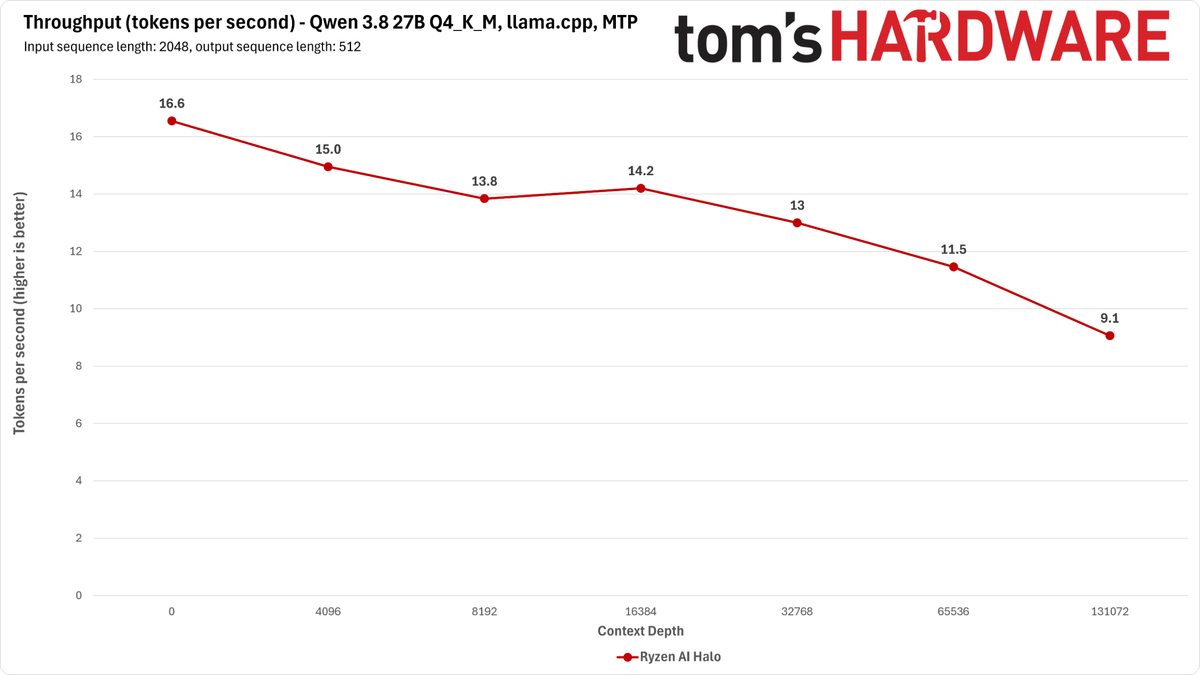
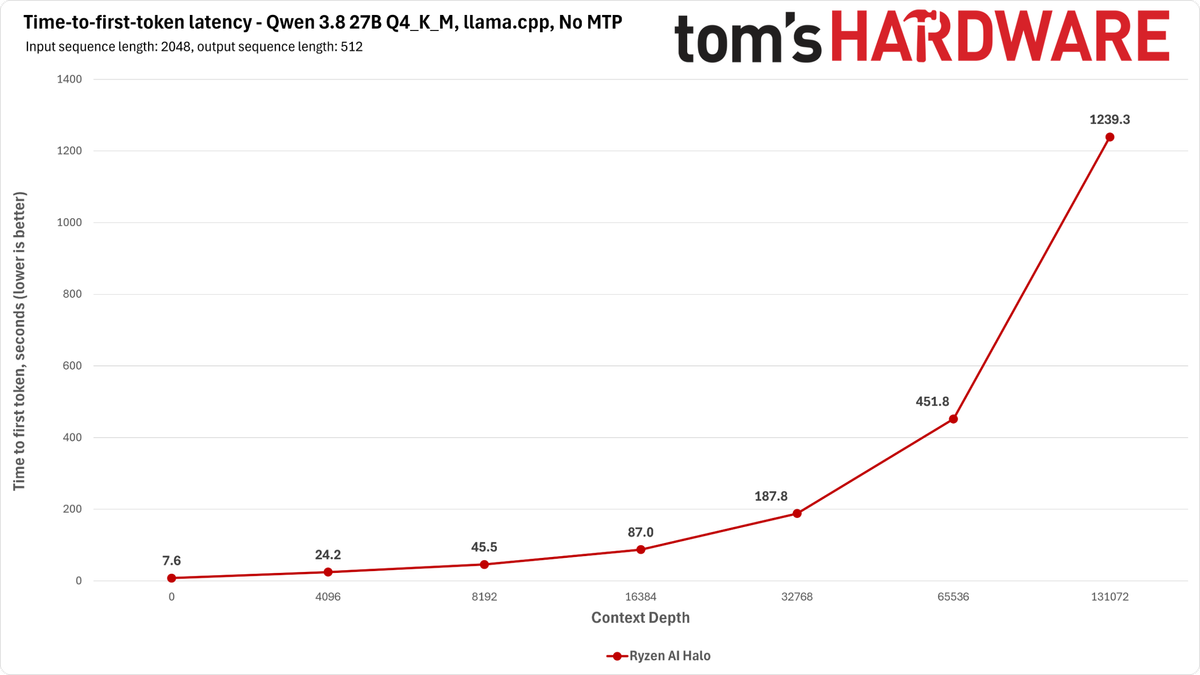
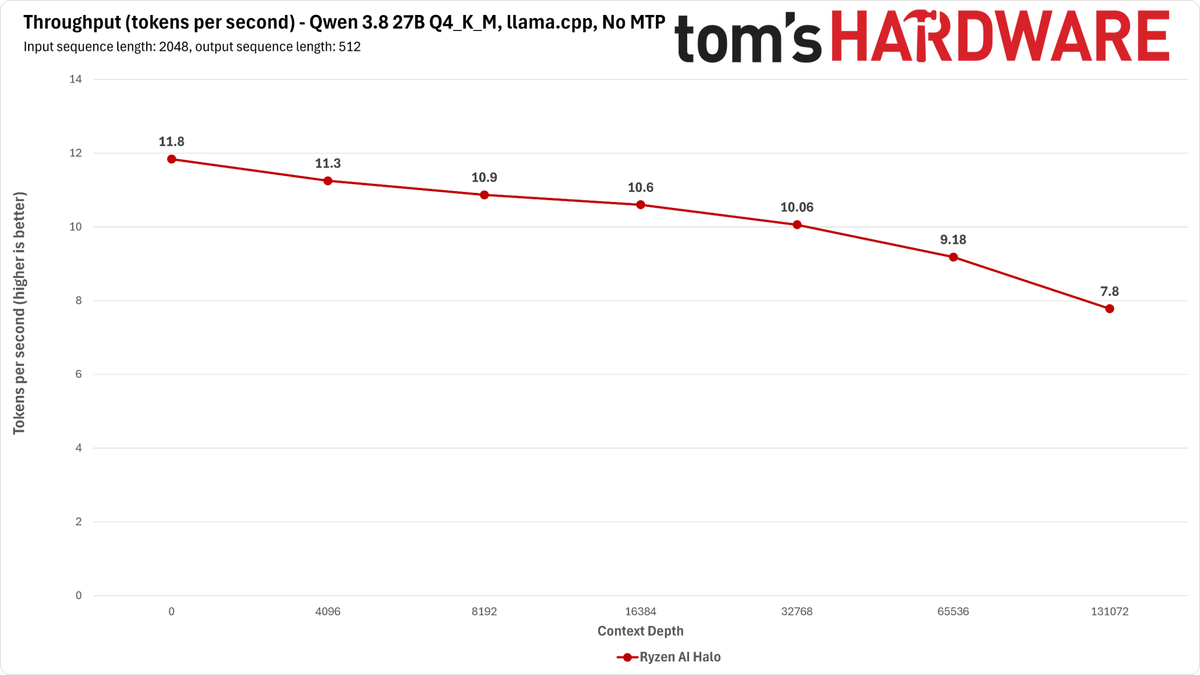
Although MTP wakes up tokens-per-second throughput a bit on this system with llama.cpp, it can’t make up for the lengthy prompt processing times required for longer contexts. You can certainly run this model if a Strix Halo is the only box you have, but we’d seek out something more capable if you’re trying to do interactive long-context work.
Bottom line
When I first set out to explore Qwen 3.8 27B's performance, I figured this would be a relatively straightforward series of tests: plug in a single graphics card, load the model, get tokens, done. In practice, our experience required a lot more tinkering. And systems we might have initially written off as being not up to the task of running a dense model like this proved surprisingly useful.
In general, breathless claims of hundreds of tokens per second of throughput from an empty context window do not account for the full range of behavior one might see from an LLM on a given inference setup.
For just one example, whether it's down to a problem with (or just the expected behavior of) llama.cpp or something else about our software stack, the notion that you'd want to wait as much as 30 minutes or more for a response from Qwen 3.8 27B at long context lengths on an RTX 5090 is outrageous. But if you naively load Qwen 3.8 27B using llama.cpp right now, this is the experience you'll get.
Changing up inference engines is a natural next step, but there are trade-offs with that approach, too. You can load Qwen 3.8 27B on one 5090 using vLLM or SGLang, but those inference engines are much more conservative about the amount of usable context they’ll give you. The recipes we used only resulted in a context window of 32K tokens on a single 5090.
To enable the full 262K context length, we had to grab another RTX 5090 from the TH testing arsenal, at which point we got both great throughput and a TTFT sweep that could be considered interactive all the way out to the maximum context length from both model runners. But the price of replicating such a setup would exceed $13K right now.
You also might expect that a DGX Spark and its 273 GB/s of memory bandwidth wouldn't be useful for this dense model, but the prefill speed of the Spark ends up being fast enough that the TTFT remains relatively interactive even with a decode throughput of just 20 or so tokens per second with MTP, and that behavior holds out to the model's full native context length.
The M4 Max-powered Mac Studio has plenty of memory bandwidth on tap for decode, but its prompt processing speed means that the total time of an inference turn is dominated by that activity on this older Apple Silicon chip. The newer M5 Max and brand-new M5 Ultra would doubtless perform better, but we didn’t have those chips handy for this testing. And AMD’s Ryzen AI Halo gets the worst of it, with both low prompt processing speeds and relatively low TPS due to its memory bandwidth.
For all this, we really need to take a step back and consider the economics of local AI once again. $5K, $10K, or $15K or more for local AI hardware is a lot of tokens from leading-edge models at Anthropic or OpenAI (and even more from providers serving the recent slate of Chinese open-source models). A lot. And if time is money for you, barring compute constraints, those tokens will get back to you or your agent faster than anything you can run at home short of a DGX Station with its GB300 GPU.
So unless you’re working with sensitive data that requires on-premises processing, you’re an enthusiast who just wants to tinker, or you’re worried about the fate of open model distribution and inference more generally for some reason, you probably don’t need to rush out and build a box just for this model.
But if you do, be aware that delivered performance is more than just VRAM capacity or memory bandwidth, and that you might not get the best performance from your setup with the most common model runners like llama.cpp. Let experimentation and careful benchmarking lead you to the best results for your specific config.




 English (US) ·