
AWeber is one of the original email marketing platforms, having launched in 1998. Founded by Tom Kulzer in Chalfont, Pennsylvania, the company has grown to serve over one million small businesses and individual creators worldwide. Its focus hasn't shifted much in 25 years: AWeber is built for people who want to send newsletters and automated email sequences without managing complex technical infrastructure.
Since TechRadar last reviewed the platform in 2023, AWeber has made several notable updates. The AI toolset has expanded considerably, with an AI Subject Line Assistant now included on all paid plans and a standalone AI Writing Assistant for drafting full email copy. The company also renamed its automation builder from Campaigns to Workflows in mid-2025 and added a direct Facebook Lead Ads integration that pulls new leads into your AWeber list automatically.
My experience with AWeber
AWeber has one of the smoothest onboarding experiences in the industry. The platform walks you through your business goals before you build anything, and importing subscribers follows a structured five-step process that handles data mapping and tagging before sending an opt-in confirmation. It's particularly well-suited to creators and small business owners who want to get a first campaign out without reading through documentation.
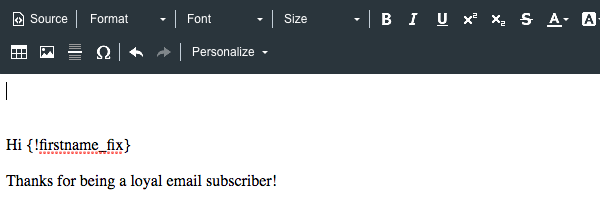
The email builder is where things get slightly muddier. AWeber's drag-and-drop editor works fine once you're in it, but selecting a template can trip you up: the preview thumbnails are small, and there's a checkbox labeled "Keep My Message Content" that's easy to overlook. If you leave it ticked, only part of the template applies. I found this confusing during testing and it's a friction point that has been around since at least 2023.
That said, AWeber's new AI Subject Line Assistant is one of the more practical recent additions. It generates suggestions based on your actual email content rather than a generic prompt, so the output tends to be relevant.
The value of the new Done For You plan depends heavily on what you're starting from. It's a reasonable option if you're migrating from another tool or launching email for the first time, but once the initial 30-day edit window closes, you're responsible for maintaining everything yourself.
AWeber: Plans and pricing
Swipe to scroll horizontally
Lite | $15.00/month | $12.49/month | Up to 500 |
Plus | $30.00/month | $19.99/month | Up to 500 |
Done For You | $30.00/month + $79 setup fee | $20.00/month + $79 setup fee | Up to 500 |
The Lite plan gives you one email list, three landing pages, three automations, and up to three team members. It covers the basics for most new senders but carries a 1.0% transaction fee on ecommerce sales and excludes behavioral automation and advanced reporting.
Plus removes most of those limits: you get unlimited lists, automations, landing pages, and users, along with priority support and a reduced 0.6% transaction fee. Paying annually on Plus saves you roughly $120 per year at the base subscriber tier.
Done For You is AWeber's managed setup tier. It includes everything in Plus and adds a professional team that configures your account within seven days: an email template, two landing pages, a signup form, a welcome sequence, and a 1:1 setup call.
The $79 setup fee shown is a promotional rate, reduced from the standard $599 at the time of writing. Businesses with more than 100,000 subscribers need to contact AWeber directly through its large-account pricing page for a custom quote.
AWeber: Features
Aweber provides a collection of 600+ email templates designed by professionals that you can edit to fit your brand. These templates make it easier to design appealing marketing emails instead of doing that from scratch. The platform also gives you access to thousands of free high-quality stock images or you can create your own images with Canva (without leaving your Aweber account).
Aweber's drag-and-drop editor makes it easy to edit emails after selecting a template. You can also use it to design your own email template from scratch if you have the required skills.
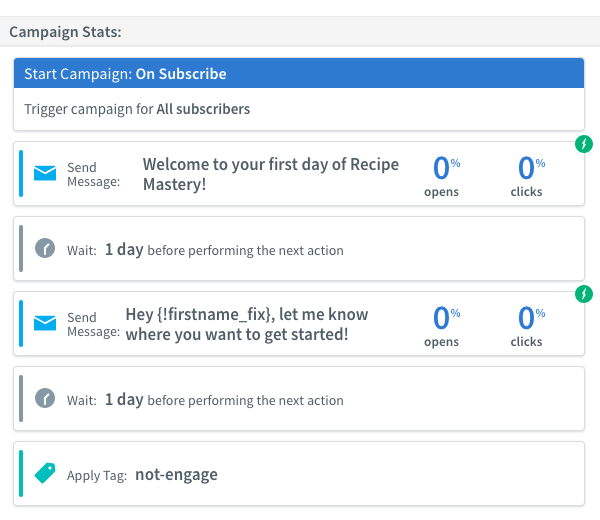
This platform lets you send personalized emails using different data collected from your customers. You can also send automated emails based on specific triggers, e.g., a welcome email to anyone who signs up for your subscriber list.
The reports section of your Aweber account lets you monitor critical metrics about your marketing campaigns like deliverability, open rate, click-through rate, unsubscribe rate, etc.
Some more new features worth highlighting include the AI Subject Line Assistant (available on all paid plans), the AI Writing Assistant, the Newsletter Assistant, AWeber's Smart Designer tool, and a new Facebook Lead Ads integration.
AWeber: Interface and use
Once you’ve completed the setup phase, AWeber makes it easy for you to find the key functions of the service: adding subscribers and creating emails.
Adding subscribers is an easy-to-follow, five-step process that begins by importing a file or copying and pasting your data, mapping that data to AWeber fields, confirming the opt-in message, adding tags, and then providing information about how the people came to be on your list.
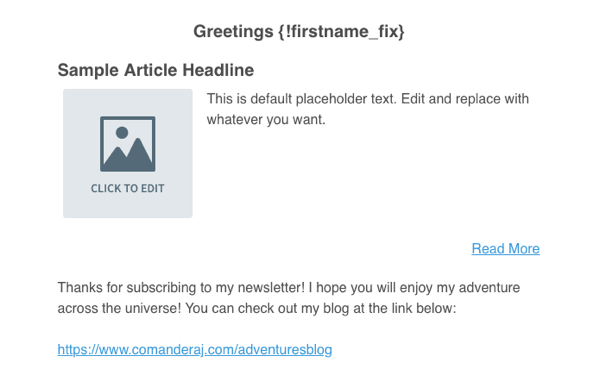
Creating an email was a bit less intuitive, though. There are three options for creating emails: the drag-and-drop email builder, plain text message, and HTML editor. When choosing the drag-and-drop builder, we were presented with a blank canvas with a list of elements that could be added on the left and templates on the right.
The thumbnails for the templates are quite small, so to get a proper look at them, you have to apply them to your email. To start with, things didn’t seem to be working properly. Only part of the template seemed to be applied. It wasn’t until we unchecked a small box at the top that says “Keep My Message Content” that the whole template, including content and images, were applied. This is confusing and makes for a less than ideal user experience.
When you actually begin working on your own content, though, you’ll want to keep that box ticked.
AWeber: Support
AWeber has an impressive track record in support, having won several customer service awards in recent years. You can receive direct support either by live chat, which is available 24/7, by phone, which is available 8 AM to 8 PM ET, or by email.
For those wanting to learn themselves, there is a knowledge base with articles, a video tutorial library, live and on-demand webinars, and a certified experts program that connects you with experienced marketing and design professionals who can help you with copywriting, graphic design, or marketing strategy.
AWeber: Specs
Swipe to scroll horizontally
Email automations | 3 on Lite; unlimited on Plus |
AI tools | Subject Line Assistant on all paid plans |
Ecommerce transaction fee | 0.6% on Plus/Done For You; 1.0% on Lite |
Support channels | 24/7 chat, email, and phone on all plans |
Template library | 600+ pre-built email templates |
Should I buy AWeber?
Swipe to scroll horizontally
Features | Core email tools are solid; automation depth remains limited on Lite | 3.5/5 |
Performance | Stable infrastructure with decent deliverability, though below some rivals in independent testing | 3.5/5 |
Design | 600+ templates available, but the editor UX feels dated compared to newer platforms | 3/5 |
Value | Reasonable entry price; costs compound quickly as subscriber counts grow | 3/5 |
Buy it if
- You need 24/7 phone support. AWeber includes phone support on all plans, not just premium tiers. For solo operators and small teams without in-house technical help, that accessibility makes a genuine difference compared to competitors that restrict phone access to enterprise customers.
- You want a managed launch. The Done For You service sets up your email infrastructure, automations, and landing pages within a week, which is a rare offer in this space. It's particularly useful for businesses migrating from a different tool that don't want to rebuild everything from scratch.
- You're new to email marketing. AWeber's onboarding is beginner-friendly, and the platform backs it up with tutorials, live webinars, and a certified expert network for users who want guided support at every stage.
Don't buy it if
- Your automations need to branch. The Workflow builder handles basic trigger-based sequences well but doesn't support the complex conditional logic you'd get from tools like ActiveCampaign or Brevo. On the Lite plan, you're also capped at three workflows total.
- You're watching costs as your list grows. At 10,000 subscribers, you're looking at $100/month on Lite or $135/month on Plus (monthly billing). That's considerably more than some comparable alternatives at the same subscriber volume.
Also consider
- MailerLite: A cheaper alternative for creators and small businesses, with competitive pricing and a free plan supporting up to 1,000 subscribers. Its automation builder is more accessible for beginners, and the template designs feel more current than AWeber's.
- Mailchimp: Worth considering if you need a wider template library and strong third-party integrations. Note that Mailchimp's free plan now caps at 500 contacts, down from the 2,000 cited in the previous version of this review.
- Brevo: Formerly Sendinblue, Brevo is a stronger option if automation depth matters to you. It prices by email sends rather than subscriber count, which can work out cheaper for larger lists that you don't mail frequently.
AWeber: Final verdict
If having 24/7 support available is important to you, AWeber is worth considering as it does provide a high level of customer support. But it’s certainly not the cheapest option available, the user interface of its email builder isn’t as intuitive as it could be, and the design of its templates didn’t impress us much.
Having to manually keep on top of your unsubscribes to avoid being bumped up to more expensive plans is also not something busy business owners should be expected to do.








 English (US) ·