
 3 hours ago
5
3 hours ago
5

In March, Apple discontinued the Mac Pro, ending a rather short experiment of combining Mac Studio guts with a massive Mac Pro housing. While the Mac Pro may no longer be an active product, I argue it died in name only.

To say the M5 Ultra Mac Studio is impressive is an understatement... a statement that is also, somehow, still an understatement.
Pros
- Absurdly powerful
- Tons of I/O including six Thunderbolt 5 ports
- Small and sleek
- Silent
This last iteration of the Mac Pro, which debuted in 2023, never made much sense to me given that it was just a Mac Studio with a giant, cavernous interior with slots set aside for PCIe expansion (and limited expansion, at that). It wasn’t more powerful than the Mac Studio because it was the exact same computer powered by the exact same M2 Ultra chip.
So now, with the M5 Ultra Mac Studio here on my desk as I look over the absolutely insane performance metrics it is reaching, I can’t help but think that the Mac Pro didn’t really die. Instead, it was reborn as the Ultra series of Mac Studios.
The Mac Studio with the M5 Ultra that I reviewed here costs $12,300, which is a lot of money for a home computer and is a significant bump in price compared to the first Mac Studio with M2 Ultra that retailed for $8,800.
However, if we look at it through the lens of the Mac Pro, suddenly we (and the potential buyer of such a machine) become a lot more forgiving. The Mac Pro was always considered in another tier. The price of the Mac Studio with M5 Ultra is just slightly more than the 2023 Mac Pro at $11,800 or the 2013 “trash can” Mac Pro at $10,000 — and considering the current cost of memory, it’s not even a huge premium — and it’s a quarter the cost of the 2019 Mac Pro’s ridiculous $52,600.
We’ll get into it below, but the new Mac Studio with M5 Ultra offers a generational performance improvement Apple’s now-dead Mac Pro never experienced, all while avoiding the absurd prices of Apple’s most powerful top-end Mac Pro desktops.
If you lamented the passing of the Mac Pro, I am happy to report that the tales of its death have been greatly exaggerated.
Mac Studio with M5 Ultra Review: Design and Build Quality
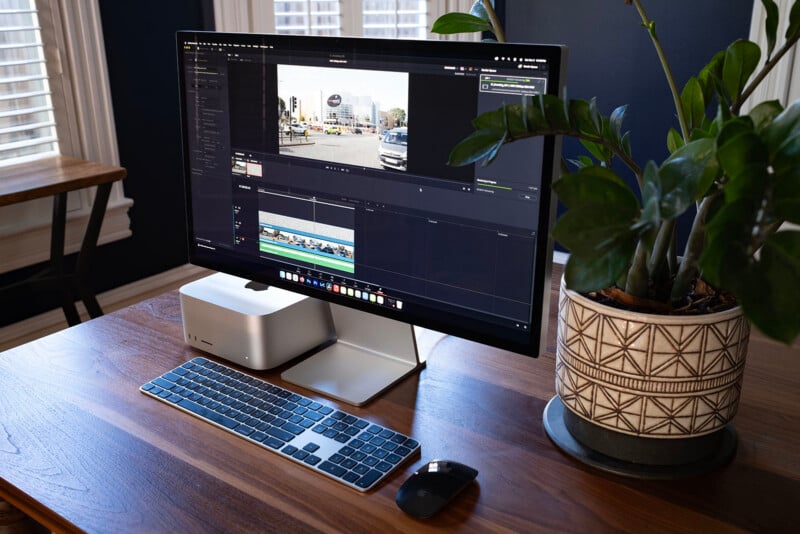
This review unit of the Apple Mac Studio with M5 Ultra is the highest specification available. It has an M5 Ultra chip with the 36-core CPU (12 super and 24 performance) and 80-core GPU, 256GB of memory, and 4TB of internal SSD storage. There will be a 512GB internal memory option available at a later date, but it wasn’t an option yet at the time of publication.
It is possible to spend $6,000 more to increase the internal storage to 16TB, but given that many of the people who would purchase a Mac Studio (or who would previously have bought a Mac Pro) would likely not trick out the machine with maxed internal storage, I hardly consider it a reason not to refer to this computer as “fully loaded” for now.
As far as performance is concerned, Apple does not make a more powerful computer at the time of this review.
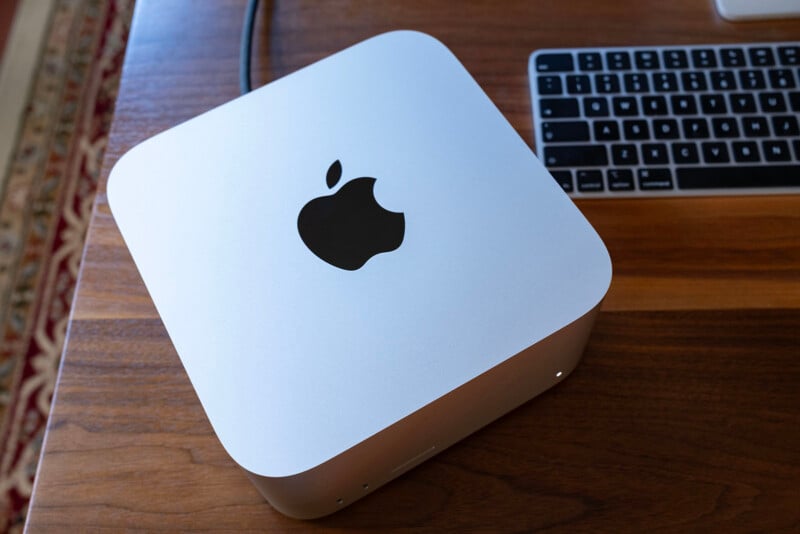
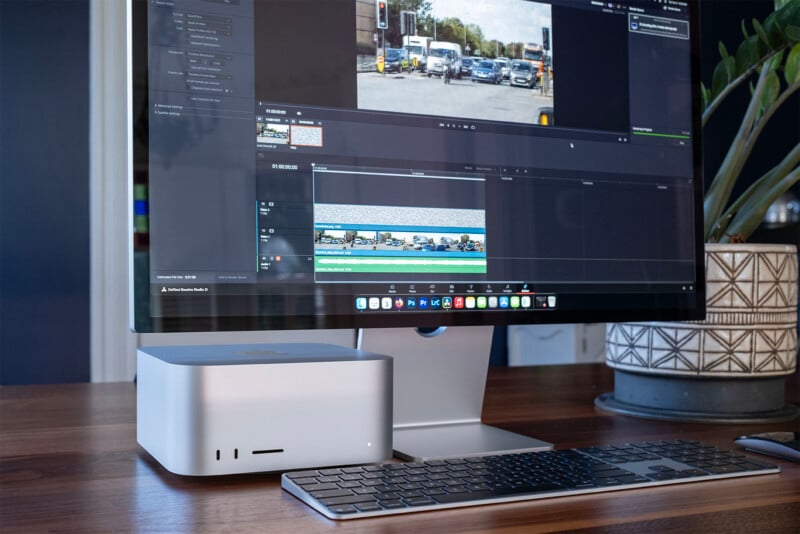
I don’t want to linger too long on the design of the Mac Studio because, frankly, it’s not any different from the M5 Max Mac Studio that Jeremy Gray reviewed a couple of weeks ago. In fact, the design hasn’t changed at all from the original Mac Studio I reviewed in 2023. It’s a silver rectangle with different sets of ports on the front and back.
On the back, you’ll find four Thunderbolt 5 ports, a 10Gb Ethernet port, two USB-A ports, an HDMI 2.1 port, a 3.5mm headphone jack, and the power button. On the front, there is an SD card reader and a power indicator light, but there is a slight difference when compared to the M5 Max version, as that lower-specification machine only has two USB-C 10Gb/s ports while the M5 Ultra delivers two more Thunderbolt 5 ports. The Mac Studio also has support for Wi-Fi 7 and Bluetooth 6.
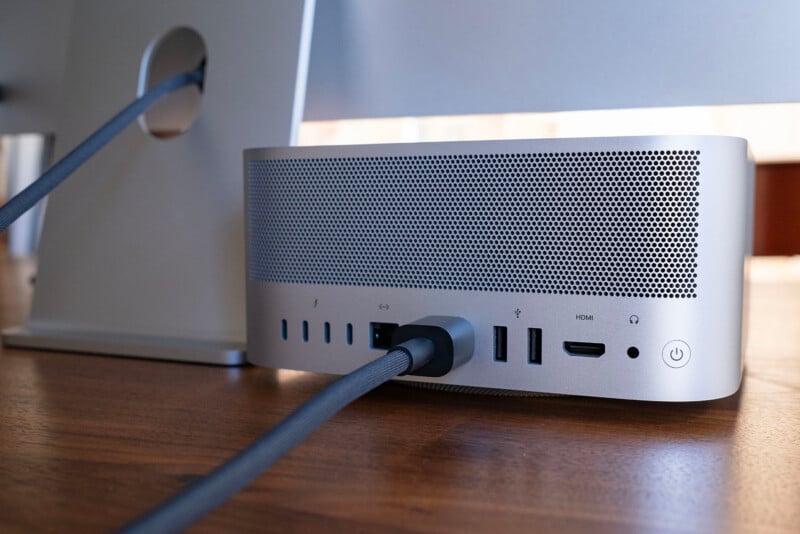
I think that the two additional Thunderbolt 5 ports on the front, which also support USB-C at its highest 80 Gb/s specification right now, make a big difference for video editors who are ingesting footage from external SSDs. In my configuration, all of the ports on the back of the computer are in use for displays, hubs, and my main external OWC Thunderblade SSD RAID array. It’s very nice to be able to plug any SSD I’m handed into my machine and pull footage at maximum speed or edit directly off external SSDs whose projects I started while on the road with my MacBook Pro. I would definitely notice, and be annoyed, if those two front ports weren’t as powerful as the ones on the back.
The other benefit of the Ultra versus the Max is support for more high-resolution displays. The M5 Max can support up to five 5K displays, two of which could be Apple Studio Display XDR monitors at 5K resolution and 120Hz. It can also drive an additional 8K HDR display over HDMI. The M5 Ultra increases that to support eight 5K displays, with four of those being Studio Display XDR monitors at 5K resolution and 120Hz. In practice, this is a relatively minor workflow benefit, but it is one nonetheless.
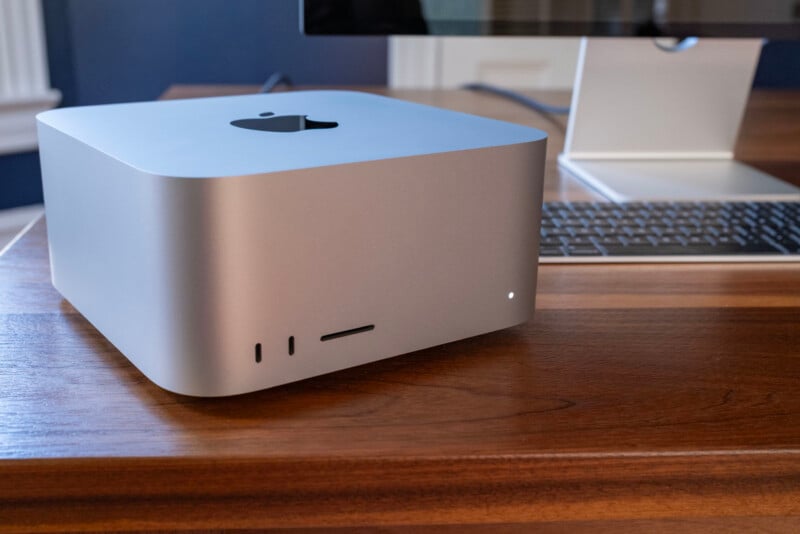
I really like the size of the Mac Studio and have ever since it came out. It is 3.7 inches tall, 7.7 inches wide, and 7.7 inches deep (9.5 x 19.7 x 19.7 centimeters) and weighs about eight pounds (3.6 kilograms). It has just enough heft that it doesn’t shift around on my desk when I reach around to hit the power button or when I plug into (or unplug from) those aforementioned front ports. It would really bug me if I had to keep straightening this computer on my desk every time I did any of that, but at the same time it isn’t so heavy that you can’t shift it around if you really mean to.
Everything else I could say about the design and build quality of this computer has been said before, multiple times. I think it looks nice, it’s durable, and it’s remarkably small for how much power it houses. Oh, and the fan basically never makes itself known, even when the computer is under heavy load.
But enough about that; let’s get to why you should care about the M5 Ultra: performance.
Mac Studio with M5 Ultra Review: Performance
I really enjoy benchmarking a new chip like the M5 Ultra in a desktop chassis, as this isn’t as common as it used to be since Apple started putting the same chipsets into both its laptops and desktops. But the Ultra series is special: it only makes an appearance in desktop computers and also only once every couple of years.
As a bit of a recap, we have shifted all of our benchmarking over to Puget Systems’ tools. We used to benchmark Lightroom Classic by hand, but after working closely with Puget Systems, the company was able to replicate our previous process and more into a much better overall system. The same can be said for Photoshop, Premiere Pro, and DaVinci Resolve.
Benchmark Testing: Adobe Photoshop
I want to start with Photoshop because this is the one area where the M5 Ultra isn’t blowing me away when it comes to performance. Photoshop is pretty CPU-dependent and doesn’t leverage the GPU like the other applications in our performance testing do, so even by increasing the power of the hardware by a substantial amount over the M5 Max (36-core CPU vs an 18-core CPU), we’re not seeing massive gains.
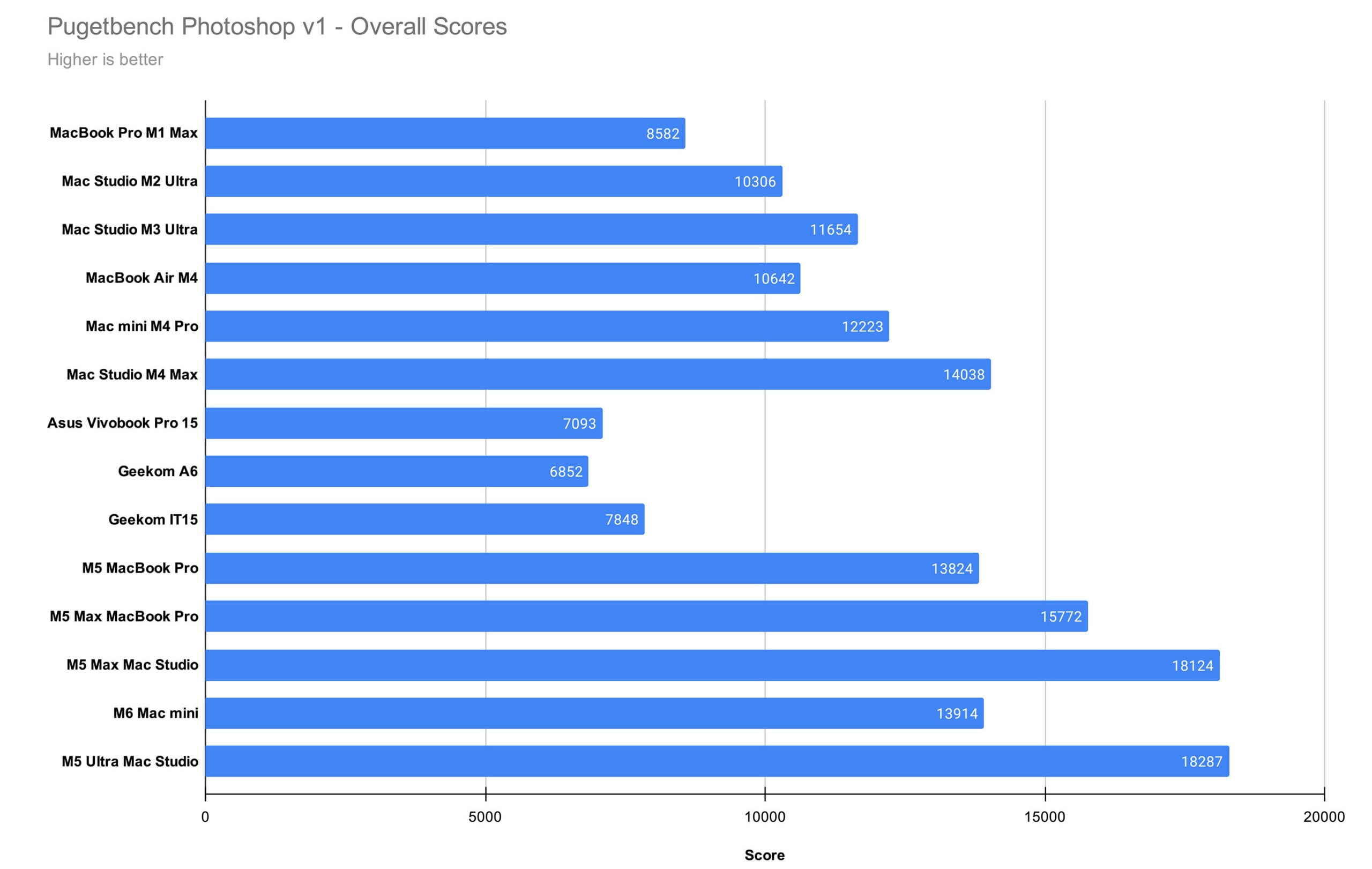
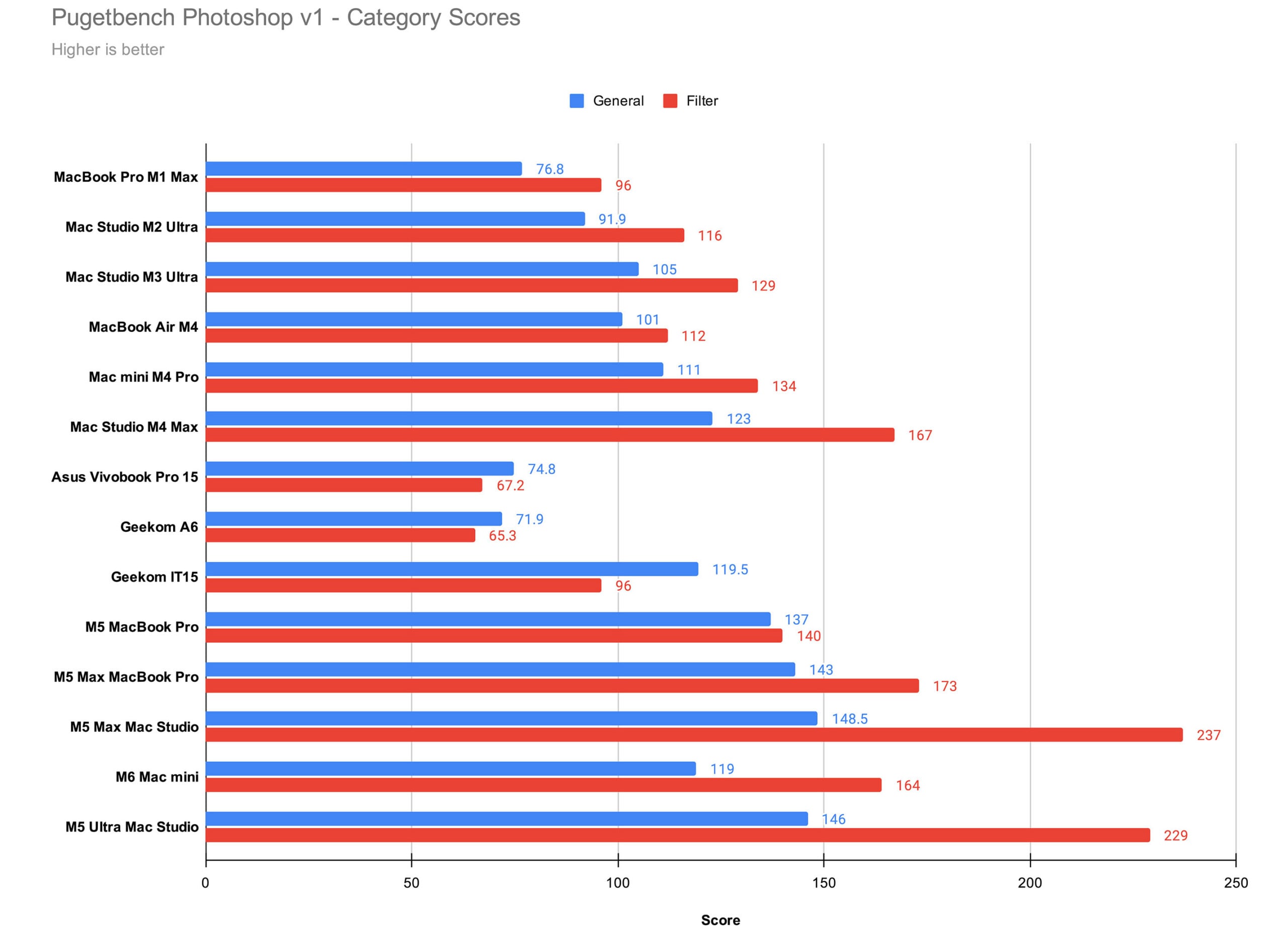
The M5 Ultra is the best computer for Photoshop that we’ve ever tested, but only barely. If you’re primarily working in Photoshop or other CPU-dependent software, you’re not going to see any appreciable benefits from the M5 Ultra over the M5 Max. Unless you’re still running a baseline M4 or considering upgrading from the M2 or M3 Ultra, the computers Apple has released in the last two years all churn through Photoshop tasks at a pretty similar rate.
Benchmark Testing: Adobe Lightroom Classic
Alright, now let’s get to the impressive results.
Puget Systems’ Lightroom Classic benchmark expands on the same process we used to perform by hand and imports 250 RAW image files from the Canon EOS R5 Mark II, Panasonic Lumix S1R II, Sony a1 II, and Nikon Z8. It then creates 100 Smart Previews of a repeatable selection of these RAW files, and exports 100 JPEG and 100 DNG images. The benchmark also includes tests of many of Lightroom’s AI-powered features, including Select Sky, Select Subject, Reflection Removal, Denoise, Enhanced Details, and Super Resolution.
The benchmark provides an overall performance score in Lightroom Classic for each batch of files. However, the full test log also includes timing for each task. PetaPixel includes timing results only for the Sony a1 II files in its charts, since the a1 II has the highest megapixel count of the four cameras included.
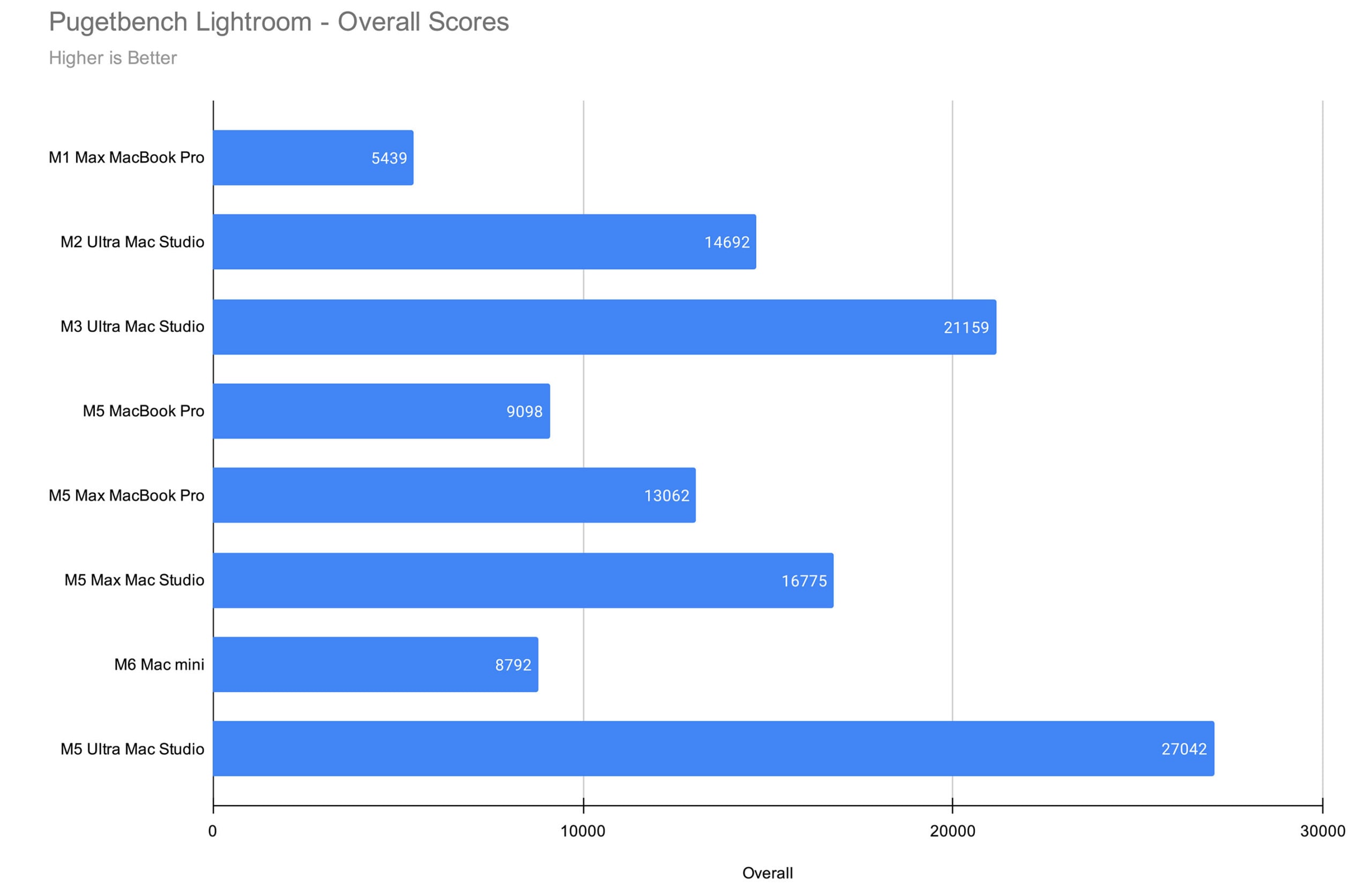
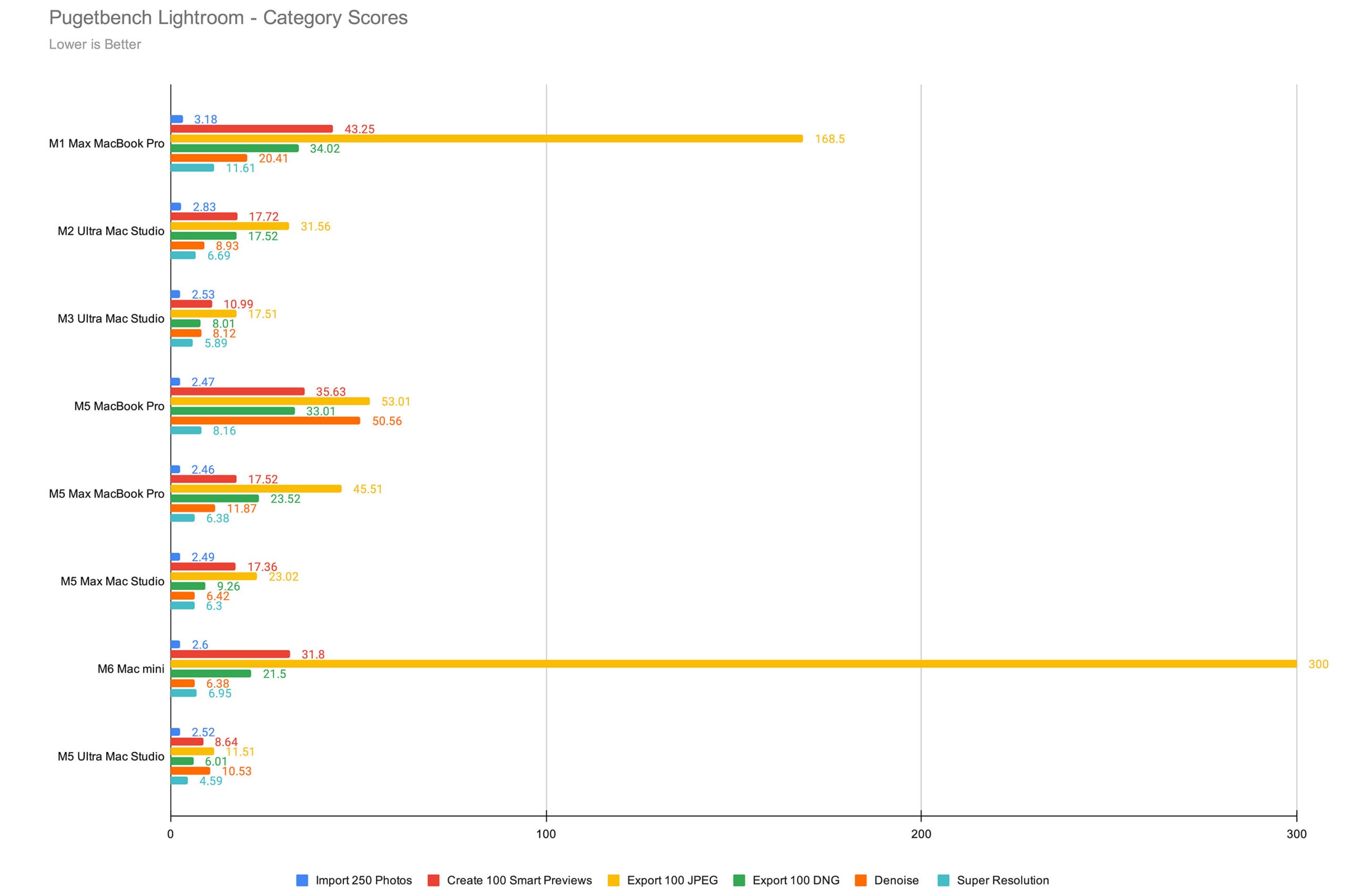
Lightroom has GPU acceleration, and the M5 Ultra’s substantial 80-core GPU crushes every other computer we’ve ever put through this benchmark. It’s nearly twice as powerful as the M2 Ultra and is 22% faster than the M3 Ultra. Where it really cruises is when compared to the non-Ultra chips, however. It’s three-and-a-half times better than the baseline M6 and nearly twice as good as the M5 Max Mac Studio (while actually being twice as good as that same chip in a MacBook Pro chassis).
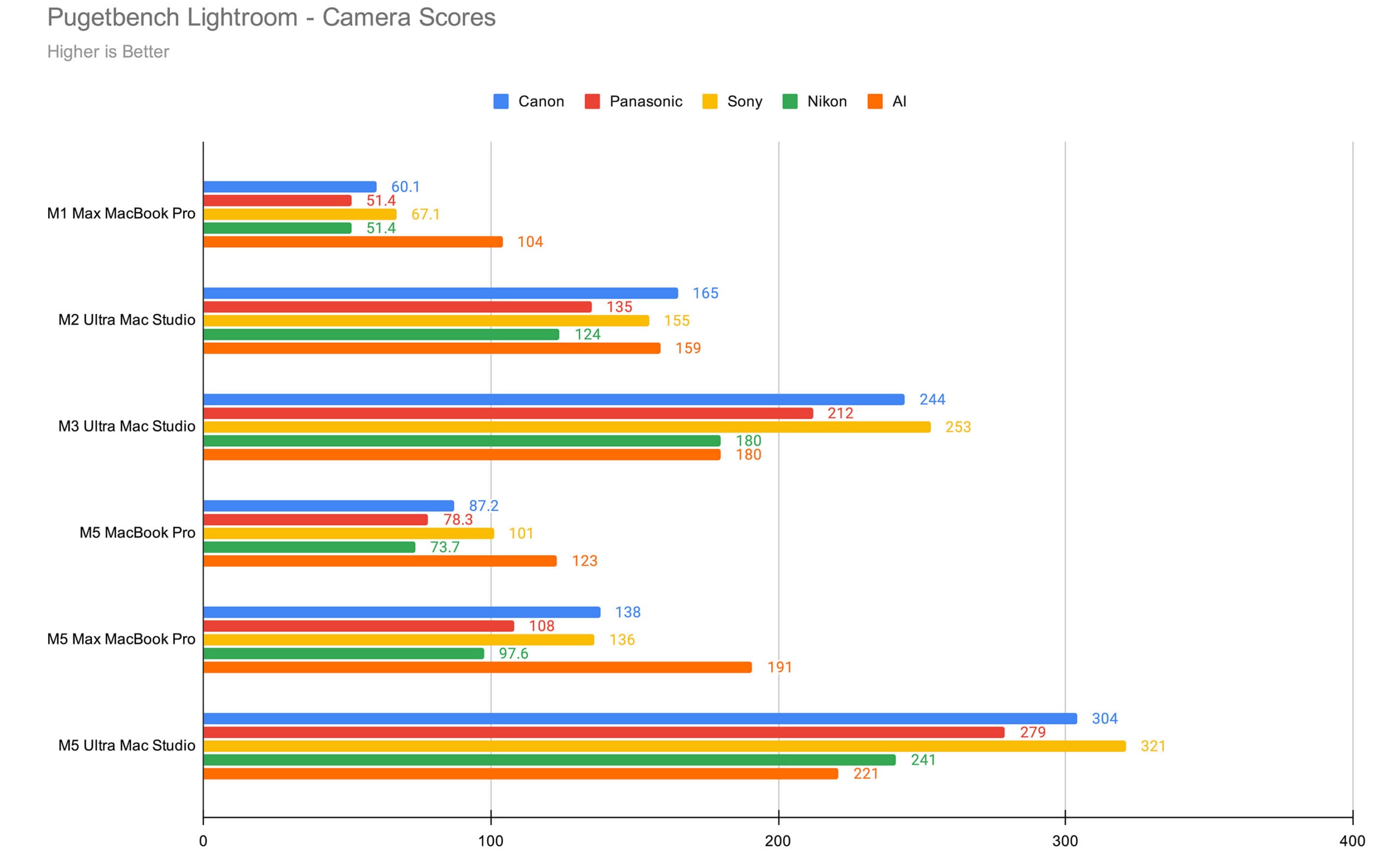
It absolutely cooked in every Camera Score category, too. We are seeing a pattern emerge with the Ultra-series chips: when we get a new one, it leapfrogs the last Ultra chip by a good amount. While it’s not quite as big of a leap over the M3 Ultra as that computer was versus the M2 Ultra, it’s not insubstantial. Oddly, the one area where we saw a bit of a slowdown was in Lightroom Denoise, where both the M6 Mac mini and the M5 Max Mac Studio performed slightly better. I’m willing to chalk this up to oddness with how a new machine works with existing software, though.
This is, without question, the most powerful Lightroom performer Apple has ever made by a wide margin.
Benchmark Testing: Adobe Premiere Pro
Let’s be real, though: there aren’t many photographers buying an M5 Ultra Mac Studio just for Lightroom. No, you get a computer like this for video editing. And hot damn, this is an incredible video editing machine.
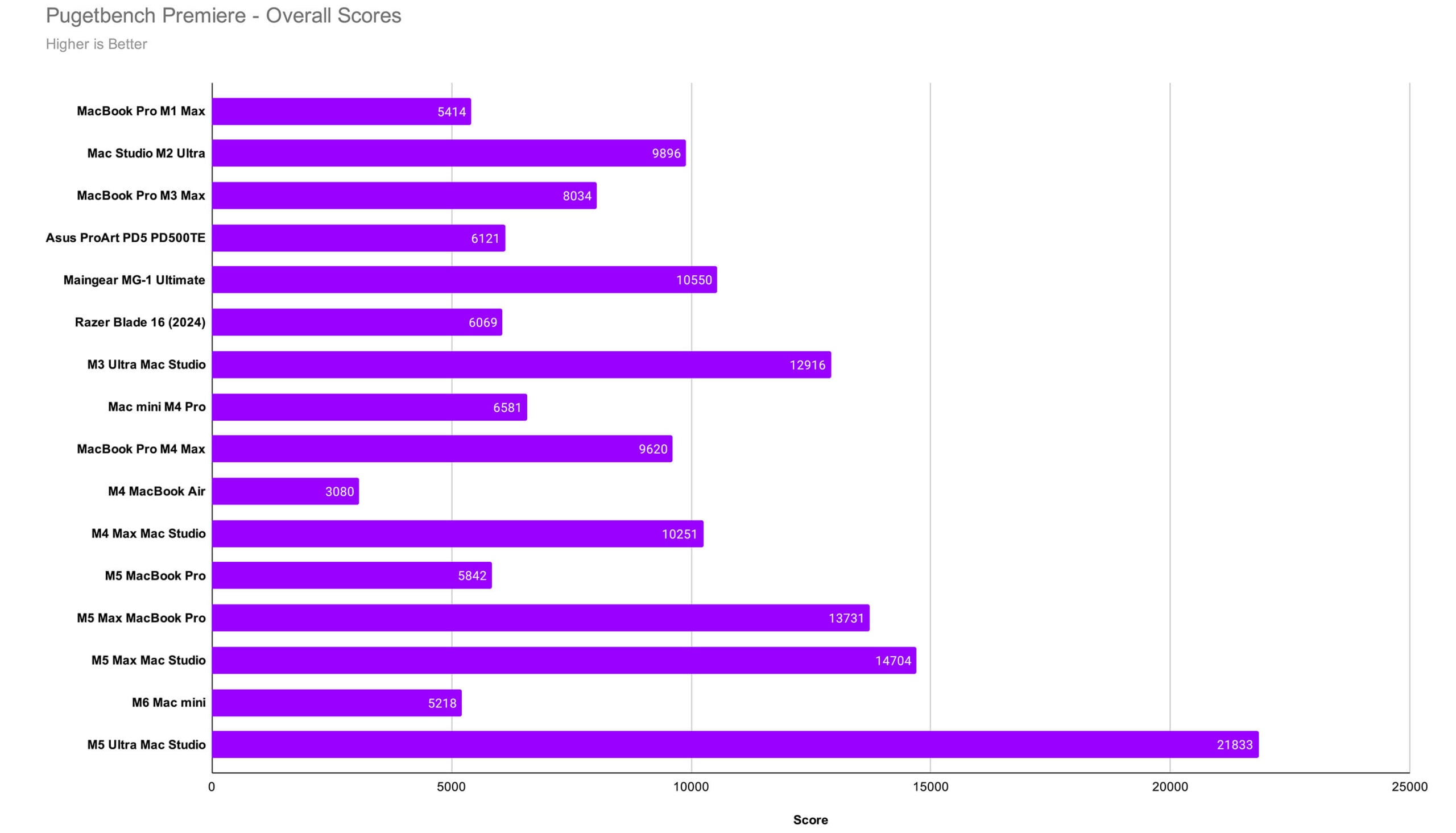
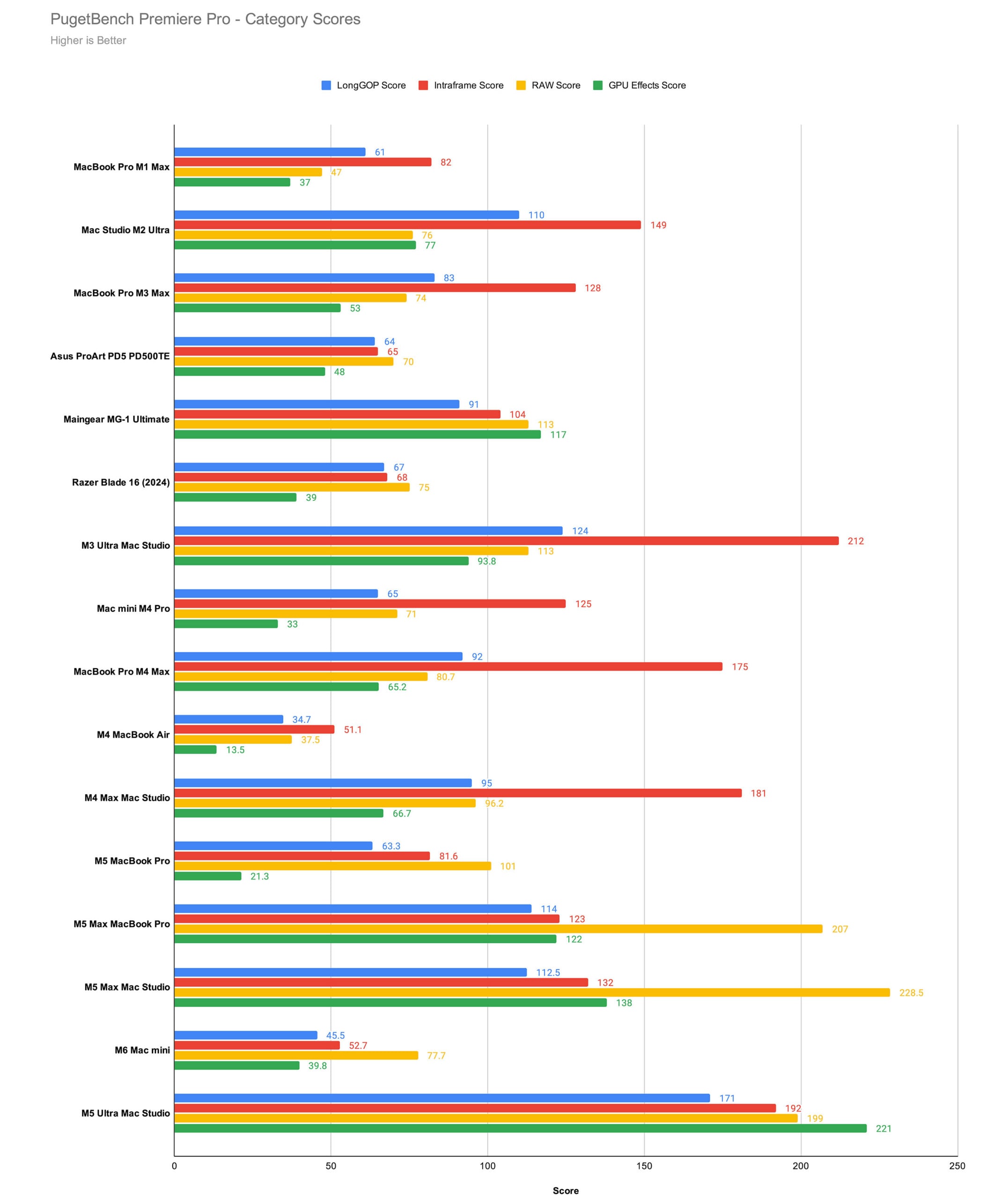
As expected, the GPU-intensive nature of video editing allows the M5 Ultra to really shine. It’s more than twice as fast as the M2 Ultra, the highest-performance video editing PC we’ve ever tested, and the M4 Max Mac Studio. It’s substantially faster than the M5 Max and the M3 Ultra Mac Studios as well, mainly due to the outstanding GPU effects score. Like with the Lightroom benchmark, however, we are seeing a slight dip in performance with the Ultra chip versus the M6 and the M5 Max in one area: RAW score. I will, again, chalk this up to the software not making the most of the new hardware because everywhere else, it’s an absolute landslide win for the M5 Ultra.
Benchmark Testing: DaVinci Resolve
Because Puget Systems recently changed its Resolve benchmark, our backlog of comparable computers isn’t as robust as our other benchmarks — we can only go back as far as the M3 Ultra. But for the purposes of this review, I think that will suffice, as that is the most recent Ultra machine and was our previous top performer across all our benches.
Not anymore, and not by a long shot.
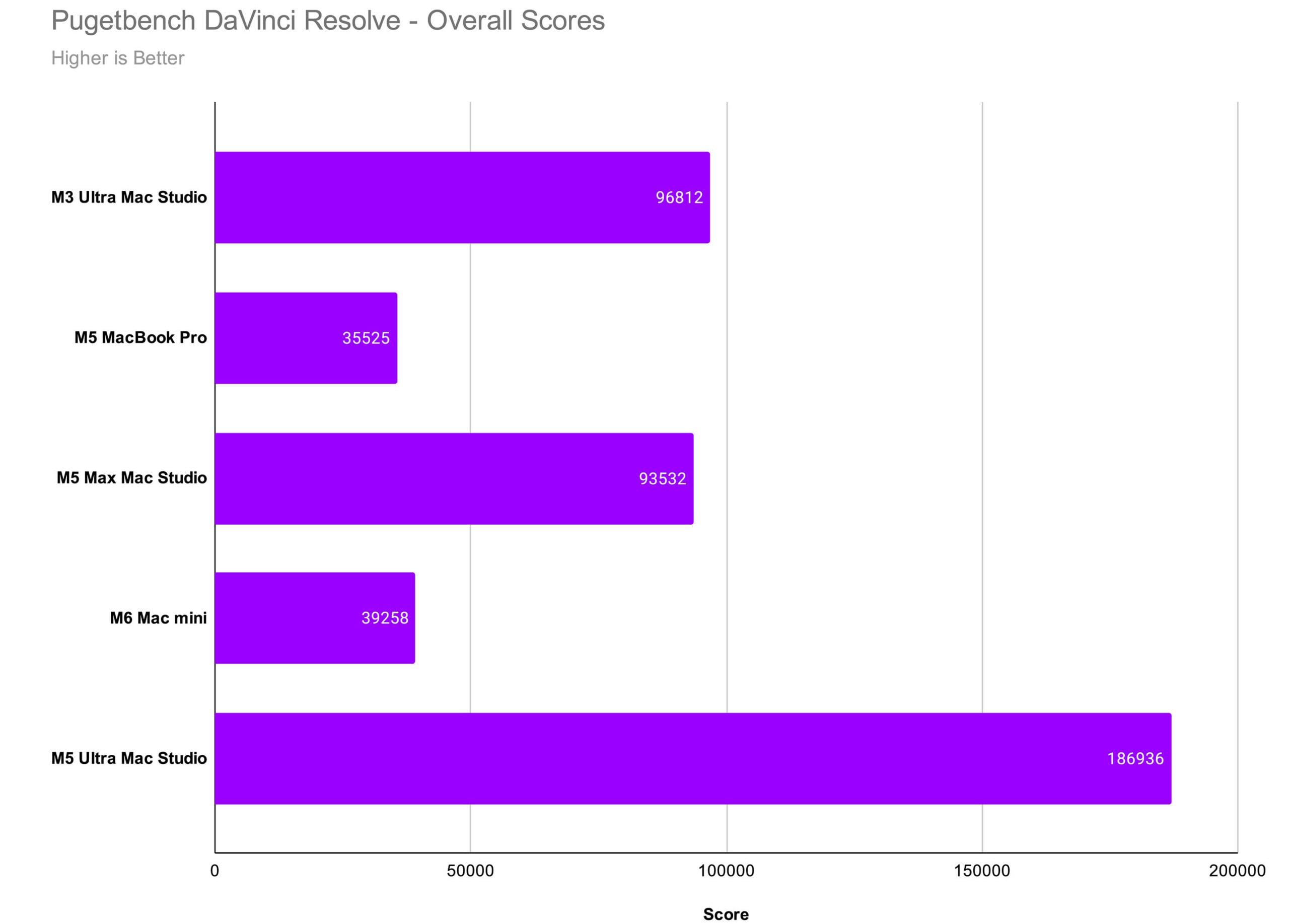
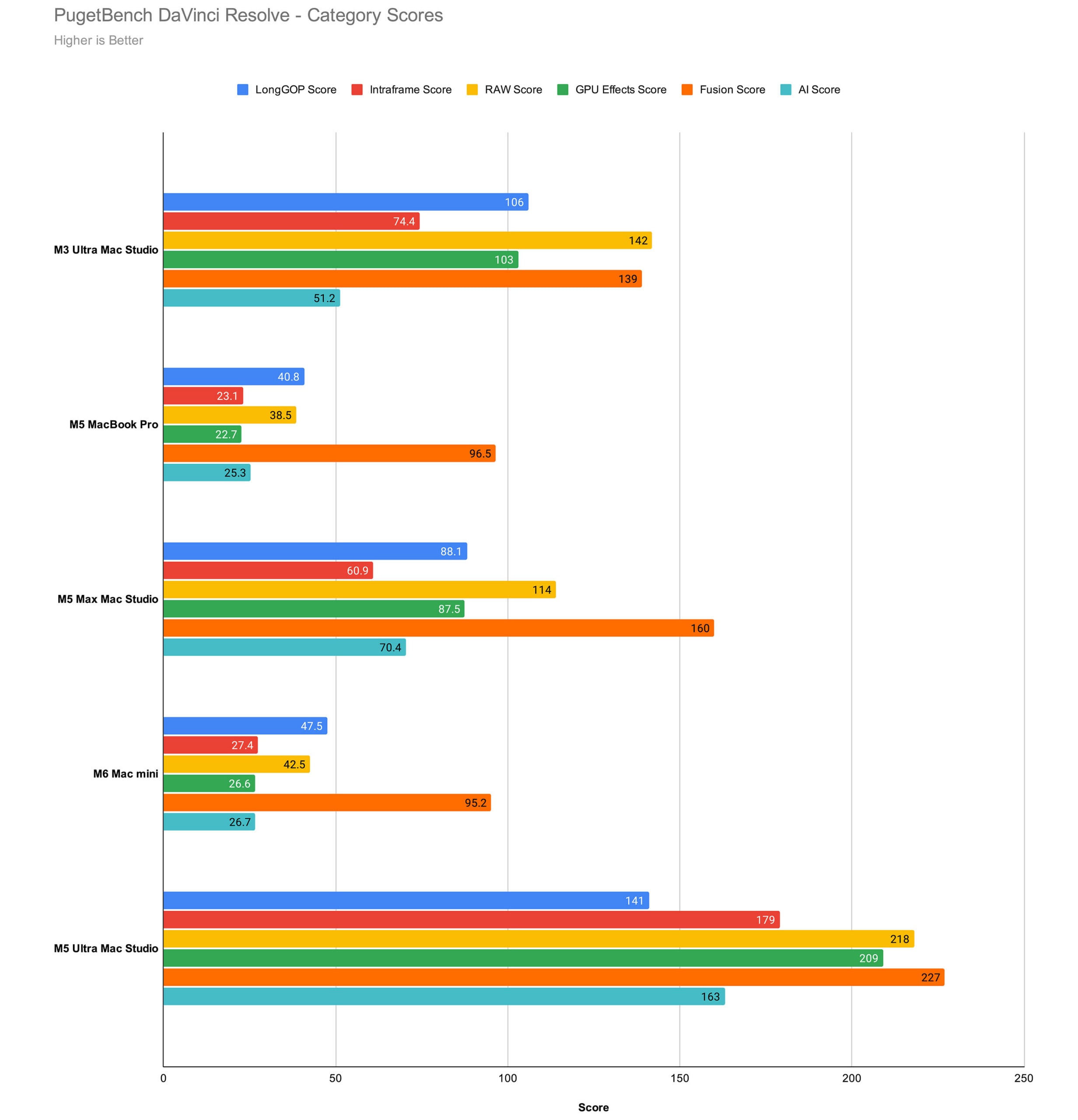
The M5 Ultra is twice as good as the previous best computer we had tested. Considering this is a single-generation upgrade (there was no M4 Ultra), this is an astounding result. We had long since given up expecting double the benefit when upgrading from one generation to the next, but the M5 Ultra is making us rethink just how good hardware can get.
In Resolve, the M5 Ultra is just straight-up better at literally every task, and by a wide margin. As was the case in the Premiere Pro benchmark, the insane power of the 80-core GPU is really driving up the scores with GPU effects, Fusion, and AI scores absolutely crushing past computers.
Mac Studio with M5 Ultra Review: Performance Takeaways
If you’re only a photographer and don’t dabble in video editing at all, then you probably haven’t been looking at the Ultra series of chips before and you shouldn’t start now. Yes, it is of course better than the other options out there, but it’s not worth the difference in cost between the M5 Pro or the M5 Max computers you could get. I know of a few photographers who are still riding their original M1 Macs and are quite happy, and they should be. When Lightroom bogs down, it’s not usually in the actual act of editing a photo, and most photographers don’t mind an excuse to stand up and go for a walk when they set their computer up for an import or export.
But that’s a different story for video editors. As we’ve gotten more performant cameras, we notice older machines start to struggle even during the editing process. PetaPixel‘s Jordan Drake gave up on his M1 Mac a couple of years ago for this reason, instead shifting over to the M4 Max, and he has been quite happy with it since. I’ve personally been editing on an M2 Ultra for the last several years and only last month realized I was hearing the fan during a Premiere Pro export — the first time in quite a while.
6K open-gate and RAW video are starting to push computers that are only a few years old now to their straining point, and it is in those situations where the M5 Ultra makes the most sense.
The sheer breadth of the valley that exists between the M5 Ultra and any other computer Apple has ever made before it epitomizes why I stand by my belief that the Ultra is just the new name of the Pro. This is what professional performance should look like compared to the other options. When you pay for the best Apple can make, it should look like a no-contest boxing match.
I look back at how video editors praised the leaps in performance from one Mac Pro generation to the next and remember the conversations I had with them about when it was time to upgrade. Most would do it every other or every three generations. I think that’s probably still the case. Looking at these numbers, jumping from the M2 Ultra to the M5 Ultra will feel fantastic. I believe that making that upgrade today will last at least as long going forward, especially as we are starting to see more impressive compressed RAW formats like Sony’s X-OCN.
The M5 Ultra shreds now and will continue to absolutely crush for at least the next three years, if not five or more.
Even More Memory?
As I mentioned at the top of this review, starting in October 2026, Apple will make a 512GB memory version of the M5 Ultra Mac Studio available and it will cost an additional $6,000 beyond the $12,300 price of the machine tested in this review. For video editors who are considering this machine, I caution you against spending that extra money.
It is very unlikely that doubling your memory will have any impact on performance in Adobe Photoshop, Lightroom Classic, Premiere Pro, or DaVinci Resolve. The parts of the M5 Ultra that are the primary drivers of performance are the GPU and 1.2TB/s of memory bandwidth, while RAM only improves performance if you are actively running out of it. Even edge-case, extreme workflows like grading 12K RAW multicam timelines or stacking hundreds of layers in Photoshop are unlikely to come close to filling the RAM capacity.
Apple is making the 512GB option mainly to support local AI workloads, which is why it has been showcasing running Mac Studio clusters to power large language models. For creative professionals, you don’t need that much memory.
M5 Ultra Mac Studio: Just Call It the Mac Pro
When Jeremy Gray reviewed the M5 Max last month, he said that while he was curious what level of “obscene numbers” the M5 Ultra would deliver, it was unlikely to change how he felt about the M5 Max for the majority of photo and video editors.
“The Mac Studio with M5 Max is an outstanding desktop computer with extreme capabilities. No, it’s not technically Apple’s ‘best’ computer in the lineup, but it is undoubtedly the best choice for photographers and video editors seeking a desktop Mac that doesn’t start at $5,499,” he wrote.
Looking now at those obscene numbers for what they are, I think that Gray’s take is still accurate. The M5 Max remains our top recommendation for editors who want a desktop Mac and do both photo and video editing. That recommendation likely applies to somewhere near 96% of all editors of this kind, but there is that other 4%, and for them, the M5 Ultra makes a lot of sense.
It takes a ton of cash and is designed specifically for those who use the computer for billable work, but if that’s you, then the Mac Studio with M5 Ultra is simply an unbeatable marvel of a computer. I have to remind myself that back when the M2 Ultra launched, I was blown away by just how good it was.
The M5 Ultra is often three to four times as good as that computer. That level of performance improvement in just three years is almost beyond putting into words. To say it is impressive is an understatement — a statement that is also, somehow, still an understatement.
The Mac Pro died in name only.
Are There Alternatives?
I would say that the M3 Ultra is an excellent alternative, but they’re difficult to find new now. They do exist, but I don’t know that it’s worth the asking price when the M5 Ultra is not that much more. If you’re already spending $10,000 on a computer, you should probably try for the best available, especially since the M5 Ultra is substantially better than the M3 Ultra. If the benchmarks were closer, I’d lean toward saying nab one of the few remaining M3 Ultra computers out there, but the performance gap between generations is so vast, I don’t feel like it’s actually a good value.
With that in mind, your best bet is going to be the M5 Max Mac Studio, which gets you a good chunk of the way there when it comes to performance, but comes at an extreme discount. The Mac Studio with M5 Max (18-core CPU and 36-core GPU), 36GB of unified memory, and a 512GB SSD is $2,499.
There are many folks who see these prices and also dislike Apple’s choice to make upgrading impossible, and decide that building a PC is the better course of action. There was a time when I would agree, even though I don’t love Windows or Linux, but the memory shortage has really made it quite difficult to build a PC that can match the M5 Max and stay under budget.
While it is difficult to compare them apples-to-apples, you could consider either a Ryzen 9 9950X or an Intel Core Ultra 9 285K as well as an NVIDIA GeForce 4070 or 5070 GPU. That is around $500 for the CPU and between $540 and $860 for the GPU. You might not get the same performance in video editing with that GPU, though, due to the lower VRAM.
Unfortunately, getting more costs a lot: the RTX Pro 6000 costs north of $7,000, so let’s disregard that due to price. You also have to think about RAM, which is another $250. Add in the motherboard, Wi-Fi and Bluetooth components, cooling, power supply, and a case, and you’re not really saving any money: it’s going to cost right around $2,500. It will also be larger and louder, but the bonus is that you’ll be able to play a wider variety of video games on it.
What I’m saying is that Apple has done an excellent job with pricing its computers competitively based on performance. You do have to confront the “cost” of living inside of Apple’s famously walled garden, though, and that is a price some folks will never agree to pay.
Should You Buy It?
Maybe. Probably not. It’s weird to give something a perfect 10/10 while simultaneously saying you probably shouldn’t buy it, but as mentioned, the majority of photo and video editors absolutely do not need the power of the M5 Ultra. But by that same token, those same people didn’t need the Mac Pro either. If you do need a Mac Pro and lament that it no longer exists, I have good news: the M5 Ultra Mac Studio is the new Pro. It is absolutely the best Mac Apple has ever made, and it’s the best by a whole lot.
Affiliate Disclosure PetaPixel articles may include affiliate links; we may earn a commission if you buy through one.







 English (US) ·