
 4 weeks ago
40
4 weeks ago
40
A year ago the Ryzen AI Halo, AMD's tiny new AI workstation, would have offered devs and machine learning enthusiasts an Nvidia DGX Spark-like experience at a fraction of the cost.
Unfortunately for AMD, time and the ongoing memory shortage, which both AMD itself and Nvidia are partially responsible for, hasn't been kind to the consumer electronics industry.
Launching at a hair under $4,000, the AI Halo is still cheaper than the Spark at its new MSRP of $4,699, but is now a much tougher sell than when you could get the same hardware for as little as $2,000.
That's right. The 128 GB AI Halo is based on year-old technology. Its main selling point, and what AMD has spent the past several months getting right, is the packaging. Much like with the Spark, you're not just buying the machine but all the software and documentation you need to run and fine-tune enterprise-grade models and AI agents like OpenClaw and Cline, locally.
Many will, understandably, balk at the price — $4,000 is a down payment on a car — the system is still one of the most affordable options for those who need more than the 32 GB that the highest-end graphics card can provide.
Not long ago, building a workstation with 128 GB of video memory would have set you back at least $20,000, and that was before the RAMpocalypse. This puts systems like DGX Spark and AI Halo in a rather unique position.
The Hardware

Despite sharing a similar form factor to Nvidia's DGX Spark, AMD has gone for a very different aesthetic. Tobias Mann
The Ryzen AI Halo was clearly inspired by the DGX Spark. Measuring in at 5.9 x 5.9 x 1.79 inches, the black and silver system shares a nearly identical form factor to its competitor.
Rather than gold aluminum siding, AMD has opted for a more subdued look with a textured top cover adorned by its logo and an LED light bar that wraps around its perimeter. The chassis itself is well ventilated with intake located along the front of the system sides and heat exhausting out the back.

Just like the DGX Spark, the Ryzen AI Halo sports four USB-C ports, one of which is for power, along with HDMI and a 10 Gbps RJ45 network port. Notably missing is any kind of high-speed networking. Tobias Mann
The back of the system is adorned with four USB-C ports, one of which is dedicated to power, while the remaining three offer connectivity (1x USB 3.2, 2x USB 4.0) for storage and peripherals. The AI Halo supports display out on all three of those ports as well as via HDMI 2.1b . A single RJ45 network port provides 10 Gbps of connectivity for those who prefer wired connectivity over the onboard WiFi 7 radio.
One thing you won't find on the back of the AI Halo are QSFP ports for high-speed networking. The DGX Spark features a 200 Gbps ConnectX-7 SmartNIC for clustering multiple devices together. The AI Halo does still support clustering if you happen to pick up multiple systems, but with only one such system on hand, we can't say how big a difference the slower networking actually makes.
AMD's Ryzen AI 395+, which you may recognize from its codename Strix Halo, sits at the heart of the system. This SoC isn’t new, having been on the market for more than a year now. In fact, we pitted the Pro variant of the chip running in HP's Z2 Mini against the DGX Spark's GB10 SoC back in December 2025.

Here's a quick run down of the Ryzen AI Halo. Image courtesy of AMD
The chip is equipped with 16 Zen 5 cores clocking up to 5.2 GHz along with an RDNA 3.5 GPU with 40 compute units putting out around 56 teraflops of dense FP16 performance under ideal conditions.
While Strix Halo can be obtained with as little as 32 GB of LPDDR5X memory, the AI Halo is packing 128 GB as standard. That's enough to run models of up to 200 billion parameters in size, at 4-bit precision that is. Out of the box, our system was configured to share up to 75 percent, or about 96 GB, of that with GPU. However, at least on Linux, you can extend this to nearly the system's full capacity.
That memory is connected to the SoC by a 256-bit bus good for about 256 GB/s of bandwidth — more than you'd get on a (non-Pro) Threadripper system.
Bandwidth is a major bottleneck for LLM inference, with token generation directly proportional to how fast the memory actually is, and because the AI Halo's memory hangs off the GPU, it can take full advantage of it.
While 256 GB/s is a lot for DDR5, it is dwarfed when you compare to the GDDR or HBM found in consumer and datacenter GPUs. The RTX 5090 delivers 1.7 TB/s of bandwidth, making it admittedly high — for models small enough to fit in that card’s 32 GB of VRAM.
We'll talk about performance in a bit, but this really gets to the hardware's core value proposition. For most local AI enthusiasts and devs, memory capacity is the biggest bottleneck.
It doesn't matter how many teraflops your GPU can push or how fast your memory is, if you don't have enough of it in the first place. At 16-bit precision you need about 2 GB of memory for every billion model parameters. At 8-bits, it's a 1:1 ratio and, at 4-bits, you need just 512 MB for every billion parameters.
If you've toyed around with local LLMs in Ollama or LM Studio before you're almost certainly running 4-bit weights, which is why you can cram a 20 billion parameter model onto a consumer graphics card with as little as 16 GB of VRAM.
Unfortunately, there are a lot of AI workloads that aren’t easily quantized or require substantial quantities of memory in addition to what’s used to hold the model weights. But once you venture beyond low precision inference, memory quickly becomes a major constraint. For example, a full fine tune of a modest 7B parameter can easily consume upwards of 100 GB of memory.
This is where systems like the AI Halo or DGX Spark really shine. They may not be the most powerful or the fastest systems, but there's not much that you'd want to do that you couldn't thanks to their ample memory capacity.
As we've shown in the past, Strix Halo is more than capable of running larger more capable models exceeding 100 billion parameters or fine-tuning models up to 70 billion parameters, something that’s well beyond the means of consumer graphics cards.
What the AI Halo actually buys you
If the chip isn't new, you might be wondering what exactly the Ryzen AI Halo buys you over another Strix box, like HP's Z2 Mini G1a we reviewed back in December. Back then, that system retailed for around $3,000. Its price has since surged to nearly $4,900.
If you're already familiar with AMD's HIP and ROCm stacks and reasonably comfortable with Linux, the answer is not a lot. AMD even has playbooks specifically for early adopters of its Ryzen AI products. So, if you jumped on a Strix Halo system before DRAM prices hockey sticked, you're really only missing out on the conveniences that the preinstalled software brings.
With that said, we're willing to bet most folks considering AI Halo are probably dipping their toes into ML and AMD's software ecosystem for the first time.
ROCm is a heck of a lot easier to get running on Ryzen APUs and Radeon graphics than it used to be, but we'd be lying if we said that it's always easy. The same is true of Nvidia and CUDA to a lesser extent. Some steps are easier, while others like GPU passthrough for containers require jumping through additional hoops.
That's not even to mention PyTorch compatibility, which can vary from app to app. Regardless of which platform you buy into, wrangling dependencies is still a mess.
Both the AI Halo and DGX Spark's core value prop is helping customers avoid as many of these headaches as possible by combining validated hardware with pre-installed dependencies and well documented playbooks that walk you through common use cases.
In other words, it's an AI lab in a box.
What's it like using the AI Halo
The AI Halo ships with your choice of Linux or Windows 11. The review unit AMD provided us with, came equipped with a lightly-modified version of Debian with the 6.18 Linux Kernel, Gnome desktop environment, ROCm 7.13 preinstalled, and a slew of preinstalled AI apps and frameworks, like ComfyUI and vLLM.
For anyone who's used Linux before, the experience should be quite intuitive. Upon first boot, a startup wizard will guide you through the process of creating your user profile, connecting to the network, and updating the device.
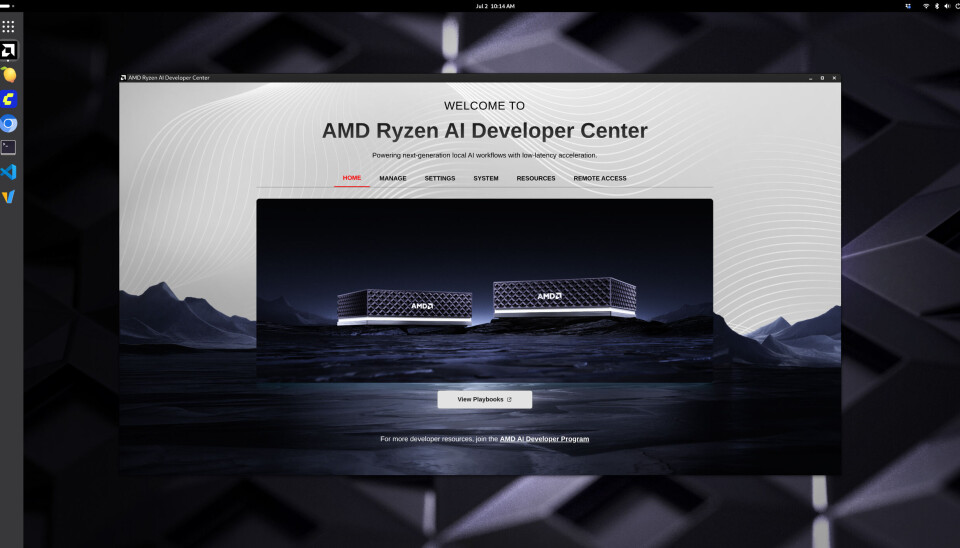
Our review unit shipped with a lightly customized spin of Debian 13. Upon completing setup, we were greeted by AMD's Ryzen AI Developer Center. The application allows you to quickly adjust settings or jump straight into The House of Zen's growing library of playbooks. Tobias Mann
Once you are logged in, AMD's Ryzen AI Developer Center launches automatically and provides quick access to resources and system settings.

At the time of publication, AMD had 19 playbooks for us to test covering everything AI agents to inference and fine tuning on LLMs and diffusion models. Tobias Mann
As of this writing, AMD's developer docs include 19 playbooks covering everything from the basics of running LLMs and image models on the device to building full blown agents with OpenClaw.
We walked through most of these as part of our review process and with a few exceptions we were able to run them with minimal troubleshooting. We did have to ask an LLM for help debugging AMD's PyTorch fine-tuning scripts. Thankfully, the selection of pre-downloaded models were capable enough to identify the single line fix required to get them running again.
While most of AMD's playbooks were more than adequate, we found its vLLM getting started guide a little lacking. It was easy enough to get it running —AMD has written a wrapper that abstracts the creation and deployment of the inference server in a Docker container — but the guide doesn't discuss how to select a model, much less configure it.
vLLM is an incredibly popular inference server broadly deployed in production. This makes it all the more disappointing that AMD's documentation isn't more comprehensive.

Lemonade Server is a bit like LM Studio or Ollama, but provides a highly optimized environment for running popular models on AMD GPUs and NPUs. Tobias Mann
One bright spot we'd like to highlight is Lemonade Server. The app comes preinstalled and provides an LM Studio or Ollama-like experience tuned specifically for AMD hardware. It's built atop a number of different model runners including vLLM, Llama.cpp, Whisper.cpp, Stable Diffusion.cpp and others. There is even support for a limited selection of models which will run on the system's NPU.
Perhaps the most attractive use case for the system is as a host for AI agents.
When AMD announced the system, it was keen to highlight how small local models, like Qwen 3.6-35B-A3B, were now good enough to replace larger proprietary models for many coding workflows.

AMD claims its Ryzen AI Halo could say developers a whopping $750 a month by vibe coding with local models instead of cloud APIs. AMD
The company went so far as to claim that, for full-time software devs, the system could save as much as $750/month compared in API expenses they’d pay to a cloud-based LLM. We plan to put those claims to the test in a future article. Beyond AI coding, we also expect the system to be quite popular as a platform for running harnesses like OpenClaw.
Given the software's significant, not to mention numerous security implications, running it locally with container isolation is probably the safest option, and its large memory capacity means that you'll have access to larger more capable models.

Yes, of course it can run OpenClaw. In fact with a 128 GB of memory on board you can run large enough models that it shouldn't mess up — too much. Tobias Mann
Performance
In terms of performance, the Ryzen AI Halo is a bit of a mixed bag.
In memory bound applications like LLM inference, the system matches and in some cases narrowly outpaces Nvidia's more expensive DGX Spark. Hanging the memory off the GPU instead of the CPU benefits the AI Halo here.
In compute bound workloads, like fine tuning, image generation, or batch processing, the gap grows considerably. We plan to dig deeper into how the AI Halo performs in a future article, but, in our initial testing, we don't see a major uplift in performance compared to our earlier testing.
We're also not sharing vLLM performance figures for the AI Halo just yet as our initial testing with AMD's provided build produced results we’re not confident in.

Performance hasn't changed much since we first pit AMD's Strix Halo SoC against the GB10 powering Nvidia's DGX Spark. While the two achieve comparable performance in memory bound scenarios, like token generation, the AMD box trails Nvidia when it comes to prompt processing. The much faster GPU in the DGX Spark benefits Nvidia heavily here. Tobias Mann

It's a similar story when looking at fine tuning. For full-fine tune of IBM's 3 billion parameter Granite 4.0 Micro Base at 16-bit precision, the Spark with its 125 teraFLOPS of BF16 performance completed the training run in nearly half the time of the AI Halo with its 56 or so teraFLOPS. Tobias Mann
Depending on the workload and precision, you can expect the Spark's GB10 APU to be anywhere from 2x to 3x quicker in compute-bound AI workloads.
A big piece of this is down to the fact that Strix Halo wasn't really intended for this use case. AMD's RDNA 3.5 GPU tech lacks support for floating point precisions lower than FP/BF16. It does offer INT8 support, but only by upcasting to FP16, which means no performance uplift from dropping to lower precision.
On paper, the GB10 delivers roughly twice the 16-bit performance, three times that at FP8 and twice again at FP4. This is one of the biggest critiques of AMD's current consumer hardware roadmap, and why we continue to see such a wide performance delta. While its software has improved and its datacenter kit supports FP8 and FP4, the AI Halo is stuck on an older microarchitecture.
But, as we mentioned in our initial Strix Halo vs GB10 head-to-head, whether you'll even notice the performance deficit really depends on what you're doing.
AI benchmarks, including ours, usually disable prefix caching. This allows us to accurately evaluate the accelerators' performance, but isn't representative of how you'd actually use the model.
In a chatbot or AI agent, the prefix caching keeps the accelerator from getting bogged down by caching previously-computed information so that only new data has to be processed. With it disabled, the problem size grows with each prompt processed and each response generated.
We're currently in the process of developing a series of new tests that take advantage of caching and other functionality, like multi-token-prediction to measure performance in agentic applications like code generation. We look forward to sharing the results of those tests soon.
Should you buy it?

Whether or not the Ryzen AI Halo is right for you is going to come down to just how limited you are by your existing hardware and whether or not you can stomach the asking price. Tobias Mann
Strix Halo wasn't a cheap part before RAMageddon and it certainly isn't now — $4,000 is a lot of money. But for the right person, it's still a relative bargain.
If you're interested in learning more about local AI, we recommend starting with what you've already got before considering dropping this kind of cash on an AI-first system like the AI Halo.
If usage based APIs are out of the question and your existing graphics card is no longer cutting it, GB for GB the Ryzen AI Halo is still much cheaper than workstation cards from either AMD or Nvidia. For reference, a 96 GB RTX Pro 6000 is much, much faster and offers nearly as much addressable memory as the AI Halo, but has an MSRP of $13,250. Oh, and that's just for the GPU; you still need to plug it into something with at least that much DDR5 on board.
And so the question becomes how badly do you need the VRAM and how valuable is AMD's documentation and support? Enthusiasts willing to blaze their own trail might be able to save a buck by picking up an OEM Strix Halo box and configuring it themselves.
On the flip side, for those willing to spend a bit more money, Nvidia's DGX Spark also offers fantastic documentation and a fair bit more computational grunt, which again means faster fine tuning, image generation, and prompt processing. The number of tok/s is limited by memory bandwidth.
With that said, the DGX Spark is much more of an appliance, which means, if you buy this thinking you're going to run agents on it and later decide it's not worth the trouble, it's less likely to end up collecting dust on the shelf. Because it's just an x86 PC under the hood, the AI Halo is perfectly capable of running Windows or your preferred Linux distro, if you decide local AI just isn't for you.
Oh, and if 128 GB of VRAM isn't enough for you, AMD has a refreshed version of the system on the way with 192 GB of LPDDR5X memory and slightly higher clocks. ®







 English (US) ·