
 2 hours ago
6
2 hours ago
6
 |
| Logos: Adobe |
Adobe has announced a new round of updates for Lightroom and Photoshop, which improve on some of the useful new features it's been rolling out, as well as making them available in more places.
To start, the company says it's improving Lightroom's Assisted Culling feature, which is designed to automatically pick out images that are in focus with proper exposure, so you don't spend your time looking through a bunch of images destined for the bin. The company says it's now "generally available" – previously it was marked as being in early access – and that there's a new "Face View" that will show each person detected in a photo to make it easier to assess for yourself whether the tool was correct about them being in focus, and the subject's eyes being open. The company also says that the stacking feature will now try to show you the best image first out of a batch of near-identical ones.
 |
| Image: Adobe |
As has been the case since we demoed the feature at last year's Adobe Max, there are lots of controls to customize what the tool will select or reject, and how picky you want it to be.
The company also says you can now use Topaz Lab's "Noise-Aware Sharpen model" from directly within Lightroom, letting you "recover fine details on flower petals, fur, foliage and more with pixel-level precision." This is part of a broader effort for the company to not just integrate its own AI tools into its photo editing tools, but to also offer third-party models that you'd typically have to go into another program to use. However, these often require the use of AI feature credits that aren't included in all Creative Cloud plans.
Finally, Lightroom now supports all of the Raw formats used by the Sony a7R VI, including the company's new "Compressed (HQ)" option. This means they're also supported in the Adobe Camera Raw processing used for Photoshop.
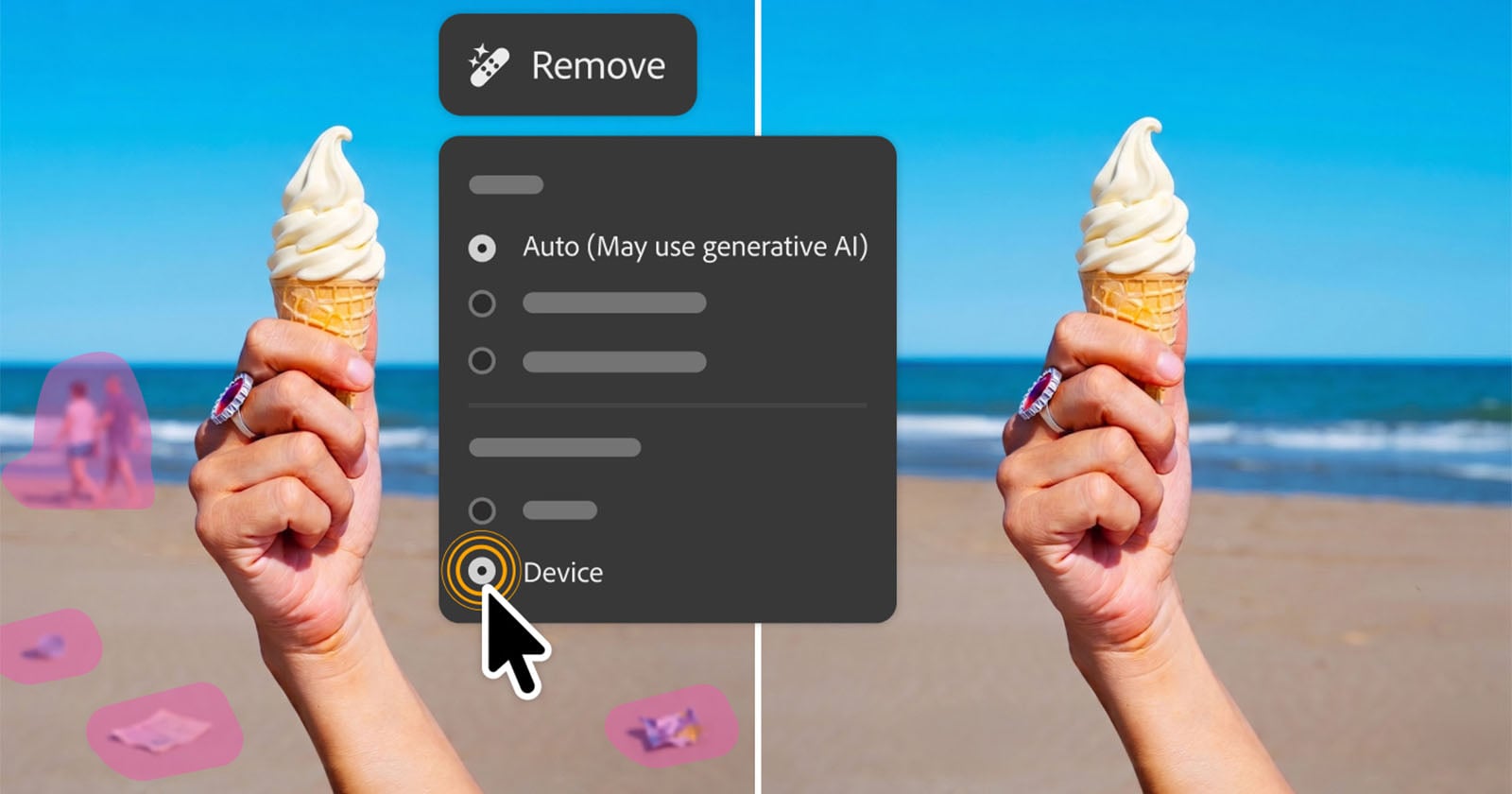
Speaking of Photoshop, the company has updated the Remove tool, which has, for a while, given you the option of using generative AI or not. If you chose to, the program would have to use a model stored on Adobe's cloud, though the company told us it was efficient enough that it didn't cost any credits. Now, however, you have the option to use the generative AI removal algorithm on-device, which could be useful if you'd prefer not to send your image to Adobe's servers, or if you're working offline.
 |
| We've had impressive results with Adobe's reflection removal tool in the past, and the company has made it even more versatile. Image: Adobe |
Finally, the company has updated the Reflection Removal tool that was originally introduced in Adobe Camera Raw. It says the tool will now isolate those reflections in a separate layer, rather than just hiding them, "giving you precise control over opacity for natural,
nondestructive results."
The company says all these updates, plus new features for Premiere and After Effects, will be rolling out to Creative Cloud subscribers throughout the week.
Press release:
From culling to compositing: New Creative Cloud innovations across every stage of your workflow
Have you ever spent hours manually reviewing thousands of photos from an event or portrait shoot to find the selects your clients will love? Redrawn a roto mask from scratch because the footage moved? Taken the perfect street portrait only to notice the shop window reflection cutting right across your subject's face? Every creative project has moments that are essential and moments that are simply necessary, and every minute spent on the latter is time away from the work that matters most to you.
Today we're sharing new features and upgrades designed to remove that friction and keep you in creative control, so you can get back to your craft.
Let’s dive into what’s new this week:
Faster culling, motion editing, and sharper results in Lightroom
We are evolving Lightroom into your complete photography workflow experience where you can organize, enhance, and edit your photos, all without leaving the app. This week’s updates make every stage of your process faster and more powerful:
- Assisted Culling is now generally available, ready for the most discerning photo editor with enhancements based on close collaboration with our photo community. New capabilities include:
- Face View which isolates each person in a photo and analyzes Eyes Open and Eye Sharpness, making it easier to evaluate shots at a glance.
- Stacking automatically groups similar images and recommends the strongest one, so you can
manage near-duplicates in a few clicks. - Customizable filters, precision dials, selection overrides, and more give you control over the entire process.
- Photo to Video brings your images to life, transforming any photo into polished b-roll or reels with AI-generated motion powered by Firefly and Google Veo. Use smart prompts based on your image or input your own creative direction to achieve your own vision.
- AI Sharpen brings Topaz Labs’ Noise-Aware Sharpen model directly into Lightroom, no exporting required, to recover fine details on flower petals, fur, foliage and more with pixel-level precision.
- All Sony RAW formats on the recently announced Sony a7R VI are now supported across Lightroom, Lightroom Classic, and Adobe Camera Raw, so you can move from import to export without missing a step.
From the timeline to the audio track, Premiere's latest updates are built around how editors actually work
With updates across Premiere this week, you now have faster AI masking, new effects, smarter audio controls, and tighter connections to Stock and Firefly, all without pulling you out of the timeline:
- Global Audio Mute lets you silence audio across the entire app in one click. Marker Search lets you pull up any marker by color or name across every open project.
- With Channel Blur, Gradient, and Noise FX, you can handle precise compositing or add organic animated texture right inside the timeline.
- 3D Spinback and Slide transitions give you dynamic motion with professional-grade easing controls built directly into your editing workflow.
- Single Word Captioning puts you in control at the word level without disturbing the broader caption block.
- The new Stock Panel Checkout lets you preview and license Adobe Stock assets without leaving Premiere. When you send multiple assets into a project through Firefly Boards, a sequence is created for you automatically.
- Object Mask is now faster and more refined. You get softer, more natural masks, and if media goes offline and gets relinked, you can regenerate the mask without starting over.
- The Sequence Index Panel gives you long-form edit control in one place. A/V Display Mode shows video and audio waveforms together in the Source Monitor, so complex timelines are easier to read and navigate.
Latest tools in After Effects make complex motion work faster, smarter and more connected
From rotoscoping to 3D rendering to vector workflows, After Effects' latest updates this week remove the tedious work that creates friction and slows down your creative process:
- Object Matte reimagines rotoscoping with four AI-powered tools, Object Selection, Quick Selection, Selection Brush, and Refine Edge, replacing the brush-only Roto Brush with the same AI precision already available and loved in Premiere.
- 3D in After Effects is getting a major upgrade, bringing your motion design work closer to full 3D production. You can now add real surface depth with Displacement Maps, apply cinematic Depth of Field across models, meshes, text, and shape layers, and use scripting APIs for Parametric Meshes for more control over complex scenes.
- You can now import SVG files directly into After Effects as editable shape layers, with gradients, strokes, and transparency all intact. And with a new copy-paste workflow from Illustrator, you can bring vector content across without any conversion.
More control with image editing in Photoshop
Photoshop's latest updates available now, give you more precise control over cleanup and reflection removal:
- Reflection Removal automatically detects and removes reflections from images shot through glass. Reflections are isolated in a separate layer, giving you precise control over opacity for natural, nondestructive results.
- Remove Tool now gives you access to a generative AI model on-device and offline, so your editing workflow doesn’t have to wait for a connection.
Illustrator's newest tool removes the friction between a rough concept and a finished vector
We know designers want tools that remove friction and speed up tedious workflows, without sacrificing creative control.
We recently introduced the new Concept to Vector feature, available now in Illustrator, to help professional designers move faster from rough concepts to usable work. Concept to Vector turns sketches or low-quality assets into clean, editable vector drafts, or can generate multiple stylistic variations from a single sketch or source image – directly within Illustrator.
Explore what’s new and let us know what you think
The latest Creative Cloud updates are rolling out this week. Together these bring you more creative control with less friction. Explore what's new and tell us what you think







 English (US) ·