
 3 hours ago
4
3 hours ago
4
If you don't have the most colorful computer, the fastest computer, or the nicest screen, you can at least have a ton of ports. For Acer's take on the premium $699 laptop, the Swift Air 14, the company doubled down on connectivity and battery life, adding top-of-the-line Thunderbolt 4 ports and up to 16 hours of battery life in our tests.
But battery life and ports alone, while important, don't make a laptop great. Competitors have stronger builds and, in some cases, better performance. Acer's choices are practical, but they might not be what everyone wants.
Design of the Acer Swift Air 14
The Acer Swift 14 feels more premium than I'd expect a $699 laptop to be, especially one from Acer, which is known for making tough decisions to hit certain budgets. The all-aluminum design isn't as solid as the MacBook Neo or Dell XPS 13. That's mostly due to flex in the Acer’s lid and on the keyboard. It feels nice in general, but if you look, you can find the small flaws.
Latest Videos FromTom's Hardware
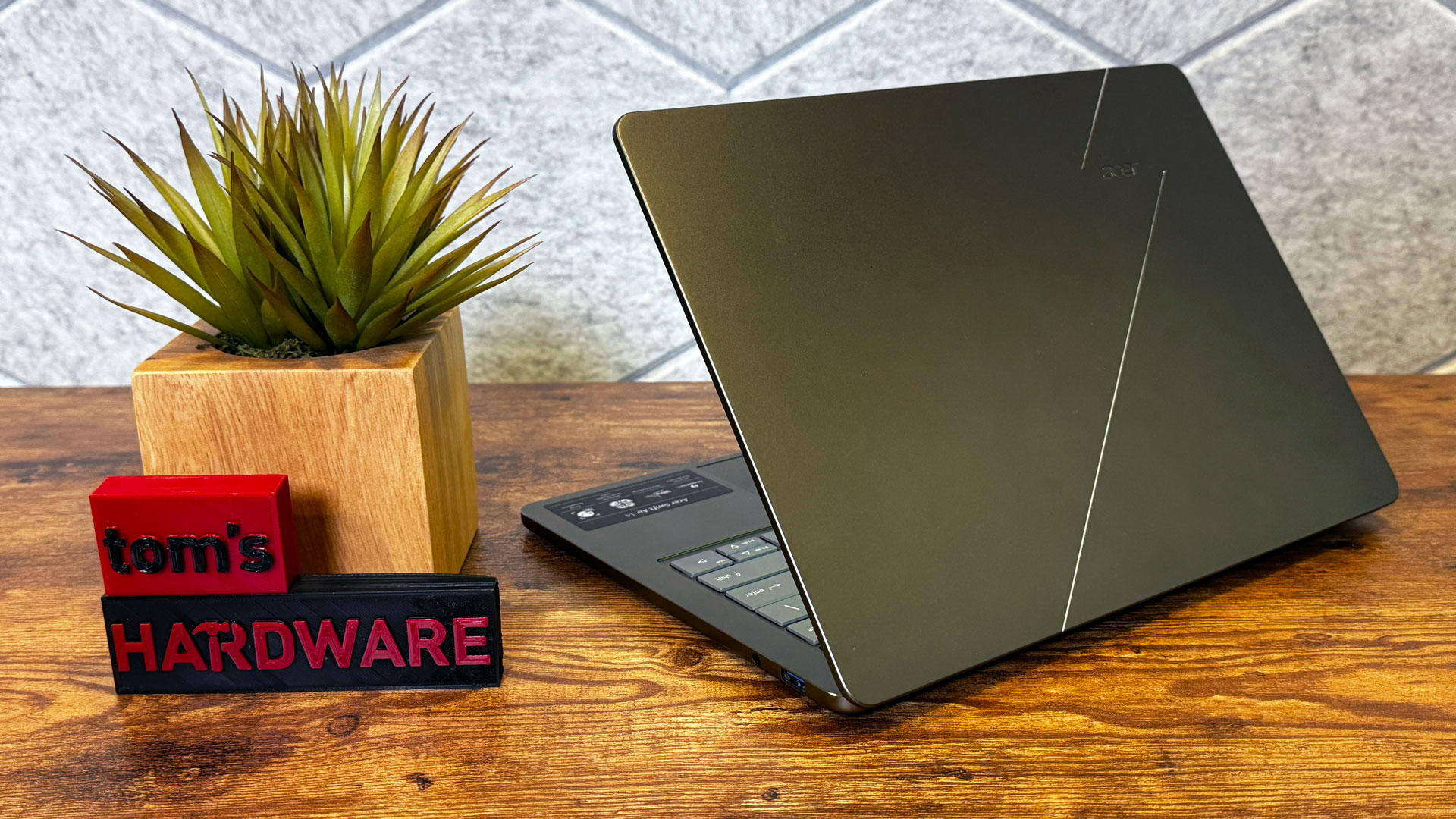
Acer is offering the Swift Air 14 in four colors worldwide, but here in the United States, there's just one: sage green. (In other countries, including Canada, there's also frost blue, blossom pink, and lilac purple.
Image 1 of 3
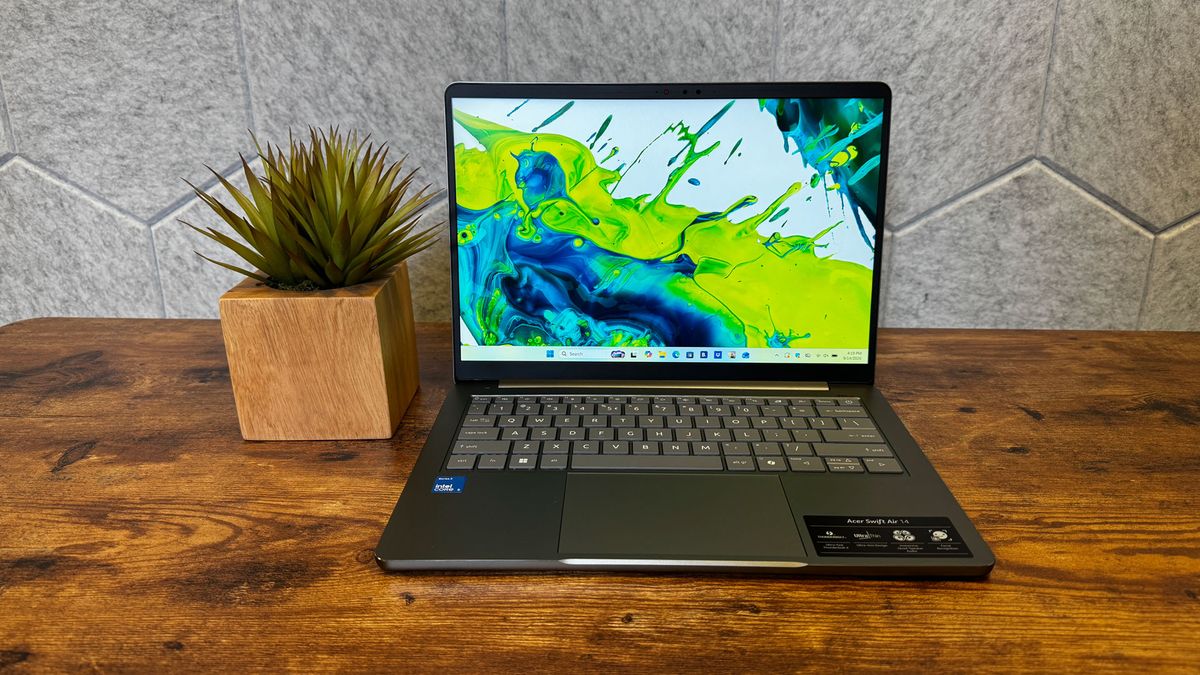
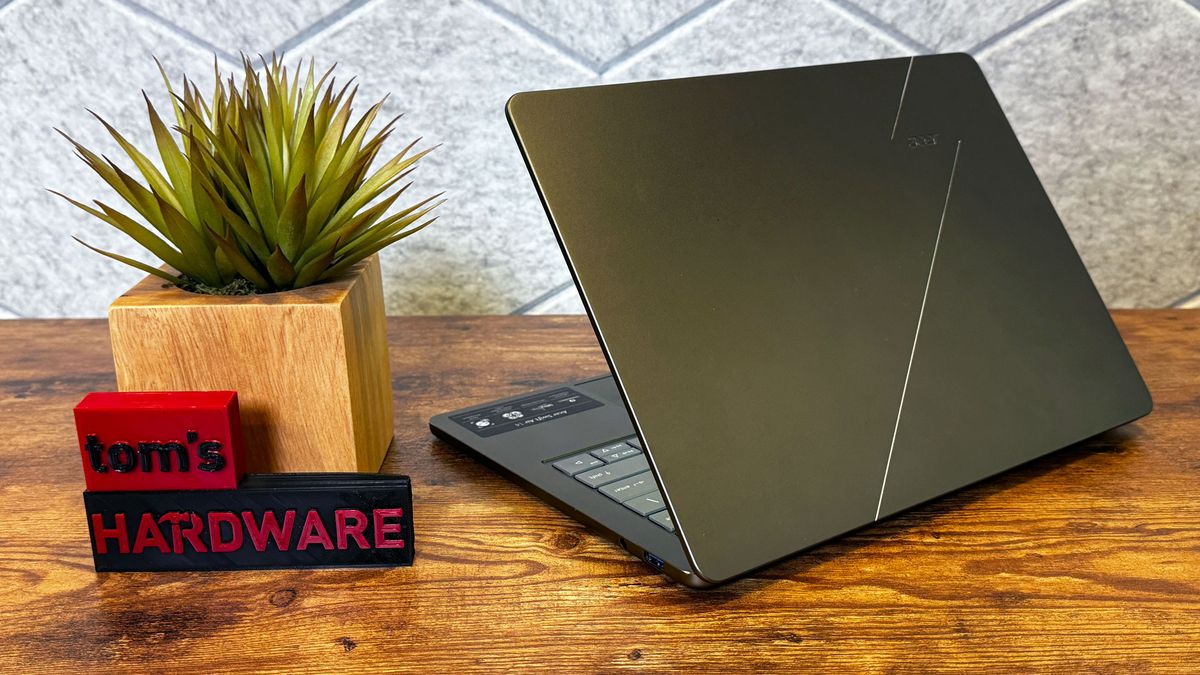
The lid is mostly plain, with an Acer logo and two silver accent lines. I like the sage color, which is more like an olive in some lights and silver in others. Like the MacBook Neo, the bezel is a bit thicker than I'd like, but not unforgivably so.
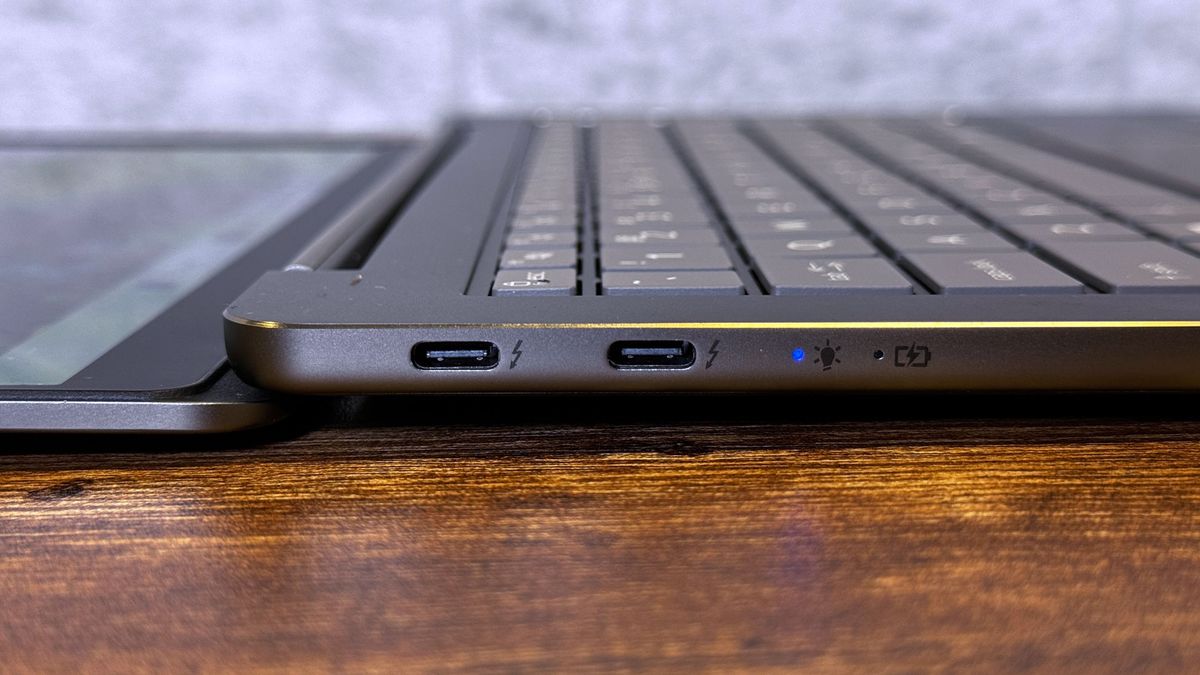
Where Acer wins on design is with its ports. On the left side of the laptop, you get two full Thunderbolt 4 ports over USB-C, which we haven't seen from any other laptop in this class yet. The right side features a 10GBps USB Type-A port and a 3.5 mm headphone jack. This system has more and faster ports than both the MacBook Neo and Dell XPS 13, which is great for people on a budget who still use a lot of peripherals, or want to use a wireless dongle while still having other ports available.
Image 1 of 2
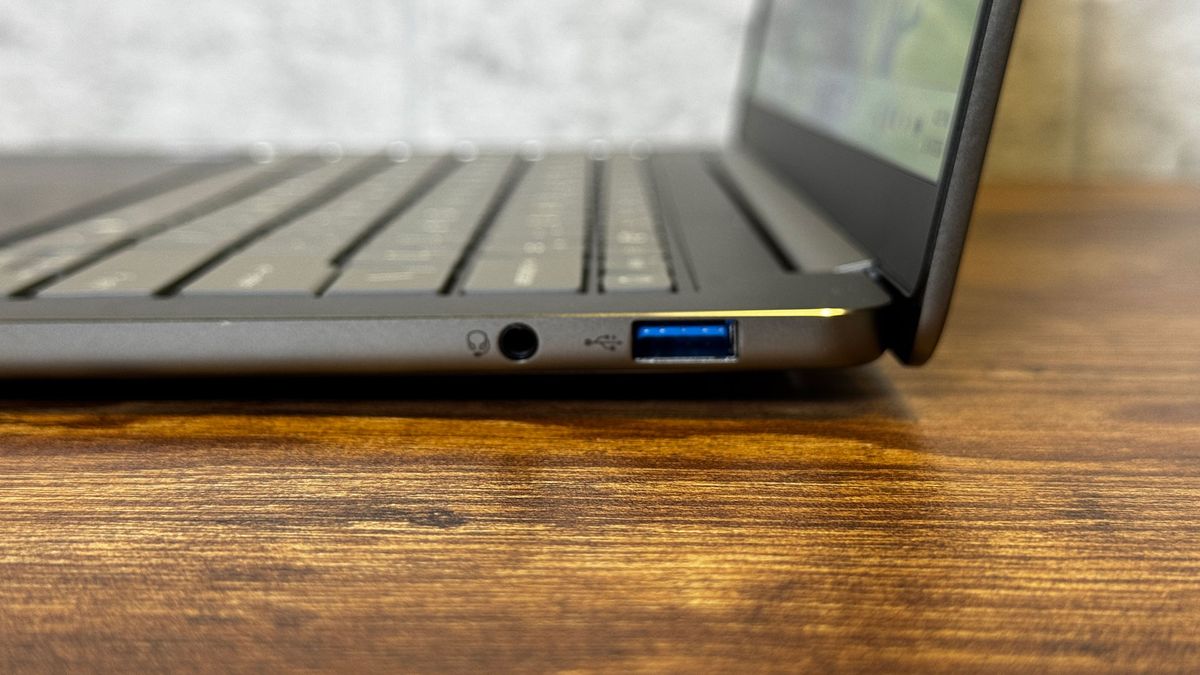
At 2.62 pounds, the Swift Air 14 is heavier than the 2.2-pound XPS 13, but still slightly lighter than the 2.7-pound Neo. I don't mind the weight, but others on my team found it felt heavy compared to Dell's laptop.
Stay On the Cutting Edge: Get the Tom's Hardware Newsletter
Get Tom's Hardware's best news and in-depth reviews, straight to your inbox.
At 0.51 inches at its thinnest, the Swift is on par with the Neo and XPS 13 (both 0.5 inches thick). There's a small foot on the bottom of the Swift that pushes it to 0.71 inches thick, which might matter a bit in a backpack, but it won't feel any thicker than the other systems when you're holding it.
Acer Swift Air 14 Specifications
Swipe to scroll horizontally
CPU |
Intel Core 5 320 |
Graphics |
Intel Graphics (integrated) |
Memory |
8GB LPDDR5-7467 (single-channel) |
Storage |
512GB PCIe Gen 3 NVMe SSD |
Display |
14-inch, 1920 x 1200, IPS, VRR up to 120 Hz |
Networking |
Intel Wi-Fi 6E AX211, Bluetooth 5.3 |
Ports |
2x Thunderbolt 4 (USB-C), USB 3.2 Gen 1 Type-A, 3.5 mm headphone jack |
Camera |
1920 x 1200, IR for Windows Hello |
Battery |
70 WHr |
Power Adapter |
100W |
Operating System |
Windows 11 Home |
Dimensions (WxDxH) |
12.36 x 8.66 x 0.71 inches (313.99 x 222.65 x 18 mm) |
Weight |
2.62 pounds (1.19 kg) |
Price (as configured) |
$699.99 |
Productivity Performance on the Acer Swift Air 14
The Intel Core 5 320, 8GB of RAM, and 512GB PCIe Gen 3 SSD make the Acer Swift 14 a decent (but not startling) performer that's best for a few simple tasks at a time.
Image 1 of 3
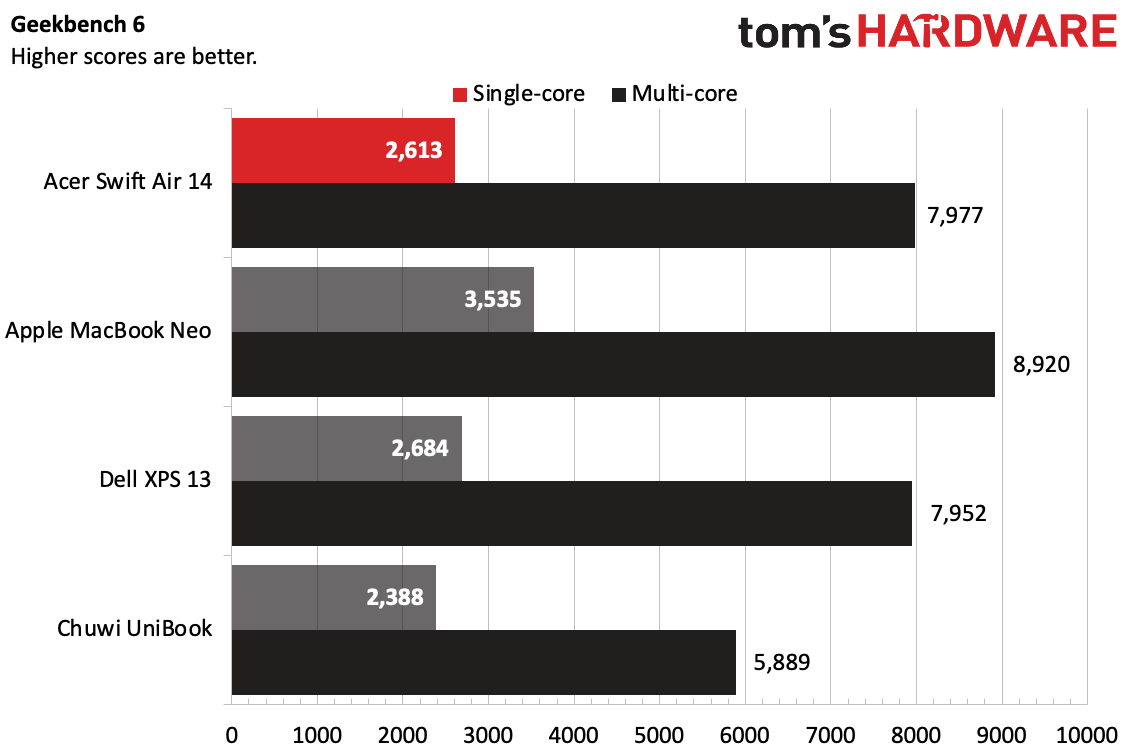
On Geekbench 6, the Swift Air notched a single-core score of 2,613 and a multi-core score of 7,977, putting it in close proximity to the Dell XPS 13, which uses the same chip. The Chuwi UniBook, with an Intel Core 3 304, was the lowest on the charts, while the MacBook Neo with its Apple A18 Pro was the fastest performer.
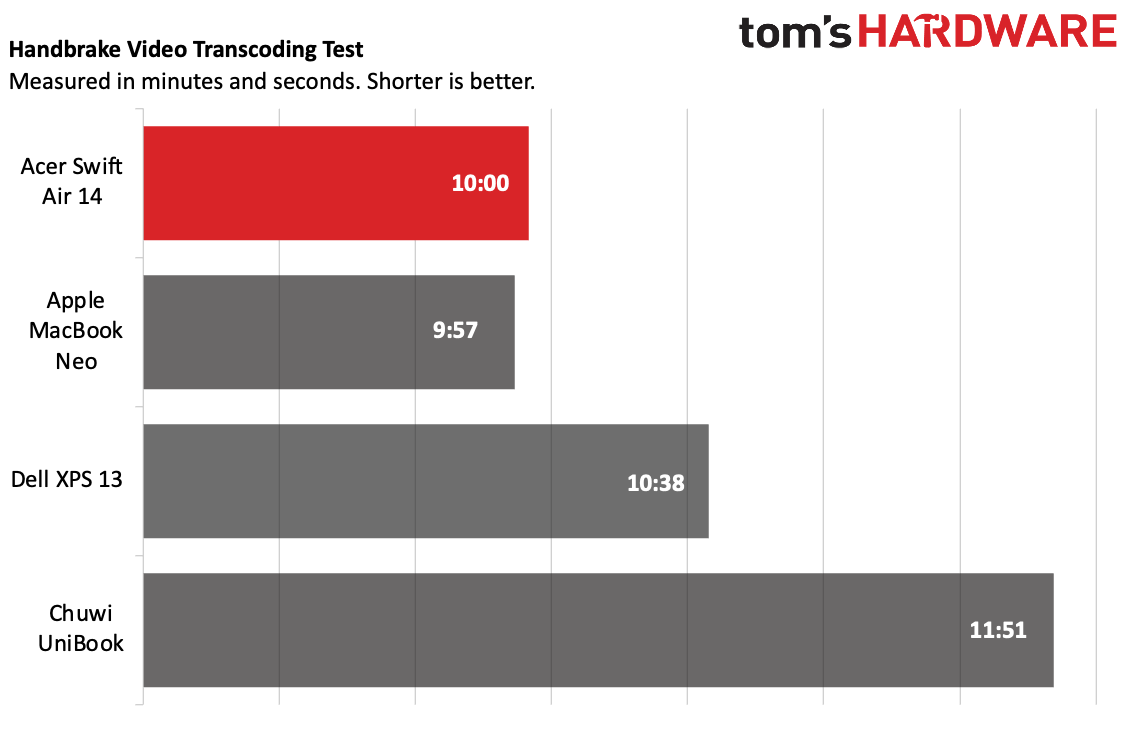
The Swift 14 outperformed on Handbrake, transcoding a 4K video to 1080p in 10 minutes, just 3 seconds behind the Macbook Neo. The Swift was a surprising 38 seconds faster than the XPS with the same chip.
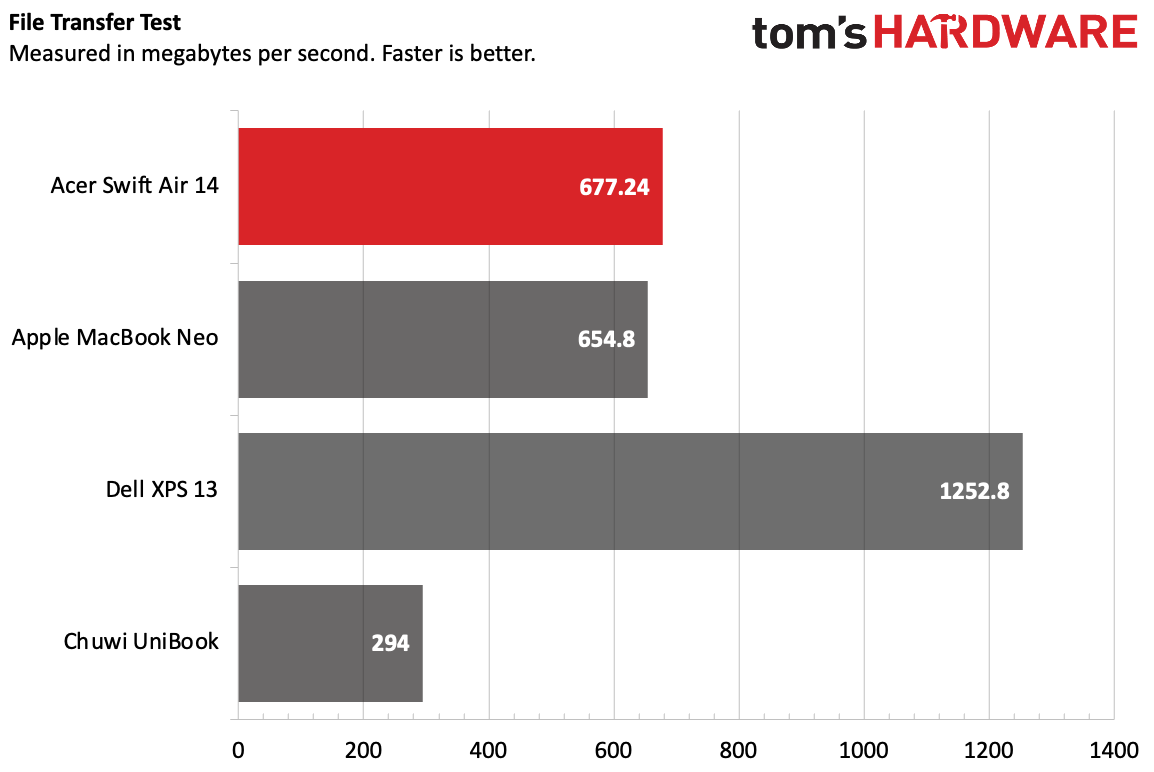
On our file transfer test, the Swift Air copied 25GB of files at a rate of 677.24 MBps, slightly faster than the MacBook Neo, but significantly slower than the XPS 13.
Usually, we stress test productivity laptops running Cinebench 2026. But like some other Wildcat Lake-based laptops, the Swift Air wouldn’t run that benchmark. Instead, to get some speeds, we opted to measure while running Handbrake. While transcoding a 4K video to 1080p, the Core 5 320's two P cores ran at 3.3 GHz, while the four low-power E cores ran at just over 3 GHz.
Display on the Acer Swift Air 14
Acer's 14-inch, 1920 x 1200 screen is colorful enough for its price, but I sure wish it were a bit brighter.
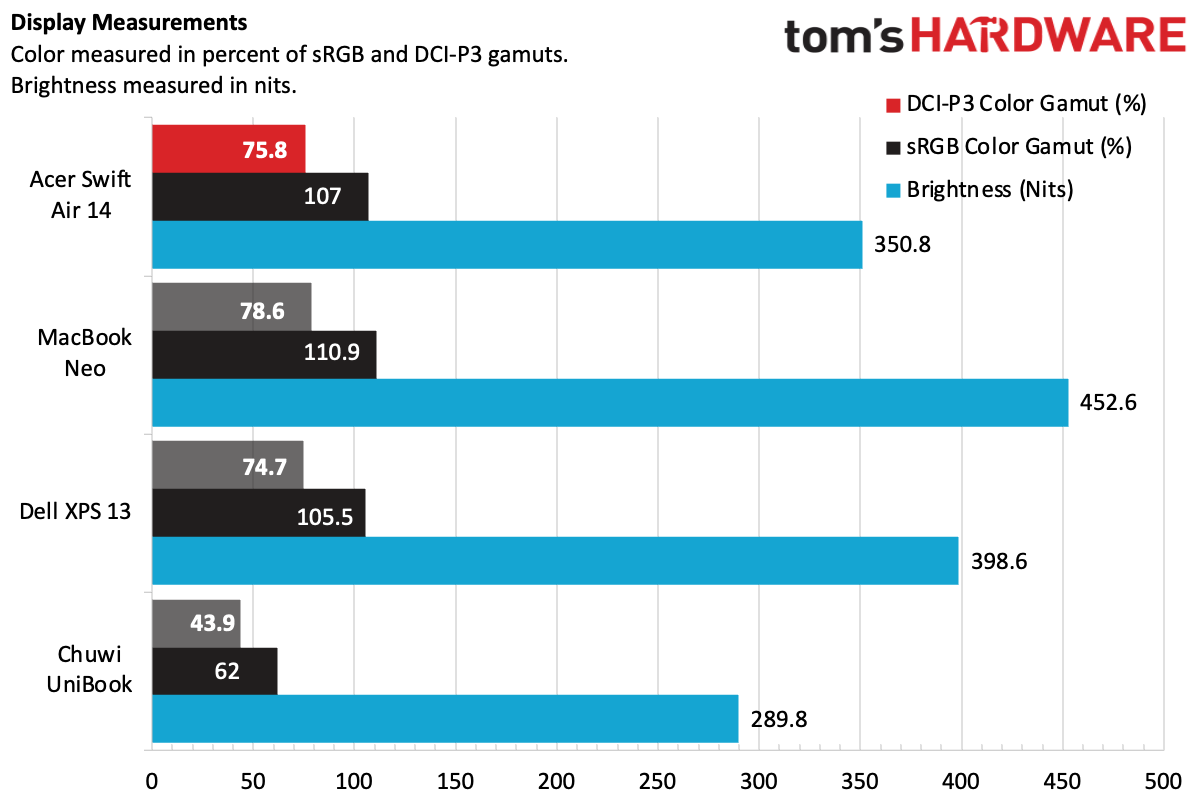
While I watched the trailer for Avengers: Endgame, I found myself reaching for the button to raise the brightness even in decently lit scenes (like a group gathering in Avengers Tower), only to find the brightness was turned all the way up. In darker scenes, like those taking place in the X-Mansion, shadows were overwhelming. At least the blacks were deep.
On our testing, we found that the Swift Air 14 covered 107% of the sRGB color gamut and 75.8% of DCI-P3. That's within range of both the MacBook Neo and the Dell XPS 13. But both of those laptops have more luminous panels (the XPS 13's is also higher resolution, at 2560 x 1600) that make the colors look better than on the Swift Air.
Keyboard and Touchpad on the Acer Swift Air 14
The keyboard on the Swift Air 14 is fine, but it has some flex while you type, and the keycaps are a little slippery. In fact, they're cheap-feeling. There's more travel than I would have expected, but with the flex, I'm not sure it mattered.
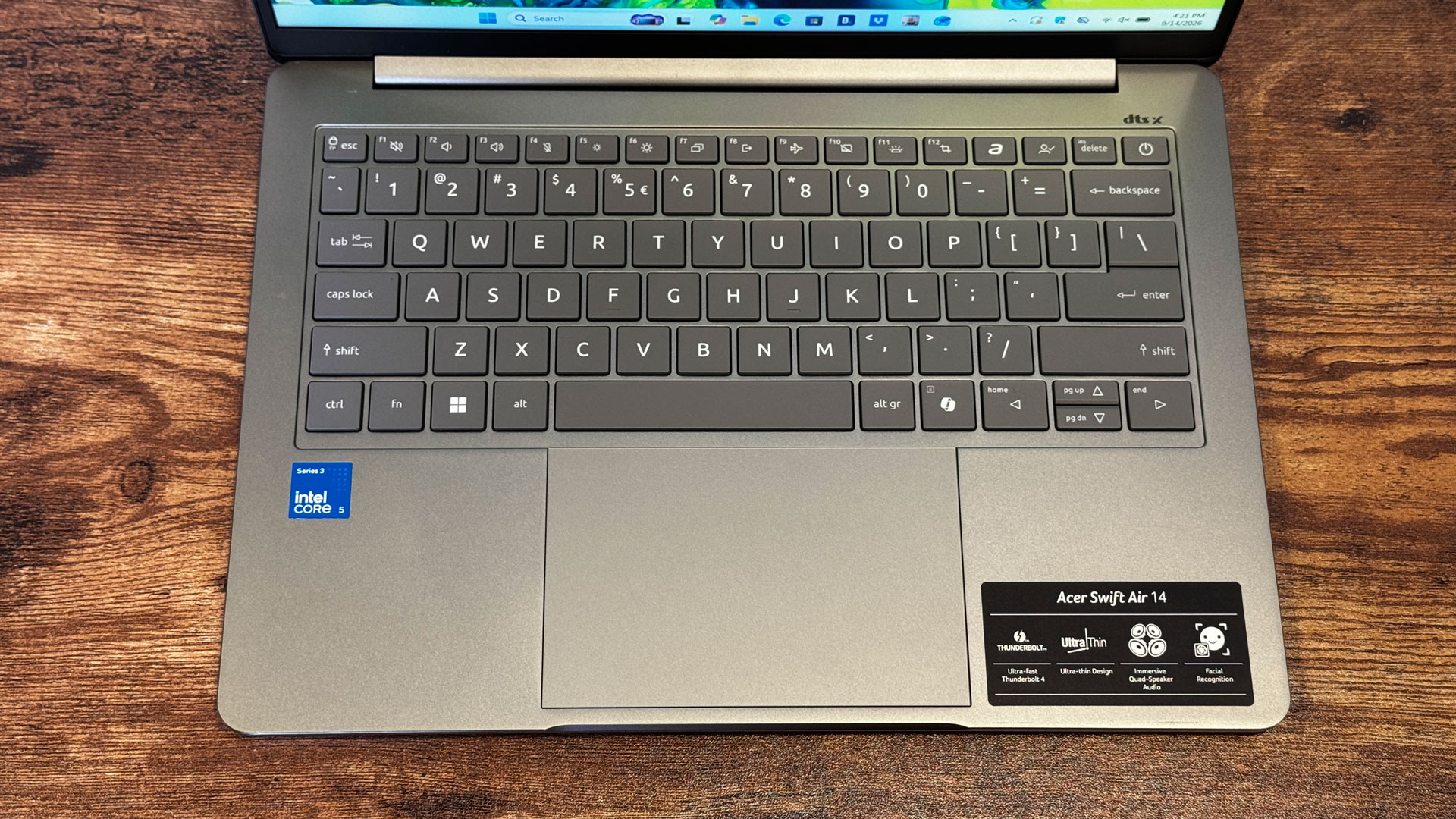
On monkeytype.com, I hit 108 words per minute, which isn't bad, but I'm usually faster. I hit that at 98% accuracy.
The touchpad has a shallow click outside of the very far corners (and also causes the system to flex), but its smooth, glass, and Windows gestures work seamlessly.
Battery Life on the Acer Swift Air 14
For a laptop in its class, the battery life on the Acer Swift Air 14 is fantastic. The system lasted 16 hours and 52 minutes on our battery test, which includes web browsing, video streaming, and light OpenGL work with the screen set to 150 nits.
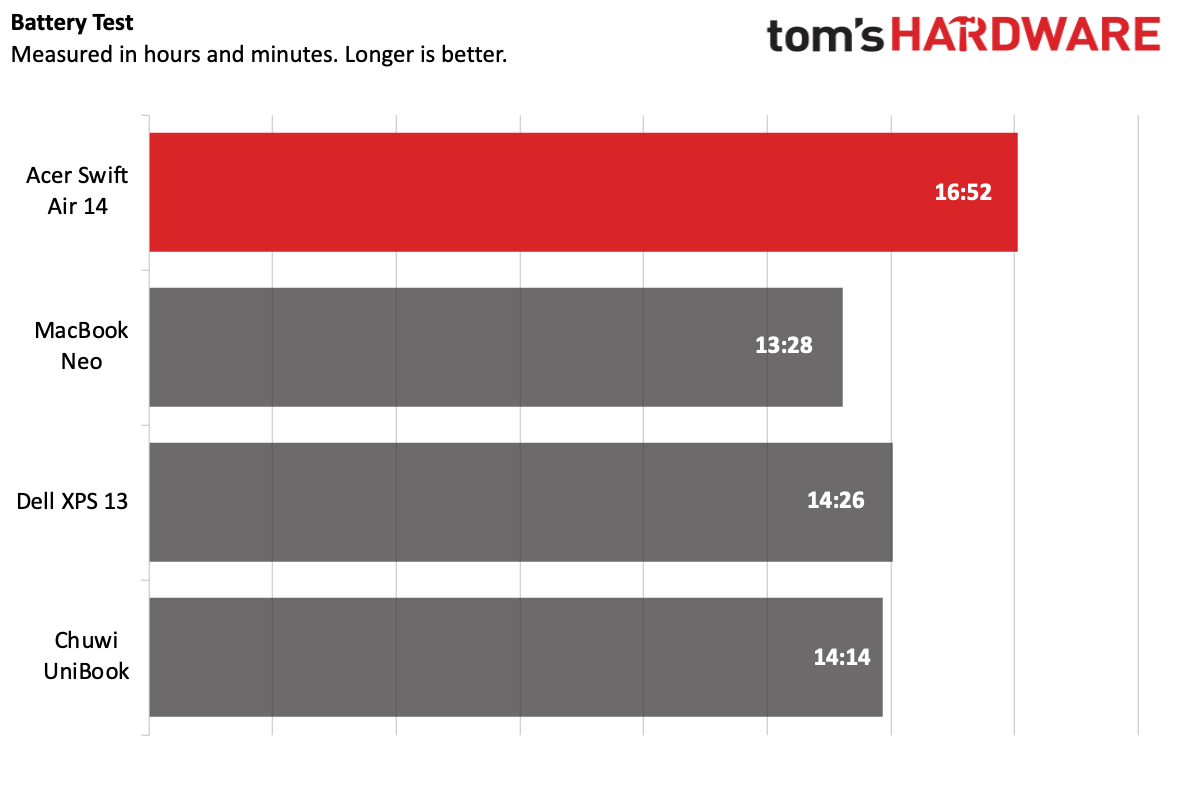
That was the longest of the group by more than 2 hours. The next highest, the Dell XPS 13, lasted 14:26 on the test, while the Neo brought up the rear at 13 hours and 28 minutes.
Audio on the Acer Swift Air 14
The speakers on Acer's colorful 14-incher are just OK. The quad-speaker system doesn't offer a ton of depth. It's fine at $699.99, but not impressive.
Alice Merton's "Ignorance is Bliss" just filled my living room, but wasn't as loud as I would like. The artist's vocals were a bit hollow, though the song's guitars and snappy drums sounded decent for the price.
You can make adjustments in the DTS:X Ultra app, though I stuck to the default music mode. (Switching to voice made vocals louder, but drowned everything else out). There's also a custom EQ with three preset slots if you want to set the speakers to your liking. Taking some time to tweak, I was able to get the vocals and treble a bit closer to my liking.
Upgradeability of the Acer Swift Air 14
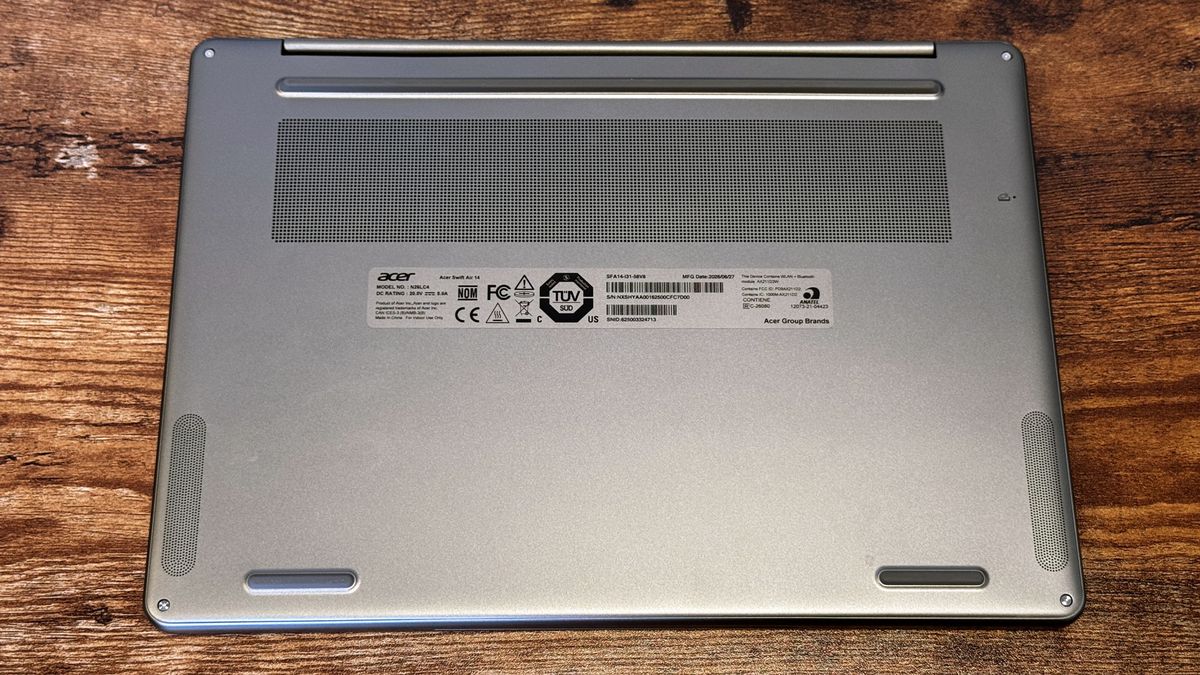
There are four Torx screws on the bottom of the Acer Swift Air 14. While the bottom of the laptop is metal, it's very thin, and the clips holding it to the rest of the chassis are made of plastic. I had to go very slowly around the edges with a prying tool to get inside.
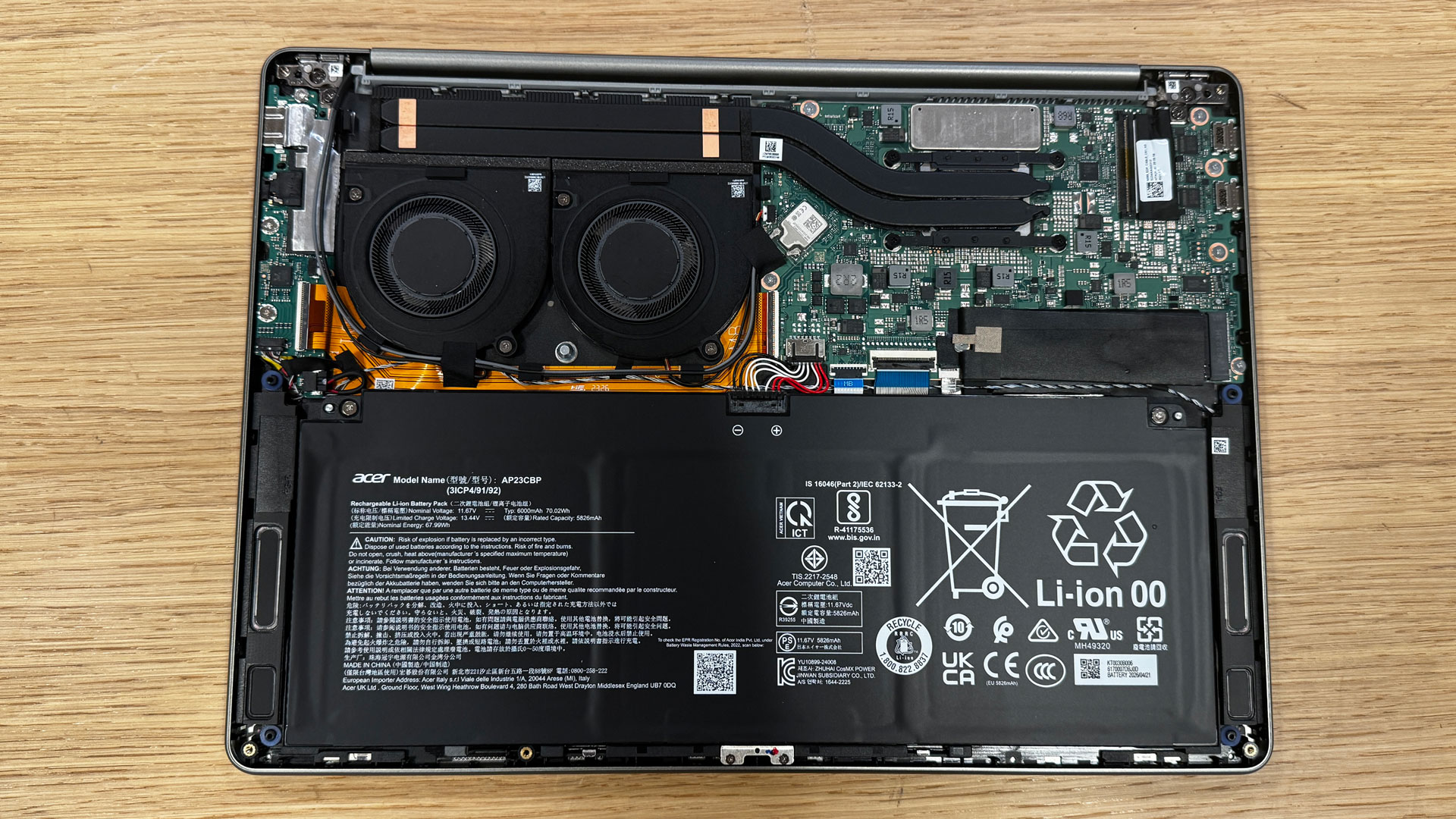
The two major components that you can remove are the SSD and the battery. There's only one SSD slot.
Heat on the Acer Swift Air 14
Usually, we measure how hot a laptop gets during our strenuous Cinebench gauntlet. Because this system couldn't run that test, we stepped down to measuring with Handbrake video encoding.
During that test, the keyboard hit 96 degrees Fahrenheit, while the touchpad was a cool 84.1 F. The hottest point on the bottom of the laptop reached 96.9 F. None of these indicate an overheating laptop, but that's also because we couldn't run more difficult workloads.
Internally, the CPU measured 74.8 degrees Celsius while running the same test.
Webcam on the Acer Swift Air 14
Acer is using a 1920 x 1080 webcam on the Swift Air 14, but higher resolution doesn't always mean better. In testing, I found that it produced noisy, sometimes blurry images. Like many other cameras, it also struggled with open windows.
On the bright side, Acer also includes an infrared camera to support Windows Hello for facial recognition. There’s a small privacy shutter built into the bezel.
Software and Warranty on the Acer Swift Air 14
Acer packs the Swift Air 14 with extra software. Some is its own, but there’s also a lot of bloatware that it likely receives a licensing fee for.
There are more than ten of Acer-branded utilities. The most important of these is AcerSense (which also has a dedicated key on the keyboard). This offers simple performance statistics, extra settings, warranty information, and a few disparate links to excess programs.
Among the other apps are Acer's PurifiedVoice and PurifiedView for noise cancellation and camera enhancements during meetings, a built-in video speed controller, and a built-in QR code reader. That last one is kind of handy in theory, though it often didn't see the codes I was trying to scan.
Even on a $700 laptop, the inclusion of Forge of Empires, Solitaire, Amazing Block Blast, the Google Play Games beta, Dropbox, Booking.com, NordVPN, and a knockoff app store called App Explorer feels like a bit much. These are found in the Start Menu, pinned to the taskbar, and in the bookmarks bar in Microsoft Edge. It's just too much.
Acer sells the Swift Air 14 with a one-year warranty.
Acer Swift Air 14 Configurations
We tested the Swift Air 14 in a $699.99 configuration with an Intel Core 5 420, 8GB of memory, 512GB of storage, and a sage green colorway. As of this writing, this system is available at Best Buy in the United States.
Acer tells us that three additional models will be available exclusively at Best Buy Canada at $999.99 CAD, though we don't know what will be different or if they will include the other colors.
Bottom Line
If you have a budget of $699 and prioritize ports over all else, the Acer Swift Air 14 should be your choice. It has high-speed Thunderbolt 4 ports, a headphone jack, USB Type-A, and a headphone jack. With a 1920 x 1200 screen that isn't the brightest, it also reached over 16 hours of battery life in our tests.
But if you prioritize anything else, the MacBook Neo and Dell XPS 13 offer some significant upgrades at the same price. The Neo has performance for the price on lock, as well as improved build quality and the brightest screen of the bunch. The XPS 13 has the highest-resolution display and makes it a touchscreen; it also has a stiffer build than the Swift Air.
But if battery life and ports are your two strongest priorities, and you're willing to make some sacrifices on build quality and uninstall a bunch of bloat, the Swift Air 14 definitely earns a place among the recent budget laptop competition.







 English (US) ·