
 4 hours ago
6
4 hours ago
6
Acer’s Nitro 60 gaming mid-tower ($1,599 as tested from Micro Center) delivers gaming essentials without the premium price of its Predator towers. Its combination of an Intel Core i7-14700F and Nvidia GeForce RTX 5070 is effective for entry-level 4K gaming performance. Outside, its attractive, glass-trimmed case lends it an upscale appearance, while inside, its RGB fans operate quietly even while gaming. It misses a few things – namely, the wireless standard is only Wi-Fi 6 and no peripherals are included – but does well everywhere else.
Design of the Acer Nitro 60
The Nitro 60 sticks to a familiar mid-tower gaming template, built around an all-black chassis with a tempered glass side panel that highlights its internals. Four RGB fans — two front intakes, one on the CPU cooler, and a rear exhaust — provide the expected glow of color. While it certainly looks the part, the design doesn’t differentiate it from the many towers in this price bracket. It’s a welcome demonstration of restraint from Acer, known for bolder and occasionally polarizing designs in its gaming line. This conventional approach provides a sense of normalcy.
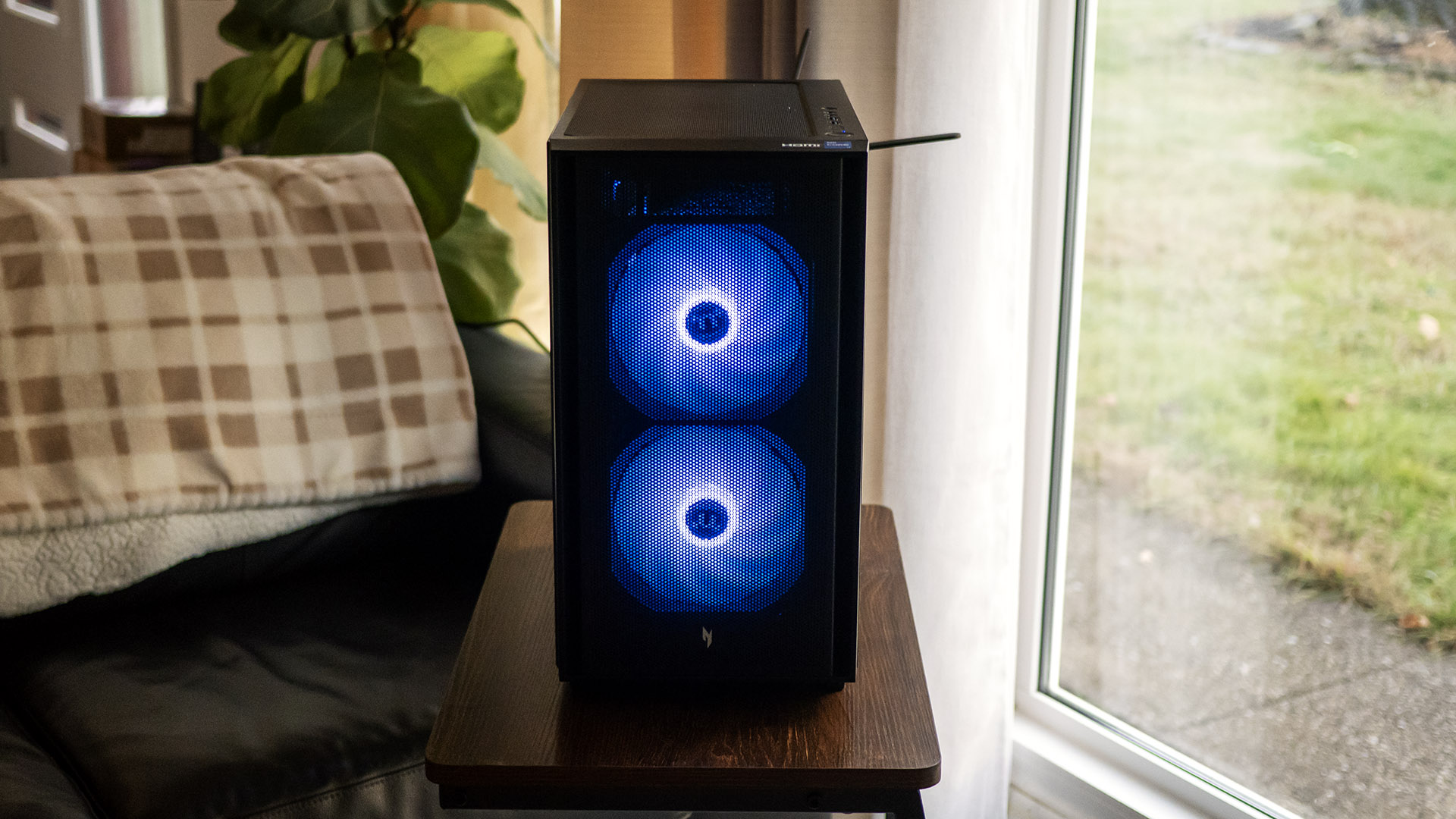
The Nitro 60’s stout dimensions of 8.5 x 14.9 x 15.9 inches (WDH) make it smaller than many other mid-towers. Build quality is solid, with clean edges, a blackout interior, and tempered glass that lends a premium feel.
Lighting is divided into two zones: one for the two RGB DIMMs and another for the four fans. You can adjust colors and patterns in the Windows Dynamic Lighting app. Acer includes Gigabyte’s Dynamic Light app, but I wasn’t able to get this to open, preventing me from changing the lighting on the fans or DIMMs. I instead installed Gigabyte’s RGB Fusion, which ultimately enabled independent customization of the fans and DIMMs.
Specifications
Swipe to scroll horizontally
CPU | Intel Core i7-14700F |
Motherboard | Gigabyte B760M C V2 |
Memory | 32GB DDR5-6000 (2x 16GB) |
Graphics | Gigabyte GeForce RTX 5070 Windforce OC SFF (12GB GDDR7, 2,542 MHz boost clock) |
Storage | 2TB M.2 PCIe Gen 4 SSD (Kingston SNV3S20000G) |
Networking | 2.5 Gbps Ethernet, RealTek RTL8851BE Wi-Fi 6, Bluetooth 5.3 |
Front Ports | 2x USB Type-A, 3.5 mm headphone, 3.5 mm audio |
Rear Ports | 4x USB Type-A 2.0, USB Type-A 3.2 Gen 2, USB Type-C 3.2 Gen 2x2, PS/2, 3x 3.5mm audio jacks |
Power Supply | 850W (Thermaltake Toughpower GT) |
Cooling | 120 mm tower air cooler |
Operating System | Windows 11 Home |
Dimensions (WxDxH) | 8.5 x 14.9 x 15.9 inches (216 x 378 x 404 mm) |
Price (as configured) | $1,599.99 (on sale from $2,099.99) |
Ports and Upgradeability on the Acer Nitro 60
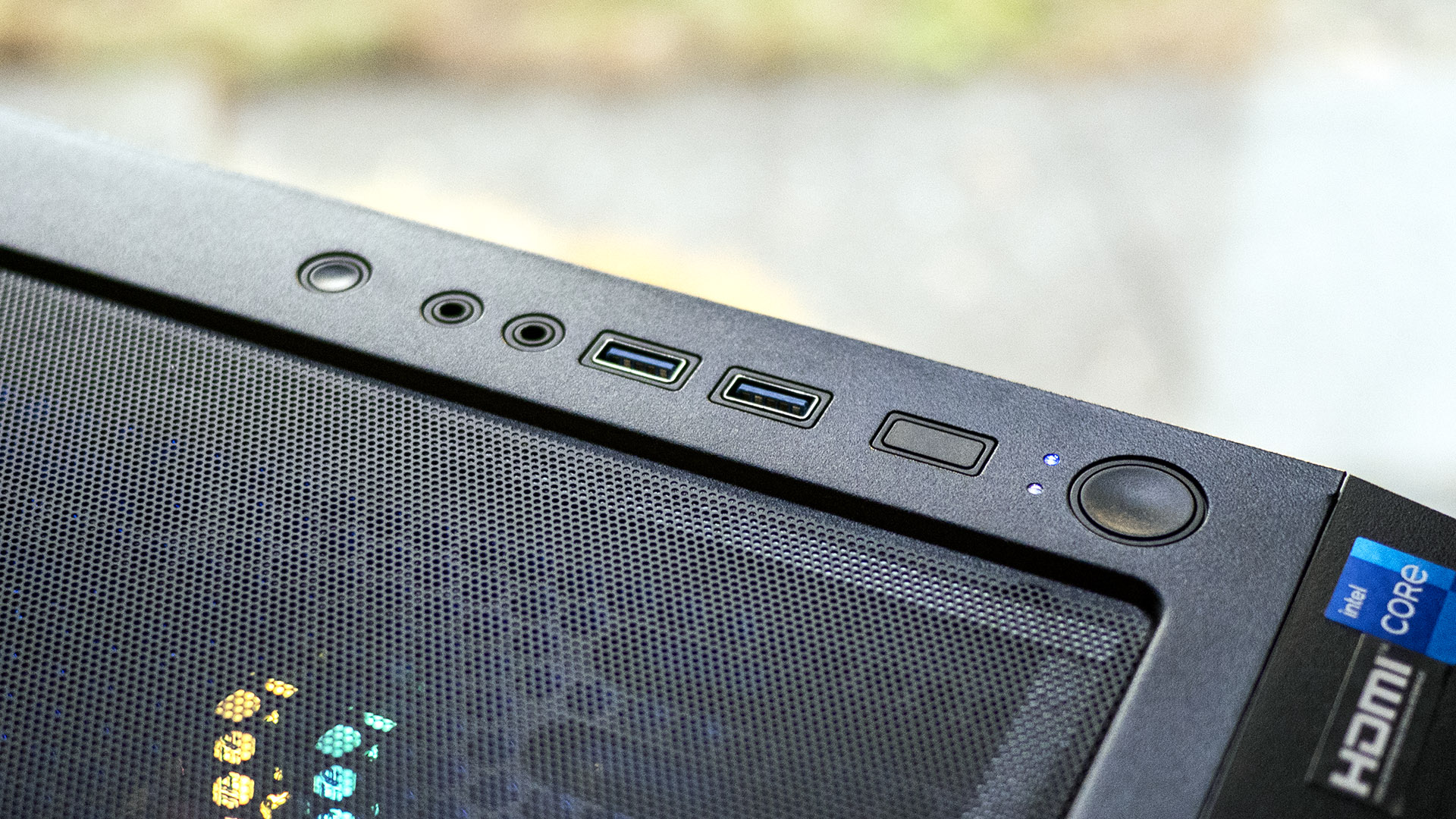
Up front, the Nitro 60 provides two USB 3.2 Type‑A ports, 3.5 mm headphone and microphone jacks, plus power and reset buttons. It’s a decent selection, though the lack of a USB-C port is notable, particularly there is room for another USB port, but the cutout is blocked off. These connections are conveniently placed if the tower sits on a floor, though less so on a desk where cables tend to cascade downward.
Rear I/O includes a USB‑C 3.2 Gen 2x2 port, a USB‑A 3.2 Gen 2 port, four USB 2.0 ports, and three 3.5 mm audio jacks. An old‑school PS/2 port is also present, which feels dated (though it's still fairly common). The motherboard’s HDMI and DisplayPort outputs are disabled since the Core i7‑14700F lacks integrated graphics.
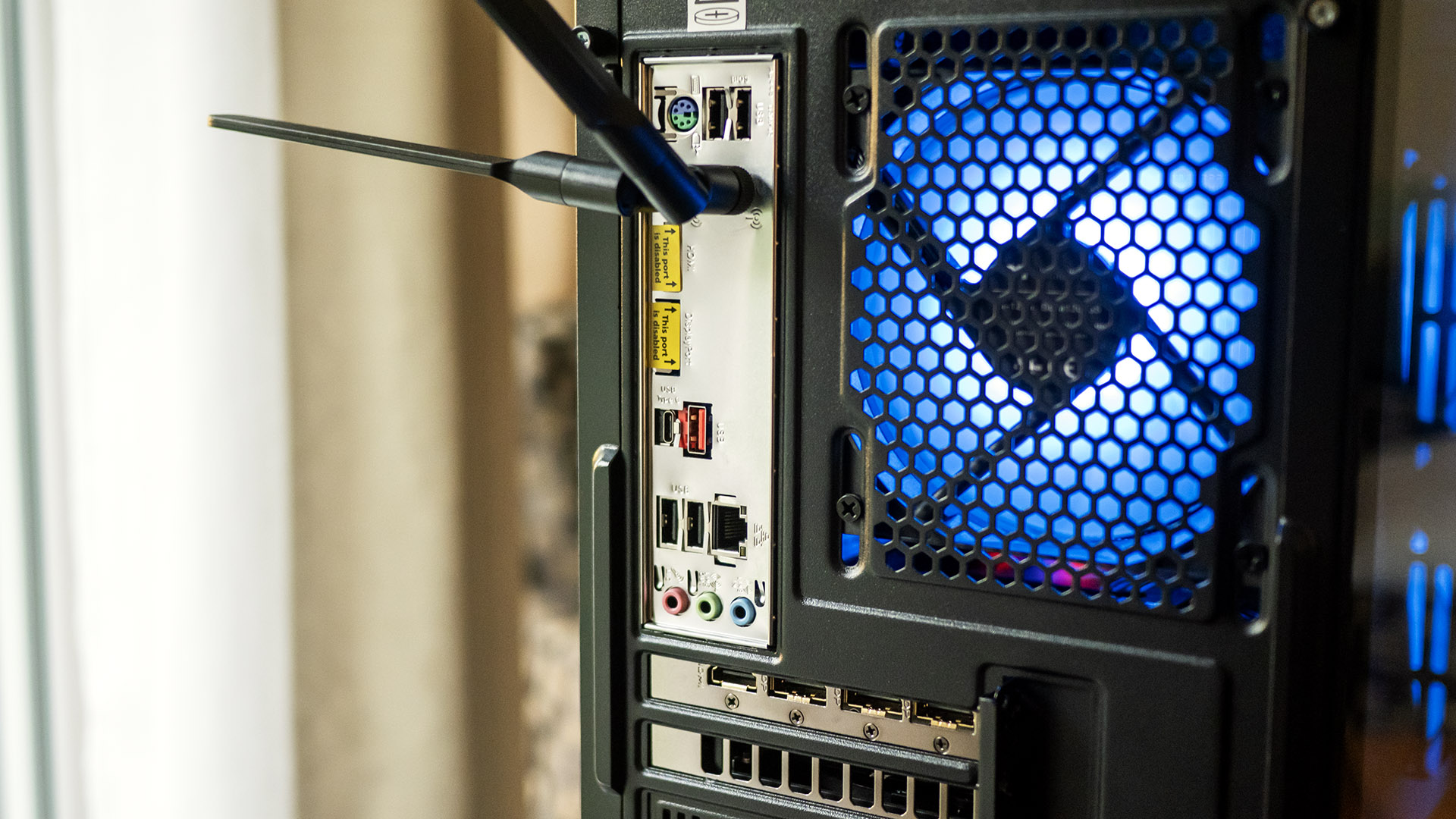
Networking is handled with a 2.5 Gbps Ethernet jack alongside built‑in Wi‑Fi 6 and Bluetooth 5.3. Faster Wi‑Fi 6E or 7 would have been better, but this configuration should suffice for most users. The included wireless antennas must be screwed in.
The side panels detach after you unscrew two thumbscrews for each. The tempered glass panel falls to the side after the screws are removed, so it’s important to support it while doing so.
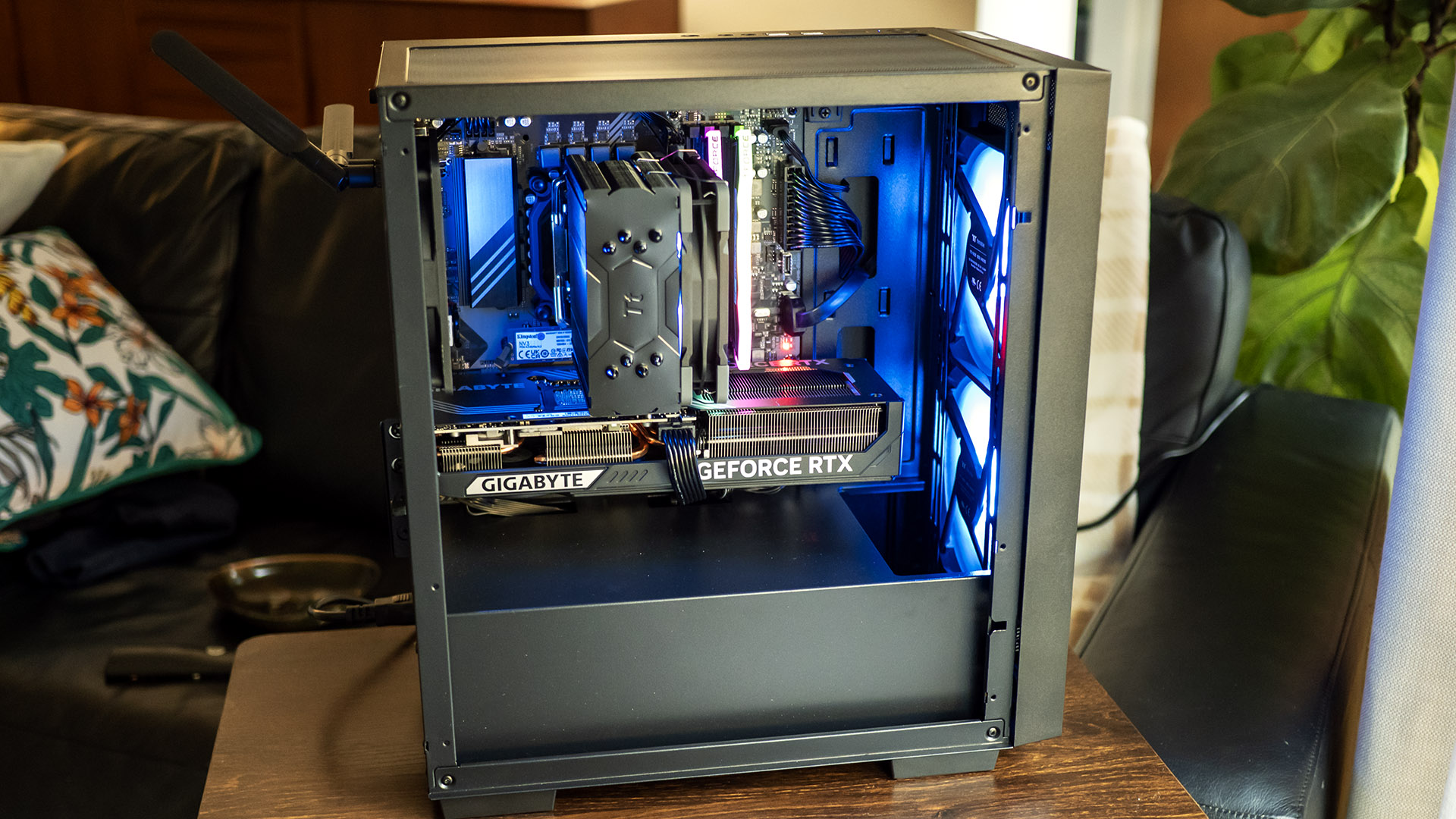
Inside, the Gigabyte B760M C V2 motherboard and a tall 120 mm CPU air cooler take center stage. It’s notable that Acer used a readily available aftermarket motherboard rather than an OEM or proprietary model. Its expansion is generous, with four DIMM slots, four PCIe slots, and three M.2 slots. Cable management is mostly hidden thanks to the isolated PSU chamber, though the right‑side panel conceals some untidy bundles.
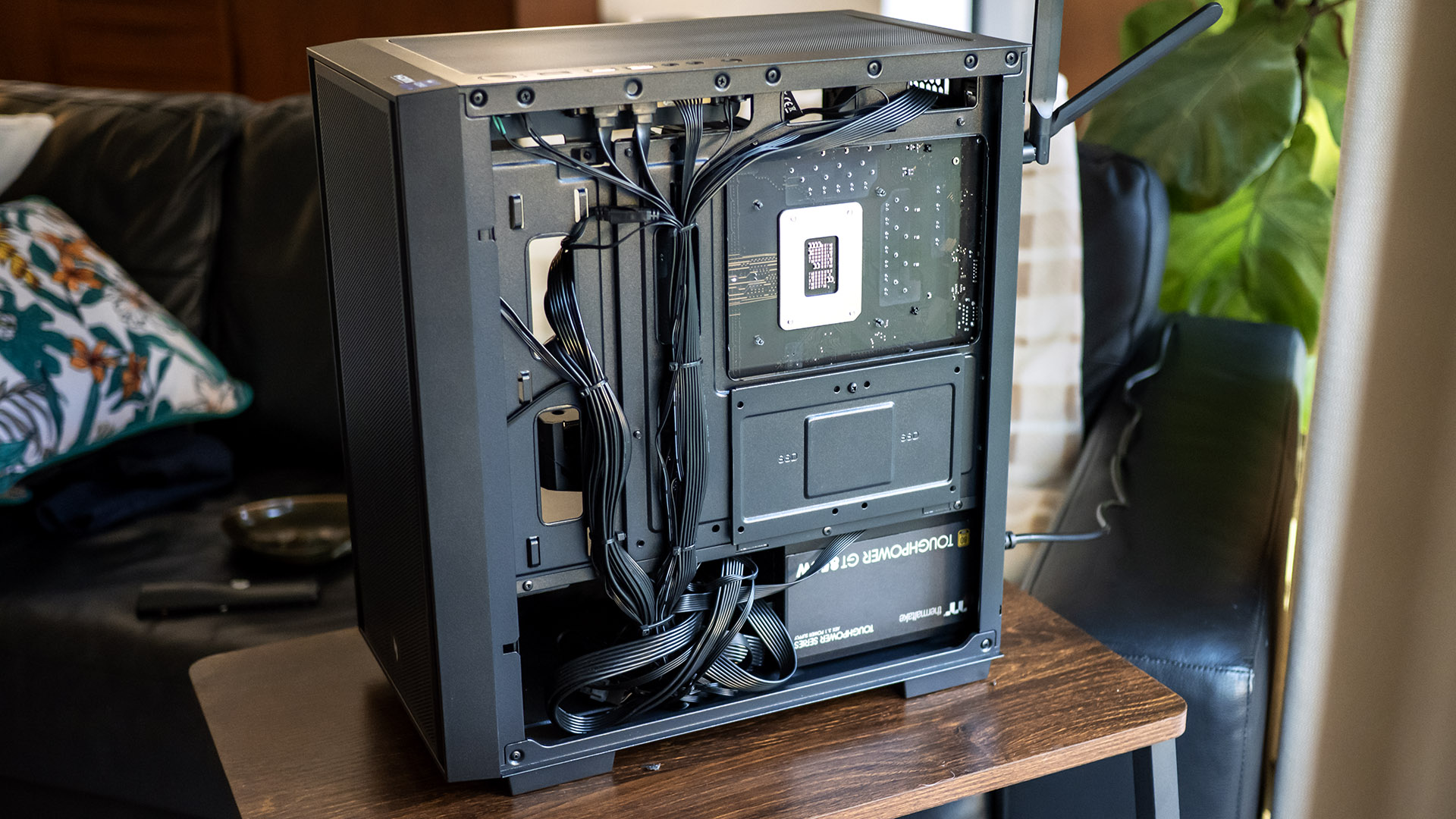
Storage expansion supports one 2.5‑ or 3.5‑inch drive, with SATA cables included. A modular 850 W Thermaltake power supply is a surprising inclusion, as many systems in this price range ship with non‑modular units. Extra cables are provided in the box.
For maintenance, the case features slide‑out dust filters beneath the PSU and on the top panel, simplifying cleaning. The front panel also comes off by tugging the handhold on its bottom edge.
Gaming and Graphics on the Acer Nitro 60
Our Acer Nitro 60 features a Core i7-14700F processor, a GeForce RTX 5070 graphics card, and 32GB of DDR5 RAM. Although the memory is rated for 6,000 MHz, it was only running at 4,800 MHz out of the box, which is how we conducted our testing. I had to access the BIOS to enable XMP1 for it to run at its rated speed.
To test the Nitro 60, I played Call of Duty: Modern Warfare III at 3840 x 2160 at the Extreme preset with DLSS enabled and observed a fluid 90 to 100 fps in most maps, with no stuttering.
For context, we compared the Nitro 60 to several gaming towers. The closest rival is the Asus ROG G700 ($2,029 as tested), which pairs a Core Ultra 7 265KF with the same GeForce RTX 5070. We also included the CyberPowerPC Gamer Supreme ($1,859), built around an AMD Ryzen 7 9800X3D and RTX 5060 Ti, and the iBuyPower Y40 Pro ($1,899) which features a higher-end Ryzen 9 7900X and RTX 5070 Ti.
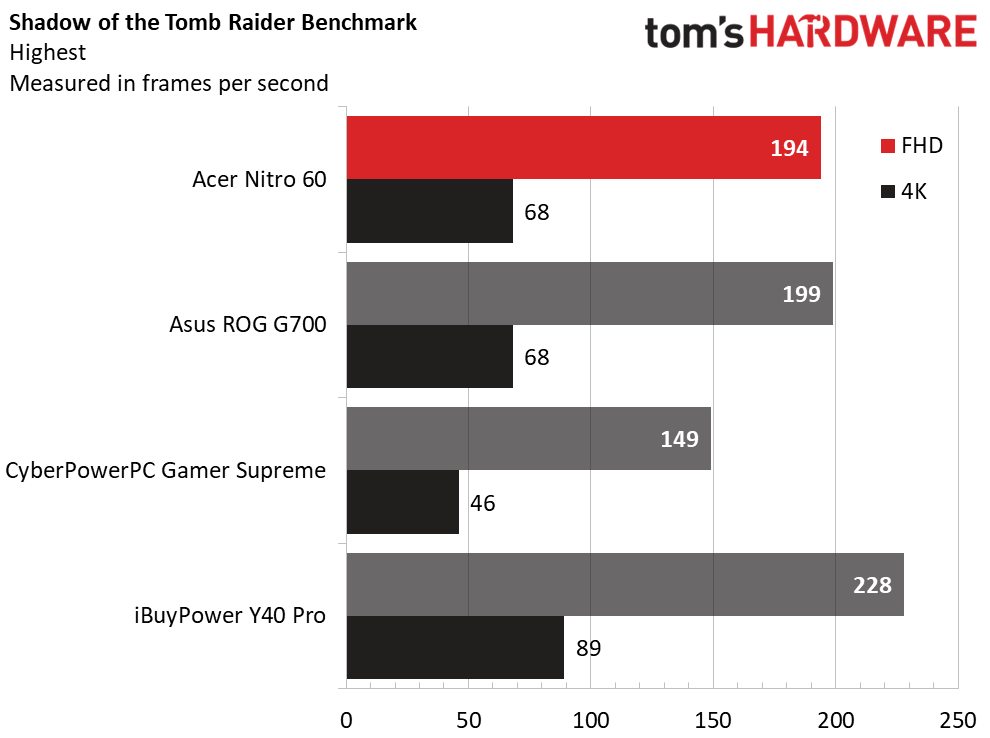
In Shadow of the Tomb Raider at the game’s Highest detail preset, the Nitro 60 competed with the ROG G700, producing 194 FPS to the latter’s 199 FPS at 1080p, while both produced 68 FPS at 4K. The RTX 5070 Ti-powered iBuyPower led the results, with 228 FPS at 1080p and 89 FPS at 4K, while the CyberPower with its RTX 5060 Ti trailed, with 149 and 46 FPS.
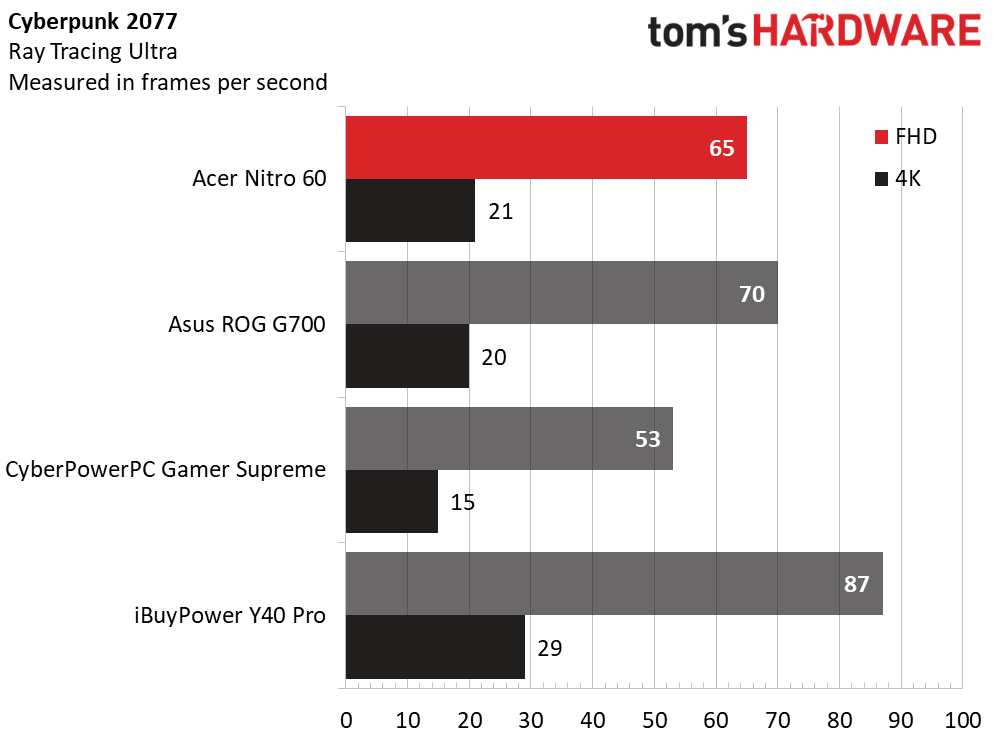
The demanding Cyberpunk 2077 (at the Ray Tracing Ultra preset) saw the desktops in a similar pecking order, with the Nitro 60’s 65 FPS at 1080p just behind the ROG G700’s 70 FPS. Both units also showed similar performance at 4K, with the Nitro’s 21 FPS against the ROG’s 20 FPS. The iBuyPower’s 87 and 29 FPS proved to be the best of the bunch, with the CyberPowerPC trailing with 53 and 15 FPS.
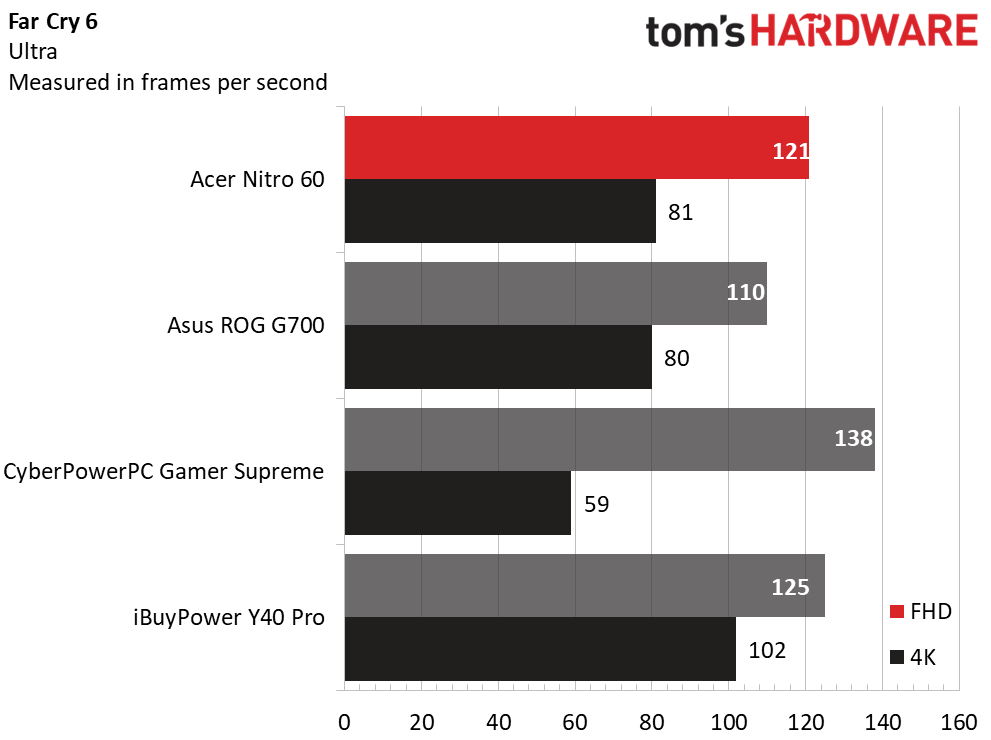
In Far Cry 6 (Ultra), the results were skewed at 1080p, with the CyberPowerPC taking the lead with 138 FPS, the iBuyPower in second place with 125 FPS, and our Nitro 60 narrowly behind it with 121 FPS. The desktops went back to their expected places at 4K, with the Nitro 60’s 81 FPS just ahead of the ROG G700’s 80. It remained behind the iBuyPower (102 FPS) and well ahead of the CyberPowerPC (59 FPS).
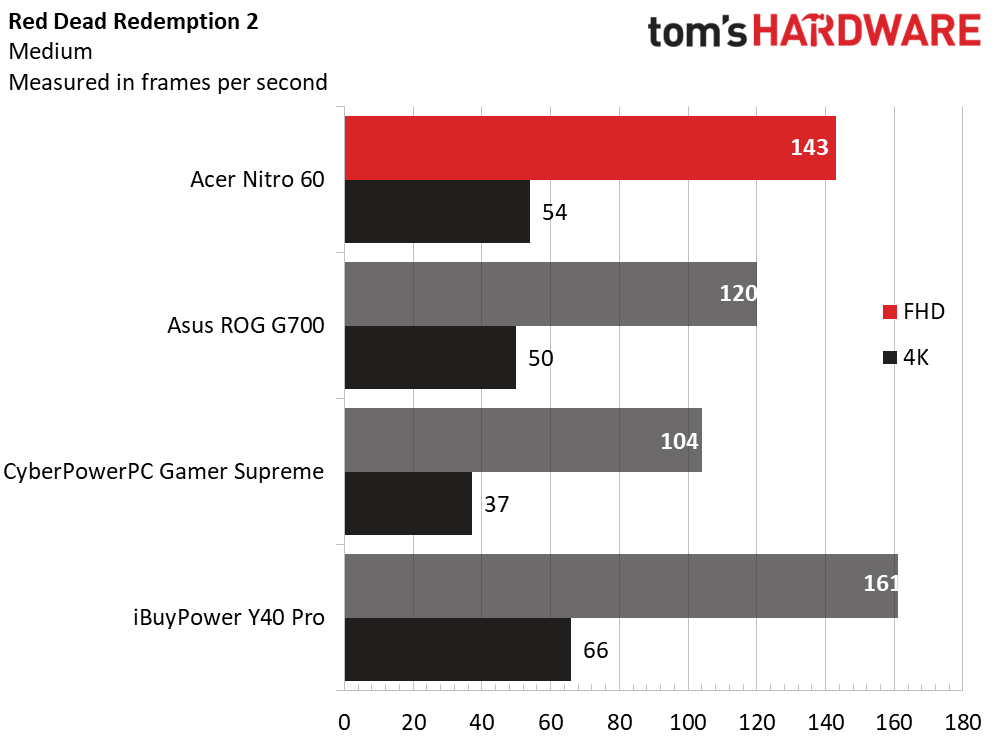
In Red Dead Redemption 2 (Medium preset), the Nitro 60’s respective 143 and 54 FPS at 1080p and 4K slightly outperformed the ROG G700’s 120 and 50 FPS, significantly outperformed the CyberPowerPC’s 104 and 37 FPS, and trailed the iBuyPower’s 161 and 66 FPS.
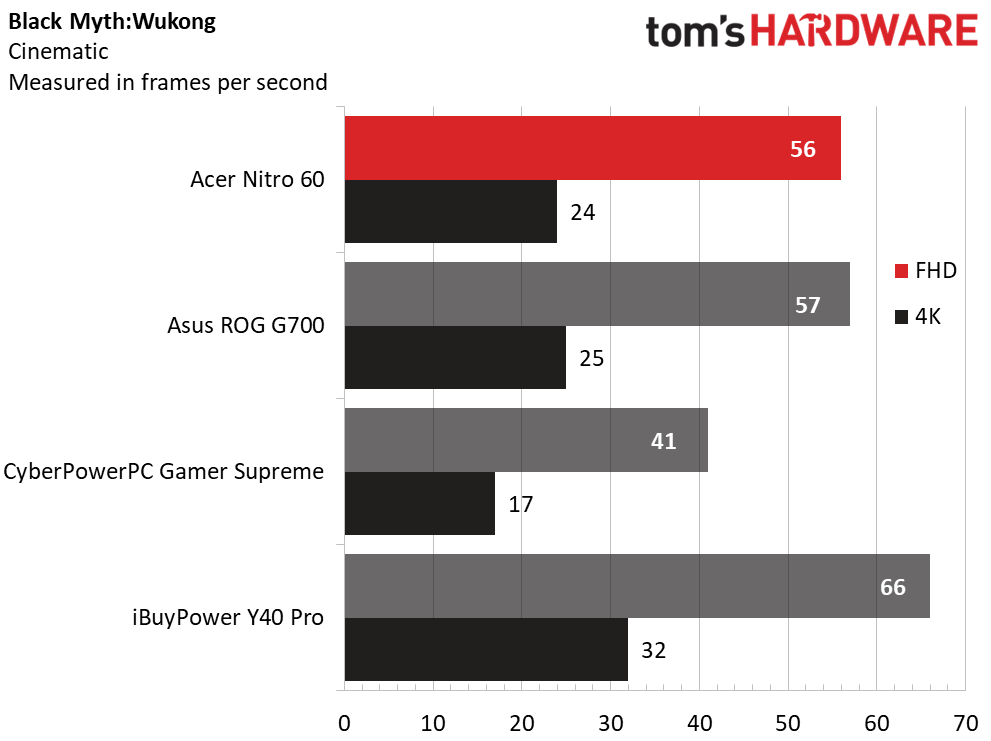
Last, in Black Myth: Wukong (Cinematic preset), the Nitro 60 remained consistent, producing 56 FPS at 1080p and 24 FPS at 4K, which was within one FPS of the ROG G700 at both resolutions. The CyberPowerPC slotted behind, with 41 FPS at 1080p and 17 FPS at 4K, while the iBuyPower’s stronger RTX 5070 Ti propelled it to 66 FPS at 1080p and 32 FPS at 4K.
The Nitro 60 demonstrates strong gaming performance in line with what we expect from an RTX 5070 desktop. Despite using an older Core i7-14700F, its gaming numbers were largely identical to what we saw from the ROG G700 featuring the newer, higher-wattage Core Ultra 7 265KF, particularly at 4K where most games will be GPU-limited. Had Acer enabled the XMP memory settings out of the box, its performance might have been even closer to the ROG G700’s.
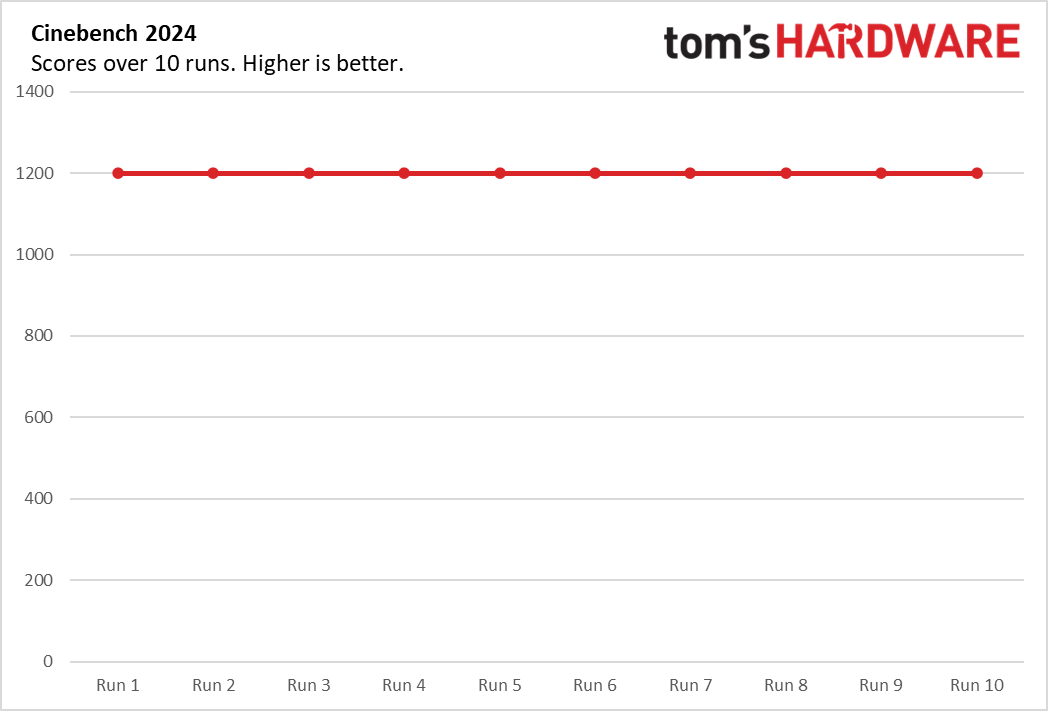
To evaluate sustained gaming performance, we run 15 loops of the Metro Exodus stress test at RTX settings. During the approximately 30-minute test, the Nitro 60 produced an average framerate of 121.3 FPS across all runs, with minimal variation between runs suggesting stable thermal performance. The Core i7-14700F maintained an average temperature of 52 degrees Celsius while the GeForce RTX 5070 Ti averaged 61 C. The Nitro 60’s fans were well-behaved throughout testing. While not inaudible, they wouldn't be distracting over typical household background noise.
Productivity Performance on the Acer Nitro 60
Our Nitro 60 features a Core i7-14700F CPU, 32GB of RAM, and a 2TB SSD. While the 65-watt CPU isn’t as formidable as the 125-watt K-series chips, it’s still a formidable performer for almost any task.
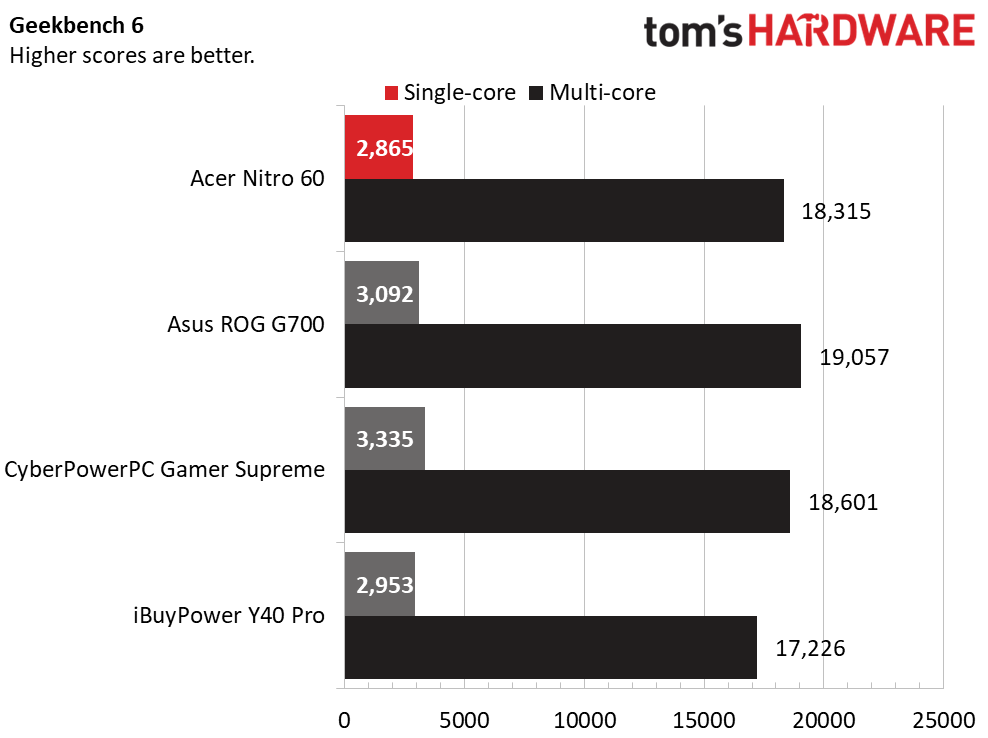
In our Geekbench 6 CPU test, the Nitro 60’s Core i7-14700F trailed the single-core results, producing 2,865 points. The iBuyPower did slightly better, with 2,953 from its Ryzen 9 7900X, the ROG G700 produced 3,092 with its Core Ultra 7 265KF, and the CyberPowerPC led with 3,335 courtesy of its Ryzen 7 9800X3D. In multi-core, the Nitro landed mid-pack, its 18,315 points ahead of the iBuyPower (17,226) and just trailing the CyberPowerPC (18,601) but out of range of the ROG G700 (19,057).
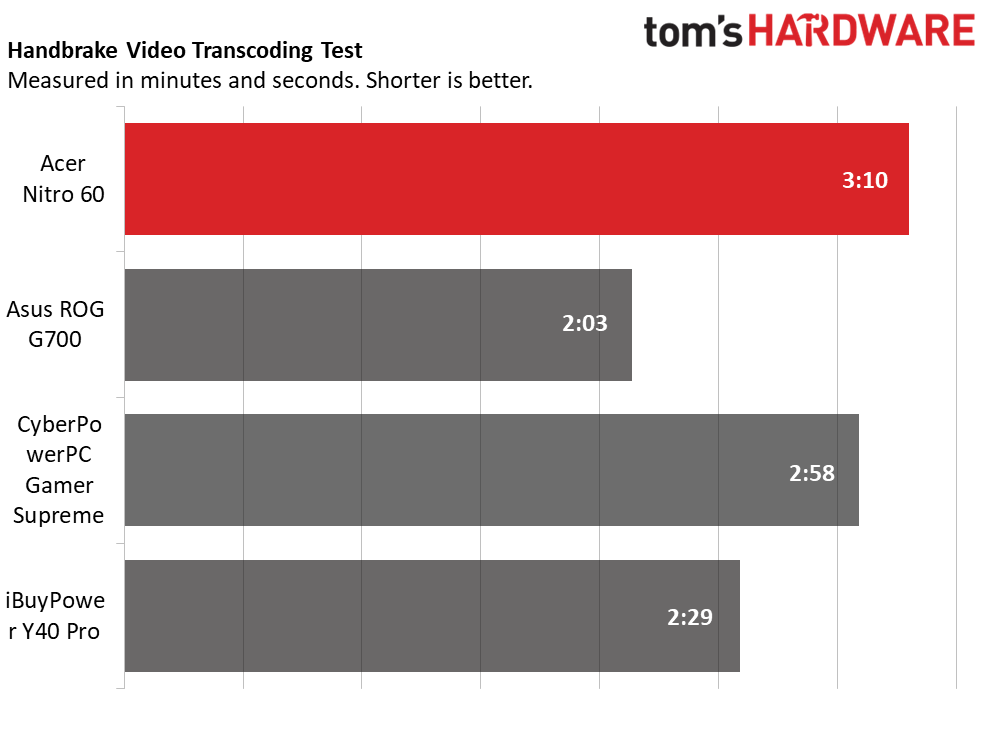
Our Handbrake 4K to 1080p video transcoding test saw the Nitro 60 finish dead last, completing the test in 3 minutes and 10 seconds. The others all broke the three-minute mark, with the CyberPowerPC finishing in 2:58, the iBuyPower in 2:29, and the ROG G700 in 2:03. This is the one test where the Nitro 60’s 65-watt CPU is not that adept.
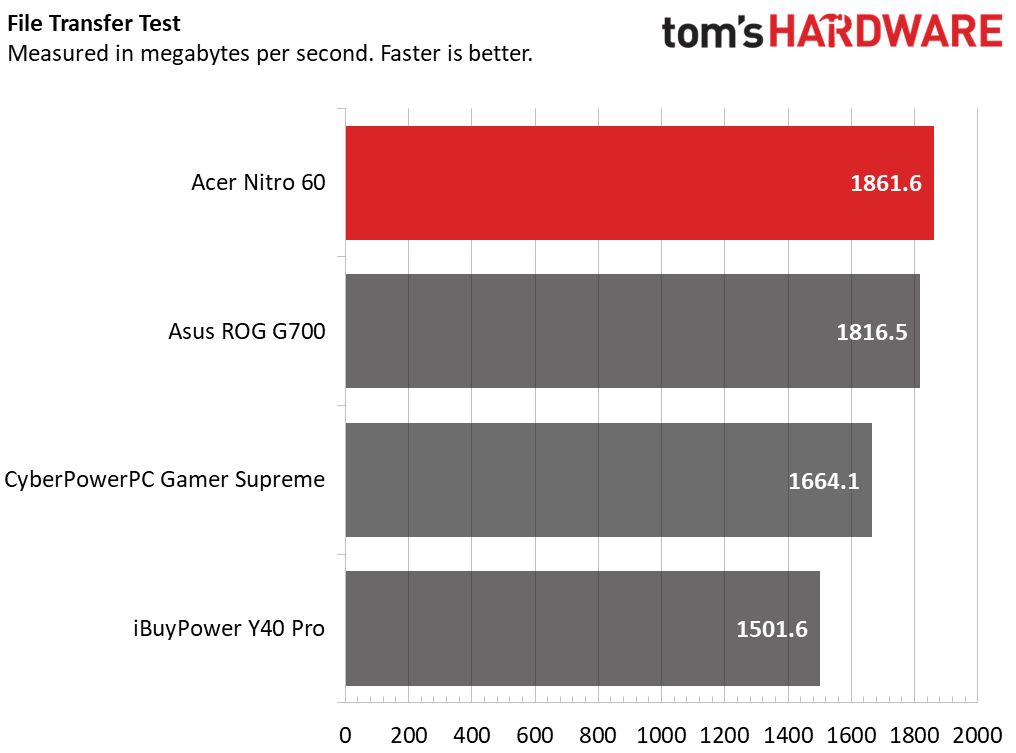
Last, the Nitro 60 produced the best transfer rate of 1,861.6 MBps in our 25 GB file transfer test. The ROG G700 was second (1,816.5) while the CyberPowerPC (1,664.1) and the iBuyPower (1,501.6) picked up the last two spots.
Keyboard and Mouse with the Acer Nitro 60
The Nitro 60 we received did not include any peripherals. This is a mild omission at best, considering bundled peripherals are usually of entry-level quality, which most users will want to replace with a better keyboard and mouse anyway. Some people may even prefer picking out their own accessories.
Software and Warranty
The Nitro 60 ships with relatively little preinstalled software. Acer Care Center is the most practical inclusion, offering system updates and easy access to support resources. Acer also bundles Gigabyte’s Dynamic Light utility for RGB control, though it failed to launch during testing. I installed Gigabyte’s RGB Fusion on my own, which functioned properly and allowed customization of both the RAM modules and fans.
Less welcome is the assortment of bloatware, including a McAfee security trial and several lightweight game demos. Fortunately, these can be quickly uninstalled.
Acer provides a one‑year warranty with the system.
Acer Nitro 60 Configurations
Our review unit, sourced from Micro Center, features an air‑cooled Core i7‑14700F processor, GeForce RTX 5070 graphics, 32GB of RAM, and a 2TB SSD is on sale for $1,599 as of this writing but is $2,099 at normal price..
This configuration is competitively priced with the sale. At Best Buy, desktops with similar RTX 5070 setups—such as models from CyberPowerPC and HP’s Omen 35L—were within $100 of the Nitro 60. It also undercuts the $1,749 Asus ROG G700, which offers comparable specifications but swaps in a Core Ultra 7 265KF.
Entry‑level Nitro 60 models start at $879 at Micro Center, pairing a Core i5‑14400F with an RTX 5060, 16GB of RAM, and a 1TB SSD. A $1,399 tier matches most of our review unit’s specifications but uses an RTX 5060 Ti. For $1,499, buyers can step up to an RTX 5070 paired with a Ryzen 7 7700. The highest‑end configuration, available from Acer’s online store, mirrors our review unit but upgrades to an RTX 5070 Ti for $1,799.
Bottom Line
Acer’s Nitro 60 delivers more than expected for a mid‑tier gaming desktop. With the Core i7‑14700F and GeForce RTX 5070 in our review unit, it proves to be a capable all‑around performer, even stretching into 4K gaming at the right settings. The design has appeal with its tempered glass side panel and the welcome inclusion of a modular power supply, a rarity at this price point.
There are a few shortcomings. Out of the box, the memory runs below its rated speed since XMP settings are not enabled, and no peripherals are included. Networking also tops out at Wi‑Fi 6 rather than newer standards, though this is unlikely to hinder most users.
Competition in this segment is intense. The Asus ROG G700 offers a liquid‑cooled CPU and a more eye-catching design, but at a higher cost. Meanwhile, the Nitro 60 remains price‑competitive against numerous mid‑tower alternatives from Best Buy and Micro Center. Taken together, its performance, design, and value make the Nitro 60 a strong contender for gamers seeking a well‑rounded desktop without overspending.






 English (US) ·